Learning Outcomes
By theend of this chapter, students will be able to:
⚫Describes databases and DBMS concepts, terminology, and architecture.
⚫Describes the basic concepts necessary for a good understanding of
databases design and implementation .
⚫Describe the conceptual modeling techniques used in database systems.
⚫Describes the relational data model, its integrity constraints and update
operations, and the operations of the relational algebra.
2
3.
Introduction to DataStorage
• Data storage: Data storage is the process of archiving data in
electromagnetic or other forms for use by a computer or device.
Different types of data storage play different roles in a computing
environment.
• Importance of data storage in today’s digital world: In the digital
age, data is one of the most valuable resources. Effective data
storage is necessary for many aspects of our lives, including
business operations, communication, entertainment, and more.
3
4.
Current and PreviousApproaches to Data Storage
• Brief history of data storage: Data storage has evolved from physical files in cabinets to
magnetic tapes, hard disk drives, and now cloud storage. Each stage of evolution aimed to
increase storage capacity and access speed while reducing physical space requirements.
• Comparison of old and new data storage methods: Older methods like physical files and
magnetic tapes had limitations in terms of access speed and capacity. Modern methods like
cloud storage provide virtually unlimited capacity and instant access from anywhere.
• Advantages and disadvantages of each method: While modern methods provide more
convenience and capacity, they also come with challenges such as data security and privacy
concerns. On the other hand, while older methods are more secure from cyber threats, they
lack the speed and accessibility of modern methods.
4
5.
Introduction to Database
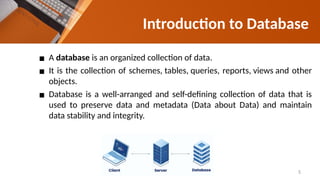
▪A database is an organized collection of data.
▪ It is the collection of schemes, tables, queries, reports, views and other
objects.
▪ Database is a well-arranged and self-defining collection of data that is
used to preserve data and metadata (Data about Data) and maintain
data stability and integrity.
5
6.
Database Functionalities
▪ DataStorage Management
▪ Data Transformation and Presentation
▪ Security
▪ Multi-user Access Control
▪ Backup and Recovery
▪ Data Integrity
▪ Database Access Language
▪ Database Communication Interface.
6
Advantages & Disadvantagesof Database
Advantages:
❖ High data quality, integrity, and consistency
❖ Reduced data redundancy and application maintenance
❖ Easy access and sharing
❖ Scalable
❖ Improved security
❖ Specialized and productive management tool
Major disadvantages:
❖ Increased complexity
❖ Greater impact of failure
8
9.
• Data managementis the process of ingesting, storing, organizing and
maintaining the data created and collected by an organization. The data
management process includes a combination of different functions that
collectively aim to make sure the data in corporate systems is accurate,
available and accessible.
Database Management System
9
10.
A wide rangeof technologies, tools and techniques can be employed as part of
the data management process. The following options are available for different
aspects of managing data.
Database Management Systems (DBMS): The most prevalent type of DBMS is
the relational database management system. Relational databases organize data
into tables with rows and columns that contain database records.
All the database design and data manipulation tasks are carried by a Database
Management System (DBMS).
It is computer software designed for the purpose of managing databases based
on a variety of data models.
Database Management System
10
11.
Data warehouses anddata lakes: The two most widely used repositories for
managing analytics data are data warehouses and data lakes.
A data warehouse -- the more traditional method -- typically is based on a relational
or columnar database, and it stores structured data that has been pulled together
from different operational systems and prepared for analysis.
Relational database (RDB) is a collective set of multiple data sets organized by
tables, records and columns.
RDBs also establish a well-defined relationship between database tables.
In simplest terms, a relational database is one that presents information in tables
with rows and columns showing relation between them.
Relational Database
11
12.
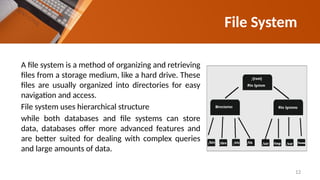
File System
A filesystem is a method of organizing and retrieving
files from a storage medium, like a hard drive. These
files are usually organized into directories for easy
navigation and access.
File system uses hierarchical structure
while both databases and file systems can store
data, databases offer more advanced features and
are better suited for dealing with complex queries
and large amounts of data.
12
13.
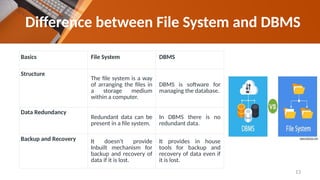
Difference between FileSystem and DBMS
Basics File System DBMS
Structure
The file system is a way
of arranging the files in
a storage medium
within a computer.
DBMS is software for
managing the database.
Data Redundancy
Redundant data can be
present in a file system.
In DBMS there is no
redundant data.
Backup and Recovery It doesn’t provide
Inbuilt mechanism for
backup and recovery of
data if it is lost.
It provides in house
tools for backup and
recovery of data even if
it is lost.
13
14.
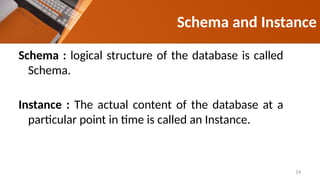
Schema : logicalstructure of the database is called
Schema.
Instance : The actual content of the database at a
particular point in time is called an Instance.
Schema and Instance
14
15.
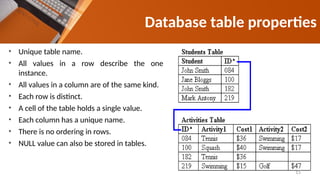
• Unique tablename.
• All values in a row describe the one
instance.
• All values in a column are of the same kind.
• Each row is distinct.
• A cell of the table holds a single value.
• Each column has a unique name.
• There is no ordering in rows.
• NULL value can also be stored in tables.
Database table properties
15
16.
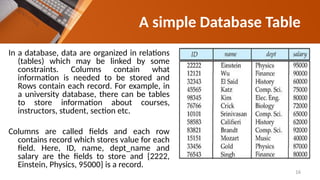
In a database,data are organized in relations
(tables) which may be linked by some
constraints. Columns contain what
information is needed to be stored and
Rows contain each record. For example, in
a university database, there can be tables
to store information about courses,
instructors, student, section etc.
Columns are called fields and each row
contains record which stores value for each
field. Here, ID, name, dept_name and
salary are the fields to store and {2222,
Einstein, Physics, 95000} is a record.
A simple Database Table
16
17.
❖ A detailedmodel that captures overall structure of organizational
data while being independent of any implementation considerations.
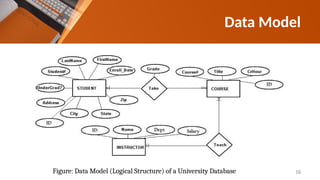
❖ Data modeling involves examining the data objects in a system and
identifying the relationship between these objects.
❖ There are different ways of model a database. They are:
▪ Relational model
▪ Entity-Relationship data model (mainly for database design)
▪ Object-based data models (Object-oriented and Object-relational)
▪ Semi structured data model (XML)
Data Model
17
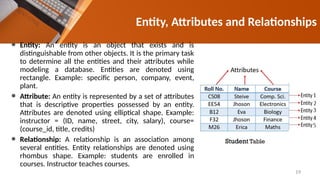
⚫ Entity: Anentity is an object that exists and is
distinguishable from other objects. It is the primary task
to determine all the entities and their attributes while
modeling a database. Entities are denoted using
rectangle. Example: specific person, company, event,
plant.
⚫ Attribute: An entity is represented by a set of attributes
that is descriptive properties possessed by an entity.
Attributes are denoted using elliptical shape. Example:
instructor = (ID, name, street, city, salary), course=
(course_id, title, credits)
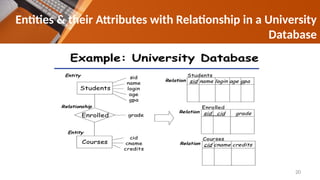
⚫ Relationship: A relationship is an association among
several entities. Entity relationships are denoted using
rhombus shape. Example: students are enrolled in
courses. Instructor teaches courses.
Entity, Attributes and Relationships
19
20.
Entities & theirAttributes with Relationship in a University
Database
20
21.
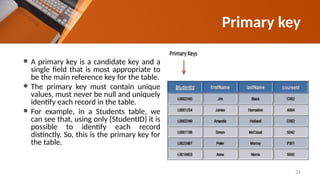
⚫ A primarykey is a candidate key and a
single field that is most appropriate to
be the main reference key for the table.
⚫ The primary key must contain unique
values, must never be null and uniquely
identify each record in the table.
⚫ For example, in a Students table, we
can see that, using only {StudentID} it is
possible to identify each record
distinctly. So, this is the primary key for
the table.
Primary key
21
22.
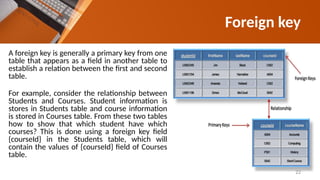
A foreign keyis generally a primary key from one
table that appears as a field in another table to
establish a relation between the first and second
table.
For example, consider the relationship between
Students and Courses. Student information is
stores in Students table and course information
is stored in Courses table. From these two tables
how to show that which student have which
courses? This is done using a foreign key field
{courseId} in the Students table, which will
contain the values of {courseId} field of Courses
table.
Foreign key
22
23.
Review Questions
• Whatis database? Why do we use database? What are the advantage and
disadvantage of database?
• What is DBMS? What is schema and instance? What are the properties of database
table? What is Field and Record?
• What is a relational database? Find the tables necessary for a Library Management
System/ Hospital Management System.
• What is a data model? What are entity, attribute and Relationship? Discuss with
example.
• Find all the entities of an online bookshop management database. Find out all the
attributes for each entity.
• Find all the entities of a Shopping Store management database. Find out all the
attributes for each entity.
23
24.
Review Questions
• Whatis Primary key? Describe with example.
• What is Foreign Key? Why do we use Foreign Key in a database? Explain with
example.
• Find all the entities of IUBAT Bus Scheduling Management database. Find out all
the attributes for each entity.
Class work:
For an online shop (Select individuals) database, identify the Primary Key and
Foreign Key in Customers and Orders table.
24
25.
References
1. Merriam-Webster (2015),"Database - Definition of database by Merriam-Webster.",
[Online] Available from: http://www.merriam-webster.com/dictionary/database [Accessed on:
18 October 2015]
2. businessdictionary.com (2015), “Metadata”, [Online] Available from:
http://www.businessdictionary.com/definition/metadata.html [Accessed: 19 October 2015].
3. opengrass.net (2015), “Relational Database Management Systems”, [Online] Available from:
http://rdbms.opengrass.net/2_Database%20Design/2.1_TermsOfReference/ 2.1.2_Keys.html
[Accessed: 19 October 2015].
4. slideshare.net (2015), “ER Diagrams By Harshal Wagh”, [Online] Available from:
http://www.slideshare.net/harshalkwagh999/er-digramms-by-harshal-wagh [Accessed: 19
October 2015].
5. ofslides.com (2015), “Database Systems -Introduction”, [Online] Available from:
http://ofslides.com/anniyappa-1540/presentation-36120 [Accessed: 19 October 2015].
25

![References
1. Merriam-Webster (2015), "Database - Definition of database by Merriam-Webster.",
[Online] Available from: http://www.merriam-webster.com/dictionary/database [Accessed on:
18 October 2015]
2. businessdictionary.com (2015), “Metadata”, [Online] Available from:
http://www.businessdictionary.com/definition/metadata.html [Accessed: 19 October 2015].
3. opengrass.net (2015), “Relational Database Management Systems”, [Online] Available from:
http://rdbms.opengrass.net/2_Database%20Design/2.1_TermsOfReference/ 2.1.2_Keys.html
[Accessed: 19 October 2015].
4. slideshare.net (2015), “ER Diagrams By Harshal Wagh”, [Online] Available from:
http://www.slideshare.net/harshalkwagh999/er-digramms-by-harshal-wagh [Accessed: 19
October 2015].
5. ofslides.com (2015), “Database Systems -Introduction”, [Online] Available from:
http://ofslides.com/anniyappa-1540/presentation-36120 [Accessed: 19 October 2015].
25](https://image.slidesharecdn.com/chapter-09basicdatastorage-260130061909-43608fcd/85/Chapter-09-Basic-Data-Storage-Systems-pptx-25-320.jpg)