Databases and Information Management By: Harleen Mahajan
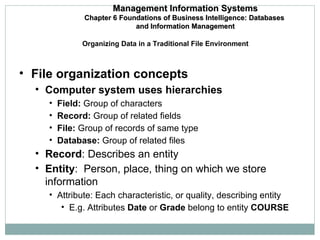
Organizing Data in a Traditional File Environment File organization concepts Computer system uses hierarchies Field:  Group of characters Record:  Group of related fields File:  Group of records of same type  Database:  Group of related files Record : Describes an entity Entity :  Person, place, thing on which we store information Attribute: Each characteristic, or quality, describing entity E.g. Attributes  Date  or  Grade  belong to entity  COURSE Management Information Systems Chapter 6 Foundations of Business Intelligence: Databases  and Information Management
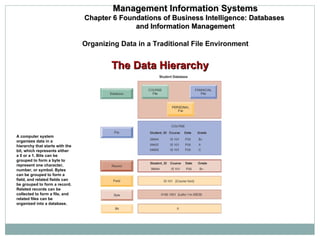
The Data Hierarchy A computer system organizes data in a hierarchy that starts with the bit, which represents either a 0 or a 1. Bits can be grouped to form a byte to represent one character, number, or symbol. Bytes can be grouped to form a field, and related fields can be grouped to form a record. Related records can be collected to form a file, and related files can be organized into a database. Management Information Systems Chapter 6 Foundations of Business Intelligence: Databases  and Information Management Organizing Data in a Traditional File Environment
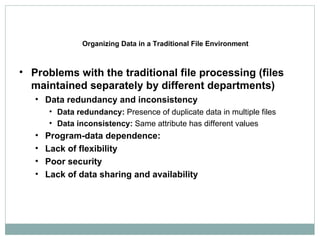
Organizing Data in a Traditional File Environment Problems with the traditional file processing (files maintained separately by different departments) Data redundancy and inconsistency Data redundancy:  Presence of duplicate data in multiple files Data inconsistency:  Same attribute has different values Program-data dependence: Lack of flexibility Poor security Lack of data sharing and availability
Database:  Collection of data organized to serve many applications by centralizing data and controlling redundant data Database management system:  Interfaces between application programs and physical data files Separates logical and physical views of data Solves problems of traditional file environment Controls redundancy Eliminated inconsistency Uncouples programs and data Enables central management and security The Database Approach to Data Management Management Information Systems Chapter 6 Foundations of Business Intelligence: Databases  and Information Management
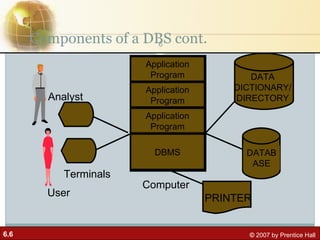
Components of a DBS cont. DATABASE DATA DICTIONARY/ DIRECTORY Application Program Application Program Application Program DBMS Computer Terminals PRINTER Analyst User
Components of a Database System Four components: People, H/W, S/W, Data Practitioners (analysts and database designers) in consultation with users identify data needs and design database structures to accommodate these needs. The database structures are specified to the DBMS through the data dictionary.
Components of a DBS cont. Users enter data into the system by following specified procedures.  The entered data are maintained on hardware media such as disks and tapes.  Application programmes that access the database are written by practitioners and users to be run on computers.
Database System: Software A database software includes two types of software General-purpose database management software like operating system. Application software that uses DBMS facilities to manipulate the database to achieve a specific business function, such as providing reports or documents, which can be used by users.
Database System: Software cont. Application software is generally written standard programming language such as C, or it may be written in a language (commonly called a fourth-generation language) supplied with the DBMS. These programs utilise the command language of the DBMS and make use of the information contained in the data dictionary.
Database System: Software cont. User Interface Language, menus and other facilities by which users interact with various system components, such as application programs, the DBMS Computer-aided software engineering (CASE) tools Automated tools used to design databases and application programs.
Data Dictionary/Directory (Repository) A subsystem that keeps track of the definitions of all data items in the database.  relationships that exists between various data structures.  indexes that are used to access data quickly. screen and report format definitions that may be used by various application programs.
Data Dictionary Definitions of data items in the database includes: Elementary-level data items (fields),  group and record-level data structures, and files or relational tables.
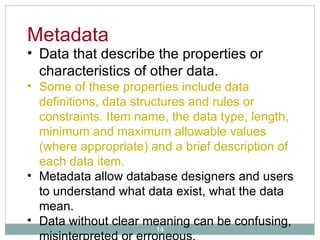
Data that describe the properties or characteristics of other data.  Some of these properties include data definitions, data structures and rules or constraints. Item name, the data type, length, minimum and maximum allowable values (where appropriate) and a brief description of each data item. Metadata allow database designers and users to understand what data exist, what the data mean.  Data without clear meaning can be confusing, misinterpreted or erroneous. Metadata
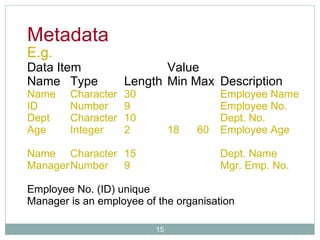
E.g.  Data Item Value Name Type Length Min Max Description Name Character 30 Employee Name ID Number 9 Employee No. Dept Character 10 Dept. No. Age Integer 2 18  60 Employee Age Name Character 15 Dept. Name Manager Number 9 Mgr. Emp. No. Employee No. (ID) unique Manager is an employee of the organisation Metadata
Database System: People Two different types of people (users and practitioners) are concerned with the database. Users who need information from the database to carry out their primary business responsibility e.g. Executives, managers, staff, clerical personnel
Database System: People cont. Practitioners people responsible for the database system and its associated application software. e.g. Database administrators, analysts, programmers, database and system designers, information systems managers.
Components of a Database System Four components: People, H/W, S/W, Data Practitioners (analysts and database designers) in consultation with users identify data needs and design database structures to accommodate these needs. The database structures are specified to the DBMS through the data dictionary.
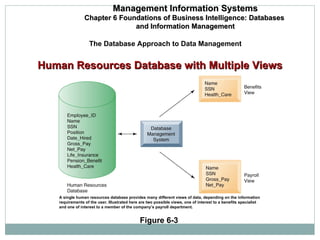
The Database Approach to Data Management Management Information Systems Chapter 6 Foundations of Business Intelligence: Databases  and Information Management Figure 6-3 A single human resources database provides many different views of data, depending on the information requirements of the user. Illustrated here are two possible views, one of interest to a benefits specialist and one of interest to a member of the company’s payroll department. Human Resources Database with Multiple Views
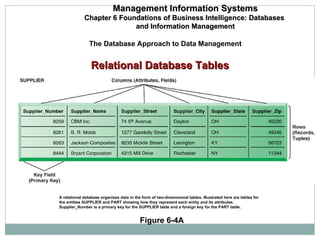
Relational DBMS Represent data as two-dimensional tables called relations or files Each table contains data on entity and attributes Table : Grid of columns and rows Rows (tuples):  Records for different entities Fields (columns):  Represents attribute for entity Key field : Field used to uniquely identify each record Primary key : Field in table used for key fields Foreign key : Primary key used in second table as look-up field to identify records from original table The Database Approach to Data Management Management Information Systems Chapter 6 Foundations of Business Intelligence: Databases  and Information Management
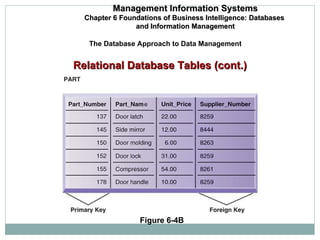
The Database Approach to Data Management Management Information Systems Chapter 6 Foundations of Business Intelligence: Databases  and Information Management Figure 6-4A A relational database organizes data in the form of two-dimensional tables. Illustrated here are tables for the entities SUPPLIER and PART showing how they represent each entity and its attributes.  Supplier_Number is a primary key for the SUPPLIER table and a foreign key for the PART table. Relational Database Tables
The Database Approach to Data Management Management Information Systems Chapter 6 Foundations of Business Intelligence: Databases  and Information Management Figure 6-4B Relational Database Tables (cont.)
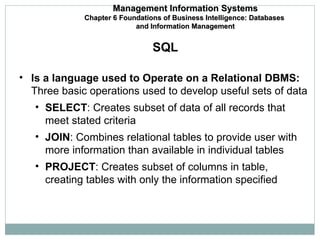
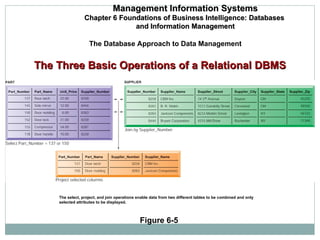
Is a language used to Operate on a Relational DBMS:  Three basic operations used to develop useful sets of data SELECT : Creates subset of data of all records that meet stated criteria JOIN : Combines relational tables to provide user with more information than available in individual tables PROJECT : Creates subset of columns in table, creating tables with only the information specified SQL Management Information Systems Chapter 6 Foundations of Business Intelligence: Databases  and Information Management
The Database Approach to Data Management Management Information Systems Chapter 6 Foundations of Business Intelligence: Databases  and Information Management Figure 6-5 The select, project, and join operations enable data from two different tables to be combined and only selected attributes to be displayed. The Three Basic Operations of a Relational DBMS
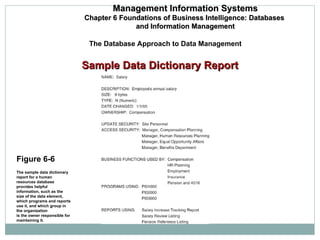
The Database Approach to Data Management Management Information Systems Chapter 6 Foundations of Business Intelligence: Databases  and Information Management Figure 6-6 The sample data dictionary report for a human resources database provides helpful information, such as the size of the data element, which programs and reports use it, and which group in the organization is the owner responsible for maintaining it. Sample Data Dictionary Report
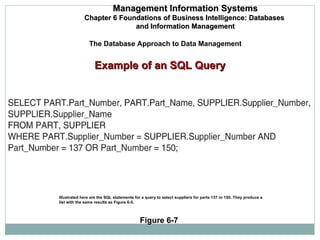
The Database Approach to Data Management Management Information Systems Chapter 6 Foundations of Business Intelligence: Databases  and Information Management Figure 6-7 Illustrated here are the SQL statements for a query to select suppliers for parts 137 or 150. They produce a list with the same results as Figure 6-5. Example of an SQL Query

Dbms

  • 1.
    Databases and InformationManagement By: Harleen Mahajan
  • 2.
    Organizing Data ina Traditional File Environment File organization concepts Computer system uses hierarchies Field: Group of characters Record: Group of related fields File: Group of records of same type Database: Group of related files Record : Describes an entity Entity : Person, place, thing on which we store information Attribute: Each characteristic, or quality, describing entity E.g. Attributes Date or Grade belong to entity COURSE Management Information Systems Chapter 6 Foundations of Business Intelligence: Databases and Information Management
  • 3.
    The Data HierarchyA computer system organizes data in a hierarchy that starts with the bit, which represents either a 0 or a 1. Bits can be grouped to form a byte to represent one character, number, or symbol. Bytes can be grouped to form a field, and related fields can be grouped to form a record. Related records can be collected to form a file, and related files can be organized into a database. Management Information Systems Chapter 6 Foundations of Business Intelligence: Databases and Information Management Organizing Data in a Traditional File Environment
  • 4.
    Organizing Data ina Traditional File Environment Problems with the traditional file processing (files maintained separately by different departments) Data redundancy and inconsistency Data redundancy: Presence of duplicate data in multiple files Data inconsistency: Same attribute has different values Program-data dependence: Lack of flexibility Poor security Lack of data sharing and availability
  • 5.
    Database: Collectionof data organized to serve many applications by centralizing data and controlling redundant data Database management system: Interfaces between application programs and physical data files Separates logical and physical views of data Solves problems of traditional file environment Controls redundancy Eliminated inconsistency Uncouples programs and data Enables central management and security The Database Approach to Data Management Management Information Systems Chapter 6 Foundations of Business Intelligence: Databases and Information Management
  • 6.
    Components of aDBS cont. DATABASE DATA DICTIONARY/ DIRECTORY Application Program Application Program Application Program DBMS Computer Terminals PRINTER Analyst User
  • 7.
    Components of aDatabase System Four components: People, H/W, S/W, Data Practitioners (analysts and database designers) in consultation with users identify data needs and design database structures to accommodate these needs. The database structures are specified to the DBMS through the data dictionary.
  • 8.
    Components of aDBS cont. Users enter data into the system by following specified procedures. The entered data are maintained on hardware media such as disks and tapes. Application programmes that access the database are written by practitioners and users to be run on computers.
  • 9.
    Database System: SoftwareA database software includes two types of software General-purpose database management software like operating system. Application software that uses DBMS facilities to manipulate the database to achieve a specific business function, such as providing reports or documents, which can be used by users.
  • 10.
    Database System: Softwarecont. Application software is generally written standard programming language such as C, or it may be written in a language (commonly called a fourth-generation language) supplied with the DBMS. These programs utilise the command language of the DBMS and make use of the information contained in the data dictionary.
  • 11.
    Database System: Softwarecont. User Interface Language, menus and other facilities by which users interact with various system components, such as application programs, the DBMS Computer-aided software engineering (CASE) tools Automated tools used to design databases and application programs.
  • 12.
    Data Dictionary/Directory (Repository)A subsystem that keeps track of the definitions of all data items in the database. relationships that exists between various data structures. indexes that are used to access data quickly. screen and report format definitions that may be used by various application programs.
  • 13.
    Data Dictionary Definitionsof data items in the database includes: Elementary-level data items (fields), group and record-level data structures, and files or relational tables.
  • 14.
    Data that describethe properties or characteristics of other data. Some of these properties include data definitions, data structures and rules or constraints. Item name, the data type, length, minimum and maximum allowable values (where appropriate) and a brief description of each data item. Metadata allow database designers and users to understand what data exist, what the data mean. Data without clear meaning can be confusing, misinterpreted or erroneous. Metadata
  • 15.
    E.g. DataItem Value Name Type Length Min Max Description Name Character 30 Employee Name ID Number 9 Employee No. Dept Character 10 Dept. No. Age Integer 2 18 60 Employee Age Name Character 15 Dept. Name Manager Number 9 Mgr. Emp. No. Employee No. (ID) unique Manager is an employee of the organisation Metadata
  • 16.
    Database System: PeopleTwo different types of people (users and practitioners) are concerned with the database. Users who need information from the database to carry out their primary business responsibility e.g. Executives, managers, staff, clerical personnel
  • 17.
    Database System: Peoplecont. Practitioners people responsible for the database system and its associated application software. e.g. Database administrators, analysts, programmers, database and system designers, information systems managers.
  • 18.
    Components of aDatabase System Four components: People, H/W, S/W, Data Practitioners (analysts and database designers) in consultation with users identify data needs and design database structures to accommodate these needs. The database structures are specified to the DBMS through the data dictionary.
  • 19.
    The Database Approachto Data Management Management Information Systems Chapter 6 Foundations of Business Intelligence: Databases and Information Management Figure 6-3 A single human resources database provides many different views of data, depending on the information requirements of the user. Illustrated here are two possible views, one of interest to a benefits specialist and one of interest to a member of the company’s payroll department. Human Resources Database with Multiple Views
  • 20.
    Relational DBMS Representdata as two-dimensional tables called relations or files Each table contains data on entity and attributes Table : Grid of columns and rows Rows (tuples): Records for different entities Fields (columns): Represents attribute for entity Key field : Field used to uniquely identify each record Primary key : Field in table used for key fields Foreign key : Primary key used in second table as look-up field to identify records from original table The Database Approach to Data Management Management Information Systems Chapter 6 Foundations of Business Intelligence: Databases and Information Management
  • 21.
    The Database Approachto Data Management Management Information Systems Chapter 6 Foundations of Business Intelligence: Databases and Information Management Figure 6-4A A relational database organizes data in the form of two-dimensional tables. Illustrated here are tables for the entities SUPPLIER and PART showing how they represent each entity and its attributes. Supplier_Number is a primary key for the SUPPLIER table and a foreign key for the PART table. Relational Database Tables
  • 22.
    The Database Approachto Data Management Management Information Systems Chapter 6 Foundations of Business Intelligence: Databases and Information Management Figure 6-4B Relational Database Tables (cont.)
  • 23.
    Is a languageused to Operate on a Relational DBMS: Three basic operations used to develop useful sets of data SELECT : Creates subset of data of all records that meet stated criteria JOIN : Combines relational tables to provide user with more information than available in individual tables PROJECT : Creates subset of columns in table, creating tables with only the information specified SQL Management Information Systems Chapter 6 Foundations of Business Intelligence: Databases and Information Management
  • 24.
    The Database Approachto Data Management Management Information Systems Chapter 6 Foundations of Business Intelligence: Databases and Information Management Figure 6-5 The select, project, and join operations enable data from two different tables to be combined and only selected attributes to be displayed. The Three Basic Operations of a Relational DBMS
  • 25.
    The Database Approachto Data Management Management Information Systems Chapter 6 Foundations of Business Intelligence: Databases and Information Management Figure 6-6 The sample data dictionary report for a human resources database provides helpful information, such as the size of the data element, which programs and reports use it, and which group in the organization is the owner responsible for maintaining it. Sample Data Dictionary Report
  • 26.
    The Database Approachto Data Management Management Information Systems Chapter 6 Foundations of Business Intelligence: Databases and Information Management Figure 6-7 Illustrated here are the SQL statements for a query to select suppliers for parts 137 or 150. They produce a list with the same results as Figure 6-5. Example of an SQL Query