Database Management An Introduction
Goals For Today: Describe why databases have become so important to modern organizations Describe what database and database management systems are and how they work. Explain four emerging database trends: (1) client / server computing,  (2) object-oriented databases,  (3) data mining, and  (4) integrating Web applications
Database Defined Database:  A collection of related data organized in a way that facilitates data searches. What are some examples of Databases?
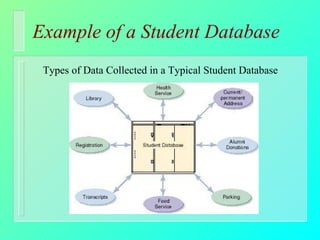
Example of a Student Database Types of Data Collected in a Typical Student Database
Databases  Before the Use of Computers Data was stored in: books ledgers card files folders file cabinets or simply in people’s heads!?
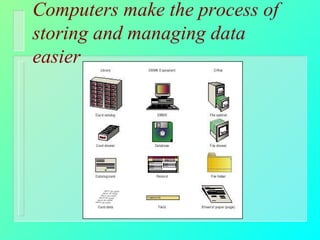
Computers make the process of storing and managing data easier
The Database Approach Database Management System software application which allows you to create, store, organize, and retrieve data from a single database or many databases.  Example: MS Access Entity something you collect data about Examples: people or classes
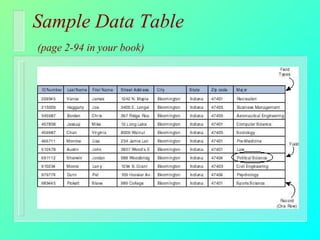
A Database Contains  the Following: Tables how entities are represented in a database, where each row is a record and each column a field.  Fields individual pieces of information Record collection of related fields within one entity
Sample Data Table   (page 2-94 in your book)
Key Database Issues  and Activities Entering and Querying Data Creating Database Reports Data Structure Data Type
Entering Data Data Entry: process of getting information into a database possible methods of data entry: Data Entry Professional, Electronic Files, Historical Records, or Web Based (Forms)
Querying Data Querying: how we get information from a database Structured Query Language (SQL): most common language used to interface with databases Example: SELECT DISTINCTROW STUDENT_ID, GRADE FROM GRADES WHERE GRADE = “A” ORDER BY STUDENT_ID;
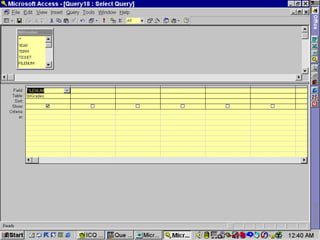
Querying Data continued Query By Example (QBE) enables you to fill out a grid, or template, in order to construct a description of the data you would like to retrieve.
 
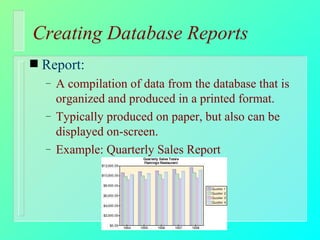
Creating Database Reports Report: A compilation of data from the database that is organized and produced in a printed format. Typically produced on paper, but also can be displayed on-screen. Example: Quarterly Sales Report
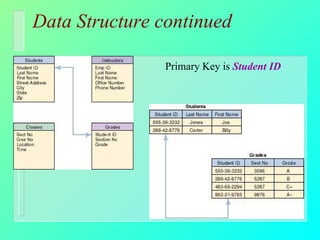
Data Structure Database has two parts: Data Data Structure: how the data is organized. Data Model: representation of entities and their relationships to the real world Primary Key: a unique identifier in the database one or more fields
Data Structure continued Primary Key is  Student ID
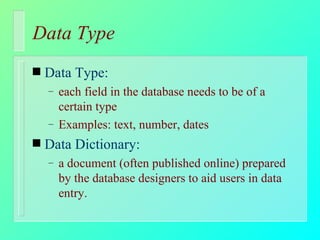
Data Type Data Type: each field in the database needs to be of a certain type Examples: text, number, dates Data Dictionary: a document (often published online) prepared by the database designers to aid users in data entry.
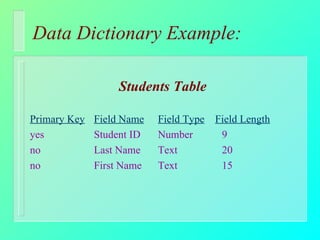
Data Dictionary Example: Students Table Primary Key Field Name   Field Type   Field Length yes Student ID Number 9 no Last Name Text 20 no First Name Text 15
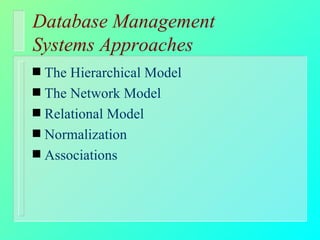
Database Management  Systems Approaches The Hierarchical Model The Network Model Relational Model Normalization Associations
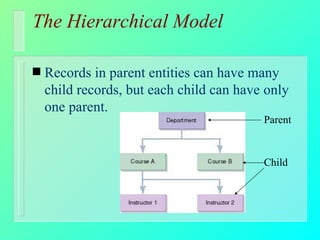
The Hierarchical Model   Records in parent entities can have many child records, but each child can have only one parent.  Parent Child
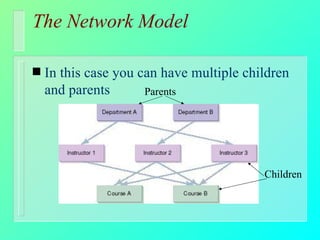
The Network Model In this case you can have multiple children and parents Parents Children
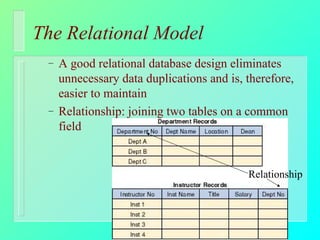
The Relational Model A good relational database design eliminates unnecessary data duplications and is, therefore, easier to maintain Relationship: joining two tables on a common field Relationship
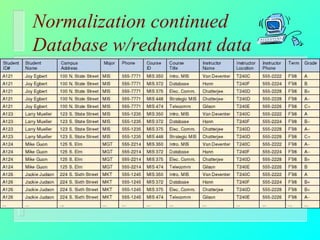
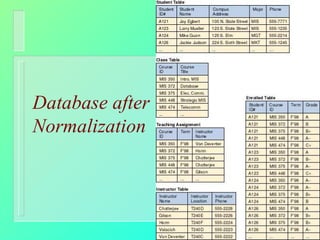
Normalization A technique used to make complex databases more efficient and easier to handle Eliminates Redundant Data
Normalization continued Database w/redundant data
Database after Normalization
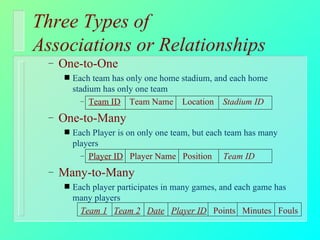
Three Types of  Associations or Relationships One-to-One  Each team has only one home stadium, and each home stadium has only one team Team ID   Team Name  Location  Stadium ID One-to-Many Each Player is on only one team, but each team has many players Player ID   Player Name  Position  Team ID Many-to-Many Each player participates in many games, and each game has many players Team 1   Team 2   Date   Player ID   Points  Minutes  Fouls
Recent Developments Affecting Database Design and Use Databases and Client / Server Computing Object-Oriented Databases Data Mining  Linking Web Site Applications to Organizational Databases
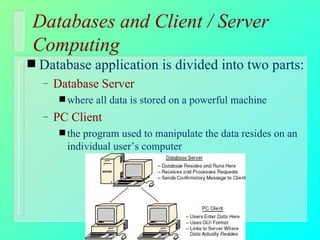
Databases and Client / Server Computing Database application is divided into two parts:  Database Server  where all data is stored on a powerful machine PC Client the program used to manipulate the data resides on an individual user’s computer
Object-Oriented Databases treat tables, queries, and other components as generic reusable OBJECTS (rather than data) that can be mixed and matched and used in many applications (e.g. MS Excel and MS Access). Most of today’s database applications have some of these Object characteristics.
Data Mining Allows companies to sort and analyze information to better understand customers, products, markets, or any other phase of their business for which data has been captured.  Example: Grocery Store Club Cards
Data Mining continued Data Warehouses An integration of multiple, large databases and other information sources into a single repository or access point that is suitable for direct querying, analysis, or processing
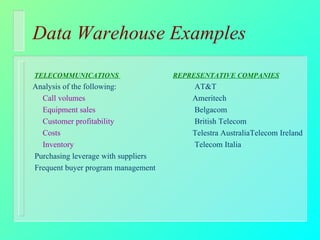
Data Warehouse Examples TELECOMMUNICATIONS    REPRESENTATIVE COMPANIES Analysis of the following:  AT&T Call volumes Ameritech Equipment sales  Belgacom Customer profitability  British Telecom Costs Telestra AustraliaTelecom Ireland Inventory  Telecom Italia Purchasing leverage with suppliers Frequent buyer program management
Data Mining continued Data Marts A small-scale data warehouse that contains a subset of the data for a single aspect of a company’s business Examples: finance, inventory, or personnel
Linking Web Site Applications to Organizational Databases Example: many comapies are enabling users of their Web Site to: view product catalogs,  check inventory, and place orders these are all actions that read and write to the organizations’ databases.
Goals For Today: Described why databases have become so important to modern organizations Described what database and database management systems are and how they work. Explained four emerging database trends: (1) client / server computing,  (2) object-oriented databases,  (3) data mining, and  (4) integrating Web applications

Database

  • 1.
  • 2.
    Goals For Today:Describe why databases have become so important to modern organizations Describe what database and database management systems are and how they work. Explain four emerging database trends: (1) client / server computing, (2) object-oriented databases, (3) data mining, and (4) integrating Web applications
  • 3.
    Database Defined Database: A collection of related data organized in a way that facilitates data searches. What are some examples of Databases?
  • 4.
    Example of aStudent Database Types of Data Collected in a Typical Student Database
  • 5.
    Databases Beforethe Use of Computers Data was stored in: books ledgers card files folders file cabinets or simply in people’s heads!?
  • 6.
    Computers make theprocess of storing and managing data easier
  • 7.
    The Database ApproachDatabase Management System software application which allows you to create, store, organize, and retrieve data from a single database or many databases. Example: MS Access Entity something you collect data about Examples: people or classes
  • 8.
    A Database Contains the Following: Tables how entities are represented in a database, where each row is a record and each column a field. Fields individual pieces of information Record collection of related fields within one entity
  • 9.
    Sample Data Table (page 2-94 in your book)
  • 10.
    Key Database Issues and Activities Entering and Querying Data Creating Database Reports Data Structure Data Type
  • 11.
    Entering Data DataEntry: process of getting information into a database possible methods of data entry: Data Entry Professional, Electronic Files, Historical Records, or Web Based (Forms)
  • 12.
    Querying Data Querying:how we get information from a database Structured Query Language (SQL): most common language used to interface with databases Example: SELECT DISTINCTROW STUDENT_ID, GRADE FROM GRADES WHERE GRADE = “A” ORDER BY STUDENT_ID;
  • 13.
    Querying Data continuedQuery By Example (QBE) enables you to fill out a grid, or template, in order to construct a description of the data you would like to retrieve.
  • 14.
  • 15.
    Creating Database ReportsReport: A compilation of data from the database that is organized and produced in a printed format. Typically produced on paper, but also can be displayed on-screen. Example: Quarterly Sales Report
  • 16.
    Data Structure Databasehas two parts: Data Data Structure: how the data is organized. Data Model: representation of entities and their relationships to the real world Primary Key: a unique identifier in the database one or more fields
  • 17.
    Data Structure continuedPrimary Key is Student ID
  • 18.
    Data Type DataType: each field in the database needs to be of a certain type Examples: text, number, dates Data Dictionary: a document (often published online) prepared by the database designers to aid users in data entry.
  • 19.
    Data Dictionary Example:Students Table Primary Key Field Name Field Type Field Length yes Student ID Number 9 no Last Name Text 20 no First Name Text 15
  • 20.
    Database Management Systems Approaches The Hierarchical Model The Network Model Relational Model Normalization Associations
  • 21.
    The Hierarchical Model Records in parent entities can have many child records, but each child can have only one parent. Parent Child
  • 22.
    The Network ModelIn this case you can have multiple children and parents Parents Children
  • 23.
    The Relational ModelA good relational database design eliminates unnecessary data duplications and is, therefore, easier to maintain Relationship: joining two tables on a common field Relationship
  • 24.
    Normalization A techniqueused to make complex databases more efficient and easier to handle Eliminates Redundant Data
  • 25.
  • 26.
  • 27.
    Three Types of Associations or Relationships One-to-One Each team has only one home stadium, and each home stadium has only one team Team ID Team Name Location Stadium ID One-to-Many Each Player is on only one team, but each team has many players Player ID Player Name Position Team ID Many-to-Many Each player participates in many games, and each game has many players Team 1 Team 2 Date Player ID Points Minutes Fouls
  • 28.
    Recent Developments AffectingDatabase Design and Use Databases and Client / Server Computing Object-Oriented Databases Data Mining Linking Web Site Applications to Organizational Databases
  • 29.
    Databases and Client/ Server Computing Database application is divided into two parts: Database Server where all data is stored on a powerful machine PC Client the program used to manipulate the data resides on an individual user’s computer
  • 30.
    Object-Oriented Databases treattables, queries, and other components as generic reusable OBJECTS (rather than data) that can be mixed and matched and used in many applications (e.g. MS Excel and MS Access). Most of today’s database applications have some of these Object characteristics.
  • 31.
    Data Mining Allowscompanies to sort and analyze information to better understand customers, products, markets, or any other phase of their business for which data has been captured. Example: Grocery Store Club Cards
  • 32.
    Data Mining continuedData Warehouses An integration of multiple, large databases and other information sources into a single repository or access point that is suitable for direct querying, analysis, or processing
  • 33.
    Data Warehouse ExamplesTELECOMMUNICATIONS REPRESENTATIVE COMPANIES Analysis of the following: AT&T Call volumes Ameritech Equipment sales Belgacom Customer profitability British Telecom Costs Telestra AustraliaTelecom Ireland Inventory Telecom Italia Purchasing leverage with suppliers Frequent buyer program management
  • 34.
    Data Mining continuedData Marts A small-scale data warehouse that contains a subset of the data for a single aspect of a company’s business Examples: finance, inventory, or personnel
  • 35.
    Linking Web SiteApplications to Organizational Databases Example: many comapies are enabling users of their Web Site to: view product catalogs, check inventory, and place orders these are all actions that read and write to the organizations’ databases.
  • 36.
    Goals For Today:Described why databases have become so important to modern organizations Described what database and database management systems are and how they work. Explained four emerging database trends: (1) client / server computing, (2) object-oriented databases, (3) data mining, and (4) integrating Web applications