2
FOR vs. Whileloops
For loop requires 3 lines of code in the header
a) Initializer
b) Boolean statement (if true the loop runs)
c) 1 Statement that runs after the loop completes
While loop has more freedom:
d) Initialization is done prior to the loop (no limit on lines)
e) Boolean statement – same as the FOR loop
f) 0 to n statements to the loop to terminate.
3.
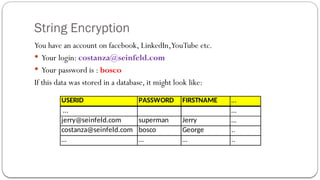
String Encryption
You havean account on facebook, LinkedIn,YouTube etc.
Your login: costanza@seinfeld.com
Your password is : bosco
If this data was stored in a database, it might look like:
USERID PASSWORD FIRSTNAME …
… …
jerry@seinfeld.com superman Jerry …
costanza@seinfeld.com bosco George ..
… … … ..
4.
String Encryption
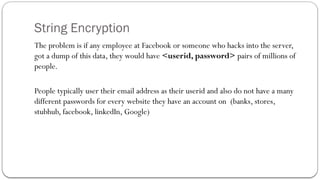
The problemis if any employee at Facebook or someone who hacks into the server,
got a dump of this data, they would have <userid, password> pairs of millions of
people.
People typically user their email address as their userid and also do not have a many
different passwords for every website they have an account on (banks, stores,
stubhub, facebook, linkedIn, Google)
5.
String Encryption -Algorithm
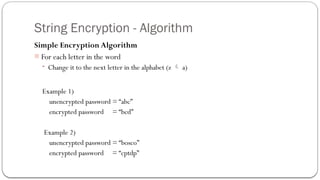
Simple Encryption Algorithm
- For each letter in the word
- Change it to the next letter in the alphabet (z a)
Example 1)
unencrypted password = “abc”
encrypted password = “bcd”
Example 2)
unencrypted password = “bosco”
encrypted password = “cptdp”
6.
Database with Encryptedpasswords
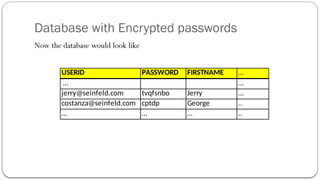
Now the database would look like
USERID PASSWORD FIRSTNAME …
… …
jerry@seinfeld.com tvqfsnbo Jerry …
costanza@seinfeld.com cptdp George ..
… … … ..
7.
Encryption Algorithm’s Rainbow
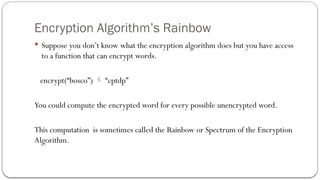
Suppose you don’t know what the encryption algorithm does but you have access
to a function that can encrypt words.
encrypt(“bosco”) “cptdp”
You could compute the encrypted word for every possible unencrypted word.
This computation is sometimes called the Rainbow or Spectrum of the Encryption
Algorithm.
8.
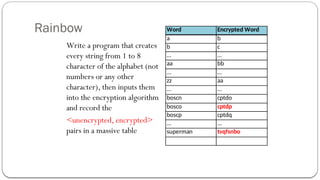
Rainbow
Write a programthat creates
every string from 1 to 8
character of the alphabet (not
numbers or any other
character), then inputs them
into the encryption algorithm
and record the
<unencrypted, encrypted>
pairs in a massive table
Word Encrypted Word
a b
b c
… …
aa bb
… …
zz aa
… …
boscn cptdo
bosco cptdp
boscp cptdq
… …
superman tvqfsnbo
9.
Time to calculatethe Rainbow
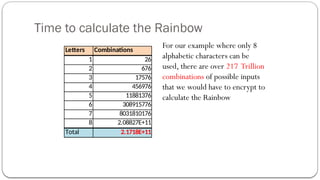
For our example where only 8
alphabetic characters can be
used, there are over 217 Trillion
combinations of possible inputs
that we would have to encrypt to
calculate the Rainbow
Letters Combinations
1 26
2 676
3 17576
4 456976
5 11881376
6 308915776
7 8031810176
8 2.08827E+11
Total 2.1718E+11
10.
Algorithm for generatingRainbow
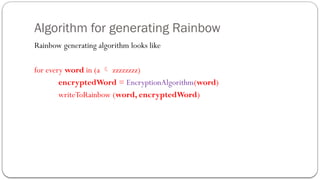
Rainbow generating algorithm looks like
for every word in (a zzzzzzzz)
encryptedWord = EncryptionAlgorithm(word)
writeToRainbow (word, encryptedWord)
11.
Time and Spacefor Rainbow
Suppose you have the latest processor 10 gigahertz
(approx. 10 billion instructions/second) and you have 217 trillion instructions to do,
how long would it take?
217 trillion/10 billion = 21,700 seconds = 6 hours
***Of course months would be more realistic
Each <word,EncryptedWord> pair is 16 characters and there are 217 trillion of them
so
[(217 trillion) * 16]/1 Gigabyte = 3Terrabytes
12.
Key (a.k.a Salt)Encryption
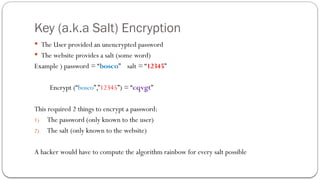
The User provided an unencrypted password
The website provides a salt (some word)
Example ) password = “bosco” salt = “12345”
Encrypt (“bosco”,”12345”) = “cqvgt”
This required 2 things to encrypt a password:
1) The password (only known to the user)
2) The salt (only known to the website)
A hacker would have to compute the algorithm rainbow for every salt possible
LinkedIn (2012 unsaltedSHA-1)
In 2012, hackers (not known if it was an inside job) go into the database of LinkedIn and
dumped the password table which contained 6.5 encrypted passwords.
Inputting these encrypted passwords into a SHA-1 unsalted rainbow generated table, showed
English-like words being produced as unencrypted passwords.
http://techcrunch.com/2012/06/06/6-5-million-linkedin-passwords-reportedly-leaked-linkedin-is-looking-into-it/
15.
2 Way (encryption/decryption)
This simple algorithm of adding 1 letter value is decryptable.
That is, if you know the encryption algorithm, since it is reversible, you know how to
decrypt and encrypted word.
It would be better if the encryption was one way.
16.
1 way Encryption
Simplebut bad Example)
Algorithm) take numerical value of all inputs and multiply them together and store
the result
Password = “cat” encrypted password = 3*1*20 = 60
What’s the encrypted password for “feb” ? = 6*5*2 = 60 also
Even if you know the algorithm you could decrypt 60 “cat”
17.
Public-Private Key Encryption
AEncryption/Decryption public algorithm that all encrypted messages sent to you can only be
decrypted by you.
You ask the public algorithm for a public key and a private key
You know your public and private key values.
You publish your public key to anyone who wants to send an encrypted message to you.
They encrypt a message using the public algorithm and your public key.
You receive the message and decrypt it using you private key.
18.
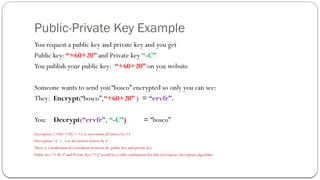
Public-Private Key Example
Yourequest a public key and private key and you get
Public key: “+60+20” and Private key “-C”
You publish your public key: “+60+20” on you website
Someone wants to send you “bosco” encrypted so only you can see:
They: Encrypt(“bosco”,“+60+20” ) = “ervfr”.
You: Decrypt(“ervfr”, “-C”) = “bosco”
Encryption: (+60/+20) = +3 so increment all letters by +3
Decryption –C = -3 so decrement letters by 3
There is a mathematical correlation between the public key and private key
Public key:“+30-3” and Private Key: “+J” would be a valid combination for this encryption/decryption algorithm
19.
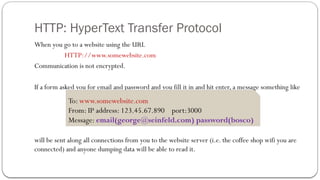
HTTP: HyperText TransferProtocol
When you go to a website using the URL
HTTP://www.somewebsite.com
Communication is not encrypted.
If a form asked you for email and password and you fill it in and hit enter, a message something like
will be sent along all connections from you to the website server (i.e. the coffee shop wifi you are
connected) and anyone dumping data will be able to read it.
To: www.somewebsite.com
From: IP address: 123.45.67.890 port:3000
Message: email(george@seinfeld.com) password(bosco)
20.
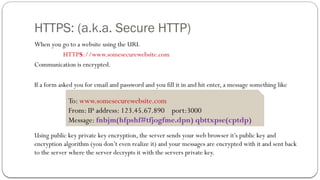
HTTPS: (a.k.a. SecureHTTP)
When you go to a website using the URL
HTTPS://www.somesecurewebsite.com
Communication is encrypted.
If a form asked you for email and password and you fill it in and hit enter, a message something like
Using public key private key encryption, the server sends your web browser it’s public key and
encryption algorithm (you don’t even realize it) and your messages are encrypted with it and sent back
to the server where the server decrypts it with the servers private key.
To: www.somesecurewebsite.com
From: IP address: 123.45.67.890 port:3000
Message: fnbjm(hfpshf#tfjogfme.dpn) qbttxpse(cptdp)
21.
SSL (Secure SocketLayer)
SSL is the predecessor toTLS (Transport Layer Security)
Certificate Authorities (CA’s) issue public/private …
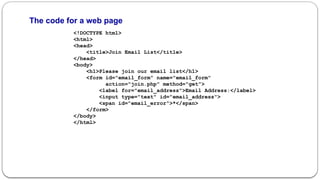
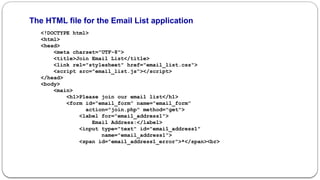
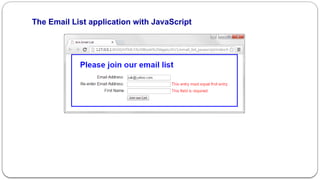
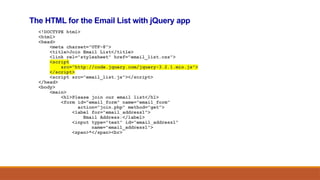
The code forthe JavaScript file (email_list.js)
var $ = function (id) {
return document.getElementById(id);
}
var joinList = function () {
var emailAddress1 = $("email_address1").value;
var emailAddress2 = $("email_address2").value;
var isValid = true;
if (emailAddress1 == "") {
$("email_address1_error").firstChild.nodeValue =
"This field is required.";
isValid = false;
}
else {
$("email_address1_error").firstChild.nodeValue =
""; }
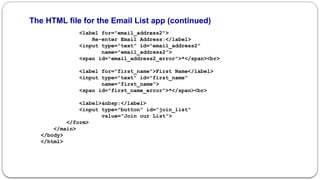
28.
The code forthe email_list.js file (continued)
if (emailAddress1 !== emailAddress2) {
$("email_address2_error").firstChild.nodeValue =
"This entry must equal first entry.";
isValid = false;
}
else {
$("email_address2_error").firstChild.nodeValue =
""; }
...
if (isValid) {
// submit the form if all entries are valid
$("email_form").submit();
}
}
window.onload = function () {
$("join_list").onclick = joinList;
}
29.
The JavaScript ina file named printPage.js
var $ = function (id) {
// this function returns the object for the element
return document.getElementById(id);
}
var printPage = function() {
// this is the event handler
// for the click event of the button
window.print();
}
window.onload = function() {
// this is the event handler for the onload event
$("printButton").onclick = printPage;
}
HTML that includes the JavaScript file
<script src="printPage.js"></script>
HTML for the Print the Page button
<input type="button" id="printButton"
value="Print the Page">
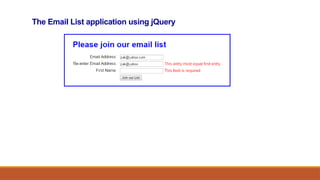
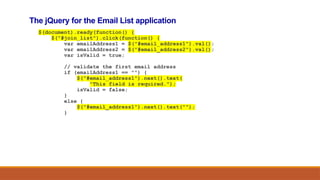
The jQuery forthe Email List application
$(document).ready(function() {
$("#join_list").click(function() {
var emailAddress1 = $("#email_address1").val();
var emailAddress2 = $("#email_address2").val();
var isValid = true;
// validate the first email address
if (emailAddress1 == "") {
$("#email_address1").next().text(
"This field is required.");
isValid = false;
}
else {
$("#email_address1").next().text("");
}
36.
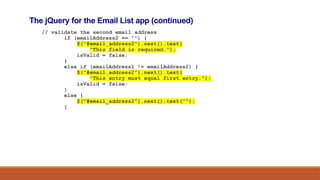
The jQuery forthe Email List app (continued)
// validate the second email address
if (emailAddress2 == "") {
$("#email_address2").next().text(
"This field is required.");
isValid = false;
}
else if (emailAddress1 != emailAddress2) {
$("#email_address2").next().text(
"This entry must equal first entry.");
isValid = false;
}
else {
$("#email_address2").next().text("");
}
37.
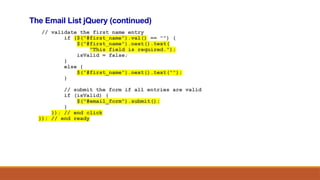
The Email ListjQuery (continued)
// validate the first name entry
if ($("#first_name").val() == "") {
$("#first_name").next().text(
"This field is required.");
isValid = false;
}
else {
$("#first_name").next().text("");
}
// submit the form if all entries are valid
if (isValid) {
$("#email_form").submit();
}
}); // end click
}); // end ready
The script elementsfor the slide show
<script src="jquery-3.2.1.min.js"></script>
<script src="slide_show.js"></script>
44.
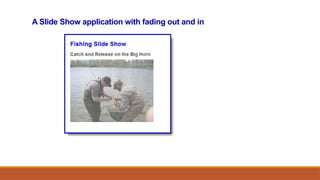
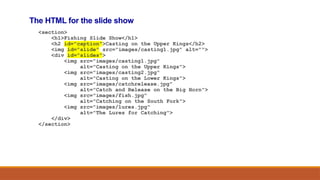
The HTML forthe slide show
<section>
<h1>Fishing Slide Show</h1>
<h2 id="caption">Casting on the Upper Kings</h2>
<img id="slide" src="images/casting1.jpg" alt="">
<div id="slides">
<img src="images/casting1.jpg"
alt="Casting on the Upper Kings">
<img src="images/casting2.jpg"
alt="Casting on the Lower Kings">
<img src="images/catchrelease.jpg"
alt="Catch and Release on the Big Horn">
<img src="images/fish.jpg"
alt="Catching on the South Fork">
<img src="images/lures.jpg"
alt="The Lures for Catching">
</div>
</section>
45.
The critical CSSfor the slide show
#slides img { display: none; }
46.
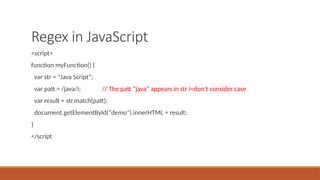
Regex in JavaScript
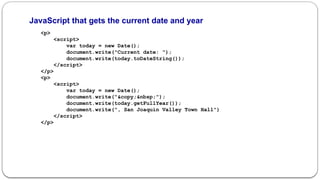
<script>
functionmyFunction() {
var str = "Java Script";
var patt = /java/i; // The patt “java” appears in str i=don’t consider case
var result = str.match(patt);
document.getElementById("demo").innerHTML = result;
}
</script
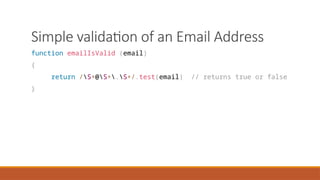
Simple validation ofan Email Address
function emailIsValid (email)
{
return /S+@S+.S+/.test(email) // returns true or false
}
49.
Advanced JavaScript Assignment
•Using this week’s slideshow create an email list application using jQuery
• This should include an HTML file and a JS file
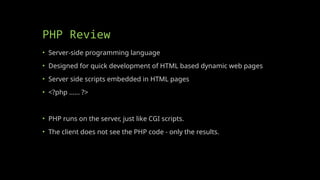
PHP Review
• Server-sideprogramming language
• Designed for quick development of HTML based dynamic web pages
• Server side scripts embedded in HTML pages
• <?php …… ?>
• PHP runs on the server, just like CGI scripts.
• The client does not see the PHP code - only the results.
52.
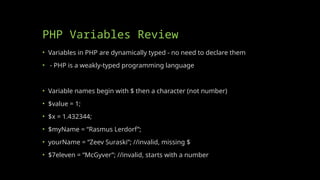
PHP Variables Review
•Variables in PHP are dynamically typed - no need to declare them
• - PHP is a weakly-typed programming language
• Variable names begin with $ then a character (not number)
• $value = 1;
• $x = 1.432344;
• $myName = “Rasmus Lerdorf”;
• yourName = “Zeev Suraski”; //invalid, missing $
• $7eleven = “McGyver”; //invalid, starts with a number
53.
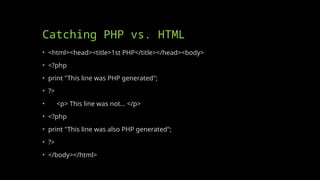
Catching PHP vs.HTML
• <html><head><title>1st PHP</title></head><body>
• <?php
• print "This line was PHP generated";
• ?>
• <p> This line was not... </p>
• <?php
• print "This line was also PHP generated";
• ?>
• </body></html>
54.
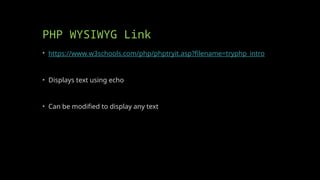
PHP WYSIWYG Link
•https://www.w3schools.com/php/phptryit.asp?filename=tryphp_intro
• Displays text using echo
• Can be modified to display any text
55.
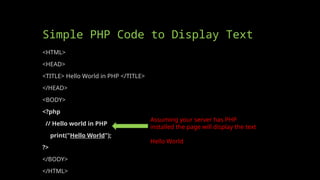
Simple PHP Codeto Display Text
<HTML>
<HEAD>
<TITLE> Hello World in PHP </TITLE>
</HEAD>
<BODY>
<?php
// Hello world in PHP
print("Hello World");
?>
</BODY>
</HTML>
Assuming your server has PHP
installed the page will display the text
Hello World
56.
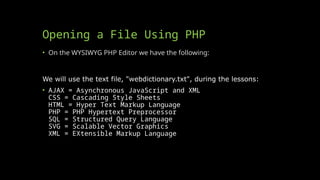
Opening a FileUsing PHP
• On the WYSIWYG PHP Editor we have the following:
We will use the text file, "webdictionary.txt", during the lessons:
• AJAX = Asynchronous JavaScript and XML
CSS = Cascading Style Sheets
HTML = Hyper Text Markup Language
PHP = PHP Hypertext Preprocessor
SQL = Structured Query Language
SVG = Scalable Vector Graphics
XML = EXtensible Markup Language
57.
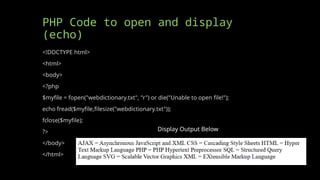
PHP Code toopen and display
(echo)
<!DOCTYPE html>
<html>
<body>
<?php
$myfile = fopen("webdictionary.txt", "r") or die("Unable to open file!");
echo fread($myfile,filesize("webdictionary.txt"));
fclose($myfile);
?>
</body>
</html>
Display Output Below
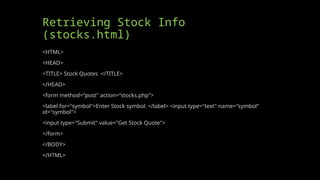
Retrieving Stock Info(stocks.php)
<HTML>
<HEAD>
<TITLE> Stock Quotes
</TITLE>
</HEAD>
<BODY>
</BODY>
</HTML>
<?php
$company = $_POST[symbol] ;
$url = "http://finance.yahoo.com/q?s=" . $company;
//open the url and store in $fp
$fp = fopen($url , "r");
//read 20000 bytes of the file
$readfile = fread($fp , 20000);
//search for the HTML below and store everything in between in $content
$readfile = ereg("<TABLE border=0 cellPadding=2 cellSpacing=0
width=100%>(.*)<small>Add</small>" , $readfile, $content);
//display the results in a table
echo "<table width = '100%’>”;
echo $url;
echo $readfile;
echo "$content[1]";
echo "</table>";
//close the file handle
fclose($fp);
?>
PHP Code Goes
in BODY
60.
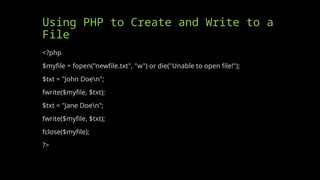
Using PHP toCreate and Write to a
File
<?php
$myfile = fopen("newfile.txt", "w") or die("Unable to open file!");
$txt = "John Doen";
fwrite($myfile, $txt);
$txt = "Jane Doen";
fwrite($myfile, $txt);
fclose($myfile);
?>
61.
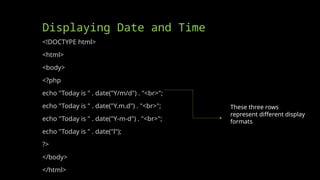
Displaying Date andTime
<!DOCTYPE html>
<html>
<body>
<?php
echo "Today is " . date("Y/m/d") . "<br>";
echo "Today is " . date("Y.m.d") . "<br>";
echo "Today is " . date("Y-m-d") . "<br>";
echo "Today is " . date("l");
?>
</body>
</html>
These three rows
represent different display
formats
62.
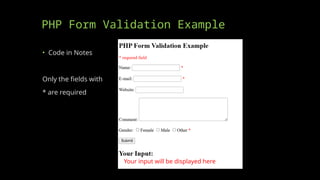
PHP Form ValidationExample
• Code in Notes
Only the fields with
* are required
Your input will be displayed here
63.
PHP Interactions
• JSON
•AJAX
• HTML
• XML
• SQL
• Helps us combine many of our web development tools
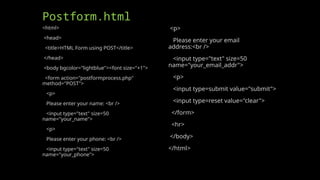
Postform.html
<html>
<head>
<title>HTML Form usingPOST</title>
</head>
<body bgcolor="lightblue"><font size="+1">
<form action="postformprocess.php"
method="POST">
<p>
Please enter your name: <br />
<input type="text" size=50
name="your_name">
<p>
Please enter your phone: <br />
<input type="text" size=50
name="your_phone">
<p>
Please enter your email
address:<br />
<input type="text" size=50
name="your_email_addr">
<p>
<input type=submit value="submit">
<input type=reset value="clear">
</form>
<hr>
</body>
</html>
74.
Postformprocess.php
<html>
<head>
<title>Process Form usingPOST</title>
</head>
<body bgcolor = "lightgreen"><font size="+1">
<h2>Here is the form input:</h2>
<?php
$name = $_POST['your_name'];
$phone = $_POST['your_phone'];
$email = $_POST['your_email_addr'];
print "Welcome to PHP $name!<br />";
print "Can I call you at $phone?<br />";
print "Is it ok to send you email at $email?<br />";
?>
</body>
</html>
75.
Advanced PHP HWassignment
• Create a form with information you may want to retrieve on your own
personal website, such as name, email, comment, etc.
• Create a HTML form to accept the input and a PHP file to retrieve and
echo the input
• This will require an HTML file and a PHP file
• Remember that your PHP file may not display the input for you in the
WYSIWYG, but if I upload it to my server it should work so long as your inputs
match your outputs [variable you create in the HTML form must match the
variable you POST]
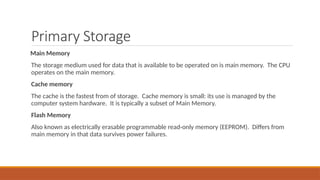
Primary Storage
Main Memory
Thestorage medium used for data that is available to be operated on is main memory. The CPU
operates on the main memory.
Cache memory
The cache is the fastest from of storage. Cache memory is small: its use is managed by the
computer system hardware. It is typically a subset of Main Memory.
Flash Memory
Also known as electrically erasable programmable read-only memory (EEPROM). Differs from
main memory in that data survives power failures.
78.
Secondary Storage
Magnetic Disk
Theprimary medium for the long-term on-line storage of data is the magnetic disk.
Optical Disk
The most popular forms of optical storage are the compact disc(CD) which can hold 640
megabytes of data, and the Digital Video Disk (DVD).
Magnetic Tape
Used primarily to backup disks.
79.
File System
A filesystem is a means to organize data expected to be retained after a program terminates by
providing procedures to store, retrieve and update data as well as manage the available space on
the device(s) which contain it.
A file system organizes data in an efficient manner and is tuned to the specific characteristics of
the device.
A tight coupling usually exists between the operating system and the file system
79
80.
Secondary Storage
File systemsare used on data storage devices, such as
I. hard disk drives,
II. floppy disks,
III. optical discs, or
IV. flash memory storage devices,
to maintain the physical locations of the computer files.
They may provide access to data on a file server by acting as clients for a network protocol (e.g. NFS, SMB, or 9P
clients),
80
81.
File names
A filename (or filename) is used to reference the storage location in the file system. Most file
systems have restrictions on the length of the filename
Most file system interface utilities have special characters that you cannot normally use in a
filename (the file system may use these special characters to indicate a device, device type,
directory prefix or file type).
Some file system utilities, editors and compilers treat prefixes and suffixes in a special way.
These are usually merely conventions and not implemented within the file system.
81
82.
Metadata (data aboutdata)
Other bookkeeping information is typically associated with each file within a file system.
The length of the data contained in a file may be stored as the number of blocks allocated for the
file or as a byte count.
The time that the file was last modified may be stored as the file's timestamp. File systems might
store the file creation time, the time it was last accessed, the time the file's meta-data was
changed, or the time the file was last backed up.
82
83.
Utilities
File systems includeutilities to initialize, alter parameters of and remove an instance of the file
system.
Directory utilities create, rename and delete directory entries and alter metadata associated with a
directory.
File utilities create, list, copy, move and delete files, and alter metadata. They may be able to
truncate data, truncate or extend space allocation, append to, move, and modify files in-place.
Also in this category are utilities to free space for deleted files if the file system provides an undelete
function.
83
84.
Access and permission
Thereare several mechanisms used by file systems to control access to data.
Usually the intent is to prevent reading or modifying files by a user or group of users.
Another reason is to ensure data is modified in a controlled way so access may be restricted to a
specific program.
Examples include passwords stored in the metadata of the file or elsewhere and file permissions
in the form of permission bits, access control lists, or capabilities.
84
85.
User Data
The mostimportant purpose of a file system is to manage user data. This includes storing,
retrieving and updating data.
Some file systems accept data for storage as a stream of bytes which are collected and stored in
a manner efficient for the media.
When a program retrieves the data it specifies the size of a memory buffer and the file system
transfers data from the media to the buffer
85
86.
Network File system
Anetwork file system is a file system that acts as a client for a remote file access protocol,
providing access to files on a server.
Examples of network file systems include clients for the NFS, AFS, SMB protocols.
NFS
I. Network File System (NFS) is a distributed file system protocol originally developed by Sun Microsystems in 1984,[1]
allowing a user on a client computer to access files over a network in a manner similar to how local storage is
accessed.
II. NFS, like many other protocols, builds on the Open Network Computing Remote Procedure Call (ONC RPC) system.
III. The Network File System is an open standard defined in RFCs, allowing anyone to implement the protocol.
86
87.
Logical files
Sequential Access- allows data to be read from a file or written to a file from beginning to end.
It is not possible to read data starting in the middle of the file, nor is it possible to write data to
the file starting in the middle using sequential methods.
Word, PowerPoint etc. Documents are sequential
The input and output streams in Java are sequential.
Direct Access - permit nonsequential, or random, access to a file's contents. You can "seek" to
any particular location within a file specifying the number of bytes.
Database records are random access files.
87
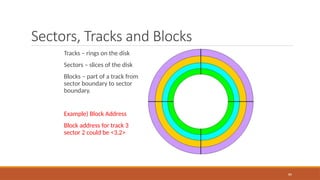
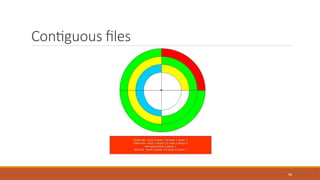
Sectors, Tracks andBlocks
89
Tracks – rings on the disk
Sectors – slices of the disk
Blocks – part of a track from
sector boundary to sector
boundary.
Example) Block Address
Block address for track 3
sector 2 could be <3,2>
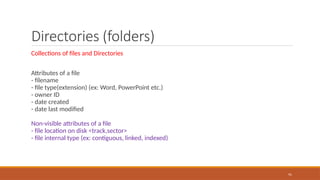
Directories (folders)
Collections offiles and Directories
Attributes of a file
- filename
- file type(extension) (ex: Word, PowerPoint etc.)
- owner ID
- date created
- date last modified
Non-visible attributes of a file
- file location on disk <track,sector>
- file internal type (ex: contiguous, linked, indexed)
91
92.
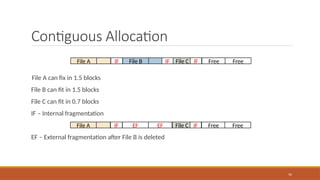
Contiguous Allocation
File Acan fix in 1.5 blocks
File B can fit in 1.5 blocks
File C can fit in 0.7 blocks
IF – Internal fragmentation
EF – External fragmentation after File B is deleted
92
File A File B File C Free Free
IF IF IF
File A EF EF File C Free Free
IF IF
93.
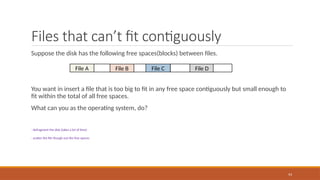
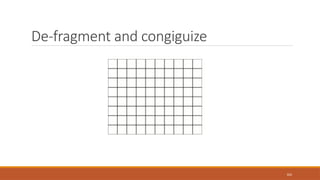
Files that can’tfit contiguously
Suppose the disk has the following free spaces(blocks) between files.
You want in insert a file that is too big to fit in any free space contiguously but small enough to
fit within the total of all free spaces.
What can you as the operating system, do?
- defragment the disk (takes a lot of time)
- scatter the file though out the free spaces
93
File A File B File C File D
94.
File Space AllocationMethods
Contiguous Allocation – File data is located on disk physically together. Block after block.
Linked Allocation – File data is located on disk in non-contiguous block locations where each
block contains the address of the next block.
Indexed Allocation – File data is located on disk in non-contiguous block locations and there is
also an index (block(s) of storage) that contains the locations of the files blocks
94
95.
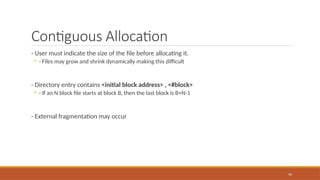
Contiguous Allocation
- Usermust indicate the size of the file before allocating it.
◦ - Files may grow and shrink dynamically making this difficult
- Directory entry contains <initial block address> , <#block>
◦ - If an N block file starts at block B, then the last block is B+N-1
- External fragmentation may occur
95
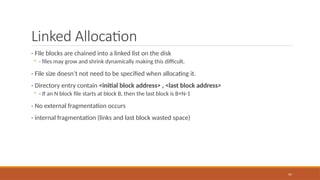
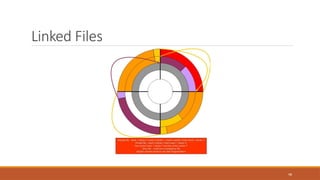
Linked Allocation
- Fileblocks are chained into a linked list on the disk
◦ - files may grow and shrink dynamically making this difficult.
- File size doesn’t not need to be specified when allocating it.
- Directory entry contain <initial block address> , <last block address>
◦ - If an N block file starts at block B, then the last block is B+N-1
- No external fragmentation occurs
- internal fragmentation (links and last block wasted space)
97
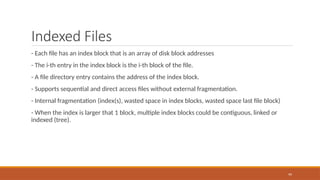
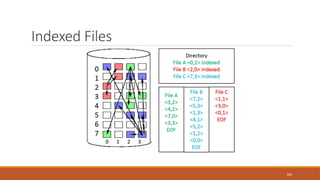
Indexed Files
- Eachfile has an index block that is an array of disk block addresses
- The i-th entry in the index block is the i-th block of the file.
- A file directory entry contains the address of the index block.
- Supports sequential and direct access files without external fragmentation.
- Internal fragmentation (index(s), wasted space in index blocks, wasted space last file block)
- When the index is larger that 1 block, multiple index blocks could be contiguous, linked or
indexed (tree).
99
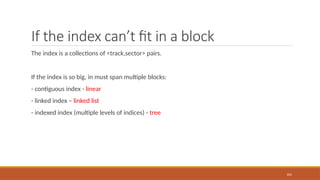
If the indexcan’t fit in a block
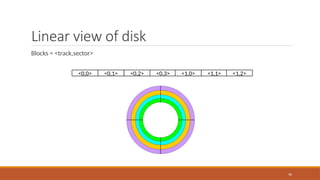
The index is a collections of <track,sector> pairs.
If the index is so big, in must span multiple blocks:
- contiguous index - linear
- linked index – linked list
- indexed index (multiple levels of indices) - tree
101
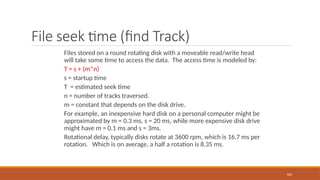
File seek time(find Track)
Files stored on a round rotating disk with a moveable read/write head
will take some time to access the data. The access time is modeled by:
T = s + (m*n)
s = startup time
T = estimated seek time
n = number of tracks traversed.
m = constant that depends on the disk drive.
For example, an inexpensive hard disk on a personal computer might be
approximated by m = 0.3 ms, s = 20 ms, while more expensive disk drive
might have m = 0.1 ms and s = 3ms.
Rotational delay, typically disks rotate at 3600 rpm, which is 16.7 ms per
rotation. Which is on average, a half a rotation is 8.35 ms.
103
104.
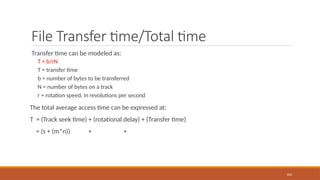
File Transfer time/Totaltime
Transfer time can be modeled as:
T = b/rN
T = transfer time
b = number of bytes to be transferred
N = number of bytes on a track
r = rotation speed, in revolutions per second
The total average access time can be expressed at:
T = (Track seek time) + (rotational delay) + (Transfer time)
= (s + (m*n)) + +
104
105.
Seek Time algorithms
FCFS(First-Come-First-Serve) There is no reordering of the queue.
SSTF (Shortest-Seek-Time-First) Disk arm is positioned next at the request (inward or outward)
that minimizes arm movement
SCAN Disk arm sweeps back and forth across the disk surface, serving all requests in its path. It
changes direction only when there are no more requests to service in the current direction.
C-SCAN (Circular-SCAN) Disk arm moves unidirectional across the disk surface toward the inner
track. When there are no more requests for service ahead of the arm, it jumps back to surface
the request nearest the outer track and proceeds inward again.
N-Step scan Disk arm sweeps back and forth as in SCAN, but all requests that arrive during a
sweep in one direction are batched and reordered for optimal service during the return sweep.
105
106.
File Type: DirectAccess
Records are directly (randomly) access by their physical address on the direct access storage
device (DASD). The application user places the records on the DASD in any order appropriate for
a particular application. Hashing techniques are often locating data in a Direct access file.
Direct Access Files exploit the capability found on disks to access directly any block of a known
address. A key field is required in each record. There is no order to the records.
106
107.
Record Blocking (Direct)
FixedBlocking
Fixed length records are used, and an integral number of records are stored in a block. There
may be unused space at the end of each block.
Variable-length spanned blocking
Variable-length records are used, and are packed into blocks with no unused space. Thus, some
records must span two blocks, with the continuation indicated by a pointer to the successor
block.
Variable-length unspanned blocking
Variable-length records are used, but spanning is not employed. There is wasted space in most
blocks because of the inability to use the remainder of the block if the next records is larger that
the remaining unused space.
107
108.
Access Methods
Queued Access
Usedwhen the sequence in which records are to be processed can be anticipated, such as in
sequential and indexed sequential accessing. The queued methods perform anticipated
buffering and scheduling of I/O operations. They try to have the next record available for
processing as soon as the previous one is processed.
Basic Access
Used when the sequence in which records are to be processed cannot be anticipated.
108
Databases for Storage
•Databases allow us to store tons of information in an organized space
• In many cases you can store multiple databases on one server
• You may have experienced using databases if you have used Microsoft
Access, but more individuals use databases through online means, such
as MySQL
• Databases allow for the retrieval of all of the information you have stored
as well.
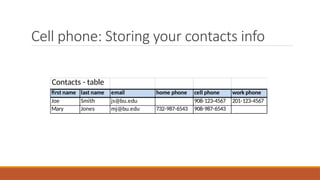
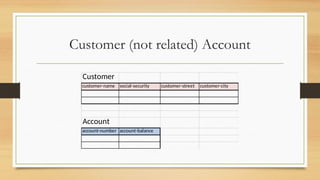
Cell phone: Storingyour contacts info
Contacts - table
first name last name email home phone cell phone work phone
Joe Smith js@bu.edu 908-123-4567 201-123-4567
Mary Jones mj@bu.edu 732-987-6543 908-987-6543
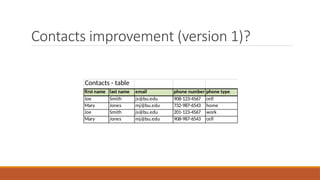
113.
Contacts improvement (version1)?
Contacts - table
first name last name email phone number phone type
Joe Smith js@bu.edu 908-123-4567 cell
Mary Jones mj@bu.edu 732-987-6543 home
Joe Smith js@bu.edu 201-123-4567 work
Mary Jones mj@bu.edu 908-987-6543 cell
114.
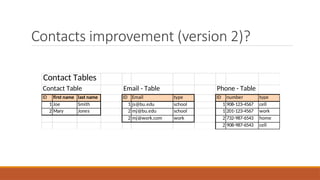
Contacts improvement (version2)?
Contact Tables
Contact Table Email - Table Phone - Table
ID first name last name ID Email type ID number type
1 Joe Smith 1 js@bu.edu school 1 908-123-4567 cell
2 Mary Jones 2 mj@bu.edu school 1 201-123-4567 work
2 mj@work.com work 2 732-987-6543 home
2 908-987-6543 cell
115.
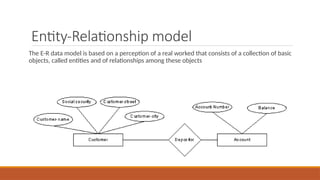
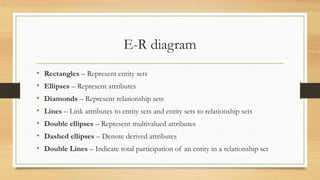
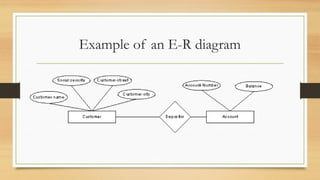
Entity-Relationship model
The E-Rdata model is based on a perception of a real worked that consists of a collection of basic
objects, called entities and of relationships among these objects
116.
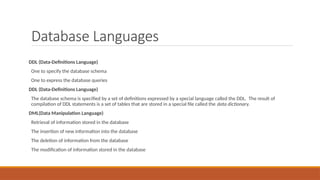
Database Languages
DDL (Data-DefinitionsLanguage)
One to specify the database schema
One to express the database queries
DDL (Data-Definitions Language)
The database schema is specified by a set of definitions expressed by a special language called the DDL. The result of
compilation of DDL statements is a set of tables that are stored in a special file called the data dictionary.
DML(Data Manipulation Language)
Retrieval of information stored in the database
The insertion of new information into the database
The deletion of information from the database
The modification of information stored in the database
117.
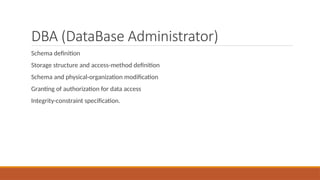
DBA (DataBase Administrator)
Schemadefinition
Storage structure and access-method definition
Schema and physical-organization modification
Granting of authorization for data access
Integrity-constraint specification.
118.
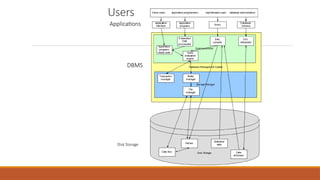
Database Users
Application Programmers– Professionals who interact with the system through DML calls, which
are embedded in a program written in a host language like Cobol, C, C++, Java, C#, php,)
Sophisticated Users – form their requests in a database query language. Each query is submitted
to a query processor whose function is to break down DML statements into instructions that the
storage manager understands.
119.
Query Processor Components
DMLCompiler – translates DML statements of a query language into low-level instructions that
the query evaluation engine understands.
Embedded DML precompiler – converts DML statements embedded in an application program to
normal procedure calls in the host language.
DDL Interpreter – interprets DDL statements and records them in the set of tables containing
metadata.
Query Evaluation Engine – executes low-level instructions generated by the DML compiler.
120.
Storage Manager
Authorization andIntegrity Manager – tests for the satisfaction of integrity constraints and
checks the authority of users to access data.
Transaction Manager – ensures that the database remains in a consistent state despite system
failures
File Manager – manages the allocation of space on disk storage and the data structures used to
represent information stored on disk.
Buffer Manager – responsible for fetching data from disk storage into main memory, cache
memory.
121.
Physical System
Data Files– stores the database itself.
Data Dictionary – stores metadata about the structure of the database.
Indices – provide fast access to data items that hold particular values.
Statistical data – store statistical information about the data in the database. Use for efficient
executions.
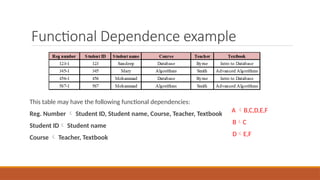
Functional Dependence example
Thistable may have the following functional dependencies:
Reg. Number Student ID, Student name, Course, Teacher, Textbook
Student ID Student name
Course Teacher, Textbook
A B,C,D,E,F
BC
DE,F
131.
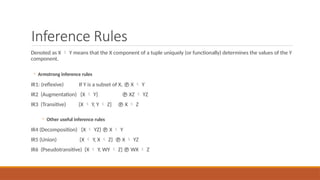
Inference Rules
Denoted asX Y means that the X component of a tuple uniquely (or functionally) determines the values of the Y
component.
◦ Armstrong inference rules
IR1: (reflexive) If Y is a subset of X, X Y
IR2 (Augmentation) {X Y} XZ YZ
IR3 (Transitive) {X Y, Y Z} X Z
◦ Other useful inference rules
IR4 (Decomposition) {X YZ} X Y
IR5 (Union) {X Y, X Z} X YZ
IR6 (Pseudotransitive) {X Y, WY Z} WX Z
132.
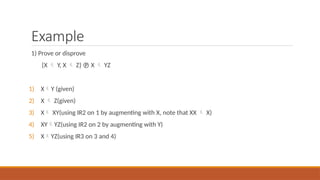
Example
1) Prove ordisprove
{X Y, X Z} X YZ
1) XY (given)
2) X Z(given)
3) X XY(using IR2 on 1 by augmenting with X, note that XX X)
4) XYYZ(using IR2 on 2 by augmenting with Y)
5) XYZ(using IR3 on 3 and 4)
133.
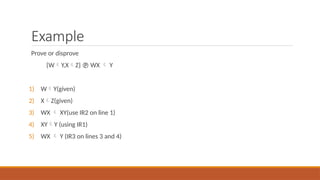
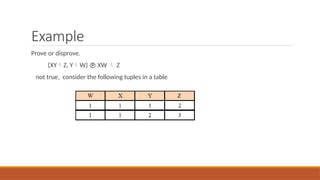
Example
Prove or disprove
{WY,XZ} WX Y
1) WY(given)
2) XZ(given)
3) WX XY(use IR2 on line 1)
4) XYY (using IR1)
5) WX Y (IR3 on lines 3 and 4)
134.
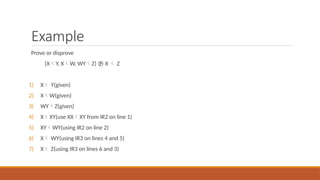
Example
Prove or disprove
{XY,XW, WYZ} X Z
1) X Y(given)
2) XW(given)
3) WYZ(given)
4) XXY(use XXXY from IR2 on line 1)
5) XYWY(using IR2 on line 2)
6) X WY(using IR3 on lines 4 and 5)
7) X Z(using IR3 on lines 6 and 3)
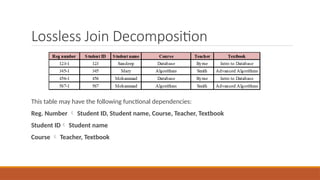
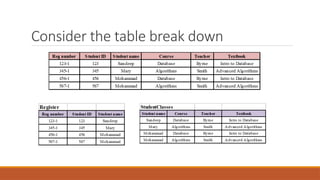
Lossless Join Decomposition
Thistable may have the following functional dependencies:
Reg. Number Student ID, Student name, Course, Teacher, Textbook
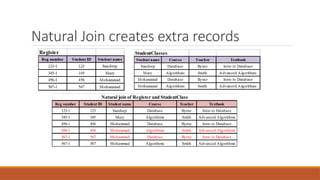
Student ID Student name
Course Teacher, Textbook
Natural Join createsextra records
Reg number Student ID Student name Course Teacher Textbook
123-1 123 Sandeep Database Byrne Intro to Database
345-1 345 Mary Algorithms Smith Advanced Algorithms
456-1 456 Mohammad Database Byrne Intro to Database
456-1 456 Mohammad Algorithms Smith Advanced Algorithms
567-1 567 Mohammad Database Byrne Intro to Database
567-1 567 Mohammad Algorithms Smith Advanced Algorithms
Natural join of Register and StudentClass
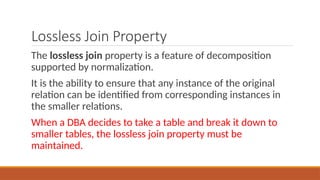
139.
Lossless Join Property
Thelossless join property is a feature of decomposition
supported by normalization.
It is the ability to ensure that any instance of the original
relation can be identified from corresponding instances in
the smaller relations.
When a DBA decides to take a table and break it down to
smaller tables, the lossless join property must be
maintained.
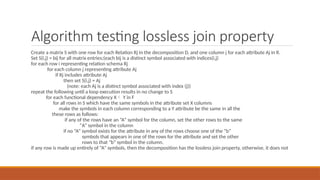
140.
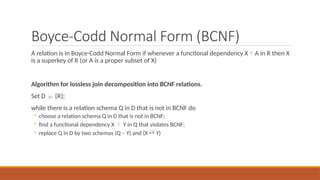
Algorithm testing losslessjoin property
Create a matrix S with one row for each Relation Rj in the decomposition D, and one column j for each attribute Aj in R.
Set S(i,j) = bij for all matrix entries;(each bij is a distinct symbol associated with indices(i,j)
for each row i representing relation schema Rj
for each column j representing attribute Aj
if Rj includes attribute Aj
then set S(i,j) = Aj
(note: each Aj is a distinct symbol associated with index (j))
repeat the following until a loop execution results in no change to S
for each functional dependency X Y in F
for all rows in S which have the same symbols in the attribute set X columns
make the symbols in each column corresponding to a Y attribute be the same in all the
these rows as follows:
if any of the rows have an “A” symbol for the column, set the other rows to the same
“A” symbol in the column
if no “A” symbol exists for the attribute in any of the rows choose one of the “b”
symbols that appears in one of the rows for the attribute and set the other
rows to that “b” symbol in the column.
if any row is made up entirely of “A” symbols, then the decomposition has the lossless join property, otherwise, it does not
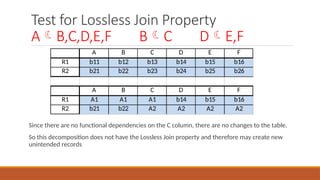
141.
Test for LosslessJoin Property
AB,C,D,E,F BC DE,F
Since there are no functional dependencies on the C column, there are no changes to the table.
So this decomposition does not have the Lossless Join property and therefore may create new
unintended records
A B C D E F
R1 b11 b12 b13 b14 b15 b16
R2 b21 b22 b23 b24 b25 b26
A B C D E F
R1 A1 A1 A1 b14 b15 b16
R2 b21 b22 A2 A2 A2 A2
142.
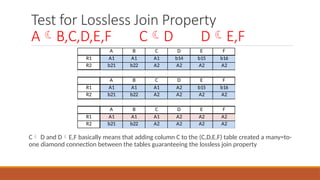
Test for LosslessJoin Property
AB,C,D,E,F CD DE,F
C D and DE,F basically means that adding column C to the (C,D,E,F) table created a many=to-
one diamond connection between the tables guaranteeing the lossless join property
A B C D E F
R1 A1 A1 A1 b14 b15 b16
R2 b21 b22 A2 A2 A2 A2
A B C D E F
R1 A1 A1 A1 A2 b15 b16
R2 b21 b22 A2 A2 A2 A2
A B C D E F
R1 A1 A1 A1 A2 A2 A2
R2 b21 b22 A2 A2 A2 A2
143.
Boyce-Codd Normal Form(BCNF)
A relation is in Boyce-Codd Normal Form if whenever a functional dependency XA in R then X
is a superkey of R (or A is a proper subset of X)
Algorithm for lossless join decomposition into BCNF relations.
Set D {R};
while there is a relation schema Q in D that is not in BCNF do
◦ choose a relation schema Q in D that is not in BCNF;
◦ find a functional dependency X Y in Q that violates BCNF;
◦ replace Q in D by two schemas (Q – Y) and (X Y)
144.
Database Assignment
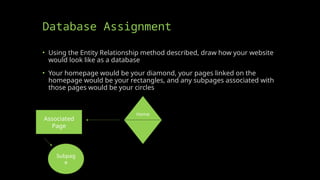
• Usingthe Entity Relationship method described, draw how your website
would look like as a database
• Your homepage would be your diamond, your pages linked on the
homepage would be your rectangles, and any subpages associated with
those pages would be your circles
Home
Associated
Page
Subpag
e
Search for Availabilityof Domain
Name
• Visit https://www.godaddy.com/domains to search for the availability of
your domain name
• Feel free to check on multiple options
• Ideally, you want firstnamelastname.com but it might not be available,
so you will need to adjust accordingly
147.
Places You CanPurchase Domain
• https://www.godaddy.com/ (usually offers first year promo price if purchasing domain
name for multiple years)
• https://www.ionos.com/ (first year promo price)
• https://www.domain.com/
• https://www.bluehost.com/ (first year promo price)
• https://domains.squarespace.com/
• https://www.web.com/
• https://www.hostgator.com/
• https://www.namecheap.com/ (first year promo price)
• https://www.hostinger.com/
Do the Research!!!!!
•Everyone of these companies is known for something they do well and
something they do poorly
• For example, GoDaddy provides exceptional services, but they charge for
everything. They are the only company I know of that will charge you for
an email address – all others provide them free with domain!
• Another example is HostGator which is very affordable, but if you ever
have a security issue you are going to have to spend a fortune to
fix/resolve the issue
150.
What I Do
•Purchase domain from GoDaddy (usually can pay $20 for two years -
$0.01 for first year at promo price and $19.99 for second year on dot
com domains)
• Offers many options which may not be available elsewhere
• Utilize SiteGround for hosting (first year promo price under $100 for
entire year, then offers ability to pay monthly, a few months at a time, or
yearly)
• Offers free emails, checks websites daily and weekly for issues, allows
WordPress and many other options
151.
Decide on YourHosting Plan
• Check the specifics of the different hosting plans
• Some plans may include security and be a little more expensive as a
result, but do not require you to purchase security as an add-on
• Look through what is included in the price – sometimes most expensive
is not the best and often the least expensive is missing something you
think you will need.
152.
What Are YouGoing To Do?
• WordPress website? No technical knowledge required
• HTML/CSS/JS website? May require stronger security
• Provided template? Likely will not look great, will take time to make
changes and may even cost additional money if modified often
• Make sure it is your own work, rather than pay someone else to do
it!!!!!!!
153.
Internet Corporation forAssigned
Names and Numbers (ICANN)
• Helps in identifying your domain
• IP address associated with your domain name
• Contact information for domain owner (which may be hidden)
• Results in a “tax” when renewing domain
• Geared towards making the world wide web safer, so all domain owners are
known and compliant
154.
Website History
• Yourdomain may have had a previous history
• Visit https://archive.org/web/ to check to see if your domain has any
history (it may not) – if it does have a history your domain may already
have potential traffic
• If it is determined there is a history of your domain, Google it to see what
is indexed by using site:yourdomain.com
• If any indexed URL is inappropriate, you may want to reconsider the purchase
of that domain name – your domain name should positively represent you as
a professional
155.
Time for Action
•Work with students individually to help them secure their domain name
and hosting plan
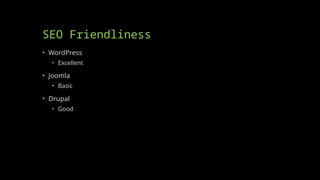
Purpose of SEO
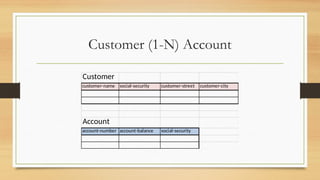
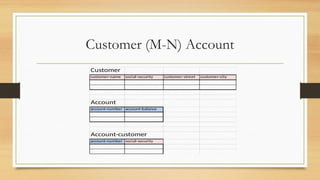
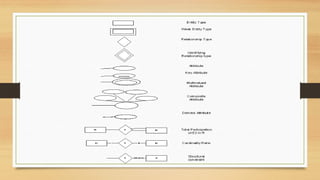
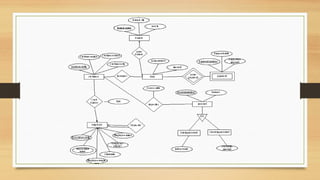
•To drive targeted traffic to your website [or specific pages]
• Ideally, the traffic drives additional sales
• Most online purchases are made on sites found through search engine
listings
158.
SEO is TechnicallyNot Paid
Advertising
• SEO – influence rankings in the “natural” (a.k.a. “organic”, a.k.a.
“algorithmic”) search results
• PPC – paid search advertising on a pay-per-click basis. The more you pay,
the higher your placement. Stop paying = stop receiving traffic.
• PPC – pay per click
• SEM – encompasses both SEO and PPC
• Search engine marketing
Most Commonly UsedSearch Engines
• Google
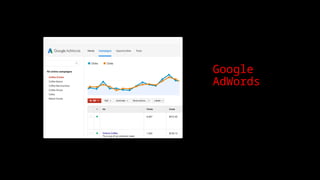
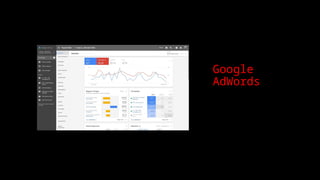
• Google AdWords
• Bing
• Microsoft Advertising
• Yahoo Search
161.
SEO is Basedon Keywords
• Keyword Research
• The “right” keywords are…
• relevant to your business
• popular with searchers
• https://ads.google.com/home/tools/keyword-planner/
SEO – ConstantChanges
• Topically relevant links from important sites
• Anchor text
• Keyword-rich title tags
• Keyword-rich content
• Internal hierarchical linking structure
• The whole is greater than the sum of the parts
164.
Begin The 7Steps
1) Get Your Site Fully Indexed
2) Get Your Pages Visible
3) Build Links & PageRank
4) Leverage Your PageRank
4) Encourage Clickthrough
6) Track the Right Metrics
7) Avoid Worst Practices
165.
1) Get YourSite Fully Indexed
Search engines are wary of “dynamic” pages
- they fear “spider traps”
The better your PageRank, the deeper and
more often your site will be spidered
166.
1) Get YourSite Fully Indexed
Page # estimates are wildly inaccurate, and include
non-indexed pages (e.g. ones with no title or snippet)
Misconfigurations (in robots.txt, in the type of redirects
used, requiring cookies, etc.) can kill indexation
Keep your error pages out of the index by returning
404 status code
Keep duplicate pages out of the index by standardizing
your URLs, eliminating unnecessary variables, using
301 redirects when needed
167.
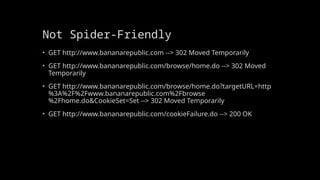
Not Spider-Friendly
• GEThttp://www.bananarepublic.com --> 302 Moved Temporarily
• GET http://www.bananarepublic.com/browse/home.do --> 302 Moved
Temporarily
• GET http://www.bananarepublic.com/browse/home.do?targetURL=http
%3A%2F%2Fwww.bananarepublic.com%2Fbrowse
%2Fhome.do&CookieSet=Set --> 302 Moved Temporarily
• GET http://www.bananarepublic.com/cookieFailure.do --> 200 OK
168.
2) Get YourPages Visible
• 100+ “signals” that influence ranking
• “Title tag” is the most important copy on the page
• Home page is the most important page of a site
• Every page of your site has a “song” (keyword theme)
• Incorporate keywords into title tags, hyperlink text, headings (H1 & H2
tags), alt tags, and high up in the page (where they’re given more “weight”)
• Eliminate extraneous HTML code
• “Meta tags” are not a magic bullet
• Have text for navigation, not graphics
169.
3) Build Linksand PageRank
• “Link popularity” affects search engine rankings
• PageRank™ - Links from “important” sites have more impact on
your Google rankings (weighted link popularity)
• Google offers a window into your PageRank
• PageRank meter in the Google Toolbar (toolbar.google.com)
• Google Directory (directory.google.com) category pages
• 3rd party tools like SEOChat.com’s “PageRank Lookup” & “PageRank
Search”
• Scores range from 0-10 on a logarithmic scale
170.
4) Leverage YourPageRank
• Your home page’s PageRank gets distributed to your deep pages by
virtue of your hierarchical internal linking structure (e.g. breadcrumb
nav)
• Pay attention to the text used within the hyperlink (“Google bombing”)
• Don’t hoard your PageRank
• Don’t link to “bad neighborhoods”
171.
4) Leverage YourPageRank
Avoid PageRank dilution
Canonicalization (www.domain.com vs. domain.com)
Duplicate pages: (session IDs, tracking codes, superfluous parameters)
http://company.com/Products/widget.html
http://company.com/products/widget.html
http://company.com/Products/Widget.html
http://company.com/products/Widget.html
In general, search engines are cautious of dynamic URLs (with ?, &, and =
characters) because of “spider traps”
Rewrite your URLs (using a server module/plug-in) or use a hosted proxy service
(e.g. GravityStream)
See http://catalogagemag.com/mag/marketing_right_page_web/
172.
5) Encourage Clickthrough
•Zipf’s Law applies - you need to be at the top of page 1 of the search
results. It’s an implied endorsement.
• Synergistic effect of being at the top of the natural results & paid results
• Entice the user with a compelling call-to-action and value proposition in
your descriptions
• Your title tag is critical
• Snippet gets built automatically, but you CAN influence what’s displayed
here
173.
6) Track theRight Metrics
Indexation: # of pages indexed, % of site indexed, % of product
inventory indexed, # of “fresh pages”
Link popularity: # of links, PageRank score (0 - 10)
Rankings: by keyword, “filtered” (penalized) rankings
Keyword popularity: # of searches, competition, KEI (Keyword
Effectiveness Indicator) scores
Cost/ROI: sales by keyword & by engine, cost per lead
174.
Avoid Worst Practices
•Target relevant keywords
• Don’t stuff keywords or replicate pages
• Create deep, useful content
• Don't conceal, manipulate, or over-optimize content
• Links should be relevant (no scheming!)
• Observe copyright/trademark law & Google’s guidelines
175.
Spamming in ItsMany Forms…
• Hidden or small text
• Keyword stuffing
• Targeted to obviously irrelevant keywords
• Automated submitting, resubmitting, deep submitting
• Competitor names in meta tags
• Duplicate pages with minimal or no changes
• Spamglish
• Machine generated content
176.
Spamming in ItsMany Forms…
Pagejacking
Doorway pages
Cloaking
Submitting to FFA (“Free For All”) sites & link farms
Buying up expired domains with high PageRanks
Scraping
Splogging (spam blogging)
177.
Not Spam, ButBad for Rankings
Splash pages, content-less home page, Flash intros
Title tags the same across the site
Error pages in the search results (eg “Session expired”)
"Click here" links
Superfluous text like “Welcome to” at beginning of titles
Spreading site across multiple domains (usually for load balancing)
Content too many levels deep
178.
In Summary
• Focuson the right keywords
• Have great keyword-rich content
• Build links, and thus your PageRank™
• Spend that PageRank™ wisely within your site
• Measure the right things
• Continually monitor and benchmark
179.
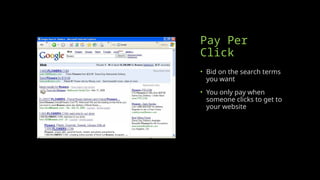
Pay Per
Click
• Bidon the search terms
you want
• You only pay when
someone clicks to get to
your website
180.
Positives of PPC
•Immediate placement
• You can control budget and positioning
• Only pay if traffic is produced
• You can use inexpensive keywords
181.
Negatives of PPC
•Requires a lot of research
• Can cost you a lot of money if done wrong
• Requires you to know about the industry
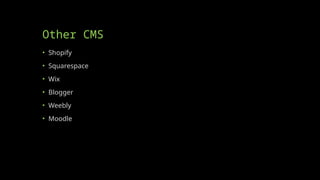
What is CMS?
•Content Management Systems (CMS) are commonly used to create and
store data online
• The most commonly used CMS tools allow individuals to create their own
website without knowing anything about web development [coding in
HTML, CSS, JS, etc.]
• Individuals merely install the CMS software to their website and type in
specific information to create websites
185.
Two Common Reasonsto Use CMS
• User-friendly browser-based publishing tools
• No technical skills required
• Compliance with Accessibility requirements
• W3C standards
186.
What is Content?
•Any type or unit of digital information.
• Text, images, graphics, video, sound, documents, records, etc
• Anything that we would like to manage in an electronic format.
187.
Why CMS?
• WebContent Management System
• Create/manage HTML & images
• Authoring tools
• Templates for presentation
Differences in CMS
•Every CMS has its own unique way of organizing and managing content.
• It helps you to create/edit/delete content in a shared repository
(database).
• It contains much improved CSS (Cascading Style Sheets).
• CMS enables content to be shared across the Web sites.
191.
Why Use Them?
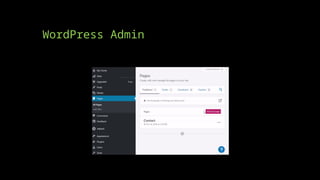
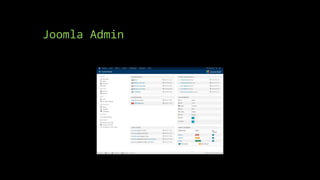
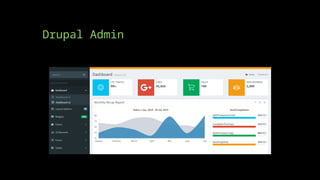
•Drupal, Joomla, WordPress use a database (tables) to store information
• CMS uses a different technology than standard html/css sites
• The technology is open-source (free!)
• Allows people to update their owns sites
• You are the master of your own domain!
192.
Joomla
• The nameJoomla is derived from the Swahili word "Jumla", which means
"all together" or "as a whole".
• Joomla! is one of the most powerful Open Source Content Management
Systems. It is used all over the world for everything from simple websites
to complex corporate applications.
• Joomla! is easy to install, simple to manage, and reliable.
193.
Joomla
• Joomla iswritten in PHP, uses object-oriented programming structure
(OOPS) techniques and software design pattern, stores data in a MySql
database, and includes features such as page caching, RSS feeds,
printable versions of pages, news flashes, blogs, polls, search, and
support for language internationalization.
• It is based on a model-view-controller (MVC) web application framework
that can be used independently.
194.
Why Joomla?
• Itis designed to work perfectly in basic shared web hosting
environments, a package that is least expensive and most common.
Installer is simple and just like any other common desktop software.
• It is supported by several extensions, add-on, and plug in. They are
written in PHP, which is most widely used, general purpose scripting
language and best suited for web development.
• Joomla supports SSL logins and SSL pages.
• Joomla probably has a pre built module to transform it in a social
bookmarking website.
• Joomla's greatest advantage is availability of a large number of
extensions that you can use to Plug-in extra features into your website
and transform your website into anything you like.
195.
WordPress Issues
• TheWordPress content management system is an ideal platform for
bloggers as it is easy to install and use.
• Adding or removing post dates, need to be changed in design mode and
it requires knowledge of WP scripting.
• You can add membership functionality in WordPress.
196.
Why WordPress?
• WithWordPress, any type of website can be created like a personal blog
or website, a photoblog, a business website, a professional portfolio, a
government website, a magazine or news website, an online community,
even a network of websites.
• Website can be made with beautiful with themes, and can be extended
with plugins.
197.
WordPress
• Free websiteon WordPress website
• Installed to your website if you own a domain
• Themes can be uploaded or created for use
198.
Drupal Issues
• Learningcurve is bigger than Joomla and WordPress
• Less support available than Joomla and WordPress
Learning Curve
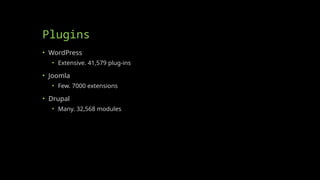
• WordPress
•Easy, No experience required
• Joomla
• Medium, Easier than Drupal, harder than WordPress.
• Drupal
• Requires technical expertise. Major updates are an effort
201.
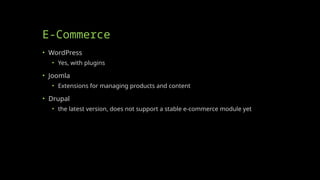
E-Commerce
• WordPress
• Yes,with plugins
• Joomla
• Extensions for managing products and content
• Drupal
• the latest version, does not support a stable e-commerce module yet
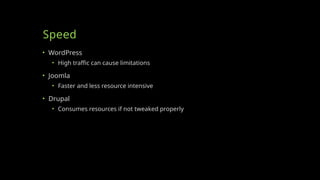
Speed
• WordPress
• Hightraffic can cause limitations
• Joomla
• Faster and less resource intensive
• Drupal
• Consumes resources if not tweaked properly
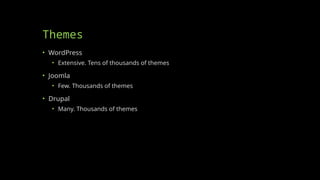
Themes
• WordPress
• Extensive.Tens of thousands of themes
• Joomla
• Few. Thousands of themes
• Drupal
• Many. Thousands of themes
206.
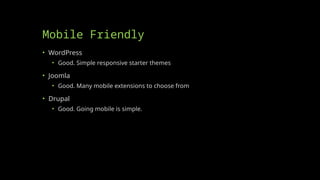
Mobile Friendly
• WordPress
•Good. Simple responsive starter themes
• Joomla
• Good. Many mobile extensions to choose from
• Drupal
• Good. Going mobile is simple.
207.
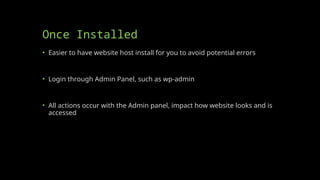
Once Installed
• Easierto have website host install for you to avoid potential errors
• Login through Admin Panel, such as wp-admin
• All actions occur with the Admin panel, impact how website looks and is
accessed
Home
• Your homepageshould be as clean as possible with some information, but not
overloaded with information
• Since this is going to be a personal/professional website about you geared
towards helping you secure a full-time position in your field upon graduation
you may be fairly open-ended in this pursuit. Two suggestions are as follows:
• If doing a WordPress website, you could have your homepage serve as a listing of
your blog posts (posts about topics that interest you)
• If doing a HTML/CSS/JS website, you could have your homepage feature some brief
information about yourself with a video resume of sorts embedded into the page
• An example of a good Homepage is https://roycekimmons.com/ which has some
info, but not too much
217.
About
• Your Aboutpage should provide a summary of who you are as a person
and a professional. It may be a paragraph or two.
• You could also include a picture of two of yourself. Perhaps a
professional picture
• Think of this page like your LinkedIn summary with your LinkedIn profile
picture (i.e. try to make it as professional as possible)
• An example of a good About page is https://ericsheninger.com/about/
218.
Work Experience
• Thispage may be open-ended and does not even need to be called Work
Experience
• Ideally, here you are going to articulate all of your skills that will get you
hired
• Work experience
• Skills – for example, Java programming, Python programming, Adobe Suite,
Microsoft Office, etc.
• Volunteer experience
• In essence, think of anything you would put on your LinkedIn!
219.
Course Artifacts
• Thispage does not need to be called Course Artifacts, but should
represent things you have done in your courses to prove you have the
skills you claim you have
• For example, those of you who had INFO 2105 should list your website
from that course with a little description explaining it
• Other items may include: a final project from a Java/Python
programming, items created using the Adobe Suite, tutorials/recordings
of you doing something complex in Microsoft Office (as an example)
• The more knowledgeable you present yourself the better
220.
Other Content
• Sincethis is your professional/personal domain you may want to include
additional information – which is encouraged – however, consider how
much is too much
• One recommendation is having an additional page with your contact
information, such as
• Email address
• Social media – assuming it is professional
• You might also include an indication that you are actively seeking opportunities
within the work force using this page
• You might also decide to include a copy of your resume on this page
221.
Questions?
• Feel freeto ask questions regarding this
• This course meeting is geared towards finishing your plan for your
website so you can put it together next week in class
WordPress or DesignYourself?
• If WordPress, pick theme and adjust accordingly – then add pages and content
based on your plan – no HTML/CSS/JS skills needed
• If designing yourself using HTML/CSS/JS consider the time requirement – due
4/28/24 at 11:59PM (though you can certainly modify upon completion of course)
• Also remember that if you are going to use the hosting providers
templates/editor that you may be limited in what you are able to do (similar to
Wix)
• This course meeting is geared towards completing the setup of your website, so
ask any question you may think of
224.
Get Website/Domain Indexed
•Once you have content on your website visit https://pingler.com/ to index
your website/domain
• Decide on what keyword you want associated with your domain and the
category that you represent – Information Technology is one of the
options ;)
• You may do this for all of the pages you created
• Additionally, you may use meta tags within your HTML code or use
WordPress plugins to enhance your domain/website SEO
225.
Website Rubric
Simply submitthe URL link for your website.
Criteria:
Appearance: 25 points
• Does the website visually look good?
Deliverables: 50 points
• Did you include the items described in your plan? (most should be on your site)
Course Info: 75 points
• Did you use course materials? (HTML, CSS, forms, JavaScript, etc.)
226.
Presentation Rubric
Submit yourPowerPoint.
Criteria
Presentation Content: 50 points
• Intro slide with Name and info
• Slides describing plan
• Slides describing website or you can pull up your website and explain it
• Slides describing any issues you had
Duration: 10 points
• Your presentation should be as close to 10 minutes as possible without going over
Presentation: 40 points
• Graded on clarity and professional presentation
• Avoid uh, umm, etc. - just pause instead
• Keep eye contact with audience
• avoid swaying of arms, toe tapping, or other distracting motions
Editor's Notes
#62 <!DOCTYPE HTML>
<html>
<head>
<style>
.error {color: #FF0000;}
</style>
</head>
<body>
<?php
// define variables and set to empty values
$nameErr = $emailErr = $genderErr = $websiteErr = "";
$name = $email = $gender = $comment = $website = "";
if ($_SERVER["REQUEST_METHOD"] == "POST") {
if (empty($_POST["name"])) {
$nameErr = "Name is required";
} else {
$name = test_input($_POST["name"]);
// check if name only contains letters and whitespace
if (!preg_match("/^[a-zA-Z-' ]*$/",$name)) {
$nameErr = "Only letters and white space allowed";
}
}
if (empty($_POST["email"])) {
$emailErr = "Email is required";
} else {
$email = test_input($_POST["email"]);
// check if e-mail address is well-formed
if (!filter_var($email, FILTER_VALIDATE_EMAIL)) {
$emailErr = "Invalid email format";
}
}
if (empty($_POST["website"])) {
$website = "";
} else {
$website = test_input($_POST["website"]);
// check if URL address syntax is valid (this regular expression also allows dashes in the URL)
if (!preg_match("/\b(?:(?:https?|ftp):\/\/|www\.)[-a-z0-9+&@#\/%?=~_|!:,.;]*[-a-z0-9+&@#\/%=~_|]/i",$website)) {
$websiteErr = "Invalid URL";
}
}
if (empty($_POST["comment"])) {
$comment = "";
} else {
$comment = test_input($_POST["comment"]);
}
if (empty($_POST["gender"])) {
$genderErr = "Gender is required";
} else {
$gender = test_input($_POST["gender"]);
}
}
function test_input($data) {
$data = trim($data);
$data = stripslashes($data);
$data = htmlspecialchars($data);
return $data;
}
?>
<h2>PHP Form Validation Example</h2>
<p><span class="error">* required field</span></p>
<form method="post" action="<?php echo htmlspecialchars($_SERVER["PHP_SELF"]);?>">
Name: <input type="text" name="name" value="<?php echo $name;?>">
<span class="error">* <?php echo $nameErr;?></span>
<br><br>
E-mail: <input type="text" name="email" value="<?php echo $email;?>">
<span class="error">* <?php echo $emailErr;?></span>
<br><br>
Website: <input type="text" name="website" value="<?php echo $website;?>">
<span class="error"><?php echo $websiteErr;?></span>
<br><br>
Comment: <textarea name="comment" rows="5" cols="40"><?php echo $comment;?></textarea>
<br><br>
Gender:
<input type="radio" name="gender" <?php if (isset($gender) && $gender=="female") echo "checked";?> value="female">Female
<input type="radio" name="gender" <?php if (isset($gender) && $gender=="male") echo "checked";?> value="male">Male
<input type="radio" name="gender" <?php if (isset($gender) && $gender=="other") echo "checked";?> value="other">Other
<span class="error">* <?php echo $genderErr;?></span>
<br><br>
<input type="submit" name="submit" value="Submit">
</form>
<?php
echo "<h2>Your Input:</h2>";
echo $name;
echo "<br>";
echo $email;
echo "<br>";
echo $website;
echo "<br>";
echo $comment;
echo "<br>";
echo $gender;
?>
</body>
</html>

![Time and Space for Rainbow
Suppose you have the latest processor 10 gigahertz
(approx. 10 billion instructions/second) and you have 217 trillion instructions to do,
how long would it take?
217 trillion/10 billion = 21,700 seconds = 6 hours
***Of course months would be more realistic
Each <word,EncryptedWord> pair is 16 characters and there are 217 trillion of them
so
[(217 trillion) * 16]/1 Gigabyte = 3Terrabytes](https://image.slidesharecdn.com/info21062-17-25-250406215358-ef94129a/85/INFO-2106-2-17-25-pptx-Course-Slide-Deck-11-320.jpg)





![Retrieving Stock Info (stocks.php)
<HTML>
<HEAD>
<TITLE> Stock Quotes
</TITLE>
</HEAD>
<BODY>
</BODY>
</HTML>
<?php
$company = $_POST[symbol] ;
$url = "http://finance.yahoo.com/q?s=" . $company;
//open the url and store in $fp
$fp = fopen($url , "r");
//read 20000 bytes of the file
$readfile = fread($fp , 20000);
//search for the HTML below and store everything in between in $content
$readfile = ereg("<TABLE border=0 cellPadding=2 cellSpacing=0
width=100%>(.*)<small>Add</small>" , $readfile, $content);
//display the results in a table
echo "<table width = '100%’>”;
echo $url;
echo $readfile;
echo "$content[1]";
echo "</table>";
//close the file handle
fclose($fp);
?>
PHP Code Goes
in BODY](https://image.slidesharecdn.com/info21062-17-25-250406215358-ef94129a/85/INFO-2106-2-17-25-pptx-Course-Slide-Deck-59-320.jpg)

![Basic Form PHP Side (fullname.php)
<html>
<head>
<title>Full Name</title>
</head>
<body>
<h2>Full Name</h2>
<?php
$first_name = $_POST['firstname'];
$last_name = $_POST['lastname'];
echo "Hi " . $first_name . " " . $last_name . ". Thanks for submitting the form!";
?>
</body>
</html>](https://image.slidesharecdn.com/info21062-17-25-250406215358-ef94129a/85/INFO-2106-2-17-25-pptx-Course-Slide-Deck-72-320.jpg)
![Postformprocess.php
<html>
<head>
<title>Process Form using POST</title>
</head>
<body bgcolor = "lightgreen"><font size="+1">
<h2>Here is the form input:</h2>
<?php
$name = $_POST['your_name'];
$phone = $_POST['your_phone'];
$email = $_POST['your_email_addr'];
print "Welcome to PHP $name!<br />";
print "Can I call you at $phone?<br />";
print "Is it ok to send you email at $email?<br />";
?>
</body>
</html>](https://image.slidesharecdn.com/info21062-17-25-250406215358-ef94129a/85/INFO-2106-2-17-25-pptx-Course-Slide-Deck-74-320.jpg)
![Advanced PHP HW assignment
• Create a form with information you may want to retrieve on your own
personal website, such as name, email, comment, etc.
• Create a HTML form to accept the input and a PHP file to retrieve and
echo the input
• This will require an HTML file and a PHP file
• Remember that your PHP file may not display the input for you in the
WYSIWYG, but if I upload it to my server it should work so long as your inputs
match your outputs [variable you create in the HTML form must match the
variable you POST]](https://image.slidesharecdn.com/info21062-17-25-250406215358-ef94129a/85/INFO-2106-2-17-25-pptx-Course-Slide-Deck-75-320.jpg)

![Network File system
A network file system is a file system that acts as a client for a remote file access protocol,
providing access to files on a server.
Examples of network file systems include clients for the NFS, AFS, SMB protocols.
NFS
I. Network File System (NFS) is a distributed file system protocol originally developed by Sun Microsystems in 1984,[1]
allowing a user on a client computer to access files over a network in a manner similar to how local storage is
accessed.
II. NFS, like many other protocols, builds on the Open Network Computing Remote Procedure Call (ONC RPC) system.
III. The Network File System is an open standard defined in RFCs, allowing anyone to implement the protocol.
86](https://image.slidesharecdn.com/info21062-17-25-250406215358-ef94129a/85/INFO-2106-2-17-25-pptx-Course-Slide-Deck-86-320.jpg)









![Purpose of SEO
• To drive targeted traffic to your website [or specific pages]
• Ideally, the traffic drives additional sales
• Most online purchases are made on sites found through search engine
listings](https://image.slidesharecdn.com/info21062-17-25-250406215358-ef94129a/85/INFO-2106-2-17-25-pptx-Course-Slide-Deck-157-320.jpg)


![What is CMS?
• Content Management Systems (CMS) are commonly used to create and
store data online
• The most commonly used CMS tools allow individuals to create their own
website without knowing anything about web development [coding in
HTML, CSS, JS, etc.]
• Individuals merely install the CMS software to their website and type in
specific information to create websites](https://image.slidesharecdn.com/info21062-17-25-250406215358-ef94129a/85/INFO-2106-2-17-25-pptx-Course-Slide-Deck-184-320.jpg)