Cloud Computing Basics May 5, 2009
Your RightScale Panel Today Josh Fraser – VP, Business Development Uri Budnik –  Evangelist David Welch  –  Sales Engineer Q&A: Matthew Small  –  Account Manager Q&A: Hunter Williams  –  Account Manager
Agenda Welcome Introduction to Cloud Computing Cloud Management Systems Demo: Cloud Basics Launch a server Dynamically configure a server Managing multiple servers Q&A  –  Getting Started Please use chat to ask questions anytime!
What is Cloud Computing? Virtually infinite computing resources Scalable on-demand Pay as you go Surpasses traditional hosting Multiple server sizes Reassign I Ps, VIPs Multiple failure zones and geographies Disk volumes Cloud interoperability
$$
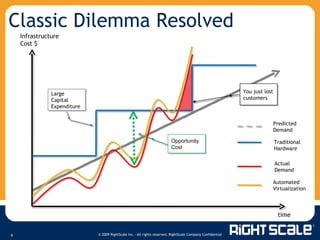
Classic Dilemma Resolved Infrastructure Cost $ time Large Capital Expenditure You just lost customers Opportunity Cost Predicted Demand Traditional Hardware Actual Demand Automated Virtualization
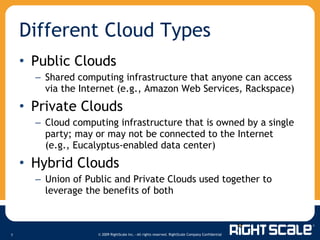
Public Clouds Shared computing infrastructure that anyone can access via the Internet (e.g., Amazon Web Services, Rackspace) Private Clouds Cloud computing infrastructure that is owned by a single party; may or may not be connected to the Internet (e.g., Eucalyptus-enabled data center) Hybrid Clouds Union of Public and Private Clouds used together to leverage the benefits of both Different Cloud Types
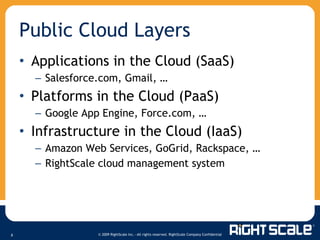
Applications in the Cloud (SaaS) Salesforce.com, Gmail, … Platforms in the Cloud (PaaS) Google App Engine, Force.com, … Infrastructure in the Cloud (IaaS) Amazon Web Services, GoGrid, Rackspace, … RightScale cloud management system Public Cloud Layers
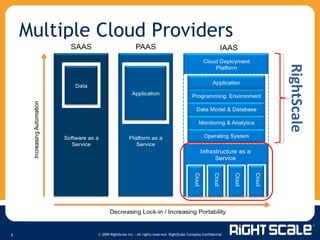
Multiple Cloud Providers Cloud Deployment Platform Infrastructure as a Service Cloud Cloud Cloud Cloud Decreasing Lock-in / Increasing Portability  Increasing Automation  SAAS PAAS IAAS RightScale Software as a Service Platform as a Service Programming  Environment Data Model & Database Monitoring & Analytics Operating System Application Application Data
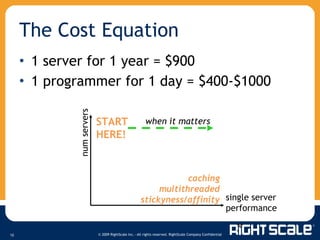
1 server for 1 year = $900 1 programmer for 1 day = $400-$1000 The Cost Equation single server performance num servers START HERE! when it matters caching multithreaded stickyness/affinity
Agile = automate and benefit! From boot to production on auto-pilot Across different stacks & different clouds Auto-failover, auto-restart, auto-scale Change your business process “ Deploy faster, better, and cheaper than your competitors”  Agile Deployment
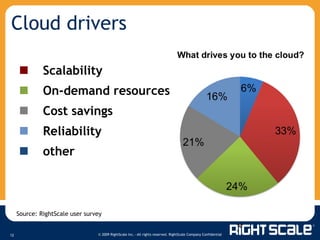
  Scalability  On-demand resources   Cost savings  Reliability   other Cloud drivers Source: RightScale user survey
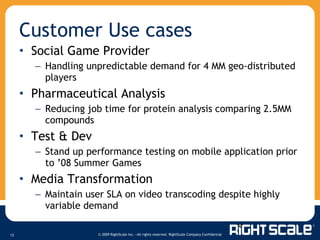
Social Game Provider Handling unpredictable demand for 4 MM geo-distributed players  Pharmaceutical Analysis Reducing job time for protein analysis comparing 2.5MM compounds Test & Dev Stand up performance testing on mobile application prior to ’08 Summer Games Media Transformation Maintain user SLA on video transcoding despite highly variable demand Customer Use cases
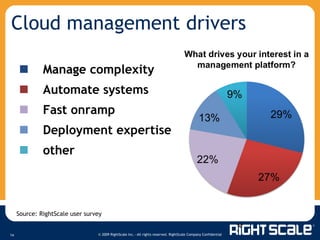
Cloud management drivers   Manage complexity   Automate systems   Fast onramp  Deployment expertise   other Source: RightScale user survey
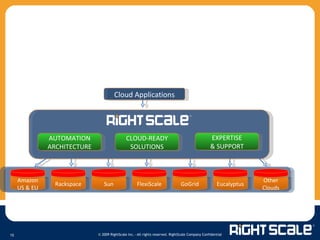
AUTOMATION ARCHITECTURE CLOUD-READY SOLUTIONS EXPERTISE & SUPPORT Cloud Applications Amazon US & EU Sun Rackspace GoGrid Other Clouds FlexiScale Eucalyptus
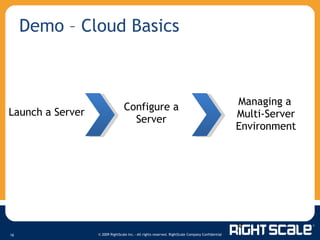
Demo – Cloud Basics Launch a Server Configure a Server Managing a Multi-Server Environment
Demo: Launch a Server Access a bundled Machine Image Launch Install your application Re-bundle and save
Dynamically Configure a Server Next gen architecture - “Cloud-ready” servers M o re than just running a bundled image Dynamic vs. static configuration Leverage one server model across different deployments Replicable design  … get up and running fast! Complete lifecycle management  …  version control Portability across multiple cloud platforms RightScale Server Templates
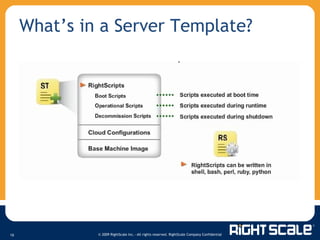
What’s in a Server Template?
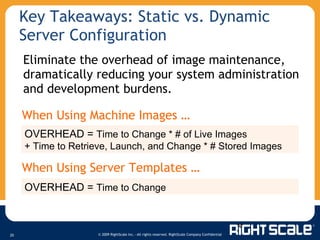
Key Takeaways: Static vs. Dynamic Server Configuration When Using Machine Images … When Using Server Templates … Eliminate the overhead of image maintenance, dramatically reducing your system administration and development burdens. OVERHEAD =  Time to Change * # of Live Images  + Time to Retrieve, Launch, and Change * # Stored Images OVERHEAD =  Time to Change
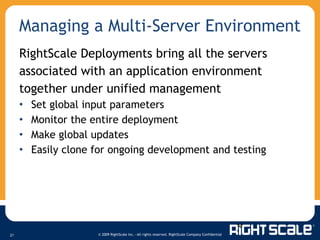
Managing a Multi-Server Environment RightScale Deployments bring all the servers associated with an application environment together under unified management Set global input parameters Monitor the entire deployment Make global updates Easily clone for ongoing development and testing
Demo: Multi-Server Environment Example deployment Global configurations Monitor a deployment Deployment management Consumption tracking Making a change
Key Takeaways: Deployments Administrators monitor and respond at a deployment level All servers share common input parameters Leverage configurations across multiple availability zones and clouds Work more efficiently and eliminate errors
Q&A - Getting Started Contact a RightScale representative for a live demo or request presentation slides at:  [email_address] (866) 720 – 0208 Sign up for a free developer account at:  RightScale.com/FreeTrial   Access webinar recordings at: RightScale.com/webinars Thank you for listening!

Cloud Computing Basics I

  • 1.
  • 2.
    Your RightScale PanelToday Josh Fraser – VP, Business Development Uri Budnik – Evangelist David Welch – Sales Engineer Q&A: Matthew Small – Account Manager Q&A: Hunter Williams – Account Manager
  • 3.
    Agenda Welcome Introductionto Cloud Computing Cloud Management Systems Demo: Cloud Basics Launch a server Dynamically configure a server Managing multiple servers Q&A – Getting Started Please use chat to ask questions anytime!
  • 4.
    What is CloudComputing? Virtually infinite computing resources Scalable on-demand Pay as you go Surpasses traditional hosting Multiple server sizes Reassign I Ps, VIPs Multiple failure zones and geographies Disk volumes Cloud interoperability
  • 5.
  • 6.
    Classic Dilemma ResolvedInfrastructure Cost $ time Large Capital Expenditure You just lost customers Opportunity Cost Predicted Demand Traditional Hardware Actual Demand Automated Virtualization
  • 7.
    Public Clouds Sharedcomputing infrastructure that anyone can access via the Internet (e.g., Amazon Web Services, Rackspace) Private Clouds Cloud computing infrastructure that is owned by a single party; may or may not be connected to the Internet (e.g., Eucalyptus-enabled data center) Hybrid Clouds Union of Public and Private Clouds used together to leverage the benefits of both Different Cloud Types
  • 8.
    Applications in theCloud (SaaS) Salesforce.com, Gmail, … Platforms in the Cloud (PaaS) Google App Engine, Force.com, … Infrastructure in the Cloud (IaaS) Amazon Web Services, GoGrid, Rackspace, … RightScale cloud management system Public Cloud Layers
  • 9.
    Multiple Cloud ProvidersCloud Deployment Platform Infrastructure as a Service Cloud Cloud Cloud Cloud Decreasing Lock-in / Increasing Portability Increasing Automation SAAS PAAS IAAS RightScale Software as a Service Platform as a Service Programming Environment Data Model & Database Monitoring & Analytics Operating System Application Application Data
  • 10.
    1 server for1 year = $900 1 programmer for 1 day = $400-$1000 The Cost Equation single server performance num servers START HERE! when it matters caching multithreaded stickyness/affinity
  • 11.
    Agile = automateand benefit! From boot to production on auto-pilot Across different stacks & different clouds Auto-failover, auto-restart, auto-scale Change your business process “ Deploy faster, better, and cheaper than your competitors” Agile Deployment
  • 12.
      Scalability On-demand resources   Cost savings  Reliability   other Cloud drivers Source: RightScale user survey
  • 13.
    Social Game ProviderHandling unpredictable demand for 4 MM geo-distributed players Pharmaceutical Analysis Reducing job time for protein analysis comparing 2.5MM compounds Test & Dev Stand up performance testing on mobile application prior to ’08 Summer Games Media Transformation Maintain user SLA on video transcoding despite highly variable demand Customer Use cases
  • 14.
    Cloud management drivers  Manage complexity   Automate systems   Fast onramp  Deployment expertise   other Source: RightScale user survey
  • 15.
    AUTOMATION ARCHITECTURE CLOUD-READYSOLUTIONS EXPERTISE & SUPPORT Cloud Applications Amazon US & EU Sun Rackspace GoGrid Other Clouds FlexiScale Eucalyptus
  • 16.
    Demo – CloudBasics Launch a Server Configure a Server Managing a Multi-Server Environment
  • 17.
    Demo: Launch aServer Access a bundled Machine Image Launch Install your application Re-bundle and save
  • 18.
    Dynamically Configure aServer Next gen architecture - “Cloud-ready” servers M o re than just running a bundled image Dynamic vs. static configuration Leverage one server model across different deployments Replicable design … get up and running fast! Complete lifecycle management … version control Portability across multiple cloud platforms RightScale Server Templates
  • 19.
    What’s in aServer Template?
  • 20.
    Key Takeaways: Staticvs. Dynamic Server Configuration When Using Machine Images … When Using Server Templates … Eliminate the overhead of image maintenance, dramatically reducing your system administration and development burdens. OVERHEAD = Time to Change * # of Live Images + Time to Retrieve, Launch, and Change * # Stored Images OVERHEAD = Time to Change
  • 21.
    Managing a Multi-ServerEnvironment RightScale Deployments bring all the servers associated with an application environment together under unified management Set global input parameters Monitor the entire deployment Make global updates Easily clone for ongoing development and testing
  • 22.
    Demo: Multi-Server EnvironmentExample deployment Global configurations Monitor a deployment Deployment management Consumption tracking Making a change
  • 23.
    Key Takeaways: DeploymentsAdministrators monitor and respond at a deployment level All servers share common input parameters Leverage configurations across multiple availability zones and clouds Work more efficiently and eliminate errors
  • 24.
    Q&A - GettingStarted Contact a RightScale representative for a live demo or request presentation slides at: [email_address] (866) 720 – 0208 Sign up for a free developer account at: RightScale.com/FreeTrial Access webinar recordings at: RightScale.com/webinars Thank you for listening!

Editor's Notes

  • #2 08/14/08
  • #4 08/14/08 eliminate
  • #5 08/14/08 eliminate
  • #11 New dynamic > throw servers at the problem Dbase crashes … old way = dba for 2 days fixing and troubleshooting; cloud way = spin up additional server(s) and can run for a year + for the same costs ALWAYS ROLL FORWARD
  • #12 We’ve arrived at agile deployment … wasn’t possible before. Change both to how we provision and consume IT resources but ALSO the Business process, which can often times have a greater impact on TCO (e.g., setting up a staging environment, QA, procurement cycles, etc.)
  • #19 08/14/08 - Business driven
  • #25 08/14/08