Cloud Computing and ServiceCloud Computing and Service
ModelsModels
CA733-Cloud ComputingCA733-Cloud Computing
Presented By :
205114026 Prateek Soni
205114032 Piyush Sharma
205114037 Mayank Gupta
INTRODUCTIONINTRODUCTION
Cloud Computing provides us a means by which
we can access the applications as utilities, over
the Internet. It allows us to create, configure, and
customize applications online.
With Cloud Computing users can access database
resources via the internet from anywhere for as
long as they need without worrying about any
maintenance or management of actual resources.
What is Cloud?What is Cloud?
The term Cloud refers to a Network or Internet.
In other words, we can say that Cloud is something,
which is present at remote location.
Cloud can provide services over network, i.e.,
on public networks or on private networks, i.e.,
WAN, LAN or VPN.
Applications such as e-mail, web conferencing,
customer relationship management (CRM),
all run in cloud.
What is Cloud Computing?What is Cloud Computing?
Cloud Computing refers to manipulating,
configuring, and accessing the applications online.
It offers online data storage, infrastructure and application.
Cloud Computing is both a combination of software and
hardware based computing resources delivered as a
network service.
Cloud Computing ArchitectureCloud Computing Architecture
Basic ConceptsBasic Concepts
There are certain services and models working behind the
scene making the cloud computing feasible and accessible
to end users. Following are the working models for cloud
computing:
1. Deployment Models1. Deployment Models
2. Service Models2. Service Models
Deployment ModelsDeployment Models
Deployment models define the type of access to the
cloud, i.e., how the cloud is located? Cloud can have any
of the four types of access: Public, Private, Hybrid and
Community.
PUBLIC CLOUDPUBLIC CLOUD : The Public Cloud allows systems and services to be
easily accessible to the general public. Public cloud may be less secure because
of its openness, e.g., e-mail.
PRIVATE CLOUDPRIVATE CLOUD : The Private Cloud allows systems and services to be
accessible within an organization. It offers increased security because of its
private nature.
COMMUNITY CLOUDCOMMUNITY CLOUD : The Community Cloud allows systems and
services to be accessible by group of organizations.
HYBRID CLOUDHYBRID CLOUD : The Hybrid Cloud is mixture of public and private
cloud. However, the critical activities are performed using private cloud while
the non-critical activities are performed using public cloud.
Service ModelsService Models
 
Service Models are the reference models on which the
Cloud Computing is based. These can be categorized
into three basic service models as listed below:
1.1.Infrastructure as a Service (IaaS)Infrastructure as a Service (IaaS)
2. Platform as a Service (PaaS)2. Platform as a Service (PaaS)
3. Software as a Service (SaaS)3. Software as a Service (SaaS)
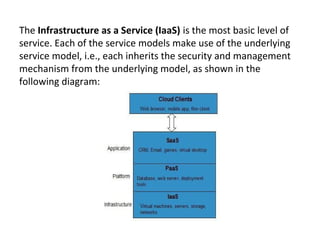
The Infrastructure as a Service (IaaS) is the most basic level of
service. Each of the service models make use of the underlying
service model, i.e., each inherits the security and management
mechanism from the underlying model, as shown in the
following diagram:
Infrastructure as a Service (IaaS)Infrastructure as a Service (IaaS)
IaaS is the delivery of technology infrastructure as an on
demand scalable service.
IaaS provides access to fundamental resources such as
physical machines, virtual machines, virtual storage, etc.
Apart from these resources, the IaaS also offers:
•Virtual machine disk storage
•Virtual local area network (VLANs)
•Load balancers
•IP addresses
•Software bundles
Infrastructure as a Service (IaaS)Infrastructure as a Service (IaaS)
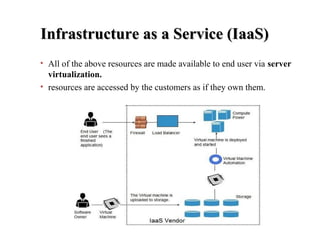
• All of the above resources are made available to end user via server
virtualization.
• resources are accessed by the customers as if they own them.
Infrastructure as a Service (IaaS)Infrastructure as a Service (IaaS)
Benefits :
• Full Control of the computing resources through
Administrative Access to VMs.
• Flexible and Efficient renting of Computer Hardware.
• Portability, Interoperability with Legacy Applications.
Issues :
• COMPATIBILITY WITH LEGACY SECURITY
VULNERABILITIES
• VIRTUAL MACHINE SPRAWL
• DATA ERASE PRACTICES
• ROBUSTNESS OF VM-LEVEL ISOLATION
IaaS ExamplesIaaS Examples
Platform as a Service (PaaS)Platform as a Service (PaaS)
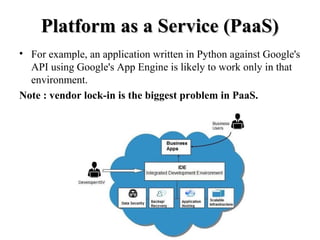
PaaS provides the runtime environment for applications,
development & deployment tools, etc.
PaaS provides all of the facilities required to support the
complete life cycle of building and delivering web
applications and services entirely from the Internet.
•Google's App Engine, Force.com are examples of PaaS
offering vendors.
•Developer may log on to these websites and use the built-in
API to create web-based applications.
Platform as a Service (PaaS)Platform as a Service (PaaS)
• For example, an application written in Python against Google's
API using Google's App Engine is likely to work only in that
environment.
Note : vendor lock-in is the biggest problem in PaaS.
Platform as a Service (PaaS)Platform as a Service (PaaS)
Benefits :
•LOWER ADMINISTRATIVE OVERHEAD
•LOWER TOTAL COST OF OWNERSHIP
•SCALABLE SOLUTIONS
•MORE CURRENT SYSTEM SOFTWARE
Issues :
•LACK OF PORTABILITY BETWEEN PAAS CLOUDS
•EVENT BASED PROCESSOR SCHEDULING
•SECURITY ENGINEERING OF PAAS APPLICATIONS
PaaS ExamplesPaaS Examples
Software as a Service (SaaS)Software as a Service (SaaS)
SaaS model allows to use software applications as a service to
end users.
Software that is deployed on a hosted service and is accessible
via Internet.
There are several SaaS applications, some of them are listed
below:
•Billing and Invoicing System
•Customer Relationship Management (CRM) applications
•Help Desk Applications
•Human Resource (HR) Solutions
Software as a Service (SaaS)Software as a Service (SaaS)
Benefits :
•MODEST SOFTWARE TOOLS
•EFFICIENT USE OF SOFTWARE LICENSES
•CENTRALIZED MANAGEMENT & DATA
•PLATFORM RESPONSIBILITIES MANAGED BY
PROVIDERS
•MULTITENANT SOLUTIONS
Issues :
•Browser based risks
•Network dependence
•Lack of portability between SaaS clouds
SaaS ExamplesSaaS Examples
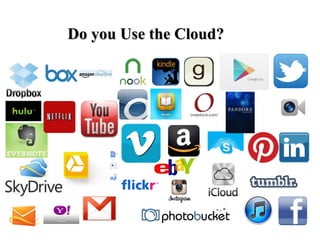
Do you Use the Cloud?Do you Use the Cloud?
AdvantagesAdvantages
• Lower computer costs
• Improved performance
• Reduced software costs
• Improved document format compatibility
• Unlimited storage capacity
• Increased data reliability
• Universal document access
• Latest version availability
• Device independence
DisadvantagesDisadvantages
• Requires a constant Internet connection
• Does not work well with low-speed connections
• Features might be limited
• Can be slow
• Stored data can be lost
• Stored data might not be secure
Cloud StorageCloud Storage
• Create an Account
User name and
password.
• Content lives with the
account in the cloud.
• Log onto any
computer with Wi-Fi
to find your content
Download For StorageDownload For Storage
• Download a cloud based app to on your computer
• The app lives on your Computer
• Save files to the app
• When connected to the Internet it will sync with the cloud
• The Cloud can be accessed from any Internet connection
ReferencesReferences
• Distributed and Cloud Computing: From Parallel Processing to
the Internet of Things written by Kai Hwang, Geoffrey C. Fox,
Jack J. Dongarra
• http://www.slideshare.net/yan_zhao/cloud-computingmodel?qid=88
• https://www.tutorialspoint.com//cloud_computing/index.htm
Thank You…!!Thank You…!!

Cloud computing and service models

  • 1.
    Cloud Computing andServiceCloud Computing and Service ModelsModels CA733-Cloud ComputingCA733-Cloud Computing Presented By : 205114026 Prateek Soni 205114032 Piyush Sharma 205114037 Mayank Gupta
  • 2.
    INTRODUCTIONINTRODUCTION Cloud Computing providesus a means by which we can access the applications as utilities, over the Internet. It allows us to create, configure, and customize applications online. With Cloud Computing users can access database resources via the internet from anywhere for as long as they need without worrying about any maintenance or management of actual resources.
  • 3.
    What is Cloud?Whatis Cloud? The term Cloud refers to a Network or Internet. In other words, we can say that Cloud is something, which is present at remote location. Cloud can provide services over network, i.e., on public networks or on private networks, i.e., WAN, LAN or VPN. Applications such as e-mail, web conferencing, customer relationship management (CRM), all run in cloud.
  • 4.
    What is CloudComputing?What is Cloud Computing? Cloud Computing refers to manipulating, configuring, and accessing the applications online. It offers online data storage, infrastructure and application. Cloud Computing is both a combination of software and hardware based computing resources delivered as a network service.
  • 5.
    Cloud Computing ArchitectureCloudComputing Architecture
  • 6.
    Basic ConceptsBasic Concepts Thereare certain services and models working behind the scene making the cloud computing feasible and accessible to end users. Following are the working models for cloud computing: 1. Deployment Models1. Deployment Models 2. Service Models2. Service Models
  • 7.
    Deployment ModelsDeployment Models Deploymentmodels define the type of access to the cloud, i.e., how the cloud is located? Cloud can have any of the four types of access: Public, Private, Hybrid and Community.
  • 9.
    PUBLIC CLOUDPUBLIC CLOUD: The Public Cloud allows systems and services to be easily accessible to the general public. Public cloud may be less secure because of its openness, e.g., e-mail. PRIVATE CLOUDPRIVATE CLOUD : The Private Cloud allows systems and services to be accessible within an organization. It offers increased security because of its private nature. COMMUNITY CLOUDCOMMUNITY CLOUD : The Community Cloud allows systems and services to be accessible by group of organizations. HYBRID CLOUDHYBRID CLOUD : The Hybrid Cloud is mixture of public and private cloud. However, the critical activities are performed using private cloud while the non-critical activities are performed using public cloud.
  • 10.
    Service ModelsService Models   ServiceModels are the reference models on which the Cloud Computing is based. These can be categorized into three basic service models as listed below: 1.1.Infrastructure as a Service (IaaS)Infrastructure as a Service (IaaS) 2. Platform as a Service (PaaS)2. Platform as a Service (PaaS) 3. Software as a Service (SaaS)3. Software as a Service (SaaS)
  • 11.
    The Infrastructure as a Service (IaaS) isthe most basic level of service. Each of the service models make use of the underlying service model, i.e., each inherits the security and management mechanism from the underlying model, as shown in the following diagram:
  • 12.
    Infrastructure as aService (IaaS)Infrastructure as a Service (IaaS) IaaS is the delivery of technology infrastructure as an on demand scalable service. IaaS provides access to fundamental resources such as physical machines, virtual machines, virtual storage, etc. Apart from these resources, the IaaS also offers: •Virtual machine disk storage •Virtual local area network (VLANs) •Load balancers •IP addresses •Software bundles
  • 13.
    Infrastructure as aService (IaaS)Infrastructure as a Service (IaaS) • All of the above resources are made available to end user via server virtualization. • resources are accessed by the customers as if they own them.
  • 14.
    Infrastructure as aService (IaaS)Infrastructure as a Service (IaaS) Benefits : • Full Control of the computing resources through Administrative Access to VMs. • Flexible and Efficient renting of Computer Hardware. • Portability, Interoperability with Legacy Applications. Issues : • COMPATIBILITY WITH LEGACY SECURITY VULNERABILITIES • VIRTUAL MACHINE SPRAWL • DATA ERASE PRACTICES • ROBUSTNESS OF VM-LEVEL ISOLATION
  • 15.
  • 16.
    Platform as aService (PaaS)Platform as a Service (PaaS) PaaS provides the runtime environment for applications, development & deployment tools, etc. PaaS provides all of the facilities required to support the complete life cycle of building and delivering web applications and services entirely from the Internet. •Google's App Engine, Force.com are examples of PaaS offering vendors. •Developer may log on to these websites and use the built-in API to create web-based applications.
  • 17.
    Platform as aService (PaaS)Platform as a Service (PaaS) • For example, an application written in Python against Google's API using Google's App Engine is likely to work only in that environment. Note : vendor lock-in is the biggest problem in PaaS.
  • 18.
    Platform as aService (PaaS)Platform as a Service (PaaS) Benefits : •LOWER ADMINISTRATIVE OVERHEAD •LOWER TOTAL COST OF OWNERSHIP •SCALABLE SOLUTIONS •MORE CURRENT SYSTEM SOFTWARE Issues : •LACK OF PORTABILITY BETWEEN PAAS CLOUDS •EVENT BASED PROCESSOR SCHEDULING •SECURITY ENGINEERING OF PAAS APPLICATIONS
  • 19.
  • 20.
    Software as aService (SaaS)Software as a Service (SaaS) SaaS model allows to use software applications as a service to end users. Software that is deployed on a hosted service and is accessible via Internet. There are several SaaS applications, some of them are listed below: •Billing and Invoicing System •Customer Relationship Management (CRM) applications •Help Desk Applications •Human Resource (HR) Solutions
  • 21.
    Software as aService (SaaS)Software as a Service (SaaS) Benefits : •MODEST SOFTWARE TOOLS •EFFICIENT USE OF SOFTWARE LICENSES •CENTRALIZED MANAGEMENT & DATA •PLATFORM RESPONSIBILITIES MANAGED BY PROVIDERS •MULTITENANT SOLUTIONS Issues : •Browser based risks •Network dependence •Lack of portability between SaaS clouds
  • 22.
  • 23.
    Do you Usethe Cloud?Do you Use the Cloud?
  • 24.
    AdvantagesAdvantages • Lower computercosts • Improved performance • Reduced software costs • Improved document format compatibility • Unlimited storage capacity • Increased data reliability • Universal document access • Latest version availability • Device independence
  • 25.
    DisadvantagesDisadvantages • Requires aconstant Internet connection • Does not work well with low-speed connections • Features might be limited • Can be slow • Stored data can be lost • Stored data might not be secure
  • 26.
    Cloud StorageCloud Storage •Create an Account User name and password. • Content lives with the account in the cloud. • Log onto any computer with Wi-Fi to find your content
  • 27.
    Download For StorageDownloadFor Storage • Download a cloud based app to on your computer • The app lives on your Computer • Save files to the app • When connected to the Internet it will sync with the cloud • The Cloud can be accessed from any Internet connection
  • 28.
    ReferencesReferences • Distributed andCloud Computing: From Parallel Processing to the Internet of Things written by Kai Hwang, Geoffrey C. Fox, Jack J. Dongarra • http://www.slideshare.net/yan_zhao/cloud-computingmodel?qid=88 • https://www.tutorialspoint.com//cloud_computing/index.htm
  • 29.