HOW TO SET UP A CLOUD COST
OPTIMIZATION PROCESS
FOR YOUR ENTERPRISE
• Brandon Willer
• Director, Cloud Cost Strategy, RightScale
• Megan Crandell
• Product Manager, RightScale
Presenters
• Cloud Cost Trends in the Market
• Setting up your Cost Optimization Team
• The Challenge of Cloud Bills
• The Cost Optimization Process
• Automated Policies
• Ins/Outs of RIs
Agenda
2
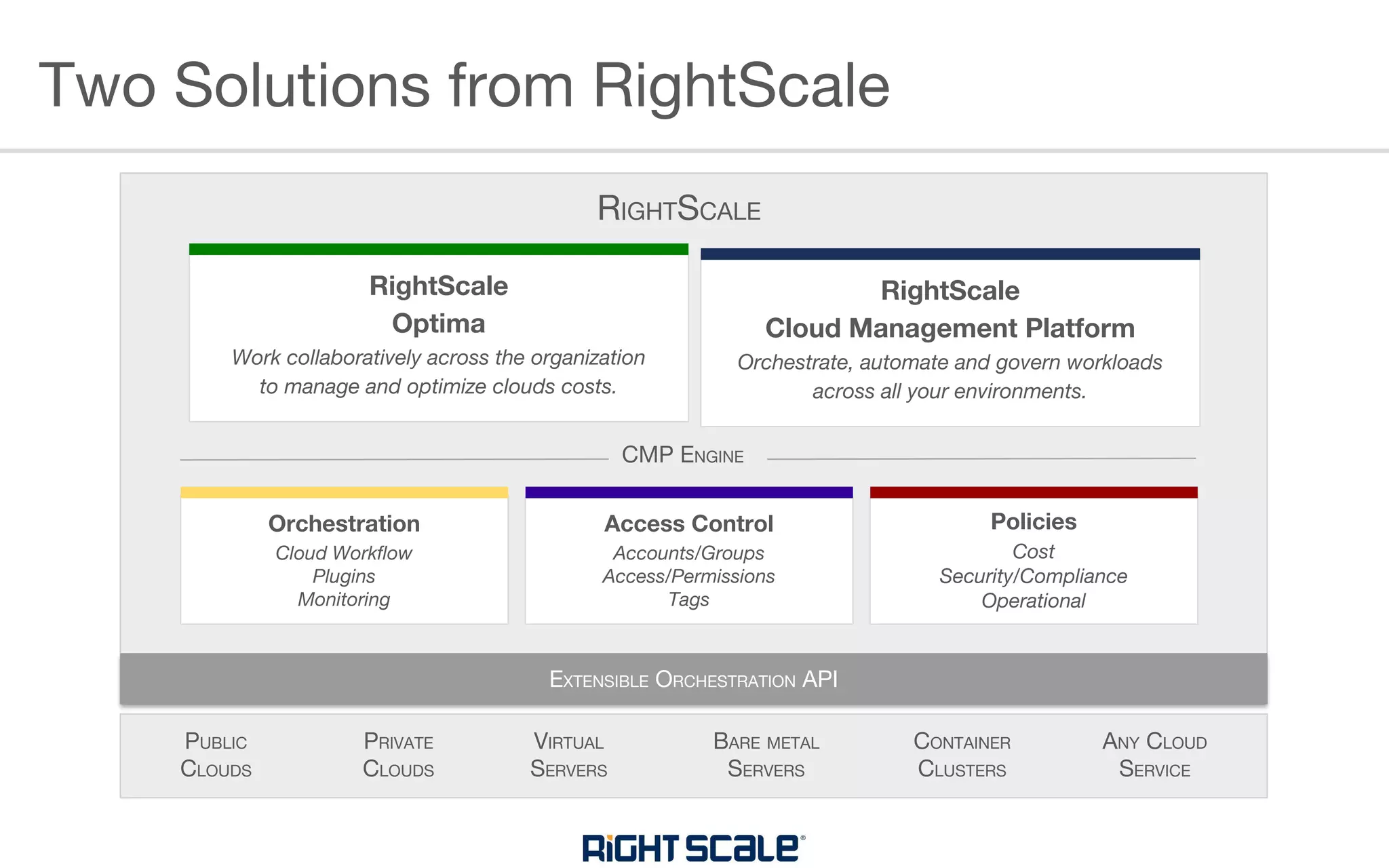
Two Solutions from RightScale
RightScale
Cloud Management Platform
Orchestrate, automate and govern workloads
across all your environments.
VIRTUAL
SERVERS
PUBLIC
CLOUDS
ANY CLOUD
SERVICE
PRIVATE
CLOUDS
BARE METAL
SERVERS
CONTAINER
CLUSTERS
RightScale
Optima
Work collaboratively across the organization
to manage and optimize clouds costs.
Orchestration
Cloud Workflow
Plugins
Monitoring
Access Control
Accounts/Groups
Access/Permissions
Tags
Policies
Cost
Security/Compliance
Operational
RIGHTSCALE
CMP ENGINE
EXTENSIBLE ORCHESTRATION API
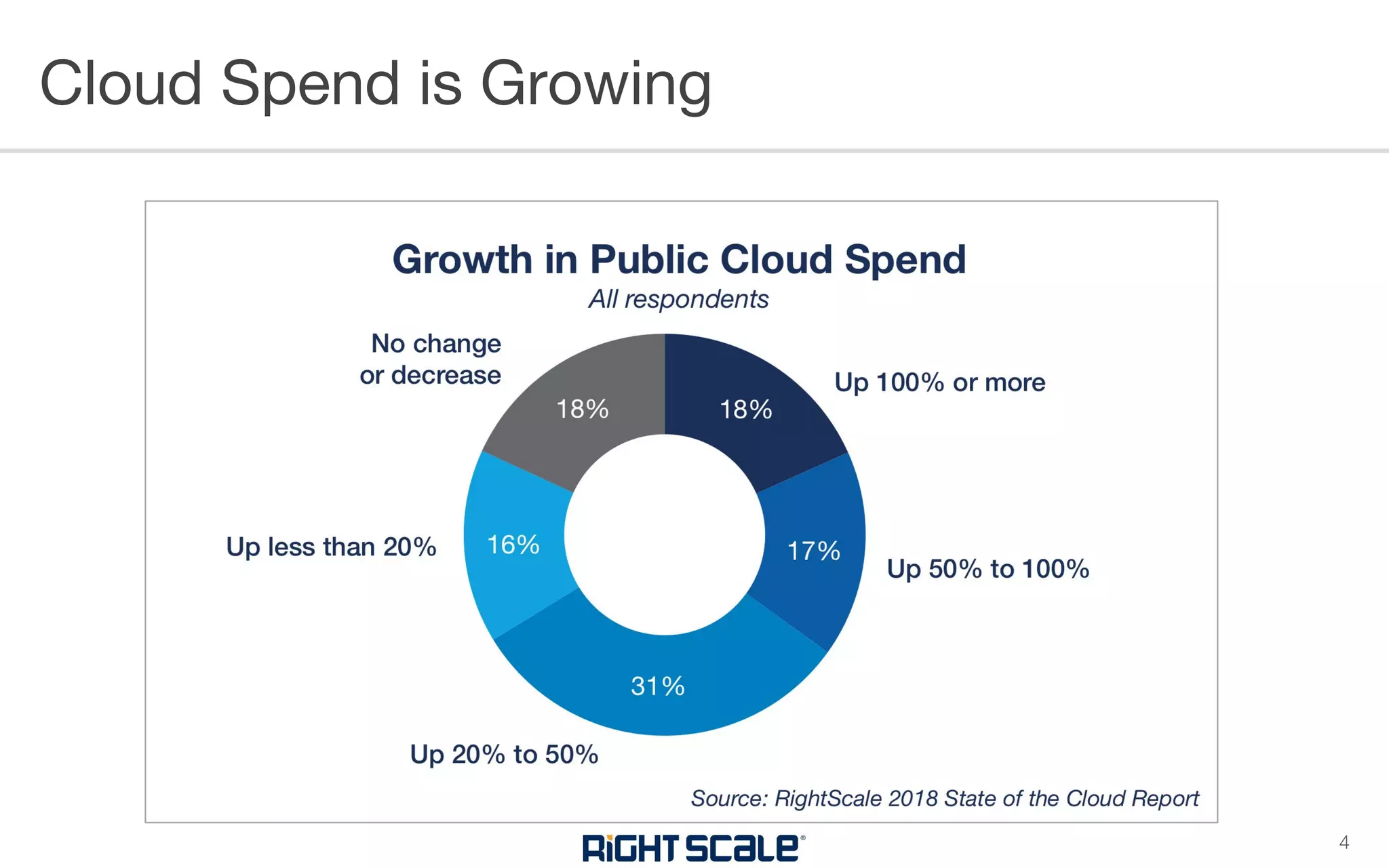
Cloud Spend is Growing
4
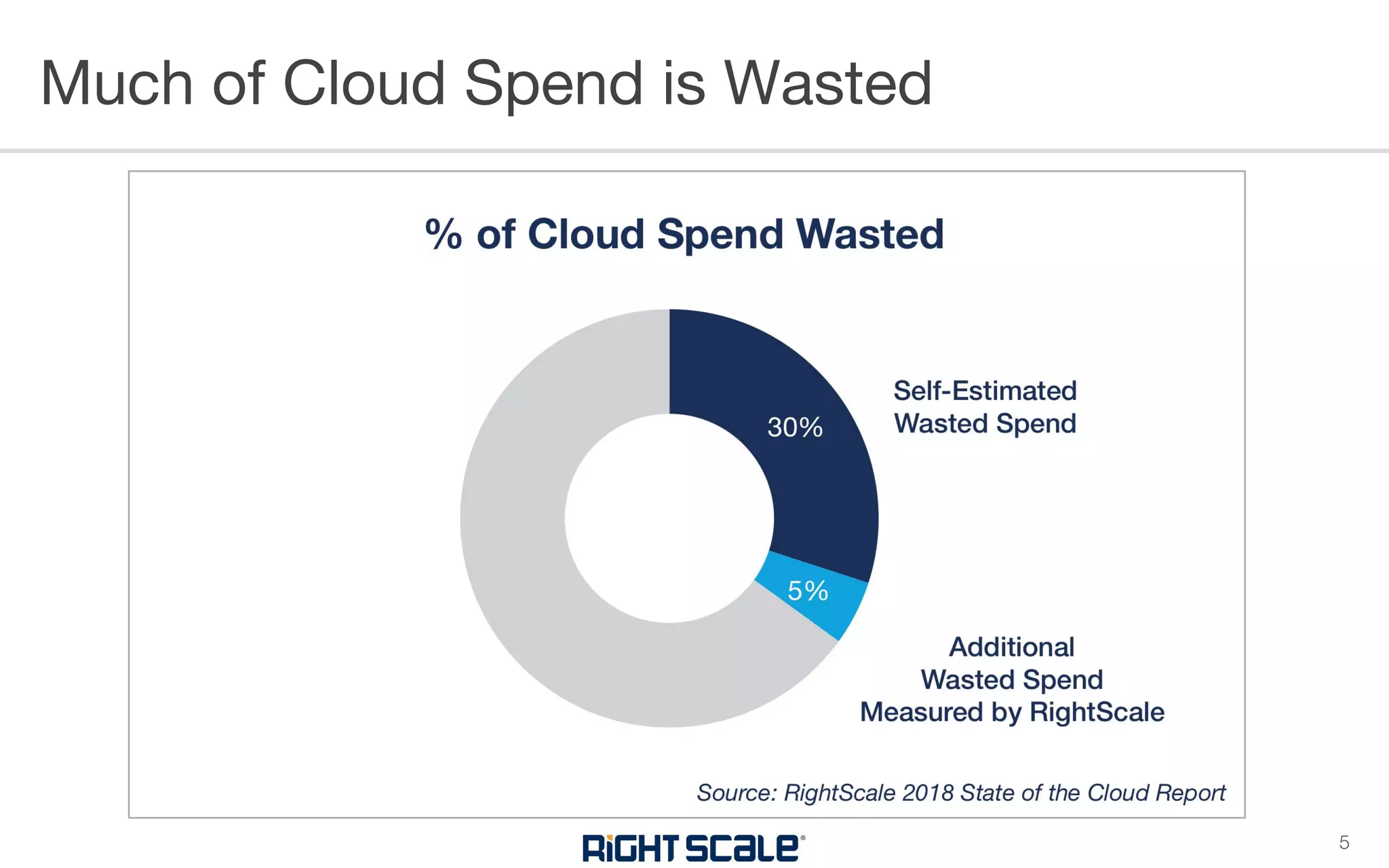
Much of Cloud Spend is Wasted
5
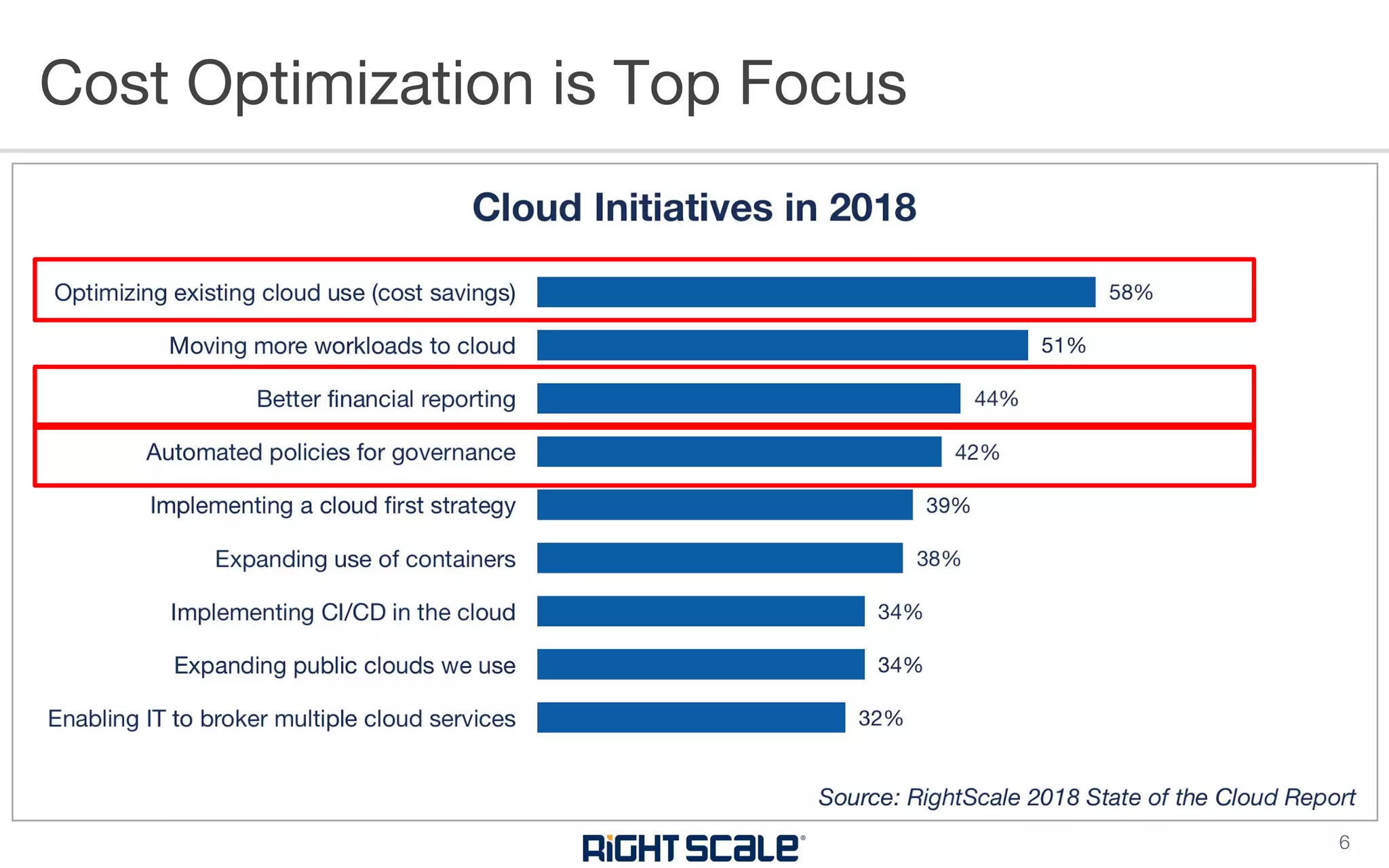
Cost Optimization is Top Focus
6
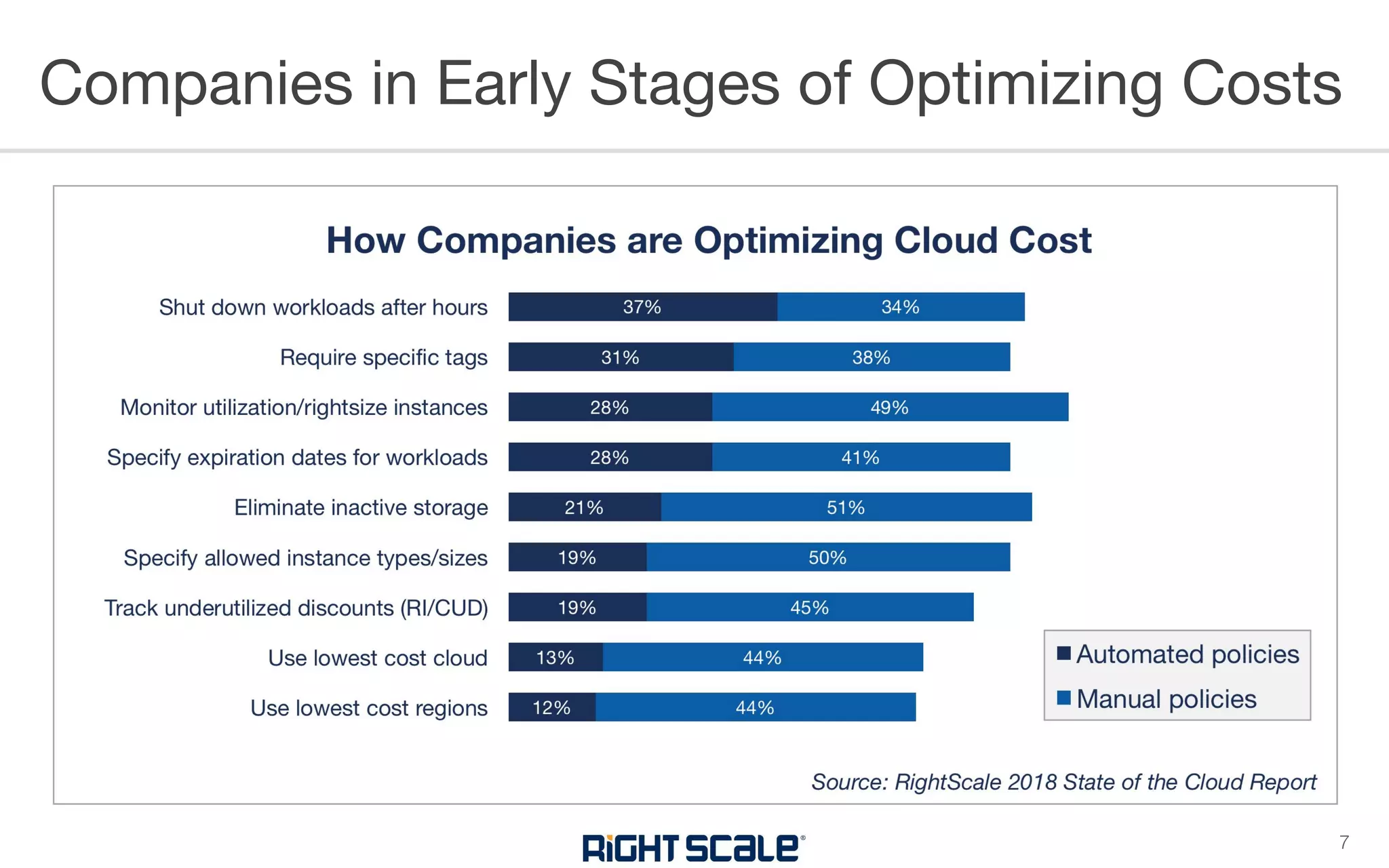
Companies in Early Stages of Optimizing Costs
7
CLOUD COST COMPLEXITY
• Hundreds of
thousands to millions
of line items each
month
• Need mechanism to
consume massive
amounts of data
Cloud Bills Kill Spreadsheets
9
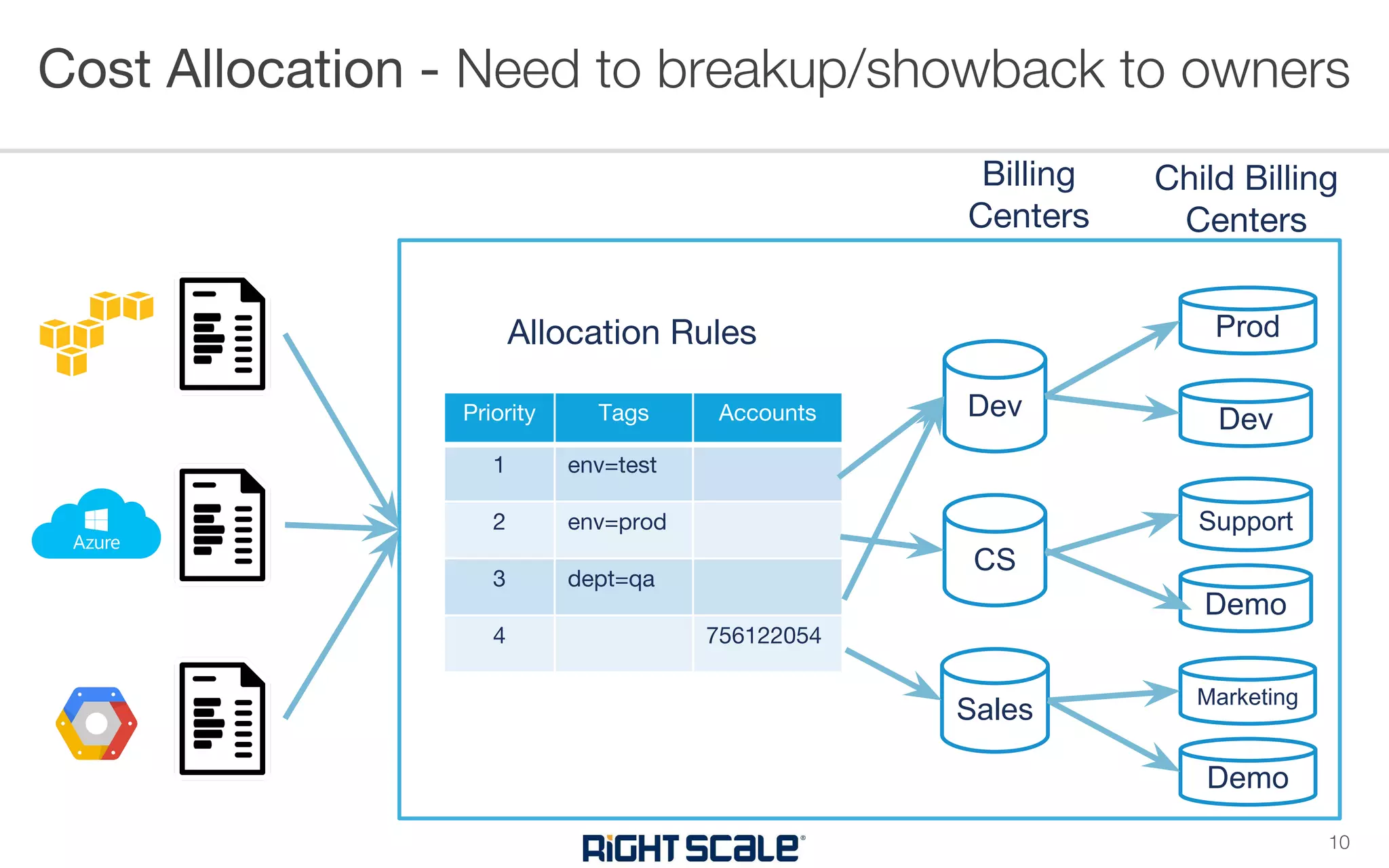
Cost Allocation - Need to breakup/showback to owners
10
Priority Tags Accounts
1 env=test
2 env=prod
3 dept=qa
4 756122054
Allocation Rules
Billing
Centers
Dev
CS
Sales
Prod
Dev
Support
Demo
Marketing
Demo
Child Billing
Centers
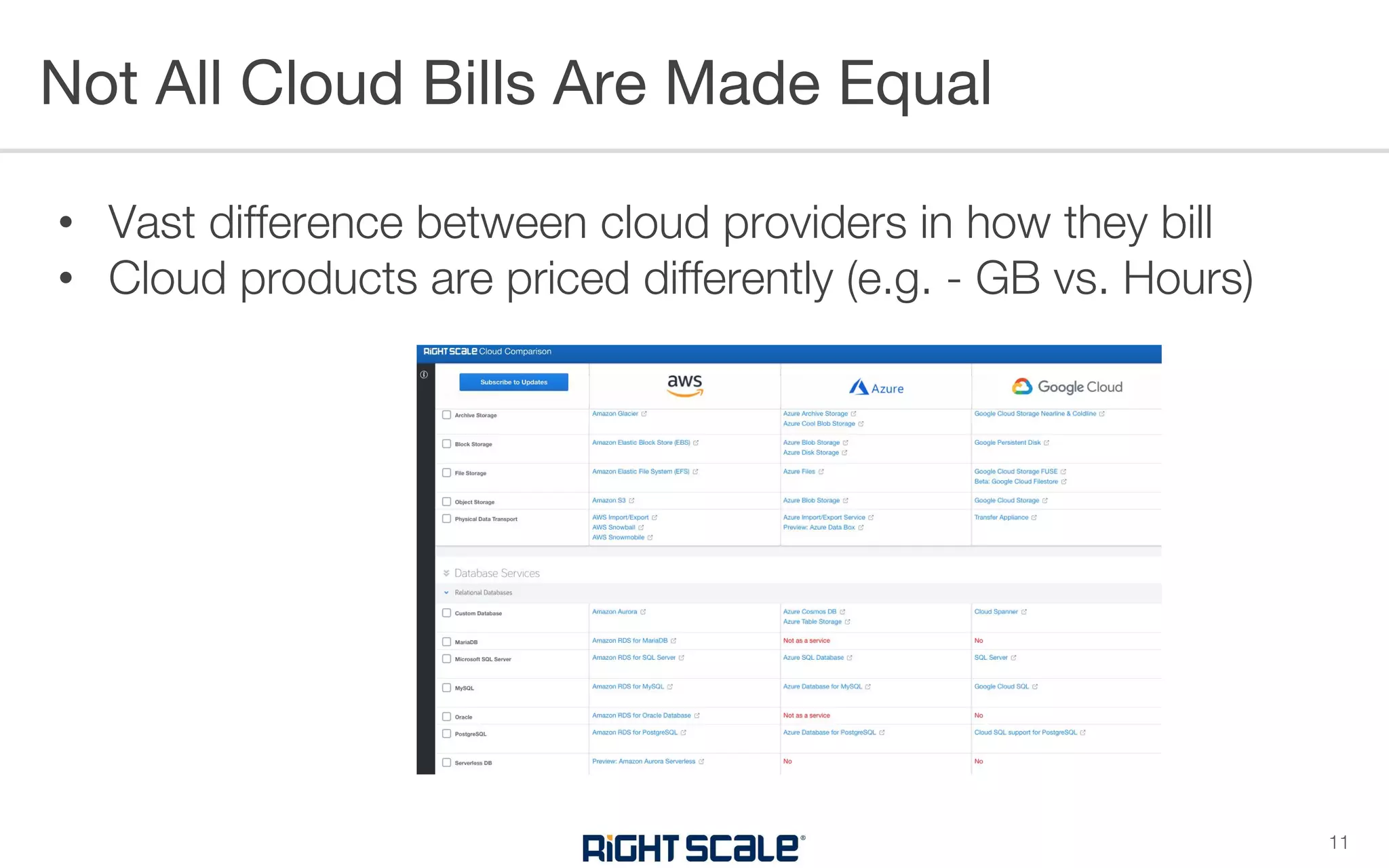
• Vast difference between cloud providers in how they bill
• Cloud products are priced differently (e.g. - GB vs. Hours)
Not All Cloud Bills Are Made Equal
11
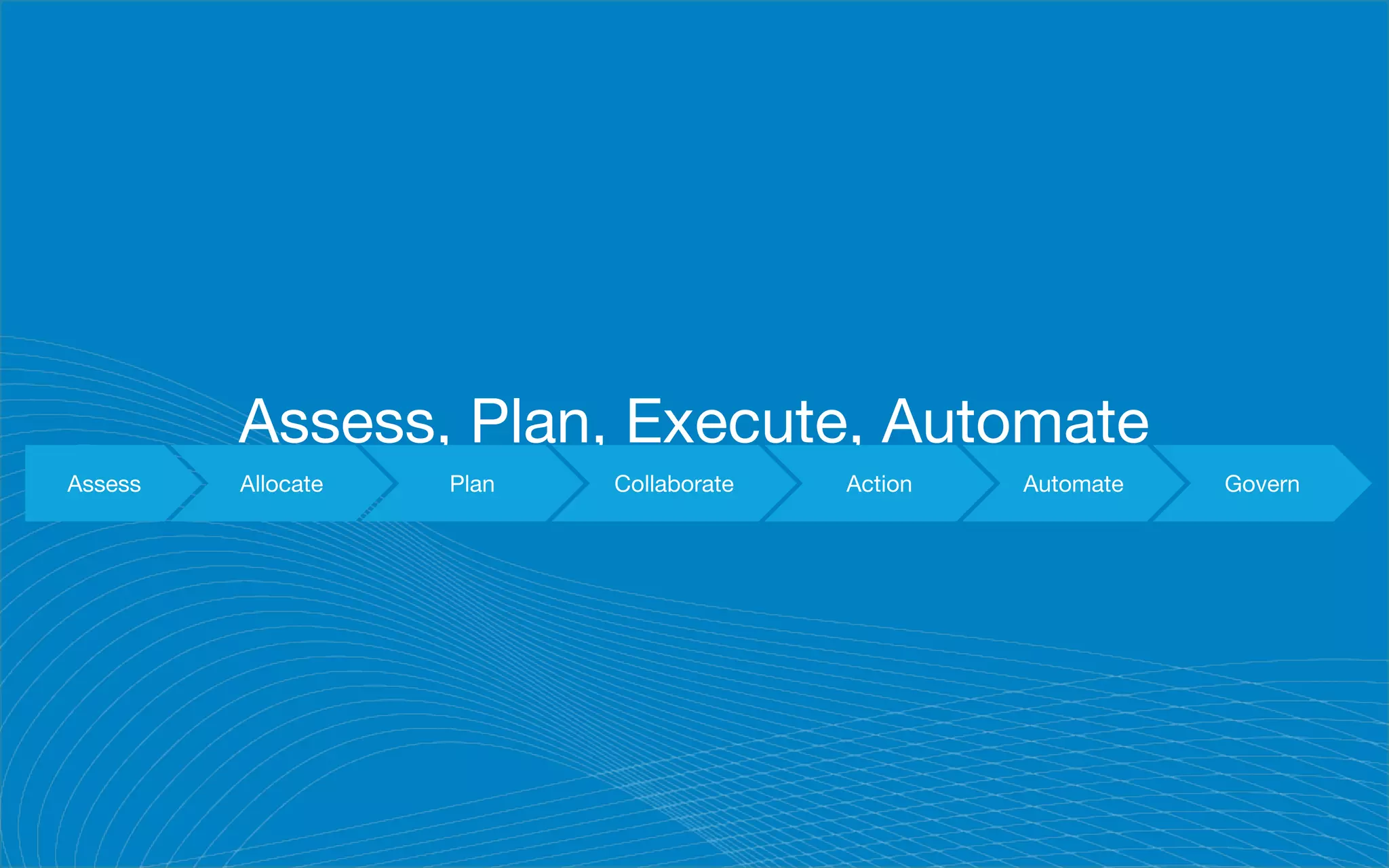
Assess, Plan, Execute, Automate
Assess Allocate Plan Collaborate Action Automate Govern
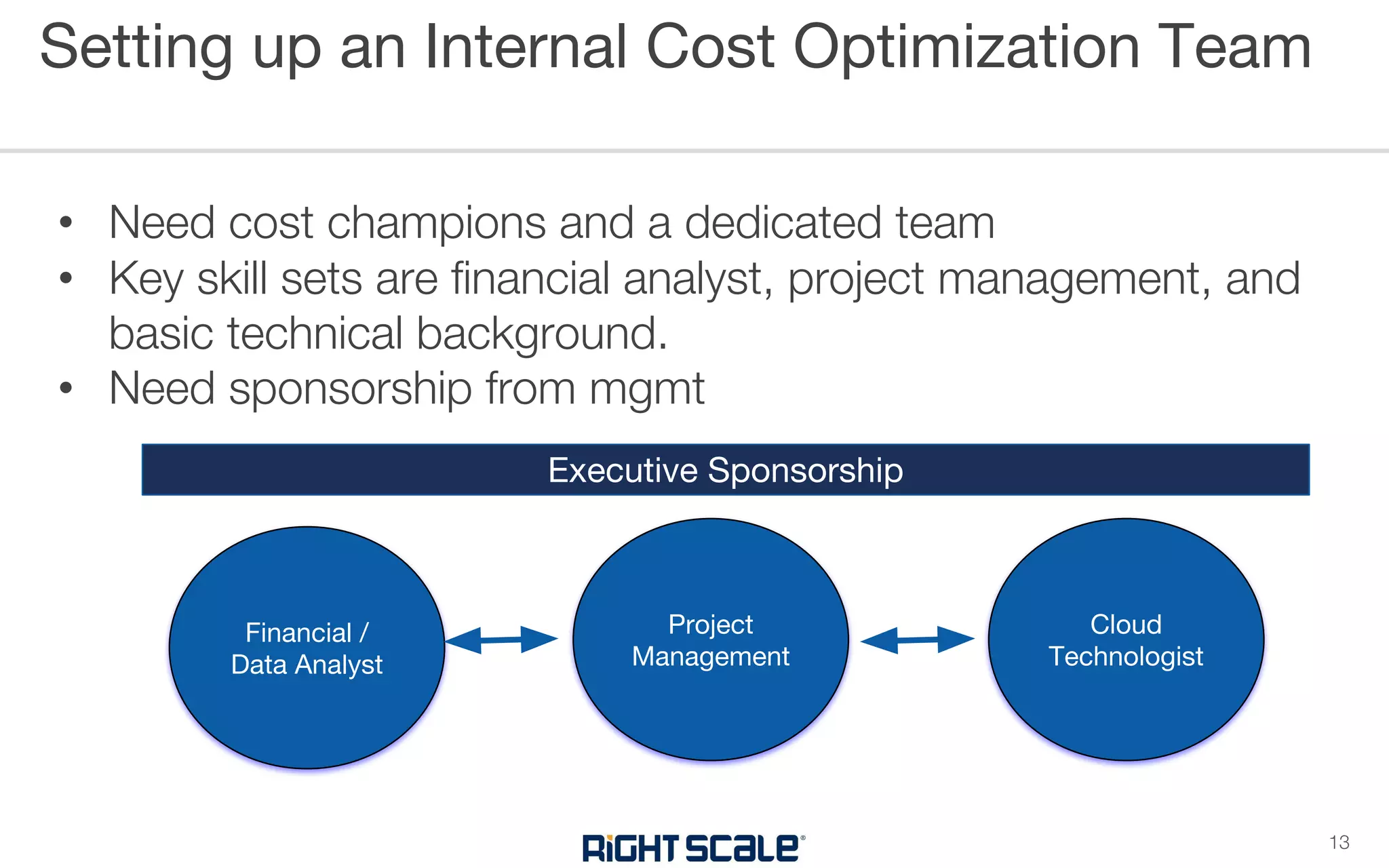
• Need cost champions and a dedicated team
• Key skill sets are financial analyst, project management, and
basic technical background.
• Need sponsorship from mgmt
Setting up an Internal Cost Optimization Team
13
Financial /
Data Analyst
Project
Management
Cloud
Technologist
Executive Sponsorship
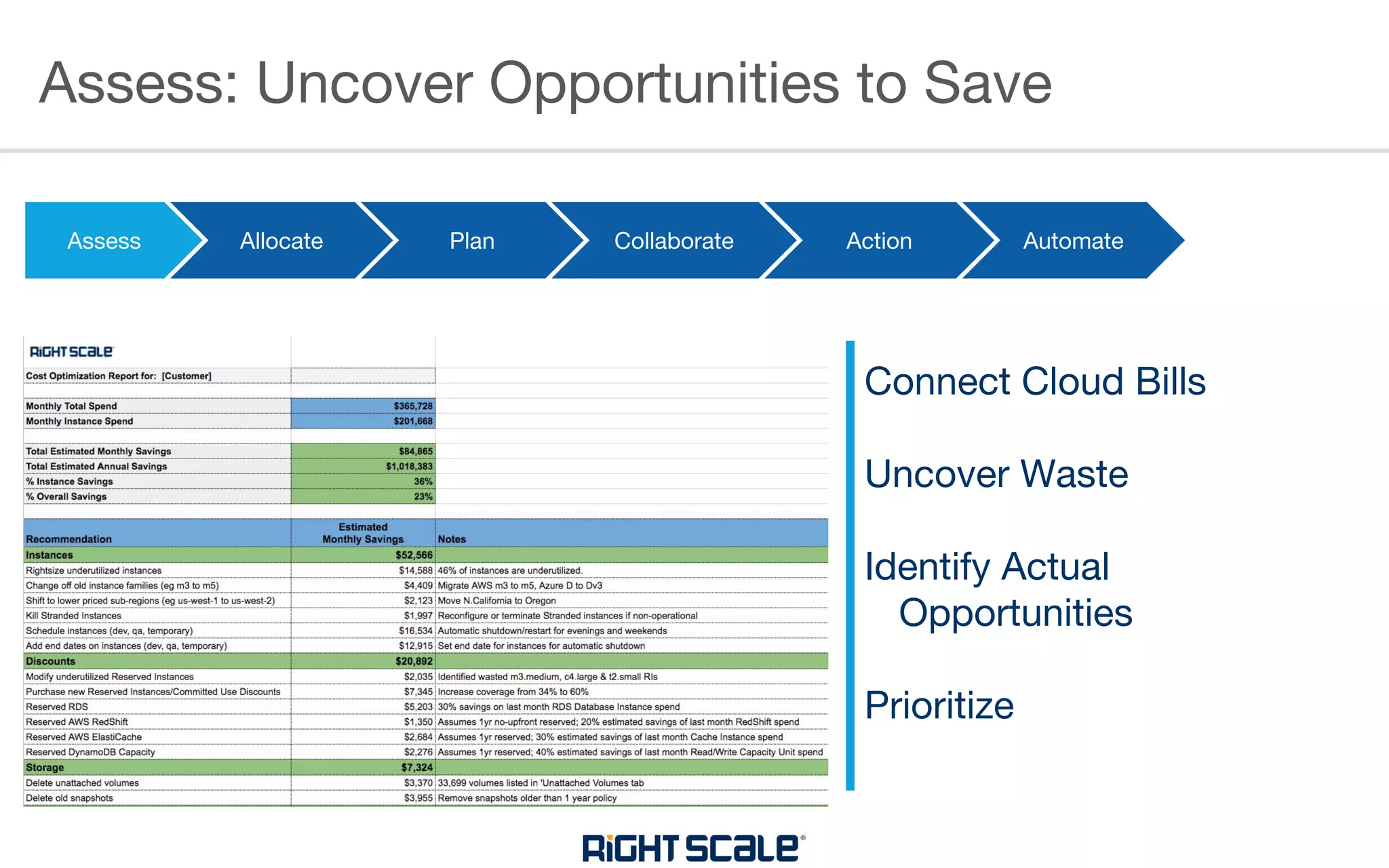
Assess: Uncover Opportunities to Save
Assess Allocate Plan Collaborate Action Automate
Connect Cloud Bills
Uncover Waste
Identify Actual
Opportunities
Prioritize
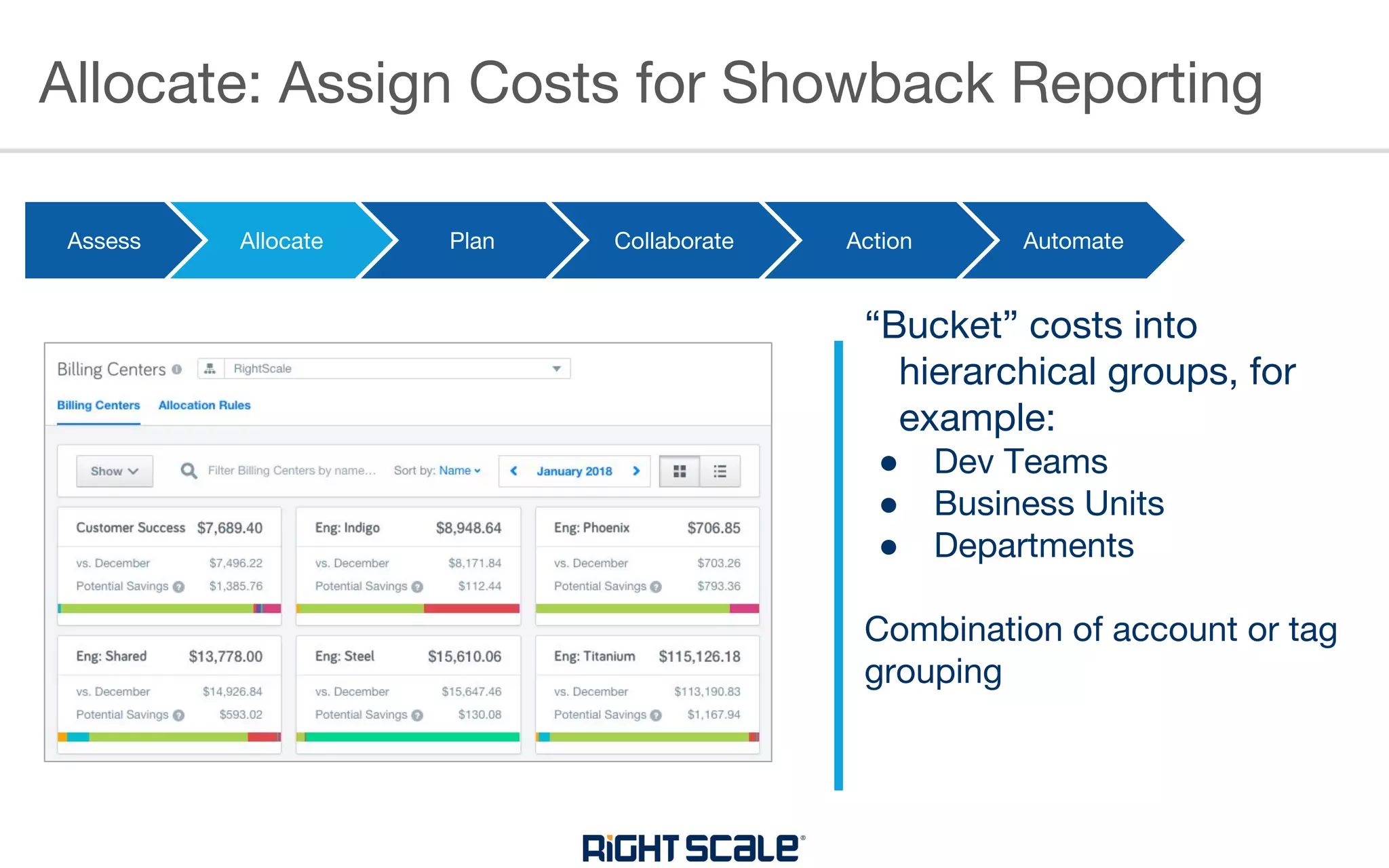
Allocate: Assign Costs for Showback Reporting
Assess Allocate Plan Collaborate Collaborate Automate
“Bucket” costs into
hierarchical groups, for
example:
● Dev Teams
● Business Units
● Departments
Combination of account or tag
grouping
Action
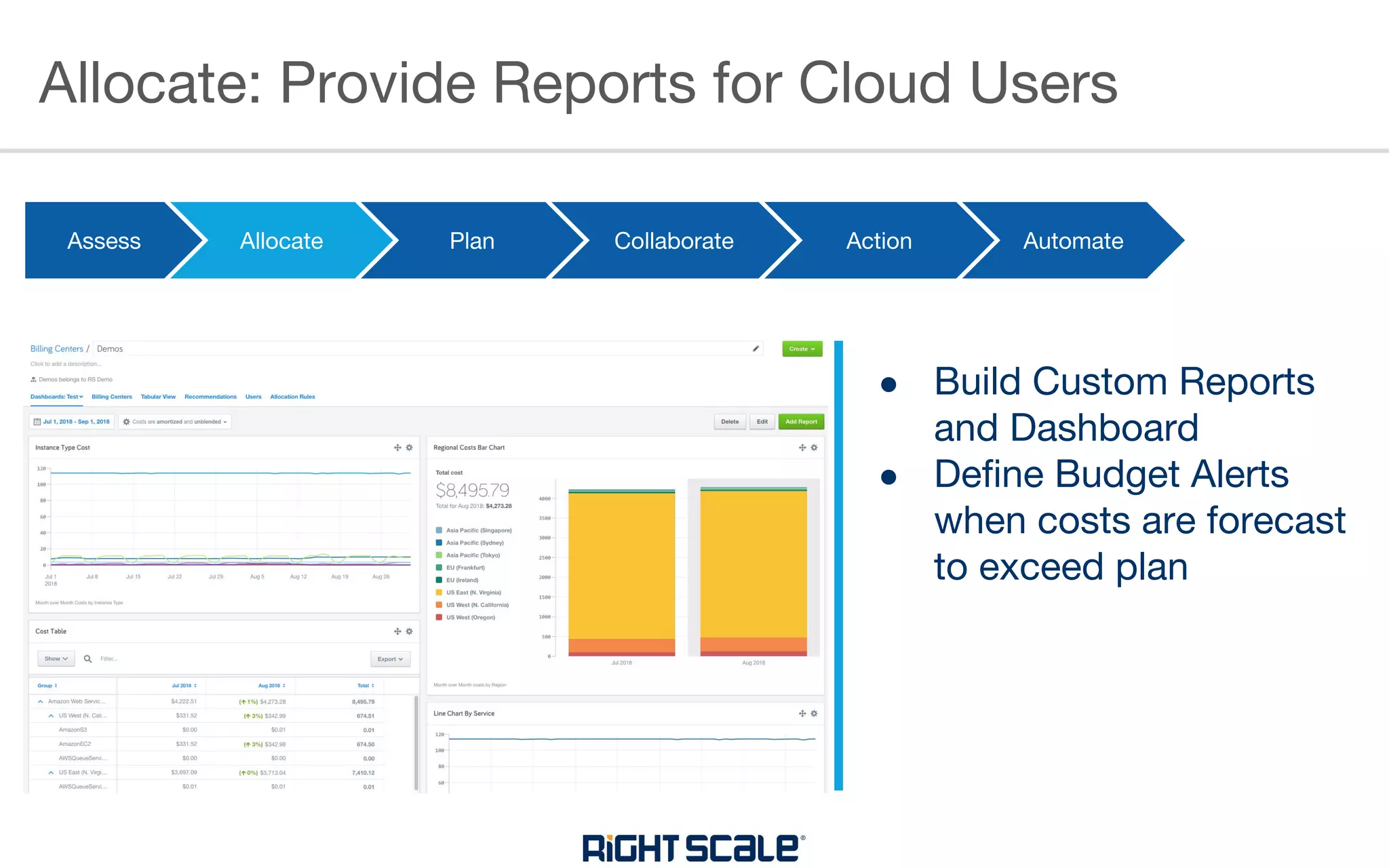
Allocate: Provide Reports for Cloud Users
Assess Allocate Plan Collaborate Collaborate Automate
● Build Custom Reports
and Dashboard
● Define Budget Alerts
when costs are forecast
to exceed plan
Action
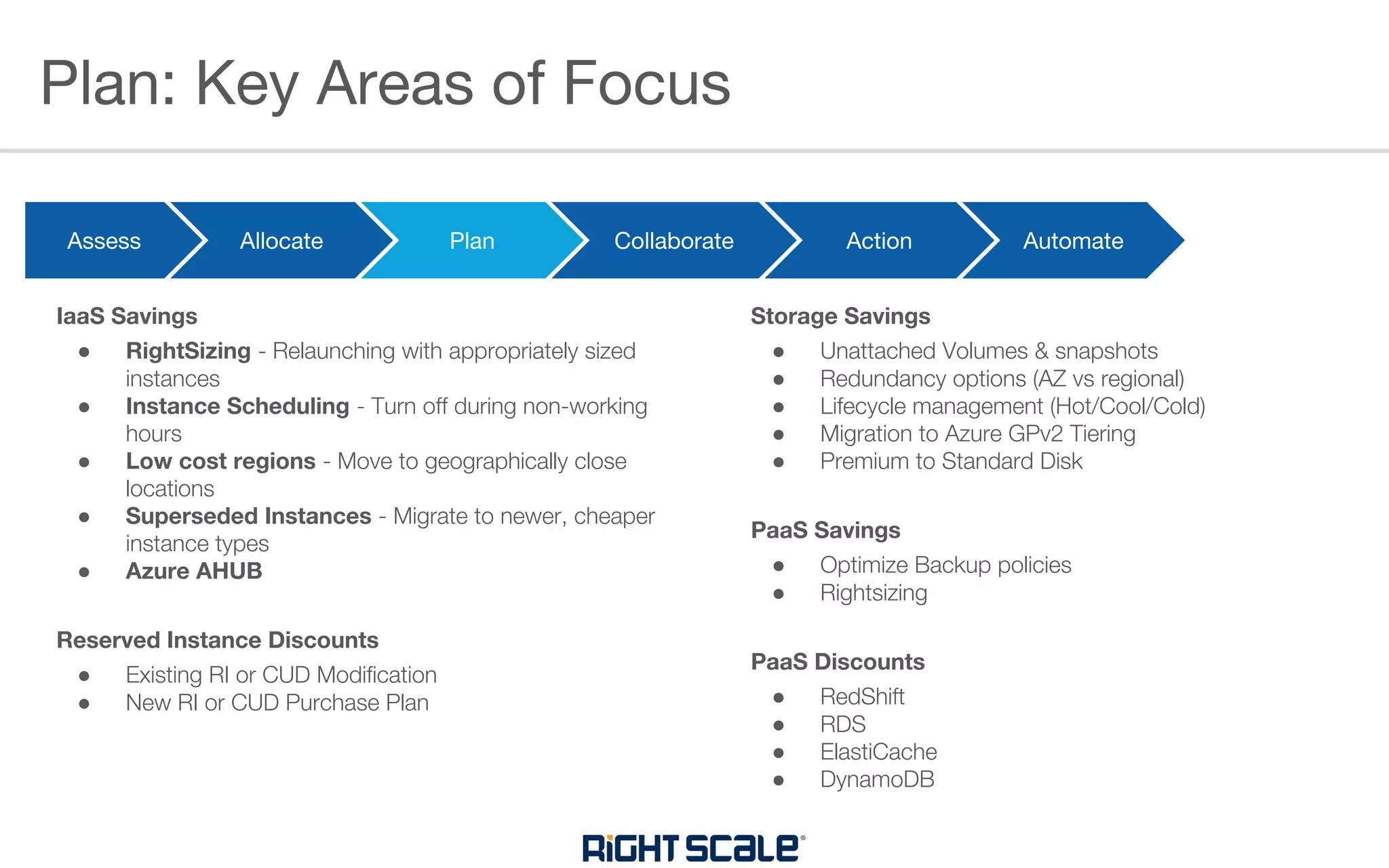
Plan: Key Areas of Focus
Assess Allocate Plan Collaborate Action Automate
IaaS Savings
● RightSizing - Relaunching with appropriately sized
instances
● Instance Scheduling - Turn off during non-working
hours
● Low cost regions - Move to geographically close
locations
● Superseded Instances - Migrate to newer, cheaper
instance types
● Azure AHUB
Reserved Instance Discounts
● Existing RI or CUD Modification
● New RI or CUD Purchase Plan
Storage Savings
● Unattached Volumes & snapshots
● Redundancy options (AZ vs regional)
● Lifecycle management (Hot/Cool/Cold)
● Migration to Azure GPv2 Tiering
● Premium to Standard Disk
PaaS Savings
● Optimize Backup policies
● Rightsizing
PaaS Discounts
● RedShift
● RDS
● ElastiCache
● DynamoDB
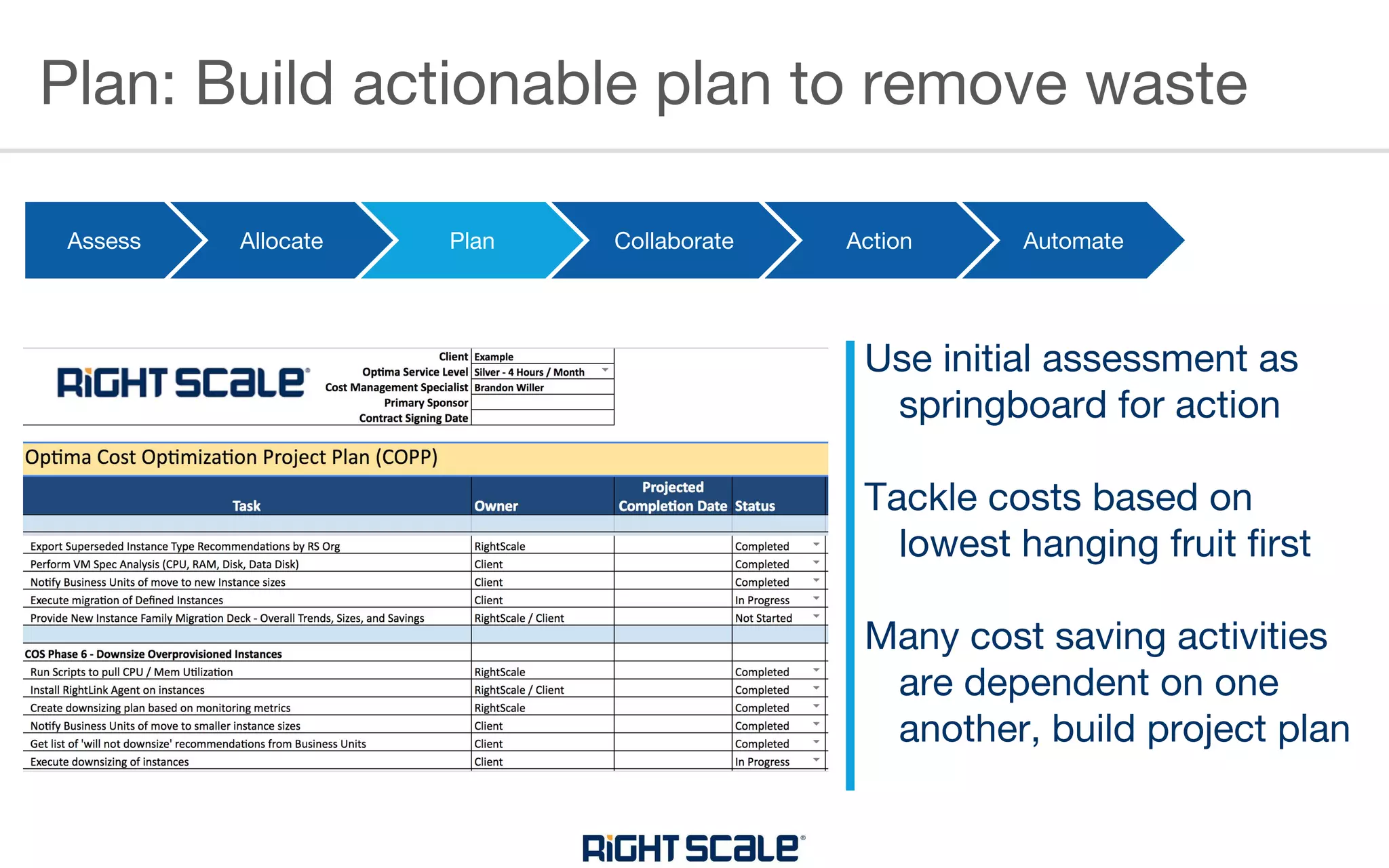
Plan: Build actionable plan to remove waste
Assess Allocate Plan Collaborate Action Automate
Use initial assessment as
springboard for action
Tackle costs based on
lowest hanging fruit first
Many cost saving activities
are dependent on one
another, build project plan
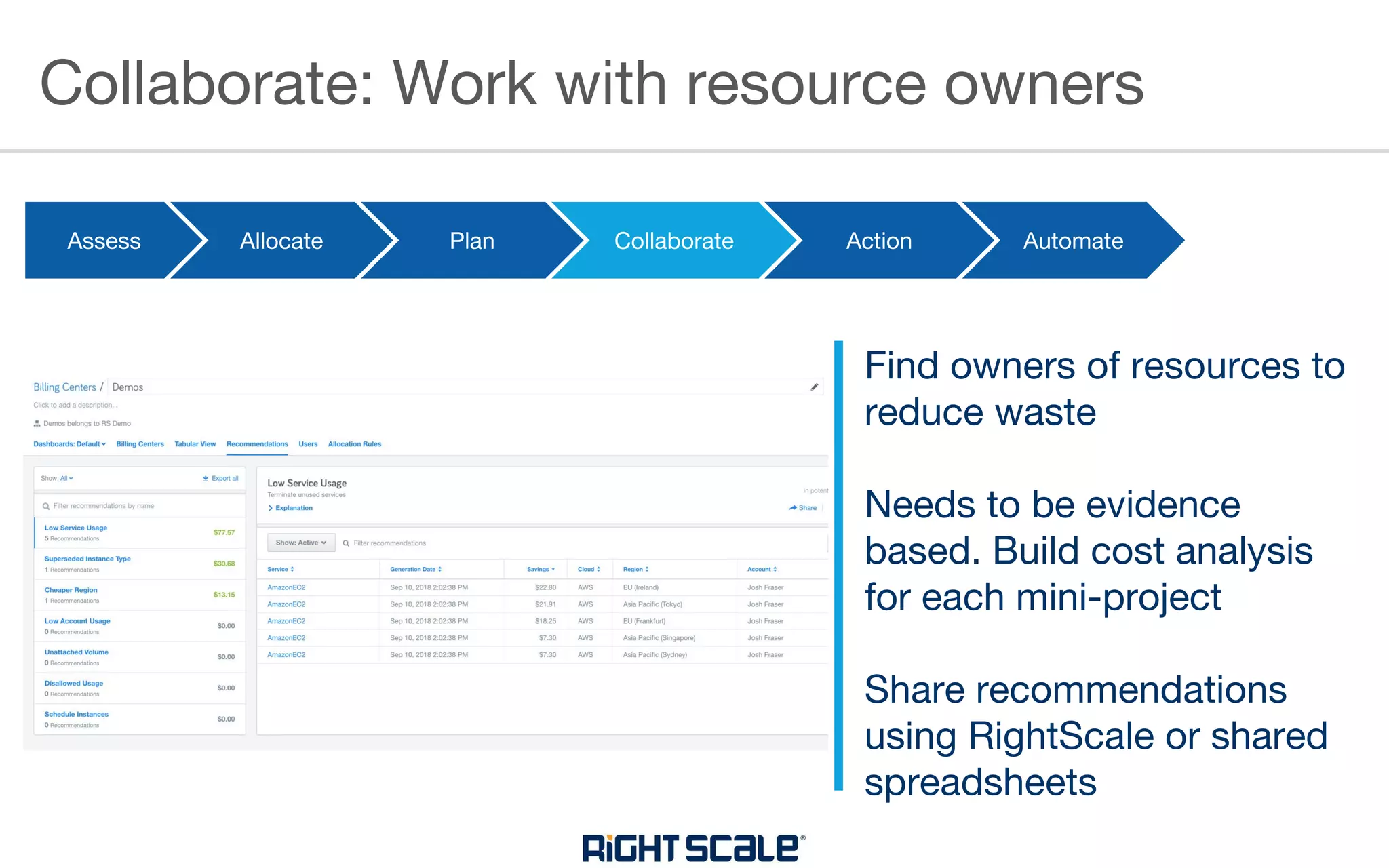
Collaborate: Work with resource owners
Assess Allocate Plan Collaborate Collaborate Automate
Find owners of resources to
reduce waste
Needs to be evidence
based. Build cost analysis
for each mini-project
Share recommendations
using RightScale or shared
spreadsheets
Action
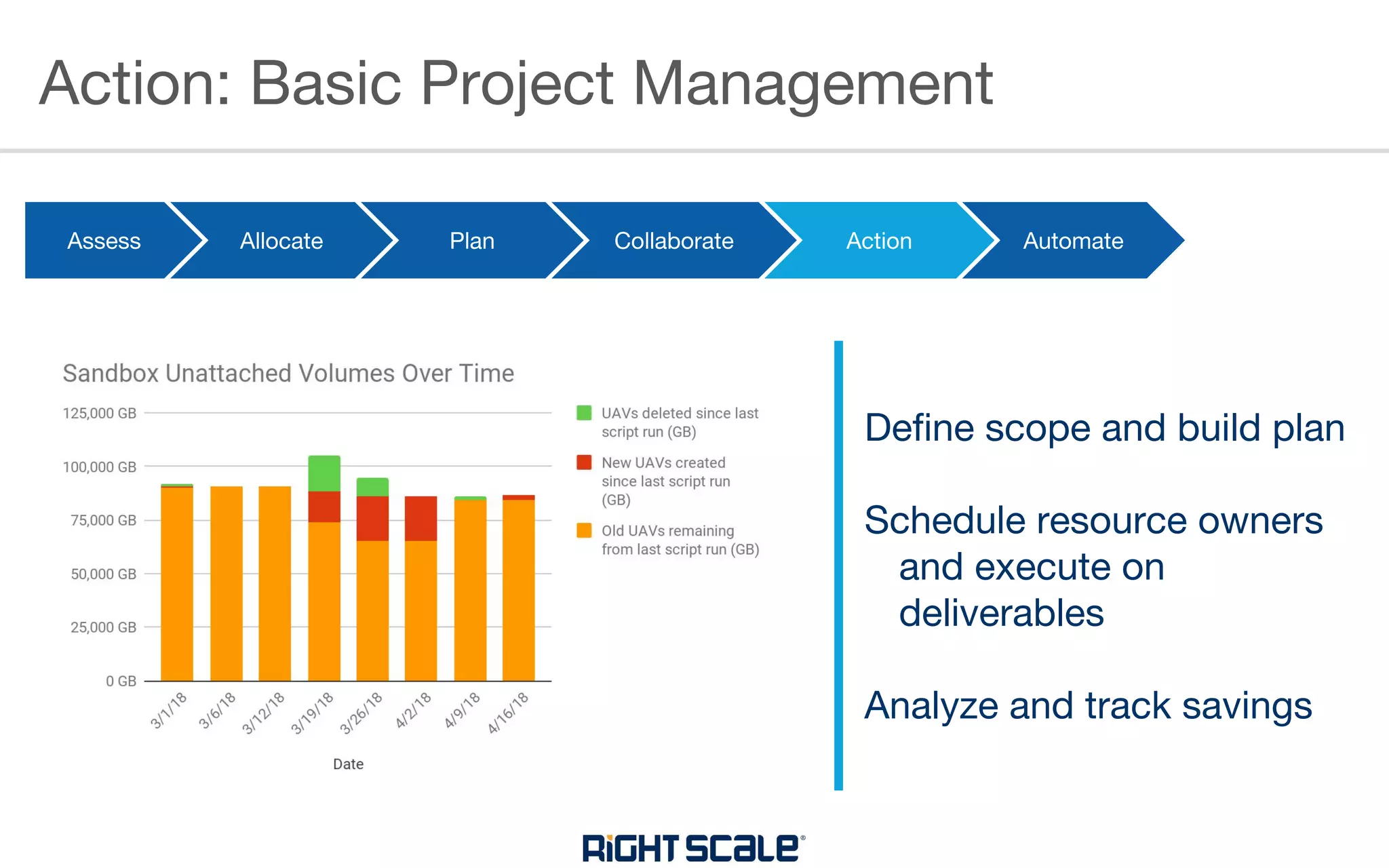
Action: Basic Project Management
Assess Allocate Plan Collaborate Collaborate Automate
Define scope and build plan
Schedule resource owners
and execute on
deliverables
Analyze and track savings
Action
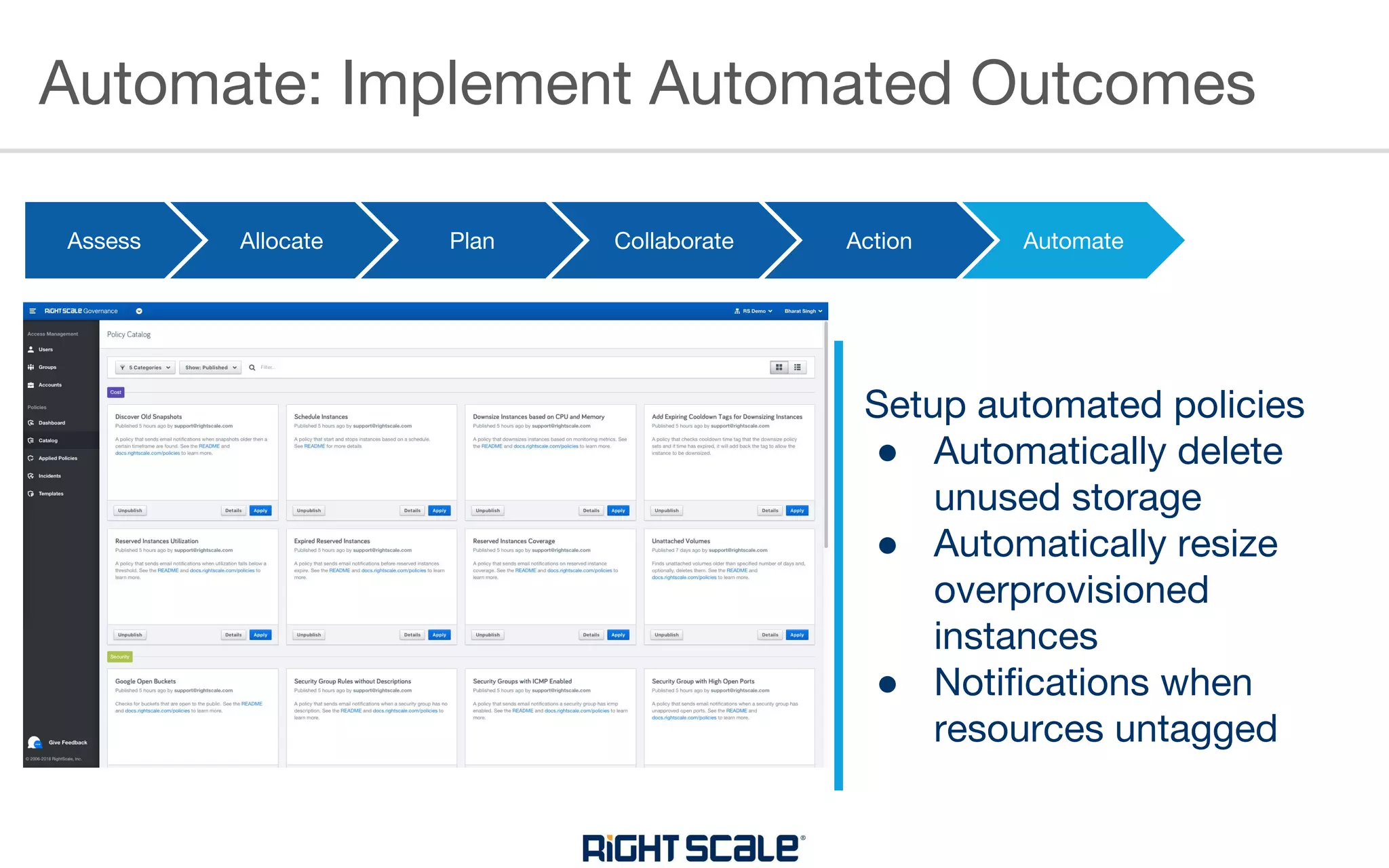
Automate: Implement Automated Outcomes
Assess Allocate Plan Collaborate Collaborate Automate
Setup automated policies
● Automatically delete
unused storage
● Automatically resize
overprovisioned
instances
● Notifications when
resources untagged
Action
RIGHTSCALE POLICIES
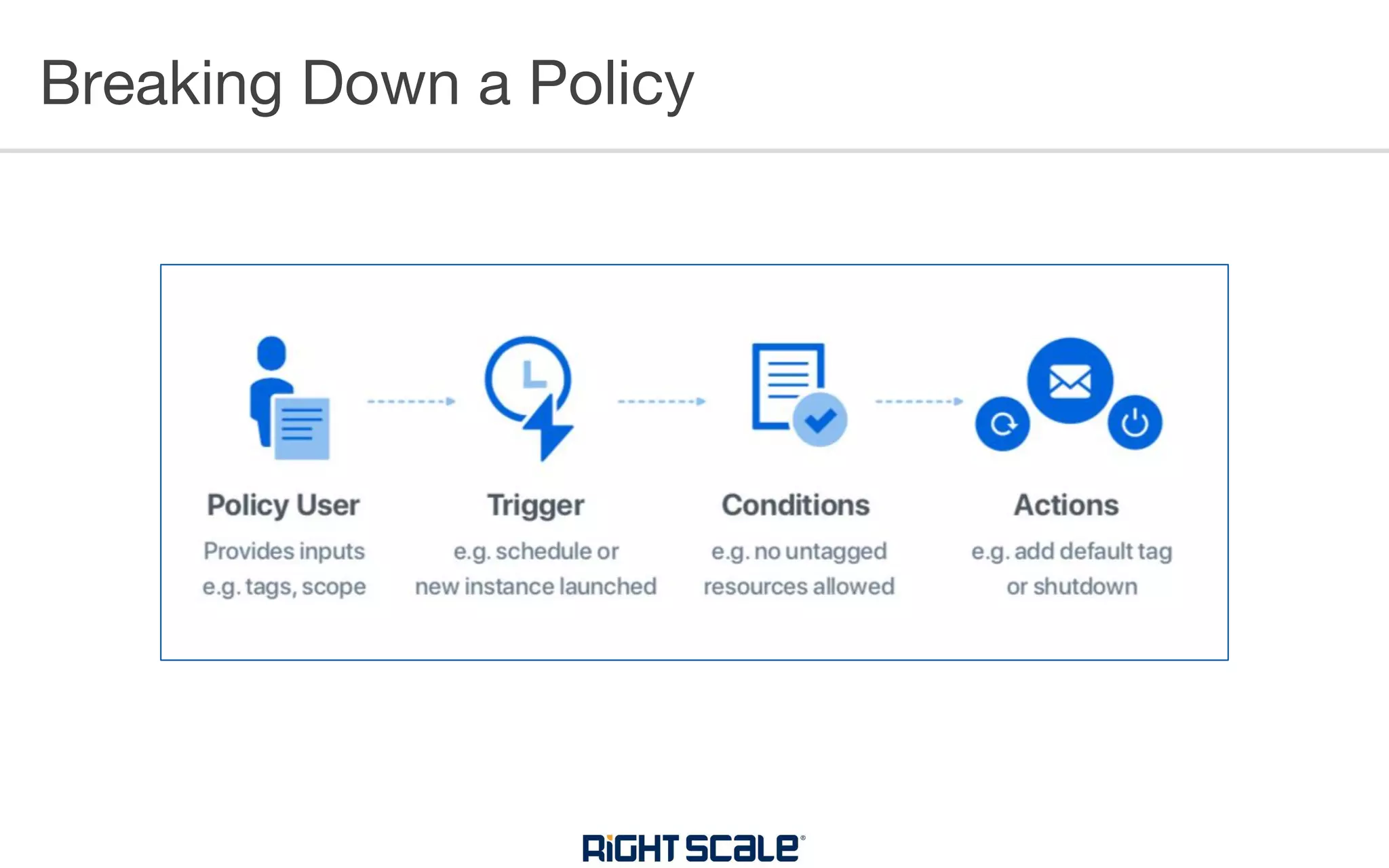
Breaking Down a Policy
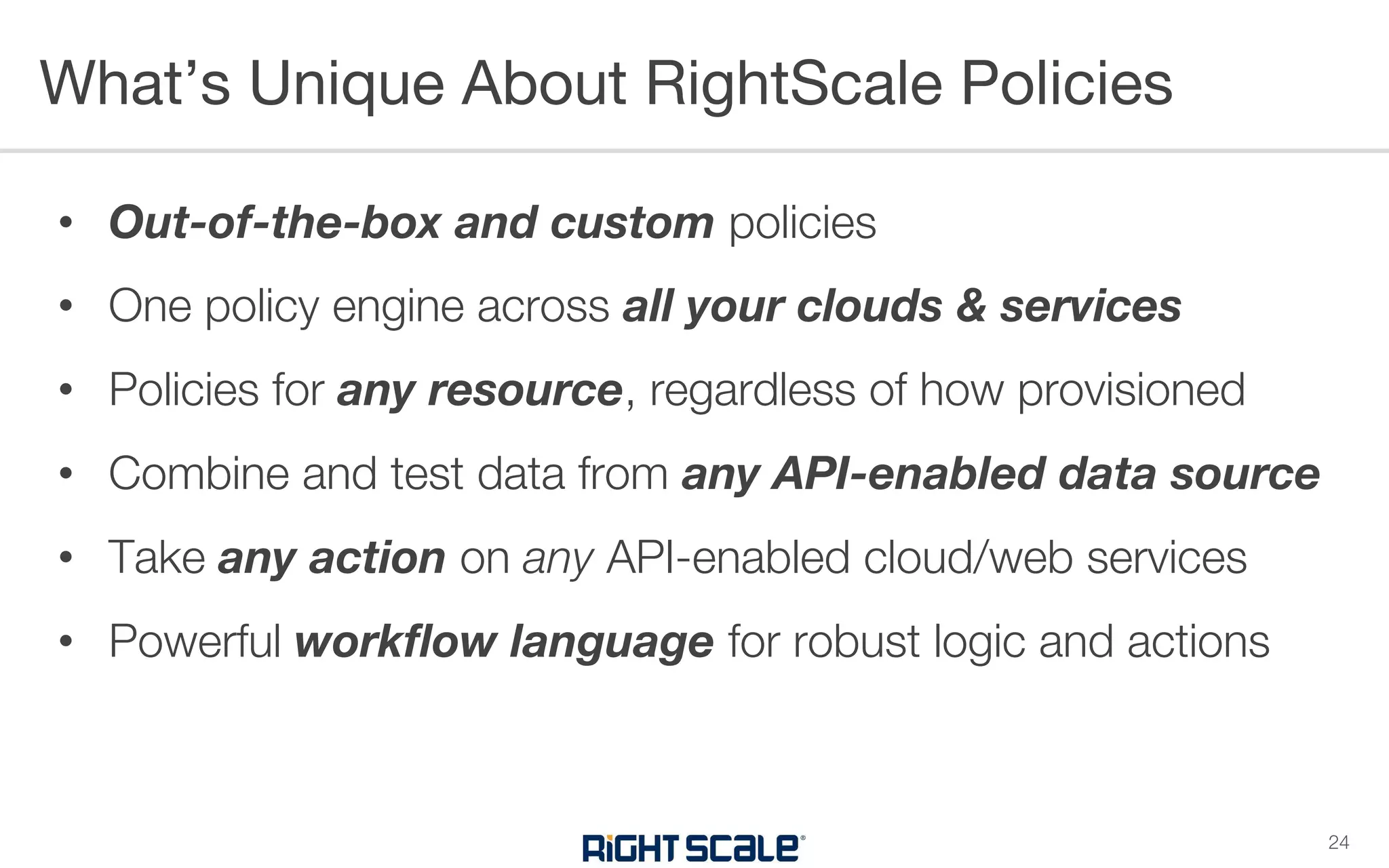
• Out-of-the-box and custom policies
• One policy engine across all your clouds & services
• Policies for any resource, regardless of how provisioned
• Combine and test data from any API-enabled data source
• Take any action on any API-enabled cloud/web services
• Powerful workflow language for robust logic and actions
What’s Unique About RightScale Policies
24
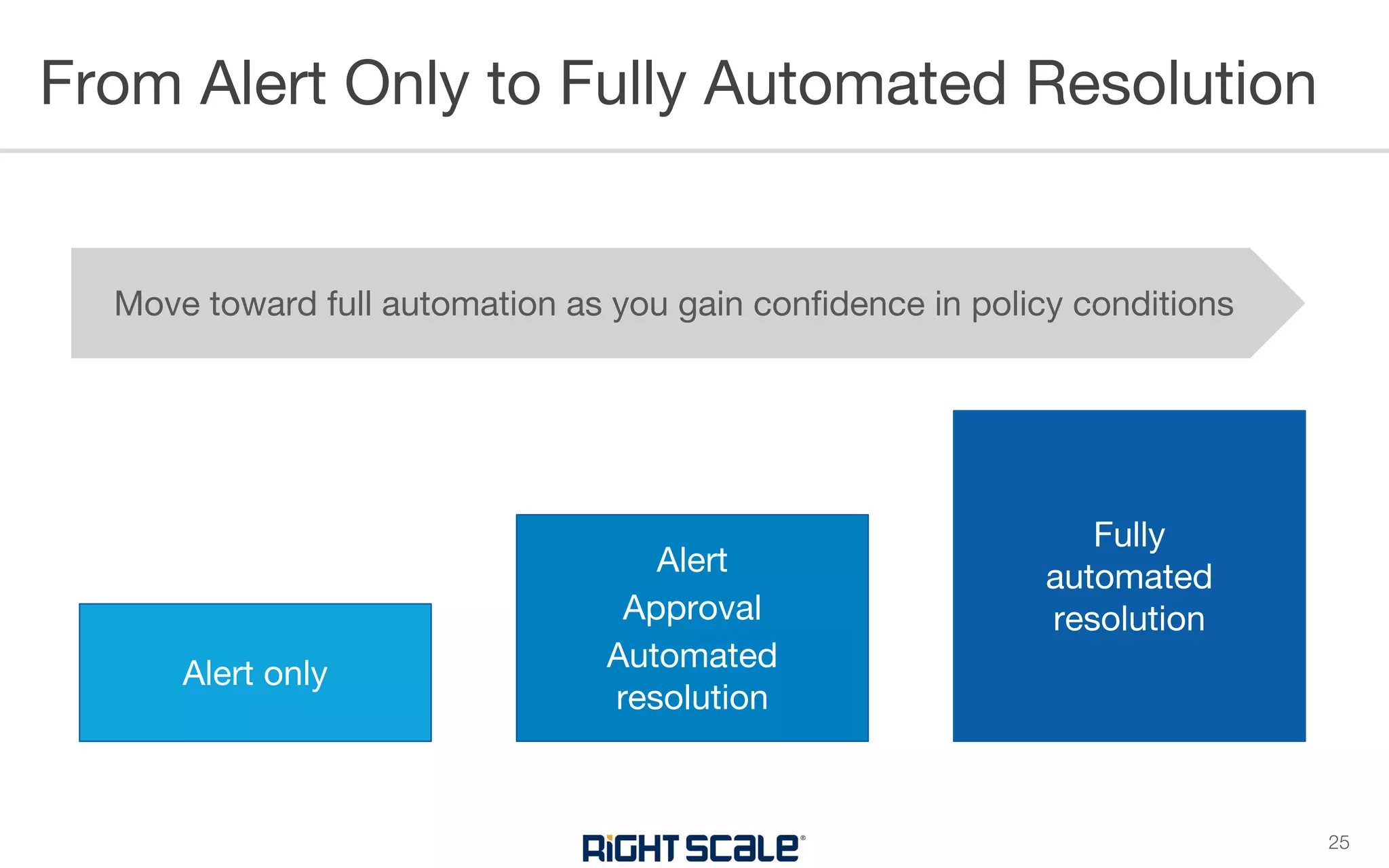
From Alert Only to Fully Automated Resolution
25
Alert only
Alert
Approval
Automated
resolution
Fully
automated
resolution
Move toward full automation as you gain confidence in policy conditions
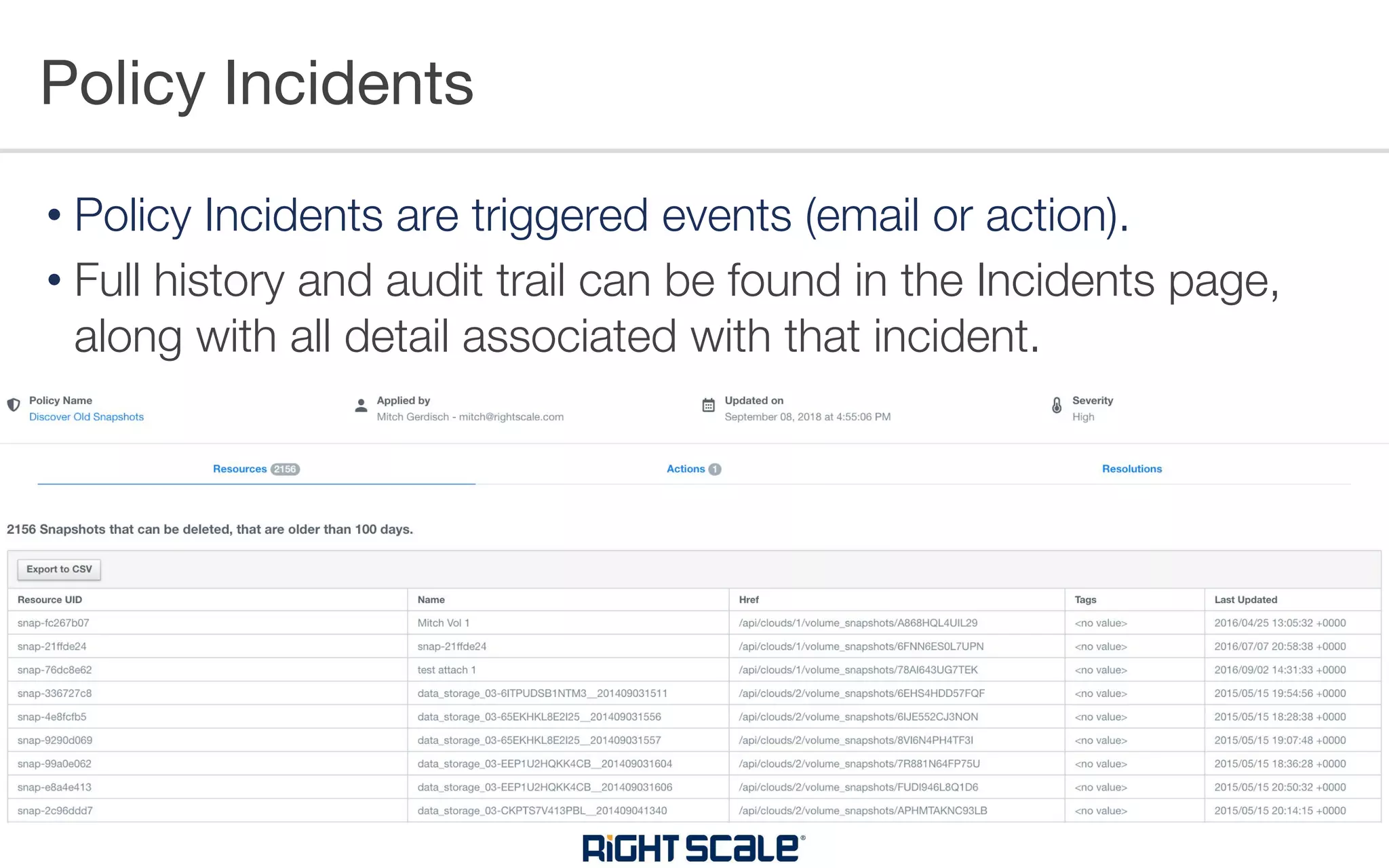
Policy Incidents
• Policy Incidents are triggered events (email or action).
• Full history and audit trail can be found in the Incidents page,
along with all detail associated with that incident.
UNDERSTANDING RESERVED
INSTANCES
• AWS
• Reserved Instances (RIs)
• Enterprise Discount Program (EDP)
• Azure
• Reserved Instances (RIs)
• Enterprise Agreement (EA)
• Google
• Sustained Use Discounts (SUD)
• Committed Use Discounts (CUD)
• “Negotiated” Discount
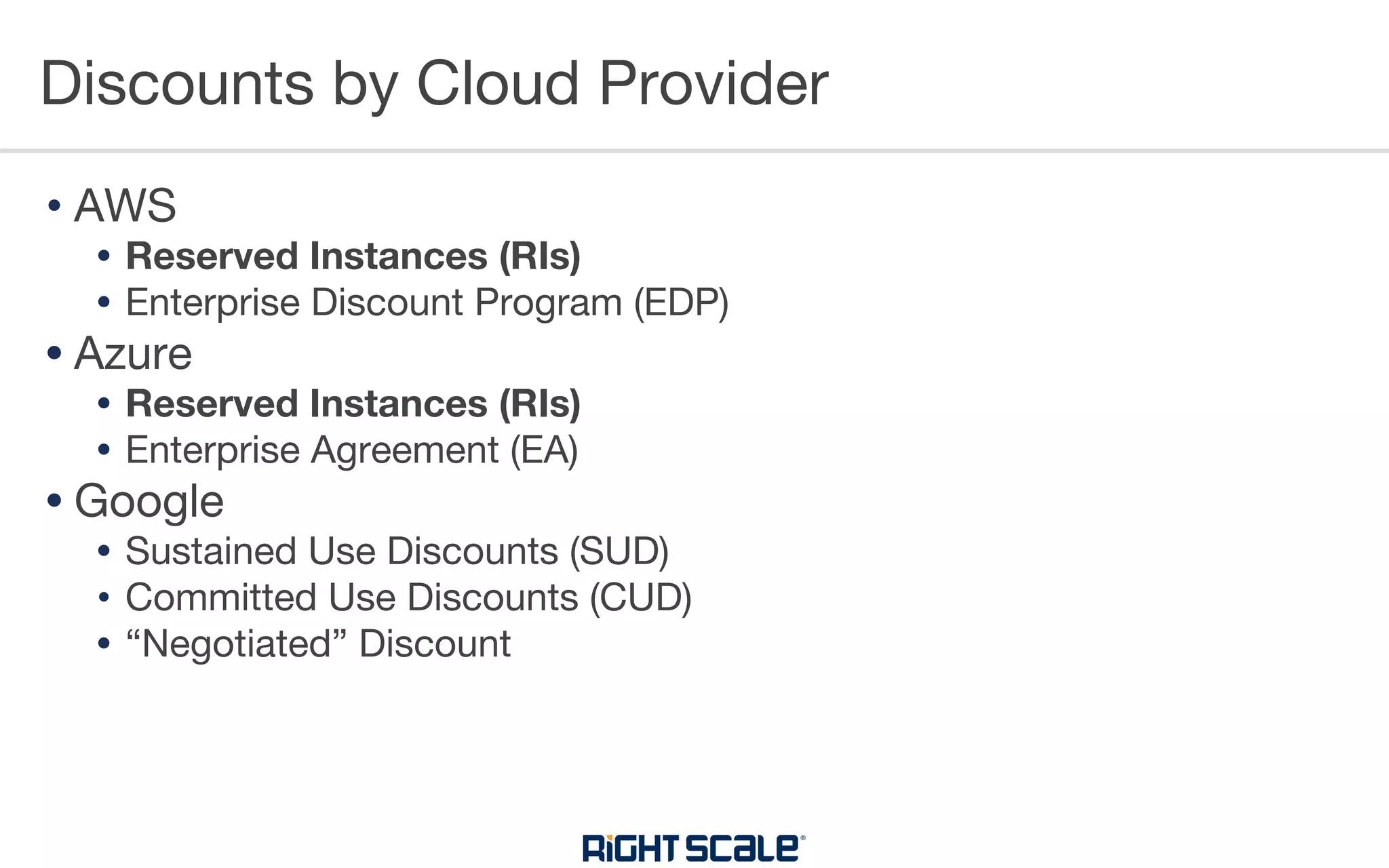
Discounts by Cloud Provider
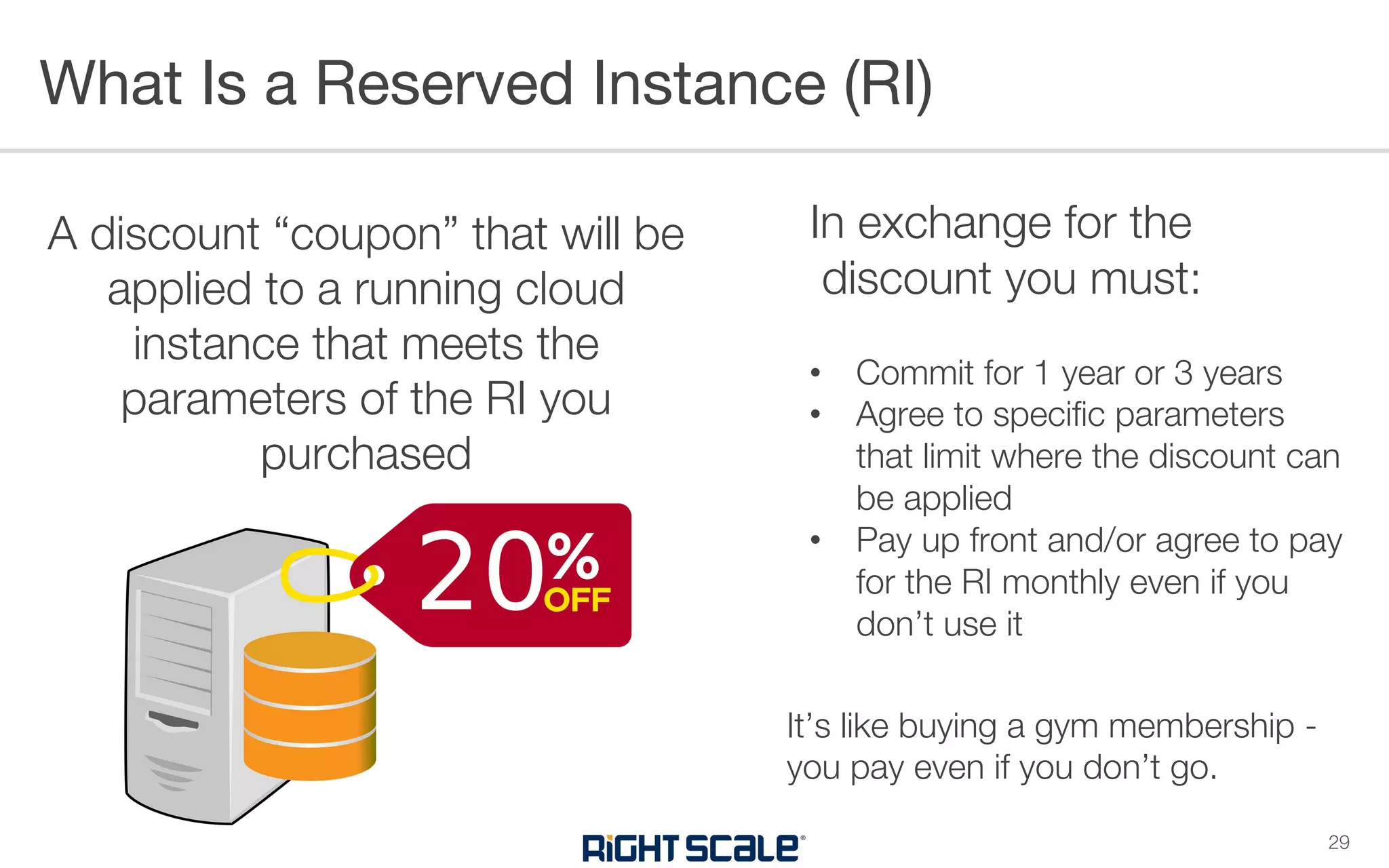
In exchange for the
discount you must:
• Commit for 1 year or 3 years
• Agree to specific parameters
that limit where the discount can
be applied
• Pay up front and/or agree to pay
for the RI monthly even if you
don’t use it
It’s like buying a gym membership -
you pay even if you don’t go.
What Is a Reserved Instance (RI)
29
A discount “coupon” that will be
applied to a running cloud
instance that meets the
parameters of the RI you
purchased
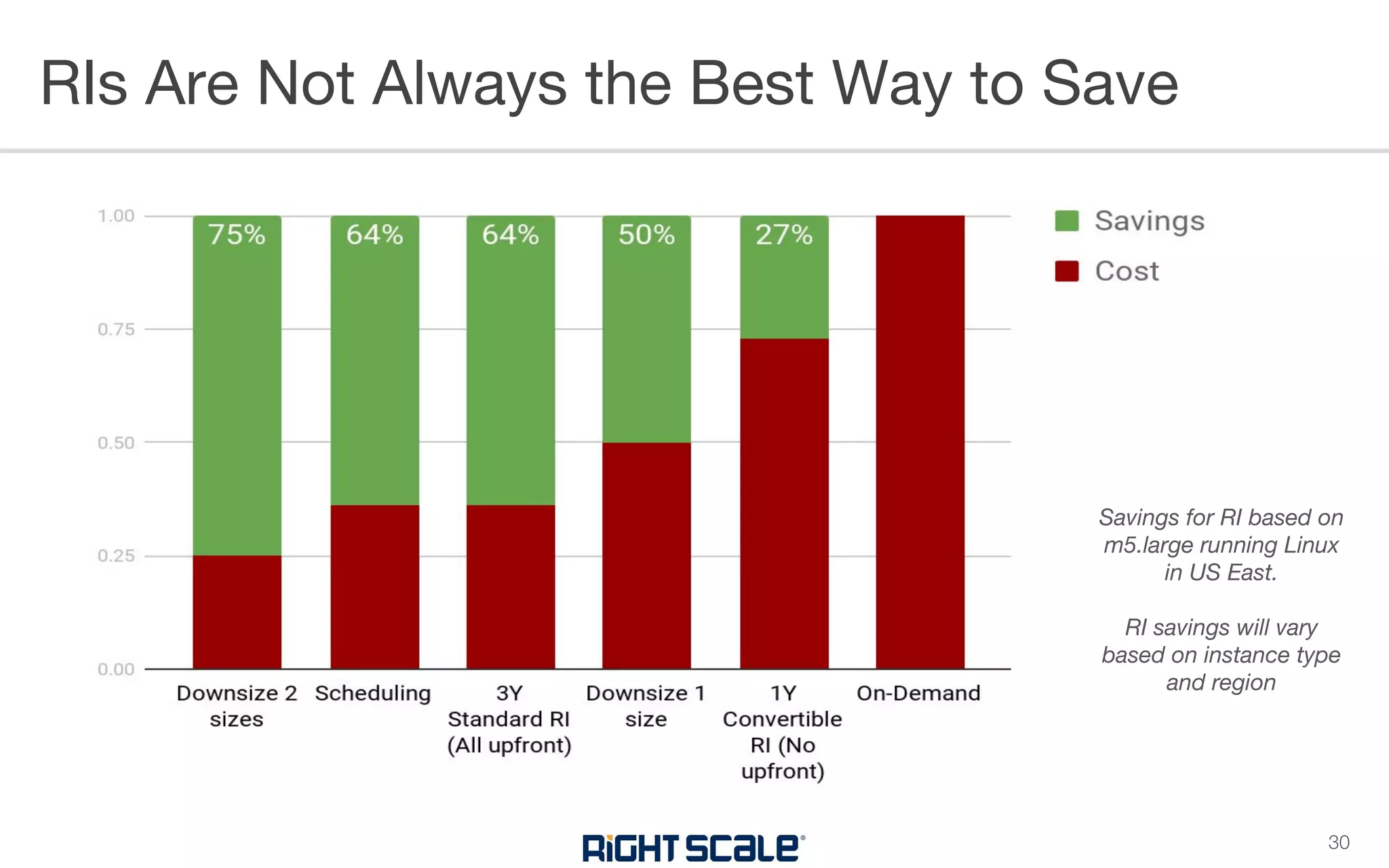
RIs Are Not Always the Best Way to Save
30
Savings for RI based on
m5.large running Linux
in US East.
RI savings will vary
based on instance type
and region
AWS RIs Azure RIs Google CUDs
Buying
Parameters
Region or AZ
Instance family or size
Operating system
Network type (VPC, Classic)
Region
Instance family
Instance size
Scope (Subscription,
Shared)
Region
Project-scoped
Machine type
(General purpose or
Memory-optimized)
Exchangeable
Convertible RIs: Yes
Standard RIs: No
Yes No
Changeable
Standard RIs: AZ (if Regional),
Network,
Instance size (if Regional and
Linux)
Yes, by exchanging or
you can just change Scope
Apply flexibly across vCPU
and memory units
consumed
Returnable
Can sell on Marketplace
(often impossible to find buyers)
Yes - return fee is 12% of
remaining value
No
Payment
Options
No Upfront
Partial Upfront
All Upfront
All Upfront No Upfront
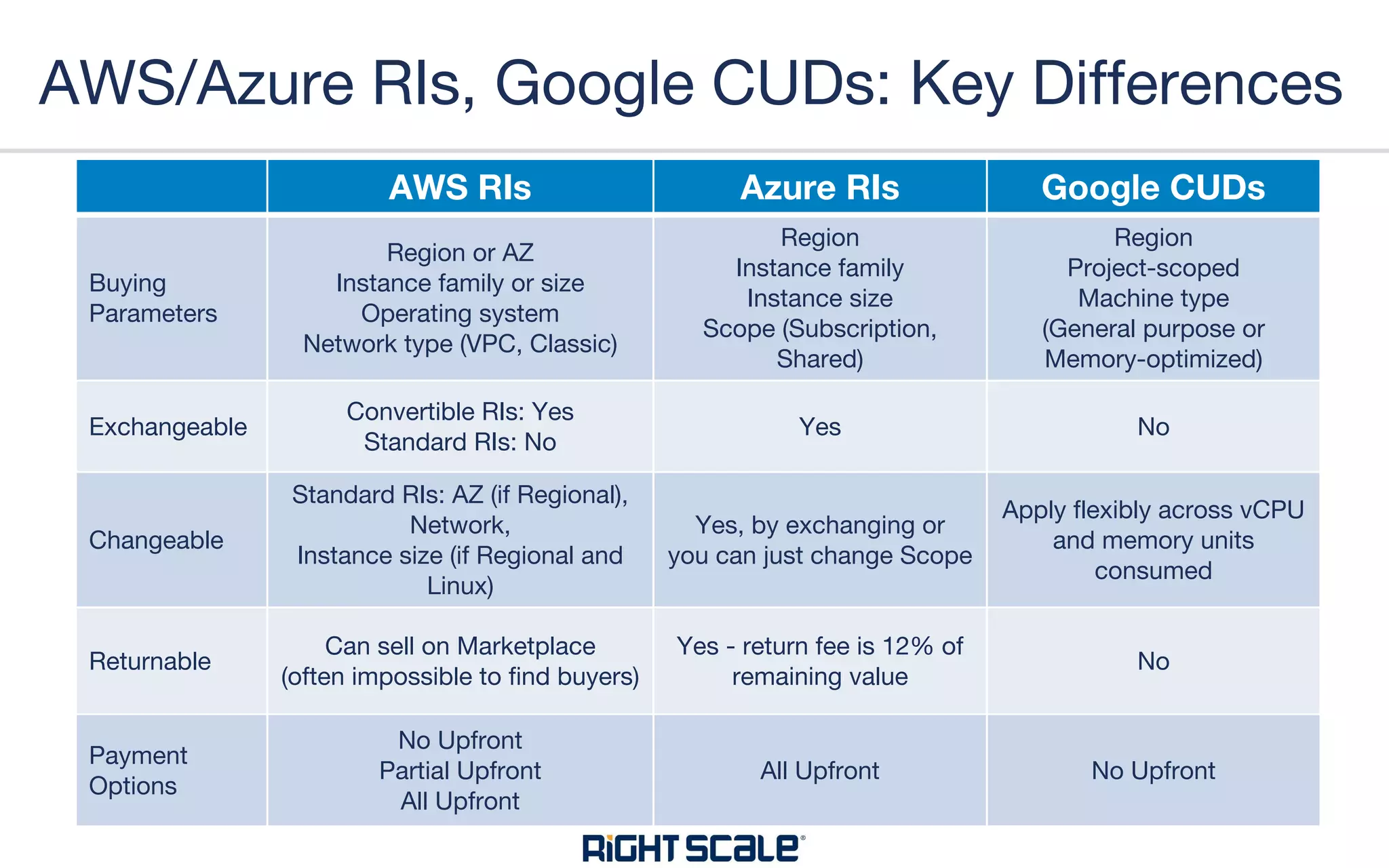
AWS/Azure RIs, Google CUDs: Key Differences
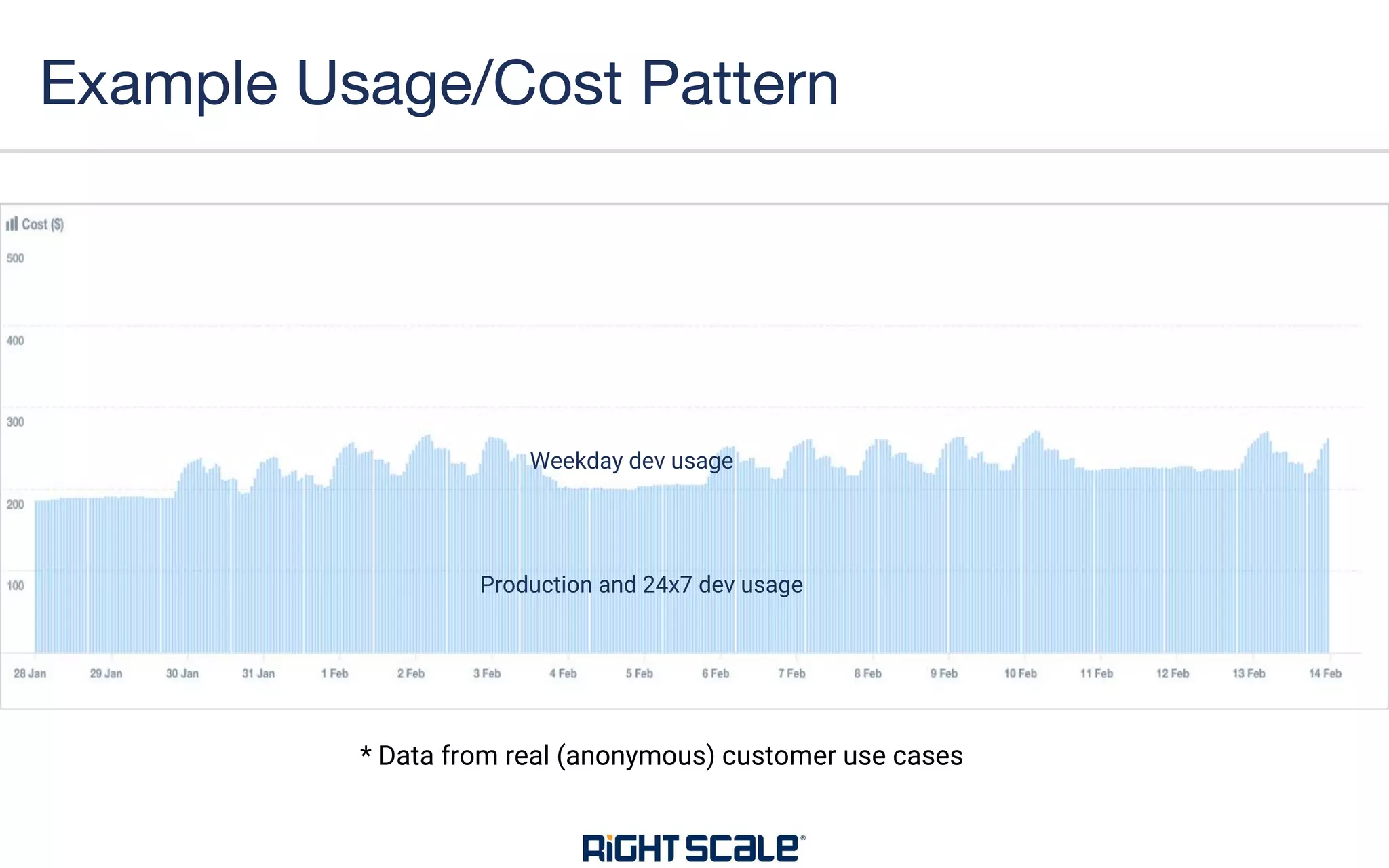
Example Usage/Cost Pattern
Production and 24x7 dev usage
Weekday dev usage
* Data from real (anonymous) customer use cases
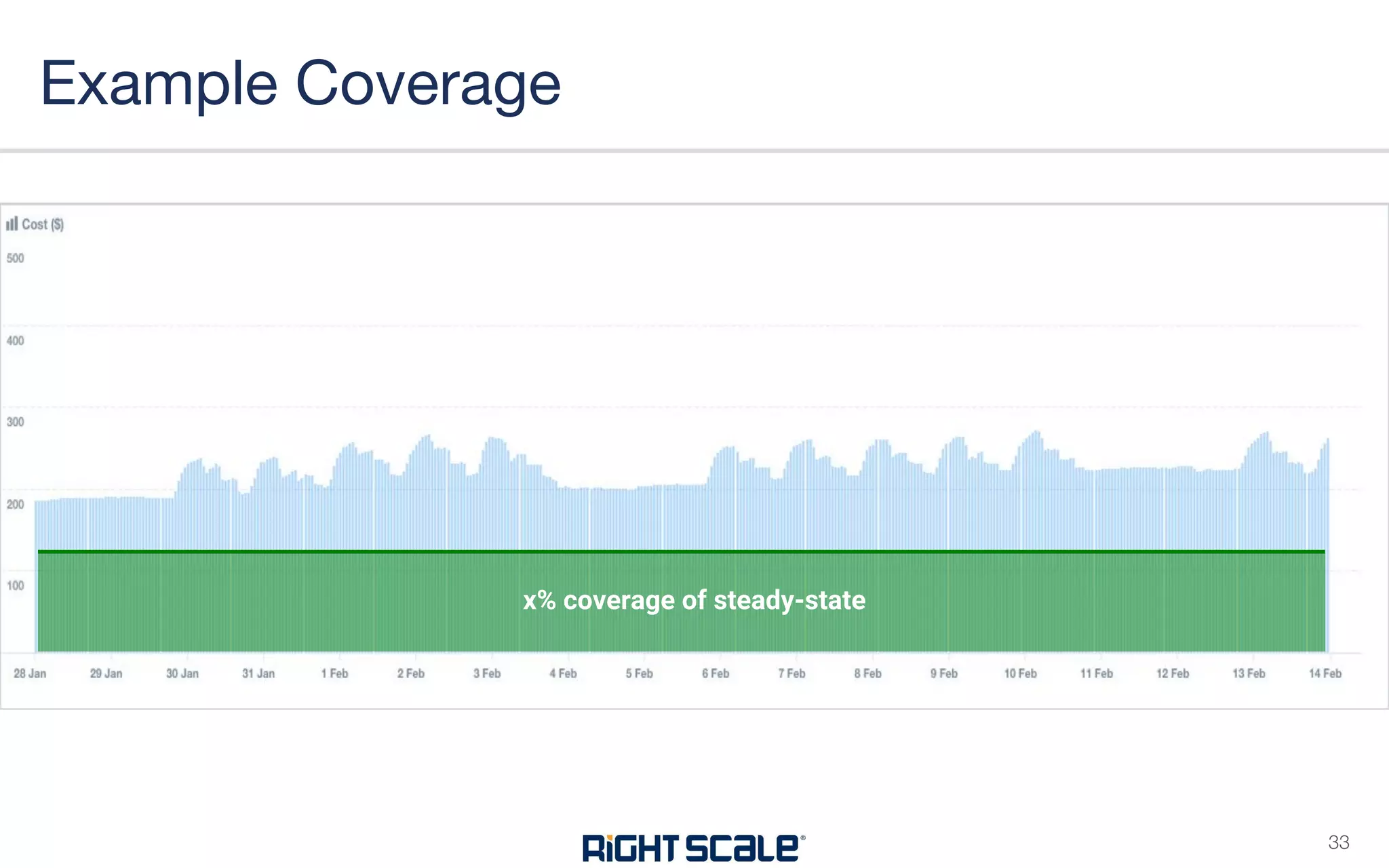
Example Coverage
x% coverage of steady-state
33
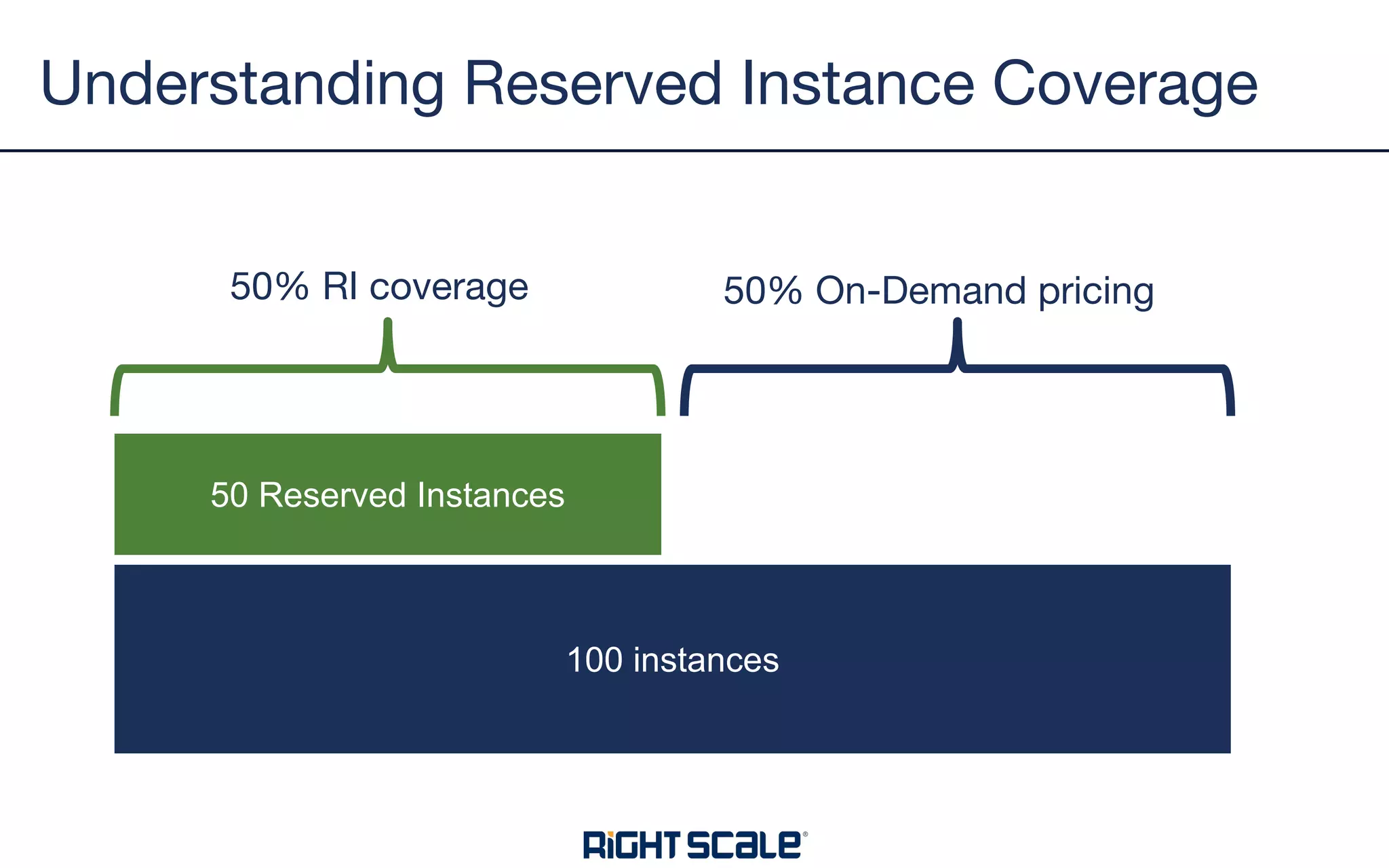
Understanding Reserved Instance Coverage
100 instances
50 Reserved Instances
50% RI coverage 50% On-Demand pricing
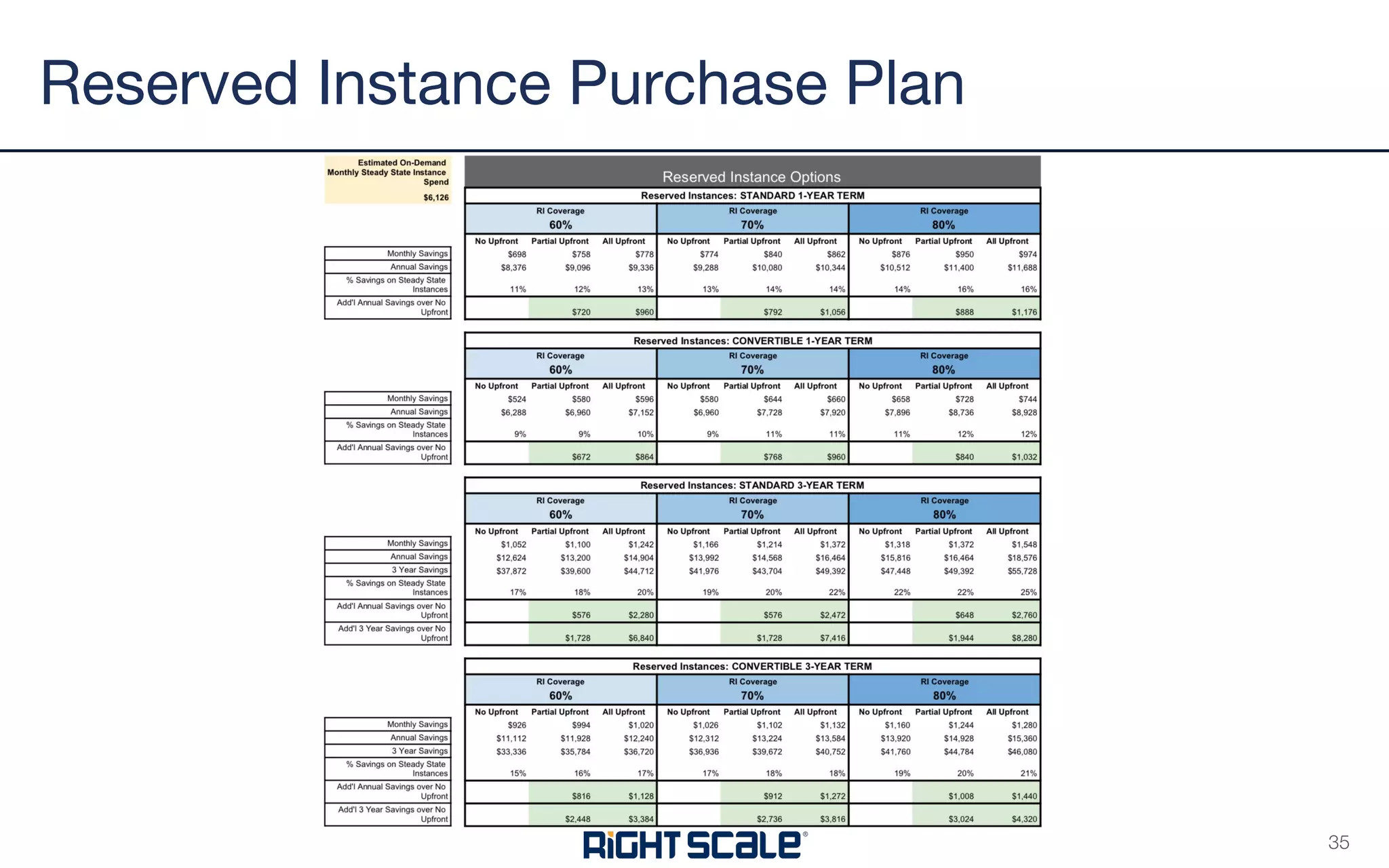
Reserved Instance Purchase Plan
35
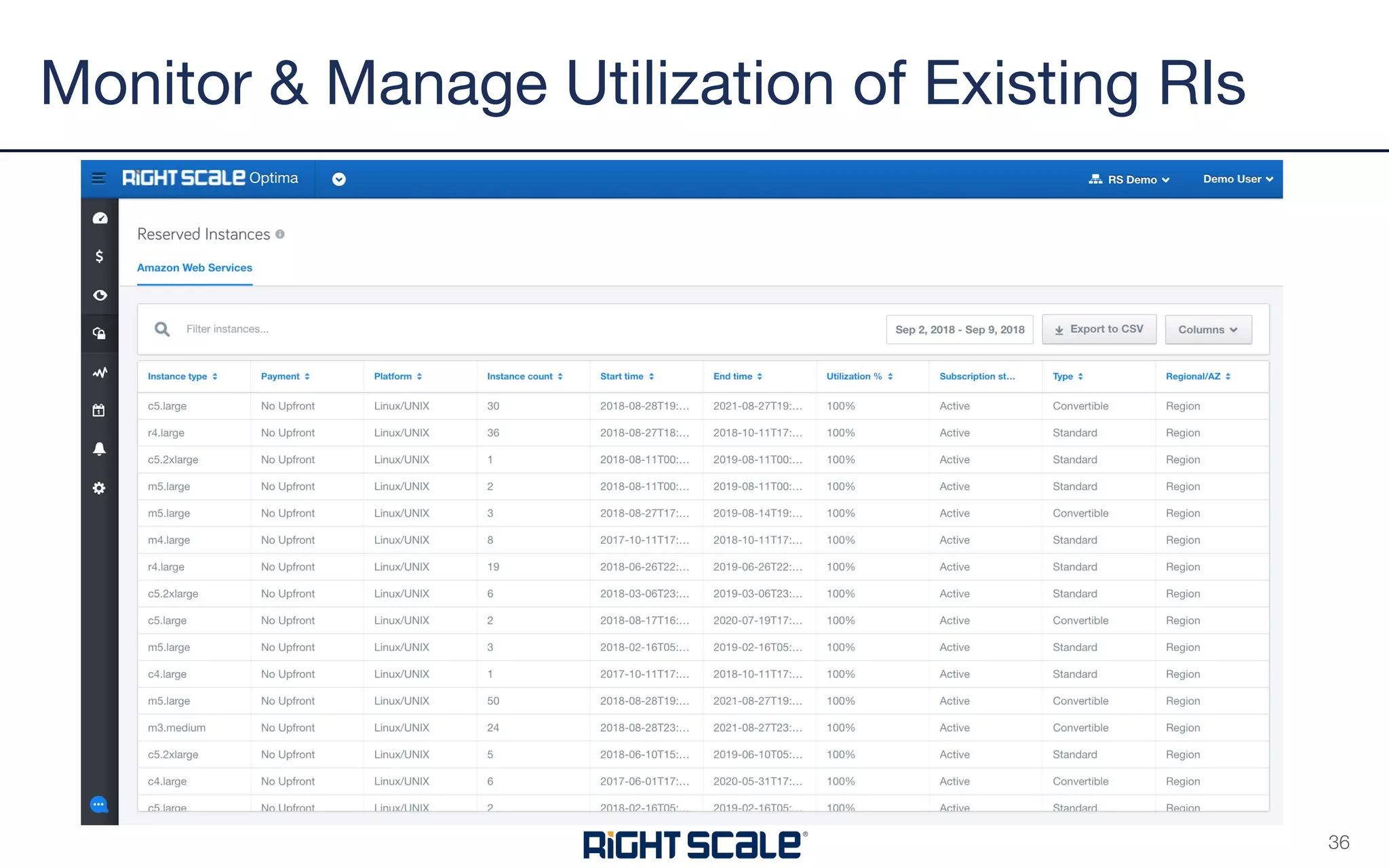
Monitor & Manage Utilization of Existing RIs
36
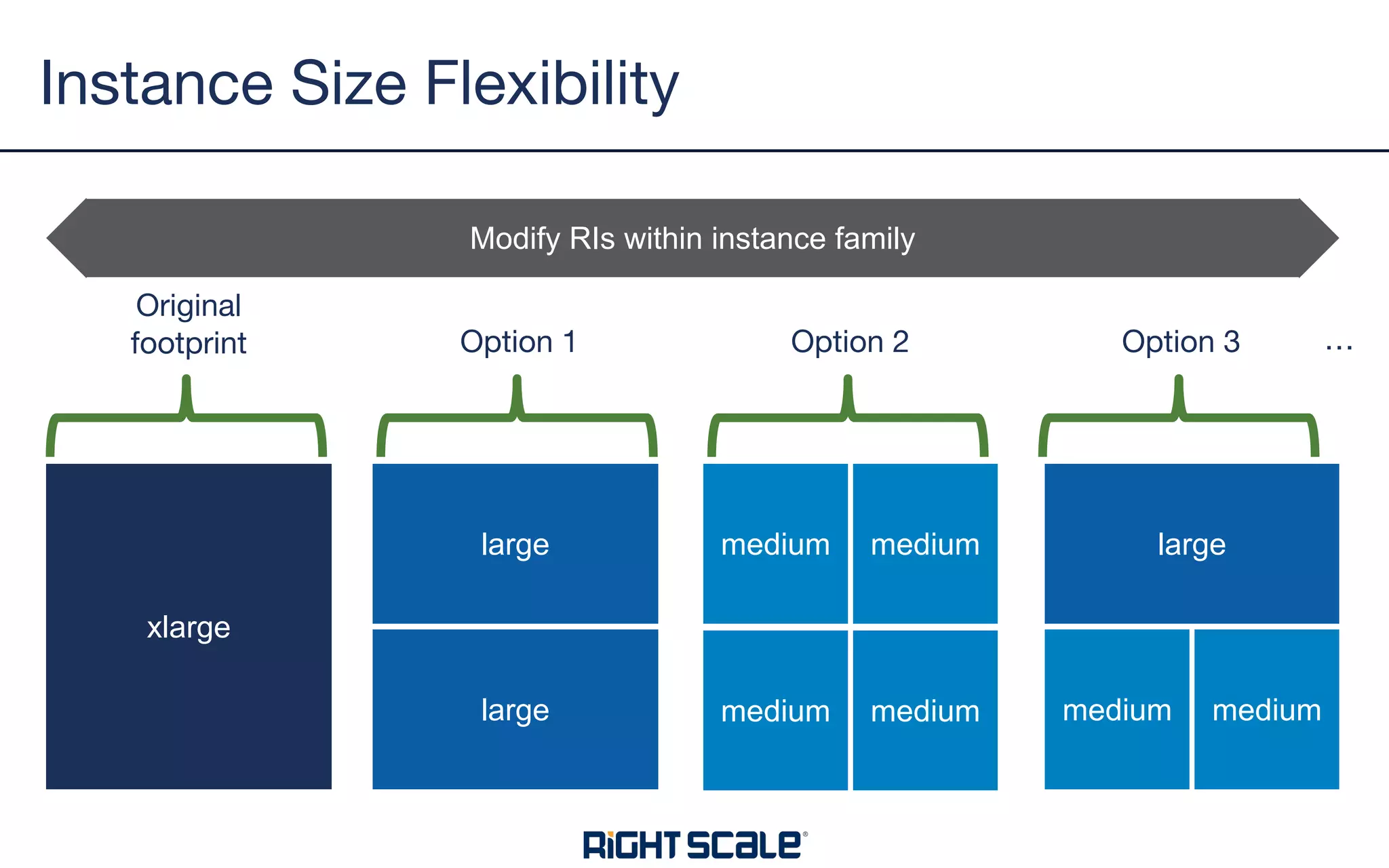
Instance Size Flexibility
xlarge
large
large
medium medium
medium medium
large
medium medium
Original
footprint Option 1 Option 2 Option 3
Modify RIs within instance family
…
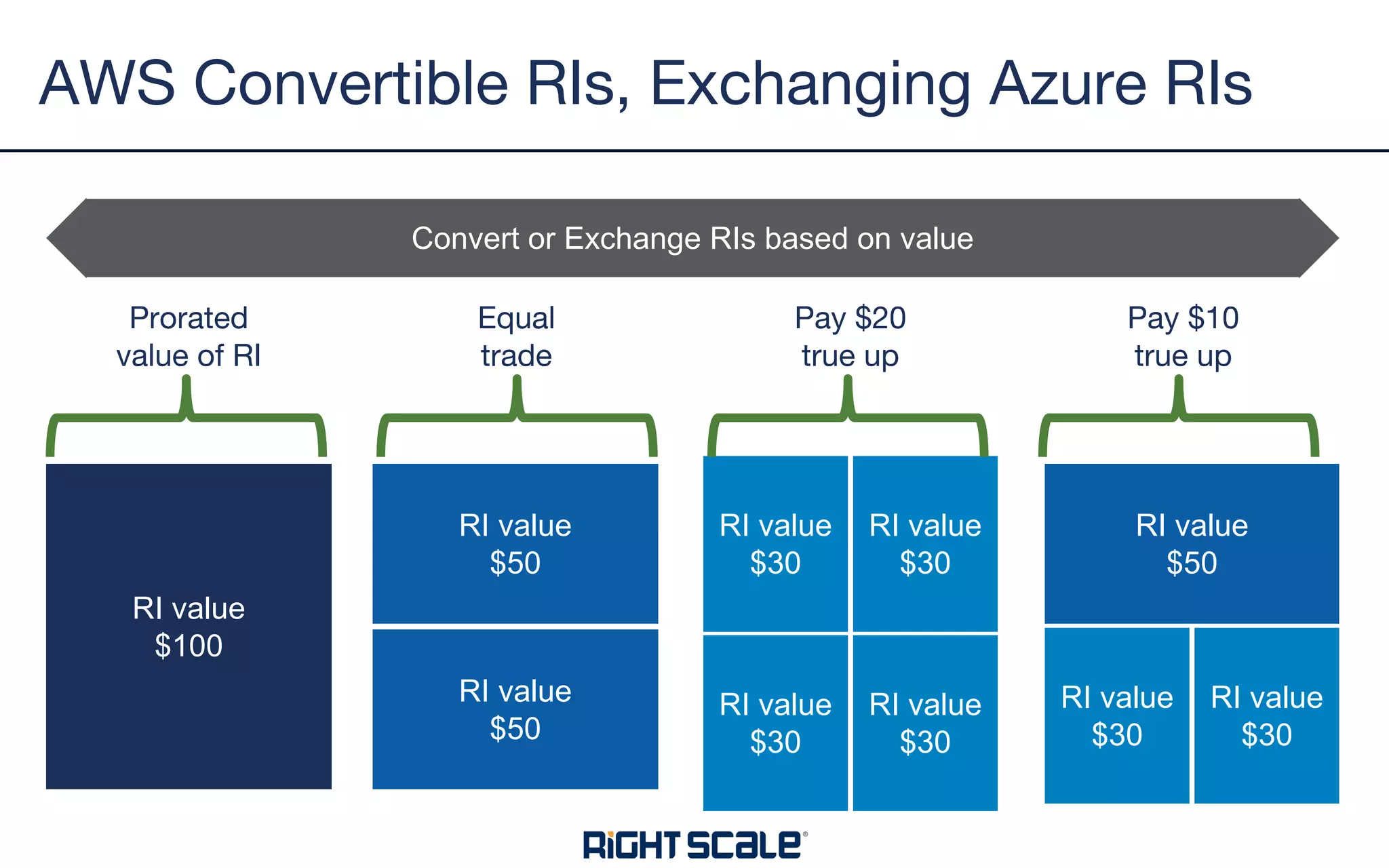
AWS Convertible RIs, Exchanging Azure RIs
RI value
$100
RI value
$50
RI value
$50
RI value
$30
RI value
$30
RI value
$30
RI value
$30
RI value
$50
RI value
$30
RI value
$30
Prorated
value of RI
Equal
trade
Pay $20
true up
Convert or Exchange RIs based on value
Pay $10
true up
• RI recommendations from your cloud sales rep will be
self-serving
• They want you locked into their cloud
• Consider other savings opportunities
• Consider future changes in cloud use
• Think coverage %
• 100% coverage is almost never right
• Carefully plan your RI purchases
• Track utilization and adjust RIs as you go
• Plan for how you will allocate costs
RI Takeaways
39
You need tools to manage cloud cost complexity
Put in place a team to focus on cloud cost management
Identify savings opportunities
Make sure you can allocate and report costs across the org
Project management and collaboration are key
Automated policies help you keep things optimized
RI planning and monitoring is an ongoing focus
Summary
40
Contact sales@rightscale.com for more info
Q&A
41

How to Set Up a Cloud Cost Optimization Process for your Enterprise

  • 1.
    HOW TO SETUP A CLOUD COST OPTIMIZATION PROCESS FOR YOUR ENTERPRISE
  • 2.
    • Brandon Willer •Director, Cloud Cost Strategy, RightScale • Megan Crandell • Product Manager, RightScale Presenters
  • 3.
    • Cloud CostTrends in the Market • Setting up your Cost Optimization Team • The Challenge of Cloud Bills • The Cost Optimization Process • Automated Policies • Ins/Outs of RIs Agenda 2
  • 4.
    Two Solutions fromRightScale RightScale Cloud Management Platform Orchestrate, automate and govern workloads across all your environments. VIRTUAL SERVERS PUBLIC CLOUDS ANY CLOUD SERVICE PRIVATE CLOUDS BARE METAL SERVERS CONTAINER CLUSTERS RightScale Optima Work collaboratively across the organization to manage and optimize clouds costs. Orchestration Cloud Workflow Plugins Monitoring Access Control Accounts/Groups Access/Permissions Tags Policies Cost Security/Compliance Operational RIGHTSCALE CMP ENGINE EXTENSIBLE ORCHESTRATION API
  • 5.
    Cloud Spend isGrowing 4
  • 6.
    Much of CloudSpend is Wasted 5
  • 7.
  • 8.
    Companies in EarlyStages of Optimizing Costs 7
  • 9.
  • 10.
    • Hundreds of thousandsto millions of line items each month • Need mechanism to consume massive amounts of data Cloud Bills Kill Spreadsheets 9
  • 11.
    Cost Allocation -Need to breakup/showback to owners 10 Priority Tags Accounts 1 env=test 2 env=prod 3 dept=qa 4 756122054 Allocation Rules Billing Centers Dev CS Sales Prod Dev Support Demo Marketing Demo Child Billing Centers
  • 12.
    • Vast differencebetween cloud providers in how they bill • Cloud products are priced differently (e.g. - GB vs. Hours) Not All Cloud Bills Are Made Equal 11
  • 13.
    Assess, Plan, Execute,Automate Assess Allocate Plan Collaborate Action Automate Govern
  • 14.
    • Need costchampions and a dedicated team • Key skill sets are financial analyst, project management, and basic technical background. • Need sponsorship from mgmt Setting up an Internal Cost Optimization Team 13 Financial / Data Analyst Project Management Cloud Technologist Executive Sponsorship
  • 15.
    Assess: Uncover Opportunitiesto Save Assess Allocate Plan Collaborate Action Automate Connect Cloud Bills Uncover Waste Identify Actual Opportunities Prioritize
  • 16.
    Allocate: Assign Costsfor Showback Reporting Assess Allocate Plan Collaborate Collaborate Automate “Bucket” costs into hierarchical groups, for example: ● Dev Teams ● Business Units ● Departments Combination of account or tag grouping Action
  • 17.
    Allocate: Provide Reportsfor Cloud Users Assess Allocate Plan Collaborate Collaborate Automate ● Build Custom Reports and Dashboard ● Define Budget Alerts when costs are forecast to exceed plan Action
  • 18.
    Plan: Key Areasof Focus Assess Allocate Plan Collaborate Action Automate IaaS Savings ● RightSizing - Relaunching with appropriately sized instances ● Instance Scheduling - Turn off during non-working hours ● Low cost regions - Move to geographically close locations ● Superseded Instances - Migrate to newer, cheaper instance types ● Azure AHUB Reserved Instance Discounts ● Existing RI or CUD Modification ● New RI or CUD Purchase Plan Storage Savings ● Unattached Volumes & snapshots ● Redundancy options (AZ vs regional) ● Lifecycle management (Hot/Cool/Cold) ● Migration to Azure GPv2 Tiering ● Premium to Standard Disk PaaS Savings ● Optimize Backup policies ● Rightsizing PaaS Discounts ● RedShift ● RDS ● ElastiCache ● DynamoDB
  • 19.
    Plan: Build actionableplan to remove waste Assess Allocate Plan Collaborate Action Automate Use initial assessment as springboard for action Tackle costs based on lowest hanging fruit first Many cost saving activities are dependent on one another, build project plan
  • 20.
    Collaborate: Work withresource owners Assess Allocate Plan Collaborate Collaborate Automate Find owners of resources to reduce waste Needs to be evidence based. Build cost analysis for each mini-project Share recommendations using RightScale or shared spreadsheets Action
  • 21.
    Action: Basic ProjectManagement Assess Allocate Plan Collaborate Collaborate Automate Define scope and build plan Schedule resource owners and execute on deliverables Analyze and track savings Action
  • 22.
    Automate: Implement AutomatedOutcomes Assess Allocate Plan Collaborate Collaborate Automate Setup automated policies ● Automatically delete unused storage ● Automatically resize overprovisioned instances ● Notifications when resources untagged Action
  • 23.
  • 24.
  • 25.
    • Out-of-the-box andcustom policies • One policy engine across all your clouds & services • Policies for any resource, regardless of how provisioned • Combine and test data from any API-enabled data source • Take any action on any API-enabled cloud/web services • Powerful workflow language for robust logic and actions What’s Unique About RightScale Policies 24
  • 26.
    From Alert Onlyto Fully Automated Resolution 25 Alert only Alert Approval Automated resolution Fully automated resolution Move toward full automation as you gain confidence in policy conditions
  • 27.
    Policy Incidents • PolicyIncidents are triggered events (email or action). • Full history and audit trail can be found in the Incidents page, along with all detail associated with that incident.
  • 28.
  • 29.
    • AWS • ReservedInstances (RIs) • Enterprise Discount Program (EDP) • Azure • Reserved Instances (RIs) • Enterprise Agreement (EA) • Google • Sustained Use Discounts (SUD) • Committed Use Discounts (CUD) • “Negotiated” Discount Discounts by Cloud Provider
  • 30.
    In exchange forthe discount you must: • Commit for 1 year or 3 years • Agree to specific parameters that limit where the discount can be applied • Pay up front and/or agree to pay for the RI monthly even if you don’t use it It’s like buying a gym membership - you pay even if you don’t go. What Is a Reserved Instance (RI) 29 A discount “coupon” that will be applied to a running cloud instance that meets the parameters of the RI you purchased
  • 31.
    RIs Are NotAlways the Best Way to Save 30 Savings for RI based on m5.large running Linux in US East. RI savings will vary based on instance type and region
  • 32.
    AWS RIs AzureRIs Google CUDs Buying Parameters Region or AZ Instance family or size Operating system Network type (VPC, Classic) Region Instance family Instance size Scope (Subscription, Shared) Region Project-scoped Machine type (General purpose or Memory-optimized) Exchangeable Convertible RIs: Yes Standard RIs: No Yes No Changeable Standard RIs: AZ (if Regional), Network, Instance size (if Regional and Linux) Yes, by exchanging or you can just change Scope Apply flexibly across vCPU and memory units consumed Returnable Can sell on Marketplace (often impossible to find buyers) Yes - return fee is 12% of remaining value No Payment Options No Upfront Partial Upfront All Upfront All Upfront No Upfront AWS/Azure RIs, Google CUDs: Key Differences
  • 33.
    Example Usage/Cost Pattern Productionand 24x7 dev usage Weekday dev usage * Data from real (anonymous) customer use cases
  • 34.
    Example Coverage x% coverageof steady-state 33
  • 35.
    Understanding Reserved InstanceCoverage 100 instances 50 Reserved Instances 50% RI coverage 50% On-Demand pricing
  • 36.
  • 37.
    Monitor & ManageUtilization of Existing RIs 36
  • 38.
    Instance Size Flexibility xlarge large large mediummedium medium medium large medium medium Original footprint Option 1 Option 2 Option 3 Modify RIs within instance family …
  • 39.
    AWS Convertible RIs,Exchanging Azure RIs RI value $100 RI value $50 RI value $50 RI value $30 RI value $30 RI value $30 RI value $30 RI value $50 RI value $30 RI value $30 Prorated value of RI Equal trade Pay $20 true up Convert or Exchange RIs based on value Pay $10 true up
  • 40.
    • RI recommendationsfrom your cloud sales rep will be self-serving • They want you locked into their cloud • Consider other savings opportunities • Consider future changes in cloud use • Think coverage % • 100% coverage is almost never right • Carefully plan your RI purchases • Track utilization and adjust RIs as you go • Plan for how you will allocate costs RI Takeaways 39
  • 41.
    You need toolsto manage cloud cost complexity Put in place a team to focus on cloud cost management Identify savings opportunities Make sure you can allocate and report costs across the org Project management and collaboration are key Automated policies help you keep things optimized RI planning and monitoring is an ongoing focus Summary 40
  • 42.