Analysis and Design
Document
Version 3.1
12/13/2013

Restaurant Management System
Object Oriented Software Engineering
SE 6301

Ajit Gogul Balakrishnan Kannan
Harika Jammula
Narla Sandeep Narla Saibaba
Prabhakar Ganesamurthy
Sai Madhu Saranya Kachireddy

Page 1
Revision History
Version
Inception draft

Date
11/4/2013

Description
First draft. To be refined
primarily during elaboration.

Author
…

Elaboration 1 Draft 1

11/16/2013

…

Elaboration 1 Draft 2

12/3/2013

Elaboration 1 Draft 3

12/13/2013

First draft. To be refined
primarily later
Second draft. To be refined
primarily later
Revised draft.

Page 2

…
Table of Contents
1. Use Case Diagram
2. Use Case Descriptions
3. Domain Model
4. System Sequence Diagram
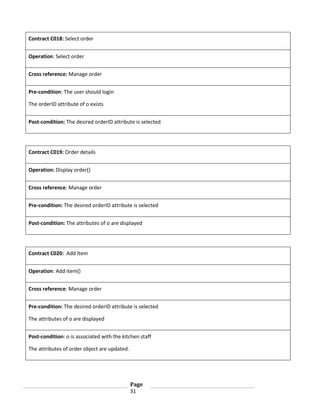
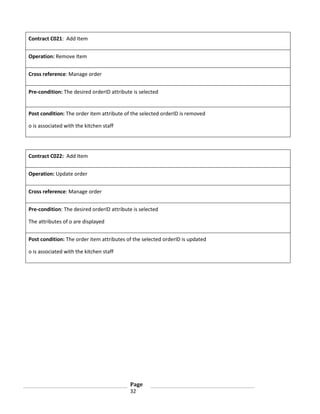
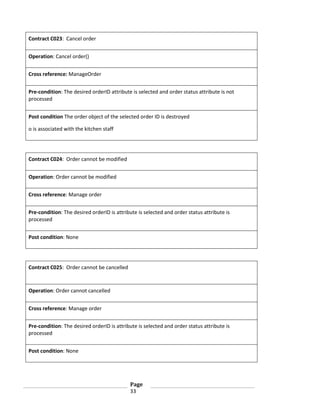
5. Operation Contracts
6. Subsystem Diagram
7. Use case Realization
8. Design Class Diagram
9. Glossary of terms
10. Screenshots

…4
...8
...17
...20
...24
...35
…38
…42
…44
…46

Page 3
1. Use Case Diagrams
Version 2.1
12/3/2013

Restaurant Management System

Page 4
Revision History
Version
Inception draft

Date
11/16/2013

Description
Inception draft. To be refined
primarily later

Author
…

Elaboration 1 Draft 1

11/16/2013

…

Elaboration 2 Draft 1

12/3/2013

First draft. To be refined
primarily later
Second draft. To be refined
primarily later

Page 5

…
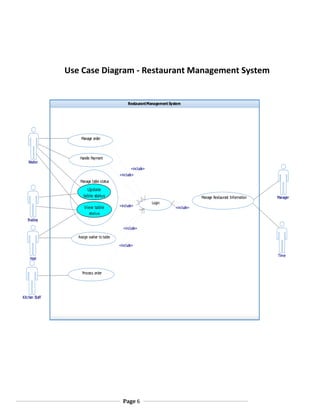
Use Case Diagram - Restaurant Management System

Restaurant Management System

Manage order

Waiter

Handle Payment
«include»
«include»
Manage table status

Update
table status
View table
status

Manage Restaurant Information
«include»

Login

Manager

«include»

Busboy
«include»
Assign waiter to table
«include»
Time

Host
Process order

Kitchen Staff

Page 6
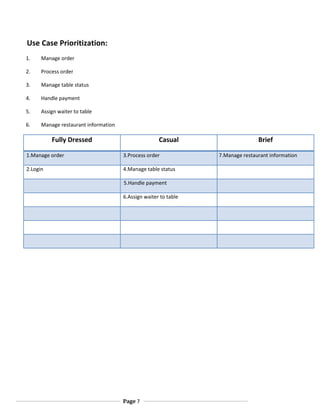
Use Case Prioritization:
1.

Manage order

2.

Process order

3.

Manage table status

4.

Handle payment

5.

Assign waiter to table

6.

Manage restaurant information

Fully Dressed

Casual

1.Manage order

3.Process order

2.Login

4.Manage table status
5.Handle payment
6.Assign waiter to table

Page 7

Brief
7.Manage restaurant information
2. Use Case Descriptions
Version 2.0
11/16/2013

Restaurant Management System

Page 8
Revision History
Version

Date

Description

1.0 Inception
draft

11/16/2013

Refined

2.0 Elaboration
1 draft 1

11/16/2013

First draft. To be refined primarily later

3.0
Elaboration 2
draft 1

12/13/2013

Refined draft.

Page 9

Author
Brief Use case descriptions:
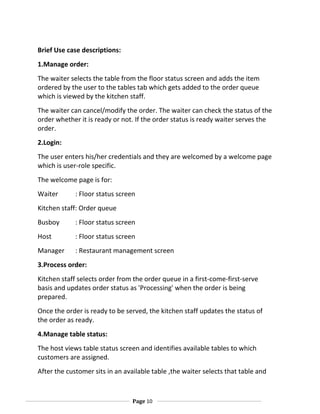
1.Manage order:
The waiter selects the table from the floor status screen and adds the item
ordered by the user to the tables tab which gets added to the order queue
which is viewed by the kitchen staff.
The waiter can cancel/modify the order. The waiter can check the status of the
order whether it is ready or not. If the order status is ready waiter serves the
order.
2.Login:
The user enters his/her credentials and they are welcomed by a welcome page
which is user-role specific.
The welcome page is for:
Waiter

: Floor status screen

Kitchen staff: Order queue
Busboy

: Floor status screen

Host

: Floor status screen

Manager

: Restaurant management screen

3.Process order:
Kitchen staff selects order from the order queue in a first-come-first-serve
basis and updates order status as 'Processing' when the order is being
prepared.
Once the order is ready to be served, the kitchen staff updates the status of
the order as ready.
4.Manage table status:
The host views table status screen and identifies available tables to which
customers are assigned.
After the customer sits in an available table ,the waiter selects that table and

Page 10
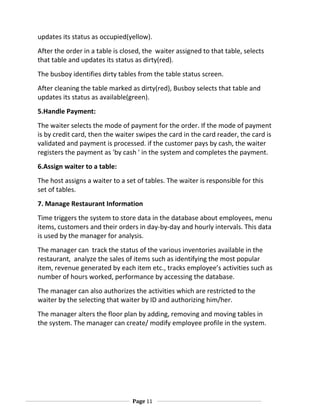
updates its status as occupied(yellow).
After the order in a table is closed, the waiter assigned to that table, selects
that table and updates its status as dirty(red).
The busboy identifies dirty tables from the table status screen.
After cleaning the table marked as dirty(red), Busboy selects that table and
updates its status as available(green).
5.Handle Payment:
The waiter selects the mode of payment for the order. If the mode of payment
is by credit card, then the waiter swipes the card in the card reader, the card is
validated and payment is processed. if the customer pays by cash, the waiter
registers the payment as 'by cash ' in the system and completes the payment.
6.Assign waiter to a table:
The host assigns a waiter to a set of tables. The waiter is responsible for this
set of tables.
7. Manage Restaurant Information
Time triggers the system to store data in the database about employees, menu
items, customers and their orders in day-by-day and hourly intervals. This data
is used by the manager for analysis.
The manager can track the status of the various inventories available in the
restaurant, analyze the sales of items such as identifying the most popular
item, revenue generated by each item etc., tracks employee’s activities such as
number of hours worked, performance by accessing the database.
The manager can also authorizes the activities which are restricted to the
waiter by the selecting that waiter by ID and authorizing him/her.
The manager alters the floor plan by adding, removing and moving tables in
the system. The manager can create/ modify employee profile in the system.

Page 11
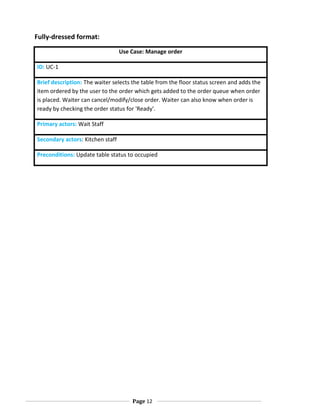
Fully-dressed format:
Use Case: Manage order
ID: UC-1
Brief description: The waiter selects the table from the floor status screen and adds the
item ordered by the user to the order which gets added to the order queue when order
is placed. Waiter can cancel/modify/close order. Waiter can also know when order is
ready by checking the order status for 'Ready'.
Primary actors: Wait Staff
Secondary actors: Kitchen staff
Preconditions: Update table status to occupied

Page 12
Main flow:
1. Include : Login.
2. Select table from the floor status screen.
3. System provides waiter with an electronic menu
4. For each item ordered by the user
4.1 The waiter selects the item from electronic menu and adds it to the order
5. After all ordered items have been added, the waiter places the order.
6. The order gets added to the order queue
7. System notifies the kitchen staff that a new order has been placed in the order queue.
8.If order needs to be modified
8.1 Select order
8.2 if order status != 'Processing'
8.2.1 Add/Remove items in the order
8.2.2 Update order
else
8.2.1 Display 'Order cannot be modified'
9.If order needs to be cancelled
9.1 Select order
9.2 if order status != 'Processing'
9.2.1 Cancel order
9.2.2 Update order status as 'Cancelled'.
9.2.3 Order is removed from the queue.
else
9.2.1 Display order cannot be cancelled.

Page 13
Post conditions:
If order is placed/modified:
1. The order is closed when order is served, payment for the order is complete and
customer leaves the table.
If order is cancelled:
1.Order is removed from the order queue if it is not processed.
Non-Functional requirements:
The waiter needs to place the order in minimal time, so the electronic menu
should be organized and quick to use
The order placed must be placed in the order queue within 1 second.
Order modifications/cancellation should be reflected in the order queue within 1
second.
Technology and Data Variation List: None
Open Issues: None

Page 14
Use case: Login
ID: UC-2
Brief description: The user enters the login credentials to access their
profile.
Primary actors: Kitchen staff, Waiter, Bus-boy, Manager, Host
Secondary actors: None
Preconditions:
network

Access to a terminal which has access to the system

Main flow:
1. User selects the login button on the screen
2. System prompts for username and password
3. The user enters the required information
4. The system validates the input of the user and the appropriate user
interface is displayed. Waiter : Floor status screen
Kitchen staff: Order queue
Busboy

: Floor status screen

Host

: Floor status screen

Manager

: Restaurant management screen

Post conditions: The user is successfully logged into the system and is
greeted by a welcome screen.
Non-Functional requirements: Login authentication should take not more
than 3 seconds.
Technology and Data Variation List: None
Open Issues: None

Page
15
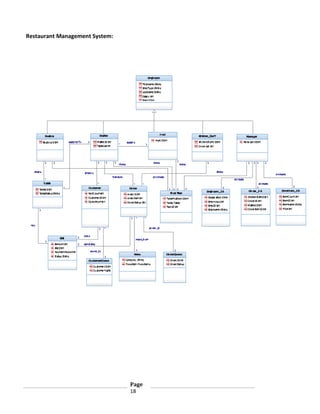
3.Domain Model
Version 2.1
12/10/2013

Page
16
Revision history:
Version
Elaboration 1 Draft 1

Date
11/16/2013

Elaboration 2 Draft 1

Description
First draft. To be refined
primarily later
Refined draft

12/10/2013

Page
17

Author
…
…
Restaurant Management System:

Page
18
4.System Sequence Diagram
Version 2.0
12/3/2013

Page
19
Revision history:
Version
Elaboration 1 Draft 1

Date
11/16/2013

Elaboration 2 Draft 1

12/3/2013

Description
First draft. To be refined
primarily later
Refined draft

Elaboration 3 Draft 1

12/13/2013

Revised draft

Page
20

Author
…
…
ManageOrder:
:Wai ter

Sys tem

Ref
Lo
gin

Sel ec t()
T abl e selec ted
Men
u

lo
op

[f or eac h it em s
s el ec t()

o
rdered]

category
Cat ego
ry i tems

Sel ec t()

l i st

it em
Item

add
ed to o
rder

Place() order
Place() order

in ord
er qu
eu
e

No if y()
t

Up
date() o
rder

i n dat abas e

Order p aced
l

op
t

[If

mod f y _o
i
rder ==true]

Sel ec t()
ord
er detai l s
alt

[If

o
rder _ tat u !=pro ess ing||ready]
s
s
c

lo
op

[Fo
r

each i tem

t o be add
ed
]

Ad
d()
Item

lo
op

[Fo
r

each i tem

add
ed

t o be r em o ed
v
]

Rem ove()
Item

rem oved

Up
date()
Place() order

in ord
er qu
eu
e

No if y()
t

Up
date()

o d
r er i n databas e

Order u
pdated

[els e]
ord
er c ann
ot be mod f i ed
i

op
t

[If
Sel ec t()

Cancel _
ord
er== true]

o
rder
ord
er detai l s

alt

[If

o
rder _ tat u !=pro ess ing||ready]
s
s
c

Canc el () order
Rem ove() order

No if y()
t

[els e]

Order cann
ot be c ancel l ed

Lo
go
ut()

Page
21

order queue

K it chen st af f

Rem ove() order

Order cancell ed

f ro
m

f ro
m

Database
Login:
:Employee

System

Ent erCredentials()
Authent icate()

alt

[If Authentication== Successful]

opt

[If Employee==Waiter||Busbo||Host]
FloorStatusScreen

opt

[If Employee==Manager]
RestaurantManagementScreen

opt

[If Employee==K it chenSt af f]
O rderQueueScreen

[If Authent ication==Failure]
Authent ication Failed

Page
22
5.Operation Contracts
Version 1
11/16/2013

Page
23
Revision history:
Version
Elaboration 1 Draft 1

Date
11/16/2013

Elaboration 2 Draft 1

Description
First draft. To be refined
primarily later
Refined draft

12/3/2013

Page
24

Author
…
…
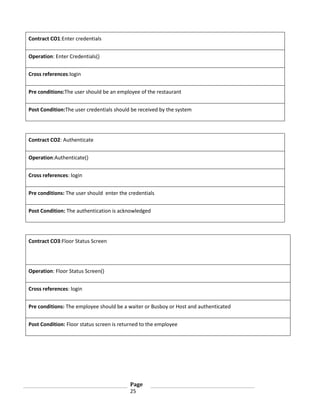
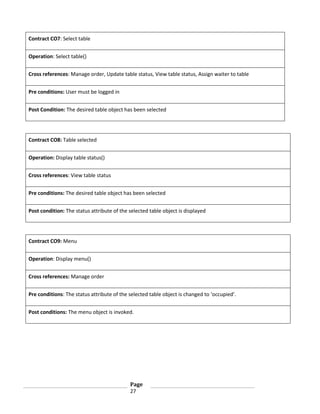
Contract CO1:Enter credentials
Operation: Enter Credentials()
Cross references:login
Pre conditions:The user should be an employee of the restaurant
Post Condition:The user credentials should be received by the system

Contract CO2: Authenticate
Operation:Authenticate()
Cross references: login
Pre conditions: The user should enter the credentials
Post Condition: The authentication is acknowledged

Contract CO3:Floor Status Screen

Operation: Floor Status Screen()
Cross references: login
Pre conditions: The employee should be a waiter or Busboy or Host and authenticated
Post Condition: Floor status screen is returned to the employee

Page
25
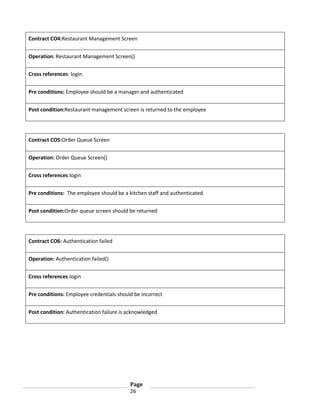
Contract CO4:Restaurant Management Screen
Operation: Restaurant Management Screen()
Cross references: login
Pre conditions: Employee should be a manager and authenticated
Post condition:Restaurant management screen is returned to the employee

Contract CO5:Order Queue Screen
Operation: Order Queue Screen()
Cross references:login
Pre conditions: The employee should be a kitchen staff and authenticated
Post condition:Order queue screen should be returned

Contract CO6: Authentication failed
Operation: Authentication failed()
Cross references:login
Pre conditions: Employee credentials should be incorrect
Post condition: Authentication failure is acknowledged

Page
26
Contract CO7: Select table
Operation: Select table()
Cross references: Manage order, Update table status, View table status, Assign waiter to table
Pre conditions: User must be logged in
Post Condition: The desired table object has been selected

Contract CO8: Table selected
Operation: Display table status()
Cross references: View table status
Pre conditions: The desired table object has been selected
Post condition: The status attribute of the selected table object is displayed

Contract CO9: Menu
Operation: Display menu()
Cross references: Manage order
Pre conditions: The status attribute of the selected table object is changed to ‘occupied’.
Post conditions: The menu object is invoked.

Page
27
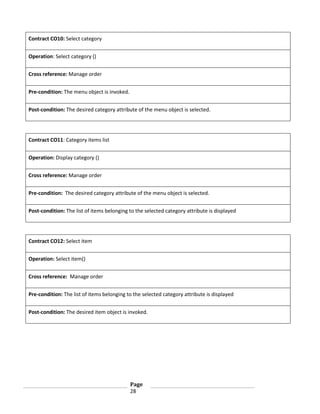
Contract CO10: Select category
Operation: Select category ()
Cross reference: Manage order
Pre-condition: The menu object is invoked.
Post-condition: The desired category attribute of the menu object is selected.

Contract CO11: Category items list
Operation: Display category ()
Cross reference: Manage order
Pre-condition: The desired category attribute of the menu object is selected.
Post-condition: The list of items belonging to the selected category attribute is displayed

Contract CO12: Select item
Operation: Select item()
Cross reference: Manage order
Pre-condition: The list of items belonging to the selected category attribute is displayed
Post-condition: The desired item object is invoked.

Page
28
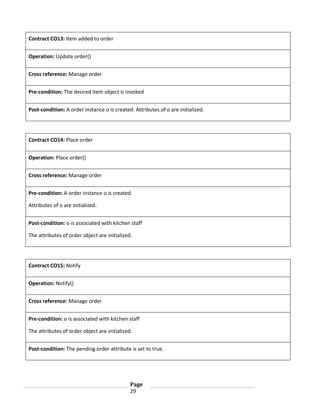
Contract CO13: Item added to order
Operation: Update order()
Cross reference: Manage order
Pre-condition: The desired item object is invoked
Post-condition: A order instance o is created. Attributes of o are initialized.

Contract CO14: Place order
Operation: Place order()
Cross reference: Manage order
Pre-condition: A order instance o is created.
Attributes of o are initialized.
Post-condition: o is associated with kitchen staff
The attributes of order object are initialized.

Contract CO15: Notify
Operation: Notify()
Cross reference: Manage order
Pre-condition: o is associated with kitchen staff
The attributes of order object are initialized.
Post-condition: The pending order attribute is set to true.

Page
29
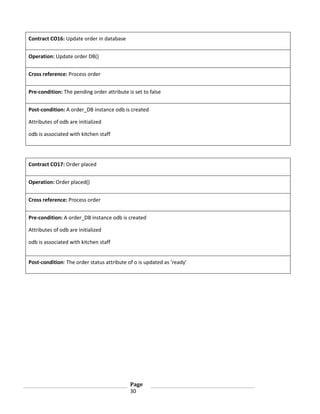
Contract CO16: Update order in database
Operation: Update order DB()
Cross reference: Process order
Pre-condition: The pending order attribute is set to false
Post-condition: A order_DB instance odb is created
Attributes of odb are initialized
odb is associated with kitchen staff

Contract CO17: Order placed
Operation: Order placed()
Cross reference: Process order
Pre-condition: A order_DB instance odb is created
Attributes of odb are initialized
odb is associated with kitchen staff
Post-condition: The order status attribute of o is updated as ‘ready’

Page
30
Contract C018: Select order
Operation: Select order
Cross reference: Manage order
Pre-condition: The user should login
The orderID attribute of o exists
Post-condition: The desired orderID attribute is selected

Contract C019: Order details
Operation: Display order()
Cross reference: Manage order
Pre-condition: The desired orderID attribute is selected
Post-condition: The attributes of o are displayed

Contract C020: Add Item
Operation: Add item()
Cross reference: Manage order
Pre-condition: The desired orderID attribute is selected
The attributes of o are displayed
Post-condition: o is associated with the kitchen staff
The attributes of order object are updated.

Page
31
Contract C021: Add Item
Operation: Remove Item
Cross reference: Manage order
Pre-condition: The desired orderID attribute is selected

Post condition: The order item attribute of the selected orderID is removed
o is associated with the kitchen staff

Contract C022: Add Item
Operation: Update order
Cross reference: Manage order
Pre-condition: The desired orderID attribute is selected
The attributes of o are displayed
Post condition: The order item attributes of the selected orderID is updated
o is associated with the kitchen staff

Page
32
Contract C023: Cancel order
Operation: Cancel order()
Cross reference: ManageOrder
Pre-condition: The desired orderID attribute is selected and order status attribute is not
processed
Post condition The order object of the selected order ID is destroyed
o is associated with the kitchen staff

Contract C024: Order cannot be modified
Operation: Order cannot be modified
Cross reference: Manage order
Pre-condition: The desired orderID is attribute is selected and order status attribute is
processed
Post condition: None

Contract C025: Order cannot be cancelled

Operation: Order cannot cancelled
Cross reference: Manage order
Pre-condition: The desired orderID is attribute is selected and order status attribute is
processed
Post condition: None

Page
33
6.Sub-system Diagram
Version 2
12/3/2013

Page
34
Revision history:
Version
Elaboration 1 Draft 1

Date
11/16/2013

Elaboration 2 Draft 1

Description
First draft. To be refined
primarily later
Refined draft

12/3/2013

Page
35

Author
…
…
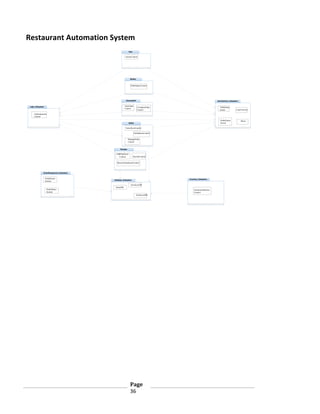
Restaurant Automation System
Host

QueueControl

Busboy

TableStatusControl

KitchenStaff

TakeOrder
Control

Login_Subsystem

UserInterface_Subsystem

CompleteOrder
Control

TableStatus
screen

Login Screen

Authentication
Control
OrderQueue
Screen

Waiter

SelectItemControl
TableStatusControl
ManageOrder
Control

Manager

AddEmployee
Control

PayrollControl

RemoveEmployeeControl

OrderManagement_Subsystem

OrderQueue
System

Inventory_Subsystem

Database_Subsystem

InventoryDB
OrderDB
OrderStatus
System

InventoryStatistics
Control
EmployeeDB

Page
36

Menu
7.Use Case Realization
Version 2
12/10/2013

Page
37
Revision history:
Version
Elaboration 2 Draft 1

Date
12/3/2013

Description
First draft. To be refined later.

Elaboration 3 Draft 1

12/10/2013

Refined draft

Page
38

Author
…
Manage Order:
:Wai t
e r

:Wai t
e r
G U I

:C ont roll erG U I

:M enu

:C ont roll erO rder

:O rder

:O rderQ ueu e

:O rderD B

:K i t chenS t af
fG U I

R ef

Log in
se le ct
_ t ab le (
)
t ab le _t ab

creat e_ order()
cre
at e o
_ rde
r_
re
qu st (W
e
ait erI
D,

Ta
bleID
)

cre
at e o
_ rde
r_
re
qu st (W
e
ait erI
D,Ta
bleID
)

cre
at e
(wa t e
i
rID
,t a l e
b
ID)
set
_W i t e
a
rID
,T a l e
b
ID

m e nu_ cat e go r es
i

l oop

sele
c t_
ca eg ry(na
t
o
me
)

o
rd
er_
cre
at e
d

orde r

orde r
ge t _m e nu (
)

ge t C at eg ori es()

cat eg ories

cat eg ories

[f or

e ach

it em

to

be

ad ded]

sele
c t_
ca eg ry(na
t
o
me
)
g
et
_ca e
t
go
ry_ t e
i
ms (n me)
a

me
nu c a e o
_
t
g ry _ t e
i
ms

sel ect _l ist _i t
e m(
)
A dd ()

ca t
e go r
y _ it em s

ca t
e go r
y _ it em s

up da t
e _i t em s _li st
a
dd i t e
_
ms_re u
q est (o
rd r,A d e
e
d dIt e
msL ist )
a
dd i t e
_
ms_re u
q est (o
rd r,It e
e
ms Li st )

u
pd t e
a
_it e
m _ st (o
li
rde
r,I emsLi st )
t
i te
m_
ad e
d d

orde r
orde r
ad ded_ it em _l ist

l oop

[f or

e ach

it em

to

be

rem ov ed]

sel ect _l ist _i t
e m(
)
R em ov e()

up da t
e _i t em s _li st
a
dd i t e
_
ms_re u
q est (o
rd r,A d e
e
d dIt e
msL ist )
a
dd i t e
_
ms_re u
q est (o
rd r,A d e
e
d dIt e
msL ist )
u
pd t e
a
_it e
m _ st (o
li
rde
r,I emsLi st )
t

orde r
orde r
orde r
up da t
e d_ it e m _l ist

pl ace_ order()
con irm _ rd r
f
o
e
al t

[order

co nf irm _ ord er()

orde r
_ conf irm ed (
or
d er
)

is

con fi rm ed]

pl ace_ order_requ est (
or
d er)
ge t
_ order()
ord erI D
set
_o
rd r_st a u
e
t
s_
In
Qu ue
e

st ore_o r
d er(
or
d er)

succe ss

o
rd
er_ l a
p
ced
o
rd
er_ l a
p
ced
S o
t
red

[order

not

conf i r
m e d]

no t _co nf irm ed()
ad de d_i t em s_l ist

l oop

[if

m odi f y _o r
d er=t rue]

S
ele
c t Or
de
r()
Mo i f yOrd
d
er(
)

C h ck Or
e
de
rS a us(o
t
t
rd
er
ID)

o
rd
er_ e ail s
d t

ord erS t
a t us
o
rd
er_ e ail s
d t

op t

[if (orderS t
st us!
= P rocessi ng| | R ead y
)]

l oop

[f or

cat eg ories
sele
c t_
ca eg ry(na
t
o
me
)

e ach

it em

to

be

ad ded]

sele
c t_
ca eg ry(na
t
o
me
)
g
et
_ca e
t
go
ry_ t e
i
ms (n me)
a

ca t
e go r
y _ it em s

ca t
e go r
y _ it em s

ca t
e go r
y _ it em s

sele
c t_ t
i em(it emID
)
sele
c t_ t
i em(it emID
)
a
dd i t e
_
m_
req e
u s t( te
i
mI
D)
a
dd i t e
_
m_ o_ st (i t e
t
li
mID)
i te
m_
ad e
d d

i te
m_
ad e
d d

it
e m

ad de d

ad de d_i t em _l ist

l oop

[f or

e ach

it em

to

be

rem ov ed]

se le ct
_ li st _i t em (i t em I D )
l ist _ it em _se le ct
e d
re
move i t e
_
m(i t e
mID)
re
move i t e
_
m(i t e
mID)
re
move i t e
_
m_re u
q est (i t
emID
)
re
move i t e
_
m_f ro
m_ i st (it emID
l
)
i te
m_
remo
ve
d
i te
m_
remo
ve
d

i te
m_
remo
ve
d

up da t
e d_ it e m _l ist
mo
dif y _ rd
o
er
()
con irm _ rd r
f
o
e

al t

co nf irm _ ord er()

[order
orde r
_ conf irm ed (
or
d er
)

is

con fi rm ed]

pl ace_ order_requ est (
or
d er)

set
_o
rd r_st a u
e
t
s_
In
Qu ue
e

st ore_o r
d er(
or
d er)

succe ss

o
rd
er_ l a
p
ced
o
rd
er_ l a
p
ced

U pd at ed

[order

not

conf i r
m e d]

no t _co nf irm ed()
ad de d_i t em s_l ist

[el se]

Ord r_ca no _ e_
e
n
t
b
mo
dif i e
d

al t

[if

S
ele
c t _ rd
o
er(
)
rem ov e_o rde r
()

cance l_o r
d er=t rue]

C h ck Or
e
de
rS a us(o
t
t
rd
er
ID)
o
rd
er_ e ail s
d t

ord erS t
a t us
o
rd
er_ e ail s
d t

al t

[if

order_st at us!
= processi ng| | read y ]

re
move _ rde
l
o
r(o
rd rID)
e
re
move ord r_
_
e
req e
u s t (o
rd rID)
e
re
move ord r(o
_
e
rde
rID
)

ord er_re m ov ed
ge t O rde r
Q

ue ue()

orde r
Li st

ord er_ca nce ll ed

ord er_ca nce ll ed

ord er_ca nce ll ed

t ab le _t ab

[el se]

o
rd
er_
ca
nn t _
o
be can
_
cell e
d

Login:
:employee

:LoginGUI

:ControllerGUI

:WaiterGUI

:KitchenStaffGUI

:EmployeeDB

enter_credentials(ID, pass)
send_credentials(ID, pass)
get_details(ID)
alt

[if ID=valid]

password,designation

authenticate(pass)

alt

[if authentication==success]

alt

[if designation=waiter]

Create(designation)

Page
39
waiter_table_screen

getTables(UserID)

[else if designation=kitchen_staff]

tables_list

:OrderQueue
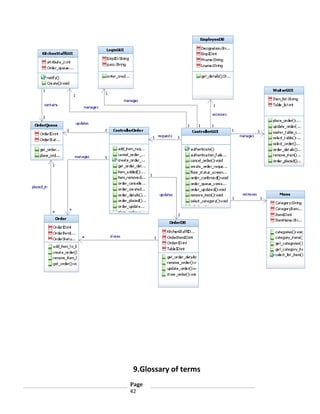
8.Design Class Diagram
Version 1
12/11/2013

Revision history:
Version

Date

Description

Page
40

Author
Elaboration 2 Draft 1

12/3/2013

First draft. To be refined later.

Elaboration 3 Draft 1

12/11/2013

Refined

Design Class Diagram:

Page
41

…
9.Glossary of terms
Page
42
1. Employee – Any individual who is involved in the day to day activities of the
restaurant, including cooks, bus boys, kitchen staff, waiters, managers and hosts.
2. Manager – Type of employee with the highest administrative authority, with the power to change the status of all
other employee types, and access to restaurant statistics and floor plan.
3. Customer – Any individual who is benefitted by the restaurant automation system and the employees working
within its framework.
4. Kitchen Staff – Type of employee who is responsible for processing the orders submitted by the waiter in the order
queue.
5. Waiter – Type of employee who is responsible to interact with the customer by creating, modifying and cancelling
orders and to keep the order queue up to date
6. Host – Type of employee who welcomes the customer and directs them to an available table. The role of host can
be performed by both manager and waiter.
7. Bus Boy – Type of employee who is responsible to keep the tables clean and to change the status of the table from
dirty to clean upon completion.
8. Table – A physical object in which the prepared food is presented to the customer, for which a waiter is assigned.
9. Table Status – Shows the status of a table and the waiter who is assigned to that table.
10. Dirty – A type of table status indicating the condition which implies that it is not being currently occupied by any
customers and needs to be cleaned to make it available to a new customer.
11. Busy – A type of table status indicating the condition where it cannot be assigned to a new customer and also
that it cannot be cleaned.
12. Ready – A type of table status indicating the condition that it is ready for service and that it can be assigned to a
new customer.
13. Order – A description submitted by the waiter, which is to be cooked and eventually
delivered to the table from which it has been ordered.
14. Order Status – Used to know the status of the order placed by the customer based on which the waiter decides
what needs to be done.
15. Processing – A type of order status which means that the order is currently being cooked and the order cannot be
modified after this.
16. Ready – A type of order status which means that the order has been cooked and ready to be served to the
customer.
17. Payroll – Used for calculating the salary of an employee based on the number of hours worked. It
differs based on the designation of the employee.

Page
43
18. Menu – List of dishes available in the restaurant from which the waiter chooses from based on the request from
the customer.
19. Floor Plan – Shows the arrangement of all the tables in the restaurant which can be modified only by the manager
when required.

Page
44
10.Screenshots
Version 1
12/13/2013

Login Screen:

Page
45
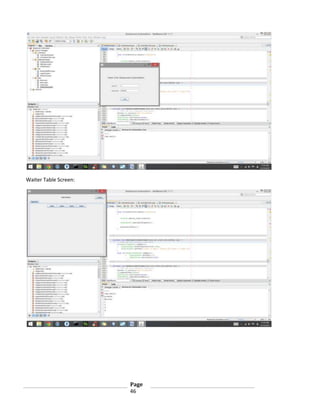
Waiter Table Screen:

Page
46
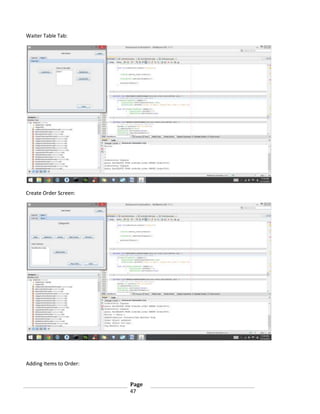
Waiter Table Tab:

Create Order Screen:

Adding Items to Order:
Page
47
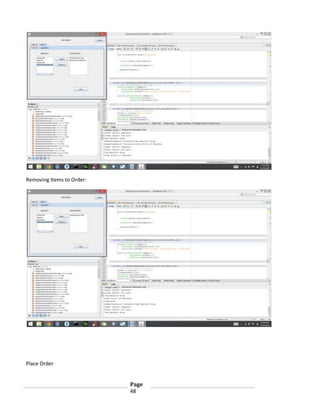
Removing Items to Order:

Place Order
Page
48
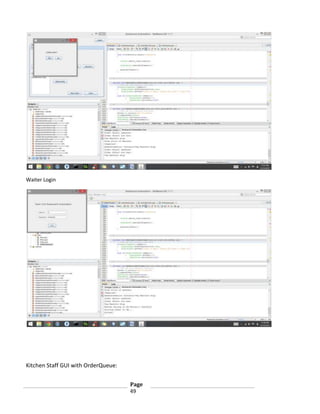
Waiter Login

Kitchen Staff GUI with OrderQueue:
Page
49
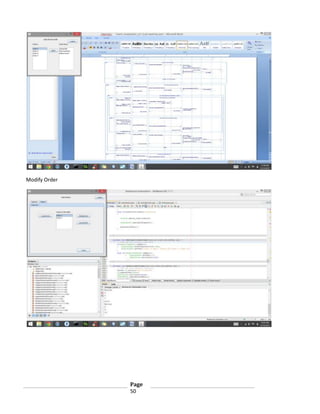
Modify Order

Page
50
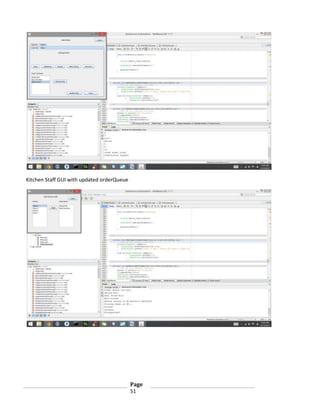
Kitchen Staff GUI with updated orderQueue

Page
51
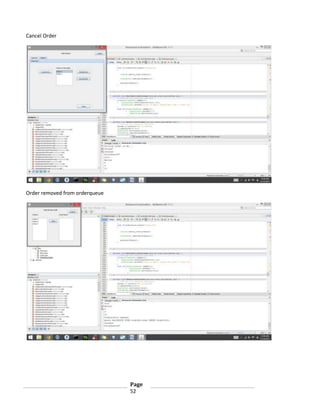
Cancel Order

Order removed from orderqueue

Page
52

Restaurant automation analysis&designdoc_v3.1

  • 1.
    Analysis and Design Document Version3.1 12/13/2013 Restaurant Management System Object Oriented Software Engineering SE 6301 Ajit Gogul Balakrishnan Kannan Harika Jammula Narla Sandeep Narla Saibaba Prabhakar Ganesamurthy Sai Madhu Saranya Kachireddy Page 1
  • 2.
    Revision History Version Inception draft Date 11/4/2013 Description Firstdraft. To be refined primarily during elaboration. Author … Elaboration 1 Draft 1 11/16/2013 … Elaboration 1 Draft 2 12/3/2013 Elaboration 1 Draft 3 12/13/2013 First draft. To be refined primarily later Second draft. To be refined primarily later Revised draft. Page 2 …
  • 3.
    Table of Contents 1.Use Case Diagram 2. Use Case Descriptions 3. Domain Model 4. System Sequence Diagram 5. Operation Contracts 6. Subsystem Diagram 7. Use case Realization 8. Design Class Diagram 9. Glossary of terms 10. Screenshots …4 ...8 ...17 ...20 ...24 ...35 …38 …42 …44 …46 Page 3
  • 4.
    1. Use CaseDiagrams Version 2.1 12/3/2013 Restaurant Management System Page 4
  • 5.
    Revision History Version Inception draft Date 11/16/2013 Description Inceptiondraft. To be refined primarily later Author … Elaboration 1 Draft 1 11/16/2013 … Elaboration 2 Draft 1 12/3/2013 First draft. To be refined primarily later Second draft. To be refined primarily later Page 5 …
  • 6.
    Use Case Diagram- Restaurant Management System Restaurant Management System Manage order Waiter Handle Payment «include» «include» Manage table status Update table status View table status Manage Restaurant Information «include» Login Manager «include» Busboy «include» Assign waiter to table «include» Time Host Process order Kitchen Staff Page 6
  • 7.
    Use Case Prioritization: 1. Manageorder 2. Process order 3. Manage table status 4. Handle payment 5. Assign waiter to table 6. Manage restaurant information Fully Dressed Casual 1.Manage order 3.Process order 2.Login 4.Manage table status 5.Handle payment 6.Assign waiter to table Page 7 Brief 7.Manage restaurant information
  • 8.
    2. Use CaseDescriptions Version 2.0 11/16/2013 Restaurant Management System Page 8
  • 9.
    Revision History Version Date Description 1.0 Inception draft 11/16/2013 Refined 2.0Elaboration 1 draft 1 11/16/2013 First draft. To be refined primarily later 3.0 Elaboration 2 draft 1 12/13/2013 Refined draft. Page 9 Author
  • 10.
    Brief Use casedescriptions: 1.Manage order: The waiter selects the table from the floor status screen and adds the item ordered by the user to the tables tab which gets added to the order queue which is viewed by the kitchen staff. The waiter can cancel/modify the order. The waiter can check the status of the order whether it is ready or not. If the order status is ready waiter serves the order. 2.Login: The user enters his/her credentials and they are welcomed by a welcome page which is user-role specific. The welcome page is for: Waiter : Floor status screen Kitchen staff: Order queue Busboy : Floor status screen Host : Floor status screen Manager : Restaurant management screen 3.Process order: Kitchen staff selects order from the order queue in a first-come-first-serve basis and updates order status as 'Processing' when the order is being prepared. Once the order is ready to be served, the kitchen staff updates the status of the order as ready. 4.Manage table status: The host views table status screen and identifies available tables to which customers are assigned. After the customer sits in an available table ,the waiter selects that table and Page 10
  • 11.
    updates its statusas occupied(yellow). After the order in a table is closed, the waiter assigned to that table, selects that table and updates its status as dirty(red). The busboy identifies dirty tables from the table status screen. After cleaning the table marked as dirty(red), Busboy selects that table and updates its status as available(green). 5.Handle Payment: The waiter selects the mode of payment for the order. If the mode of payment is by credit card, then the waiter swipes the card in the card reader, the card is validated and payment is processed. if the customer pays by cash, the waiter registers the payment as 'by cash ' in the system and completes the payment. 6.Assign waiter to a table: The host assigns a waiter to a set of tables. The waiter is responsible for this set of tables. 7. Manage Restaurant Information Time triggers the system to store data in the database about employees, menu items, customers and their orders in day-by-day and hourly intervals. This data is used by the manager for analysis. The manager can track the status of the various inventories available in the restaurant, analyze the sales of items such as identifying the most popular item, revenue generated by each item etc., tracks employee’s activities such as number of hours worked, performance by accessing the database. The manager can also authorizes the activities which are restricted to the waiter by the selecting that waiter by ID and authorizing him/her. The manager alters the floor plan by adding, removing and moving tables in the system. The manager can create/ modify employee profile in the system. Page 11
  • 12.
    Fully-dressed format: Use Case:Manage order ID: UC-1 Brief description: The waiter selects the table from the floor status screen and adds the item ordered by the user to the order which gets added to the order queue when order is placed. Waiter can cancel/modify/close order. Waiter can also know when order is ready by checking the order status for 'Ready'. Primary actors: Wait Staff Secondary actors: Kitchen staff Preconditions: Update table status to occupied Page 12
  • 13.
    Main flow: 1. Include: Login. 2. Select table from the floor status screen. 3. System provides waiter with an electronic menu 4. For each item ordered by the user 4.1 The waiter selects the item from electronic menu and adds it to the order 5. After all ordered items have been added, the waiter places the order. 6. The order gets added to the order queue 7. System notifies the kitchen staff that a new order has been placed in the order queue. 8.If order needs to be modified 8.1 Select order 8.2 if order status != 'Processing' 8.2.1 Add/Remove items in the order 8.2.2 Update order else 8.2.1 Display 'Order cannot be modified' 9.If order needs to be cancelled 9.1 Select order 9.2 if order status != 'Processing' 9.2.1 Cancel order 9.2.2 Update order status as 'Cancelled'. 9.2.3 Order is removed from the queue. else 9.2.1 Display order cannot be cancelled. Page 13
  • 14.
    Post conditions: If orderis placed/modified: 1. The order is closed when order is served, payment for the order is complete and customer leaves the table. If order is cancelled: 1.Order is removed from the order queue if it is not processed. Non-Functional requirements: The waiter needs to place the order in minimal time, so the electronic menu should be organized and quick to use The order placed must be placed in the order queue within 1 second. Order modifications/cancellation should be reflected in the order queue within 1 second. Technology and Data Variation List: None Open Issues: None Page 14
  • 15.
    Use case: Login ID:UC-2 Brief description: The user enters the login credentials to access their profile. Primary actors: Kitchen staff, Waiter, Bus-boy, Manager, Host Secondary actors: None Preconditions: network Access to a terminal which has access to the system Main flow: 1. User selects the login button on the screen 2. System prompts for username and password 3. The user enters the required information 4. The system validates the input of the user and the appropriate user interface is displayed. Waiter : Floor status screen Kitchen staff: Order queue Busboy : Floor status screen Host : Floor status screen Manager : Restaurant management screen Post conditions: The user is successfully logged into the system and is greeted by a welcome screen. Non-Functional requirements: Login authentication should take not more than 3 seconds. Technology and Data Variation List: None Open Issues: None Page 15
  • 16.
  • 17.
    Revision history: Version Elaboration 1Draft 1 Date 11/16/2013 Elaboration 2 Draft 1 Description First draft. To be refined primarily later Refined draft 12/10/2013 Page 17 Author … …
  • 18.
  • 19.
    4.System Sequence Diagram Version2.0 12/3/2013 Page 19
  • 20.
    Revision history: Version Elaboration 1Draft 1 Date 11/16/2013 Elaboration 2 Draft 1 12/3/2013 Description First draft. To be refined primarily later Refined draft Elaboration 3 Draft 1 12/13/2013 Revised draft Page 20 Author … …
  • 21.
    ManageOrder: :Wai ter Sys tem Ref Lo gin Selec t() T abl e selec ted Men u lo op [f or eac h it em s s el ec t() o rdered] category Cat ego ry i tems Sel ec t() l i st it em Item add ed to o rder Place() order Place() order in ord er qu eu e No if y() t Up date() o rder i n dat abas e Order p aced l op t [If mod f y _o i rder ==true] Sel ec t() ord er detai l s alt [If o rder _ tat u !=pro ess ing||ready] s s c lo op [Fo r each i tem t o be add ed ] Ad d() Item lo op [Fo r each i tem add ed t o be r em o ed v ] Rem ove() Item rem oved Up date() Place() order in ord er qu eu e No if y() t Up date() o d r er i n databas e Order u pdated [els e] ord er c ann ot be mod f i ed i op t [If Sel ec t() Cancel _ ord er== true] o rder ord er detai l s alt [If o rder _ tat u !=pro ess ing||ready] s s c Canc el () order Rem ove() order No if y() t [els e] Order cann ot be c ancel l ed Lo go ut() Page 21 order queue K it chen st af f Rem ove() order Order cancell ed f ro m f ro m Database
  • 22.
    Login: :Employee System Ent erCredentials() Authent icate() alt [IfAuthentication== Successful] opt [If Employee==Waiter||Busbo||Host] FloorStatusScreen opt [If Employee==Manager] RestaurantManagementScreen opt [If Employee==K it chenSt af f] O rderQueueScreen [If Authent ication==Failure] Authent ication Failed Page 22
  • 23.
  • 24.
    Revision history: Version Elaboration 1Draft 1 Date 11/16/2013 Elaboration 2 Draft 1 Description First draft. To be refined primarily later Refined draft 12/3/2013 Page 24 Author … …
  • 25.
    Contract CO1:Enter credentials Operation:Enter Credentials() Cross references:login Pre conditions:The user should be an employee of the restaurant Post Condition:The user credentials should be received by the system Contract CO2: Authenticate Operation:Authenticate() Cross references: login Pre conditions: The user should enter the credentials Post Condition: The authentication is acknowledged Contract CO3:Floor Status Screen Operation: Floor Status Screen() Cross references: login Pre conditions: The employee should be a waiter or Busboy or Host and authenticated Post Condition: Floor status screen is returned to the employee Page 25
  • 26.
    Contract CO4:Restaurant ManagementScreen Operation: Restaurant Management Screen() Cross references: login Pre conditions: Employee should be a manager and authenticated Post condition:Restaurant management screen is returned to the employee Contract CO5:Order Queue Screen Operation: Order Queue Screen() Cross references:login Pre conditions: The employee should be a kitchen staff and authenticated Post condition:Order queue screen should be returned Contract CO6: Authentication failed Operation: Authentication failed() Cross references:login Pre conditions: Employee credentials should be incorrect Post condition: Authentication failure is acknowledged Page 26
  • 27.
    Contract CO7: Selecttable Operation: Select table() Cross references: Manage order, Update table status, View table status, Assign waiter to table Pre conditions: User must be logged in Post Condition: The desired table object has been selected Contract CO8: Table selected Operation: Display table status() Cross references: View table status Pre conditions: The desired table object has been selected Post condition: The status attribute of the selected table object is displayed Contract CO9: Menu Operation: Display menu() Cross references: Manage order Pre conditions: The status attribute of the selected table object is changed to ‘occupied’. Post conditions: The menu object is invoked. Page 27
  • 28.
    Contract CO10: Selectcategory Operation: Select category () Cross reference: Manage order Pre-condition: The menu object is invoked. Post-condition: The desired category attribute of the menu object is selected. Contract CO11: Category items list Operation: Display category () Cross reference: Manage order Pre-condition: The desired category attribute of the menu object is selected. Post-condition: The list of items belonging to the selected category attribute is displayed Contract CO12: Select item Operation: Select item() Cross reference: Manage order Pre-condition: The list of items belonging to the selected category attribute is displayed Post-condition: The desired item object is invoked. Page 28
  • 29.
    Contract CO13: Itemadded to order Operation: Update order() Cross reference: Manage order Pre-condition: The desired item object is invoked Post-condition: A order instance o is created. Attributes of o are initialized. Contract CO14: Place order Operation: Place order() Cross reference: Manage order Pre-condition: A order instance o is created. Attributes of o are initialized. Post-condition: o is associated with kitchen staff The attributes of order object are initialized. Contract CO15: Notify Operation: Notify() Cross reference: Manage order Pre-condition: o is associated with kitchen staff The attributes of order object are initialized. Post-condition: The pending order attribute is set to true. Page 29
  • 30.
    Contract CO16: Updateorder in database Operation: Update order DB() Cross reference: Process order Pre-condition: The pending order attribute is set to false Post-condition: A order_DB instance odb is created Attributes of odb are initialized odb is associated with kitchen staff Contract CO17: Order placed Operation: Order placed() Cross reference: Process order Pre-condition: A order_DB instance odb is created Attributes of odb are initialized odb is associated with kitchen staff Post-condition: The order status attribute of o is updated as ‘ready’ Page 30
  • 31.
    Contract C018: Selectorder Operation: Select order Cross reference: Manage order Pre-condition: The user should login The orderID attribute of o exists Post-condition: The desired orderID attribute is selected Contract C019: Order details Operation: Display order() Cross reference: Manage order Pre-condition: The desired orderID attribute is selected Post-condition: The attributes of o are displayed Contract C020: Add Item Operation: Add item() Cross reference: Manage order Pre-condition: The desired orderID attribute is selected The attributes of o are displayed Post-condition: o is associated with the kitchen staff The attributes of order object are updated. Page 31
  • 32.
    Contract C021: AddItem Operation: Remove Item Cross reference: Manage order Pre-condition: The desired orderID attribute is selected Post condition: The order item attribute of the selected orderID is removed o is associated with the kitchen staff Contract C022: Add Item Operation: Update order Cross reference: Manage order Pre-condition: The desired orderID attribute is selected The attributes of o are displayed Post condition: The order item attributes of the selected orderID is updated o is associated with the kitchen staff Page 32
  • 33.
    Contract C023: Cancelorder Operation: Cancel order() Cross reference: ManageOrder Pre-condition: The desired orderID attribute is selected and order status attribute is not processed Post condition The order object of the selected order ID is destroyed o is associated with the kitchen staff Contract C024: Order cannot be modified Operation: Order cannot be modified Cross reference: Manage order Pre-condition: The desired orderID is attribute is selected and order status attribute is processed Post condition: None Contract C025: Order cannot be cancelled Operation: Order cannot cancelled Cross reference: Manage order Pre-condition: The desired orderID is attribute is selected and order status attribute is processed Post condition: None Page 33
  • 34.
  • 35.
    Revision history: Version Elaboration 1Draft 1 Date 11/16/2013 Elaboration 2 Draft 1 Description First draft. To be refined primarily later Refined draft 12/3/2013 Page 35 Author … …
  • 36.
    Restaurant Automation System Host QueueControl Busboy TableStatusControl KitchenStaff TakeOrder Control Login_Subsystem UserInterface_Subsystem CompleteOrder Control TableStatus screen LoginScreen Authentication Control OrderQueue Screen Waiter SelectItemControl TableStatusControl ManageOrder Control Manager AddEmployee Control PayrollControl RemoveEmployeeControl OrderManagement_Subsystem OrderQueue System Inventory_Subsystem Database_Subsystem InventoryDB OrderDB OrderStatus System InventoryStatistics Control EmployeeDB Page 36 Menu
  • 37.
    7.Use Case Realization Version2 12/10/2013 Page 37
  • 38.
    Revision history: Version Elaboration 2Draft 1 Date 12/3/2013 Description First draft. To be refined later. Elaboration 3 Draft 1 12/10/2013 Refined draft Page 38 Author …
  • 39.
    Manage Order: :Wai t er :Wai t e r G U I :C ont roll erG U I :M enu :C ont roll erO rder :O rder :O rderQ ueu e :O rderD B :K i t chenS t af fG U I R ef Log in se le ct _ t ab le ( ) t ab le _t ab creat e_ order() cre at e o _ rde r_ re qu st (W e ait erI D, Ta bleID ) cre at e o _ rde r_ re qu st (W e ait erI D,Ta bleID ) cre at e (wa t e i rID ,t a l e b ID) set _W i t e a rID ,T a l e b ID m e nu_ cat e go r es i l oop sele c t_ ca eg ry(na t o me ) o rd er_ cre at e d orde r orde r ge t _m e nu ( ) ge t C at eg ori es() cat eg ories cat eg ories [f or e ach it em to be ad ded] sele c t_ ca eg ry(na t o me ) g et _ca e t go ry_ t e i ms (n me) a me nu c a e o _ t g ry _ t e i ms sel ect _l ist _i t e m( ) A dd () ca t e go r y _ it em s ca t e go r y _ it em s up da t e _i t em s _li st a dd i t e _ ms_re u q est (o rd r,A d e e d dIt e msL ist ) a dd i t e _ ms_re u q est (o rd r,It e e ms Li st ) u pd t e a _it e m _ st (o li rde r,I emsLi st ) t i te m_ ad e d d orde r orde r ad ded_ it em _l ist l oop [f or e ach it em to be rem ov ed] sel ect _l ist _i t e m( ) R em ov e() up da t e _i t em s _li st a dd i t e _ ms_re u q est (o rd r,A d e e d dIt e msL ist ) a dd i t e _ ms_re u q est (o rd r,A d e e d dIt e msL ist ) u pd t e a _it e m _ st (o li rde r,I emsLi st ) t orde r orde r orde r up da t e d_ it e m _l ist pl ace_ order() con irm _ rd r f o e al t [order co nf irm _ ord er() orde r _ conf irm ed ( or d er ) is con fi rm ed] pl ace_ order_requ est ( or d er) ge t _ order() ord erI D set _o rd r_st a u e t s_ In Qu ue e st ore_o r d er( or d er) succe ss o rd er_ l a p ced o rd er_ l a p ced S o t red [order not conf i r m e d] no t _co nf irm ed() ad de d_i t em s_l ist l oop [if m odi f y _o r d er=t rue] S ele c t Or de r() Mo i f yOrd d er( ) C h ck Or e de rS a us(o t t rd er ID) o rd er_ e ail s d t ord erS t a t us o rd er_ e ail s d t op t [if (orderS t st us! = P rocessi ng| | R ead y )] l oop [f or cat eg ories sele c t_ ca eg ry(na t o me ) e ach it em to be ad ded] sele c t_ ca eg ry(na t o me ) g et _ca e t go ry_ t e i ms (n me) a ca t e go r y _ it em s ca t e go r y _ it em s ca t e go r y _ it em s sele c t_ t i em(it emID ) sele c t_ t i em(it emID ) a dd i t e _ m_ req e u s t( te i mI D) a dd i t e _ m_ o_ st (i t e t li mID) i te m_ ad e d d i te m_ ad e d d it e m ad de d ad de d_i t em _l ist l oop [f or e ach it em to be rem ov ed] se le ct _ li st _i t em (i t em I D ) l ist _ it em _se le ct e d re move i t e _ m(i t e mID) re move i t e _ m(i t e mID) re move i t e _ m_re u q est (i t emID ) re move i t e _ m_f ro m_ i st (it emID l ) i te m_ remo ve d i te m_ remo ve d i te m_ remo ve d up da t e d_ it e m _l ist mo dif y _ rd o er () con irm _ rd r f o e al t co nf irm _ ord er() [order orde r _ conf irm ed ( or d er ) is con fi rm ed] pl ace_ order_requ est ( or d er) set _o rd r_st a u e t s_ In Qu ue e st ore_o r d er( or d er) succe ss o rd er_ l a p ced o rd er_ l a p ced U pd at ed [order not conf i r m e d] no t _co nf irm ed() ad de d_i t em s_l ist [el se] Ord r_ca no _ e_ e n t b mo dif i e d al t [if S ele c t _ rd o er( ) rem ov e_o rde r () cance l_o r d er=t rue] C h ck Or e de rS a us(o t t rd er ID) o rd er_ e ail s d t ord erS t a t us o rd er_ e ail s d t al t [if order_st at us! = processi ng| | read y ] re move _ rde l o r(o rd rID) e re move ord r_ _ e req e u s t (o rd rID) e re move ord r(o _ e rde rID ) ord er_re m ov ed ge t O rde r Q ue ue() orde r Li st ord er_ca nce ll ed ord er_ca nce ll ed ord er_ca nce ll ed t ab le _t ab [el se] o rd er_ ca nn t _ o be can _ cell e d Login: :employee :LoginGUI :ControllerGUI :WaiterGUI :KitchenStaffGUI :EmployeeDB enter_credentials(ID, pass) send_credentials(ID, pass) get_details(ID) alt [if ID=valid] password,designation authenticate(pass) alt [if authentication==success] alt [if designation=waiter] Create(designation) Page 39 waiter_table_screen getTables(UserID) [else if designation=kitchen_staff] tables_list :OrderQueue
  • 40.
    8.Design Class Diagram Version1 12/11/2013 Revision history: Version Date Description Page 40 Author
  • 41.
    Elaboration 2 Draft1 12/3/2013 First draft. To be refined later. Elaboration 3 Draft 1 12/11/2013 Refined Design Class Diagram: Page 41 …
  • 42.
  • 43.
    1. Employee –Any individual who is involved in the day to day activities of the restaurant, including cooks, bus boys, kitchen staff, waiters, managers and hosts. 2. Manager – Type of employee with the highest administrative authority, with the power to change the status of all other employee types, and access to restaurant statistics and floor plan. 3. Customer – Any individual who is benefitted by the restaurant automation system and the employees working within its framework. 4. Kitchen Staff – Type of employee who is responsible for processing the orders submitted by the waiter in the order queue. 5. Waiter – Type of employee who is responsible to interact with the customer by creating, modifying and cancelling orders and to keep the order queue up to date 6. Host – Type of employee who welcomes the customer and directs them to an available table. The role of host can be performed by both manager and waiter. 7. Bus Boy – Type of employee who is responsible to keep the tables clean and to change the status of the table from dirty to clean upon completion. 8. Table – A physical object in which the prepared food is presented to the customer, for which a waiter is assigned. 9. Table Status – Shows the status of a table and the waiter who is assigned to that table. 10. Dirty – A type of table status indicating the condition which implies that it is not being currently occupied by any customers and needs to be cleaned to make it available to a new customer. 11. Busy – A type of table status indicating the condition where it cannot be assigned to a new customer and also that it cannot be cleaned. 12. Ready – A type of table status indicating the condition that it is ready for service and that it can be assigned to a new customer. 13. Order – A description submitted by the waiter, which is to be cooked and eventually delivered to the table from which it has been ordered. 14. Order Status – Used to know the status of the order placed by the customer based on which the waiter decides what needs to be done. 15. Processing – A type of order status which means that the order is currently being cooked and the order cannot be modified after this. 16. Ready – A type of order status which means that the order has been cooked and ready to be served to the customer. 17. Payroll – Used for calculating the salary of an employee based on the number of hours worked. It differs based on the designation of the employee. Page 43
  • 44.
    18. Menu –List of dishes available in the restaurant from which the waiter chooses from based on the request from the customer. 19. Floor Plan – Shows the arrangement of all the tables in the restaurant which can be modified only by the manager when required. Page 44
  • 45.
  • 46.
  • 47.
    Waiter Table Tab: CreateOrder Screen: Adding Items to Order: Page 47
  • 48.
    Removing Items toOrder: Place Order Page 48
  • 49.
    Waiter Login Kitchen StaffGUI with OrderQueue: Page 49
  • 50.
  • 51.
    Kitchen Staff GUIwith updated orderQueue Page 51
  • 52.
    Cancel Order Order removedfrom orderqueue Page 52