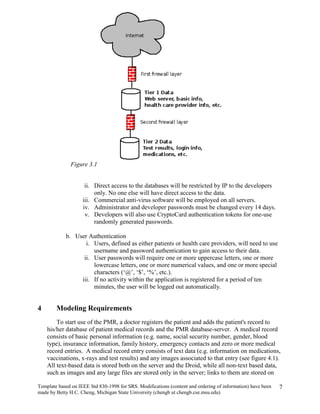
Software Requirements Specification (SRS)Project PMR-DroidAuthors: Joe Heldt, Jong Jang, Michael Keesey, Tom Randall, and Kurt SeippelCustomer: Dr. Betty Cheng and Dr. Tom Foster, Droid user.Instructor: Dr. Betty ChengIntroduction This Software Requirements Specification document provides an overview of the functionality of a Personal Medical Record (PMR) designed for the Motorola Droid phone.  This document will cover the scope, organization, description, constraints, requirements, and the prototype of the PMR.     PurposeThe purpose of this document is to describe the functionality and specifications of the design of a PMR for the Droid.  The expected audiences of this document are the developers and users of the application.     ScopeThe PMR will be designed to run on the Droid.  The user will be able to store, access and comment on their medical records from their Droid phone.  This information will be stored on a central database where health care providers will be able to upload the most recent medical records for their patients.  The application will then be able to download this data from the server whenever it needs the up to date medical record.     Definitions, acronyms, and abbreviationsAndroid- The operating system, developed by Google, made to run on cellular phones.Droid- A smart phone that is currently distributed by Verizon Wireless that runs the latest version of the Android operating system.EMR (Electronic Medical Record) - An electronic copy of the patient’s medical record.  Your health care providers provide all information.GUI (Graphical User Interface) - The part of the application that the user sees and interacts with.IP Address- A unique number given to every computer on a network to uniquely identify it.PC (Personal Computer) - A desktop or laptop running the Microsoft windows operating system.PMR (Personal Medical Record) - A copy of the patient’s EMR that is stored, accessed and possibly edited by the patient.  Contains most, if not all, medical data that is in your medical record.SDK (Software Development Kit) – set of tools that makes it possible to create software for a particular piece of software or hardware, in our case the Android 2.0 operating system.Thumbnail- A scaled down version of an image used to save space but still allow you to preview the image.XML (Extensible Markup Language) – A widely used type of text data organization and storage language that use ‘’ to label and distinguish sections of data or instructions from each other.     OrganizationThe remaining portions of this document are decomposed into four major sections, followed by references and a point of contact.  The first section will provide an overall description of the project and the next part will give more detailed requirements.  Following the requirements, there are models describing the application and the description/use of the prototype.Overall Description This section provides a high level description of the entire application.  It describes the product perspective, functionality, and characteristics of an expected user, constraints, assumptions and dependencies, and the approportioning of requirements.     Product PerspectiveThis application is specifically designed for the Droid.  There needs to be a database with all of the different patient’s EMR’s for the application to access.  The interface will be made to have a similar look and feel that is consistent with other Droid applications.  Most Droid applications have a similar way to display and navigate through data. The display that will be implemented by the PMR application will be consistent with other applications.  This familiar GUI will make the user feel more comfortable navigating and viewing the data on our system.Our PMR system is a part in a larger system.  In figure 2.1 you will see that the health care worker is in charge of inputted the medical data to make an EMR.  Once the EMR is made, it is stored on a secure database, refer to section 3, which our PMR can access.  Once our application downloads this data, it provides the patient with an organized and easy way to navigate and view their medical record.DatabasePMREMRHealth Care ProviderPatientFigure 2.1          Product FunctionsProvides a high-level view of the key types of medical information that includes medications, procedures, vaccinations, conditions, allergies, family history, test and lab results, insurance providers, and emergency contacts.Provides a means to easily navigate, using the Droid’s touch screen interface and keyboard, to the details of any of the key types of medical information.Provides access to different types of media for medical records including images, text-based documents, and scanned documents.The user is able to backup a local copy of their PMR on their personal computer and edit it.  This backup can be later transferred back to the phone if needed.     User CharacteristicsThe user should be familiar with the basic functionality of the phone.  The user should be able to use the touch screen and the other navigation buttons along with the keyboard to input the data.  The user will also have to know some basic medical terminology and information to understand the application and the different categories.     ConstraintsOne major constraint on the application is the amount of data that can be stored on the phone.  The EMR’s on the server can contain large sized files, like images and scanned documents.  These large files can quickly use up a lot of the space available on the Droid, so our application doesn’t save these files stored locally.  Instead, a thumbnail is saved on the Droid and the user can choose to download the image if they feel it is important.  This will save space by limiting the amount of images actually stored on the phone.  One other constraint is that this application will not work on other phones. This application will only work on the Android 2.0 operating system. The Motorola Droid is currently the only phone in production that supports Android 2.0.    Assumptions and DependenciesAndroid 2.0 has a number of features that are included that we can assume our application can utilize.  Some important features include a web browser, java support, video and camera, and touch-screen support.  Our application will use all of these features and should work on any phone as long as it is running Android 2.0.  We can also assume that all input will only come in three forms, the touch screen, keyboard, and the other buttons found on the Droid.  Since each phone has its’ unique buttons, we will only use these buttons to end the application and rely on the touch screen and keyboard to perform the rest of the applications navigation.     Approportioning of RequirementsOne of the things the customer would like implemented is a more robust application on the computer.  The computer side application will only have limited functionality to edit and view the PMR.  Having a more robust system could offer better navigation, ability to see if a file on the Droid or server has changed, or many other features.Another feature to be added will be an auto-sync feature.  This will automatically update the PMR on either the Droid or computer whenever the EMR on the server has changed.  It could do this automatically or could accept only certain changes.  As of now, to access the PMR on the Droid you need the correct username and password.  Some customers might want their PMR to be more secure so there could be functionality added to improve the security.  Some ways to improve security could be to add some biometric access, like finger print or iris scanning which is possible using the Droid, but not reliable as of yet.Specific RequirementsThis section provides further details on the specific requirements of our application.Each requirement is given along with a description of the requirements.Provide a high-level view of the key types of medical information: We will have a “front page” where basic medical data will be displayed.  This front page is designed to be used in case of an emergency.  If doctors would need to quickly obtain important medical data, like blood type or allergies to certain medications, they could look at this main page without having to log in.  For security reasons, the user can hide whatever information they don’t want someone to see without logging in.  They can go through and select whatever information they think is important on the front page, and hide whatever information they don’t want anyone to see.  Provide a means to easily navigate to the details of any major categories: there is a tabbed user interface where the major topics will be selectable.  Once a category is selected, the screen will be refreshed to a separate page where all the relevant information will be displayed in an organized fashion.
Provide access to different types of media for medical records, including:
Text-based documents
Images (CT-scans, X-rays)
Scanned documents
Photographs
All of the above information will be stored on the server unless specifically downloaded by the user.  A person’s medical record can contain dozens of pictures and scanned documents so this could take up a lot of space very quickly.  For this reason, we allow users to download these different pieces of media if they think it is important, but don’t include it automatically to save space.
For each medical procedure, diagnosis, medication prescribed, there will be the following information stored with the entry:
A healthcare worker’s complete contact information
Date of event
Rationale for treatment/medication/diagnosis
Follow-up activities
As appropriate, any short-term or long-term side effects
As appropriate, any relationship to family history (ancestors and/or descendants).
This information is standard for any information provided by in the medical record, other than the basic information.  There can be more information needed depending on the kind or medical information being provided, so wherever necessary there are more fields to input additional data.  Below is a list of this additional information:
Medication - name, dosage, frequency, date prescribed and date ended.
Medical procedure - procedure type and date of procedure.
Vaccination - name and frequency.
Medical condition – name, diagnosis, symptoms, treatment, severity, onset date, and cured date.
Allergy - what you are allergic to, what kind of medication are you taking, if any, any other treatments you are receiving, and the severity of the allergy.

Software Requirements Specification Final

  • 1.
    Software Requirements Specification(SRS)Project PMR-DroidAuthors: Joe Heldt, Jong Jang, Michael Keesey, Tom Randall, and Kurt SeippelCustomer: Dr. Betty Cheng and Dr. Tom Foster, Droid user.Instructor: Dr. Betty ChengIntroduction This Software Requirements Specification document provides an overview of the functionality of a Personal Medical Record (PMR) designed for the Motorola Droid phone. This document will cover the scope, organization, description, constraints, requirements, and the prototype of the PMR. PurposeThe purpose of this document is to describe the functionality and specifications of the design of a PMR for the Droid. The expected audiences of this document are the developers and users of the application. ScopeThe PMR will be designed to run on the Droid. The user will be able to store, access and comment on their medical records from their Droid phone. This information will be stored on a central database where health care providers will be able to upload the most recent medical records for their patients. The application will then be able to download this data from the server whenever it needs the up to date medical record. Definitions, acronyms, and abbreviationsAndroid- The operating system, developed by Google, made to run on cellular phones.Droid- A smart phone that is currently distributed by Verizon Wireless that runs the latest version of the Android operating system.EMR (Electronic Medical Record) - An electronic copy of the patient’s medical record. Your health care providers provide all information.GUI (Graphical User Interface) - The part of the application that the user sees and interacts with.IP Address- A unique number given to every computer on a network to uniquely identify it.PC (Personal Computer) - A desktop or laptop running the Microsoft windows operating system.PMR (Personal Medical Record) - A copy of the patient’s EMR that is stored, accessed and possibly edited by the patient. Contains most, if not all, medical data that is in your medical record.SDK (Software Development Kit) – set of tools that makes it possible to create software for a particular piece of software or hardware, in our case the Android 2.0 operating system.Thumbnail- A scaled down version of an image used to save space but still allow you to preview the image.XML (Extensible Markup Language) – A widely used type of text data organization and storage language that use ‘’ to label and distinguish sections of data or instructions from each other. OrganizationThe remaining portions of this document are decomposed into four major sections, followed by references and a point of contact. The first section will provide an overall description of the project and the next part will give more detailed requirements. Following the requirements, there are models describing the application and the description/use of the prototype.Overall Description This section provides a high level description of the entire application. It describes the product perspective, functionality, and characteristics of an expected user, constraints, assumptions and dependencies, and the approportioning of requirements. Product PerspectiveThis application is specifically designed for the Droid. There needs to be a database with all of the different patient’s EMR’s for the application to access. The interface will be made to have a similar look and feel that is consistent with other Droid applications. Most Droid applications have a similar way to display and navigate through data. The display that will be implemented by the PMR application will be consistent with other applications. This familiar GUI will make the user feel more comfortable navigating and viewing the data on our system.Our PMR system is a part in a larger system. In figure 2.1 you will see that the health care worker is in charge of inputted the medical data to make an EMR. Once the EMR is made, it is stored on a secure database, refer to section 3, which our PMR can access. Once our application downloads this data, it provides the patient with an organized and easy way to navigate and view their medical record.DatabasePMREMRHealth Care ProviderPatientFigure 2.1 Product FunctionsProvides a high-level view of the key types of medical information that includes medications, procedures, vaccinations, conditions, allergies, family history, test and lab results, insurance providers, and emergency contacts.Provides a means to easily navigate, using the Droid’s touch screen interface and keyboard, to the details of any of the key types of medical information.Provides access to different types of media for medical records including images, text-based documents, and scanned documents.The user is able to backup a local copy of their PMR on their personal computer and edit it. This backup can be later transferred back to the phone if needed. User CharacteristicsThe user should be familiar with the basic functionality of the phone. The user should be able to use the touch screen and the other navigation buttons along with the keyboard to input the data. The user will also have to know some basic medical terminology and information to understand the application and the different categories. ConstraintsOne major constraint on the application is the amount of data that can be stored on the phone. The EMR’s on the server can contain large sized files, like images and scanned documents. These large files can quickly use up a lot of the space available on the Droid, so our application doesn’t save these files stored locally. Instead, a thumbnail is saved on the Droid and the user can choose to download the image if they feel it is important. This will save space by limiting the amount of images actually stored on the phone. One other constraint is that this application will not work on other phones. This application will only work on the Android 2.0 operating system. The Motorola Droid is currently the only phone in production that supports Android 2.0. Assumptions and DependenciesAndroid 2.0 has a number of features that are included that we can assume our application can utilize. Some important features include a web browser, java support, video and camera, and touch-screen support. Our application will use all of these features and should work on any phone as long as it is running Android 2.0. We can also assume that all input will only come in three forms, the touch screen, keyboard, and the other buttons found on the Droid. Since each phone has its’ unique buttons, we will only use these buttons to end the application and rely on the touch screen and keyboard to perform the rest of the applications navigation. Approportioning of RequirementsOne of the things the customer would like implemented is a more robust application on the computer. The computer side application will only have limited functionality to edit and view the PMR. Having a more robust system could offer better navigation, ability to see if a file on the Droid or server has changed, or many other features.Another feature to be added will be an auto-sync feature. This will automatically update the PMR on either the Droid or computer whenever the EMR on the server has changed. It could do this automatically or could accept only certain changes. As of now, to access the PMR on the Droid you need the correct username and password. Some customers might want their PMR to be more secure so there could be functionality added to improve the security. Some ways to improve security could be to add some biometric access, like finger print or iris scanning which is possible using the Droid, but not reliable as of yet.Specific RequirementsThis section provides further details on the specific requirements of our application.Each requirement is given along with a description of the requirements.Provide a high-level view of the key types of medical information: We will have a “front page” where basic medical data will be displayed. This front page is designed to be used in case of an emergency. If doctors would need to quickly obtain important medical data, like blood type or allergies to certain medications, they could look at this main page without having to log in. For security reasons, the user can hide whatever information they don’t want someone to see without logging in. They can go through and select whatever information they think is important on the front page, and hide whatever information they don’t want anyone to see. Provide a means to easily navigate to the details of any major categories: there is a tabbed user interface where the major topics will be selectable. Once a category is selected, the screen will be refreshed to a separate page where all the relevant information will be displayed in an organized fashion.
  • 2.
    Provide access todifferent types of media for medical records, including:
  • 3.
  • 4.
  • 5.
  • 6.
  • 7.
    All of theabove information will be stored on the server unless specifically downloaded by the user. A person’s medical record can contain dozens of pictures and scanned documents so this could take up a lot of space very quickly. For this reason, we allow users to download these different pieces of media if they think it is important, but don’t include it automatically to save space.
  • 8.
    For each medicalprocedure, diagnosis, medication prescribed, there will be the following information stored with the entry:
  • 9.
    A healthcare worker’scomplete contact information
  • 10.
  • 11.
  • 12.
  • 13.
    As appropriate, anyshort-term or long-term side effects
  • 14.
    As appropriate, anyrelationship to family history (ancestors and/or descendants).
  • 15.
    This information isstandard for any information provided by in the medical record, other than the basic information. There can be more information needed depending on the kind or medical information being provided, so wherever necessary there are more fields to input additional data. Below is a list of this additional information:
  • 16.
    Medication - name,dosage, frequency, date prescribed and date ended.
  • 17.
    Medical procedure -procedure type and date of procedure.
  • 18.
    Vaccination - nameand frequency.
  • 19.
    Medical condition –name, diagnosis, symptoms, treatment, severity, onset date, and cured date.
  • 20.
    Allergy - whatyou are allergic to, what kind of medication are you taking, if any, any other treatments you are receiving, and the severity of the allergy.