ANALYSIS AND DESIGN
                                     DOCUMENT


                             FOR DEVELOPMENT OF
                        RESTAURANT E - MENU PROTOTYPE


                                                              Created by      Traitet Th.
Project:   E-menu on iPad for Thai restaurant
                                                              Created Date    31 July 2012

Subject:   Research outcome#1                                 Revised Date    22 Aug 2012

                                                              Revision No.    1.0
Content:   Functional Requirements, Use Case Diagram, Class
                                                              Document Name   O01-001
           Diagram and Work flow diagrams
1) FUNCTIONAL REQUIREMENTS


             2
3   1) FUNCTIONAL REQUIREMENTS


          E-menu system consists of
          1.   E-menu application on iPad for restaurant
               customers
                Main features
                •   Ordering food & drinks
                •   Confirm and view orders
                •   Request services


          2.   E-menu web application for restaurant staff
                •   Manage table
                      •    Open & Close table
                •   Operate order
                      •    Starter, Main course, drinks and sweet
                •   Operate services requested
                      •    Call waiter, main course and bill
4                            1) FUNCTIONAL REQUIREMENTS


                       Functional Requirements (E-menu application on iPad)
Restaurant Customers
 E-menu on iPad for


                          Restaurant customers can order food and drinks on e-menu.
                          Restaurant customers can search menu items by menu categories such
                           as appetisers, main dishes (main course), drinks and sweets
                          Restaurant customers can check list of ordering items before confirming
                           orders.
                          Restaurant customers can remove ordering items before confirming order.
                          Restaurant customers can request waiting staff on e-menu
                          Restaurant customers can request for billing on e-menu.
                          Restaurant customers can request main dishes (main course) on e-menu
                           after they have appetisers.
                          Restaurant customers can check status of ordering items on e-menu,
                           such as queuing, cooking, serving and served.
                          Restaurant customers can select a language to make orders.
1) FUNCTIONAL REQUIREMENTS
        5
                                                          ( CONT.)
Restaurant Customers

                       Functional Requirements (E-menu application on iPad)
 E-menu on iPad for


                          E-menu can provide basic information for customers, such as picture,
                           name and price of each menu item.
                          E-menu can provide additional information, such as menu description
                           and levels of spicy and recommended items.
                          E-menu can summarise list of order including total price and a number
                           of items ordered.
                          The system can transfer information from iPad e-menu to a kitchen and
                           bar for preparing food and drinks.
                          The system can transfer information from iPad e-menu to a cashier for
                           preparing payment.
                          The system can transfer information from iPad e-menu to show list of
                           services requested by restaurant customers.
1) FUNCTIONAL REQUIREMENTS
        6
                                                        ( CONT.)


                     Functional Requirements (E-menu application on Web)
E-menu on iPad for
 Restaurant Staff


                        The system can operate table for a new customer group such as
                         opening a new table and closing table or order.

                        Waiting staff can monitor and operate services requested by customers
                         such as a request of main course, waiter and billing.

                        Chef and waiting staff can view and maintain orders transferred from
                         iPad e-menus to prepare food and drinks for customers.

                        Chef and waiting staff can record ordering status of preparing, cooking
                         and serving.

                        Waiting staff can check list of order requested by customers
2) NON-FUNCTIONAL
   REQUIREMENTS


        7
8       2) NON-FUNCTIONAL REQUIREMENTS


    Non-functional Requirements


       Real-time Information can be transferred from iPad e-menu to a
        kitchen, cashier, and bar though wireless connection.

       User interfaces’ e-menu should be user-friendly and easy to use.

       E-menu should provide useful information including beautiful images of
        food and drinks for restaurant customers to be easy to understand
        menu description.

       E-menu on iPad can consume web services provided by a external
        server through internet connection.
2) NON-FUNCTIONAL REQUIREMENTS
9
                                                                   (CONT.)


    Non-functional Requirements


       E-menu system must provide web services to integrate data between
        iPad e-menu, back office application and a database.

       E-menu system must have adequate security to access system
        information such as Web service authentication.

       E-menu system should record log of each transaction including
        transaction, user name and time to make analytics reports in the future.

       E-menu system must provide real-time information with quick
        response. All transactions must spend time less than 2 seconds.
3) USE CASE DIAGRAM


         10
3) USE CASE DIAGRAM
4) CLASS DIAGRAM


       12
4) CLASS DIAGRAM
For developing the e-menu prototype
5) ER DIAGRAM


      14
5.1) ER-DIAGRAM
For developing the e-menu prototype
5.2) REVISED ER-DIAGRAM
(To develop a real e-menu application in the future)
6) DESIGN OF RESTAURANT
SERVICE PROCESS (E-MENU)


           17
Food ordering processes
                          6.1) DESIGN OF RESTAURANT SERVICE PROCESS
18                                       Current Restaurant System


                  Order from Customer


Drinks                 Starters            Main Dishes            Sweet

                                                                                       1.     Kitchen
                                                                                       2.     Bar
                                                                                       3.     Front-bar
                                  Taken Order
                                   (3 copies)


     Post on board
                                                 Prepare Main
     in front of the          Cook Starters                                                 Give to bar
                                                    Dishes
         kitchen


                                                 Request to eat           Cook Main
                                                   Main Dish               Dishes


                                                                          Serve Main    Serve Drinks
                              Serve Starter
                                                                            Dishes       and Sweet
6.2) DESIGN OF RESTAURANT SERVICE PROCESS
    For developing the e-menu prototype
7) E-MENU WORKFLOW
 DIAGRAM (E-MENU)


        20
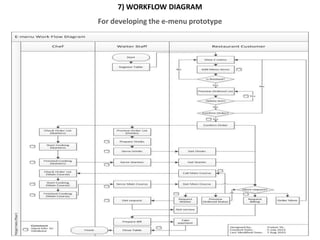
7) WORKFLOW DIAGRAM
For developing the e-menu prototype

A1 analysis design

  • 1.
    ANALYSIS AND DESIGN DOCUMENT FOR DEVELOPMENT OF RESTAURANT E - MENU PROTOTYPE Created by Traitet Th. Project: E-menu on iPad for Thai restaurant Created Date 31 July 2012 Subject: Research outcome#1 Revised Date 22 Aug 2012 Revision No. 1.0 Content: Functional Requirements, Use Case Diagram, Class Document Name O01-001 Diagram and Work flow diagrams
  • 2.
  • 3.
    3 1) FUNCTIONAL REQUIREMENTS E-menu system consists of 1. E-menu application on iPad for restaurant customers Main features • Ordering food & drinks • Confirm and view orders • Request services 2. E-menu web application for restaurant staff • Manage table • Open & Close table • Operate order • Starter, Main course, drinks and sweet • Operate services requested • Call waiter, main course and bill
  • 4.
    4 1) FUNCTIONAL REQUIREMENTS Functional Requirements (E-menu application on iPad) Restaurant Customers E-menu on iPad for  Restaurant customers can order food and drinks on e-menu.  Restaurant customers can search menu items by menu categories such as appetisers, main dishes (main course), drinks and sweets  Restaurant customers can check list of ordering items before confirming orders.  Restaurant customers can remove ordering items before confirming order.  Restaurant customers can request waiting staff on e-menu  Restaurant customers can request for billing on e-menu.  Restaurant customers can request main dishes (main course) on e-menu after they have appetisers.  Restaurant customers can check status of ordering items on e-menu, such as queuing, cooking, serving and served.  Restaurant customers can select a language to make orders.
  • 5.
    1) FUNCTIONAL REQUIREMENTS 5 ( CONT.) Restaurant Customers Functional Requirements (E-menu application on iPad) E-menu on iPad for  E-menu can provide basic information for customers, such as picture, name and price of each menu item.  E-menu can provide additional information, such as menu description and levels of spicy and recommended items.  E-menu can summarise list of order including total price and a number of items ordered.  The system can transfer information from iPad e-menu to a kitchen and bar for preparing food and drinks.  The system can transfer information from iPad e-menu to a cashier for preparing payment.  The system can transfer information from iPad e-menu to show list of services requested by restaurant customers.
  • 6.
    1) FUNCTIONAL REQUIREMENTS 6 ( CONT.) Functional Requirements (E-menu application on Web) E-menu on iPad for Restaurant Staff  The system can operate table for a new customer group such as opening a new table and closing table or order.  Waiting staff can monitor and operate services requested by customers such as a request of main course, waiter and billing.  Chef and waiting staff can view and maintain orders transferred from iPad e-menus to prepare food and drinks for customers.  Chef and waiting staff can record ordering status of preparing, cooking and serving.  Waiting staff can check list of order requested by customers
  • 7.
    2) NON-FUNCTIONAL REQUIREMENTS 7
  • 8.
    8 2) NON-FUNCTIONAL REQUIREMENTS Non-functional Requirements  Real-time Information can be transferred from iPad e-menu to a kitchen, cashier, and bar though wireless connection.  User interfaces’ e-menu should be user-friendly and easy to use.  E-menu should provide useful information including beautiful images of food and drinks for restaurant customers to be easy to understand menu description.  E-menu on iPad can consume web services provided by a external server through internet connection.
  • 9.
    2) NON-FUNCTIONAL REQUIREMENTS 9 (CONT.) Non-functional Requirements  E-menu system must provide web services to integrate data between iPad e-menu, back office application and a database.  E-menu system must have adequate security to access system information such as Web service authentication.  E-menu system should record log of each transaction including transaction, user name and time to make analytics reports in the future.  E-menu system must provide real-time information with quick response. All transactions must spend time less than 2 seconds.
  • 10.
    3) USE CASEDIAGRAM 10
  • 11.
    3) USE CASEDIAGRAM
  • 12.
  • 13.
    4) CLASS DIAGRAM Fordeveloping the e-menu prototype
  • 14.
  • 15.
    5.1) ER-DIAGRAM For developingthe e-menu prototype
  • 16.
    5.2) REVISED ER-DIAGRAM (Todevelop a real e-menu application in the future)
  • 17.
    6) DESIGN OFRESTAURANT SERVICE PROCESS (E-MENU) 17
  • 18.
    Food ordering processes 6.1) DESIGN OF RESTAURANT SERVICE PROCESS 18 Current Restaurant System Order from Customer Drinks Starters Main Dishes Sweet 1. Kitchen 2. Bar 3. Front-bar Taken Order (3 copies) Post on board Prepare Main in front of the Cook Starters Give to bar Dishes kitchen Request to eat Cook Main Main Dish Dishes Serve Main Serve Drinks Serve Starter Dishes and Sweet
  • 19.
    6.2) DESIGN OFRESTAURANT SERVICE PROCESS For developing the e-menu prototype
  • 20.
    7) E-MENU WORKFLOW DIAGRAM (E-MENU) 20
  • 21.
    7) WORKFLOW DIAGRAM Fordeveloping the e-menu prototype

Editor's Notes

  • #12 Use case diagram mainly illustrates;Who are users?Main functions operated by user.
  • #14 Class diagram mainly illustrates;Relationships between each class or entityAttributes in each class or entityExample of methods in each class or entity
  • #16 ER diagram mainly illustrates;EntitiesRelationshipsAttributesPrimary keys and foreign keys
  • #17 ER diagram mainly illustrates;EntitiesRelationshipsAttributesPrimary keys and foreign keys
  • #19 Drinks and Sweet are served at different times.Drinks are served immediately.Sweet is served finally.
  • #20 The diagram explains all processes;From customers come into the restaurantTo customers leave from the restaurant
  • #22 This diagram was used to develop the e-menu application.It shows all processes of e-menu application (on iPad)It shows how the data are input into the database.