Welcome to our Presentation
Presentation Topic: IOT Based Smart Restaurant
Group Members
• Shahedul Islam Rishad(162-15-1029)
• Md. Rifat Rahman (162-15-1049)
• Arifur Jaman (153-15-607)
• Mohammad Salim Hosen (162-15-1044)
• Md. Tofael Ahmed Monshi(162-15-1050)
Team: Dream Crushers
Story
We are Team Dream Crushers. We have selected a project called “IOT Based Smart Restaurant” for
our final year project. For this Project we will have to make an application. So, we have decided to
name it according to our favorite name “Ekhane Khan”. There will be three type of users in our
application Customer, Chef and Admin. A customer can search for food, create his profile, order
food and provide ratings to a Food. On creating profile customer will have membership with the
Restaurant. A Chef Can Create and update food menu. But for both login is needed. Chef can also
mark an order as Finished. Admin can add or remove a food menu and worker but needs login.
Admin can also update food menu after login. All users Admin, Customer and Chef can update their
profile after login. Customer can make payment using available payment options. Payment can be
made by using cash or by giving credit card information.
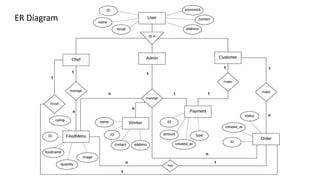
Each user in the system is uniquely identified by its id, name, password, email and type of the user.
Each user has one profile and each profile is identified by profile id, contact and address. Admin can
manage worker. Worker is identified by id and name. Admin and Chef can add or update food menu.
Food menu is identified by id, food name, quantity, food image and rating. Customer can make
order and each order is identified by order id, time of creation, and status. Customer can make
payment using cash or credit card. Payment is identified by payment id, amount, payment type and
time of payment.
Sequence Diagram
Customer
Chef
Admin
login
Payment
Search food
Create profile
Order food
Create food
menu
Update
information
Use case Diagram
Add food
menu
Use Case ID: UC1
Use Case Name: Order Food
Created By: Md. Rifat Rahman Last Updated By: Md. Rifat Rahman
Date Created: 10.12.2018 Date Last Updated: 10.12.2018
Actors: Customer
Description: The customer can order food then have the food delivered to their doorstep or at any location they
choose.
Pre conditions: 1.The customer is trying for login to the system.
2.Customer should create profile for ordering.
Postconditions: 1.Customer logged into the system.
2.Customer search food for ordering.
3. Customer has access to the functions of the system.
Normal Flow: 1.Customer trying for login to the system for create a profile.
2. The customer gains access to the systems functionality.
3.Customer can provide ratings after ordering.
4.To place order a customer have to choose the type of food (Lunch , Dinner) he or she wants to
enjoy.
Includes: None.
Extend: None.
Use case Description
Use Case ID: UC2
Use Case Name: Create food menu
Created By: Md. Rifat Rahman Last Updated By: Md. Rifat Rahman
Date Created: 10.12.2018 Date Last Updated: 10.12.2018
Actors: Chef
Description: To create food menu a chef has to enter a name for the cuisine. Fix price for the cuisine. Then the
chef have to select type of the food, e.g. Lunch , snacks or Dinner.
Pre conditions: 1. The customer is trying for login to the system.
2.The Chef should create profile for create food menu
Postconditions: 1.The Chef logged into the system.
2.The Chef create food menu for customer.
Normal Flow: 1. The chef trying for login to the system for create a profile.
2. A picture of the food followed by the details of the food ingredients.
3.The chef have to select the type of the food e.g. Lunch , snacks or Dinner.
Includes: None.
Extend: None.
Use case Description
ER Diagram
Class Diagram
Test Case Group1:User interface:
Test Case Group 2: Checkout
Functionality
THANK YOU

Presentation on iot restaurant project

  • 1.
    Welcome to ourPresentation Presentation Topic: IOT Based Smart Restaurant
  • 2.
    Group Members • ShahedulIslam Rishad(162-15-1029) • Md. Rifat Rahman (162-15-1049) • Arifur Jaman (153-15-607) • Mohammad Salim Hosen (162-15-1044) • Md. Tofael Ahmed Monshi(162-15-1050) Team: Dream Crushers
  • 3.
    Story We are TeamDream Crushers. We have selected a project called “IOT Based Smart Restaurant” for our final year project. For this Project we will have to make an application. So, we have decided to name it according to our favorite name “Ekhane Khan”. There will be three type of users in our application Customer, Chef and Admin. A customer can search for food, create his profile, order food and provide ratings to a Food. On creating profile customer will have membership with the Restaurant. A Chef Can Create and update food menu. But for both login is needed. Chef can also mark an order as Finished. Admin can add or remove a food menu and worker but needs login. Admin can also update food menu after login. All users Admin, Customer and Chef can update their profile after login. Customer can make payment using available payment options. Payment can be made by using cash or by giving credit card information. Each user in the system is uniquely identified by its id, name, password, email and type of the user. Each user has one profile and each profile is identified by profile id, contact and address. Admin can manage worker. Worker is identified by id and name. Admin and Chef can add or update food menu. Food menu is identified by id, food name, quantity, food image and rating. Customer can make order and each order is identified by order id, time of creation, and status. Customer can make payment using cash or credit card. Payment is identified by payment id, amount, payment type and time of payment.
  • 4.
  • 5.
    Customer Chef Admin login Payment Search food Create profile Orderfood Create food menu Update information Use case Diagram Add food menu
  • 6.
    Use Case ID:UC1 Use Case Name: Order Food Created By: Md. Rifat Rahman Last Updated By: Md. Rifat Rahman Date Created: 10.12.2018 Date Last Updated: 10.12.2018 Actors: Customer Description: The customer can order food then have the food delivered to their doorstep or at any location they choose. Pre conditions: 1.The customer is trying for login to the system. 2.Customer should create profile for ordering. Postconditions: 1.Customer logged into the system. 2.Customer search food for ordering. 3. Customer has access to the functions of the system. Normal Flow: 1.Customer trying for login to the system for create a profile. 2. The customer gains access to the systems functionality. 3.Customer can provide ratings after ordering. 4.To place order a customer have to choose the type of food (Lunch , Dinner) he or she wants to enjoy. Includes: None. Extend: None. Use case Description
  • 7.
    Use Case ID:UC2 Use Case Name: Create food menu Created By: Md. Rifat Rahman Last Updated By: Md. Rifat Rahman Date Created: 10.12.2018 Date Last Updated: 10.12.2018 Actors: Chef Description: To create food menu a chef has to enter a name for the cuisine. Fix price for the cuisine. Then the chef have to select type of the food, e.g. Lunch , snacks or Dinner. Pre conditions: 1. The customer is trying for login to the system. 2.The Chef should create profile for create food menu Postconditions: 1.The Chef logged into the system. 2.The Chef create food menu for customer. Normal Flow: 1. The chef trying for login to the system for create a profile. 2. A picture of the food followed by the details of the food ingredients. 3.The chef have to select the type of the food e.g. Lunch , snacks or Dinner. Includes: None. Extend: None. Use case Description
  • 8.
  • 9.
  • 10.
  • 11.
    Test Case Group2: Checkout Functionality
  • 12.