DOCUMENT INFORMATION
Category Information
Document HR Management System
Author(s) IMRAN
Status Approved
Reviewer(s) ABID
Approver(s) ASIF
Issue Date 18-April-2012
Distribution IT SOLUTIONS
(SRS)_HR MANAGEMENT SYSTEM (1)
DOCUMENT REVISION HISTORY
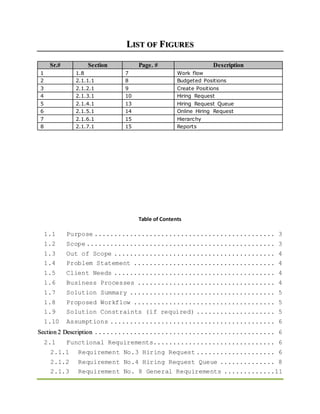
DOCUMENT APPROVAL/ SIGN OFF SHEET
 I have reviewed the whole (related parts of) document.
 I agree and approve all of the (related) contents of this document.
Name Designation Department Date Signature
RAB NAWAZ
QAMAR
Human
Resources
Executive
Human Resources 22-April-2013
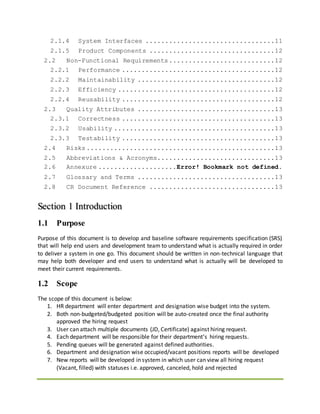
LIST OF FIGURES
Sr.# Section Page. # Description
1 1.8 7 Work flow
2 2.1.1.1 8 Budgeted Positions
3 2.1.2.1 9 Create Positions
4 2.1.3.1 10 Hiring Request
5 2.1.4.1 13 Hiring Request Queue
6 2.1.5.1 14 Online Hiring Request
7 2.1.6.1 15 Hierarchy
8 2.1.7.1 15 Reports
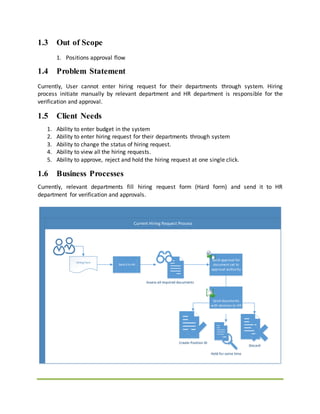
Table of Contents
1.1 Purpose .............................................. 3
1.2 Scope ................................................ 3
1.3 Out of Scope ......................................... 4
1.4 Problem Statement .................................... 4
1.5 Client Needs ......................................... 4
1.6 Business Processes ................................... 4
1.7 Solution Summary ..................................... 5
1.8 Proposed Workflow .................................... 5
1.9 Solution Constraints (if required) .................... 5
1.10 Assumptions .......................................... 6
Section 2 Description .............................................. 6
2.1 Functional Requirements............................... 6
2.1.1 Requirement No.3 Hiring Request .................... 6
2.1.2 Requirement No.4 Hiring Request Queue .............. 8
2.1.3 Requirement No. 8 General Requirements .............11
2.1.4 System Interfaces .................................11
2.1.5 Product Components ................................12
2.2 Non-Functional Requirements...........................12
2.2.1 Performance .......................................12
2.2.2 Maintainability ...................................12
2.2.3 Efficiency ........................................12
2.2.4 Reusability .......................................12
2.3 Quality Attributes ...................................13
2.3.1 Correctness .......................................13
2.3.2 Usability .........................................13
2.3.3 Testability .......................................13
2.4 Risks ................................................13
2.5 Abbreviations & Acronyms..............................13
2.6 Annexure ....................Error! Bookmark not defined.
2.7 Glossary and Terms ...................................13
2.8 CR Document Reference ................................13
Section 1 Introduction
1.1 Purpose
Purpose of this document is to develop and baseline software requirements specification (SRS)
that will help end users and development team to understand what is actually required in order
to deliver a system in one go. This document should be written in non-technical language that
may help both developer and end users to understand what is actually will be developed to
meet their current requirements.
1.2 Scope
The scope of this document is below:
1. HR department will enter department and designation wise budget into the system.
2. Both non-budgeted/budgeted position will be auto-created once the final authority
approved the hiring request
3. User can attach multiple documents (JD, Certificate) against hiring request.
4. Each department will be responsible for their department’s hiring requests.
5. Pending queues will be generated against defined authorities.
6. Department and designation wise occupied/vacant positions reports will be developed
7. New reports will be developed in system in which user can view all hiring request
(Vacant, filled) with statuses i.e. approved, canceled, hold and rejected
1.3 Out of Scope
1. Positions approval flow
1.4 Problem Statement
Currently, User cannot enter hiring request for their departments through system. Hiring
process initiate manually by relevant department and HR department is responsible for the
verification and approval.
1.5 Client Needs
1. Ability to enter budget in the system
2. Ability to enter hiring request for their departments through system
3. Ability to change the status of hiring request.
4. Ability to view all the hiring requests.
5. Ability to approve, reject and hold the hiring request at one single click.
1.6 Business Processes
Currently, relevant departments fill hiring request form (Hard form) and send it to HR
department for verification and approvals.
Current Hiring Request Process
Hiring form
Send it to HR
Send approval for
document set to
approval authority
Assess all required documents
Discard
Create Position ID
Hold for some time
Send documents
with decision to HR
1.7 Solution Summary
1. Two new buttons (Post) and (report) should be added on the “Budgeted positions” screen
and after post user cannot update the record.
2. A new screen will be developed in system where user can enter the hiring request.
3. A pending queue will be generated for all the defined authorities, where they can mark
their decisions against hiring requests.
4. Position ID will be auto generated, once the final authority approved the hiring request
5. A new screen is required in system where user can view all hiring requests.
6. A new report will be developed in system in which user can view all hiring requests
(Vacant, filled) with statuses i.e. approved, canceled, hold and rejected
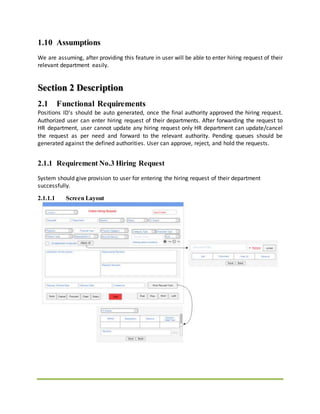
1.8 Proposed Workflow
1.9 Solution Constraints (if required)
No solution constraints have been identified for this change request.
1.10 Assumptions
We are assuming, after providing this feature in user will be able to enter hiring request of their
relevant department easily.
Section 2 Description
2.1 Functional Requirements
Positions ID’s should be auto generated, once the final authority approved the hiring request.
Authorized user can enter hiring request of their departments. After forwarding the request to
HR department, user cannot update any hiring request only HR department can update/cancel
the request as per need and forward to the relevant authority. Pending queues should be
generated against the defined authorities. User can approve, reject, and hold the requests.
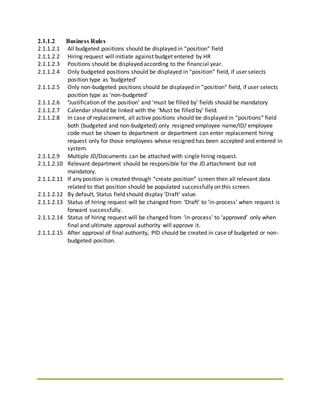
2.1.1 Requirement No.3 Hiring Request
System should give provision to user for entering the hiring request of their department
successfully.
2.1.1.1 Screen Layout
2.1.1.2 Business Rules
2.1.1.2.1 All budgeted positions should be displayed in “position” field
2.1.1.2.2 Hiring request will initiate against budget entered by HR
2.1.1.2.3 Positions should be displayed according to the financial year.
2.1.1.2.4 Only budgeted positions should be displayed in “position” field, if user selects
position type as ‘budgeted’
2.1.1.2.5 Only non-budgeted positions should be displayed in “position” field, if user selects
position type as ‘non-budgeted’
2.1.1.2.6 ‘Justification of the position’ and ‘must be filled by’ fields should be mandatory
2.1.1.2.7 Calendar should be linked with the ‘Must be filled by’ field.
2.1.1.2.8 In case of replacement, all active positions should be displayed in “positions” field
both (budgeted and non-budgeted).only resigned employee name/ID/ employee
code must be shown to department or department can enter replacement hiring
request only for those employees whose resigned has been accepted and entered in
system.
2.1.1.2.9 Multiple JD/Documents can be attached with single hiring request.
2.1.1.2.10 Relevant department should be responsible for the JD attachment but not
mandatory.
2.1.1.2.11 If any position is created through “create position” screen then all relevant data
related to that position should be populated successfully on this screen.
2.1.1.2.12 By default, Status field should display ‘Draft’ value.
2.1.1.2.13 Status of hiring request will be changed from ‘Draft’ to ‘in-process’ when request is
forward successfully.
2.1.1.2.14 Status of hiring request will be changed from ‘in-process’ to ‘approved’ only when
final and ultimate approval authority will approve it.
2.1.1.2.15 After approval of final authority, PID should be created in case of budgeted or non-
budgeted position.
2.1.1.2.16 HR department can change the request status and ‘in queue’ fields as per need.
2.1.1.2.17 After forward the request to HR, relevant department will not update the hiring
request.
2.1.1.2.18 Rejected hiring request will be auto closed through back end job according to the
budget expiry/end date.
2.1.1.2.19 If Hiring request is rejected from the CEO, then department cannot initiate hiring
request again.
2.1.1.2.20 Hold hiring requests can be resumed by HR at any time.
2.1.1.2.21 Email alert should be send to the HR department against those “Hold hiring
requests” whose hold duration is about to end.
2.1.1.2.22 HR can change request track. ‘In queue’ field will show MRNO & name of upper
hierarchy concerns.
2.1.1.2.23 History of hiring request will be maintained in system.
2.1.1.2.24 If budget expiry date is 31-dec-2019, then system will not give provision to user for
entering the new hiring request for the budget of financial year 2019
2.1.1.2.25 Hiring requests with status “In- Process” will be continued after budget expiry
2.1.1.2.26 Positions will not carry forward in next financial year, if hiring request against that
position is marked as rejected.
2.1.1.2.27 Positions will carry forward in next financial year, if hiring request against that
position is marked as approved
2.1.1.2.28 If user select/query hiring request, which is on, hold or rejected then system will
display alert that “Request is marked as rejected or on hold in the system
2.1.1.2.29 Hold/rejected and canceled positions and hiring requests will be displayed in the
system.
2.1.1.2.30 If budgeted positions are not available, then systemshould give provision to user to
create a budgeted position manually.
2.1.1.2.31 In this case, manually created budgeted positions will be deducted from the budget
of next financial year automatically.
2.1.1.3 Requirements Priority
High
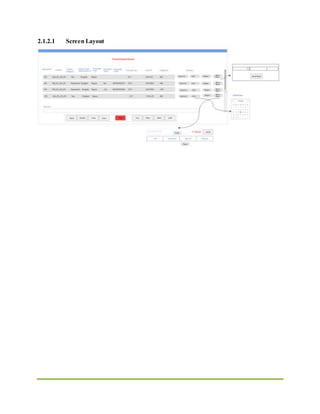
2.1.2 Requirement No.4 Hiring RequestQueue
Pending queue should be generated for defined authorities, once user forwards the request
successfully.
2.1.2.1 Screen Layout
2.1.2.2 Business Rules
2.1.2.2.1 If HOD itself enters the hiring request for their department, then pending queue will
not be generated for HOD.
2.1.2.2.2 If department manager and HOD both are same in system, then pending queue will
not be generate for the manager or HOD.
2.1.2.2.3 If manager enters the hiring request then request will route to the HOD.
2.1.2.2.4 HOD can update hiring request, except its status and ‘in queue’ fields by double
clicking the record before taking any decision regarding selected hiring request
2.1.2.2.5 All fields except “Decision” should be read only. User can “Hold” “Approve” and
Reject” the request and record will be vanished from the queue. In case of
rejection/hold remarks will be mandatory
2.1.2.2.6 If any request is rejected mistakenly, then request will be entered again by relevant
department
2.1.2.2.7 If, at any point, hiring request is rejected, its status will be ‘rejected’. In addition,
department will not be allowed to raise hiring request again.
2.1.2.2.8 If, at any point, hiring request is on hold, its status will be marked as ‘hold’. After
specific period, this request will be reviewed again to begin the process again as per
Human Resource Department.
2.1.2.2.9 In case of Hold, a canvas will be opened, with ‘hold till date’ field, where user can
enter the hold duration by selecting the desired date. This field will be mandatory.
2.1.2.2.10 JD should be attached at the time of HR approval. System should give a message if
user approve request without JD “JD is required for proceeding, kindly attach”
2.1.2.2.11 User can attach/view/remove JD by clicking on ‘JD’ button.
2.1.2.2.12 User can fetch data as per given criteria. Cursor should move to department field.
2.1.2.2.13 In case of rejection/hold at any point, an email alert should be send to the
department HOD and HR recruitment section with rejection/hold reason.
2.1.2.2.14 System will give provision to user for sending back the hiring request to the
previous hierarchy.
2.1.2.2.15 Rejection/Hold email should contain the following information:
 Request#
 position
 Status “Rejected”, “Hold”
 Hold till (Duration)
 Rejection/Hold reason
 Rejected/ hold by
 Rejection/ hold date& time
2.1.2.2.16 In case of final approval, an email alert should be send to the department HOD HR
recruitment section.
2.1.2.2.17 Final approval email should contain the following information:
 Request#
 Position
 Status “Approved”
2.1.3 Requirement No. 8 GeneralRequirements
1. All LOV fields should be validated and indicated by light yellow color.
2. Validation error messages should be displayed properly at correct position indicating the
field for which error occurred.
3. Dialog boxes/Error Message Windows should have appropriate titles, text, buttons, and
button labels.
4. Check the short cut key and their functioning.
5. Check for spelling and grammatical mistakes on all forms, reports, and error messages.
6. Date Field:
a) According to the scenario, systemshould not accept the past date or future date in
the date fields.
b) Where 'From Date' and 'To Date' are present then 'From Date' should not be
greater than the 'To Date'.
c) Correct format of the date must be used DD-MM-YYYY (According to the application
standard).
d) Check calendar control applied where necessary.
7. All mandatory fields should be validated and indicated by red Asterisk. (*)
8. All fields and their labels should be aligned properly.
9. Font size, style, and color for headline, description text, labels, infield data, and grid info
should be standardized as specified in GUI Design guide.
10. Disabled fields should be grayed out and user should not be able to set focus on these
fields.
11. Order of Navigation Buttons on Right Side. <First><Prev><Next><Last>
12. Order of functional Buttons on Left Side.
<Save><Post><Cancel><Clear><Query><Delete><Exit>
13. TAB sequence from Top left to Bottom right. (Line by line starting from top left)
2.1.4 System Interfaces
N/A
2.1.4.1 User Interfaces
1. Online Hiring request
2. Hire Request pending queue
3. Hiring request history
4. Create Position
5. Budgeted positions
2.1.4.2 Hardware Interfaces
No new hardware interfaces to be used for this task.
2.1.4.3 Communication Interfaces
1. It should be operate-able through LAN and WAN.
2. Network and database connection shall be required to fetch required data.
2.1.4.4 Software Interfaces
Application shall interface with Oracle 12c database already configured as primary database via
ODBC connection and WebLogic server.
2.1.4.5 External Interfaces
No external interfaces involved.
2.1.5 Product Components
Online hiring request process
2.2 Non-Functional Requirements
2.2.1 Performance
1. There should be no effect on system performance on adding such minor modifications in
system.
2. System should not take much time to fetch pending requests; in user queue when screen is
opened by pending task.
2.2.2 Maintainability
System should be recoverable in production environment within 1 to 2 hours after any issue
pops up.
2.2.3 Efficiency
System performance shouldn’t be affected on pending queue generation event.
2.2.4 Reusability
Moreover, System should be capable enough to be developed in a way that this code can be
used with no or very little modification in other modules if required.
2.3 Quality Attributes
2.3.1 Correctness
The system must be collaborative and the interruptions involved must be less, there should be
no immediate delays in case of opening form, popping alert message. Pending queues should
be generated against relevant authority.
2.3.2 Usability
All users must be able to operate/use the newly developed screen after complete
demonstration. Interface must be self-descriptive so that user should be able to understand
functionality/working of system after consulting available user guide/system documentation
2.3.3 Testability
All above stated business rules/functionality must be testable easily in available test
environment.
2.4 Risks
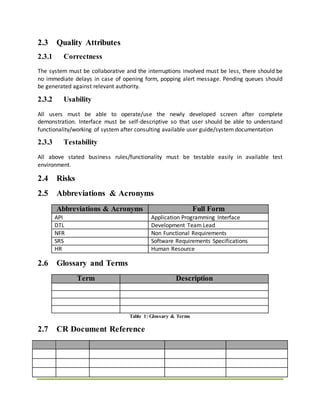
2.5 Abbreviations & Acronyms
Abbreviations & Acronyms Full Form
API Application Programming Interface
DTL Development Team Lead
NFR Non Functional Requirements
SRS Software Requirements Specifications
HR Human Resource
2.6 Glossary and Terms
Term Description
Table 1: Glossary & Terms
2.7 CR Document Reference
Table 2: CR Document Reference

Srs sample

  • 1.
    DOCUMENT INFORMATION Category Information DocumentHR Management System Author(s) IMRAN Status Approved Reviewer(s) ABID Approver(s) ASIF Issue Date 18-April-2012 Distribution IT SOLUTIONS (SRS)_HR MANAGEMENT SYSTEM (1)
  • 2.
    DOCUMENT REVISION HISTORY DOCUMENTAPPROVAL/ SIGN OFF SHEET  I have reviewed the whole (related parts of) document.  I agree and approve all of the (related) contents of this document. Name Designation Department Date Signature RAB NAWAZ QAMAR Human Resources Executive Human Resources 22-April-2013
  • 3.
    LIST OF FIGURES Sr.#Section Page. # Description 1 1.8 7 Work flow 2 2.1.1.1 8 Budgeted Positions 3 2.1.2.1 9 Create Positions 4 2.1.3.1 10 Hiring Request 5 2.1.4.1 13 Hiring Request Queue 6 2.1.5.1 14 Online Hiring Request 7 2.1.6.1 15 Hierarchy 8 2.1.7.1 15 Reports Table of Contents 1.1 Purpose .............................................. 3 1.2 Scope ................................................ 3 1.3 Out of Scope ......................................... 4 1.4 Problem Statement .................................... 4 1.5 Client Needs ......................................... 4 1.6 Business Processes ................................... 4 1.7 Solution Summary ..................................... 5 1.8 Proposed Workflow .................................... 5 1.9 Solution Constraints (if required) .................... 5 1.10 Assumptions .......................................... 6 Section 2 Description .............................................. 6 2.1 Functional Requirements............................... 6 2.1.1 Requirement No.3 Hiring Request .................... 6 2.1.2 Requirement No.4 Hiring Request Queue .............. 8 2.1.3 Requirement No. 8 General Requirements .............11
  • 4.
    2.1.4 System Interfaces.................................11 2.1.5 Product Components ................................12 2.2 Non-Functional Requirements...........................12 2.2.1 Performance .......................................12 2.2.2 Maintainability ...................................12 2.2.3 Efficiency ........................................12 2.2.4 Reusability .......................................12 2.3 Quality Attributes ...................................13 2.3.1 Correctness .......................................13 2.3.2 Usability .........................................13 2.3.3 Testability .......................................13 2.4 Risks ................................................13 2.5 Abbreviations & Acronyms..............................13 2.6 Annexure ....................Error! Bookmark not defined. 2.7 Glossary and Terms ...................................13 2.8 CR Document Reference ................................13 Section 1 Introduction 1.1 Purpose Purpose of this document is to develop and baseline software requirements specification (SRS) that will help end users and development team to understand what is actually required in order to deliver a system in one go. This document should be written in non-technical language that may help both developer and end users to understand what is actually will be developed to meet their current requirements. 1.2 Scope The scope of this document is below: 1. HR department will enter department and designation wise budget into the system. 2. Both non-budgeted/budgeted position will be auto-created once the final authority approved the hiring request 3. User can attach multiple documents (JD, Certificate) against hiring request. 4. Each department will be responsible for their department’s hiring requests. 5. Pending queues will be generated against defined authorities. 6. Department and designation wise occupied/vacant positions reports will be developed 7. New reports will be developed in system in which user can view all hiring request (Vacant, filled) with statuses i.e. approved, canceled, hold and rejected
  • 5.
    1.3 Out ofScope 1. Positions approval flow 1.4 Problem Statement Currently, User cannot enter hiring request for their departments through system. Hiring process initiate manually by relevant department and HR department is responsible for the verification and approval. 1.5 Client Needs 1. Ability to enter budget in the system 2. Ability to enter hiring request for their departments through system 3. Ability to change the status of hiring request. 4. Ability to view all the hiring requests. 5. Ability to approve, reject and hold the hiring request at one single click. 1.6 Business Processes Currently, relevant departments fill hiring request form (Hard form) and send it to HR department for verification and approvals. Current Hiring Request Process Hiring form Send it to HR Send approval for document set to approval authority Assess all required documents Discard Create Position ID Hold for some time Send documents with decision to HR
  • 6.
    1.7 Solution Summary 1.Two new buttons (Post) and (report) should be added on the “Budgeted positions” screen and after post user cannot update the record. 2. A new screen will be developed in system where user can enter the hiring request. 3. A pending queue will be generated for all the defined authorities, where they can mark their decisions against hiring requests. 4. Position ID will be auto generated, once the final authority approved the hiring request 5. A new screen is required in system where user can view all hiring requests. 6. A new report will be developed in system in which user can view all hiring requests (Vacant, filled) with statuses i.e. approved, canceled, hold and rejected 1.8 Proposed Workflow 1.9 Solution Constraints (if required) No solution constraints have been identified for this change request.
  • 7.
    1.10 Assumptions We areassuming, after providing this feature in user will be able to enter hiring request of their relevant department easily. Section 2 Description 2.1 Functional Requirements Positions ID’s should be auto generated, once the final authority approved the hiring request. Authorized user can enter hiring request of their departments. After forwarding the request to HR department, user cannot update any hiring request only HR department can update/cancel the request as per need and forward to the relevant authority. Pending queues should be generated against the defined authorities. User can approve, reject, and hold the requests. 2.1.1 Requirement No.3 Hiring Request System should give provision to user for entering the hiring request of their department successfully. 2.1.1.1 Screen Layout
  • 8.
    2.1.1.2 Business Rules 2.1.1.2.1All budgeted positions should be displayed in “position” field 2.1.1.2.2 Hiring request will initiate against budget entered by HR 2.1.1.2.3 Positions should be displayed according to the financial year. 2.1.1.2.4 Only budgeted positions should be displayed in “position” field, if user selects position type as ‘budgeted’ 2.1.1.2.5 Only non-budgeted positions should be displayed in “position” field, if user selects position type as ‘non-budgeted’ 2.1.1.2.6 ‘Justification of the position’ and ‘must be filled by’ fields should be mandatory 2.1.1.2.7 Calendar should be linked with the ‘Must be filled by’ field. 2.1.1.2.8 In case of replacement, all active positions should be displayed in “positions” field both (budgeted and non-budgeted).only resigned employee name/ID/ employee code must be shown to department or department can enter replacement hiring request only for those employees whose resigned has been accepted and entered in system. 2.1.1.2.9 Multiple JD/Documents can be attached with single hiring request. 2.1.1.2.10 Relevant department should be responsible for the JD attachment but not mandatory. 2.1.1.2.11 If any position is created through “create position” screen then all relevant data related to that position should be populated successfully on this screen. 2.1.1.2.12 By default, Status field should display ‘Draft’ value. 2.1.1.2.13 Status of hiring request will be changed from ‘Draft’ to ‘in-process’ when request is forward successfully. 2.1.1.2.14 Status of hiring request will be changed from ‘in-process’ to ‘approved’ only when final and ultimate approval authority will approve it. 2.1.1.2.15 After approval of final authority, PID should be created in case of budgeted or non- budgeted position.
  • 9.
    2.1.1.2.16 HR departmentcan change the request status and ‘in queue’ fields as per need. 2.1.1.2.17 After forward the request to HR, relevant department will not update the hiring request. 2.1.1.2.18 Rejected hiring request will be auto closed through back end job according to the budget expiry/end date. 2.1.1.2.19 If Hiring request is rejected from the CEO, then department cannot initiate hiring request again. 2.1.1.2.20 Hold hiring requests can be resumed by HR at any time. 2.1.1.2.21 Email alert should be send to the HR department against those “Hold hiring requests” whose hold duration is about to end. 2.1.1.2.22 HR can change request track. ‘In queue’ field will show MRNO & name of upper hierarchy concerns. 2.1.1.2.23 History of hiring request will be maintained in system. 2.1.1.2.24 If budget expiry date is 31-dec-2019, then system will not give provision to user for entering the new hiring request for the budget of financial year 2019 2.1.1.2.25 Hiring requests with status “In- Process” will be continued after budget expiry 2.1.1.2.26 Positions will not carry forward in next financial year, if hiring request against that position is marked as rejected. 2.1.1.2.27 Positions will carry forward in next financial year, if hiring request against that position is marked as approved 2.1.1.2.28 If user select/query hiring request, which is on, hold or rejected then system will display alert that “Request is marked as rejected or on hold in the system 2.1.1.2.29 Hold/rejected and canceled positions and hiring requests will be displayed in the system. 2.1.1.2.30 If budgeted positions are not available, then systemshould give provision to user to create a budgeted position manually. 2.1.1.2.31 In this case, manually created budgeted positions will be deducted from the budget of next financial year automatically. 2.1.1.3 Requirements Priority High 2.1.2 Requirement No.4 Hiring RequestQueue Pending queue should be generated for defined authorities, once user forwards the request successfully.
  • 10.
  • 11.
    2.1.2.2 Business Rules 2.1.2.2.1If HOD itself enters the hiring request for their department, then pending queue will not be generated for HOD. 2.1.2.2.2 If department manager and HOD both are same in system, then pending queue will not be generate for the manager or HOD. 2.1.2.2.3 If manager enters the hiring request then request will route to the HOD. 2.1.2.2.4 HOD can update hiring request, except its status and ‘in queue’ fields by double clicking the record before taking any decision regarding selected hiring request 2.1.2.2.5 All fields except “Decision” should be read only. User can “Hold” “Approve” and Reject” the request and record will be vanished from the queue. In case of rejection/hold remarks will be mandatory 2.1.2.2.6 If any request is rejected mistakenly, then request will be entered again by relevant department 2.1.2.2.7 If, at any point, hiring request is rejected, its status will be ‘rejected’. In addition, department will not be allowed to raise hiring request again. 2.1.2.2.8 If, at any point, hiring request is on hold, its status will be marked as ‘hold’. After specific period, this request will be reviewed again to begin the process again as per Human Resource Department. 2.1.2.2.9 In case of Hold, a canvas will be opened, with ‘hold till date’ field, where user can enter the hold duration by selecting the desired date. This field will be mandatory. 2.1.2.2.10 JD should be attached at the time of HR approval. System should give a message if user approve request without JD “JD is required for proceeding, kindly attach” 2.1.2.2.11 User can attach/view/remove JD by clicking on ‘JD’ button. 2.1.2.2.12 User can fetch data as per given criteria. Cursor should move to department field. 2.1.2.2.13 In case of rejection/hold at any point, an email alert should be send to the department HOD and HR recruitment section with rejection/hold reason. 2.1.2.2.14 System will give provision to user for sending back the hiring request to the previous hierarchy. 2.1.2.2.15 Rejection/Hold email should contain the following information:  Request#  position  Status “Rejected”, “Hold”  Hold till (Duration)  Rejection/Hold reason  Rejected/ hold by  Rejection/ hold date& time 2.1.2.2.16 In case of final approval, an email alert should be send to the department HOD HR recruitment section. 2.1.2.2.17 Final approval email should contain the following information:  Request#  Position  Status “Approved”
  • 12.
    2.1.3 Requirement No.8 GeneralRequirements 1. All LOV fields should be validated and indicated by light yellow color. 2. Validation error messages should be displayed properly at correct position indicating the field for which error occurred. 3. Dialog boxes/Error Message Windows should have appropriate titles, text, buttons, and button labels. 4. Check the short cut key and their functioning. 5. Check for spelling and grammatical mistakes on all forms, reports, and error messages. 6. Date Field: a) According to the scenario, systemshould not accept the past date or future date in the date fields. b) Where 'From Date' and 'To Date' are present then 'From Date' should not be greater than the 'To Date'. c) Correct format of the date must be used DD-MM-YYYY (According to the application standard). d) Check calendar control applied where necessary. 7. All mandatory fields should be validated and indicated by red Asterisk. (*) 8. All fields and their labels should be aligned properly. 9. Font size, style, and color for headline, description text, labels, infield data, and grid info should be standardized as specified in GUI Design guide. 10. Disabled fields should be grayed out and user should not be able to set focus on these fields. 11. Order of Navigation Buttons on Right Side. <First><Prev><Next><Last> 12. Order of functional Buttons on Left Side. <Save><Post><Cancel><Clear><Query><Delete><Exit> 13. TAB sequence from Top left to Bottom right. (Line by line starting from top left) 2.1.4 System Interfaces N/A 2.1.4.1 User Interfaces 1. Online Hiring request 2. Hire Request pending queue 3. Hiring request history 4. Create Position 5. Budgeted positions 2.1.4.2 Hardware Interfaces No new hardware interfaces to be used for this task.
  • 13.
    2.1.4.3 Communication Interfaces 1.It should be operate-able through LAN and WAN. 2. Network and database connection shall be required to fetch required data. 2.1.4.4 Software Interfaces Application shall interface with Oracle 12c database already configured as primary database via ODBC connection and WebLogic server. 2.1.4.5 External Interfaces No external interfaces involved. 2.1.5 Product Components Online hiring request process 2.2 Non-Functional Requirements 2.2.1 Performance 1. There should be no effect on system performance on adding such minor modifications in system. 2. System should not take much time to fetch pending requests; in user queue when screen is opened by pending task. 2.2.2 Maintainability System should be recoverable in production environment within 1 to 2 hours after any issue pops up. 2.2.3 Efficiency System performance shouldn’t be affected on pending queue generation event. 2.2.4 Reusability Moreover, System should be capable enough to be developed in a way that this code can be used with no or very little modification in other modules if required.
  • 14.
    2.3 Quality Attributes 2.3.1Correctness The system must be collaborative and the interruptions involved must be less, there should be no immediate delays in case of opening form, popping alert message. Pending queues should be generated against relevant authority. 2.3.2 Usability All users must be able to operate/use the newly developed screen after complete demonstration. Interface must be self-descriptive so that user should be able to understand functionality/working of system after consulting available user guide/system documentation 2.3.3 Testability All above stated business rules/functionality must be testable easily in available test environment. 2.4 Risks 2.5 Abbreviations & Acronyms Abbreviations & Acronyms Full Form API Application Programming Interface DTL Development Team Lead NFR Non Functional Requirements SRS Software Requirements Specifications HR Human Resource 2.6 Glossary and Terms Term Description Table 1: Glossary & Terms 2.7 CR Document Reference
  • 15.
    Table 2: CRDocument Reference