Regular Expressions
What are they all about?
What Are Regular Expressions?
• A RegEx (regular expression) is a special string for describing a pattern.
• Template for deterring matching
• Wild card on steroids
• Exquisite string handling and manipulation
• RegEx aren’t merely a part of Perl
• sed
• awk
• Grep
• Vi
• Search engines
RegEx Basics
• Code: /expression/
• The expression you are searching, matching processing is placed within forward slashes.
• Ex. /abc/, /[0-9]/, [A-Z], [a-cw-z] etc.
• When performing pattern matches you are primarily concerned with the final
yes(true) or no(false) outcome.
• Condtional based statements
• if
• while
• However, it is possible to extract the search string or line from text.
The Binding Operator
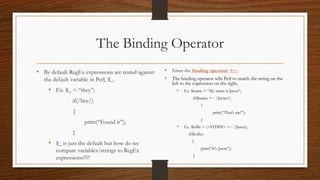
• By default RegEx expressions are tested against
the default variable in Perl, $_.
• Ex. $_ = “they”;
if(/hey/)
{
print(“Found it”);
}
• $_ is just the default but how do we
compare variables/strings to RegEx
expressions?!?!
• Enter the binding operator, =~.
• The binding operator tells Perl to match the string on the
left to the expression on the right.
• Ex. $name = “My name is Jason”;
if($name =~ /Jason/)
{
print(“That’s me!”);
}
• Ex. $isMe = (<STDIN> =~ /Jason);
if($isMe)
{
print(“It’s Jason”);
}
Metacharacters
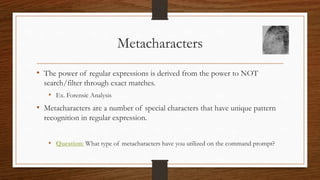
• The power of regular expressions is derived from the power to NOT
search/filter through exact matches.
• Ex. Forensic Analysis
• Metacharacters are a number of special characters that have unique pattern
recognition in regular expression.
• Question: What type of metacharacters have you utilized on the command prompt?
Presenting the Metacharacters
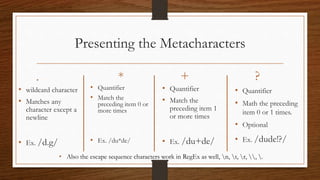
• wildcard character
• Matches any
character except a
newline
• Ex. /d.g/
• Quantifier
• Match the
preceding item 0 or
more times
• Ex. /du*de/
• Quantifier
• Match the
preceding item 1
or more times
• Ex. /du+de/
• Quantifier
• Math the preceding
item 0 or 1 times.
• Optional
• Ex. /dude!?/
*. + ?
• Also the escape sequence characters work in RegEx as well, n, t, r, , .
Grouping in Patterns
• Parentheses can be used to group parts of a pattern.
• Ex. /(franko)+/ /(franko)*/ /(franko +jason)/
• However the more beneficial technique is that parentheses form capture
groups.
• With a capture group created you can reuse them using back references.
• Code: g{ref#}
• Ex. $_ = “zippiddy doo daa”;
• /(.)g{1}/ /(.)(i)g{1}g{1}/ /(.)(.)g{-1}/ /i(.)g{1}y/

Regular Expressions

  • 1.
  • 2.
    What Are RegularExpressions? • A RegEx (regular expression) is a special string for describing a pattern. • Template for deterring matching • Wild card on steroids • Exquisite string handling and manipulation • RegEx aren’t merely a part of Perl • sed • awk • Grep • Vi • Search engines
  • 3.
    RegEx Basics • Code:/expression/ • The expression you are searching, matching processing is placed within forward slashes. • Ex. /abc/, /[0-9]/, [A-Z], [a-cw-z] etc. • When performing pattern matches you are primarily concerned with the final yes(true) or no(false) outcome. • Condtional based statements • if • while • However, it is possible to extract the search string or line from text.
  • 4.
    The Binding Operator •By default RegEx expressions are tested against the default variable in Perl, $_. • Ex. $_ = “they”; if(/hey/) { print(“Found it”); } • $_ is just the default but how do we compare variables/strings to RegEx expressions?!?! • Enter the binding operator, =~. • The binding operator tells Perl to match the string on the left to the expression on the right. • Ex. $name = “My name is Jason”; if($name =~ /Jason/) { print(“That’s me!”); } • Ex. $isMe = (<STDIN> =~ /Jason); if($isMe) { print(“It’s Jason”); }
  • 5.
    Metacharacters • The powerof regular expressions is derived from the power to NOT search/filter through exact matches. • Ex. Forensic Analysis • Metacharacters are a number of special characters that have unique pattern recognition in regular expression. • Question: What type of metacharacters have you utilized on the command prompt?
  • 6.
    Presenting the Metacharacters •wildcard character • Matches any character except a newline • Ex. /d.g/ • Quantifier • Match the preceding item 0 or more times • Ex. /du*de/ • Quantifier • Match the preceding item 1 or more times • Ex. /du+de/ • Quantifier • Math the preceding item 0 or 1 times. • Optional • Ex. /dude!?/ *. + ? • Also the escape sequence characters work in RegEx as well, n, t, r, , .
  • 7.
    Grouping in Patterns •Parentheses can be used to group parts of a pattern. • Ex. /(franko)+/ /(franko)*/ /(franko +jason)/ • However the more beneficial technique is that parentheses form capture groups. • With a capture group created you can reuse them using back references. • Code: g{ref#} • Ex. $_ = “zippiddy doo daa”; • /(.)g{1}/ /(.)(i)g{1}g{1}/ /(.)(.)g{-1}/ /i(.)g{1}y/

Editor's Notes

  • #3 Can run Perl regex in grep using the option –P ‘ ‘
  • #6 Explain with the question Globs vs. RegEx
  • #7 What’s the difference between the * and + example
  • #8 Back references work both ways positive numbers look in order Negative numbers are in reference from the current position