

String Interpolation In Scala

Ruchi Agarwal
Software Consultant
Knoldus Software LLP
Index:
●
●

●

Introduction
String Interpolation in Scala
Usage
●

The s String Interpolator
●

●
●

Using expressions in string literals

The f Interpolator
The raw Interpolator
Introduction:
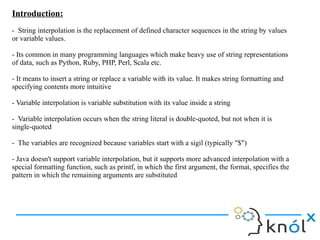
- String interpolation is the replacement of defined character sequences in the string by values
or variable values.
- Its common in many programming languages which make heavy use of string representations
of data, such as Python, Ruby, PHP, Perl, Scala etc.
- It means to insert a string or replace a variable with its value. It makes string formatting and
specifying contents more intuitive
- Variable interpolation is variable substitution with its value inside a string
- Variable interpolation occurs when the string literal is double-quoted, but not when it is
single-quoted
- The variables are recognized because variables start with a sigil (typically "$")
- Java doesn't support variable interpolation, but it supports more advanced interpolation with a
special formatting function, such as printf, in which the first argument, the format, specifies the
pattern in which the remaining arguments are substituted
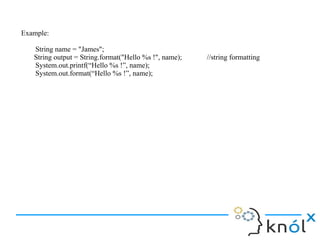
Example:
String name = "James";
String output = String.format("Hello %s !", name);
System.out.printf(“Hello %s !”, name);
System.out.format(“Hello %s !”, name);

//string formatting
String Interpolation in Scala:
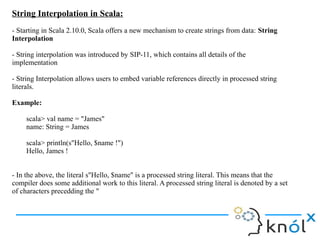
- Starting in Scala 2.10.0, Scala offers a new mechanism to create strings from data: String
Interpolation
- String interpolation was introduced by SIP-11, which contains all details of the
implementation
- String Interpolation allows users to embed variable references directly in processed string
literals.
Example:
scala> val name = "James"
name: String = James
scala> println(s"Hello, $name !")
Hello, James !
- In the above, the literal s"Hello, $name" is a processed string literal. This means that the
compiler does some additional work to this literal. A processed string literal is denoted by a set
of characters precedding the "
The s String Interpolator:
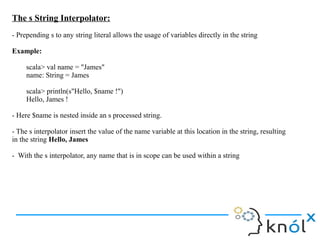
- Prepending s to any string literal allows the usage of variables directly in the string
Example:
scala> val name = "James"
name: String = James
scala> println(s"Hello, $name !")
Hello, James !
- Here $name is nested inside an s processed string.
- The s interpolator insert the value of the name variable at this location in the string, resulting
in the string Hello, James
- With the s interpolator, any name that is in scope can be used within a string
Using expressions in string literals:
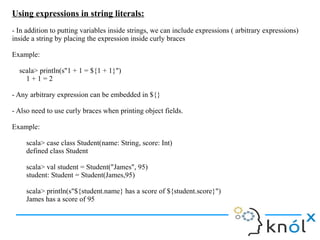
- In addition to putting variables inside strings, we can include expressions ( arbitrary expressions)
inside a string by placing the expression inside curly braces
Example:
scala> println(s"1 + 1 = ${1 + 1}")
1+1=2
- Any arbitrary expression can be embedded in ${}
- Also need to use curly braces when printing object fields.
Example:
scala> case class Student(name: String, score: Int)
defined class Student
scala> val student = Student("James", 95)
student: Student = Student(James,95)
scala> println(s"${student.name} has a score of ${student.score}")
James has a score of 95
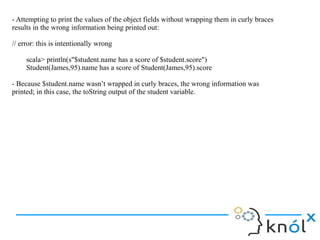
- Attempting to print the values of the object fields without wrapping them in curly braces
results in the wrong information being printed out:
// error: this is intentionally wrong
scala> println(s"$student.name has a score of $student.score")
Student(James,95).name has a score of Student(James,95).score
- Because $student.name wasn’t wrapped in curly braces, the wrong information was
printed; in this case, the toString output of the student variable.
The f String Interpolator:
- Prepending f to any string literal allows the creation of simple formatted strings, similar to printf in
other languages. When using the f interpolator, all variable references should be followed by a printfstyle format string, like %d.
Example:
scala> val height = 1.9d
height: Double = 1.9
scala> val name = "James"
name: String = James
scala> f"$name%s is $height%.2f meters tall")
String = James is 1.90 meters tall
- The f interpolator is typesafe. If you try to pass a format string that only works for integers but pass a
double, the compiler will issue an error.
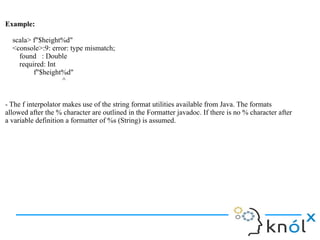
Example:
scala> f"$height%d"
<console>:9: error: type mismatch;
found : Double
required: Int
f"$height%d"
^
- The f interpolator makes use of the string format utilities available from Java. The formats
allowed after the % character are outlined in the Formatter javadoc. If there is no % character after
a variable definition a formatter of %s (String) is assumed.
The raw String Interpolator:
- The raw interpolator is similar to the s interpolator except that it performs “No escaping of literals
within the string”
Example:
scala> s"anb"
res0: String =
a
b
- Here the s string interpolator replaced the characters n with a return character. The raw interpolator
will not do that
Example:
scala> raw"anb"
res1: String = anb
- The raw interpolator is useful when you want to avoid having a sequence of characters like n turn
into a newline character
- In addition to the three default string interpolators, users can define their own
String Interpolation in Scala

String Interpolation in Scala

  • 1.
    String Interpolation InScala Ruchi Agarwal Software Consultant Knoldus Software LLP
  • 2.
    Index: ● ● ● Introduction String Interpolation inScala Usage ● The s String Interpolator ● ● ● Using expressions in string literals The f Interpolator The raw Interpolator
  • 3.
    Introduction: - String interpolationis the replacement of defined character sequences in the string by values or variable values. - Its common in many programming languages which make heavy use of string representations of data, such as Python, Ruby, PHP, Perl, Scala etc. - It means to insert a string or replace a variable with its value. It makes string formatting and specifying contents more intuitive - Variable interpolation is variable substitution with its value inside a string - Variable interpolation occurs when the string literal is double-quoted, but not when it is single-quoted - The variables are recognized because variables start with a sigil (typically "$") - Java doesn't support variable interpolation, but it supports more advanced interpolation with a special formatting function, such as printf, in which the first argument, the format, specifies the pattern in which the remaining arguments are substituted
  • 4.
    Example: String name ="James"; String output = String.format("Hello %s !", name); System.out.printf(“Hello %s !”, name); System.out.format(“Hello %s !”, name); //string formatting
  • 5.
    String Interpolation inScala: - Starting in Scala 2.10.0, Scala offers a new mechanism to create strings from data: String Interpolation - String interpolation was introduced by SIP-11, which contains all details of the implementation - String Interpolation allows users to embed variable references directly in processed string literals. Example: scala> val name = "James" name: String = James scala> println(s"Hello, $name !") Hello, James ! - In the above, the literal s"Hello, $name" is a processed string literal. This means that the compiler does some additional work to this literal. A processed string literal is denoted by a set of characters precedding the "
  • 6.
    The s StringInterpolator: - Prepending s to any string literal allows the usage of variables directly in the string Example: scala> val name = "James" name: String = James scala> println(s"Hello, $name !") Hello, James ! - Here $name is nested inside an s processed string. - The s interpolator insert the value of the name variable at this location in the string, resulting in the string Hello, James - With the s interpolator, any name that is in scope can be used within a string
  • 7.
    Using expressions instring literals: - In addition to putting variables inside strings, we can include expressions ( arbitrary expressions) inside a string by placing the expression inside curly braces Example: scala> println(s"1 + 1 = ${1 + 1}") 1+1=2 - Any arbitrary expression can be embedded in ${} - Also need to use curly braces when printing object fields. Example: scala> case class Student(name: String, score: Int) defined class Student scala> val student = Student("James", 95) student: Student = Student(James,95) scala> println(s"${student.name} has a score of ${student.score}") James has a score of 95
  • 8.
    - Attempting toprint the values of the object fields without wrapping them in curly braces results in the wrong information being printed out: // error: this is intentionally wrong scala> println(s"$student.name has a score of $student.score") Student(James,95).name has a score of Student(James,95).score - Because $student.name wasn’t wrapped in curly braces, the wrong information was printed; in this case, the toString output of the student variable.
  • 9.
    The f StringInterpolator: - Prepending f to any string literal allows the creation of simple formatted strings, similar to printf in other languages. When using the f interpolator, all variable references should be followed by a printfstyle format string, like %d. Example: scala> val height = 1.9d height: Double = 1.9 scala> val name = "James" name: String = James scala> f"$name%s is $height%.2f meters tall") String = James is 1.90 meters tall - The f interpolator is typesafe. If you try to pass a format string that only works for integers but pass a double, the compiler will issue an error.
  • 10.
    Example: scala> f"$height%d" <console>:9: error:type mismatch; found : Double required: Int f"$height%d" ^ - The f interpolator makes use of the string format utilities available from Java. The formats allowed after the % character are outlined in the Formatter javadoc. If there is no % character after a variable definition a formatter of %s (String) is assumed.
  • 11.
    The raw StringInterpolator: - The raw interpolator is similar to the s interpolator except that it performs “No escaping of literals within the string” Example: scala> s"anb" res0: String = a b - Here the s string interpolator replaced the characters n with a return character. The raw interpolator will not do that Example: scala> raw"anb" res1: String = anb - The raw interpolator is useful when you want to avoid having a sequence of characters like n turn into a newline character - In addition to the three default string interpolators, users can define their own