Regular expressions:
Text editing and
Advanced manipulation
HORT 59000
Lecture 4
Instructor: Kranthi Varala
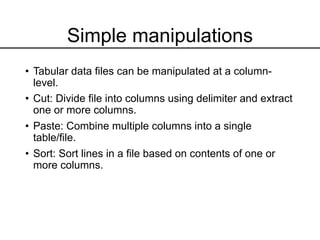
Simple manipulations
• Tabular data files can be manipulated at a column-
level.
• Cut: Divide file into columns using delimiter and extract
one or more columns.
• Paste: Combine multiple columns into a single
table/file.
• Sort: Sort lines in a file based on contents of one or
more columns.
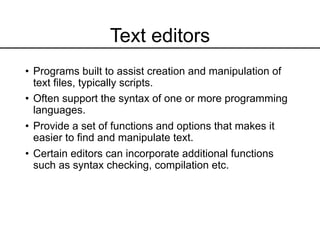
Text editors
• Programs built to assist creation and manipulation of
text files, typically scripts.
• Often support the syntax of one or more programming
languages.
• Provide a set of functions and options that makes it
easier to find and manipulate text.
• Certain editors can incorporate additional functions
such as syntax checking, compilation etc.
nano/pico editors
• nano is a pure text editor in GNU, that was build to
emulate the original pico editor in UNIX.
• Easy-to-learn, supports syntax highlighting, regular
expressions, scrolling etc.
• Lacks GUI, navigate within editor using keyboard.
• Special functions, such as toggling options/features,
use the Ctrl or Meta (Alt) key.
• Check /usr/share/nano to see the list of supported
syntax formats.
• For example: /usr/share/nano/python.nanorc provides
syntax rules for Python.
emacs editor
• Powerful program that provides basic editing functions
but also extendible to add functionality.
• Supports syntax highlighting, regular expressions,
Unicode (other languages)
• Supports GUI, when connection invoked with X support
(ssh -X <user>@server)
• Can install extensions that provide a wide range of
functions. E.g. Calendar, debugging interface,
calculator, version control etc.
• Learn more:
https://www.gnu.org/software/emacs/tour/index.html
vi editor
• Powerful editor that provides extensive editing
functions and relatively limited extensibility. My favorite
text editor!!
• Normal or Command mode is default and captures
keyboard input as commands or instructions to the
editor.
• Insert mode is entered by pressing ‘i’ which then allows
changes in text. Return to command mode by pressing
’Esc’.
• Steep learning curve… but very rewarding experience.
• ALL Unix systems include vi
Regular expressions
• Regular expressions (regex) are a specific way of
defining patterns in text.
• Patterns allow us to look for exact and inexact
matches.
• For example, British vs. US English
• Centre vs. Center
• Theatre vs. Theater
• -ize vs –ise
• Regex allows us to mix fixed and variable
characters.
• Typically written as follows: /<regex>/
• Regex is CaSe-SeNsiTive
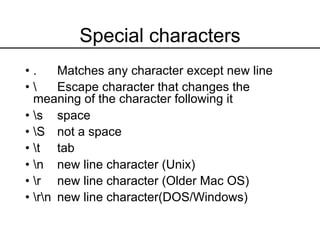
Special characters
• . Matches any character except new line
•  Escape character that changes the
meaning of the character following it
• s space
• S not a space
• t tab
• n new line character (Unix)
• r new line character (Older Mac OS)
• rn new line character(DOS/Windows)
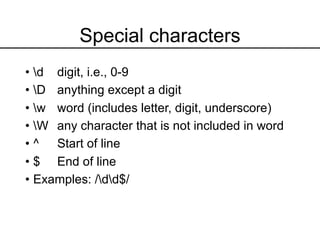
Special characters
• d digit, i.e., 0-9
• D anything except a digit
• w word (includes letter, digit, underscore)
• W any character that is not included in word
• ^ Start of line
• $ End of line
• Examples: /dd$/
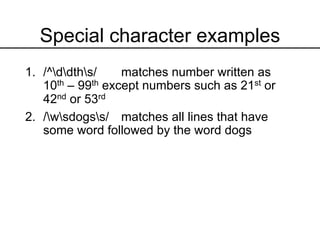
Special character examples
1. /^ddths/ matches number written as
10th – 99th except numbers such as 21st or
42nd or 53rd
2. /wsdogss/ matches all lines that have
some word followed by the word dogs
Character classes
• A class/set is used to define a group of
characters that are allowed in the pattern.
• Class is defined using the [] construct.
• Each character within the [] is treated as a
possible option for the character.
• Each class refers to one character in the
pattern.
• Character ranges, such as all numbers or all
letters supported.
Character classes
• [A-Z] matches all upper-case letters
• [a-z] matches all lower-case letters
• [0-9] matches all digits
• [tnr][hd] matches th or nd or rd
• Character class can be negated by using ^ as
the first character in the class.
• [^0-9] matches all characters that are not a
number
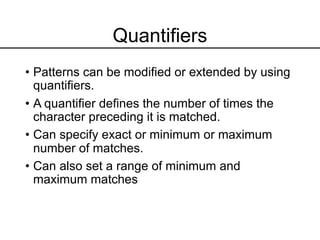
Quantifiers
• Patterns can be modified or extended by using
quantifiers.
• A quantifier defines the number of times the
character preceding it is matched.
• Can specify exact or minimum or maximum
number of matches.
• Can also set a range of minimum and
maximum matches
Quantifiers
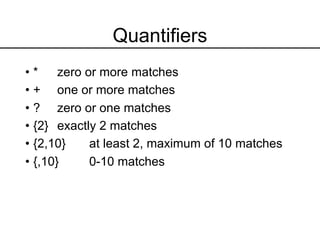
• * zero or more matches
• + one or more matches
• ? zero or one matches
• {2} exactly 2 matches
• {2,10} at least 2, maximum of 10 matches
• {,10} 0-10 matches
Quantifiers examples
• /G+/ at least one G
• /G*/ zero or more Gs (will match every
line)
• /G{5}/ Exactly 5 Gs (continuous)
• /AG{5,10}/ A followed by 5-10 Gs
• /CG{5,}/ C followed by >= 5 Gs
• /ATCG*/ ??
• /[0-9]{2,4}/ ??
Character groups
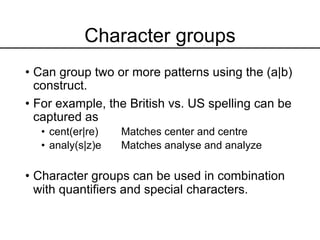
• Can group two or more patterns using the (a|b)
construct.
• For example, the British vs. US spelling can be
captured as
• cent(er|re) Matches center and centre
• analy(s|z)e Matches analyse and analyze
• Character groups can be used in combination
with quantifiers and special characters.
grep
• grep command searches for the specified pattern in
every line of the file.
• By default returns (prints) every line in file that matches
the pattern.
• Supports many options/arguments that alter the
behavior of grep.
• Very useful to select rows of data that match a pattern
the user is interested in.
grep
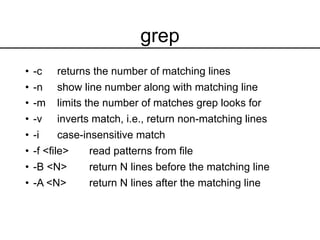
• -c returns the number of matching lines
• -n show line number along with matching line
• -m limits the number of matches grep looks for
• -v inverts match, i.e., return non-matching lines
• -i case-insensitive match
• -f <file> read patterns from file
• -B <N> return N lines before the matching line
• -A <N> return N lines after the matching line
sed
• grep is useful for finding matches but not
editing.
• sed is a stream editor, i.e., it is used to edit the
stream (STDIN or file) that is passing through
it.
• sed s/<pattern>/<replacement>/ <file>
• Replace every match of <pattern> in the file with
<replacement>
• Useful for repetitive editing of one or multiple
files.
awk
• awk is a programming language that allows
one line programs, therefore can be used as a
command.
• Each line in a file is a ‘record’ and each word in
the line is a ‘field’. Default separator is space.
• Works best with tabular data files since the
‘fields’ are consistent across the ‘records’.
awk (condition/pattern){action/script} filename
awk variables
• Special variables in awk have predefined meaning.
• FS = Field separator
• RS = Record separator
• OFS= Output Field separator
• ORS = Output Record separator
• $0 = Current record/line
• $N = Nth field in current record
• BEGIN = execute at start of command
• END = execute at end of command
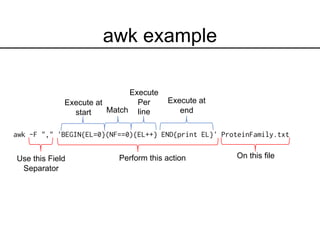
awk -F "," 'BEGIN{EL=0}(NF==0){EL++} END{print EL}' ProteinFamily.txt
awk example
Use this Field
Separator
Perform this action On this file
Execute at
start Match
Execute
Per
line
Execute at
end

Lecture_4.pdf

  • 1.
    Regular expressions: Text editingand Advanced manipulation HORT 59000 Lecture 4 Instructor: Kranthi Varala
  • 2.
    Simple manipulations • Tabulardata files can be manipulated at a column- level. • Cut: Divide file into columns using delimiter and extract one or more columns. • Paste: Combine multiple columns into a single table/file. • Sort: Sort lines in a file based on contents of one or more columns.
  • 3.
    Text editors • Programsbuilt to assist creation and manipulation of text files, typically scripts. • Often support the syntax of one or more programming languages. • Provide a set of functions and options that makes it easier to find and manipulate text. • Certain editors can incorporate additional functions such as syntax checking, compilation etc.
  • 4.
    nano/pico editors • nanois a pure text editor in GNU, that was build to emulate the original pico editor in UNIX. • Easy-to-learn, supports syntax highlighting, regular expressions, scrolling etc. • Lacks GUI, navigate within editor using keyboard. • Special functions, such as toggling options/features, use the Ctrl or Meta (Alt) key. • Check /usr/share/nano to see the list of supported syntax formats. • For example: /usr/share/nano/python.nanorc provides syntax rules for Python.
  • 5.
    emacs editor • Powerfulprogram that provides basic editing functions but also extendible to add functionality. • Supports syntax highlighting, regular expressions, Unicode (other languages) • Supports GUI, when connection invoked with X support (ssh -X <user>@server) • Can install extensions that provide a wide range of functions. E.g. Calendar, debugging interface, calculator, version control etc. • Learn more: https://www.gnu.org/software/emacs/tour/index.html
  • 6.
    vi editor • Powerfuleditor that provides extensive editing functions and relatively limited extensibility. My favorite text editor!! • Normal or Command mode is default and captures keyboard input as commands or instructions to the editor. • Insert mode is entered by pressing ‘i’ which then allows changes in text. Return to command mode by pressing ’Esc’. • Steep learning curve… but very rewarding experience. • ALL Unix systems include vi
  • 7.
    Regular expressions • Regularexpressions (regex) are a specific way of defining patterns in text. • Patterns allow us to look for exact and inexact matches. • For example, British vs. US English • Centre vs. Center • Theatre vs. Theater • -ize vs –ise • Regex allows us to mix fixed and variable characters. • Typically written as follows: /<regex>/ • Regex is CaSe-SeNsiTive
  • 8.
    Special characters • .Matches any character except new line • Escape character that changes the meaning of the character following it • s space • S not a space • t tab • n new line character (Unix) • r new line character (Older Mac OS) • rn new line character(DOS/Windows)
  • 9.
    Special characters • ddigit, i.e., 0-9 • D anything except a digit • w word (includes letter, digit, underscore) • W any character that is not included in word • ^ Start of line • $ End of line • Examples: /dd$/
  • 10.
    Special character examples 1./^ddths/ matches number written as 10th – 99th except numbers such as 21st or 42nd or 53rd 2. /wsdogss/ matches all lines that have some word followed by the word dogs
  • 11.
    Character classes • Aclass/set is used to define a group of characters that are allowed in the pattern. • Class is defined using the [] construct. • Each character within the [] is treated as a possible option for the character. • Each class refers to one character in the pattern. • Character ranges, such as all numbers or all letters supported.
  • 12.
    Character classes • [A-Z]matches all upper-case letters • [a-z] matches all lower-case letters • [0-9] matches all digits • [tnr][hd] matches th or nd or rd • Character class can be negated by using ^ as the first character in the class. • [^0-9] matches all characters that are not a number
  • 13.
    Quantifiers • Patterns canbe modified or extended by using quantifiers. • A quantifier defines the number of times the character preceding it is matched. • Can specify exact or minimum or maximum number of matches. • Can also set a range of minimum and maximum matches
  • 14.
    Quantifiers • * zeroor more matches • + one or more matches • ? zero or one matches • {2} exactly 2 matches • {2,10} at least 2, maximum of 10 matches • {,10} 0-10 matches
  • 15.
    Quantifiers examples • /G+/at least one G • /G*/ zero or more Gs (will match every line) • /G{5}/ Exactly 5 Gs (continuous) • /AG{5,10}/ A followed by 5-10 Gs • /CG{5,}/ C followed by >= 5 Gs • /ATCG*/ ?? • /[0-9]{2,4}/ ??
  • 16.
    Character groups • Cangroup two or more patterns using the (a|b) construct. • For example, the British vs. US spelling can be captured as • cent(er|re) Matches center and centre • analy(s|z)e Matches analyse and analyze • Character groups can be used in combination with quantifiers and special characters.
  • 17.
    grep • grep commandsearches for the specified pattern in every line of the file. • By default returns (prints) every line in file that matches the pattern. • Supports many options/arguments that alter the behavior of grep. • Very useful to select rows of data that match a pattern the user is interested in.
  • 18.
    grep • -c returnsthe number of matching lines • -n show line number along with matching line • -m limits the number of matches grep looks for • -v inverts match, i.e., return non-matching lines • -i case-insensitive match • -f <file> read patterns from file • -B <N> return N lines before the matching line • -A <N> return N lines after the matching line
  • 19.
    sed • grep isuseful for finding matches but not editing. • sed is a stream editor, i.e., it is used to edit the stream (STDIN or file) that is passing through it. • sed s/<pattern>/<replacement>/ <file> • Replace every match of <pattern> in the file with <replacement> • Useful for repetitive editing of one or multiple files.
  • 20.
    awk • awk isa programming language that allows one line programs, therefore can be used as a command. • Each line in a file is a ‘record’ and each word in the line is a ‘field’. Default separator is space. • Works best with tabular data files since the ‘fields’ are consistent across the ‘records’. awk (condition/pattern){action/script} filename
  • 21.
    awk variables • Specialvariables in awk have predefined meaning. • FS = Field separator • RS = Record separator • OFS= Output Field separator • ORS = Output Record separator • $0 = Current record/line • $N = Nth field in current record • BEGIN = execute at start of command • END = execute at end of command
  • 22.
    awk -F ","'BEGIN{EL=0}(NF==0){EL++} END{print EL}' ProteinFamily.txt awk example Use this Field Separator Perform this action On this file Execute at start Match Execute Per line Execute at end