RADIOGRAPHIC ERRORS AND ARTIFACTSDr. Walid Samir SalemBDS, MS, MHPElecturer, Oral Surgery DepartmentMember, Dental education unit
Films with errors should be avoided due to the following reasons:Retake will lead to:Expose the patient to unnecessary radiation.
Waste film & time (money).
Interfere with accurate interpretation and diagnosis.Causes of faulty radiographThe majority of the errors produced can be categorized into three groups:Technique & Projection errors.Exposure errors.Processing errors.
Technique & Projection errors:a. Patient preparation error:b. Film placment artifact:
c. Projection errors:Incorrect vertical angulation.
Incorrect horizontal angulation
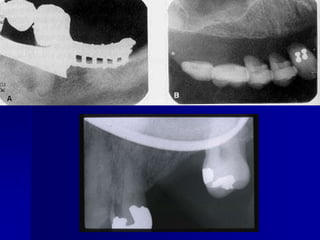
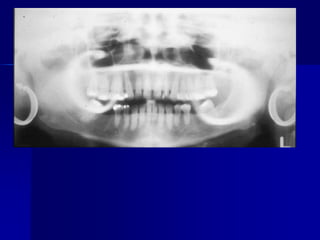
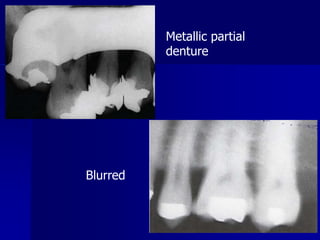
PID alignment artifactTechnique & Projection errorsa. Patient preparation errorRadiopaque artifactDental appliances, body piercings, jewelry & eye glasses left in the mouth during exposure will appear as radiopaque artifact superimposed over the dental image. Correction: all this items should be removed before placing of the film.
Technique & Projection errorsa. Patient preparation errorBlurred imageMovement of the film, patient or X-ray tube head during exposure will result in a blurred image.Correction: the operator should explain for the patient & remind him to remain motionless during exposure.
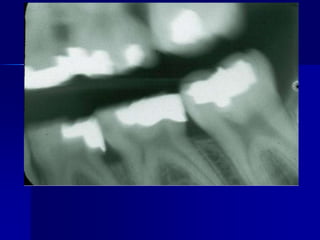
Technique & Projection errorsa. Patient preparation error:Pressure markPressure from the incisal edge & cusps of the teeth (mostly in the pediatric occlusal radiograph).May appear black or white.Correction: ask the patient to bite gently.
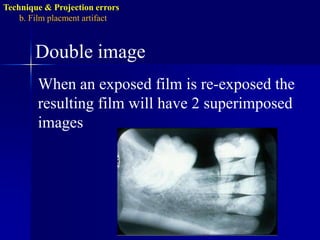
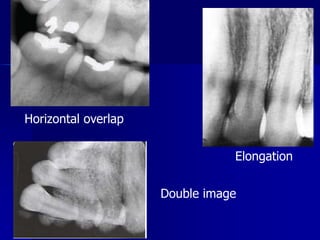
Technique & Projection errorsb. Film placmentartifactDouble imageWhen an exposed film is re-exposed the resulting film will have 2 superimposed images
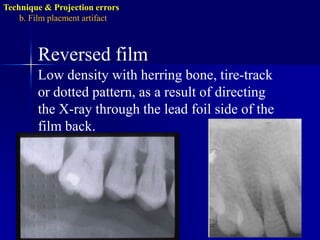
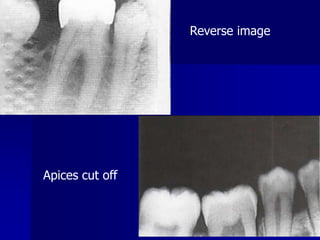
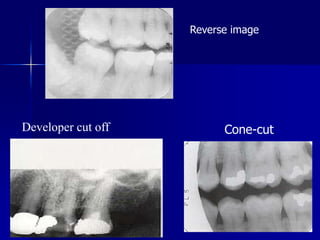
Technique & Projection errorsb. Film placmentartifactReversed filmLow density with herring bone, tire-track or dotted pattern, as a result of directing the X-ray through the lead foil side of the film back.
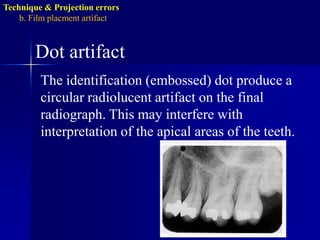
Technique & Projection errorsb. Film placmentartifactDot artifactThe identification (embossed) dot produce a circular radiolucent artifact on the final radiograph. This may interfere with interpretation of the apical areas of the teeth.
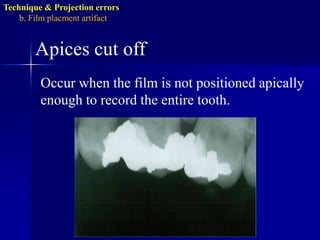
Technique & Projection errorsb. Film placmentartifactApices cut offOccur when the film is not positioned apically enough to record the entire tooth.
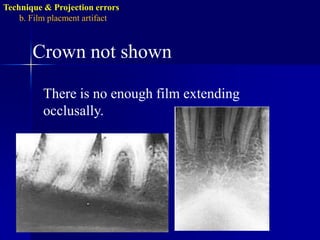
Technique & Projection errorsb. Film placmentartifactCrown not shown There is no enough film extending occlusally.
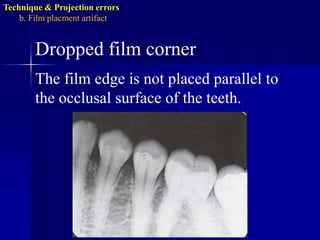
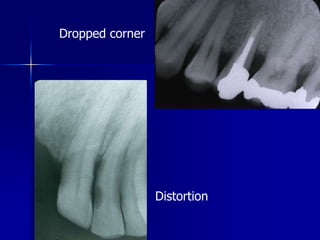
Technique & Projection errorsb. Film placmentartifactDropped film cornerThe film edge is not placed parallel to the occlusal surface of the teeth.
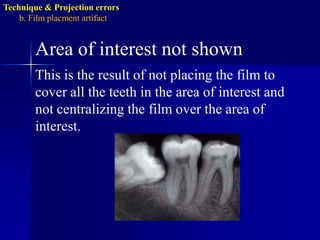
Technique & Projection errorsb. Film placmentartifactArea of interest not shownThis is the result of not placing the film to cover all the teeth in the area of interest and not centralizing the film over the area of interest.
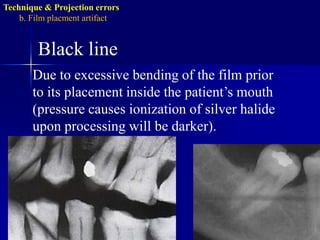
Technique & Projection errorsb. Film placmentartifactBlack lineDue to excessive bending of the film prior to its placement inside the patient’s mouth (pressure causes ionization of silver halide upon processing will be darker).
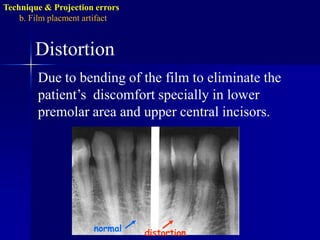
Technique & Projection errorsb. Film placmentartifactnormaldistortionDistortionDue to bending of the film to eliminate the patient’s  discomfort specially in lower premolar area and upper central incisors.
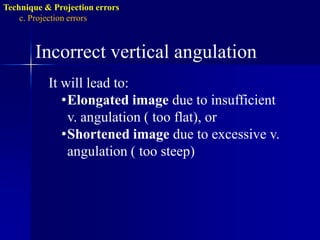
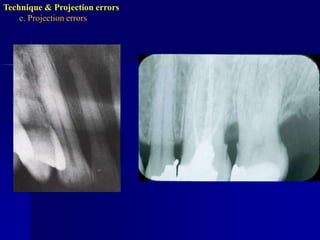
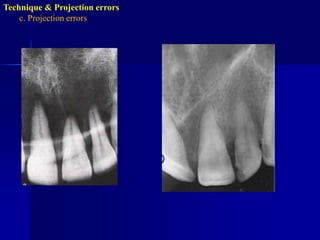
Technique & Projection errorsc. Projection errorsIncorrect vertical angulationIt will lead to:Elongated image due to insufficient v. angulation ( too flat), or
Shortened image due to excessive v. angulation ( too steep)Technique & Projection errorsc. Projection errors
Technique & Projection errorsc. Projection errors
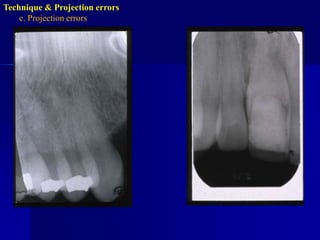
Technique & Projection errorsc. Projection errorsIncorrect horizontal angulationIs the appearance of the interproximal surfaces of the adjacent teeth over each other. This is due to improper H.A. due to improper alignment of the C.R. through the contact points i.e. not // to interproximal surfaces.
Technique & Projection errorsc. Projection errors
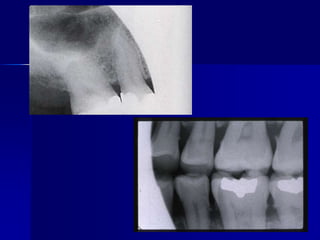
Technique & Projection errorsc. Projection errorsPID alignment artifactIf the PID is misaligned and the x-ray is not centered over the film, a partial image is seen on the resultant radiograph, this partial image is called cone-cut.It appear as a clear area with curved outline.
Asuan – Egy.
II. Exposure errors.Blank image.Low density image.High density image.Image with high and low contrast.
Exposure errorsBlank imageA film that didn’t receive radiation will have no image and will appear clear.
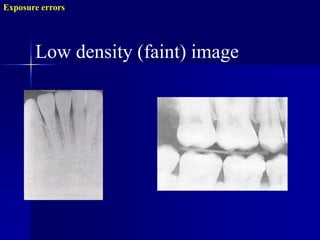
Exposure errorsLow density (faint) image
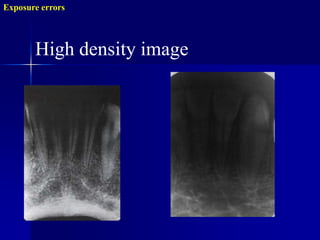
Exposure errorsHigh density image
III. Processing errorsChemical errors:Light image.
Dark image.
Blank image.
Reticulation.
Black spot or patch.
Black line.
White spot or patch.
Yellowish brown discoloration.Film Handling errors:Writing lines
Developer cut off
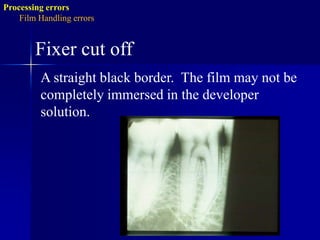
Fixer cut off
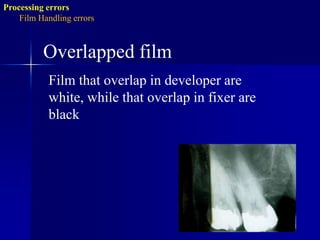
Overlapped film
Finger nail artifact
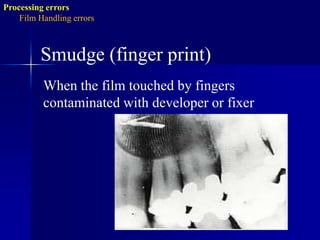
Smudge.
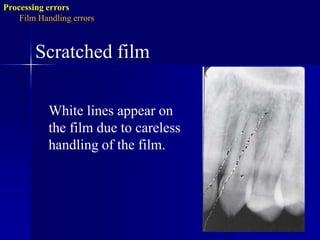
Scratched film
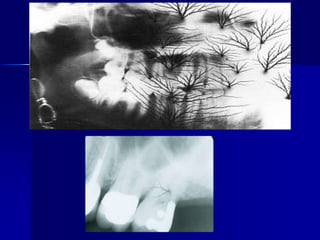
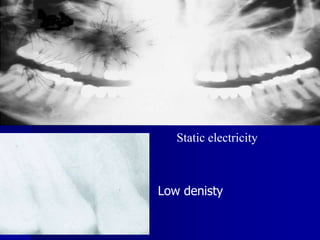
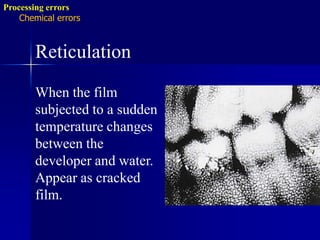
Static electricityProcessing errorsChemical errorsReticulationWhen the film subjected to a sudden temperature changes between the developer and water.Appear as cracked film.
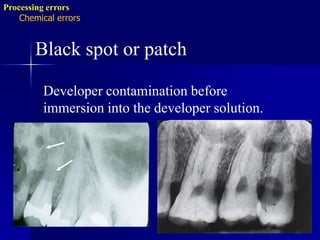
Processing errorsChemical errorsBlack spot or patchDeveloper contamination before immersion into the developer solution.
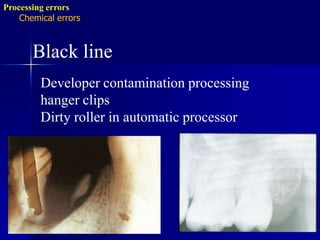
Processing errorsChemical errorsBlack lineDeveloper contamination processing hanger clipsDirty roller in automatic processor
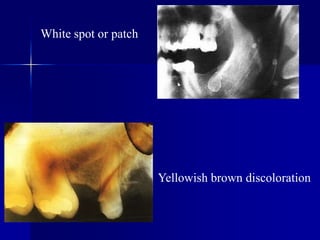
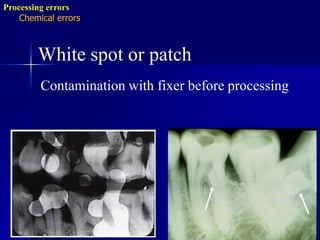
Processing errorsChemical errorsWhite spot or patchContamination with fixer before processing
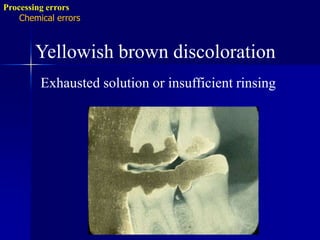
Processing errorsChemical errorsYellowish brown discolorationExhausted solution or insufficient rinsing
Processing errorsFilm Handling errorsWriting linesAppear on the radiograph due to writing on the film packet with ballpoint pen or lead pencil.It may appear black or white.Finger nail artifactBlack or whit crescent shape mark due to rough handling of the film.
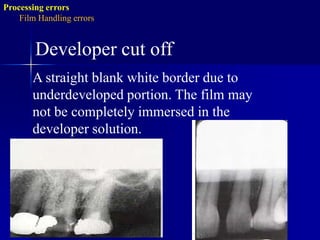
Processing errorsFilm Handling errorsDeveloper cut offA straight blank white border due to underdeveloped portion. The film may not be completely immersed in the developer solution.
Radiographic errors and artifacts

  • 1.
    RADIOGRAPHIC ERRORS ANDARTIFACTSDr. Walid Samir SalemBDS, MS, MHPElecturer, Oral Surgery DepartmentMember, Dental education unit
  • 2.
    Films with errorsshould be avoided due to the following reasons:Retake will lead to:Expose the patient to unnecessary radiation.
  • 3.
    Waste film &time (money).
  • 4.
    Interfere with accurateinterpretation and diagnosis.Causes of faulty radiographThe majority of the errors produced can be categorized into three groups:Technique & Projection errors.Exposure errors.Processing errors.
  • 5.
    Technique & Projectionerrors:a. Patient preparation error:b. Film placment artifact:
  • 6.
    c. Projection errors:Incorrectvertical angulation.
  • 7.
  • 8.
    PID alignment artifactTechnique& Projection errorsa. Patient preparation errorRadiopaque artifactDental appliances, body piercings, jewelry & eye glasses left in the mouth during exposure will appear as radiopaque artifact superimposed over the dental image. Correction: all this items should be removed before placing of the film.
  • 11.
    Technique & Projectionerrorsa. Patient preparation errorBlurred imageMovement of the film, patient or X-ray tube head during exposure will result in a blurred image.Correction: the operator should explain for the patient & remind him to remain motionless during exposure.
  • 13.
    Technique & Projectionerrorsa. Patient preparation error:Pressure markPressure from the incisal edge & cusps of the teeth (mostly in the pediatric occlusal radiograph).May appear black or white.Correction: ask the patient to bite gently.
  • 14.
    Technique & Projectionerrorsb. Film placmentartifactDouble imageWhen an exposed film is re-exposed the resulting film will have 2 superimposed images
  • 15.
    Technique & Projectionerrorsb. Film placmentartifactReversed filmLow density with herring bone, tire-track or dotted pattern, as a result of directing the X-ray through the lead foil side of the film back.
  • 16.
    Technique & Projectionerrorsb. Film placmentartifactDot artifactThe identification (embossed) dot produce a circular radiolucent artifact on the final radiograph. This may interfere with interpretation of the apical areas of the teeth.
  • 17.
    Technique & Projectionerrorsb. Film placmentartifactApices cut offOccur when the film is not positioned apically enough to record the entire tooth.
  • 18.
    Technique & Projectionerrorsb. Film placmentartifactCrown not shown There is no enough film extending occlusally.
  • 19.
    Technique & Projectionerrorsb. Film placmentartifactDropped film cornerThe film edge is not placed parallel to the occlusal surface of the teeth.
  • 20.
    Technique & Projectionerrorsb. Film placmentartifactArea of interest not shownThis is the result of not placing the film to cover all the teeth in the area of interest and not centralizing the film over the area of interest.
  • 21.
    Technique & Projectionerrorsb. Film placmentartifactBlack lineDue to excessive bending of the film prior to its placement inside the patient’s mouth (pressure causes ionization of silver halide upon processing will be darker).
  • 22.
    Technique & Projectionerrorsb. Film placmentartifactnormaldistortionDistortionDue to bending of the film to eliminate the patient’s discomfort specially in lower premolar area and upper central incisors.
  • 23.
    Technique & Projectionerrorsc. Projection errorsIncorrect vertical angulationIt will lead to:Elongated image due to insufficient v. angulation ( too flat), or
  • 24.
    Shortened image dueto excessive v. angulation ( too steep)Technique & Projection errorsc. Projection errors
  • 25.
    Technique & Projectionerrorsc. Projection errors
  • 26.
    Technique & Projectionerrorsc. Projection errorsIncorrect horizontal angulationIs the appearance of the interproximal surfaces of the adjacent teeth over each other. This is due to improper H.A. due to improper alignment of the C.R. through the contact points i.e. not // to interproximal surfaces.
  • 27.
    Technique & Projectionerrorsc. Projection errors
  • 28.
    Technique & Projectionerrorsc. Projection errorsPID alignment artifactIf the PID is misaligned and the x-ray is not centered over the film, a partial image is seen on the resultant radiograph, this partial image is called cone-cut.It appear as a clear area with curved outline.
  • 30.
  • 31.
    II. Exposure errors.Blankimage.Low density image.High density image.Image with high and low contrast.
  • 32.
    Exposure errorsBlank imageAfilm that didn’t receive radiation will have no image and will appear clear.
  • 33.
  • 34.
  • 36.
  • 37.
  • 38.
  • 39.
  • 40.
  • 41.
  • 42.
  • 43.
    Yellowish brown discoloration.FilmHandling errors:Writing lines
  • 44.
  • 45.
  • 46.
  • 47.
  • 48.
  • 49.
  • 50.
    Static electricityProcessing errorsChemicalerrorsReticulationWhen the film subjected to a sudden temperature changes between the developer and water.Appear as cracked film.
  • 51.
    Processing errorsChemical errorsBlackspot or patchDeveloper contamination before immersion into the developer solution.
  • 52.
    Processing errorsChemical errorsBlacklineDeveloper contamination processing hanger clipsDirty roller in automatic processor
  • 53.
    Processing errorsChemical errorsWhitespot or patchContamination with fixer before processing
  • 54.
    Processing errorsChemical errorsYellowishbrown discolorationExhausted solution or insufficient rinsing
  • 55.
    Processing errorsFilm HandlingerrorsWriting linesAppear on the radiograph due to writing on the film packet with ballpoint pen or lead pencil.It may appear black or white.Finger nail artifactBlack or whit crescent shape mark due to rough handling of the film.
  • 56.
    Processing errorsFilm HandlingerrorsDeveloper cut offA straight blank white border due to underdeveloped portion. The film may not be completely immersed in the developer solution.