DEPARTMENT OF :-
ORAL MEDICINE AND
RADIOLOGY
KALKA DENTAL COLLEGE
SUBMITTED BY:-
Dr. NIKESH ROSHAN
Causes of FAULTY RADIOGRAPHS can be
broadly classified into:-
• PROJECTION ERRORS
• EXPOSURE AND PROCESSING ERRORS
• AUTOMATIC PROCESSING ERRORS
• MISCELLANEOUS TECHNIQUE ERRORS
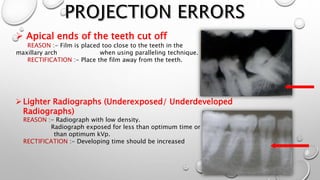
 Apical ends of the teeth cut off
REASON :- Film is placed too close to the teeth in the
maxillary arch when using paralleling technique.
RECTIFICATION :- Place the film away from the teeth.
Lighter Radiographs (Underexposed/ Underdeveloped
Radiographs)
REASON :- Radiograph with low density.
Radiograph exposed for less than optimum time or with less
than optimum kVp.
RECTIFICATION :- Developing time should be increased
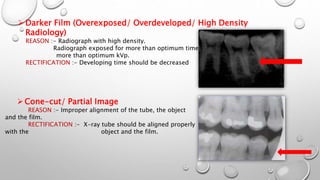
Darker Film (Overexposed/ Overdeveloped/ High Density
Radiology)
REASON :- Radiograph with high density.
Radiograph exposed for more than optimum time or with
more than optimum kVp.
RECTIFICATION :- Developing time should be decreased
Cone-cut/ Partial Image
REASON :- Improper alignment of the tube, the object
and the film.
RECTIFICATION :- X-ray tube should be aligned properly
with the object and the film.
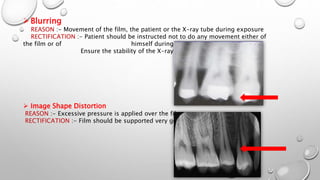
Blurring
REASON :- Movement of the film, the patient or the X-ray tube during exposure
RECTIFICATION :- Patient should be instructed not to do any movement either of
the film or of himself during the radiograph.
Ensure the stability of the X-ray tube.
 Image Shape Distortion
REASON :- Excessive pressure is applied over the film.
RECTIFICATION :- Film should be supported very gently.
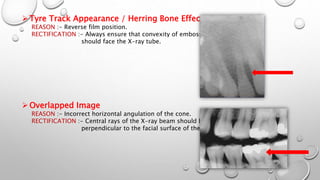
Tyre Track Appearance / Herring Bone Effect
REASON :- Reverse film position.
RECTIFICATION :- Always ensure that convexity of embossed dot
should face the X-ray tube.
Overlapped Image
REASON :- Incorrect horizontal angulation of the cone.
RECTIFICATION :- Central rays of the X-ray beam should be directed
perpendicular to the facial surface of the teeth.
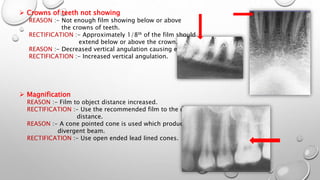
 Crowns of teeth not showing
REASON :- Not enough film showing below or above
the crowns of teeth.
RECTIFICATION :- Approximately 1/8th of the film should
extend below or above the crown.
REASON :- Decreased vertical angulation causing elongation.
RECTIFICATION :- Increased vertical angulation.
 Magnification
REASON :- Film to object distance increased.
RECTIFICATION :- Use the recommended film to the object
distance.
REASON :- A cone pointed cone is used which produces a
divergent beam.
RECTIFICATION :- Use open ended lead lined cones.
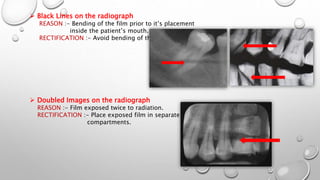
 Black Lines on the radiograph
REASON :- Bending of the film prior to it’s placement
inside the patient’s mouth.
RECTIFICATION :- Avoid bending of the film.
 Doubled Images on the radiograph
REASON :- Film exposed twice to radiation.
RECTIFICATION :- Place exposed film in separate labeled
compartments.
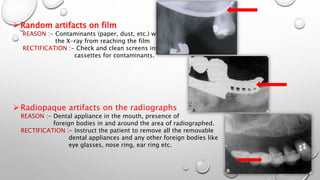
Random artifacts on film
REASON :- Contaminants (paper, dust, etc.) will prevent
the X-ray from reaching the film
RECTIFICATION :- Check and clean screens inside the
cassettes for contaminants.
Radiopaque artifacts on the radiographs
REASON :- Dental appliance in the mouth, presence of
foreign bodies in and around the area of radiographed.
RECTIFICATION :- Instruct the patient to remove all the removable
dental appliances and any other foreign bodies like
eye glasses, nose ring, ear ring etc.
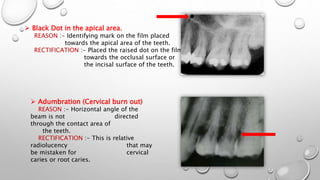
 Black Dot in the apical area.
REASON :- Identifying mark on the film placed
towards the apical area of the teeth.
RECTIFICATION :- Placed the raised dot on the film
towards the occlusal surface or
the incisal surface of the teeth.
 Adumbration (Cervical burn out)
REASON :- Horizontal angle of the
beam is not directed
through the contact area of
the teeth.
RECTIFICATION :- This is relative
radiolucency that may
be mistaken for cervical
caries or root caries.
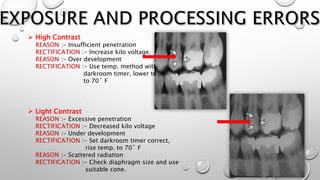
 High Contrast
REASON :- Insufficient penetration
RECTIFICATION :- Increase kilo voltage.
REASON :- Over development
RECTIFICATION :- Use temp. method with a
darkroom timer, lower temp.
to 70˚ F
 Light Contrast
REASON :- Excessive penetration
RECTIFICATION :- Decreased kilo voltage
REASON :- Under development
RECTIFICATION :- Set darkroom timer correct,
rise temp. to 70˚ F
REASON :- Scattered radiation
RECTIFICATION :- Check diaphragm size and use
suitable cone.
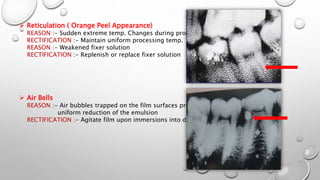
 Reticulation ( Orange Peel Appearance)
REASON :- Sudden extreme temp. Changes during processing
RECTIFICATION :- Maintain uniform processing temp.
REASON :- Weakened fixer solution
RECTIFICATION :- Replenish or replace fixer solution
 Air Bells
REASON :- Air bubbles trapped on the film surfaces preventing
uniform reduction of the emulsion
RECTIFICATION :- Agitate film upon immersions into developer
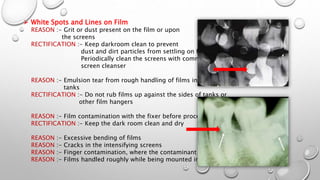
 White Spots and Lines on Film
REASON :- Grit or dust present on the film or upon
the screens
RECTIFICATION :- Keep darkroom clean to prevent
dust and dirt particles from settling on films
Periodically clean the screens with commercial
screen cleanser
REASON :- Emulsion tear from rough handling of films in processing
tanks
RECTIFICATION :- Do not rub films up against the sides of tanks or
other film hangers
REASON :- Film contamination with the fixer before processing
RECTIFICATION :- Keep the dark room clean and dry
REASON :- Excessive bending of films
REASON :- Cracks in the intensifying screens
REASON :- Finger contamination, where the contaminant is the fixer
REASON :- Films handled roughly while being mounted in the hanger
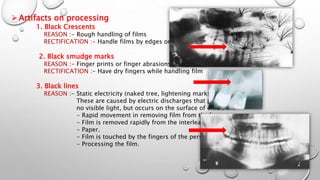
Artifacts on processing
1. Black Crescents
REASON :- Rough handling of films
RECTIFICATION :- Handle films by edges only
2. Black smudge marks
REASON :- Finger prints or finger abrasions
RECTIFICATION :- Have dry fingers while handling film
3. Black lines
REASON :- Static electricity (naked tree, lightening marks).
These are caused by electric discharges that produce
no visible light, but occurs on the surface of emulsion.
- Rapid movement in removing film from the box.
- Film is removed rapidly from the interleaving.
- Paper.
- Film is touched by the fingers of the person.
- Processing the film.
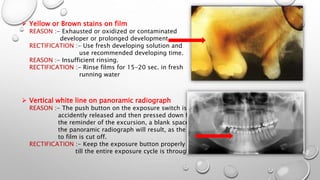
 Yellow or Brown stains on film
REASON :- Exhausted or oxidized or contaminated
developer or prolonged development.
RECTIFICATION :- Use fresh developing solution and
use recommended developing time.
REASON :- Insufficient rinsing.
RECTIFICATION :- Rinse films for 15-20 sec. in fresh
running water
 Vertical white line on panoramic radiograph
REASON :- The push button on the exposure switch is
accidently released and then pressed down for
the reminder of the excursion, a blank space on
the panoramic radiograph will result, as the radiation
to film is cut off.
RECTIFICATION :- Keep the exposure button properly pressed
till the entire exposure cycle is through.
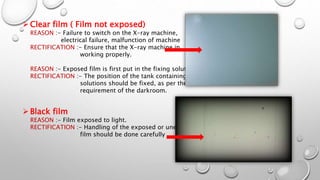
Clear film ( Film not exposed)
REASON :- Failure to switch on the X-ray machine,
electrical failure, malfunction of machine
RECTIFICATION :- Ensure that the X-ray machine in
working properly.
REASON :- Exposed film is first put in the fixing solution
RECTIFICATION :- The position of the tank containing the
solutions should be fixed, as per the
requirement of the darkroom.
Black film
REASON :- Film exposed to light.
RECTIFICATION :- Handling of the exposed or unexposed
film should be done carefully
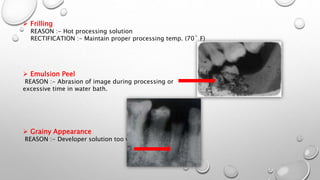
 Frilling
REASON :- Hot processing solution
RECTIFICATION :- Maintain proper processing temp. (70˚ F)
 Emulsion Peel
REASON :- Abrasion of image during processing or
excessive time in water bath.
 Grainy Appearance
REASON :- Developer solution too warm
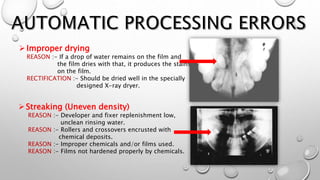
Improper drying
REASON :- If a drop of water remains on the film and
the film dries with that, it produces the stains
on the film.
RECTIFICATION :- Should be dried well in the specially
designed X-ray dryer.
Streaking (Uneven density)
REASON :- Developer and fixer replenishment low,
unclean rinsing water.
REASON :- Rollers and crossovers encrusted with
chemical deposits.
REASON :- Improper chemicals and/or films used.
REASON :- Films not hardened properly by chemicals.
 Increased film density ( overall dark film )
REASON :- Developer temp. too high
RECTIFICATION :- Check that the water is not turned off.
Check temp. of the incoming water supply
and adjust between 75˚ - 80˚ F.
Decrease the heat in the developing solution.
REASON :- Light leaks in processor cover
REASON :- too much replenisher
 Decreased film density ( overall light film )
REASON :- Low developer temp. , exhausted or contaminated
developer , no agitation in developer tank.
RECTIFICATION :- Drain and thoroughly clean tank, install new
developer. Be sure that the agitator paddle
drive belt is in the proper position in the pulley.
REASON :- Processing too fast.
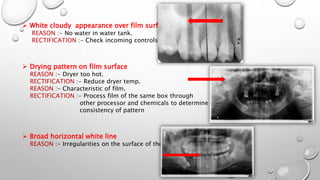
 White cloudy appearance over film surface
REASON :- No water in water tank.
RECTIFICATION :- Check incoming controls and lines.
 Drying pattern on film surface
REASON :- Dryer too hot.
RECTIFICATION :- Reduce dryer temp.
REASON :- Characteristic of film.
RECTIFICATION :- Process film of the same box through
other processor and chemicals to determine
consistency of pattern
 Broad horizontal white line
REASON :- Irregularities on the surface of the rollers.
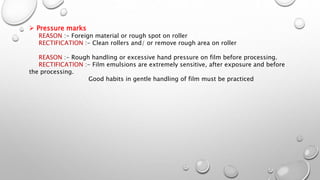
 Pressure marks
REASON :- Foreign material or rough spot on roller
RECTIFICATION :- Clean rollers and/ or remove rough area on roller
REASON :- Rough handling or excessive hand pressure on film before processing.
RECTIFICATION :- Film emulsions are extremely sensitive, after exposure and before
the processing.
Good habits in gentle handling of film must be practiced
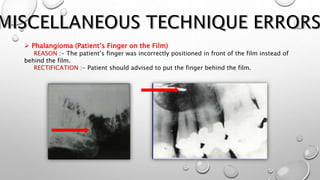
 Phalangioma (Patient’s Finger on the Film)
REASON :- The patient’s finger was incorrectly positioned in front of the film instead of
behind the film.
RECTIFICATION :- Patient should advised to put the finger behind the film.
 FERRYR. KARJODKAR
(FIRSTEDITION)
 ANILGOVINDRAOGHOM
(FIRSTEDITION)
 STUARTC. WHITE• MICHAELJ. PHAROAH
( FIRSTSOUTHASIAEDITION)
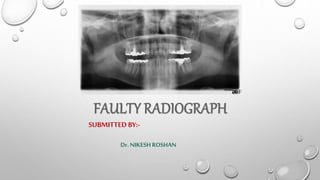
Faulty Radiographs

Faulty Radiographs

  • 1.
    DEPARTMENT OF :- ORALMEDICINE AND RADIOLOGY KALKA DENTAL COLLEGE
  • 2.
  • 3.
    Causes of FAULTYRADIOGRAPHS can be broadly classified into:- • PROJECTION ERRORS • EXPOSURE AND PROCESSING ERRORS • AUTOMATIC PROCESSING ERRORS • MISCELLANEOUS TECHNIQUE ERRORS
  • 4.
     Apical endsof the teeth cut off REASON :- Film is placed too close to the teeth in the maxillary arch when using paralleling technique. RECTIFICATION :- Place the film away from the teeth. Lighter Radiographs (Underexposed/ Underdeveloped Radiographs) REASON :- Radiograph with low density. Radiograph exposed for less than optimum time or with less than optimum kVp. RECTIFICATION :- Developing time should be increased
  • 5.
    Darker Film (Overexposed/Overdeveloped/ High Density Radiology) REASON :- Radiograph with high density. Radiograph exposed for more than optimum time or with more than optimum kVp. RECTIFICATION :- Developing time should be decreased Cone-cut/ Partial Image REASON :- Improper alignment of the tube, the object and the film. RECTIFICATION :- X-ray tube should be aligned properly with the object and the film.
  • 6.
    Blurring REASON :- Movementof the film, the patient or the X-ray tube during exposure RECTIFICATION :- Patient should be instructed not to do any movement either of the film or of himself during the radiograph. Ensure the stability of the X-ray tube.  Image Shape Distortion REASON :- Excessive pressure is applied over the film. RECTIFICATION :- Film should be supported very gently.
  • 7.
    Tyre Track Appearance/ Herring Bone Effect REASON :- Reverse film position. RECTIFICATION :- Always ensure that convexity of embossed dot should face the X-ray tube. Overlapped Image REASON :- Incorrect horizontal angulation of the cone. RECTIFICATION :- Central rays of the X-ray beam should be directed perpendicular to the facial surface of the teeth.
  • 8.
     Crowns ofteeth not showing REASON :- Not enough film showing below or above the crowns of teeth. RECTIFICATION :- Approximately 1/8th of the film should extend below or above the crown. REASON :- Decreased vertical angulation causing elongation. RECTIFICATION :- Increased vertical angulation.  Magnification REASON :- Film to object distance increased. RECTIFICATION :- Use the recommended film to the object distance. REASON :- A cone pointed cone is used which produces a divergent beam. RECTIFICATION :- Use open ended lead lined cones.
  • 9.
     Black Lineson the radiograph REASON :- Bending of the film prior to it’s placement inside the patient’s mouth. RECTIFICATION :- Avoid bending of the film.  Doubled Images on the radiograph REASON :- Film exposed twice to radiation. RECTIFICATION :- Place exposed film in separate labeled compartments.
  • 10.
    Random artifacts onfilm REASON :- Contaminants (paper, dust, etc.) will prevent the X-ray from reaching the film RECTIFICATION :- Check and clean screens inside the cassettes for contaminants. Radiopaque artifacts on the radiographs REASON :- Dental appliance in the mouth, presence of foreign bodies in and around the area of radiographed. RECTIFICATION :- Instruct the patient to remove all the removable dental appliances and any other foreign bodies like eye glasses, nose ring, ear ring etc.
  • 11.
     Black Dotin the apical area. REASON :- Identifying mark on the film placed towards the apical area of the teeth. RECTIFICATION :- Placed the raised dot on the film towards the occlusal surface or the incisal surface of the teeth.  Adumbration (Cervical burn out) REASON :- Horizontal angle of the beam is not directed through the contact area of the teeth. RECTIFICATION :- This is relative radiolucency that may be mistaken for cervical caries or root caries.
  • 12.
     High Contrast REASON:- Insufficient penetration RECTIFICATION :- Increase kilo voltage. REASON :- Over development RECTIFICATION :- Use temp. method with a darkroom timer, lower temp. to 70˚ F  Light Contrast REASON :- Excessive penetration RECTIFICATION :- Decreased kilo voltage REASON :- Under development RECTIFICATION :- Set darkroom timer correct, rise temp. to 70˚ F REASON :- Scattered radiation RECTIFICATION :- Check diaphragm size and use suitable cone.
  • 13.
     Reticulation (Orange Peel Appearance) REASON :- Sudden extreme temp. Changes during processing RECTIFICATION :- Maintain uniform processing temp. REASON :- Weakened fixer solution RECTIFICATION :- Replenish or replace fixer solution  Air Bells REASON :- Air bubbles trapped on the film surfaces preventing uniform reduction of the emulsion RECTIFICATION :- Agitate film upon immersions into developer
  • 14.
     White Spotsand Lines on Film REASON :- Grit or dust present on the film or upon the screens RECTIFICATION :- Keep darkroom clean to prevent dust and dirt particles from settling on films Periodically clean the screens with commercial screen cleanser REASON :- Emulsion tear from rough handling of films in processing tanks RECTIFICATION :- Do not rub films up against the sides of tanks or other film hangers REASON :- Film contamination with the fixer before processing RECTIFICATION :- Keep the dark room clean and dry REASON :- Excessive bending of films REASON :- Cracks in the intensifying screens REASON :- Finger contamination, where the contaminant is the fixer REASON :- Films handled roughly while being mounted in the hanger
  • 15.
    Artifacts on processing 1.Black Crescents REASON :- Rough handling of films RECTIFICATION :- Handle films by edges only 2. Black smudge marks REASON :- Finger prints or finger abrasions RECTIFICATION :- Have dry fingers while handling film 3. Black lines REASON :- Static electricity (naked tree, lightening marks). These are caused by electric discharges that produce no visible light, but occurs on the surface of emulsion. - Rapid movement in removing film from the box. - Film is removed rapidly from the interleaving. - Paper. - Film is touched by the fingers of the person. - Processing the film.
  • 16.
     Yellow orBrown stains on film REASON :- Exhausted or oxidized or contaminated developer or prolonged development. RECTIFICATION :- Use fresh developing solution and use recommended developing time. REASON :- Insufficient rinsing. RECTIFICATION :- Rinse films for 15-20 sec. in fresh running water  Vertical white line on panoramic radiograph REASON :- The push button on the exposure switch is accidently released and then pressed down for the reminder of the excursion, a blank space on the panoramic radiograph will result, as the radiation to film is cut off. RECTIFICATION :- Keep the exposure button properly pressed till the entire exposure cycle is through.
  • 17.
    Clear film (Film not exposed) REASON :- Failure to switch on the X-ray machine, electrical failure, malfunction of machine RECTIFICATION :- Ensure that the X-ray machine in working properly. REASON :- Exposed film is first put in the fixing solution RECTIFICATION :- The position of the tank containing the solutions should be fixed, as per the requirement of the darkroom. Black film REASON :- Film exposed to light. RECTIFICATION :- Handling of the exposed or unexposed film should be done carefully
  • 18.
     Frilling REASON :-Hot processing solution RECTIFICATION :- Maintain proper processing temp. (70˚ F)  Emulsion Peel REASON :- Abrasion of image during processing or excessive time in water bath.  Grainy Appearance REASON :- Developer solution too warm
  • 19.
    Improper drying REASON :-If a drop of water remains on the film and the film dries with that, it produces the stains on the film. RECTIFICATION :- Should be dried well in the specially designed X-ray dryer. Streaking (Uneven density) REASON :- Developer and fixer replenishment low, unclean rinsing water. REASON :- Rollers and crossovers encrusted with chemical deposits. REASON :- Improper chemicals and/or films used. REASON :- Films not hardened properly by chemicals.
  • 20.
     Increased filmdensity ( overall dark film ) REASON :- Developer temp. too high RECTIFICATION :- Check that the water is not turned off. Check temp. of the incoming water supply and adjust between 75˚ - 80˚ F. Decrease the heat in the developing solution. REASON :- Light leaks in processor cover REASON :- too much replenisher  Decreased film density ( overall light film ) REASON :- Low developer temp. , exhausted or contaminated developer , no agitation in developer tank. RECTIFICATION :- Drain and thoroughly clean tank, install new developer. Be sure that the agitator paddle drive belt is in the proper position in the pulley. REASON :- Processing too fast.
  • 21.
     White cloudyappearance over film surface REASON :- No water in water tank. RECTIFICATION :- Check incoming controls and lines.  Drying pattern on film surface REASON :- Dryer too hot. RECTIFICATION :- Reduce dryer temp. REASON :- Characteristic of film. RECTIFICATION :- Process film of the same box through other processor and chemicals to determine consistency of pattern  Broad horizontal white line REASON :- Irregularities on the surface of the rollers.
  • 22.
     Pressure marks REASON:- Foreign material or rough spot on roller RECTIFICATION :- Clean rollers and/ or remove rough area on roller REASON :- Rough handling or excessive hand pressure on film before processing. RECTIFICATION :- Film emulsions are extremely sensitive, after exposure and before the processing. Good habits in gentle handling of film must be practiced
  • 23.
     Phalangioma (Patient’sFinger on the Film) REASON :- The patient’s finger was incorrectly positioned in front of the film instead of behind the film. RECTIFICATION :- Patient should advised to put the finger behind the film.
  • 24.
     FERRYR. KARJODKAR (FIRSTEDITION) ANILGOVINDRAOGHOM (FIRSTEDITION)  STUARTC. WHITE• MICHAELJ. PHAROAH ( FIRSTSOUTHASIAEDITION)