SAP – CO CUSTOMIZING GUIDE 4. INTERNAL ORDERS
SANDESH KAKDE
EMAIL:sandeshkakde@live.com
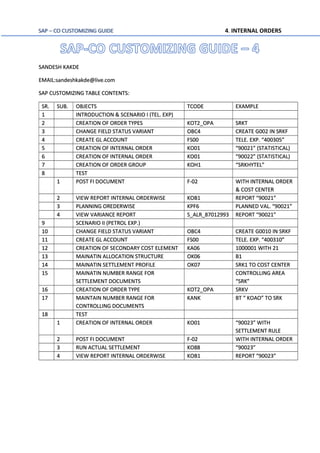
SAP CUSTOMIZING TABLE CONTENTS:
SR. SUB. OBJECTS TCODE EXAMPLE
1 INTRODUCTION & SCENARIO I (TEL. EXP)
2 CREATION OF ORDER TYPES KOT2_OPA SRKT
3 CHANGE FIELD STATUS VARIANT OBC4 CREATE G002 IN SRKF
4 CREATE GL ACCOUNT FS00 TELE. EXP. “400305”
5 CREATION OF INTERNAL ORDER KO01 “90021” (STATISTICAL)
6 CREATION OF INTERNAL ORDER KO01 “90022” (STATISTICAL)
7 CREATION OF ORDER GROUP KOH1 “SRKHYTEL”
8 TEST
1 POST FI DOCUMENT F-02 WITH INTERNAL ORDER
& COST CENTER
2 VIEW REPORT INTERNAL ORDERWISE KOB1 REPORT “90021”
3 PLANNING OREDERWISE KPF6 PLANNED VAL. “90021”
4 VIEW VARIANCE REPORT S_ALR_87012993 REPORT “90021”
9 SCENARIO II (PETROL EXP.)
10 CHANGE FIELD STATUS VARIANT OBC4 CREATE G0010 IN SRKF
11 CREATE GL ACCOUNT FS00 TELE. EXP. “400310”
12 CREATION OF SECONDARY COST ELEMENT KA06 1000001 WITH 21
13 MAINATIN ALLOCATION STRUCTURE OK06 B1
14 MAINATIN SETTLEMENT PROFILE OK07 SRK1 TO COST CENTER
15 MAINATIN NUMBER RANGE FOR
SETTLEMENT DOCUMENTS
CONTROLLING AREA
“SRK”
16 CREATION OF ORDER TYPE KOT2_OPA SRKV
17 MAINTAIN NUMBER RANGE FOR
CONTROLLING DOCUMENTS
KANK BT “ KOAO” TO SRK
18 TEST
1 CREATION OF INTERNAL ORDER KO01 “90023” WITH
SETTLEMENT RULE
2 POST FI DOCUMENT F-02 WITH INTERNAL ORDER
3 RUN ACTUAL SETTLEMENT KO88 “90023”
4 VIEW REPORT INTERNAL ORDERWISE KOB1 REPORT “90023”
SAP – CO CUSTOMIZING GUIDE 4. INTERNAL ORDERS
Internal Order is used to view costs for a specific task.
Examples:
A) Vehicle wise running expenses - Management has a task decision whether to sell the (or)
keep the vehicle in company
A) petrol expenses for the vehicle
B) Repairs to the vehicle
It we take GL accounts in FI –we will not create each vehicle wise petrol expenses and
repairs account.
In cost centre accounting –vehicles will be under administration cost centre and the petrol
expenses repair and administration expenses will be posted to administration cost centre.
By creating vehicle as an internal order, we can get the costs.
B) Telephone expenses:
If we want to know telephone wise expenses in FI –we will have one account for all
telephones.
If we take cost centre –It will be entered in administration cost centre - We cannot get
telephone wise expenses directly.
By creating telephone as an order, we can get telephone wise expenses.
C) Production order costs
In a month no. of production orders will be executed. Some production orders
consume more raw material and same production orders consume less raw material.
If FI we have only GL account raw material consumption – We don’t know order
wise consumption.
By crating production order, we can get order wise costs.
D) Exhibition costs
Company is conducting an exhibition
Salesmen salaries One account
Conveyance Different account
Advertisement Different account
Discounts Different account
We don't know the exhibition costs by creating an order we can get exhibition costs
Orders will be of 2 types
SAP – CO CUSTOMIZING GUIDE 4. INTERNAL ORDERS
1) Real orders - Settlement is possible & We can settle order
2) Statistical orders - Settlement not possible & statistical orders are used for decision making
To Cost Centre (Internal settlement) (From Co to Co)
&
GL Accounts Assets (External settlement) (From CO to FI)
When we transfer from cost centre –To cost centres allocation by assessment /
Distribution periodic reposting / Indirect activity allocation.
When we transfer from Internal order settlement.
E.g. Telephone expenses
Telephone Exp. 50000 Dr. Cost centre Dept. / Order Tel no.9820982101
To Bank 50000 The cost will be allocation to production orders from CO
In the production order valuation, we can’t take. (50000+50000)
We have to take only one time 50000
When we are posting to no. of cost objects are will be real and others will be statistical.
At the time of order creation there is a statistical order check box.
A) When we select statistical order is statistical order check box.
Order is statistical (Automatically cost center will be real)
B) If we don’t select statistical order check box
Order is real (Automatically cost center will be statistical)
Statistical order:
Telephone wise expenses order we create as statistical order.
Telephone expense Dr 50000 Cost center Dept A
Order Telephone no.9820982101 Statistical
To Bank 50000
Cost Center Dept A
Telephone expenses 50000 Allocation to paid order 50000
Cost center Dept A – Zero
In the month end we allocation costs from Dept A to production orders there by cost
center Dept A will be zero.
Order telephone no. 9820982101
Telephone expenses 50000
Management can see telephone wise expense at any point of time afterwards.
SAP – CO CUSTOMIZING GUIDE 4. INTERNAL ORDERS
Suppose we create order as real order
Telephone expenses Dr 50000 Cost center Dept A
To Bank 50000 order telephone no.9820982101 Real
Cost center c data
Telephone Expenses 50000 Order Telephone no.9820982102
Telephone expenses 50000 Allocation to production 50000
Order will be zero
In the month end we allocate cost from order telephone no. 9820982101 to production order
there by order will be zero.
Afterwards management can’t see telephone wise expense.
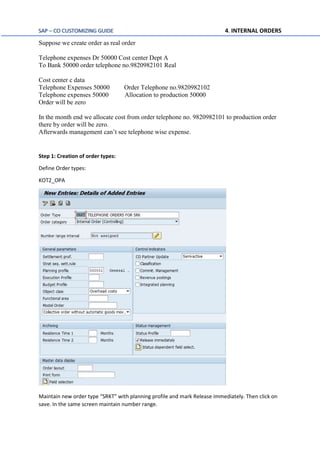
Step 1: Creation of order types:
Define Order types:
KOT2_OPA
Maintain new order type “SRKT” with planning profile and mark Release immediately. Then click on
save. In the same screen maintain number range.
SAP – CO CUSTOMIZING GUIDE 4. INTERNAL ORDERS
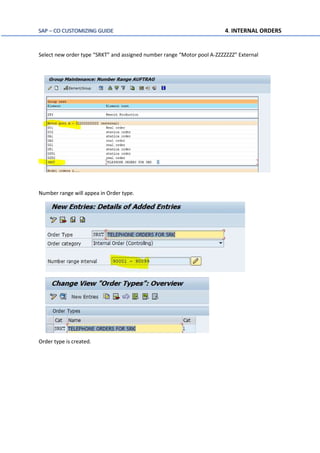
Select new order type “SRKT” and assigned number range “Motor pool A-ZZZZZZZ” External
Number range will appea in Order type.
Order type is created.
SAP – CO CUSTOMIZING GUIDE 4. INTERNAL ORDERS
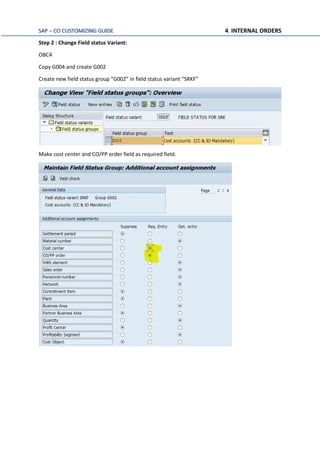
Step 2 : Change Field status Variant:
OBC4
Copy G004 and create G002
Create new field status group “G002” in field status variant “SRKF”
Make cost center and CO/PP order field as required field.
SAP – CO CUSTOMIZING GUIDE 4. INTERNAL ORDERS
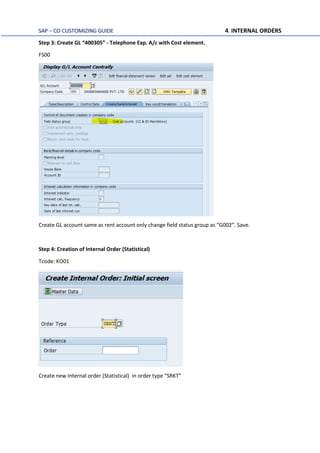
Step 3: Create GL “400305” - Telephone Exp. A/c with Cost element.
FS00
Create GL account same as rent account only change field status group as “G002”. Save.
Step 4: Creation of Internal Order (Statistical)
Tcode: KO01
Create new Internal order (Statistical) in order type “SRKT”
SAP – CO CUSTOMIZING GUIDE 4. INTERNAL ORDERS
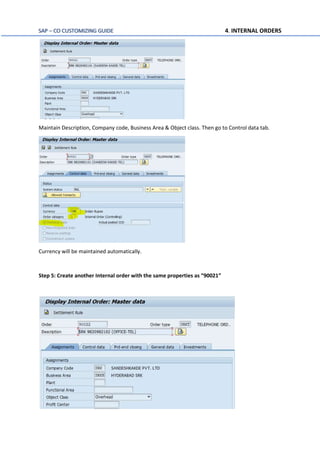
Maintain Description, Company code, Business Area & Object class. Then go to Control data tab.
Currency will be maintained automatically.
Step 5: Create another Internal order with the same properties as “90021”
SAP – CO CUSTOMIZING GUIDE 4. INTERNAL ORDERS
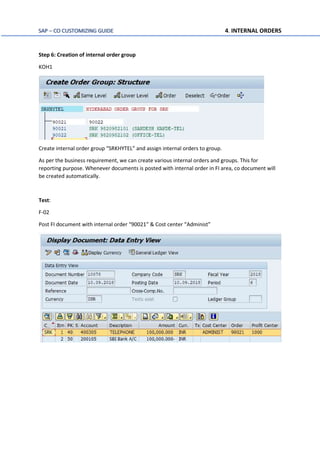
Step 6: Creation of internal order group
KOH1
Create internal order group “SRKHYTEL” and assign internal orders to group.
As per the business requirement, we can create various internal orders and groups. This for
reporting purpose. Whenever documents is posted with internal order in FI area, co document will
be created automatically.
Test:
F-02
Post FI document with internal order “90021” & Cost center “Administ”
SAP – CO CUSTOMIZING GUIDE 4. INTERNAL ORDERS
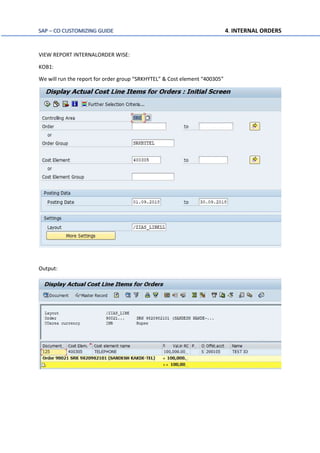
VIEW REPORT INTERNALORDER WISE:
KOB1:
We will run the report for order group “SRKHYTEL” & Cost element “400305”
Output:
SAP – CO CUSTOMIZING GUIDE 4. INTERNAL ORDERS
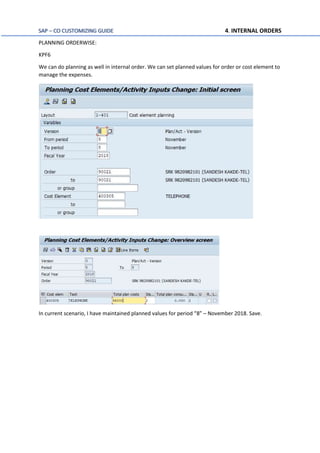
PLANNING ORDERWISE:
KPF6
We can do planning as well in internal order. We can set planned values for order or cost element to
manage the expenses.
In current scenario, I have maintained planned values for period “8” – November 2018. Save.
SAP – CO CUSTOMIZING GUIDE 4. INTERNAL ORDERS
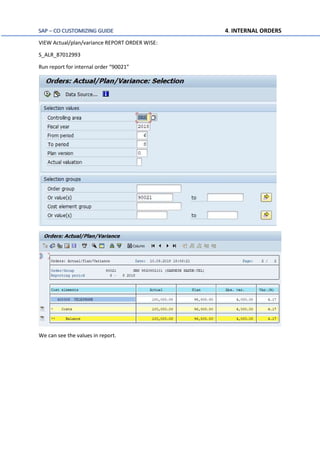
VIEW Actual/plan/variance REPORT ORDER WISE:
S_ALR_87012993
Run report for internal order “90021”
We can see the values in report.
SAP – CO CUSTOMIZING GUIDE 4. INTERNAL ORDERS
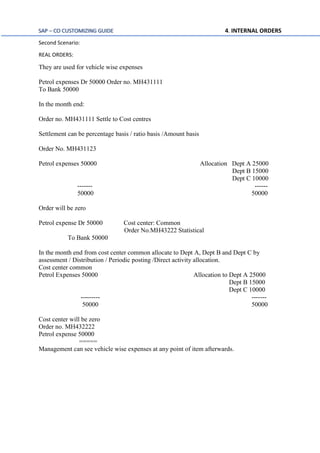
Second Scenario:
REAL ORDERS:
They are used for vehicle wise expenses
Petrol expenses Dr 50000 Order no. MH431111
To Bank 50000
In the month end:
Order no. MH431111 Settle to Cost centres
Settlement can be percentage basis / ratio basis /Amount basis
Order No. MH431123
Petrol expenses 50000 Allocation Dept A 25000
Dept B 15000
Dept C 10000
------- ------
50000 50000
Order will be zero
Petrol expense Dr 50000 Cost center: Common
Order No.MH43222 Statistical
To Bank 50000
In the month end from cost center common allocate to Dept A, Dept B and Dept C by
assessment / Distribution / Periodic posting /Direct activity allocation.
Cost center common
Petrol Expenses 50000 Allocation to Dept A 25000
Dept B 15000
Dept C 10000
--------- -------
50000 50000
Cost center will be zero
Order no. MH432222
Petrol expense 50000
=====
Management can see vehicle wise expenses at any point of item afterwards.
SAP – CO CUSTOMIZING GUIDE 4. INTERNAL ORDERS
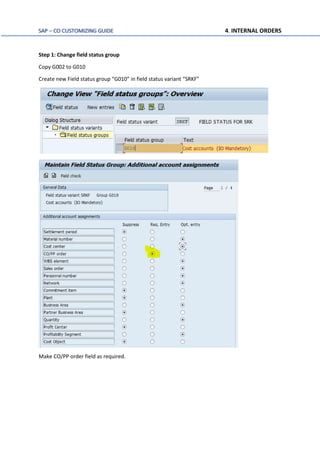
Step 1: Change field status group
Copy G002 to G010
Create new Field status group “G010” in field status variant “SRKF”
Make CO/PP order field as required.
SAP – CO CUSTOMIZING GUIDE 4. INTERNAL ORDERS
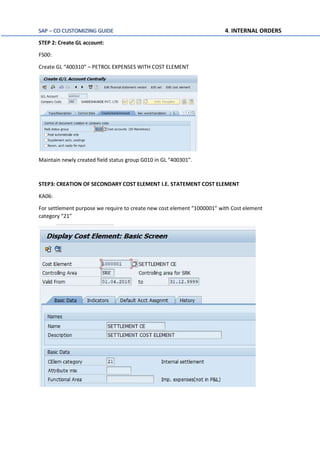
STEP 2: Create GL account:
FS00:
Create GL “400310” – PETROL EXPENSES WITH COST ELEMENT
Maintain newly created field status group G010 in GL “400301”.
STEP3: CREATION OF SECONDARY COST ELEMENT I.E. STATEMENT COST ELEMENT
KA06:
For settlement purpose we require to create new cost element “1000001” with Cost element
category “21”
SAP – CO CUSTOMIZING GUIDE 4. INTERNAL ORDERS
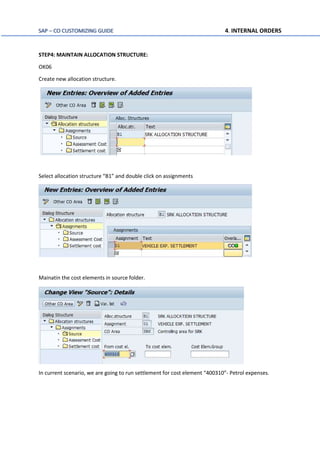
STEP4: MAINTAIN ALLOCATION STRUCTURE:
OK06
Create new allocation structure.
Select allocation structure “B1” and double click on assignments
Mainatin the cost elements in source folder.
In current scenario, we are going to run settlement for cost element “400310”- Petrol expenses.
SAP – CO CUSTOMIZING GUIDE 4. INTERNAL ORDERS
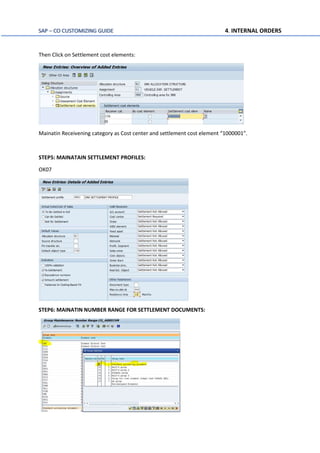
Then Click on Settlement cost elements:
Mainatin Receivening category as Cost center and settlement cost element “1000001”.
STEP5: MAINATAIN SETTLEMENT PROFILES:
OK07
STEP6: MAINATIN NUMBER RANGE FOR SETTLEMENT DOCUMENTS:
SAP – CO CUSTOMIZING GUIDE 4. INTERNAL ORDERS
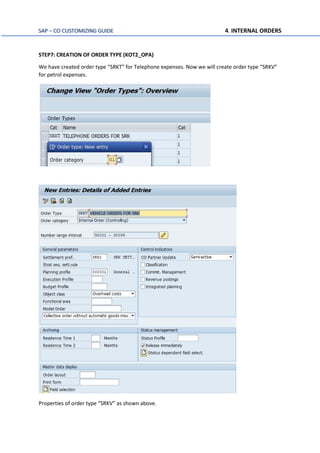
STEP7: CREATION OF ORDER TYPE (KOT2_OPA)
We have created order type “SRKT” for Telephone expenses. Now we will create order type “SRKV”
for petrol expenses.
Properties of order type “SRKV” as shown above.
SAP – CO CUSTOMIZING GUIDE 4. INTERNAL ORDERS
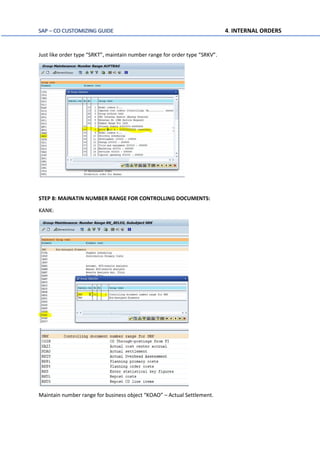
Just like order type “SRKT”, maintain number range for order type “SRKV”.
STEP 8: MAINATIN NUMBER RANGE FOR CONTROLLING DOCUMENTS:
KANK:
Maintain number range for business object “KOAO” – Actual Settlement.
SAP – CO CUSTOMIZING GUIDE 4. INTERNAL ORDERS
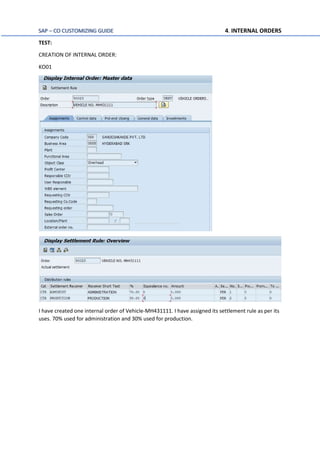
TEST:
CREATION OF INTERNAL ORDER:
KO01
I have created one internal order of Vehicle-MH431111. I have assigned its settlement rule as per its
uses. 70% used for administration and 30% used for production.
SAP – CO CUSTOMIZING GUIDE 4. INTERNAL ORDERS
F-02:
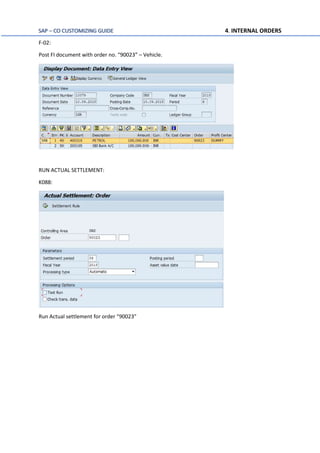
Post FI document with order no. “90023” – Vehicle.
RUN ACTUAL SETTLEMENT:
K088:
Run Actual settlement for order “90023”
SAP – CO CUSTOMIZING GUIDE 4. INTERNAL ORDERS
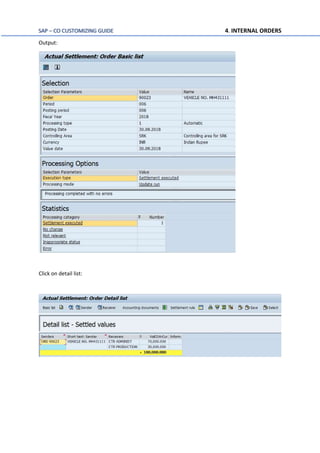
Output:
Click on detail list:
SAP – CO CUSTOMIZING GUIDE 4. INTERNAL ORDERS
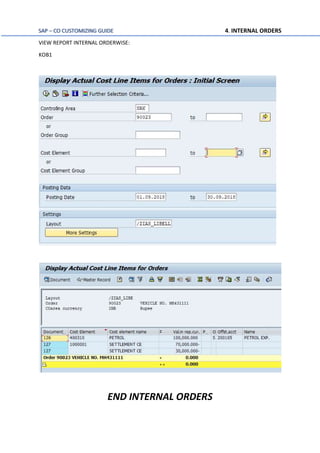
VIEW REPORT INTERNAL ORDERWISE:
KOB1
END INTERNAL ORDERS

Quick sap co configuration Internal Order

  • 1.
    SAP – COCUSTOMIZING GUIDE 4. INTERNAL ORDERS SANDESH KAKDE EMAIL:sandeshkakde@live.com SAP CUSTOMIZING TABLE CONTENTS: SR. SUB. OBJECTS TCODE EXAMPLE 1 INTRODUCTION & SCENARIO I (TEL. EXP) 2 CREATION OF ORDER TYPES KOT2_OPA SRKT 3 CHANGE FIELD STATUS VARIANT OBC4 CREATE G002 IN SRKF 4 CREATE GL ACCOUNT FS00 TELE. EXP. “400305” 5 CREATION OF INTERNAL ORDER KO01 “90021” (STATISTICAL) 6 CREATION OF INTERNAL ORDER KO01 “90022” (STATISTICAL) 7 CREATION OF ORDER GROUP KOH1 “SRKHYTEL” 8 TEST 1 POST FI DOCUMENT F-02 WITH INTERNAL ORDER & COST CENTER 2 VIEW REPORT INTERNAL ORDERWISE KOB1 REPORT “90021” 3 PLANNING OREDERWISE KPF6 PLANNED VAL. “90021” 4 VIEW VARIANCE REPORT S_ALR_87012993 REPORT “90021” 9 SCENARIO II (PETROL EXP.) 10 CHANGE FIELD STATUS VARIANT OBC4 CREATE G0010 IN SRKF 11 CREATE GL ACCOUNT FS00 TELE. EXP. “400310” 12 CREATION OF SECONDARY COST ELEMENT KA06 1000001 WITH 21 13 MAINATIN ALLOCATION STRUCTURE OK06 B1 14 MAINATIN SETTLEMENT PROFILE OK07 SRK1 TO COST CENTER 15 MAINATIN NUMBER RANGE FOR SETTLEMENT DOCUMENTS CONTROLLING AREA “SRK” 16 CREATION OF ORDER TYPE KOT2_OPA SRKV 17 MAINTAIN NUMBER RANGE FOR CONTROLLING DOCUMENTS KANK BT “ KOAO” TO SRK 18 TEST 1 CREATION OF INTERNAL ORDER KO01 “90023” WITH SETTLEMENT RULE 2 POST FI DOCUMENT F-02 WITH INTERNAL ORDER 3 RUN ACTUAL SETTLEMENT KO88 “90023” 4 VIEW REPORT INTERNAL ORDERWISE KOB1 REPORT “90023”
  • 2.
    SAP – COCUSTOMIZING GUIDE 4. INTERNAL ORDERS Internal Order is used to view costs for a specific task. Examples: A) Vehicle wise running expenses - Management has a task decision whether to sell the (or) keep the vehicle in company A) petrol expenses for the vehicle B) Repairs to the vehicle It we take GL accounts in FI –we will not create each vehicle wise petrol expenses and repairs account. In cost centre accounting –vehicles will be under administration cost centre and the petrol expenses repair and administration expenses will be posted to administration cost centre. By creating vehicle as an internal order, we can get the costs. B) Telephone expenses: If we want to know telephone wise expenses in FI –we will have one account for all telephones. If we take cost centre –It will be entered in administration cost centre - We cannot get telephone wise expenses directly. By creating telephone as an order, we can get telephone wise expenses. C) Production order costs In a month no. of production orders will be executed. Some production orders consume more raw material and same production orders consume less raw material. If FI we have only GL account raw material consumption – We don’t know order wise consumption. By crating production order, we can get order wise costs. D) Exhibition costs Company is conducting an exhibition Salesmen salaries One account Conveyance Different account Advertisement Different account Discounts Different account We don't know the exhibition costs by creating an order we can get exhibition costs Orders will be of 2 types
  • 3.
    SAP – COCUSTOMIZING GUIDE 4. INTERNAL ORDERS 1) Real orders - Settlement is possible & We can settle order 2) Statistical orders - Settlement not possible & statistical orders are used for decision making To Cost Centre (Internal settlement) (From Co to Co) & GL Accounts Assets (External settlement) (From CO to FI) When we transfer from cost centre –To cost centres allocation by assessment / Distribution periodic reposting / Indirect activity allocation. When we transfer from Internal order settlement. E.g. Telephone expenses Telephone Exp. 50000 Dr. Cost centre Dept. / Order Tel no.9820982101 To Bank 50000 The cost will be allocation to production orders from CO In the production order valuation, we can’t take. (50000+50000) We have to take only one time 50000 When we are posting to no. of cost objects are will be real and others will be statistical. At the time of order creation there is a statistical order check box. A) When we select statistical order is statistical order check box. Order is statistical (Automatically cost center will be real) B) If we don’t select statistical order check box Order is real (Automatically cost center will be statistical) Statistical order: Telephone wise expenses order we create as statistical order. Telephone expense Dr 50000 Cost center Dept A Order Telephone no.9820982101 Statistical To Bank 50000 Cost Center Dept A Telephone expenses 50000 Allocation to paid order 50000 Cost center Dept A – Zero In the month end we allocation costs from Dept A to production orders there by cost center Dept A will be zero. Order telephone no. 9820982101 Telephone expenses 50000 Management can see telephone wise expense at any point of time afterwards.
  • 4.
    SAP – COCUSTOMIZING GUIDE 4. INTERNAL ORDERS Suppose we create order as real order Telephone expenses Dr 50000 Cost center Dept A To Bank 50000 order telephone no.9820982101 Real Cost center c data Telephone Expenses 50000 Order Telephone no.9820982102 Telephone expenses 50000 Allocation to production 50000 Order will be zero In the month end we allocate cost from order telephone no. 9820982101 to production order there by order will be zero. Afterwards management can’t see telephone wise expense. Step 1: Creation of order types: Define Order types: KOT2_OPA Maintain new order type “SRKT” with planning profile and mark Release immediately. Then click on save. In the same screen maintain number range.
  • 5.
    SAP – COCUSTOMIZING GUIDE 4. INTERNAL ORDERS Select new order type “SRKT” and assigned number range “Motor pool A-ZZZZZZZ” External Number range will appea in Order type. Order type is created.
  • 6.
    SAP – COCUSTOMIZING GUIDE 4. INTERNAL ORDERS Step 2 : Change Field status Variant: OBC4 Copy G004 and create G002 Create new field status group “G002” in field status variant “SRKF” Make cost center and CO/PP order field as required field.
  • 7.
    SAP – COCUSTOMIZING GUIDE 4. INTERNAL ORDERS Step 3: Create GL “400305” - Telephone Exp. A/c with Cost element. FS00 Create GL account same as rent account only change field status group as “G002”. Save. Step 4: Creation of Internal Order (Statistical) Tcode: KO01 Create new Internal order (Statistical) in order type “SRKT”
  • 8.
    SAP – COCUSTOMIZING GUIDE 4. INTERNAL ORDERS Maintain Description, Company code, Business Area & Object class. Then go to Control data tab. Currency will be maintained automatically. Step 5: Create another Internal order with the same properties as “90021”
  • 9.
    SAP – COCUSTOMIZING GUIDE 4. INTERNAL ORDERS Step 6: Creation of internal order group KOH1 Create internal order group “SRKHYTEL” and assign internal orders to group. As per the business requirement, we can create various internal orders and groups. This for reporting purpose. Whenever documents is posted with internal order in FI area, co document will be created automatically. Test: F-02 Post FI document with internal order “90021” & Cost center “Administ”
  • 10.
    SAP – COCUSTOMIZING GUIDE 4. INTERNAL ORDERS VIEW REPORT INTERNALORDER WISE: KOB1: We will run the report for order group “SRKHYTEL” & Cost element “400305” Output:
  • 11.
    SAP – COCUSTOMIZING GUIDE 4. INTERNAL ORDERS PLANNING ORDERWISE: KPF6 We can do planning as well in internal order. We can set planned values for order or cost element to manage the expenses. In current scenario, I have maintained planned values for period “8” – November 2018. Save.
  • 12.
    SAP – COCUSTOMIZING GUIDE 4. INTERNAL ORDERS VIEW Actual/plan/variance REPORT ORDER WISE: S_ALR_87012993 Run report for internal order “90021” We can see the values in report.
  • 13.
    SAP – COCUSTOMIZING GUIDE 4. INTERNAL ORDERS Second Scenario: REAL ORDERS: They are used for vehicle wise expenses Petrol expenses Dr 50000 Order no. MH431111 To Bank 50000 In the month end: Order no. MH431111 Settle to Cost centres Settlement can be percentage basis / ratio basis /Amount basis Order No. MH431123 Petrol expenses 50000 Allocation Dept A 25000 Dept B 15000 Dept C 10000 ------- ------ 50000 50000 Order will be zero Petrol expense Dr 50000 Cost center: Common Order No.MH43222 Statistical To Bank 50000 In the month end from cost center common allocate to Dept A, Dept B and Dept C by assessment / Distribution / Periodic posting /Direct activity allocation. Cost center common Petrol Expenses 50000 Allocation to Dept A 25000 Dept B 15000 Dept C 10000 --------- ------- 50000 50000 Cost center will be zero Order no. MH432222 Petrol expense 50000 ===== Management can see vehicle wise expenses at any point of item afterwards.
  • 14.
    SAP – COCUSTOMIZING GUIDE 4. INTERNAL ORDERS Step 1: Change field status group Copy G002 to G010 Create new Field status group “G010” in field status variant “SRKF” Make CO/PP order field as required.
  • 15.
    SAP – COCUSTOMIZING GUIDE 4. INTERNAL ORDERS STEP 2: Create GL account: FS00: Create GL “400310” – PETROL EXPENSES WITH COST ELEMENT Maintain newly created field status group G010 in GL “400301”. STEP3: CREATION OF SECONDARY COST ELEMENT I.E. STATEMENT COST ELEMENT KA06: For settlement purpose we require to create new cost element “1000001” with Cost element category “21”
  • 16.
    SAP – COCUSTOMIZING GUIDE 4. INTERNAL ORDERS STEP4: MAINTAIN ALLOCATION STRUCTURE: OK06 Create new allocation structure. Select allocation structure “B1” and double click on assignments Mainatin the cost elements in source folder. In current scenario, we are going to run settlement for cost element “400310”- Petrol expenses.
  • 17.
    SAP – COCUSTOMIZING GUIDE 4. INTERNAL ORDERS Then Click on Settlement cost elements: Mainatin Receivening category as Cost center and settlement cost element “1000001”. STEP5: MAINATAIN SETTLEMENT PROFILES: OK07 STEP6: MAINATIN NUMBER RANGE FOR SETTLEMENT DOCUMENTS:
  • 18.
    SAP – COCUSTOMIZING GUIDE 4. INTERNAL ORDERS STEP7: CREATION OF ORDER TYPE (KOT2_OPA) We have created order type “SRKT” for Telephone expenses. Now we will create order type “SRKV” for petrol expenses. Properties of order type “SRKV” as shown above.
  • 19.
    SAP – COCUSTOMIZING GUIDE 4. INTERNAL ORDERS Just like order type “SRKT”, maintain number range for order type “SRKV”. STEP 8: MAINATIN NUMBER RANGE FOR CONTROLLING DOCUMENTS: KANK: Maintain number range for business object “KOAO” – Actual Settlement.
  • 20.
    SAP – COCUSTOMIZING GUIDE 4. INTERNAL ORDERS TEST: CREATION OF INTERNAL ORDER: KO01 I have created one internal order of Vehicle-MH431111. I have assigned its settlement rule as per its uses. 70% used for administration and 30% used for production.
  • 21.
    SAP – COCUSTOMIZING GUIDE 4. INTERNAL ORDERS F-02: Post FI document with order no. “90023” – Vehicle. RUN ACTUAL SETTLEMENT: K088: Run Actual settlement for order “90023”
  • 22.
    SAP – COCUSTOMIZING GUIDE 4. INTERNAL ORDERS Output: Click on detail list:
  • 23.
    SAP – COCUSTOMIZING GUIDE 4. INTERNAL ORDERS VIEW REPORT INTERNAL ORDERWISE: KOB1 END INTERNAL ORDERS