Product Costing - Cost Estimation in SAP
Cost Estimation
• The price of the finished goods (FG) and semi-finished goods (SFG) manufactured is determined
through Standard Cost estimate.
• Standard cost is estimated based on the cost of input materials, planned cost of activities and
overheads.
• It is the price at which the finished and semi-finished goods are valuated in finance.
• The standard cost once estimated is valid for a specific period interval.
• A standard cost estimate is created at the end of the period and is valid for the entire next
period.
• When the standard cost estimate for the respective material (FG & SFG) is released, the system
updates the result of this estimate as standard price in ‘Accounting 1’ and ‘Costing 2’ view detail
screen of the material master record.
• This price is then valid for valuation of material in financial accounting till next cost estimate is
run.
• The materials are revaluated when the next standard cost estimate is released.
• In this specific period interval, all the FG and SFG produced through production order or product
cost collector are valued at the standard cost updated in the material master.
• This is termed as ‘Cost of goods manufactured’ (COGM).
Following are the important tools used in cost estimate.
• Costing Variant
• Cost Component Split
• Costing Estimate with/without quantity structure
• Costing Run/Price Update
The above mentioned tools have been discussed in detail in this article to cover the concept
behind the standard cost estimate in SAP.
Costing Variant
It is a key based on which standard cost is performed and valuated. Following are the control
parameters in costing variant.
(a) Costing Type :
It updates price such as ‘Standard price’ or ‘Commercial price’ or ‘Tax valuation’ price depending upon
the price update type. It contains the ‘calculation base ’ based on which prices are updated in material
master for FG and SFG.
For inventory valuation, calculation base will always be ‘COGM’. The COGM value will be determined
through ‘Cost component split’.
(b) Valuation Variant:
It searches prices of input materials, activities and overhead ( overhead cost sheet ) during cost estimate.
The strategy sequences for searching of the prices are specified for input materials, activities and
overhead in the valuation variant.
The strategy sequence prioritizes whether moving Avg. price, standard price or Info record price is to be
picked up for input material, plan or actual price is to be picked for activities. It also specifies which
costing sheet is to be used for overhead calculation (Material OH, Production OH).
Strategy Sequence : Input Material
Priority Strategy Sequence
1 Moving Average Price
2 Last Price from Purchasing Info Record
Strategy Sequence : Activity Prices
Priority Strategy Sequence
1. Actual Price of Previous Period
2. Plan Price for the Period
3. Plan Price as Average of All Fiscal Year Periods
(c) Date Control :
It determines period for which cost estimate is applicable.
(d) Quantity Structure control :
It determines BOM and routing which is to be considered for costing. It considers only those BOM and
Routing which have the status ‘Release for Costing’.
Cost Component Split
What elements of costs are to be considered in ‘Cost of goods manufactured (COGM)’ is specified in
Cost component structure. Each cost component mentioned in Costing (A) are captured in controlling
through cost elements which are grouped in Cost Component Structure (B) as COGM, COGS.
In Costing Type of costing variant, COGM will be specified as the calculation base for standard cost.
Therefore, the summation of COGM in Cost component structure will be carried to SFG’s and FG’s
material master as standard cost.
Cost estimate with quantity structure - CK11N
• Cost estimate with quantity structure is a tool for estimating material costs.
• It calculates standard cost of goods manufactured.
• CK11N is the transaction code for cost estimate with quantity structure.
• In cost estimate SFG or FG code, plant, costing variant, costing version, costing period interval,
quantity structure date ( BOM and Routing), valuation date for input material in BOM and
activities in routing needs to be specified.
• All dates as mentioned are defaulted by the system through Date control in costing variant which
can be overwritten manually.
• In cost estimate, the system on the basis of costing variant and the finished good item code
specified determines the quantity structure of the BOM and Routing.
• It then valuates the input materials in the BOM and the production activities from the routing with
prices according to the strategy sequence maintained in the Valuation Variant (see costing
variant) for input material and activities.
• It calculates the overhead as per Costing Sheet maintained in costing variant.
• Cost estimate gives break up of the costing according to the cost component split defined for the
cost estimate.
• Cost estimate result needs to be saved before price update run or costing run.
• The cost estimate with quantity structure accesses data in the Production Planning (PP), Materials
Management (MM), and Controlling (CO) application of the SAP System.
Cost Estimates without Quantity Structure: KKPAN
• Costing without a quantity structure is a tool for planning costs and setting prices for materials
without reference to quantity structure ( BOM and routing ) in Production Planning.
• It is intended for materials with insufficient or no quantity structure data. It can also be used to
enter data from non-SAP systems.
• This is very useful while simulating costing based on Management requirement without creating
quantity structure in the system.
• A material cost estimate without a quantity structure enables to plan the costs for raw materials,
internal activities, and external activities for a product in the form of a unit cost estimate.
• Unit costing is a type of spreadsheet that, due to its integration, can use existing master data
and prices in the system, such as activity prices from Cost Center Accounting.
• Cost estimates without quantity structure can access data in various application components:
• Materials Management (MM), such as material master records and services
• Production Planning (PP), such as work centers and resources
• Controlling (CO), such as cost centers and activity types
Costing Run / Price update:
• Once cost estimate is carried out, costing results needs to be transferred to material master for
updating prices.
• Depending on the purpose of costing (Inventory valuation for AS-2, simulation costing for the
purpose for management decision etc), selected price controls( Standard Price, Tax Valuation
Price, Commercial Price) specified in the costing type ( see costing variant ) in the material
master can be updated.
• When the cost estimate is ‘Marked’ Future standard price in the material master is updated.
• After marking, the cost estimate is ‘Released’, the new released standard price becomes the
‘Current standard price’ and standard price previously updated in ‘Current standard price’ is
updated in the ‘Previous standard price’.
• The existing inventory gets revalued with the new current standard price and system passes
following accounting entry for revaluation.
FG/ SFG inventory A/c Dr / Cr
Revaluation – Inventory Dr / Cr
SAP T Code To be used
Create Cost Estimate with quantity structure CK151N
Display Cost Estimate with quantity structure CK13N
Comparison with itemization CK33
Create Cost estimate without quantity structure KKPAN
Change Cost estimate without quantity structure KKPBN
Display Cost Estimate without quantity structure KKPCN
Price Update CK24
Create Costing Run CKMATSEL
Edit Costing Run CKMATCON
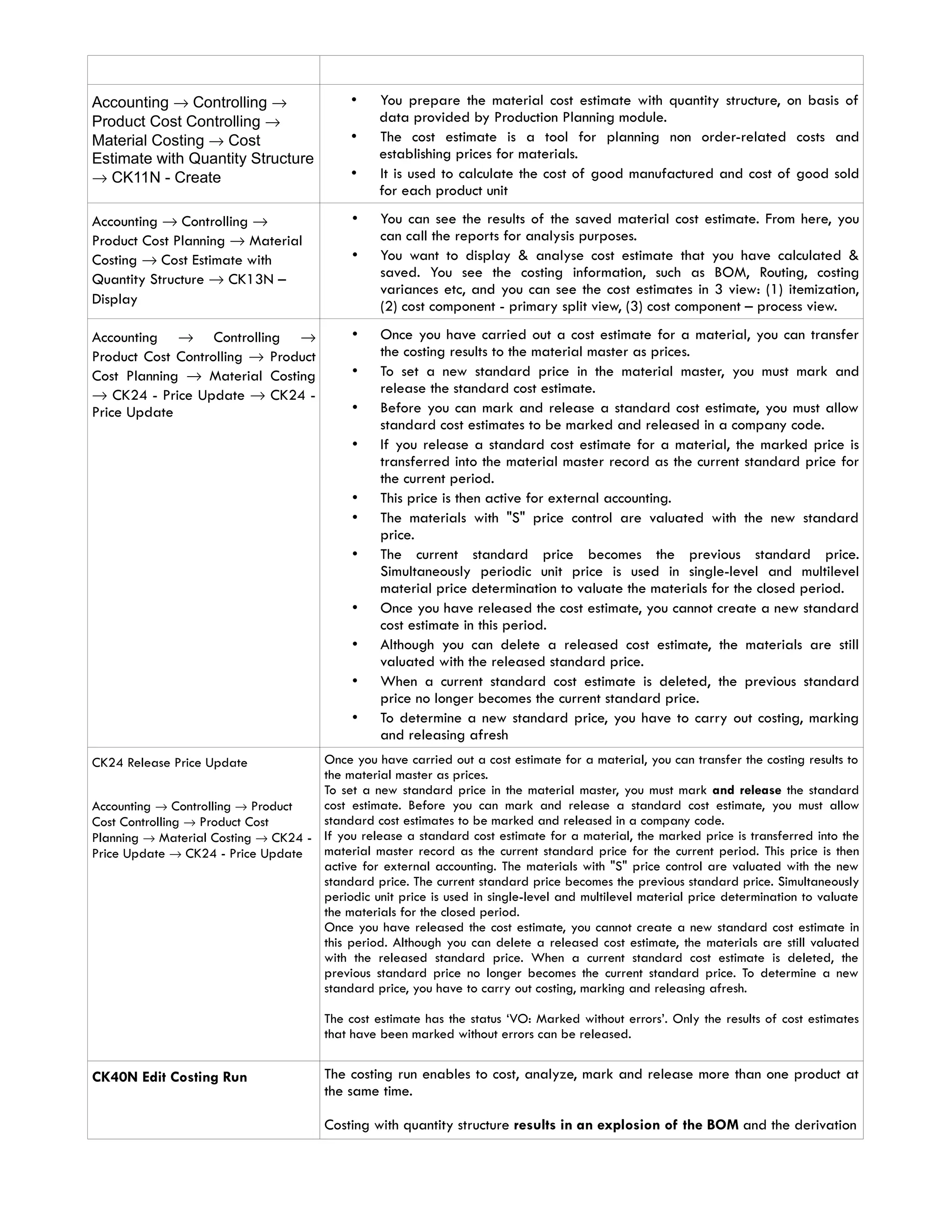
Accounting → Controlling →
Product Cost Controlling →
Material Costing → Cost
Estimate with Quantity Structure
→ CK11N - Create
• You prepare the material cost estimate with quantity structure, on basis of
data provided by Production Planning module.
• The cost estimate is a tool for planning non order-related costs and
establishing prices for materials.
• It is used to calculate the cost of good manufactured and cost of good sold
for each product unit
Accounting → Controlling →
Product Cost Planning → Material
Costing → Cost Estimate with
Quantity Structure → CK13N –
Display
• You can see the results of the saved material cost estimate. From here, you
can call the reports for analysis purposes.
• You want to display & analyse cost estimate that you have calculated &
saved. You see the costing information, such as BOM, Routing, costing
variances etc, and you can see the cost estimates in 3 view: (1) itemization,
(2) cost component - primary split view, (3) cost component – process view.
Accounting → Controlling →
Product Cost Controlling → Product
Cost Planning → Material Costing
→ CK24 - Price Update → CK24 -
Price Update
• Once you have carried out a cost estimate for a material, you can transfer
the costing results to the material master as prices.
• To set a new standard price in the material master, you must mark and
release the standard cost estimate.
• Before you can mark and release a standard cost estimate, you must allow
standard cost estimates to be marked and released in a company code.
• If you release a standard cost estimate for a material, the marked price is
transferred into the material master record as the current standard price for
the current period.
• This price is then active for external accounting.
• The materials with "S" price control are valuated with the new standard
price.
• The current standard price becomes the previous standard price.
Simultaneously periodic unit price is used in single-level and multilevel
material price determination to valuate the materials for the closed period.
• Once you have released the cost estimate, you cannot create a new standard
cost estimate in this period.
• Although you can delete a released cost estimate, the materials are still
valuated with the released standard price.
• When a current standard cost estimate is deleted, the previous standard
price no longer becomes the current standard price.
• To determine a new standard price, you have to carry out costing, marking
and releasing afresh
CK24 Release Price Update
Accounting → Controlling → Product
Cost Controlling → Product Cost
Planning → Material Costing → CK24 -
Price Update → CK24 - Price Update
Once you have carried out a cost estimate for a material, you can transfer the costing results to
the material master as prices.
To set a new standard price in the material master, you must mark and release the standard
cost estimate. Before you can mark and release a standard cost estimate, you must allow
standard cost estimates to be marked and released in a company code.
If you release a standard cost estimate for a material, the marked price is transferred into the
material master record as the current standard price for the current period. This price is then
active for external accounting. The materials with "S" price control are valuated with the new
standard price. The current standard price becomes the previous standard price. Simultaneously
periodic unit price is used in single-level and multilevel material price determination to valuate
the materials for the closed period.
Once you have released the cost estimate, you cannot create a new standard cost estimate in
this period. Although you can delete a released cost estimate, the materials are still valuated
with the released standard price. When a current standard cost estimate is deleted, the
previous standard price no longer becomes the current standard price. To determine a new
standard price, you have to carry out costing, marking and releasing afresh.
The cost estimate has the status ‘VO: Marked without errors’. Only the results of cost estimates
that have been marked without errors can be released.
CK40N Edit Costing Run The costing run enables to cost, analyze, mark and release more than one product at
the same time.
Costing with quantity structure results in an explosion of the BOM and the derivation
of activity prices from the routings and work centers to create a cost estimate for each
product.
Marking the cost estimate results in the standard price becoming visible on the
material master in the field Planned Price as the future standard price.
Releasing the cost estimate can occur once the period roll-over has happened and the
standard price becomes the current valuation price of the product. A financial
document is created for the valuation difference of stock. Every goods issue in the new
period will effectively be valued against the new standard price.
Mass costing run for all products that are valuated at standard price.
Requirements
Bill of Materials (BOM’s) must be maintained. Activity prices must exist as planned
prices on the cost centers linked to Work Centers. Routings and activity types must be
maintained.
Accounting →Controlling →Product Cost
Controlling →Cost Object Controlling
→Product Cost by Order→Period-End
Closing→Single Functions
→Settlement→
CO88 - Collective Processing -
During Production order settlement, either Work In Process (if incomplete delivery) or Variance
(if complete delivery) is posted. If Variance is posted, any WIP posted before will be reversed.
You want to post WIP or Variance after WIP & Variance calculation
Accounting → Controlling → Product
Cost Controlling → Product Cost
Planning → Material Costing → CK40N
- Edit Costing Run
CK40N Edit Costing Run
The costing run enables to cost, analyze, mark and release more than one product at
the same time.
Costing with quantity structure results in an explosion of the BOM and the derivation
of activity prices from the routings and work centers to create a cost estimate for each
product.
Marking the cost estimate results in the standard price becoming visible on the
material master in the field Planned Price as the future standard price.
Releasing the cost estimate can occur once the period roll-over has happened and the
standard price becomes the current valuation price of the product. A financial
document is created for the valuation difference of stock. Every goods issue in the new
period will effectively be valued against the new standard price.
Bill of Materials (BOM’s) must be maintained. Activity prices must exist as planned
prices on the cost centers linked to Work Centers. Routings and activity types must be
maintained.
Mass costing run for all products that are valuated at standard price.
Accounting → Controlling → Product
Cost Controlling → Product Cost
Planning → Environment → Costing Run
→ CK44 - Delete Costing Run
The administrative data for the costing run (name, description, selection and structure explosion)
is deleted. The material cost estimates themselves are not deleted. You have to delete them in a
second step (delete test data).
You have created costing run that you no longer wanted in the system. For example costing run
with wrong dates or costing variant. When you create a new costing variant, you want to delete
the first one with error.
CKAPP01 Display materials to be
costed
The report displays the following materials:
• Materials that can be costed (the No Costing indicator is not set in the costing view of
the material master)
• Materials for which no marked or released standard cost estimates exist in the system
This report can be used to check if materials that do not have cost estimate (marked or
released).
Scenario
Run this report to check if there are any semi-finished products ‘HALB’ or finished products to be
costed in plant 1200.
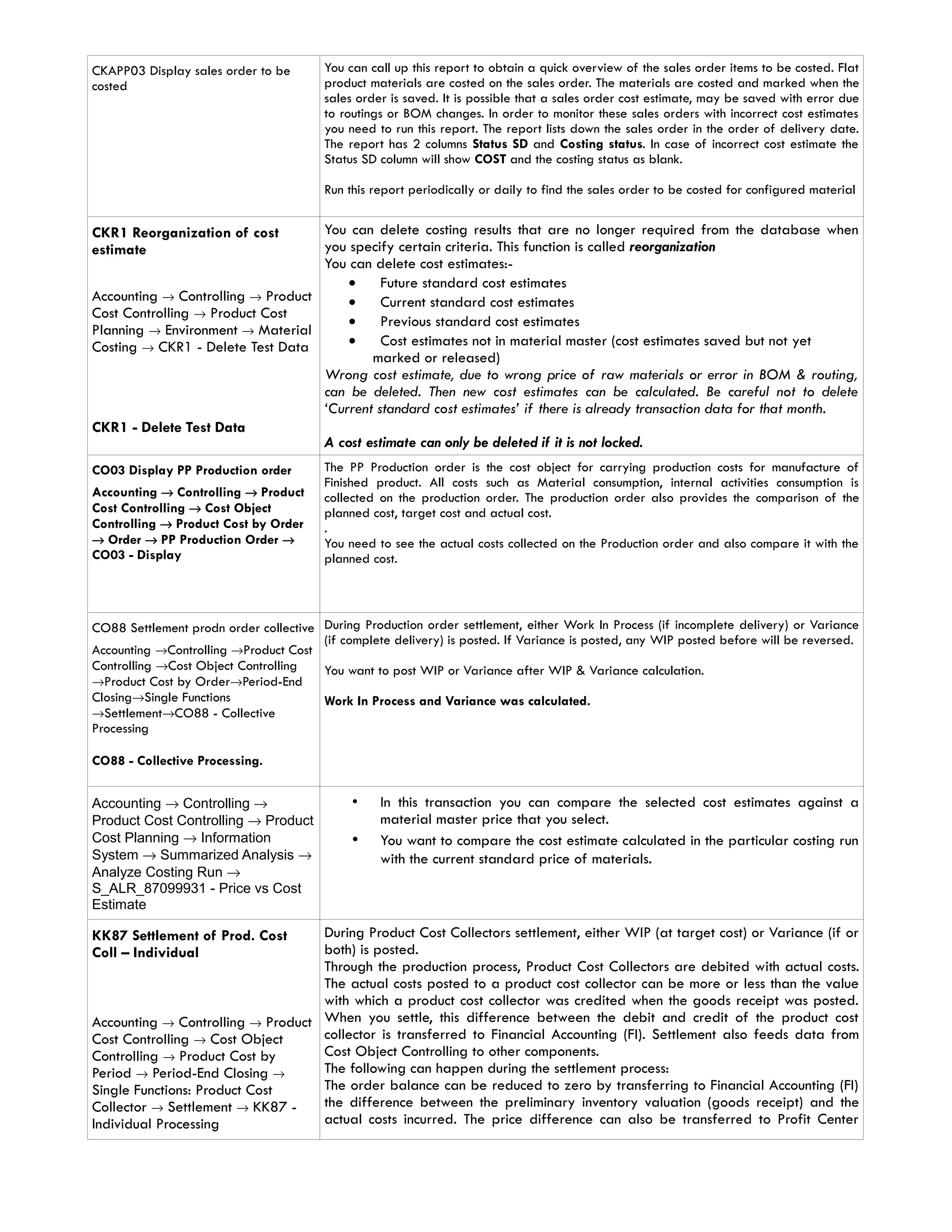
CKAPP03 Display sales order to be
costed
You can call up this report to obtain a quick overview of the sales order items to be costed. Flat
product materials are costed on the sales order. The materials are costed and marked when the
sales order is saved. It is possible that a sales order cost estimate, may be saved with error due
to routings or BOM changes. In order to monitor these sales orders with incorrect cost estimates
you need to run this report. The report lists down the sales order in the order of delivery date.
The report has 2 columns Status SD and Costing status. In case of incorrect cost estimate the
Status SD column will show COST and the costing status as blank.
Run this report periodically or daily to find the sales order to be costed for configured material
CKR1 Reorganization of cost
estimate
Accounting → Controlling → Product
Cost Controlling → Product Cost
Planning → Environment → Material
Costing → CKR1 - Delete Test Data
CKR1 - Delete Test Data
You can delete costing results that are no longer required from the database when
you specify certain criteria. This function is called reorganization
You can delete cost estimates:-
• Future standard cost estimates
• Current standard cost estimates
• Previous standard cost estimates
• Cost estimates not in material master (cost estimates saved but not yet
marked or released)
Wrong cost estimate, due to wrong price of raw materials or error in BOM & routing,
can be deleted. Then new cost estimates can be calculated. Be careful not to delete
‘Current standard cost estimates’ if there is already transaction data for that month.
A cost estimate can only be deleted if it is not locked.
CO03 Display PP Production order
Accounting → Controlling → Product
Cost Controlling → Cost Object
Controlling → Product Cost by Order
→ Order → PP Production Order →
CO03 - Display
The PP Production order is the cost object for carrying production costs for manufacture of
Finished product. All costs such as Material consumption, internal activities consumption is
collected on the production order. The production order also provides the comparison of the
planned cost, target cost and actual cost.
.
You need to see the actual costs collected on the Production order and also compare it with the
planned cost.
CO88 Settlement prodn order collective
Accounting →Controlling →Product Cost
Controlling →Cost Object Controlling
→Product Cost by Order→Period-End
Closing→Single Functions
→Settlement→CO88 - Collective
Processing
CO88 - Collective Processing.
During Production order settlement, either Work In Process (if incomplete delivery) or Variance
(if complete delivery) is posted. If Variance is posted, any WIP posted before will be reversed.
You want to post WIP or Variance after WIP & Variance calculation.
Work In Process and Variance was calculated.
Accounting → Controlling →
Product Cost Controlling → Product
Cost Planning → Information
System → Summarized Analysis →
Analyze Costing Run →
S_ALR_87099931 - Price vs Cost
Estimate
• In this transaction you can compare the selected cost estimates against a
material master price that you select.
• You want to compare the cost estimate calculated in the particular costing run
with the current standard price of materials.
KK87 Settlement of Prod. Cost
Coll – Individual
Accounting → Controlling → Product
Cost Controlling → Cost Object
Controlling → Product Cost by
Period → Period-End Closing →
Single Functions: Product Cost
Collector → Settlement → KK87 -
Individual Processing
During Product Cost Collectors settlement, either WIP (at target cost) or Variance (if or
both) is posted.
Through the production process, Product Cost Collectors are debited with actual costs.
The actual costs posted to a product cost collector can be more or less than the value
with which a product cost collector was credited when the goods receipt was posted.
When you settle, this difference between the debit and credit of the product cost
collector is transferred to Financial Accounting (FI). Settlement also feeds data from
Cost Object Controlling to other components.
The following can happen during the settlement process:
The order balance can be reduced to zero by transferring to Financial Accounting (FI)
the difference between the preliminary inventory valuation (goods receipt) and the
actual costs incurred. The price difference can also be transferred to Profit Center
Accounting (EC-PCA).
The total variance can be transferred to profitability segments in Profitability Analysis
(CO-PA). This enables you to see an additional contribution margin in CO-PA. You can
transfer the individual variance categories of the total variance to value fields in CO-
PA in combination with certain cost elements or cost element groups
You want to post WIP or Variance after WIP and Variance calculation.
KKAO Calculate WIP for PCC Coll
Accounting → Controlling →
Product Cost Controlling → Cost
Object Controlling → Product Cost
by Period → Period-End Closing →
Single Functions: Product Cost
Collector → Work in Process →
Collective Processing → KKAO -
Calculate
The WIP calculation function valuates the unfinished products (work in process).
In the Product Cost by Period component, work in process is valuated at target costs.
The operation quantities confirmed for the manufacturing orders or production versions
(only in repetitive manufacturing) that are not scrap are valuated at target cost in
accordance with the valuation variant for work in process and scrap.
You calculate work in process at target costs for the following objects:
• Product cost collectors
• Production orders with quantity structure assigned to the product cost
collectors
• Process orders assigned to the product cost collectors
• As part of the period end processing Work In Process needs to be calculated
for accurate period end closing.
Calculate WIP prodn order
collective – KKAO
Accounting → Controlling → Product
Cost Controlling → Cost Object
Controlling → Product Cost by
Order → Period-End Closing →
Single Functions → Work in Process
→ Collective Processing → KKAO -
Calculate
The system calculates Work In Process (WIP) to determine the costs incurred for
materials that have not yet been delivered to stock. This calculates the value of the
unfinished goods.
In Product Cost by Order the work in process is calculated for the Manufacturing
Order. The work in process for manufacturing orders is normally calculated at actual
costs. Work in process at actual costs is calculated as the difference between the
debits for material withdrawals, internal activity allocations, external activities, and
overhead costs (that is, the Actual Costs assigned to the object) and the Actual Credits
from goods receipts for delivery to stock.
The work in process can be transferred to Financial Accounting and Profit Center WIP
= amount if only partial Goods Receipts has been performed.
WIP = 0 if only complete Goods Receipts has been performed.
You want to calculated WIP either when Order is completed or at month end. WIP
must be calculated when order is completed. In this case WIP =0. WIP must also be
calculated at month end even though order is not completed. In this case WIP=amount.
KKAQ Display WIP for CO
Production Order Coll.
Accounting → Controlling → Product
Cost Controlling → Cost Object
Controlling → Product Cost by
Order → Period-End Closing →
Single Functions → Work in Process
→ Collective Processing → KKAQ -
Display
The system calculates Work In Process (WIP) to determine the costs incurred for
materials that have not yet been delivered to stock. This calculates the value of the
unfinished goods.
In Product Cost by Order the work in process is calculated for the Manufacturing
Order. The work in process for manufacturing orders is normally calculated at actual
costs. Work in process at actual costs is calculated as the difference between the
debits for material withdrawals, internal activity allocations, external activities, and
overhead costs (that is, the Actual Costs assigned to the object) and the Actual Credits
from goods receipts for delivery to stock.
The work in process can be transferred to Financial Accounting and Profit Center WIP
= amount if only partial Goods Receipts has been performed.
WIP = 0 if only complete Goods Receipts has been performed.
KKAS Calculate WIP for PCC –
Individual
Accounting → Controlling → Product
Cost Controlling → Cost Object
Controlling → Product Cost by
Period → Period-End Closing →
Single Functions: Product Cost
Collector → Work in Process →
Individual Processing → KKAS -
Calculate
The WIP calculation function valuates the unfinished products (work in process).
In the Product Cost by Period component, work in process is valuated at target costs.
The operation quantities confirmed for the manufacturing orders or production versions
(only in repetitive manufacturing) that are not scrap are valuated at target cost in
accordance with the valuation variant for work in process and scrap.
You calculate work in process at target costs for the following objects:
• Product cost collectors
• Production orders with quantity structure assigned to the product cost
collectors
• Process orders assigned to the product cost collectors
As part of the period end processing Work In Process needs to be calculated
prior to variance calculation and settlement for accurate period end closing
Display WIP for Product Cost –
Collective - KKAT
Accounting → Controlling → Product
Cost Controlling → Cost Object
Controlling → Product Cost by
Period → Period-End Closing →
Single Functions: Product Cost
Collector → Work in Process →
Individual Processing → KKAT -
Display
•
• The system calculates the work in process. The work in process is updated to
the product cost collector or manufacturing order under results analysis cost
elements.
• You want to display work in process that you calculated.
KKAX Calculate WIP Individually-
KKAX
Accounting → Controlling → Product
Cost Controlling → Cost Object
Controlling → Product Cost by
Order → Period-End Closing →
Single Functions → Work in Process
→ Individual Processing → KKAX -
Calculate
The WIP calculation process valuates the unfinished products (work in process).
In the Product Cost by Order component, the work in process is valuated at actual costs. Work in
process is the difference between the debit and credit of an order that has not been completely
delivered. This method determines the work in process for each production order by calculating
the difference between the actual costs incurred and the actual costs settled (that is, the
difference between the debits for goods issues, internal activity allocations, external activities,
and overhead on the one hand, and the credits for goods receipts on the other). Once the last
part of the order lot has been delivered to stock, any remaining work in process must be
canceled so that the order costs can properly be settled to stock.
The status of the order determines whether WIP calculation creates or cancels the work in
process.
If the order has the status REL (released), the system can calculate work in process.
Once the order receives the status DLV (Delivered) or TECO (Technically completed), the work in
process calculated in a previous period is canceled.
Display WIP for Prod. Order –
Individual - KKAY
Accounting → Controlling →
Product Cost Controlling → Cost
Object Controlling → Product Cost
by Order → Period-End Closing →
Single Functions → Work in
Process → Individual Processing →
KKAY - Display
The system calculates Work In Process (WIP) to determine the costs incurred for
materials that have not yet been delivered to stock. This calculates the value of the
unfinished goods.
In Product Cost by Order the work in process is calculated for the Manufacturing
Order. The work in process for manufacturing orders is normally calculated at actual
costs. Work in process at actual costs is calculated as the difference between the
debits for material withdrawals, internal activity allocations, external activities, and
overhead costs (that is, the Actual Costs assigned to the object) and the Actual Credits
from goods receipts for delivery to stock.
The work in process can be transferred to Financial Accounting and Profit Center WIP
= amount if only partial Goods Receipts has been performed.
WIP = 0 if only complete Goods Receipts has been performed.
Accounting → Controlling →
Product Cost Controlling → Cost
Object Controlling → Product Cost
by Order → Information System →
Tools → Data Collection →
S_ALR_87013099 – For Product
Drill down
To select data for a drill down report, you must first execute a data collection run. The
selected dataset is saved. You access this saved dataset when you execute the report.
You can execute the data collection for one plant or for all plants in a controlling area.
You can also select the summarization time frame. The values in the summarization time
frame are re-summarized and any old values are overwritten. Summarized values that
are outside of the summarization time frame are retained.
• This step should be done before you execute the product drill down report
KKS1 - Collective Processing
Accounting → Controlling →
Product Cost Controlling → Cost
Object Controlling → Product
Cost by Order → Period-End
Closing → Single Functions →
Variances →
The system compares the control costs with the target costs and assigns the variances
to variance categories. The variances are assigned to variance categories in the
following sequence:
• Input price variance
• Resource-usage variance
• Input quantity variance
• Remaining input variance
• Mixed-price variance
• Output price variance
• Lot size variance
• Remaining variance
Variance = 0 if only partial Goods Receipts has been performed.
• Variance = amount if only complete Goods Receipts has been performed.
KKS2 • Individual Processing
Accounting → Controlling → Product
Cost Controlling → Cost Object
Controlling → Product Cost by
Order → Period-End Closing ->
Single Functions → Variances →
KKS2 - Individual Processing
Same Narration
KKS5 Variance calculation product cost collector – collective Processing
Accounting → Controlling →
Product Cost Controlling →
Cost Object Controlling →
Product Cost by Period →
Period-End Closing → Single
Functions: Product Cost
Collector → Variances → KKS5
- Collective Processing
• You use this transaction to calculate the variances for all product cost collectors in a
plant.
• The system compares the control costs with the target costs and assigns the variances
to variance categories.
• Target cost version 0 is used to explain the difference between the debit and credit
of the product cost collector or manufacturing order. The target costs calculated on the
basis of the current standard cost estimate are compared with the actual costs from
which the work in process has been deducted. The difference is assigned to different
variance categories depending on the cause. Only the variances calculated with
target cost version 0 can be transferred to Profitability Analysis (CO-PA).
• With target cost version 1, production variances for the product cost collector are
calculated using the target costs determined on the basis of the preliminary cost
estimate for the product cost collector. If you are using a product cost collector, the
target costs cannot be determined on the basis of the preliminary cost estimate for
the manufacturing order. Target cost version 1 is used for informational purposes. It
cannot be settled.
KKS6 Variance calculation product cost collector – Individual Processing
Accounting → Controlling →
Product Cost Controlling →
Cost Object Controlling →
Product Cost by Period →
Single Functions: Product Cost
Collector → Variances → KKS6
- Individual Processing
Same Narration
KO88 Individual Processing
Accounting →Controlling →Product
Cost Controlling → Cost Object
Controlling → Product Cost by
Order → Period-End Closing →
Single Functions → Settlement →
KO88 - Individual Processing
• During Production order settlement, either Work In Process (if incomplete
delivery) or Variance (if complete delivery) is posted. If Variance is posted,
any WIP posted before will be reversed.
• You want to post WIP or Variance after WIP & Variance calculation
KRMI Actual costs
Accounting → Controlling →
Product Cost Controlling → Cost
Object Controlling → Product Cost
by Period → Information System →
Reports for Product Cost by Period
→ Line Items → Product Cost
Collectors → KRMI - Actual Costs
• This transaction gives you the actual line items on the Product Cost Collectors
created for particular material and production version.
• In Product Cost Controlling costs are collected on Product Cost Collectors with
order types:
• RM01 - PCC for Repetitive Manufacturing
RM01 - PCC for Process Orders
• CP01 – CO Production Orders
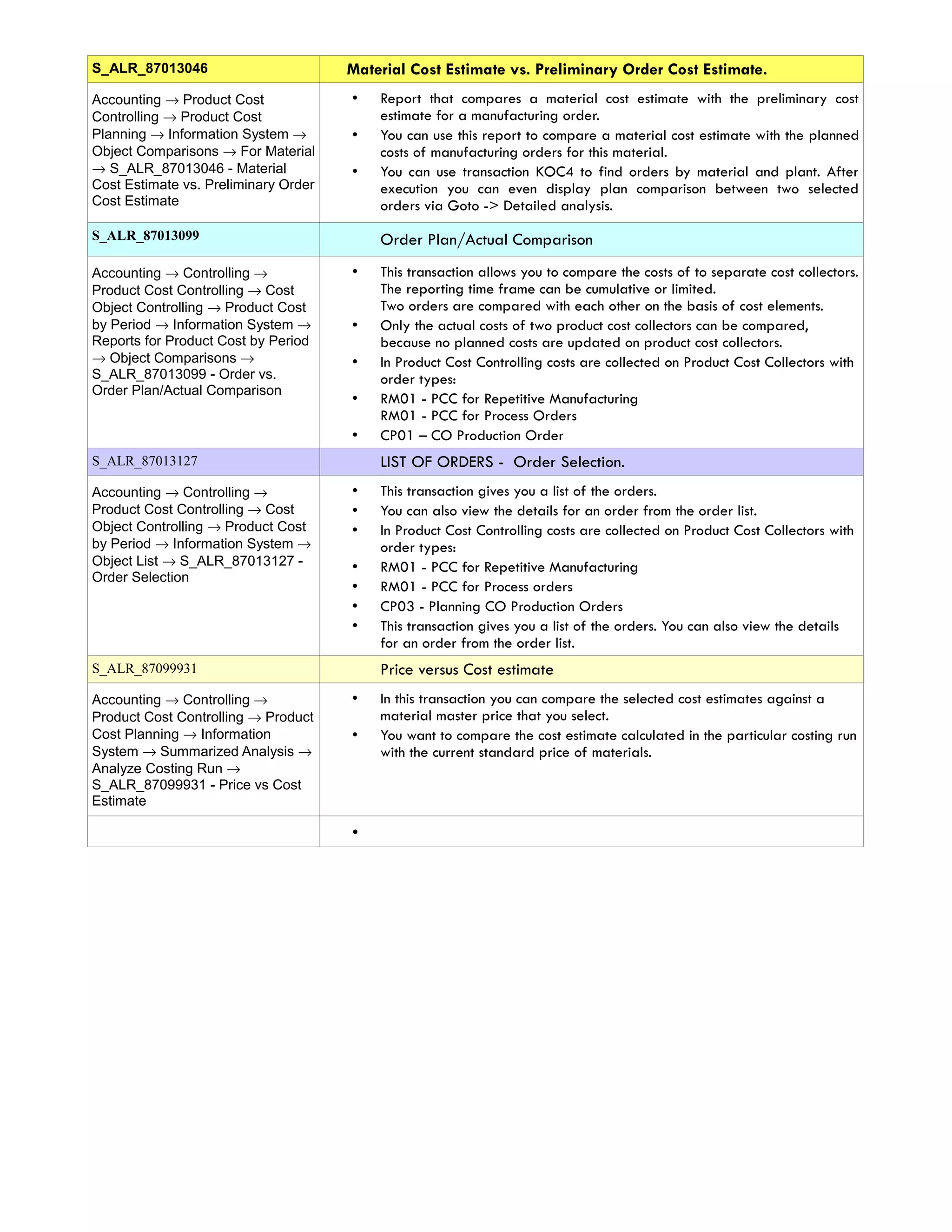
S_ALR_87013046 Material Cost Estimate vs. Preliminary Order Cost Estimate.
Accounting → Product Cost
Controlling → Product Cost
Planning → Information System →
Object Comparisons → For Material
→ S_ALR_87013046 - Material
Cost Estimate vs. Preliminary Order
Cost Estimate
• Report that compares a material cost estimate with the preliminary cost
estimate for a manufacturing order.
• You can use this report to compare a material cost estimate with the planned
costs of manufacturing orders for this material.
• You can use transaction KOC4 to find orders by material and plant. After
execution you can even display plan comparison between two selected
orders via Goto -> Detailed analysis.
S_ALR_87013099 Order Plan/Actual Comparison
Accounting → Controlling →
Product Cost Controlling → Cost
Object Controlling → Product Cost
by Period → Information System →
Reports for Product Cost by Period
→ Object Comparisons →
S_ALR_87013099 - Order vs.
Order Plan/Actual Comparison
• This transaction allows you to compare the costs of to separate cost collectors.
The reporting time frame can be cumulative or limited.
Two orders are compared with each other on the basis of cost elements.
• Only the actual costs of two product cost collectors can be compared,
because no planned costs are updated on product cost collectors.
• In Product Cost Controlling costs are collected on Product Cost Collectors with
order types:
• RM01 - PCC for Repetitive Manufacturing
RM01 - PCC for Process Orders
• CP01 – CO Production Order
S_ALR_87013127 LIST OF ORDERS - Order Selection.
Accounting → Controlling →
Product Cost Controlling → Cost
Object Controlling → Product Cost
by Period → Information System →
Object List → S_ALR_87013127 -
Order Selection
• This transaction gives you a list of the orders.
• You can also view the details for an order from the order list.
• In Product Cost Controlling costs are collected on Product Cost Collectors with
order types:
• RM01 - PCC for Repetitive Manufacturing
• RM01 - PCC for Process orders
• CP03 - Planning CO Production Orders
• This transaction gives you a list of the orders. You can also view the details
for an order from the order list.
S_ALR_87099931 Price versus Cost estimate
Accounting → Controlling →
Product Cost Controlling → Product
Cost Planning → Information
System → Summarized Analysis →
Analyze Costing Run →
S_ALR_87099931 - Price vs Cost
Estimate
• In this transaction you can compare the selected cost estimates against a
material master price that you select.
• You want to compare the cost estimate calculated in the particular costing run
with the current standard price of materials.
•

55811936 product-costing-cost-estimation-in-sap

  • 1.
    Product Costing -Cost Estimation in SAP Cost Estimation • The price of the finished goods (FG) and semi-finished goods (SFG) manufactured is determined through Standard Cost estimate. • Standard cost is estimated based on the cost of input materials, planned cost of activities and overheads. • It is the price at which the finished and semi-finished goods are valuated in finance. • The standard cost once estimated is valid for a specific period interval. • A standard cost estimate is created at the end of the period and is valid for the entire next period. • When the standard cost estimate for the respective material (FG & SFG) is released, the system updates the result of this estimate as standard price in ‘Accounting 1’ and ‘Costing 2’ view detail screen of the material master record. • This price is then valid for valuation of material in financial accounting till next cost estimate is run. • The materials are revaluated when the next standard cost estimate is released. • In this specific period interval, all the FG and SFG produced through production order or product cost collector are valued at the standard cost updated in the material master. • This is termed as ‘Cost of goods manufactured’ (COGM). Following are the important tools used in cost estimate. • Costing Variant • Cost Component Split • Costing Estimate with/without quantity structure • Costing Run/Price Update The above mentioned tools have been discussed in detail in this article to cover the concept behind the standard cost estimate in SAP.
  • 2.
    Costing Variant It isa key based on which standard cost is performed and valuated. Following are the control parameters in costing variant. (a) Costing Type : It updates price such as ‘Standard price’ or ‘Commercial price’ or ‘Tax valuation’ price depending upon the price update type. It contains the ‘calculation base ’ based on which prices are updated in material master for FG and SFG. For inventory valuation, calculation base will always be ‘COGM’. The COGM value will be determined through ‘Cost component split’. (b) Valuation Variant: It searches prices of input materials, activities and overhead ( overhead cost sheet ) during cost estimate. The strategy sequences for searching of the prices are specified for input materials, activities and overhead in the valuation variant. The strategy sequence prioritizes whether moving Avg. price, standard price or Info record price is to be picked up for input material, plan or actual price is to be picked for activities. It also specifies which costing sheet is to be used for overhead calculation (Material OH, Production OH). Strategy Sequence : Input Material Priority Strategy Sequence 1 Moving Average Price 2 Last Price from Purchasing Info Record Strategy Sequence : Activity Prices
  • 3.
    Priority Strategy Sequence 1.Actual Price of Previous Period 2. Plan Price for the Period 3. Plan Price as Average of All Fiscal Year Periods (c) Date Control : It determines period for which cost estimate is applicable. (d) Quantity Structure control : It determines BOM and routing which is to be considered for costing. It considers only those BOM and Routing which have the status ‘Release for Costing’. Cost Component Split What elements of costs are to be considered in ‘Cost of goods manufactured (COGM)’ is specified in Cost component structure. Each cost component mentioned in Costing (A) are captured in controlling through cost elements which are grouped in Cost Component Structure (B) as COGM, COGS. In Costing Type of costing variant, COGM will be specified as the calculation base for standard cost. Therefore, the summation of COGM in Cost component structure will be carried to SFG’s and FG’s material master as standard cost.
  • 4.
    Cost estimate withquantity structure - CK11N • Cost estimate with quantity structure is a tool for estimating material costs. • It calculates standard cost of goods manufactured. • CK11N is the transaction code for cost estimate with quantity structure. • In cost estimate SFG or FG code, plant, costing variant, costing version, costing period interval, quantity structure date ( BOM and Routing), valuation date for input material in BOM and activities in routing needs to be specified. • All dates as mentioned are defaulted by the system through Date control in costing variant which can be overwritten manually. • In cost estimate, the system on the basis of costing variant and the finished good item code specified determines the quantity structure of the BOM and Routing. • It then valuates the input materials in the BOM and the production activities from the routing with prices according to the strategy sequence maintained in the Valuation Variant (see costing variant) for input material and activities. • It calculates the overhead as per Costing Sheet maintained in costing variant. • Cost estimate gives break up of the costing according to the cost component split defined for the cost estimate. • Cost estimate result needs to be saved before price update run or costing run. • The cost estimate with quantity structure accesses data in the Production Planning (PP), Materials Management (MM), and Controlling (CO) application of the SAP System. Cost Estimates without Quantity Structure: KKPAN • Costing without a quantity structure is a tool for planning costs and setting prices for materials without reference to quantity structure ( BOM and routing ) in Production Planning. • It is intended for materials with insufficient or no quantity structure data. It can also be used to enter data from non-SAP systems. • This is very useful while simulating costing based on Management requirement without creating quantity structure in the system. • A material cost estimate without a quantity structure enables to plan the costs for raw materials, internal activities, and external activities for a product in the form of a unit cost estimate. • Unit costing is a type of spreadsheet that, due to its integration, can use existing master data and prices in the system, such as activity prices from Cost Center Accounting. • Cost estimates without quantity structure can access data in various application components: • Materials Management (MM), such as material master records and services • Production Planning (PP), such as work centers and resources • Controlling (CO), such as cost centers and activity types
  • 5.
    Costing Run /Price update: • Once cost estimate is carried out, costing results needs to be transferred to material master for updating prices. • Depending on the purpose of costing (Inventory valuation for AS-2, simulation costing for the purpose for management decision etc), selected price controls( Standard Price, Tax Valuation Price, Commercial Price) specified in the costing type ( see costing variant ) in the material master can be updated. • When the cost estimate is ‘Marked’ Future standard price in the material master is updated. • After marking, the cost estimate is ‘Released’, the new released standard price becomes the ‘Current standard price’ and standard price previously updated in ‘Current standard price’ is updated in the ‘Previous standard price’. • The existing inventory gets revalued with the new current standard price and system passes following accounting entry for revaluation. FG/ SFG inventory A/c Dr / Cr Revaluation – Inventory Dr / Cr SAP T Code To be used Create Cost Estimate with quantity structure CK151N Display Cost Estimate with quantity structure CK13N Comparison with itemization CK33 Create Cost estimate without quantity structure KKPAN Change Cost estimate without quantity structure KKPBN Display Cost Estimate without quantity structure KKPCN Price Update CK24 Create Costing Run CKMATSEL Edit Costing Run CKMATCON
  • 6.
    Accounting → Controlling→ Product Cost Controlling → Material Costing → Cost Estimate with Quantity Structure → CK11N - Create • You prepare the material cost estimate with quantity structure, on basis of data provided by Production Planning module. • The cost estimate is a tool for planning non order-related costs and establishing prices for materials. • It is used to calculate the cost of good manufactured and cost of good sold for each product unit Accounting → Controlling → Product Cost Planning → Material Costing → Cost Estimate with Quantity Structure → CK13N – Display • You can see the results of the saved material cost estimate. From here, you can call the reports for analysis purposes. • You want to display & analyse cost estimate that you have calculated & saved. You see the costing information, such as BOM, Routing, costing variances etc, and you can see the cost estimates in 3 view: (1) itemization, (2) cost component - primary split view, (3) cost component – process view. Accounting → Controlling → Product Cost Controlling → Product Cost Planning → Material Costing → CK24 - Price Update → CK24 - Price Update • Once you have carried out a cost estimate for a material, you can transfer the costing results to the material master as prices. • To set a new standard price in the material master, you must mark and release the standard cost estimate. • Before you can mark and release a standard cost estimate, you must allow standard cost estimates to be marked and released in a company code. • If you release a standard cost estimate for a material, the marked price is transferred into the material master record as the current standard price for the current period. • This price is then active for external accounting. • The materials with "S" price control are valuated with the new standard price. • The current standard price becomes the previous standard price. Simultaneously periodic unit price is used in single-level and multilevel material price determination to valuate the materials for the closed period. • Once you have released the cost estimate, you cannot create a new standard cost estimate in this period. • Although you can delete a released cost estimate, the materials are still valuated with the released standard price. • When a current standard cost estimate is deleted, the previous standard price no longer becomes the current standard price. • To determine a new standard price, you have to carry out costing, marking and releasing afresh CK24 Release Price Update Accounting → Controlling → Product Cost Controlling → Product Cost Planning → Material Costing → CK24 - Price Update → CK24 - Price Update Once you have carried out a cost estimate for a material, you can transfer the costing results to the material master as prices. To set a new standard price in the material master, you must mark and release the standard cost estimate. Before you can mark and release a standard cost estimate, you must allow standard cost estimates to be marked and released in a company code. If you release a standard cost estimate for a material, the marked price is transferred into the material master record as the current standard price for the current period. This price is then active for external accounting. The materials with "S" price control are valuated with the new standard price. The current standard price becomes the previous standard price. Simultaneously periodic unit price is used in single-level and multilevel material price determination to valuate the materials for the closed period. Once you have released the cost estimate, you cannot create a new standard cost estimate in this period. Although you can delete a released cost estimate, the materials are still valuated with the released standard price. When a current standard cost estimate is deleted, the previous standard price no longer becomes the current standard price. To determine a new standard price, you have to carry out costing, marking and releasing afresh. The cost estimate has the status ‘VO: Marked without errors’. Only the results of cost estimates that have been marked without errors can be released. CK40N Edit Costing Run The costing run enables to cost, analyze, mark and release more than one product at the same time. Costing with quantity structure results in an explosion of the BOM and the derivation
  • 7.
    of activity pricesfrom the routings and work centers to create a cost estimate for each product. Marking the cost estimate results in the standard price becoming visible on the material master in the field Planned Price as the future standard price. Releasing the cost estimate can occur once the period roll-over has happened and the standard price becomes the current valuation price of the product. A financial document is created for the valuation difference of stock. Every goods issue in the new period will effectively be valued against the new standard price. Mass costing run for all products that are valuated at standard price. Requirements Bill of Materials (BOM’s) must be maintained. Activity prices must exist as planned prices on the cost centers linked to Work Centers. Routings and activity types must be maintained. Accounting →Controlling →Product Cost Controlling →Cost Object Controlling →Product Cost by Order→Period-End Closing→Single Functions →Settlement→ CO88 - Collective Processing - During Production order settlement, either Work In Process (if incomplete delivery) or Variance (if complete delivery) is posted. If Variance is posted, any WIP posted before will be reversed. You want to post WIP or Variance after WIP & Variance calculation Accounting → Controlling → Product Cost Controlling → Product Cost Planning → Material Costing → CK40N - Edit Costing Run CK40N Edit Costing Run The costing run enables to cost, analyze, mark and release more than one product at the same time. Costing with quantity structure results in an explosion of the BOM and the derivation of activity prices from the routings and work centers to create a cost estimate for each product. Marking the cost estimate results in the standard price becoming visible on the material master in the field Planned Price as the future standard price. Releasing the cost estimate can occur once the period roll-over has happened and the standard price becomes the current valuation price of the product. A financial document is created for the valuation difference of stock. Every goods issue in the new period will effectively be valued against the new standard price. Bill of Materials (BOM’s) must be maintained. Activity prices must exist as planned prices on the cost centers linked to Work Centers. Routings and activity types must be maintained. Mass costing run for all products that are valuated at standard price. Accounting → Controlling → Product Cost Controlling → Product Cost Planning → Environment → Costing Run → CK44 - Delete Costing Run The administrative data for the costing run (name, description, selection and structure explosion) is deleted. The material cost estimates themselves are not deleted. You have to delete them in a second step (delete test data). You have created costing run that you no longer wanted in the system. For example costing run with wrong dates or costing variant. When you create a new costing variant, you want to delete the first one with error. CKAPP01 Display materials to be costed The report displays the following materials: • Materials that can be costed (the No Costing indicator is not set in the costing view of the material master) • Materials for which no marked or released standard cost estimates exist in the system This report can be used to check if materials that do not have cost estimate (marked or released). Scenario Run this report to check if there are any semi-finished products ‘HALB’ or finished products to be costed in plant 1200.
  • 8.
    CKAPP03 Display salesorder to be costed You can call up this report to obtain a quick overview of the sales order items to be costed. Flat product materials are costed on the sales order. The materials are costed and marked when the sales order is saved. It is possible that a sales order cost estimate, may be saved with error due to routings or BOM changes. In order to monitor these sales orders with incorrect cost estimates you need to run this report. The report lists down the sales order in the order of delivery date. The report has 2 columns Status SD and Costing status. In case of incorrect cost estimate the Status SD column will show COST and the costing status as blank. Run this report periodically or daily to find the sales order to be costed for configured material CKR1 Reorganization of cost estimate Accounting → Controlling → Product Cost Controlling → Product Cost Planning → Environment → Material Costing → CKR1 - Delete Test Data CKR1 - Delete Test Data You can delete costing results that are no longer required from the database when you specify certain criteria. This function is called reorganization You can delete cost estimates:- • Future standard cost estimates • Current standard cost estimates • Previous standard cost estimates • Cost estimates not in material master (cost estimates saved but not yet marked or released) Wrong cost estimate, due to wrong price of raw materials or error in BOM & routing, can be deleted. Then new cost estimates can be calculated. Be careful not to delete ‘Current standard cost estimates’ if there is already transaction data for that month. A cost estimate can only be deleted if it is not locked. CO03 Display PP Production order Accounting → Controlling → Product Cost Controlling → Cost Object Controlling → Product Cost by Order → Order → PP Production Order → CO03 - Display The PP Production order is the cost object for carrying production costs for manufacture of Finished product. All costs such as Material consumption, internal activities consumption is collected on the production order. The production order also provides the comparison of the planned cost, target cost and actual cost. . You need to see the actual costs collected on the Production order and also compare it with the planned cost. CO88 Settlement prodn order collective Accounting →Controlling →Product Cost Controlling →Cost Object Controlling →Product Cost by Order→Period-End Closing→Single Functions →Settlement→CO88 - Collective Processing CO88 - Collective Processing. During Production order settlement, either Work In Process (if incomplete delivery) or Variance (if complete delivery) is posted. If Variance is posted, any WIP posted before will be reversed. You want to post WIP or Variance after WIP & Variance calculation. Work In Process and Variance was calculated. Accounting → Controlling → Product Cost Controlling → Product Cost Planning → Information System → Summarized Analysis → Analyze Costing Run → S_ALR_87099931 - Price vs Cost Estimate • In this transaction you can compare the selected cost estimates against a material master price that you select. • You want to compare the cost estimate calculated in the particular costing run with the current standard price of materials. KK87 Settlement of Prod. Cost Coll – Individual Accounting → Controlling → Product Cost Controlling → Cost Object Controlling → Product Cost by Period → Period-End Closing → Single Functions: Product Cost Collector → Settlement → KK87 - Individual Processing During Product Cost Collectors settlement, either WIP (at target cost) or Variance (if or both) is posted. Through the production process, Product Cost Collectors are debited with actual costs. The actual costs posted to a product cost collector can be more or less than the value with which a product cost collector was credited when the goods receipt was posted. When you settle, this difference between the debit and credit of the product cost collector is transferred to Financial Accounting (FI). Settlement also feeds data from Cost Object Controlling to other components. The following can happen during the settlement process: The order balance can be reduced to zero by transferring to Financial Accounting (FI) the difference between the preliminary inventory valuation (goods receipt) and the actual costs incurred. The price difference can also be transferred to Profit Center
  • 9.
    Accounting (EC-PCA). The totalvariance can be transferred to profitability segments in Profitability Analysis (CO-PA). This enables you to see an additional contribution margin in CO-PA. You can transfer the individual variance categories of the total variance to value fields in CO- PA in combination with certain cost elements or cost element groups You want to post WIP or Variance after WIP and Variance calculation. KKAO Calculate WIP for PCC Coll Accounting → Controlling → Product Cost Controlling → Cost Object Controlling → Product Cost by Period → Period-End Closing → Single Functions: Product Cost Collector → Work in Process → Collective Processing → KKAO - Calculate The WIP calculation function valuates the unfinished products (work in process). In the Product Cost by Period component, work in process is valuated at target costs. The operation quantities confirmed for the manufacturing orders or production versions (only in repetitive manufacturing) that are not scrap are valuated at target cost in accordance with the valuation variant for work in process and scrap. You calculate work in process at target costs for the following objects: • Product cost collectors • Production orders with quantity structure assigned to the product cost collectors • Process orders assigned to the product cost collectors • As part of the period end processing Work In Process needs to be calculated for accurate period end closing. Calculate WIP prodn order collective – KKAO Accounting → Controlling → Product Cost Controlling → Cost Object Controlling → Product Cost by Order → Period-End Closing → Single Functions → Work in Process → Collective Processing → KKAO - Calculate The system calculates Work In Process (WIP) to determine the costs incurred for materials that have not yet been delivered to stock. This calculates the value of the unfinished goods. In Product Cost by Order the work in process is calculated for the Manufacturing Order. The work in process for manufacturing orders is normally calculated at actual costs. Work in process at actual costs is calculated as the difference between the debits for material withdrawals, internal activity allocations, external activities, and overhead costs (that is, the Actual Costs assigned to the object) and the Actual Credits from goods receipts for delivery to stock. The work in process can be transferred to Financial Accounting and Profit Center WIP = amount if only partial Goods Receipts has been performed. WIP = 0 if only complete Goods Receipts has been performed. You want to calculated WIP either when Order is completed or at month end. WIP must be calculated when order is completed. In this case WIP =0. WIP must also be calculated at month end even though order is not completed. In this case WIP=amount. KKAQ Display WIP for CO Production Order Coll. Accounting → Controlling → Product Cost Controlling → Cost Object Controlling → Product Cost by Order → Period-End Closing → Single Functions → Work in Process → Collective Processing → KKAQ - Display The system calculates Work In Process (WIP) to determine the costs incurred for materials that have not yet been delivered to stock. This calculates the value of the unfinished goods. In Product Cost by Order the work in process is calculated for the Manufacturing Order. The work in process for manufacturing orders is normally calculated at actual costs. Work in process at actual costs is calculated as the difference between the debits for material withdrawals, internal activity allocations, external activities, and overhead costs (that is, the Actual Costs assigned to the object) and the Actual Credits from goods receipts for delivery to stock. The work in process can be transferred to Financial Accounting and Profit Center WIP = amount if only partial Goods Receipts has been performed. WIP = 0 if only complete Goods Receipts has been performed. KKAS Calculate WIP for PCC – Individual Accounting → Controlling → Product Cost Controlling → Cost Object Controlling → Product Cost by Period → Period-End Closing → Single Functions: Product Cost Collector → Work in Process → Individual Processing → KKAS - Calculate The WIP calculation function valuates the unfinished products (work in process). In the Product Cost by Period component, work in process is valuated at target costs. The operation quantities confirmed for the manufacturing orders or production versions (only in repetitive manufacturing) that are not scrap are valuated at target cost in accordance with the valuation variant for work in process and scrap. You calculate work in process at target costs for the following objects: • Product cost collectors • Production orders with quantity structure assigned to the product cost collectors • Process orders assigned to the product cost collectors As part of the period end processing Work In Process needs to be calculated prior to variance calculation and settlement for accurate period end closing
  • 10.
    Display WIP forProduct Cost – Collective - KKAT Accounting → Controlling → Product Cost Controlling → Cost Object Controlling → Product Cost by Period → Period-End Closing → Single Functions: Product Cost Collector → Work in Process → Individual Processing → KKAT - Display • • The system calculates the work in process. The work in process is updated to the product cost collector or manufacturing order under results analysis cost elements. • You want to display work in process that you calculated. KKAX Calculate WIP Individually- KKAX Accounting → Controlling → Product Cost Controlling → Cost Object Controlling → Product Cost by Order → Period-End Closing → Single Functions → Work in Process → Individual Processing → KKAX - Calculate The WIP calculation process valuates the unfinished products (work in process). In the Product Cost by Order component, the work in process is valuated at actual costs. Work in process is the difference between the debit and credit of an order that has not been completely delivered. This method determines the work in process for each production order by calculating the difference between the actual costs incurred and the actual costs settled (that is, the difference between the debits for goods issues, internal activity allocations, external activities, and overhead on the one hand, and the credits for goods receipts on the other). Once the last part of the order lot has been delivered to stock, any remaining work in process must be canceled so that the order costs can properly be settled to stock. The status of the order determines whether WIP calculation creates or cancels the work in process. If the order has the status REL (released), the system can calculate work in process. Once the order receives the status DLV (Delivered) or TECO (Technically completed), the work in process calculated in a previous period is canceled. Display WIP for Prod. Order – Individual - KKAY Accounting → Controlling → Product Cost Controlling → Cost Object Controlling → Product Cost by Order → Period-End Closing → Single Functions → Work in Process → Individual Processing → KKAY - Display The system calculates Work In Process (WIP) to determine the costs incurred for materials that have not yet been delivered to stock. This calculates the value of the unfinished goods. In Product Cost by Order the work in process is calculated for the Manufacturing Order. The work in process for manufacturing orders is normally calculated at actual costs. Work in process at actual costs is calculated as the difference between the debits for material withdrawals, internal activity allocations, external activities, and overhead costs (that is, the Actual Costs assigned to the object) and the Actual Credits from goods receipts for delivery to stock. The work in process can be transferred to Financial Accounting and Profit Center WIP = amount if only partial Goods Receipts has been performed. WIP = 0 if only complete Goods Receipts has been performed. Accounting → Controlling → Product Cost Controlling → Cost Object Controlling → Product Cost by Order → Information System → Tools → Data Collection → S_ALR_87013099 – For Product Drill down To select data for a drill down report, you must first execute a data collection run. The selected dataset is saved. You access this saved dataset when you execute the report. You can execute the data collection for one plant or for all plants in a controlling area. You can also select the summarization time frame. The values in the summarization time frame are re-summarized and any old values are overwritten. Summarized values that are outside of the summarization time frame are retained. • This step should be done before you execute the product drill down report KKS1 - Collective Processing Accounting → Controlling → Product Cost Controlling → Cost Object Controlling → Product Cost by Order → Period-End Closing → Single Functions → Variances → The system compares the control costs with the target costs and assigns the variances to variance categories. The variances are assigned to variance categories in the following sequence: • Input price variance • Resource-usage variance • Input quantity variance • Remaining input variance • Mixed-price variance • Output price variance • Lot size variance • Remaining variance Variance = 0 if only partial Goods Receipts has been performed.
  • 11.
    • Variance =amount if only complete Goods Receipts has been performed. KKS2 • Individual Processing Accounting → Controlling → Product Cost Controlling → Cost Object Controlling → Product Cost by Order → Period-End Closing -> Single Functions → Variances → KKS2 - Individual Processing Same Narration KKS5 Variance calculation product cost collector – collective Processing Accounting → Controlling → Product Cost Controlling → Cost Object Controlling → Product Cost by Period → Period-End Closing → Single Functions: Product Cost Collector → Variances → KKS5 - Collective Processing • You use this transaction to calculate the variances for all product cost collectors in a plant. • The system compares the control costs with the target costs and assigns the variances to variance categories. • Target cost version 0 is used to explain the difference between the debit and credit of the product cost collector or manufacturing order. The target costs calculated on the basis of the current standard cost estimate are compared with the actual costs from which the work in process has been deducted. The difference is assigned to different variance categories depending on the cause. Only the variances calculated with target cost version 0 can be transferred to Profitability Analysis (CO-PA). • With target cost version 1, production variances for the product cost collector are calculated using the target costs determined on the basis of the preliminary cost estimate for the product cost collector. If you are using a product cost collector, the target costs cannot be determined on the basis of the preliminary cost estimate for the manufacturing order. Target cost version 1 is used for informational purposes. It cannot be settled. KKS6 Variance calculation product cost collector – Individual Processing Accounting → Controlling → Product Cost Controlling → Cost Object Controlling → Product Cost by Period → Single Functions: Product Cost Collector → Variances → KKS6 - Individual Processing Same Narration KO88 Individual Processing Accounting →Controlling →Product Cost Controlling → Cost Object Controlling → Product Cost by Order → Period-End Closing → Single Functions → Settlement → KO88 - Individual Processing • During Production order settlement, either Work In Process (if incomplete delivery) or Variance (if complete delivery) is posted. If Variance is posted, any WIP posted before will be reversed. • You want to post WIP or Variance after WIP & Variance calculation KRMI Actual costs Accounting → Controlling → Product Cost Controlling → Cost Object Controlling → Product Cost by Period → Information System → Reports for Product Cost by Period → Line Items → Product Cost Collectors → KRMI - Actual Costs • This transaction gives you the actual line items on the Product Cost Collectors created for particular material and production version. • In Product Cost Controlling costs are collected on Product Cost Collectors with order types: • RM01 - PCC for Repetitive Manufacturing RM01 - PCC for Process Orders • CP01 – CO Production Orders
  • 12.
    S_ALR_87013046 Material CostEstimate vs. Preliminary Order Cost Estimate. Accounting → Product Cost Controlling → Product Cost Planning → Information System → Object Comparisons → For Material → S_ALR_87013046 - Material Cost Estimate vs. Preliminary Order Cost Estimate • Report that compares a material cost estimate with the preliminary cost estimate for a manufacturing order. • You can use this report to compare a material cost estimate with the planned costs of manufacturing orders for this material. • You can use transaction KOC4 to find orders by material and plant. After execution you can even display plan comparison between two selected orders via Goto -> Detailed analysis. S_ALR_87013099 Order Plan/Actual Comparison Accounting → Controlling → Product Cost Controlling → Cost Object Controlling → Product Cost by Period → Information System → Reports for Product Cost by Period → Object Comparisons → S_ALR_87013099 - Order vs. Order Plan/Actual Comparison • This transaction allows you to compare the costs of to separate cost collectors. The reporting time frame can be cumulative or limited. Two orders are compared with each other on the basis of cost elements. • Only the actual costs of two product cost collectors can be compared, because no planned costs are updated on product cost collectors. • In Product Cost Controlling costs are collected on Product Cost Collectors with order types: • RM01 - PCC for Repetitive Manufacturing RM01 - PCC for Process Orders • CP01 – CO Production Order S_ALR_87013127 LIST OF ORDERS - Order Selection. Accounting → Controlling → Product Cost Controlling → Cost Object Controlling → Product Cost by Period → Information System → Object List → S_ALR_87013127 - Order Selection • This transaction gives you a list of the orders. • You can also view the details for an order from the order list. • In Product Cost Controlling costs are collected on Product Cost Collectors with order types: • RM01 - PCC for Repetitive Manufacturing • RM01 - PCC for Process orders • CP03 - Planning CO Production Orders • This transaction gives you a list of the orders. You can also view the details for an order from the order list. S_ALR_87099931 Price versus Cost estimate Accounting → Controlling → Product Cost Controlling → Product Cost Planning → Information System → Summarized Analysis → Analyze Costing Run → S_ALR_87099931 - Price vs Cost Estimate • In this transaction you can compare the selected cost estimates against a material master price that you select. • You want to compare the cost estimate calculated in the particular costing run with the current standard price of materials. •