DOCUMENT SPLITTING IN SAP New GL
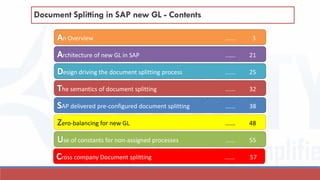
Document Splitting in SAP new GL - Contents
esign driving the document splitting process ...... 25
n Overview ...... 3
rchitecture of new GL in SAP ...... 21
he semantics of document splitting ...... 32
AP delivered pre-configured document splitting ...... 38
se of constants for non-assigned processes ...... 55
Zero-balancing for new GL ...... 48
ross company Document splitting ...... 57
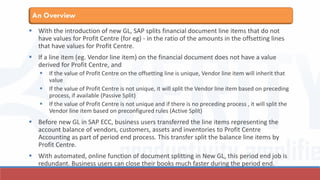
AN OVERVIEW
DOCUMENT SPLITTING IN NEW GL IN SAP ECC IS ONE OF THE KEY CHANGES INTRODUCED BY SAP
TO STREAMLINE MULTIPLE REPORTING REQUIREMENTS AND TO ENABLE FASTER CLOSE PROCESS
FOR ITS CUSTOMERS. IN MY SERIES OF SLIDES/ BLOGS ON DOCUMENT SPLITTING, I INTEND TO
EXPLAIN AND ELABORATE THE CONCEPTS BEHIND DOCUMENT SPLITTING AND DEMONSTRATE
USING EXAMPLES HOW DOCUMENT SPLITTING CAN BE ACHIEVED FOR VARIOUS COMPLEX
BUSINESS PROCESSES.
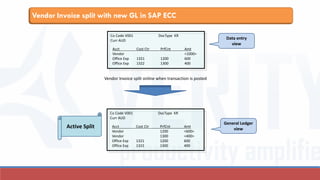
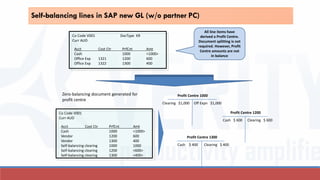
 With the introduction of new GL, SAP splits financial document line items that do not
have values for Profit Centre (for eg) - in the ratio of the amounts in the offsetting lines
that have values for Profit Centre.
 If a line item (eg. Vendor line item) on the financial document does not have a value
derived for Profit Centre, and
 If the value of Profit Centre on the offsetting line is unique, Vendor line item will inherit that
value
 If the value of Profit Centre is not unique, it will split the Vendor line item based on preceding
process, if available (Passive Split)
 If the value of Profit Centre is not unique and if there is no preceding process , it will split the
Vendor line item based on preconfigured rules (Active Split)
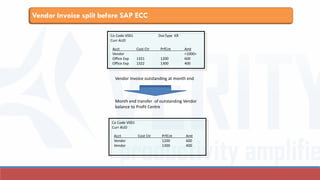
 Before new GL in SAP ECC, business users transferred the line items representing the
account balance of vendors, customers, assets and inventories to Profit Centre
Accounting as part of period end process. This transfer split the balance line items by
Profit Centre.
 With automated, online function of document splitting in New GL, this period end job is
redundant. Business users can close their books much faster during the period end.
An Overview
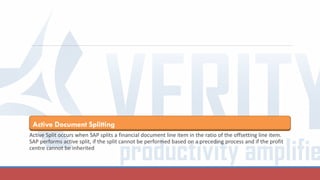
Active Document Splitting
Active Split occurs when SAP splits a financial document line item in the ratio of the offsetting line item.
SAP performs active split, if the split cannot be performed based on a preceding process and if the profit
centre cannot be inherited
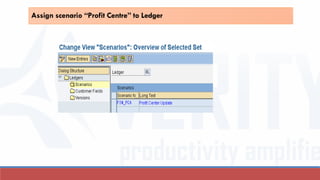
Acct Cost Ctr PrfCnt Amt
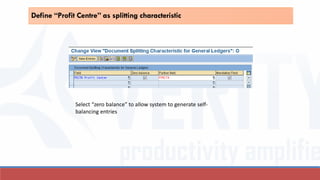
Vendor <1000>
Office Exp 1321 1200 600
Office Exp 1322 1300 400
Co Code V001 DocType KR
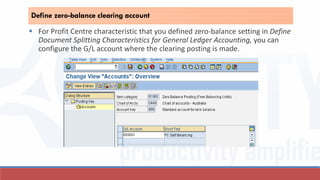
Curr AUD
Vendor Invoice outstanding at month end
Month end transfer of outstanding Vendor
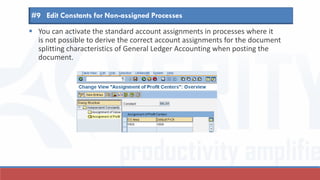
balance to Profit Centre
Acct Cost Ctr PrfCnt Amt
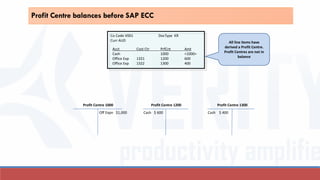
Vendor 1200 600
Vendor 1300 400
Co Code V001
Curr AUD
Vendor Invoice split before SAP ECC
Vendor Invoice split with new GL in SAP ECC
Acct Cost Ctr PrfCnt Amt
Vendor <1000>
Office Exp 1321 1200 600
Office Exp 1322 1300 400
Co Code V001 DocType KR
Curr AUD
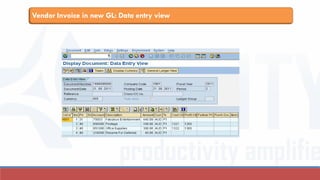
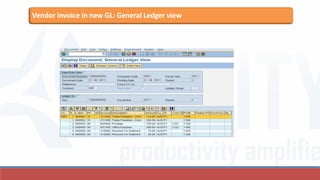
Vendor Invoice split online when transaction is posted
Acct Cost Ctr PrfCnt Amt
Vendor 1200 <600>
Vendor 1300 <400>
Office Exp 1321 1200 600
Office Exp 1322 1300 400
Co Code V001 DocType KR
Curr AUD
Data entry
view
General Ledger
viewActive Split
Vendor Invoice in new GL: Data entry view
Vendor Invoice in new GL: General Ledger view
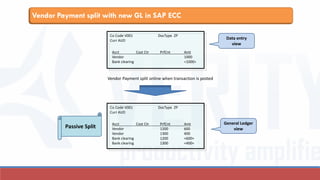
Passive Document Splitting
Passive split occurs when SAP splits a financial document line item based on the split in a preceding
process (eg. Vendor line in payment process is split based on Vendor line split in Vendor Invoice process)
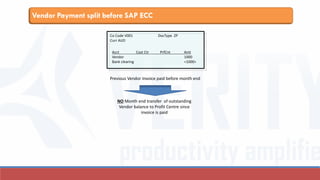
Vendor Payment split before SAP ECC
Acct Cost Ctr PrfCnt Amt
Vendor 1000
Bank clearing <1000>
Co Code V001 DocType ZP
Curr AUD
Previous Vendor Invoice paid before month end
NO Month end transfer of outstanding
Vendor balance to Profit Centre since
invoice is paid
Vendor Payment split with new GL in SAP ECC
Acct Cost Ctr PrfCnt Amt
Vendor 1000
Bank clearing <1000>
Co Code V001 DocType ZP
Curr AUD
Vendor Payment split online when transaction is posted
Acct Cost Ctr PrfCnt Amt
Vendor 1200 600
Vendor 1300 400
Bank clearing 1200 <600>
Bank clearing 1300 <400>
Co Code V001 DocType ZP
Curr AUD
Passive Split
Data entry
view
General Ledger
view
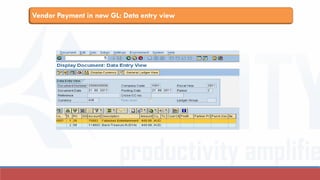
Vendor Payment in new GL: Data entry view
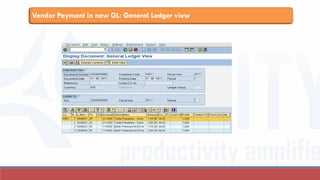
Vendor Payment in new GL: General Ledger view
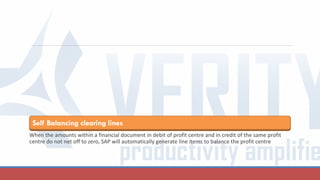
Self Balancing clearing lines
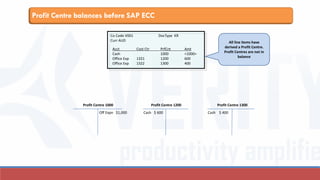
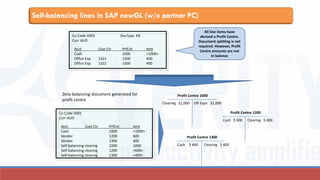
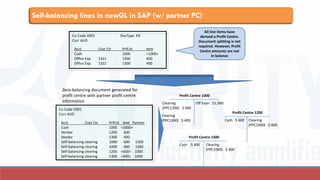
When the amounts within a financial document in debit of profit centre and in credit of the same profit
centre do not net off to zero, SAP will automatically generate line items to balance the profit centre
Profit Centre balances before SAP ECC
Acct Cost Ctr PrfCnt Amt
Cash 1000 <1000>
Office Exp 1321 1200 600
Office Exp 1322 1300 400
Co Code V001 DocType KR
Curr AUD All line items have
derived a Profit Centre.
Profit Centres are not in
balance
Profit Centre 1000
Off Expn $1,000
Profit Centre 1200
Cash $ 600
Profit Centre 1300
Cash $ 400
Self-balancing lines in SAP newGL (w/o partner PC)
Acct Cost Ctr PrfCnt Amt
Cash 1000 <1000>
Office Exp 1321 1200 600
Office Exp 1322 1300 400
Co Code V001 DocType KR
Curr AUD
Zero-balancing document generated for
profit centre
Acct Cost Ctr PrfCnt Amt
Cash 1000 <1000>
Vendor 1200 600
Vendor 1300 400
Self-balancing clearing 1000 1000
Self-balancing clearing 1200 <600>
Self-balancing clearing 1300 <400>
Co Code V001
Curr AUD
All line items have
derived a Profit Centre.
Document splitting is not
required. However, Profit
Centre amounts are not
in balance
Profit Centre 1000
Off Expn $1,000Clearing $1,000
Profit Centre 1200
Cash $ 600 Clearing $ 600
Profit Centre 1300
Cash $ 400 Clearing $ 400
Self-balancing lines in newGL in SAP (w/ partner PC)
Acct Cost Ctr PrfCnt Amt
Cash 1000 <1000>
Office Exp 1321 1200 600
Office Exp 1322 1300 400
Co Code V001 DocType KR
Curr AUD
Zero-balancing document generated for
profit centre with partner profit centre
information
Acct Cost Ctr PrfCnt Amt Partner
Cash 1000 <1000>
Vendor 1200 600
Vendor 1300 400
Self-balancing clearing 1000 600 1200
Self-balancing clearing 1000 400 1300
Self-balancing clearing 1200 <600> 1000
Self-balancing clearing 1300 <400> 1000
Co Code V001
Curr AUD
All line items have
derived a Profit Centre.
Document splitting is not
required. However, Profit
Centre amounts are not
in balance
Profit Centre 1000
Off Expn $1,000Clearing
(PPC1200) $ 600
Profit Centre 1200
Cash $ 600
Profit Centre 1300
Cash $ 400
Clearing
(PPC1300) $ 400 Clearing
(PPC1000) $ 600
Clearing
(PPC1000) $ 400
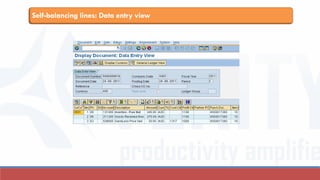
Self-balancing lines: Data entry view
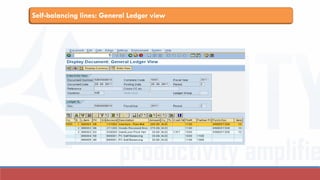
Self-balancing lines: General Ledger view
New GL in SAP: Architecture
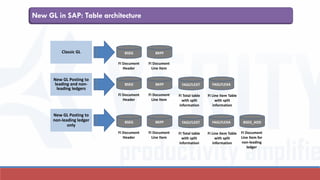
SAP RETAINED THE FI TABLES BSEG AND BKPF AND INTRODUCED NEW TABLES FAGLFLEXT AND
FAGLFLEXA TO STORE THE DOCUMENT SPLIT INFORMATION. THE NEXT FEW SLIDES EXPLAIN THE
ARCHITECTURE OF NEW GL IN SAP
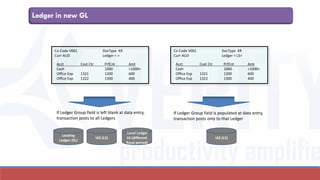
Ledger in new GL
Acct Cost Ctr PrfCnt Amt
Cash 1000 <1000>
Office Exp 1321 1200 600
Office Exp 1322 1300 400
Co Code V001 DocType KR
Curr AUD Ledger < >
Leading
Ledger (0L)
IAS (L5)
Local Ledger
L6 (different
fiscal period)
Acct Cost Ctr PrfCnt Amt
Cash 1000 <1000>
Office Exp 1321 1200 600
Office Exp 1322 1300 400
Co Code V001 DocType KR
Curr AUD Ledger < L5>
IAS (L5)
If Ledger Group field is left blank at data entry,
transaction posts to all Ledgers
If Ledger Group field is populated at data entry,
transaction posts only to that Ledger
New GL in SAP: Table architecture
Classic GL BSEG BKPF
FI Document
Header
FI Document
Line Item
New GL Posting to
leading and non-
leading ledgers
FAGLFLEXT FAGLFLEXA
FI Line Item Table
with split
information
FI Total table
with split
information
New GL Posting to
non-leading ledger
only
BSEG BKPF
FI Document
Header
FI Document
Line Item
BSEG BKPF
FI Document
Header
FI Document
Line Item
FAGLFLEXT FAGLFLEXA
FI Line Item Table
with split
information
FI Total table
with split
information
BSEG_ADD
FI Document
Line Item for
non-leading
ledger
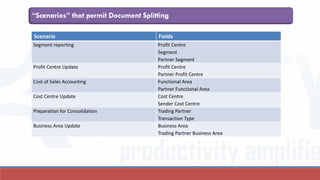
“Scenarios” that permit Document Splitting
Scenario Fields
Segment reporting Profit Centre
Segment
Partner Segment
Profit Centre Update Profit Centre
Partner Profit Centre
Cost of Sales Accounting Functional Area
Partner Functional Area
Cost Centre Update Cost Centre
Sender Cost Centre
Preparation for Consolidation Trading Partner
Transaction Type
Business Area Update Business Area
Trading Partner Business Area
Design driving the document splitting process
in new GL
WE NOW ATTEMPT TO UNDERSTAND THE LOGIC DRIVING THE DOCUMENT SPLITTING PROCESS.
DOCUMENT SPLITTING OCCURS IN THE BACKGROUND DRIVEN BY CONFIGURATION RULES; IN SOME
CASES, IT IS POSSIBLE TO SIMULATE THE SPLIT PROCESS.
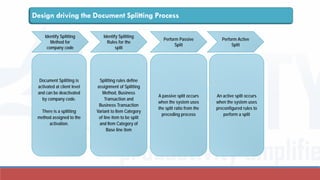
Design driving the Document Splitting Process
Identify Splitting
Method for
company code
Identify Splitting
Rules for the
split
Perform Active
Split
Perform Passive
Split
Document Splitting is
activated at client level
and can be deactivated
by company code.
There is a splitting
method assigned to the
activation.
Splitting rules define
assignment of Splitting
Method, Business
Transaction and
Business Transaction
Variant to Item Category
of line item to be split
and Item Category of
Base line item
A passive split occurs
when the system uses
the split ratio from the
preceding process
An active split occurs
when the system uses
preconfigured rules to
perform a split
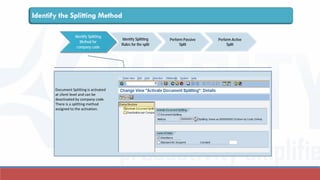
Document Splitting is activated
at client level and can be
deactivated by company code.
There is a splitting method
assigned to the activation.
Identify Splitting
Method for
company code
Identify Splitting
Rules for the split
Perform Active
Split
Perform Passive
Split
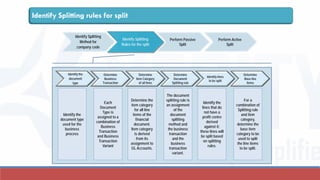
Identify the Splitting Method
Identify Splitting rules for split
Identify the
document
type
Determine
Business
Transaction
Determine
Item Category
of all lines
Determine
Document
Splitting rule
Determine
Base line
items
Identify lines
to be split
Identify the
document type
used for the
business
process
Each
Document
Type is
assigned to a
combination of
Business
Transaction
and Business
Transaction
Variant
Determine the
item category
for all line
items of the
financial
document.
Item category
is derived
from its
assignment to
GL Accounts.
The document
splitting rule is
an assignment
of the
document
splitting
method and
the business
transaction
and the
business
transaction
variant.
Identify the
lines that do
not have a
profit centre
derived
against it;
these lines will
be split based
on splitting
rules.
For a
combination of
Splitting rule
and item
category,
determine the
base item
category to be
used to split
the line items
to be split.
Identify Splitting
Method for
company code
Identify Splitting
Rules for the split
Perform Active
Split
Perform Passive
Split
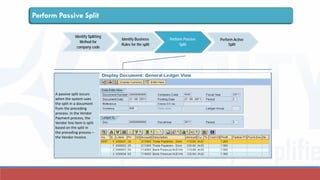
Perform Passive Split
Identify Splitting
Method for
company code
Identify Business
Rules for the split
Perform Active
Split
Perform Passive
Split
A passive split occurs
when the system uses
the split in a document
from the preceding
process. In the Vendor
Payment process, the
Vendor line item is split
based on the split in
the preceding process –
the Vendor Invoice.
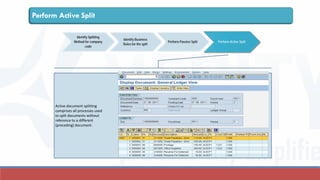
Perform Active Split
Identify Splitting
Method for company
code
Identify Business
Rules for the split
Perform Active SplitPerform Passive Split
Active document splitting
comprises all processes used
to split documents without
reference to a different
(preceding) document.
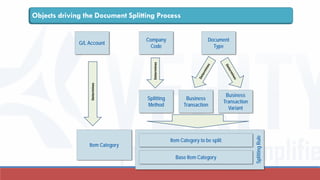
SplittingRule
Objects driving the Document Splitting Process
Splitting
Method
Business
Transaction
Business
Transaction
Variant
Document
Type
Company
Code
Determines
Item Category to be split
Base Item Category
G/L Account
Determines
Item Category
The semantics of document splitting
DOCUMENT SPLITTING PROCESS IN NEW GL IN SAP USES A CONUNDRUM OF TERMS THAT SOUND
SYNONYMOUS TO TERMS ALREADY USED IN OTHER TABLES IN SAP. IT IS IMPORTANT TO
UNDERSTAND THESE TERMS AND WHAT THEY MEAN WITHIN THE OVERALL CONTEXT OF DOCUMENT
SPLITTING.
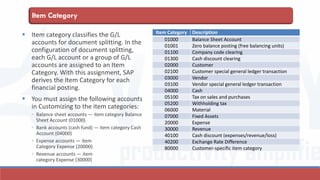
Item Category
 Item category classifies the G/L
accounts for document splitting. In the
configuration of document splitting,
each G/L account or a group of G/L
accounts are assigned to an Item
Category. With this assignment, SAP
derives the Item Category for each
financial posting.
 You must assign the following accounts
in Customizing to the item categories:
◦ Balance sheet accounts — item category Balance
Sheet Account (01000)
◦ Bank accounts (cash fund) — item category Cash
Account (04000)
◦ Expense accounts — item
Category Expense (20000)
◦ Revenue accounts — item
category Expense (30000)
Item Category Description
01000 Balance Sheet Account
01001 Zero balance posting (free balancing units)
01100 Company code clearing
01300 Cash discount clearing
02000 Customer
02100 Customer special general ledger transaction
03000 Vendor
03100 Vendor special general ledger transaction
04000 Cash
05100 Tax on sales and purchases
05200 Withholding tax
06000 Material
07000 Fixed Assets
20000 Expense
30000 Revenue
40100 Cash discount (expenses/revenue/loss)
40200 Exchange Rate Difference
80000 Customer-specific item category
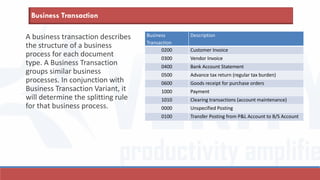
Business Transaction
A business transaction describes
the structure of a business
process for each document
type. A Business Transaction
groups similar business
processes. In conjunction with
Business Transaction Variant, it
will determine the splitting rule
for that business process.
Business
Transaction
Description
0200 Customer Invoice
0300 Vendor Invoice
0400 Bank Account Statement
0500 Advance tax return (regular tax burden)
0600 Goods receipt for purchase orders
1000 Payment
1010 Clearing transactions (account maintenance)
0000 Unspecified Posting
0100 Transfer Posting from P&L Account to B/S Account
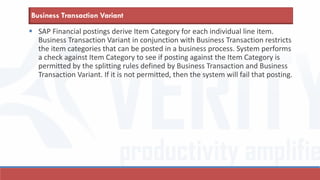
 SAP Financial postings derive Item Category for each individual line item.
Business Transaction Variant in conjunction with Business Transaction restricts
the item categories that can be posted in a business process. System performs
a check against Item Category to see if posting against the Item Category is
permitted by the splitting rules defined by Business Transaction and Business
Transaction Variant. If it is not permitted, then the system will fail that posting.
Business Transaction Variant
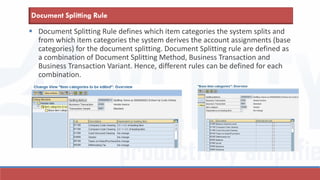
 Document Splitting Method is assigned to the client-level activation of
Document Splitting. In conjunction with Business Transaction and Business
Transaction Variant, it determines the document splitting rule.
Document Splitting Method
 Document Splitting Rule defines which item categories the system splits and
from which item categories the system derives the account assignments (base
categories) for the document splitting. Document Splitting rule are defined as
a combination of Document Splitting Method, Business Transaction and
Business Transaction Variant. Hence, different rules can be defined for each
combination.
Document Splitting Rule
SAP delivered pre-configured document
splitting
SAP ECC DELIVERS PRE-CONFIGURED SPLITTING RULES THAT CAN BE USED WITH LITTLE “LOCAL”
CONFIGURATION. THE RULES CAN ALSO BE MODIFIED IN THE CONFIGURATION TO SUIT SPECIFIC
BUSINESS REQUIREMENTS/ PROCESSES. AS FAR AS POSSIBLE, USE THE PRE-CONFIGURED RULES
FOR YOUR BUSINESS.
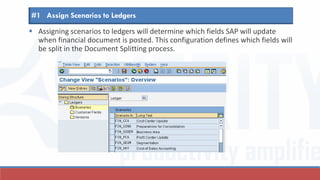
 Assigning scenarios to ledgers will determine which fields SAP will update
when financial document is posted. This configuration defines which fields will
be split in the Document Splitting process.
#1 Assign Scenarios to Ledgers
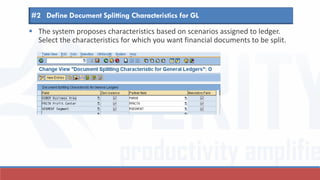
 The system proposes characteristics based on scenarios assigned to ledger.
Select the characteristics for which you want financial documents to be split.
#2 Define Document Splitting Characteristics for GL
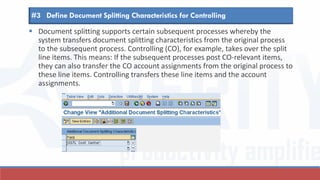
 Document splitting supports certain subsequent processes whereby the
system transfers document splitting characteristics from the original process
to the subsequent process. Controlling (CO), for example, takes over the split
line items. This means: If the subsequent processes post CO-relevant items,
they can also transfer the CO account assignments from the original process to
these line items. Controlling transfers these line items and the account
assignments.
#3 Define Document Splitting Characteristics for Controlling
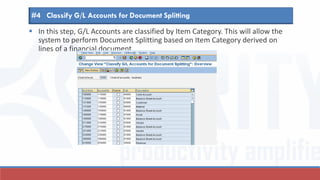
 In this step, G/L Accounts are classified by Item Category. This will allow the
system to perform Document Splitting based on Item Category derived on
lines of a financial document.
#4 Classify G/L Accounts for Document Splitting
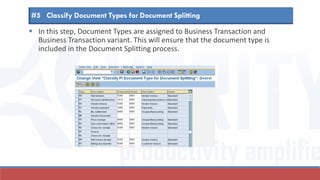
 In this step, Document Types are assigned to Business Transaction and
Business Transaction variant. This will ensure that the document type is
included in the Document Splitting process.
#5 Classify Document Types for Document Splitting
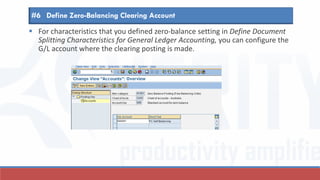
 For characteristics that you defined zero-balance setting in Define Document
Splitting Characteristics for General Ledger Accounting, you can configure the
G/L account where the clearing posting is made.
#6 Define Zero-Balancing Clearing Account
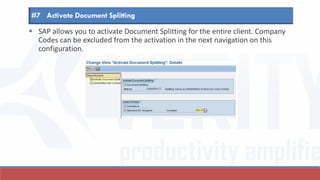
 SAP allows you to activate Document Splitting for the entire client. Company
Codes can be excluded from the activation in the next navigation on this
configuration.
#7 Activate Document Splitting
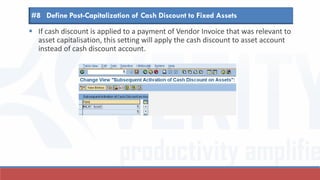
 If cash discount is applied to a payment of Vendor Invoice that was relevant to
asset capitalisation, this setting will apply the cash discount to asset account
instead of cash discount account.
#8 Define Post-Capitalization of Cash Discount to Fixed Assets
 You can activate the standard account assignments in processes where it
is not possible to derive the correct account assignments for the document
splitting characteristics of General Ledger Accounting when posting the
document.
#9 Edit Constants for Non-assigned Processes
Zero-balancing for new GL
ZERO-BALANCING FEATURE ENABLES THE SYSTEM TO BALANCE EVERY FINANCIAL DOCUMENT BY
PROFIT CENTRE. IF THE ENTERED DOCUMENT IS NOT BALANCED, IT WILL AUTO-GENERATE SELF-
BALANCING ENTRIES BY PROFIT CENTRE.
Acct Cost Ctr PrfCnt Amt
Cash 1000 <1000>
Office Exp 1321 1200 600
Office Exp 1322 1300 400
Co Code V001 DocType KR
Curr AUD All line items have
derived a Profit Centre.
Profit Centres are not in
balance
Profit Centre 1000
Off Expn $1,000
Profit Centre 1200
Cash $ 600
Profit Centre 1300
Cash $ 400
Profit Centre balances before SAP ECC
Acct Cost Ctr PrfCnt Amt
Cash 1000 <1000>
Office Exp 1321 1200 600
Office Exp 1322 1300 400
Co Code V001 DocType KR
Curr AUD
Zero-balancing document generated for
profit centre
Acct Cost Ctr PrfCnt Amt
Cash 1000 <1000>
Vendor 1200 600
Vendor 1300 400
Self-balancing clearing 1000 1000
Self-balancing clearing 1200 <600>
Self-balancing clearing 1300 <400>
Co Code V001
Curr AUD
All line items have
derived a Profit Centre.
Document splitting is not
required. However, Profit
Centre amounts are not
in balance
Profit Centre 1000
Off Expn $1,000Clearing $1,000
Profit Centre 1200
Cash $ 600 Clearing $ 600
Profit Centre 1300
Cash $ 400 Clearing $ 400
Self-balancing lines in SAP new GL (w/o partner PC)
Configuration settings
Additional configuration required to zero-balance profit centres
Assign scenario “Profit Centre” to Ledger
Define “Profit Centre” as splitting characteristic
Select “zero balance” to allow system to generate self-
balancing entries
 For Profit Centre characteristic that you defined zero-balance setting in Define
Document Splitting Characteristics for General Ledger Accounting, you can
configure the G/L account where the clearing posting is made.
Define zero-balance clearing account
Use of constants for non-assigned processes
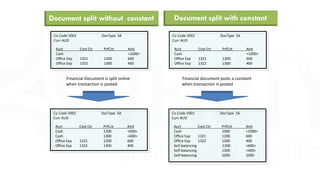
YOU COULD CUSTOMISE DOCUMENT SPLITTING RULES TO SPLIT FINANCIAL DOCUMENT LINE ITEMS
THAT DO NOT DERIVE PROFIT CENTRE. ALTERNATIVELY, YOU CAN CONFIGURE A CONSTANT PROFIT
CENTRE VALUE TO POST AGAINST THIS LINE ITEM. THIS IS USEFUL FOR BALANCE SHEET ACCOUNTS
LIKE CASH, BANK
Document split without constant
Acct Cost Ctr PrfCnt Amt
Cash <1000>
Office Exp 1321 1200 600
Office Exp 1322 1300 400
Co Code V001 DocType SA
Curr AUD
Financial Document is split online
when transaction is posted
Acct Cost Ctr PrfCnt Amt
Cash 1200 <600>
Cash 1300 <400>
Office Exp 1321 1200 600
Office Exp 1322 1300 400
Co Code V001 DocType SA
Curr AUD
Acct Cost Ctr PrfCnt Amt
Cash <1000>
Office Exp 1321 1200 600
Office Exp 1322 1300 400
Co Code V001 DocType SA
Curr AUD
Financial document posts a constant
when transaction is posted
Acct Cost Ctr PrfCnt Amt
Cash 1000 <1000>
Office Exp 1321 1200 600
Office Exp 1322 1300 400
Self-balancing 1200 <600>
Self-balancing 1300 <400>
Self-balancing 1000 1000
Co Code V001 DocType SA
Curr AUD
Document split with constant
Document Splitting in cross company code
transactions
A CROSS COMPANY CODE DOCUMENT IS ONE ENTRY DOCUMENT BUT TWO FINANCIAL
DOCUMENTS. PRE-CONFIGURED DOCUMENT SPLITTING RULE SPLITS CROSS COMPANY DOCUMENT
AS A SINGLE DOCUMENT; YOU CAN CUSTOMISE DOCUMENT SPLITTING RULE TO SPLIT THE
DOCUMENT AS TWO INDEPENDENT DOCUMENTS
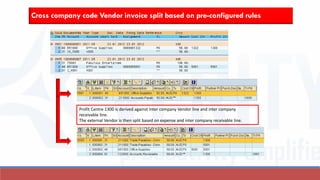
Cross company code Vendor invoice split based on pre-configured rules
Profit Centre 1300 is derived against Inter company Vendor line and inter company
receivable line.
The external Vendor is then split based on expense and inter company receivable line.
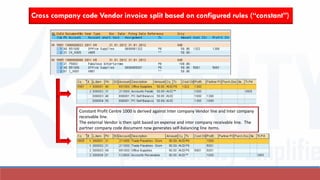
Cross company code Vendor invoice split based on configured rules (“constant”)
Constant Profit Centre 1000 is derived against Inter company Vendor line and Inter company
receivable line.
The external Vendor is then split based on expense and inter company receivable line. The
partner company code document now generates self-balancing line items.
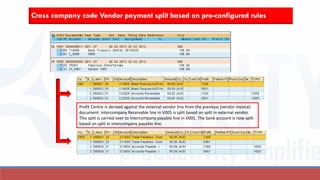
Cross company code Vendor payment split based on pre-configured rules
Profit Centre is derived against the external vendor line from the previous (vendor invoice)
document. Intercompany Receivable line in V005 is split based on split in external vendor.
This split is carried over to Intercompany payable line in V001. The bank account is now split
based on split in intercompany payable line.
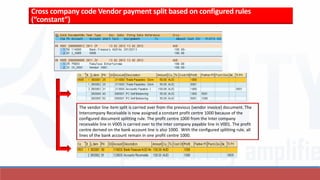
Cross company code Vendor payment split based on configured rules
(“constant”)
The vendor line item split is carried over from the previous (vendor invoice) document. The
Intercompany Receivable is now assigned a constant profit centre 1000 because of the
configured document splitting rule. The profit centre 1000 from the Inter company
receivable line in V005 is carried over to the Inter company payable line in V001. The profit
centre derived on the bank account line is also 1000. With the configured splitting rule, all
lines of the bank account remain in one profit centre 1000.
Verity provides the vision, and the framework for
a successful Finance process and technology
transformation and re-engineering.
We at Verity believe we have the experience to make success happen for our
clients. This belief comes from our track record of successfully engaging
customers in their pursuit of the best-of-class business solutions. We believe that
this search with Verity is short because of our past experience, and fruitful
because we do not simply deliver an end-result, but strive to deliver value-added
service that earns us the trust and confidence of our customers.
Verity Business Solutions
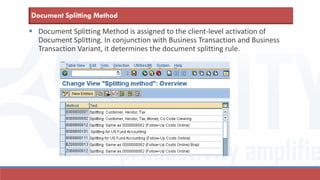
Rajesh is an accomplished and successful Finance professional with over 20
years’ experience in Finance processes and related technologies.
He is a qualified accountant, and he has worked in Finance
departments of multinational companies. With this strong
foundation in Finance, he has managed to successfully
implement best-in-class Finance processes in IT (primarily SAP).
Over the last few years, Rajesh has led Finance teams on large SAP
implementations and provided his insights and experience to provide a workable
and an improved solution for his customers. Rajesh is a SAP Certified Application
Professional.
Presented by Rajesh Shanbhag
Contact
• Contact me if have any questions, need clarifications or would like a
demo of these features in an IDES SAP system.
• Do visit the blog related to these slides at
www.veritysolutions.com.au (Category SAP > Document Splitting)
Rajesh Shanbhag
W www.veritysolutions.com.au
E rajesh@veritysolutions.com.au
M +61 4 1123 8873

Document splitting in New GL in SAP

  • 1.
  • 2.
    Document Splitting inSAP new GL - Contents esign driving the document splitting process ...... 25 n Overview ...... 3 rchitecture of new GL in SAP ...... 21 he semantics of document splitting ...... 32 AP delivered pre-configured document splitting ...... 38 se of constants for non-assigned processes ...... 55 Zero-balancing for new GL ...... 48 ross company Document splitting ...... 57
  • 3.
    AN OVERVIEW DOCUMENT SPLITTINGIN NEW GL IN SAP ECC IS ONE OF THE KEY CHANGES INTRODUCED BY SAP TO STREAMLINE MULTIPLE REPORTING REQUIREMENTS AND TO ENABLE FASTER CLOSE PROCESS FOR ITS CUSTOMERS. IN MY SERIES OF SLIDES/ BLOGS ON DOCUMENT SPLITTING, I INTEND TO EXPLAIN AND ELABORATE THE CONCEPTS BEHIND DOCUMENT SPLITTING AND DEMONSTRATE USING EXAMPLES HOW DOCUMENT SPLITTING CAN BE ACHIEVED FOR VARIOUS COMPLEX BUSINESS PROCESSES.
  • 4.
     With theintroduction of new GL, SAP splits financial document line items that do not have values for Profit Centre (for eg) - in the ratio of the amounts in the offsetting lines that have values for Profit Centre.  If a line item (eg. Vendor line item) on the financial document does not have a value derived for Profit Centre, and  If the value of Profit Centre on the offsetting line is unique, Vendor line item will inherit that value  If the value of Profit Centre is not unique, it will split the Vendor line item based on preceding process, if available (Passive Split)  If the value of Profit Centre is not unique and if there is no preceding process , it will split the Vendor line item based on preconfigured rules (Active Split)  Before new GL in SAP ECC, business users transferred the line items representing the account balance of vendors, customers, assets and inventories to Profit Centre Accounting as part of period end process. This transfer split the balance line items by Profit Centre.  With automated, online function of document splitting in New GL, this period end job is redundant. Business users can close their books much faster during the period end. An Overview
  • 5.
    Active Document Splitting ActiveSplit occurs when SAP splits a financial document line item in the ratio of the offsetting line item. SAP performs active split, if the split cannot be performed based on a preceding process and if the profit centre cannot be inherited
  • 6.
    Acct Cost CtrPrfCnt Amt Vendor <1000> Office Exp 1321 1200 600 Office Exp 1322 1300 400 Co Code V001 DocType KR Curr AUD Vendor Invoice outstanding at month end Month end transfer of outstanding Vendor balance to Profit Centre Acct Cost Ctr PrfCnt Amt Vendor 1200 600 Vendor 1300 400 Co Code V001 Curr AUD Vendor Invoice split before SAP ECC
  • 7.
    Vendor Invoice splitwith new GL in SAP ECC Acct Cost Ctr PrfCnt Amt Vendor <1000> Office Exp 1321 1200 600 Office Exp 1322 1300 400 Co Code V001 DocType KR Curr AUD Vendor Invoice split online when transaction is posted Acct Cost Ctr PrfCnt Amt Vendor 1200 <600> Vendor 1300 <400> Office Exp 1321 1200 600 Office Exp 1322 1300 400 Co Code V001 DocType KR Curr AUD Data entry view General Ledger viewActive Split
  • 8.
    Vendor Invoice innew GL: Data entry view
  • 9.
    Vendor Invoice innew GL: General Ledger view
  • 10.
    Passive Document Splitting Passivesplit occurs when SAP splits a financial document line item based on the split in a preceding process (eg. Vendor line in payment process is split based on Vendor line split in Vendor Invoice process)
  • 11.
    Vendor Payment splitbefore SAP ECC Acct Cost Ctr PrfCnt Amt Vendor 1000 Bank clearing <1000> Co Code V001 DocType ZP Curr AUD Previous Vendor Invoice paid before month end NO Month end transfer of outstanding Vendor balance to Profit Centre since invoice is paid
  • 12.
    Vendor Payment splitwith new GL in SAP ECC Acct Cost Ctr PrfCnt Amt Vendor 1000 Bank clearing <1000> Co Code V001 DocType ZP Curr AUD Vendor Payment split online when transaction is posted Acct Cost Ctr PrfCnt Amt Vendor 1200 600 Vendor 1300 400 Bank clearing 1200 <600> Bank clearing 1300 <400> Co Code V001 DocType ZP Curr AUD Passive Split Data entry view General Ledger view
  • 13.
    Vendor Payment innew GL: Data entry view
  • 14.
    Vendor Payment innew GL: General Ledger view
  • 15.
    Self Balancing clearinglines When the amounts within a financial document in debit of profit centre and in credit of the same profit centre do not net off to zero, SAP will automatically generate line items to balance the profit centre
  • 16.
    Profit Centre balancesbefore SAP ECC Acct Cost Ctr PrfCnt Amt Cash 1000 <1000> Office Exp 1321 1200 600 Office Exp 1322 1300 400 Co Code V001 DocType KR Curr AUD All line items have derived a Profit Centre. Profit Centres are not in balance Profit Centre 1000 Off Expn $1,000 Profit Centre 1200 Cash $ 600 Profit Centre 1300 Cash $ 400
  • 17.
    Self-balancing lines inSAP newGL (w/o partner PC) Acct Cost Ctr PrfCnt Amt Cash 1000 <1000> Office Exp 1321 1200 600 Office Exp 1322 1300 400 Co Code V001 DocType KR Curr AUD Zero-balancing document generated for profit centre Acct Cost Ctr PrfCnt Amt Cash 1000 <1000> Vendor 1200 600 Vendor 1300 400 Self-balancing clearing 1000 1000 Self-balancing clearing 1200 <600> Self-balancing clearing 1300 <400> Co Code V001 Curr AUD All line items have derived a Profit Centre. Document splitting is not required. However, Profit Centre amounts are not in balance Profit Centre 1000 Off Expn $1,000Clearing $1,000 Profit Centre 1200 Cash $ 600 Clearing $ 600 Profit Centre 1300 Cash $ 400 Clearing $ 400
  • 18.
    Self-balancing lines innewGL in SAP (w/ partner PC) Acct Cost Ctr PrfCnt Amt Cash 1000 <1000> Office Exp 1321 1200 600 Office Exp 1322 1300 400 Co Code V001 DocType KR Curr AUD Zero-balancing document generated for profit centre with partner profit centre information Acct Cost Ctr PrfCnt Amt Partner Cash 1000 <1000> Vendor 1200 600 Vendor 1300 400 Self-balancing clearing 1000 600 1200 Self-balancing clearing 1000 400 1300 Self-balancing clearing 1200 <600> 1000 Self-balancing clearing 1300 <400> 1000 Co Code V001 Curr AUD All line items have derived a Profit Centre. Document splitting is not required. However, Profit Centre amounts are not in balance Profit Centre 1000 Off Expn $1,000Clearing (PPC1200) $ 600 Profit Centre 1200 Cash $ 600 Profit Centre 1300 Cash $ 400 Clearing (PPC1300) $ 400 Clearing (PPC1000) $ 600 Clearing (PPC1000) $ 400
  • 19.
  • 20.
  • 21.
    New GL inSAP: Architecture SAP RETAINED THE FI TABLES BSEG AND BKPF AND INTRODUCED NEW TABLES FAGLFLEXT AND FAGLFLEXA TO STORE THE DOCUMENT SPLIT INFORMATION. THE NEXT FEW SLIDES EXPLAIN THE ARCHITECTURE OF NEW GL IN SAP
  • 22.
    Ledger in newGL Acct Cost Ctr PrfCnt Amt Cash 1000 <1000> Office Exp 1321 1200 600 Office Exp 1322 1300 400 Co Code V001 DocType KR Curr AUD Ledger < > Leading Ledger (0L) IAS (L5) Local Ledger L6 (different fiscal period) Acct Cost Ctr PrfCnt Amt Cash 1000 <1000> Office Exp 1321 1200 600 Office Exp 1322 1300 400 Co Code V001 DocType KR Curr AUD Ledger < L5> IAS (L5) If Ledger Group field is left blank at data entry, transaction posts to all Ledgers If Ledger Group field is populated at data entry, transaction posts only to that Ledger
  • 23.
    New GL inSAP: Table architecture Classic GL BSEG BKPF FI Document Header FI Document Line Item New GL Posting to leading and non- leading ledgers FAGLFLEXT FAGLFLEXA FI Line Item Table with split information FI Total table with split information New GL Posting to non-leading ledger only BSEG BKPF FI Document Header FI Document Line Item BSEG BKPF FI Document Header FI Document Line Item FAGLFLEXT FAGLFLEXA FI Line Item Table with split information FI Total table with split information BSEG_ADD FI Document Line Item for non-leading ledger
  • 24.
    “Scenarios” that permitDocument Splitting Scenario Fields Segment reporting Profit Centre Segment Partner Segment Profit Centre Update Profit Centre Partner Profit Centre Cost of Sales Accounting Functional Area Partner Functional Area Cost Centre Update Cost Centre Sender Cost Centre Preparation for Consolidation Trading Partner Transaction Type Business Area Update Business Area Trading Partner Business Area
  • 25.
    Design driving thedocument splitting process in new GL WE NOW ATTEMPT TO UNDERSTAND THE LOGIC DRIVING THE DOCUMENT SPLITTING PROCESS. DOCUMENT SPLITTING OCCURS IN THE BACKGROUND DRIVEN BY CONFIGURATION RULES; IN SOME CASES, IT IS POSSIBLE TO SIMULATE THE SPLIT PROCESS.
  • 26.
    Design driving theDocument Splitting Process Identify Splitting Method for company code Identify Splitting Rules for the split Perform Active Split Perform Passive Split Document Splitting is activated at client level and can be deactivated by company code. There is a splitting method assigned to the activation. Splitting rules define assignment of Splitting Method, Business Transaction and Business Transaction Variant to Item Category of line item to be split and Item Category of Base line item A passive split occurs when the system uses the split ratio from the preceding process An active split occurs when the system uses preconfigured rules to perform a split
  • 27.
    Document Splitting isactivated at client level and can be deactivated by company code. There is a splitting method assigned to the activation. Identify Splitting Method for company code Identify Splitting Rules for the split Perform Active Split Perform Passive Split Identify the Splitting Method
  • 28.
    Identify Splitting rulesfor split Identify the document type Determine Business Transaction Determine Item Category of all lines Determine Document Splitting rule Determine Base line items Identify lines to be split Identify the document type used for the business process Each Document Type is assigned to a combination of Business Transaction and Business Transaction Variant Determine the item category for all line items of the financial document. Item category is derived from its assignment to GL Accounts. The document splitting rule is an assignment of the document splitting method and the business transaction and the business transaction variant. Identify the lines that do not have a profit centre derived against it; these lines will be split based on splitting rules. For a combination of Splitting rule and item category, determine the base item category to be used to split the line items to be split. Identify Splitting Method for company code Identify Splitting Rules for the split Perform Active Split Perform Passive Split
  • 29.
    Perform Passive Split IdentifySplitting Method for company code Identify Business Rules for the split Perform Active Split Perform Passive Split A passive split occurs when the system uses the split in a document from the preceding process. In the Vendor Payment process, the Vendor line item is split based on the split in the preceding process – the Vendor Invoice.
  • 30.
    Perform Active Split IdentifySplitting Method for company code Identify Business Rules for the split Perform Active SplitPerform Passive Split Active document splitting comprises all processes used to split documents without reference to a different (preceding) document.
  • 31.
    SplittingRule Objects driving theDocument Splitting Process Splitting Method Business Transaction Business Transaction Variant Document Type Company Code Determines Item Category to be split Base Item Category G/L Account Determines Item Category
  • 32.
    The semantics ofdocument splitting DOCUMENT SPLITTING PROCESS IN NEW GL IN SAP USES A CONUNDRUM OF TERMS THAT SOUND SYNONYMOUS TO TERMS ALREADY USED IN OTHER TABLES IN SAP. IT IS IMPORTANT TO UNDERSTAND THESE TERMS AND WHAT THEY MEAN WITHIN THE OVERALL CONTEXT OF DOCUMENT SPLITTING.
  • 33.
    Item Category  Itemcategory classifies the G/L accounts for document splitting. In the configuration of document splitting, each G/L account or a group of G/L accounts are assigned to an Item Category. With this assignment, SAP derives the Item Category for each financial posting.  You must assign the following accounts in Customizing to the item categories: ◦ Balance sheet accounts — item category Balance Sheet Account (01000) ◦ Bank accounts (cash fund) — item category Cash Account (04000) ◦ Expense accounts — item Category Expense (20000) ◦ Revenue accounts — item category Expense (30000) Item Category Description 01000 Balance Sheet Account 01001 Zero balance posting (free balancing units) 01100 Company code clearing 01300 Cash discount clearing 02000 Customer 02100 Customer special general ledger transaction 03000 Vendor 03100 Vendor special general ledger transaction 04000 Cash 05100 Tax on sales and purchases 05200 Withholding tax 06000 Material 07000 Fixed Assets 20000 Expense 30000 Revenue 40100 Cash discount (expenses/revenue/loss) 40200 Exchange Rate Difference 80000 Customer-specific item category
  • 34.
    Business Transaction A businesstransaction describes the structure of a business process for each document type. A Business Transaction groups similar business processes. In conjunction with Business Transaction Variant, it will determine the splitting rule for that business process. Business Transaction Description 0200 Customer Invoice 0300 Vendor Invoice 0400 Bank Account Statement 0500 Advance tax return (regular tax burden) 0600 Goods receipt for purchase orders 1000 Payment 1010 Clearing transactions (account maintenance) 0000 Unspecified Posting 0100 Transfer Posting from P&L Account to B/S Account
  • 35.
     SAP Financialpostings derive Item Category for each individual line item. Business Transaction Variant in conjunction with Business Transaction restricts the item categories that can be posted in a business process. System performs a check against Item Category to see if posting against the Item Category is permitted by the splitting rules defined by Business Transaction and Business Transaction Variant. If it is not permitted, then the system will fail that posting. Business Transaction Variant
  • 36.
     Document SplittingMethod is assigned to the client-level activation of Document Splitting. In conjunction with Business Transaction and Business Transaction Variant, it determines the document splitting rule. Document Splitting Method
  • 37.
     Document SplittingRule defines which item categories the system splits and from which item categories the system derives the account assignments (base categories) for the document splitting. Document Splitting rule are defined as a combination of Document Splitting Method, Business Transaction and Business Transaction Variant. Hence, different rules can be defined for each combination. Document Splitting Rule
  • 38.
    SAP delivered pre-configureddocument splitting SAP ECC DELIVERS PRE-CONFIGURED SPLITTING RULES THAT CAN BE USED WITH LITTLE “LOCAL” CONFIGURATION. THE RULES CAN ALSO BE MODIFIED IN THE CONFIGURATION TO SUIT SPECIFIC BUSINESS REQUIREMENTS/ PROCESSES. AS FAR AS POSSIBLE, USE THE PRE-CONFIGURED RULES FOR YOUR BUSINESS.
  • 39.
     Assigning scenariosto ledgers will determine which fields SAP will update when financial document is posted. This configuration defines which fields will be split in the Document Splitting process. #1 Assign Scenarios to Ledgers
  • 40.
     The systemproposes characteristics based on scenarios assigned to ledger. Select the characteristics for which you want financial documents to be split. #2 Define Document Splitting Characteristics for GL
  • 41.
     Document splittingsupports certain subsequent processes whereby the system transfers document splitting characteristics from the original process to the subsequent process. Controlling (CO), for example, takes over the split line items. This means: If the subsequent processes post CO-relevant items, they can also transfer the CO account assignments from the original process to these line items. Controlling transfers these line items and the account assignments. #3 Define Document Splitting Characteristics for Controlling
  • 42.
     In thisstep, G/L Accounts are classified by Item Category. This will allow the system to perform Document Splitting based on Item Category derived on lines of a financial document. #4 Classify G/L Accounts for Document Splitting
  • 43.
     In thisstep, Document Types are assigned to Business Transaction and Business Transaction variant. This will ensure that the document type is included in the Document Splitting process. #5 Classify Document Types for Document Splitting
  • 44.
     For characteristicsthat you defined zero-balance setting in Define Document Splitting Characteristics for General Ledger Accounting, you can configure the G/L account where the clearing posting is made. #6 Define Zero-Balancing Clearing Account
  • 45.
     SAP allowsyou to activate Document Splitting for the entire client. Company Codes can be excluded from the activation in the next navigation on this configuration. #7 Activate Document Splitting
  • 46.
     If cashdiscount is applied to a payment of Vendor Invoice that was relevant to asset capitalisation, this setting will apply the cash discount to asset account instead of cash discount account. #8 Define Post-Capitalization of Cash Discount to Fixed Assets
  • 47.
     You canactivate the standard account assignments in processes where it is not possible to derive the correct account assignments for the document splitting characteristics of General Ledger Accounting when posting the document. #9 Edit Constants for Non-assigned Processes
  • 48.
    Zero-balancing for newGL ZERO-BALANCING FEATURE ENABLES THE SYSTEM TO BALANCE EVERY FINANCIAL DOCUMENT BY PROFIT CENTRE. IF THE ENTERED DOCUMENT IS NOT BALANCED, IT WILL AUTO-GENERATE SELF- BALANCING ENTRIES BY PROFIT CENTRE.
  • 49.
    Acct Cost CtrPrfCnt Amt Cash 1000 <1000> Office Exp 1321 1200 600 Office Exp 1322 1300 400 Co Code V001 DocType KR Curr AUD All line items have derived a Profit Centre. Profit Centres are not in balance Profit Centre 1000 Off Expn $1,000 Profit Centre 1200 Cash $ 600 Profit Centre 1300 Cash $ 400 Profit Centre balances before SAP ECC
  • 50.
    Acct Cost CtrPrfCnt Amt Cash 1000 <1000> Office Exp 1321 1200 600 Office Exp 1322 1300 400 Co Code V001 DocType KR Curr AUD Zero-balancing document generated for profit centre Acct Cost Ctr PrfCnt Amt Cash 1000 <1000> Vendor 1200 600 Vendor 1300 400 Self-balancing clearing 1000 1000 Self-balancing clearing 1200 <600> Self-balancing clearing 1300 <400> Co Code V001 Curr AUD All line items have derived a Profit Centre. Document splitting is not required. However, Profit Centre amounts are not in balance Profit Centre 1000 Off Expn $1,000Clearing $1,000 Profit Centre 1200 Cash $ 600 Clearing $ 600 Profit Centre 1300 Cash $ 400 Clearing $ 400 Self-balancing lines in SAP new GL (w/o partner PC)
  • 51.
    Configuration settings Additional configurationrequired to zero-balance profit centres
  • 52.
    Assign scenario “ProfitCentre” to Ledger
  • 53.
    Define “Profit Centre”as splitting characteristic Select “zero balance” to allow system to generate self- balancing entries
  • 54.
     For ProfitCentre characteristic that you defined zero-balance setting in Define Document Splitting Characteristics for General Ledger Accounting, you can configure the G/L account where the clearing posting is made. Define zero-balance clearing account
  • 55.
    Use of constantsfor non-assigned processes YOU COULD CUSTOMISE DOCUMENT SPLITTING RULES TO SPLIT FINANCIAL DOCUMENT LINE ITEMS THAT DO NOT DERIVE PROFIT CENTRE. ALTERNATIVELY, YOU CAN CONFIGURE A CONSTANT PROFIT CENTRE VALUE TO POST AGAINST THIS LINE ITEM. THIS IS USEFUL FOR BALANCE SHEET ACCOUNTS LIKE CASH, BANK
  • 56.
    Document split withoutconstant Acct Cost Ctr PrfCnt Amt Cash <1000> Office Exp 1321 1200 600 Office Exp 1322 1300 400 Co Code V001 DocType SA Curr AUD Financial Document is split online when transaction is posted Acct Cost Ctr PrfCnt Amt Cash 1200 <600> Cash 1300 <400> Office Exp 1321 1200 600 Office Exp 1322 1300 400 Co Code V001 DocType SA Curr AUD Acct Cost Ctr PrfCnt Amt Cash <1000> Office Exp 1321 1200 600 Office Exp 1322 1300 400 Co Code V001 DocType SA Curr AUD Financial document posts a constant when transaction is posted Acct Cost Ctr PrfCnt Amt Cash 1000 <1000> Office Exp 1321 1200 600 Office Exp 1322 1300 400 Self-balancing 1200 <600> Self-balancing 1300 <400> Self-balancing 1000 1000 Co Code V001 DocType SA Curr AUD Document split with constant
  • 57.
    Document Splitting incross company code transactions A CROSS COMPANY CODE DOCUMENT IS ONE ENTRY DOCUMENT BUT TWO FINANCIAL DOCUMENTS. PRE-CONFIGURED DOCUMENT SPLITTING RULE SPLITS CROSS COMPANY DOCUMENT AS A SINGLE DOCUMENT; YOU CAN CUSTOMISE DOCUMENT SPLITTING RULE TO SPLIT THE DOCUMENT AS TWO INDEPENDENT DOCUMENTS
  • 58.
    Cross company codeVendor invoice split based on pre-configured rules Profit Centre 1300 is derived against Inter company Vendor line and inter company receivable line. The external Vendor is then split based on expense and inter company receivable line.
  • 59.
    Cross company codeVendor invoice split based on configured rules (“constant”) Constant Profit Centre 1000 is derived against Inter company Vendor line and Inter company receivable line. The external Vendor is then split based on expense and inter company receivable line. The partner company code document now generates self-balancing line items.
  • 60.
    Cross company codeVendor payment split based on pre-configured rules Profit Centre is derived against the external vendor line from the previous (vendor invoice) document. Intercompany Receivable line in V005 is split based on split in external vendor. This split is carried over to Intercompany payable line in V001. The bank account is now split based on split in intercompany payable line.
  • 61.
    Cross company codeVendor payment split based on configured rules (“constant”) The vendor line item split is carried over from the previous (vendor invoice) document. The Intercompany Receivable is now assigned a constant profit centre 1000 because of the configured document splitting rule. The profit centre 1000 from the Inter company receivable line in V005 is carried over to the Inter company payable line in V001. The profit centre derived on the bank account line is also 1000. With the configured splitting rule, all lines of the bank account remain in one profit centre 1000.
  • 62.
    Verity provides thevision, and the framework for a successful Finance process and technology transformation and re-engineering. We at Verity believe we have the experience to make success happen for our clients. This belief comes from our track record of successfully engaging customers in their pursuit of the best-of-class business solutions. We believe that this search with Verity is short because of our past experience, and fruitful because we do not simply deliver an end-result, but strive to deliver value-added service that earns us the trust and confidence of our customers. Verity Business Solutions
  • 63.
    Rajesh is anaccomplished and successful Finance professional with over 20 years’ experience in Finance processes and related technologies. He is a qualified accountant, and he has worked in Finance departments of multinational companies. With this strong foundation in Finance, he has managed to successfully implement best-in-class Finance processes in IT (primarily SAP). Over the last few years, Rajesh has led Finance teams on large SAP implementations and provided his insights and experience to provide a workable and an improved solution for his customers. Rajesh is a SAP Certified Application Professional. Presented by Rajesh Shanbhag
  • 64.
    Contact • Contact meif have any questions, need clarifications or would like a demo of these features in an IDES SAP system. • Do visit the blog related to these slides at www.veritysolutions.com.au (Category SAP > Document Splitting) Rajesh Shanbhag W www.veritysolutions.com.au E rajesh@veritysolutions.com.au M +61 4 1123 8873