SAP 1099MISC Generic Withholding Tax Reporting SAP-US-WHT
Gmail:sureshbabu.fico@gmail.com 1 LinkedIn: Suresh Babu Muchinthala
SAP 1099MISC Generic Withholding Tax Reporting
Withholding Tax:
Withholding Tax is also called as retention tax. Its requirement of payer to deduct or withhold a
particular percentage from payment to the vendors and pay such amount to the Government on
behalf of vendors.
SAP provides you with two procedures for processing withholding tax: "Standard" and extended
withholding tax.
"Standard" withholding tax is the procedure that has always been supported by the system.
It offers you the following features:
 Withholding tax for accounts payable
 Withholding tax calculation during payment
 Withholding tax code per vendor line item
Extended withholding tax provides the following additional features:
 Multiple withholding taxes per customer or vendor line item
 Withholding tax calculation for partial payments
 Withholding tax calculation for invoice entry and payment
Note:-
If you decided on extended withholding tax and activate this procedure, you must migrate your
master data and transaction data. You cannot then return to the original withholding tax procedure
afterwards.
Withholding Tax-US
In the United States, invoice recipients are sometimes required to collect withholding tax on behalf
of certain vendors, such as self-employed people or non-resident foreigners. However, normally,
invoice recipients need only to report withholding taxes and do not have to collect and pay
withholding taxes. In this common case, the vendor is liable for paying the tax amount to the
Internal Revenue Service (IRS).
Withholding tax amounts must be reported to the IRS at regular intervals and a statement is also
sent periodically to the vendor. Companies submit annual statements of withholding tax amounts
to the vendors and the IRS by using the pre-printed forms 1099 MISC 1099-G, 1099-INT, and
1042S. With SAP R/3, you can create the 1099 and 1042S reports.
Note:-
If you withhold taxes at both state and federal level, we recommend that you use the extended
withholding tax functions.
SAP 1099MISC Generic Withholding Tax Reporting SAP-US-WHT
Gmail:sureshbabu.fico@gmail.com 2 LinkedIn: Suresh Babu Muchinthala
Business Requirement
 This is a requirement by Internal Revenue Service (IRS). A 1099-MISC form must be provided
to the recipient and a copy mailed to or e-filed with the IRS.
 Any business that has paid vendor $600 USD or more as a non-employee, or at least $10 USD
in royalties, must provide with a 1099-MISC.
 Copy A of the 1099-MISC form is intended for the IRS. It must be filed by February 28, if
sending the form by mail. If it is filed electronically, the last date is March 31.
 Copy B is sent to the vendor for whom reporting to the IRS by January 31.
This document explains step by step process for executing 1099 MISC Reporting (Generic
Withholding Tax Reporting)
A. Prerequisites/ 1099MISC (US Generic Withholding Tax Reporting) Configuration
steps:
I. Extended Withholding Tax- Calculation
1. Define Withholding Tax Type for Payment Posting
2. Define Withholding Tax Codes
II Extended Withholding Tax- Basic Settings
3. Check Recipient Types
III. Extended Withholding Tax- Company Code
4. Assign Withholding Tax Types to Company Codes
5. Activate Extended Withholding Tax
IV Extended Withholding Tax- Generic Withholding Tax Reporting
6. Define Output Groups
7. Define File Format for Withholding Tax Reporting
B.1099MISC (US Generic Withholding Tax Reporting) Procedural Steps (End
User):
1. Vendor master creation with tax details
2. Vendor Invoice Posting
3. Run Generic Withholding Tax Report & validate the file
SAP 1099MISC Generic Withholding Tax Reporting SAP-US-WHT
Gmail:sureshbabu.fico@gmail.com 3 LinkedIn: Suresh Babu Muchinthala
A. Prerequisites/ 1099MISC (US Generic Withholding Tax Reporting) Reporting
Configuration steps:
I. Extended Withholding Tax- Calculation
1. Define Withholding Tax Type for Payment Posting
Withholding Tax Type:
In the system you use withholding tax types to represent the various withholding taxes in a country.
You define withholding tax types in the following activities.
The withholding tax type controls the essential calculation options for extended withholding tax,
whilst the withholding tax code only controls the percentage rate of the withholding tax.
You must enter the withholding tax type in the customer/vendor withholding tax master data and
in the company code master data.
The system recognizes two categories of withholding tax type depending on when the withholding
tax amounts are posted:
 Posting with invoice
 Posting with payment
Define Withholding Tax Type for Payment Posting
In this activity you define the withholding tax type for posting at the time of paying. You also have
to enter the withholding tax information when entering the document for this withholding tax type.
Further notes
All calculations for extended withholding tax are made in the first local currency of the respective
company code. This means that you have to maintain amounts in the company code country
currency.
A withholding tax type is used to identify a main tax itself. We have defined two withholding tax
types, which are:
 FE: This is reserved for Federal Income Tax.
 ST: This is reserved for State Tax.
SAP Menu Path SPRO → SAP Customizing Implementation Guide → Financial
Accounting (New) → Financial Accounting Global Settings (New) →
Withholding Tax → Extended Withholding Tax → Calculation →
Withholding Tax Type → Define Withholding Tax Type for Payment
Posting
Transaction code S_ALR_87003266
SAP 1099MISC Generic Withholding Tax Reporting SAP-US-WHT
Gmail:sureshbabu.fico@gmail.com 4 LinkedIn: Suresh Babu Muchinthala
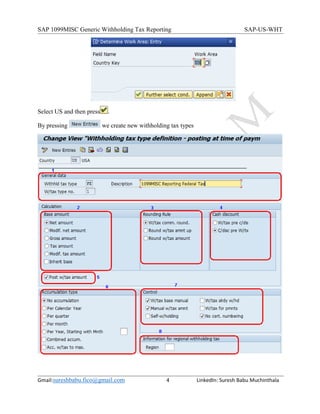
Select US and then press .
By pressing we create new withholding tax types
SAP 1099MISC Generic Withholding Tax Reporting SAP-US-WHT
Gmail:sureshbabu.fico@gmail.com 5 LinkedIn: Suresh Babu Muchinthala
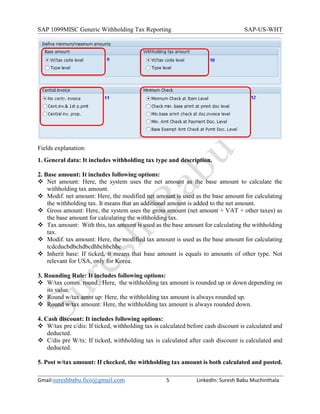
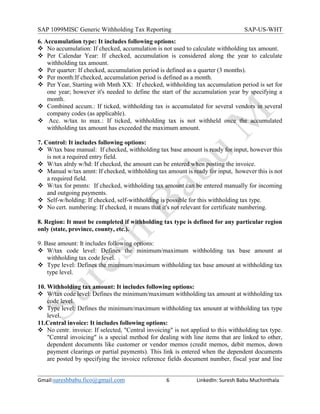
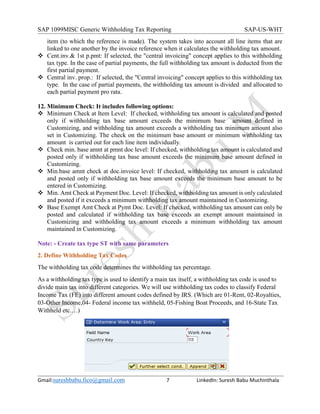
Fields explanation:
1. General data: It includes withholding tax type and description.
2. Base amount: It includes following options:
 Net amount: Here, the system uses the net amount as the base amount to calculate the
withholding tax amount.
 Modif. net amount: Here, the modified net amount is used as the base amount for calculating
the withholding tax. It means that an additional amount is added to the net amount.
 Gross amount: Here, the system uses the gross amount (net amount + VAT + other taxes) as
the base amount for calculating the withholding tax.
 Tax amount: With this, tax amount is used as the base amount for calculating the withholding
tax.
 Modif. tax amount: Here, the modified tax amount is used as the base amount for calculating
tcdcducbdbchdbcdhbchbchbc
 Inherit base: If ticked, it means that base amount is equals to amounts of other type. Not
relevant for USA, only for Korea.
3. Rounding Rule: It includes following options:
 W/tax comm. round.: Here, the withholding tax amount is rounded up or down depending on
its value.
 Round w/tax amnt up: Here, the withholding tax amount is always rounded up.
 Round w/tax amount: Here, the withholding tax amount is always rounded down.
4. Cash discount: It includes following options:
 W/tax pre c/dis: If ticked, withholding tax is calculated before cash discount is calculated and
deducted.
 C/dis pre W/tx: If ticked, withholding tax is calculated after cash discount is calculated and
deducted.
5. Post w/tax amount: If checked, the withholding tax amount is both calculated and posted.
SAP 1099MISC Generic Withholding Tax Reporting SAP-US-WHT
Gmail:sureshbabu.fico@gmail.com 6 LinkedIn: Suresh Babu Muchinthala
6. Accumulation type: It includes following options:
 No accumulation: If checked, accumulation is not used to calculate withholding tax amount.
 Per Calendar Year: If checked, accumulation is considered along the year to calculate
withholding tax amount.
 Per quarter: If checked, accumulation period is defined as a quarter (3 months).
 Per month:If checked, accumulation period is defined as a month.
 Per Year, Starting with Mnth XX: If checked, withholding tax accumulation period is set for
one year; however it's needed to define the start of the accumulation year by specifying a
month.
 Combined accum.: If ticked, withholding tax is accumulated for several vendors in several
company codes (as applicable).
 Acc. w/tax to max.: If ticked, withholding tax is not withheld once the accumulated
withholding tax amount has exceeded the maximum amount.
7. Control: It includes following options:
 W/tax base manual: If checked, withholding tax base amount is ready for input, however this
is not a required entry field.
 W/tax alrdy w/hd: If checked, the amount can be entered when posting the invoice.
 Manual w/tax amnt: If checked, withholding tax amount is ready for input, however this is not
a required field.
 W/tax for pmnts: If checked, withholding tax amount can be entered manually for incoming
and outgoing payments.
 Self-w/holding: If checked, self-withholding is possible for this withholding tax type.
 No cert. numbering: If checked, it means that it's not relevant for certificate numbering.
8. Region: It must be completed if withholding tax type is defined for any particular region
only (state, province, county, etc.).
9. Base amount: It includes following options:
 W/tax code level: Defines the minimum/maximum withholding tax base amount at
withholding tax code level.
 Type level: Defines the minimum/maximum withholding tax base amount at withholding tax
type level.
10. Withholding tax amount: It includes following options:
 W/tax code level: Defines the minimum/maximum withholding tax amount at withholding tax
code level.
 Type level: Defines the minimum/maximum withholding tax amount at withholding tax type
level.
11.Central invoice: It includes following options:
 No centr. invoice: If selected, "Central invoicing" is not applied to this withholding tax type.
"Central invoicing" is a special method for dealing with line items that are linked to other,
dependent documents like customer or vendor memos (credit memos, debit memos, down
payment clearings or partial payments). This link is entered when the dependent documents
are posted by specifying the invoice reference fields document number, fiscal year and line
SAP 1099MISC Generic Withholding Tax Reporting SAP-US-WHT
Gmail:sureshbabu.fico@gmail.com 7 LinkedIn: Suresh Babu Muchinthala
item (to which the reference is made). The system takes into account all line items that are
linked to one another by the invoice reference when it calculates the withholding tax amount.
 Cent.inv.& 1st p.pmt: If selected, the "central invoicing" concept applies to this withholding
tax type. In the case of partial payments, the full withholding tax amount is deducted from the
first partial payment.
 Central inv. prop.: If selected, the "Central invoicing" concept applies to this withholding tax
type. In the case of partial payments, the withholding tax amount is divided and allocated to
each partial payment pro rata.
12. Minimum Check: It includes following options:
 Minimum Check at Item Level: If checked, withholding tax amount is calculated and posted
only if withholding tax base amount exceeds the minimum base amount defined in
Customizing, and withholding tax amount exceeds a withholding tax minimum amount also
set in Customizing. The check on the minimum base amount or minimum withholding tax
amount is carried out for each line item individually.
 Check min. base amnt at pmnt doc level: If checked, withholding tax amount is calculated and
posted only if withholding tax base amount exceeds the minimum base amount defined in
Customizing.
 Min.base amnt check at doc.invoice level: If checked, withholding tax amount is calculated
and posted only if withholding tax base amount exceeds the minimum base amount to be
entered in Customizing.
 Min. Amt Check at Payment Doc. Level: If checked, withholding tax amount is only calculated
and posted if it exceeds a minimum withholding tax amount maintained in Customizing.
 Base Exempt Amt Check at Pymt Doc. Level: If checked, withholding tax amount can only be
posted and calculated if withholding tax base exceeds an exempt amount maintained in
Customizing and withholding tax amount exceeds a minimum withholding tax amount
maintained in Customizing.
Note: - Create tax type ST with same parameters
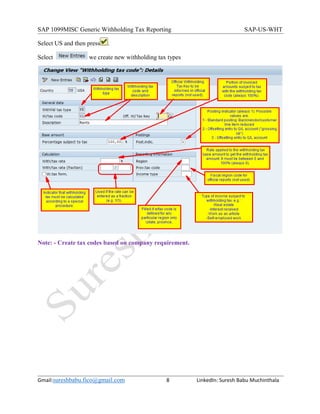
2. Define Withholding Tax Codes
The withholding tax code determines the withholding tax percentage.
As a withholding tax type is used to identify a main tax itself, a withholding tax code is used to
divide main tax into different categories. We will use withholding tax codes to classify Federal
Income Tax (FE) into different amount codes defined by IRS. (Which are 01-Rent, 02-Royalties,
03-Other Income,04- Federal income tax withheld, 05-Fishing Boat Proceeds, and 16-State Tax
Withheld etc.…)
SAP 1099MISC Generic Withholding Tax Reporting SAP-US-WHT
Gmail:sureshbabu.fico@gmail.com 8 LinkedIn: Suresh Babu Muchinthala
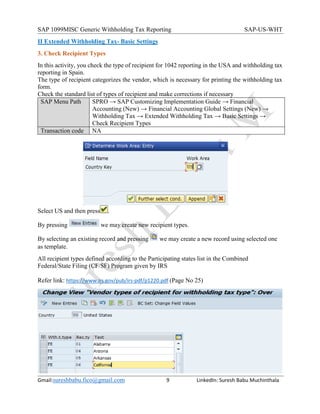
Select US and then press .
Select we create new withholding tax types
Note: - Create tax codes based on company requirement.
SAP 1099MISC Generic Withholding Tax Reporting SAP-US-WHT
Gmail:sureshbabu.fico@gmail.com 9 LinkedIn: Suresh Babu Muchinthala
II Extended Withholding Tax- Basic Settings
3. Check Recipient Types
In this activity, you check the type of recipient for 1042 reporting in the USA and withholding tax
reporting in Spain.
The type of recipient categorizes the vendor, which is necessary for printing the withholding tax
form.
Check the standard list of types of recipient and make corrections if necessary
SAP Menu Path SPRO → SAP Customizing Implementation Guide → Financial
Accounting (New) → Financial Accounting Global Settings (New) →
Withholding Tax → Extended Withholding Tax → Basic Settings →
Check Recipient Types
Transaction code NA
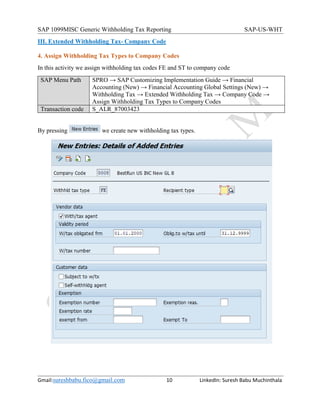
Select US and then press .
By pressing we may create new recipient types.
By selecting an existing record and pressing we may create a new record using selected one
as template.
All recipient types defined according to the Participating states list in the Combined
Federal/State Filing (CF/SF) Program given by IRS
Refer link: https://www.irs.gov/pub/irs-pdf/p1220.pdf (Page No 25)
SAP 1099MISC Generic Withholding Tax Reporting SAP-US-WHT
Gmail:sureshbabu.fico@gmail.com 10 LinkedIn: Suresh Babu Muchinthala
III. Extended Withholding Tax- Company Code
4. Assign Withholding Tax Types to Company Codes
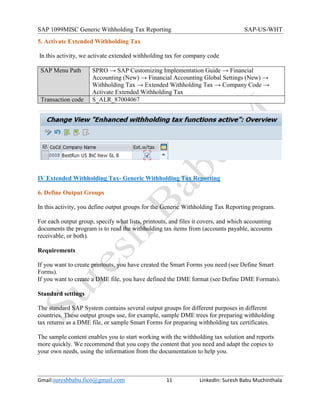
In this activity we assign withholding tax codes FE and ST to company code
SAP Menu Path SPRO → SAP Customizing Implementation Guide → Financial
Accounting (New) → Financial Accounting Global Settings (New) →
Withholding Tax → Extended Withholding Tax → Company Code →
Assign Withholding Tax Types to Company Codes
Transaction code S_ALR_87003423
By pressing we create new withholding tax types.
SAP 1099MISC Generic Withholding Tax Reporting SAP-US-WHT
Gmail:sureshbabu.fico@gmail.com 11 LinkedIn: Suresh Babu Muchinthala
5. Activate Extended Withholding Tax
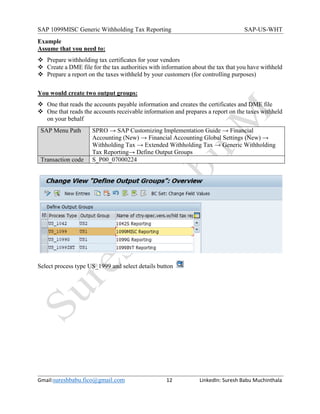
In this activity, we activate extended withholding tax for company code
SAP Menu Path SPRO → SAP Customizing Implementation Guide → Financial
Accounting (New) → Financial Accounting Global Settings (New) →
Withholding Tax → Extended Withholding Tax → Company Code →
Activate Extended Withholding Tax
Transaction code S_ALR_87004067
IV Extended Withholding Tax- Generic Withholding Tax Reporting
6. Define Output Groups
In this activity, you define output groups for the Generic Withholding Tax Reporting program.
For each output group, specify what lists, printouts, and files it covers, and which accounting
documents the program is to read the withholding tax items from (accounts payable, accounts
receivable, or both).
Requirements
If you want to create printouts, you have created the Smart Forms you need (see Define Smart
Forms).
If you want to create a DME file, you have defined the DME format (see Define DME Formats).
Standard settings
The standard SAP System contains several output groups for different purposes in different
countries. These output groups use, for example, sample DME trees for preparing withholding
tax returns as a DME file, or sample Smart Forms for preparing withholding tax certificates.
The sample content enables you to start working with the withholding tax solution and reports
more quickly. We recommend that you copy the content that you need and adapt the copies to
your own needs, using the information from the documentation to help you.
SAP 1099MISC Generic Withholding Tax Reporting SAP-US-WHT
Gmail:sureshbabu.fico@gmail.com 12 LinkedIn: Suresh Babu Muchinthala
Example
Assume that you need to:
 Prepare withholding tax certificates for your vendors
 Create a DME file for the tax authorities with information about the tax that you have withheld
 Prepare a report on the taxes withheld by your customers (for controlling purposes)
You would create two output groups:
 One that reads the accounts payable information and creates the certificates and DME file
 One that reads the accounts receivable information and prepares a report on the taxes withheld
on your behalf
SAP Menu Path SPRO → SAP Customizing Implementation Guide → Financial
Accounting (New) → Financial Accounting Global Settings (New) →
Withholding Tax → Extended Withholding Tax → Generic Withholding
Tax Reporting→ Define Output Groups
Transaction code S_P00_07000224
Select process type US_1999 and select details button
SAP 1099MISC Generic Withholding Tax Reporting SAP-US-WHT
Gmail:sureshbabu.fico@gmail.com 13 LinkedIn: Suresh Babu Muchinthala
Items that must be red form the WHT table
(WITH_ITEEM) Possibale values selected 1
Here we have the output file formate , its genrated
using tool called DMEE and formate tree is called
IDWTFILE_US_1099,Down load file option :
SAP 1099MISC Generic Withholding Tax Reporting SAP-US-WHT
Gmail:sureshbabu.fico@gmail.com 14 LinkedIn: Suresh Babu Muchinthala
Include Open Items: If you choose the Data Source 1 ( report invoices , credit memos.in
Accounts Payable ) and if your Withholding Tax customizing is defined as 'calculated at the
Payment time, selecting this option will allow you to see also the open items (without payments ).
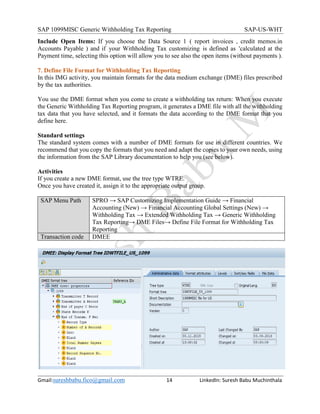
7. Define File Format for Withholding Tax Reporting
In this IMG activity, you maintain formats for the data medium exchange (DME) files prescribed
by the tax authorities.
You use the DME format when you come to create a withholding tax return: When you execute
the Generic Withholding Tax Reporting program, it generates a DME file with all the withholding
tax data that you have selected, and it formats the data according to the DME format that you
define here.
Standard settings
The standard system comes with a number of DME formats for use in different countries. We
recommend that you copy the formats that you need and adapt the copies to your own needs, using
the information from the SAP Library documentation to help you (see below).
Activities
If you create a new DME format, use the tree type WTRE.
Once you have created it, assign it to the appropriate output group.
SAP Menu Path SPRO → SAP Customizing Implementation Guide → Financial
Accounting (New) → Financial Accounting Global Settings (New) →
Withholding Tax → Extended Withholding Tax → Generic Withholding
Tax Reporting→ DME Files→ Define File Format for Withholding Tax
Reporting
Transaction code DMEE
SAP 1099MISC Generic Withholding Tax Reporting SAP-US-WHT
Gmail:sureshbabu.fico@gmail.com 15 LinkedIn: Suresh Babu Muchinthala
Click on to display tree. And by click on , to update the
tree structure.
Note: DMEE tree will be configured according to IRS guidelines
Refer: https://www.irs.gov/pub/irs-pdf/p1220.pdf (Sec. 7 Test Files) Page no 41
B.1099MISC (US Generic Withholding Tax Reporting) Procedural Steps (End
User):
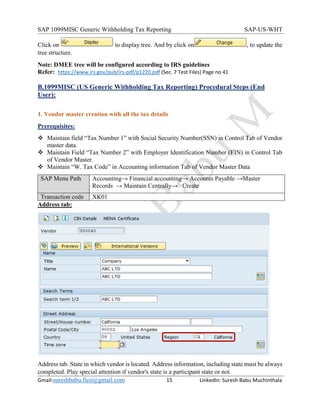
1. Vendor master creation with all the tax details
Prerequisites:
 Maintain field “Tax Number 1” with Social Security Number(SSN) in Control Tab of Vendor
master data.
 Maintain Field “Tax Number 2” with Employer Identification Number (EIN) in Control Tab
of Vendor Master.
 Maintain “W. Tax Code” in Accounting information Tab of Vendor Master Data
SAP Menu Path Accounting→ Financial accounting→ Accounts Payable →Master
Records → Maintain Centrally→ Create
Transaction code XK01
Address tab:
Address tab. State in which vendor is located. Address information, including state must be always
completed. Play special attention if vendor's state is a participant state or not.
SAP 1099MISC Generic Withholding Tax Reporting SAP-US-WHT
Gmail:sureshbabu.fico@gmail.com 16 LinkedIn: Suresh Babu Muchinthala
Control tab:
Control tab. Tax Number 1. Complete TIN keeping the format when it's a social secure number
(SSN) or Tax Number 2 when it's a employer identification number (EIN).
When TIN is a SSN, it must be indicated as it follows → 123-45-6789.
When TIN is a EIN, it must be indicated as it follows → 12-3456789.
Withholding tax tab:
Withholding tax tab. Complete as it follows when vendor must be informed through 1099MISC,
otherwise leave it empty
SAP 1099MISC Generic Withholding Tax Reporting SAP-US-WHT
Gmail:sureshbabu.fico@gmail.com 17 LinkedIn: Suresh Babu Muchinthala
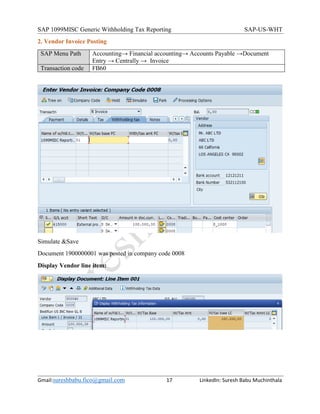
2. Vendor Invoice Posting
SAP Menu Path Accounting→ Financial accounting→ Accounts Payable →Document
Entry → Centrally → Invoice
Transaction code FB60
Simulate &Save
Document 1900000001 was posted in company code 0008
Display Vendor line item:
SAP 1099MISC Generic Withholding Tax Reporting SAP-US-WHT
Gmail:sureshbabu.fico@gmail.com 18 LinkedIn: Suresh Babu Muchinthala
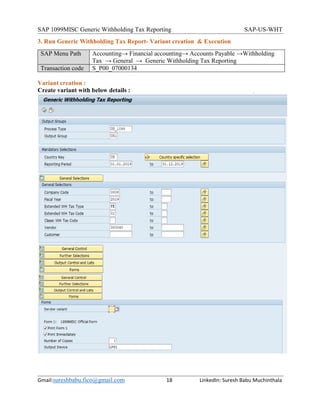
3. Run Generic Withholding Tax Report- Variant creation & Execution
SAP Menu Path Accounting→ Financial accounting→ Accounts Payable →Withholding
Tax → General → Generic Withholding Tax Reporting
Transaction code S_P00_07000134
Variant creation :
Create variant with below details :
SAP 1099MISC Generic Withholding Tax Reporting SAP-US-WHT
Gmail:sureshbabu.fico@gmail.com 19 LinkedIn: Suresh Babu Muchinthala
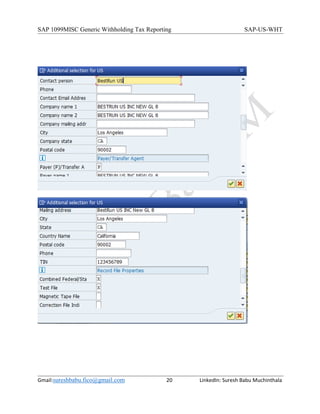
Country specific selections:
SAP 1099MISC Generic Withholding Tax Reporting SAP-US-WHT
Gmail:sureshbabu.fico@gmail.com 20 LinkedIn: Suresh Babu Muchinthala
SAP 1099MISC Generic Withholding Tax Reporting SAP-US-WHT
Gmail:sureshbabu.fico@gmail.com 21 LinkedIn: Suresh Babu Muchinthala
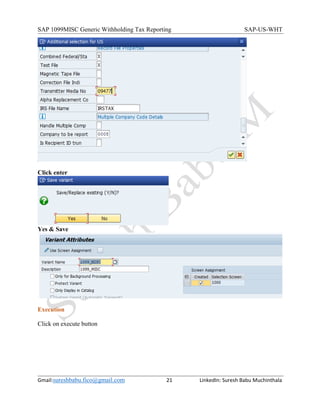
Click enter
Yes & Save
Execution
Click on execute button
SAP 1099MISC Generic Withholding Tax Reporting SAP-US-WHT
Gmail:sureshbabu.fico@gmail.com 22 LinkedIn: Suresh Babu Muchinthala
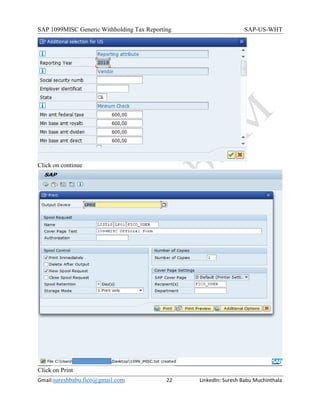
Click on continue
Click on Print
SAP 1099MISC Generic Withholding Tax Reporting SAP-US-WHT
Gmail:sureshbabu.fico@gmail.com 23 LinkedIn: Suresh Babu Muchinthala
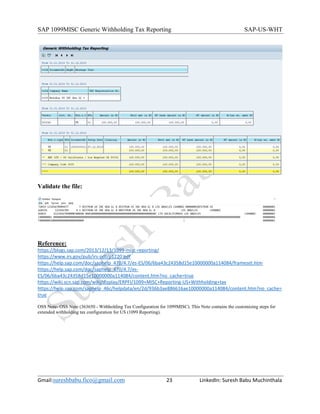
Validate the file:
Reference:
https://blogs.sap.com/2013/12/13/1099-misc-reporting/
https://www.irs.gov/pub/irs-pdf/p1220.pdf
https://help.sap.com/doc/saphelp_470/4.7/es-ES/06/6ba43c24358d15e10000000a114084/frameset.htm
https://help.sap.com/doc/saphelp_470/4.7/es-
ES/06/6ba43c24358d15e10000000a114084/content.htm?no_cache=true
https://wiki.scn.sap.com/wiki/display/ERPFI/1099+MISC+Reporting-US+Withholding+tax
https://help.sap.com/saphelp_46c/helpdata/en/2d/936b3ae886616ae10000000a114084/content.htm?no_cache=
true
OSS Note- OSS Note (363650 - Withholding Tax Configuration for 1099MISC). This Note contains the customizing steps for
extended withholding tax configuration for US (1099 Reporting).

Sap 1099 misc generic withholding tax reporting

  • 1.
    SAP 1099MISC GenericWithholding Tax Reporting SAP-US-WHT Gmail:sureshbabu.fico@gmail.com 1 LinkedIn: Suresh Babu Muchinthala SAP 1099MISC Generic Withholding Tax Reporting Withholding Tax: Withholding Tax is also called as retention tax. Its requirement of payer to deduct or withhold a particular percentage from payment to the vendors and pay such amount to the Government on behalf of vendors. SAP provides you with two procedures for processing withholding tax: "Standard" and extended withholding tax. "Standard" withholding tax is the procedure that has always been supported by the system. It offers you the following features:  Withholding tax for accounts payable  Withholding tax calculation during payment  Withholding tax code per vendor line item Extended withholding tax provides the following additional features:  Multiple withholding taxes per customer or vendor line item  Withholding tax calculation for partial payments  Withholding tax calculation for invoice entry and payment Note:- If you decided on extended withholding tax and activate this procedure, you must migrate your master data and transaction data. You cannot then return to the original withholding tax procedure afterwards. Withholding Tax-US In the United States, invoice recipients are sometimes required to collect withholding tax on behalf of certain vendors, such as self-employed people or non-resident foreigners. However, normally, invoice recipients need only to report withholding taxes and do not have to collect and pay withholding taxes. In this common case, the vendor is liable for paying the tax amount to the Internal Revenue Service (IRS). Withholding tax amounts must be reported to the IRS at regular intervals and a statement is also sent periodically to the vendor. Companies submit annual statements of withholding tax amounts to the vendors and the IRS by using the pre-printed forms 1099 MISC 1099-G, 1099-INT, and 1042S. With SAP R/3, you can create the 1099 and 1042S reports. Note:- If you withhold taxes at both state and federal level, we recommend that you use the extended withholding tax functions.
  • 2.
    SAP 1099MISC GenericWithholding Tax Reporting SAP-US-WHT Gmail:sureshbabu.fico@gmail.com 2 LinkedIn: Suresh Babu Muchinthala Business Requirement  This is a requirement by Internal Revenue Service (IRS). A 1099-MISC form must be provided to the recipient and a copy mailed to or e-filed with the IRS.  Any business that has paid vendor $600 USD or more as a non-employee, or at least $10 USD in royalties, must provide with a 1099-MISC.  Copy A of the 1099-MISC form is intended for the IRS. It must be filed by February 28, if sending the form by mail. If it is filed electronically, the last date is March 31.  Copy B is sent to the vendor for whom reporting to the IRS by January 31. This document explains step by step process for executing 1099 MISC Reporting (Generic Withholding Tax Reporting) A. Prerequisites/ 1099MISC (US Generic Withholding Tax Reporting) Configuration steps: I. Extended Withholding Tax- Calculation 1. Define Withholding Tax Type for Payment Posting 2. Define Withholding Tax Codes II Extended Withholding Tax- Basic Settings 3. Check Recipient Types III. Extended Withholding Tax- Company Code 4. Assign Withholding Tax Types to Company Codes 5. Activate Extended Withholding Tax IV Extended Withholding Tax- Generic Withholding Tax Reporting 6. Define Output Groups 7. Define File Format for Withholding Tax Reporting B.1099MISC (US Generic Withholding Tax Reporting) Procedural Steps (End User): 1. Vendor master creation with tax details 2. Vendor Invoice Posting 3. Run Generic Withholding Tax Report & validate the file
  • 3.
    SAP 1099MISC GenericWithholding Tax Reporting SAP-US-WHT Gmail:sureshbabu.fico@gmail.com 3 LinkedIn: Suresh Babu Muchinthala A. Prerequisites/ 1099MISC (US Generic Withholding Tax Reporting) Reporting Configuration steps: I. Extended Withholding Tax- Calculation 1. Define Withholding Tax Type for Payment Posting Withholding Tax Type: In the system you use withholding tax types to represent the various withholding taxes in a country. You define withholding tax types in the following activities. The withholding tax type controls the essential calculation options for extended withholding tax, whilst the withholding tax code only controls the percentage rate of the withholding tax. You must enter the withholding tax type in the customer/vendor withholding tax master data and in the company code master data. The system recognizes two categories of withholding tax type depending on when the withholding tax amounts are posted:  Posting with invoice  Posting with payment Define Withholding Tax Type for Payment Posting In this activity you define the withholding tax type for posting at the time of paying. You also have to enter the withholding tax information when entering the document for this withholding tax type. Further notes All calculations for extended withholding tax are made in the first local currency of the respective company code. This means that you have to maintain amounts in the company code country currency. A withholding tax type is used to identify a main tax itself. We have defined two withholding tax types, which are:  FE: This is reserved for Federal Income Tax.  ST: This is reserved for State Tax. SAP Menu Path SPRO → SAP Customizing Implementation Guide → Financial Accounting (New) → Financial Accounting Global Settings (New) → Withholding Tax → Extended Withholding Tax → Calculation → Withholding Tax Type → Define Withholding Tax Type for Payment Posting Transaction code S_ALR_87003266
  • 4.
    SAP 1099MISC GenericWithholding Tax Reporting SAP-US-WHT Gmail:sureshbabu.fico@gmail.com 4 LinkedIn: Suresh Babu Muchinthala Select US and then press . By pressing we create new withholding tax types
  • 5.
    SAP 1099MISC GenericWithholding Tax Reporting SAP-US-WHT Gmail:sureshbabu.fico@gmail.com 5 LinkedIn: Suresh Babu Muchinthala Fields explanation: 1. General data: It includes withholding tax type and description. 2. Base amount: It includes following options:  Net amount: Here, the system uses the net amount as the base amount to calculate the withholding tax amount.  Modif. net amount: Here, the modified net amount is used as the base amount for calculating the withholding tax. It means that an additional amount is added to the net amount.  Gross amount: Here, the system uses the gross amount (net amount + VAT + other taxes) as the base amount for calculating the withholding tax.  Tax amount: With this, tax amount is used as the base amount for calculating the withholding tax.  Modif. tax amount: Here, the modified tax amount is used as the base amount for calculating tcdcducbdbchdbcdhbchbchbc  Inherit base: If ticked, it means that base amount is equals to amounts of other type. Not relevant for USA, only for Korea. 3. Rounding Rule: It includes following options:  W/tax comm. round.: Here, the withholding tax amount is rounded up or down depending on its value.  Round w/tax amnt up: Here, the withholding tax amount is always rounded up.  Round w/tax amount: Here, the withholding tax amount is always rounded down. 4. Cash discount: It includes following options:  W/tax pre c/dis: If ticked, withholding tax is calculated before cash discount is calculated and deducted.  C/dis pre W/tx: If ticked, withholding tax is calculated after cash discount is calculated and deducted. 5. Post w/tax amount: If checked, the withholding tax amount is both calculated and posted.
  • 6.
    SAP 1099MISC GenericWithholding Tax Reporting SAP-US-WHT Gmail:sureshbabu.fico@gmail.com 6 LinkedIn: Suresh Babu Muchinthala 6. Accumulation type: It includes following options:  No accumulation: If checked, accumulation is not used to calculate withholding tax amount.  Per Calendar Year: If checked, accumulation is considered along the year to calculate withholding tax amount.  Per quarter: If checked, accumulation period is defined as a quarter (3 months).  Per month:If checked, accumulation period is defined as a month.  Per Year, Starting with Mnth XX: If checked, withholding tax accumulation period is set for one year; however it's needed to define the start of the accumulation year by specifying a month.  Combined accum.: If ticked, withholding tax is accumulated for several vendors in several company codes (as applicable).  Acc. w/tax to max.: If ticked, withholding tax is not withheld once the accumulated withholding tax amount has exceeded the maximum amount. 7. Control: It includes following options:  W/tax base manual: If checked, withholding tax base amount is ready for input, however this is not a required entry field.  W/tax alrdy w/hd: If checked, the amount can be entered when posting the invoice.  Manual w/tax amnt: If checked, withholding tax amount is ready for input, however this is not a required field.  W/tax for pmnts: If checked, withholding tax amount can be entered manually for incoming and outgoing payments.  Self-w/holding: If checked, self-withholding is possible for this withholding tax type.  No cert. numbering: If checked, it means that it's not relevant for certificate numbering. 8. Region: It must be completed if withholding tax type is defined for any particular region only (state, province, county, etc.). 9. Base amount: It includes following options:  W/tax code level: Defines the minimum/maximum withholding tax base amount at withholding tax code level.  Type level: Defines the minimum/maximum withholding tax base amount at withholding tax type level. 10. Withholding tax amount: It includes following options:  W/tax code level: Defines the minimum/maximum withholding tax amount at withholding tax code level.  Type level: Defines the minimum/maximum withholding tax amount at withholding tax type level. 11.Central invoice: It includes following options:  No centr. invoice: If selected, "Central invoicing" is not applied to this withholding tax type. "Central invoicing" is a special method for dealing with line items that are linked to other, dependent documents like customer or vendor memos (credit memos, debit memos, down payment clearings or partial payments). This link is entered when the dependent documents are posted by specifying the invoice reference fields document number, fiscal year and line
  • 7.
    SAP 1099MISC GenericWithholding Tax Reporting SAP-US-WHT Gmail:sureshbabu.fico@gmail.com 7 LinkedIn: Suresh Babu Muchinthala item (to which the reference is made). The system takes into account all line items that are linked to one another by the invoice reference when it calculates the withholding tax amount.  Cent.inv.& 1st p.pmt: If selected, the "central invoicing" concept applies to this withholding tax type. In the case of partial payments, the full withholding tax amount is deducted from the first partial payment.  Central inv. prop.: If selected, the "Central invoicing" concept applies to this withholding tax type. In the case of partial payments, the withholding tax amount is divided and allocated to each partial payment pro rata. 12. Minimum Check: It includes following options:  Minimum Check at Item Level: If checked, withholding tax amount is calculated and posted only if withholding tax base amount exceeds the minimum base amount defined in Customizing, and withholding tax amount exceeds a withholding tax minimum amount also set in Customizing. The check on the minimum base amount or minimum withholding tax amount is carried out for each line item individually.  Check min. base amnt at pmnt doc level: If checked, withholding tax amount is calculated and posted only if withholding tax base amount exceeds the minimum base amount defined in Customizing.  Min.base amnt check at doc.invoice level: If checked, withholding tax amount is calculated and posted only if withholding tax base amount exceeds the minimum base amount to be entered in Customizing.  Min. Amt Check at Payment Doc. Level: If checked, withholding tax amount is only calculated and posted if it exceeds a minimum withholding tax amount maintained in Customizing.  Base Exempt Amt Check at Pymt Doc. Level: If checked, withholding tax amount can only be posted and calculated if withholding tax base exceeds an exempt amount maintained in Customizing and withholding tax amount exceeds a minimum withholding tax amount maintained in Customizing. Note: - Create tax type ST with same parameters 2. Define Withholding Tax Codes The withholding tax code determines the withholding tax percentage. As a withholding tax type is used to identify a main tax itself, a withholding tax code is used to divide main tax into different categories. We will use withholding tax codes to classify Federal Income Tax (FE) into different amount codes defined by IRS. (Which are 01-Rent, 02-Royalties, 03-Other Income,04- Federal income tax withheld, 05-Fishing Boat Proceeds, and 16-State Tax Withheld etc.…)
  • 8.
    SAP 1099MISC GenericWithholding Tax Reporting SAP-US-WHT Gmail:sureshbabu.fico@gmail.com 8 LinkedIn: Suresh Babu Muchinthala Select US and then press . Select we create new withholding tax types Note: - Create tax codes based on company requirement.
  • 9.
    SAP 1099MISC GenericWithholding Tax Reporting SAP-US-WHT Gmail:sureshbabu.fico@gmail.com 9 LinkedIn: Suresh Babu Muchinthala II Extended Withholding Tax- Basic Settings 3. Check Recipient Types In this activity, you check the type of recipient for 1042 reporting in the USA and withholding tax reporting in Spain. The type of recipient categorizes the vendor, which is necessary for printing the withholding tax form. Check the standard list of types of recipient and make corrections if necessary SAP Menu Path SPRO → SAP Customizing Implementation Guide → Financial Accounting (New) → Financial Accounting Global Settings (New) → Withholding Tax → Extended Withholding Tax → Basic Settings → Check Recipient Types Transaction code NA Select US and then press . By pressing we may create new recipient types. By selecting an existing record and pressing we may create a new record using selected one as template. All recipient types defined according to the Participating states list in the Combined Federal/State Filing (CF/SF) Program given by IRS Refer link: https://www.irs.gov/pub/irs-pdf/p1220.pdf (Page No 25)
  • 10.
    SAP 1099MISC GenericWithholding Tax Reporting SAP-US-WHT Gmail:sureshbabu.fico@gmail.com 10 LinkedIn: Suresh Babu Muchinthala III. Extended Withholding Tax- Company Code 4. Assign Withholding Tax Types to Company Codes In this activity we assign withholding tax codes FE and ST to company code SAP Menu Path SPRO → SAP Customizing Implementation Guide → Financial Accounting (New) → Financial Accounting Global Settings (New) → Withholding Tax → Extended Withholding Tax → Company Code → Assign Withholding Tax Types to Company Codes Transaction code S_ALR_87003423 By pressing we create new withholding tax types.
  • 11.
    SAP 1099MISC GenericWithholding Tax Reporting SAP-US-WHT Gmail:sureshbabu.fico@gmail.com 11 LinkedIn: Suresh Babu Muchinthala 5. Activate Extended Withholding Tax In this activity, we activate extended withholding tax for company code SAP Menu Path SPRO → SAP Customizing Implementation Guide → Financial Accounting (New) → Financial Accounting Global Settings (New) → Withholding Tax → Extended Withholding Tax → Company Code → Activate Extended Withholding Tax Transaction code S_ALR_87004067 IV Extended Withholding Tax- Generic Withholding Tax Reporting 6. Define Output Groups In this activity, you define output groups for the Generic Withholding Tax Reporting program. For each output group, specify what lists, printouts, and files it covers, and which accounting documents the program is to read the withholding tax items from (accounts payable, accounts receivable, or both). Requirements If you want to create printouts, you have created the Smart Forms you need (see Define Smart Forms). If you want to create a DME file, you have defined the DME format (see Define DME Formats). Standard settings The standard SAP System contains several output groups for different purposes in different countries. These output groups use, for example, sample DME trees for preparing withholding tax returns as a DME file, or sample Smart Forms for preparing withholding tax certificates. The sample content enables you to start working with the withholding tax solution and reports more quickly. We recommend that you copy the content that you need and adapt the copies to your own needs, using the information from the documentation to help you.
  • 12.
    SAP 1099MISC GenericWithholding Tax Reporting SAP-US-WHT Gmail:sureshbabu.fico@gmail.com 12 LinkedIn: Suresh Babu Muchinthala Example Assume that you need to:  Prepare withholding tax certificates for your vendors  Create a DME file for the tax authorities with information about the tax that you have withheld  Prepare a report on the taxes withheld by your customers (for controlling purposes) You would create two output groups:  One that reads the accounts payable information and creates the certificates and DME file  One that reads the accounts receivable information and prepares a report on the taxes withheld on your behalf SAP Menu Path SPRO → SAP Customizing Implementation Guide → Financial Accounting (New) → Financial Accounting Global Settings (New) → Withholding Tax → Extended Withholding Tax → Generic Withholding Tax Reporting→ Define Output Groups Transaction code S_P00_07000224 Select process type US_1999 and select details button
  • 13.
    SAP 1099MISC GenericWithholding Tax Reporting SAP-US-WHT Gmail:sureshbabu.fico@gmail.com 13 LinkedIn: Suresh Babu Muchinthala Items that must be red form the WHT table (WITH_ITEEM) Possibale values selected 1 Here we have the output file formate , its genrated using tool called DMEE and formate tree is called IDWTFILE_US_1099,Down load file option :
  • 14.
    SAP 1099MISC GenericWithholding Tax Reporting SAP-US-WHT Gmail:sureshbabu.fico@gmail.com 14 LinkedIn: Suresh Babu Muchinthala Include Open Items: If you choose the Data Source 1 ( report invoices , credit memos.in Accounts Payable ) and if your Withholding Tax customizing is defined as 'calculated at the Payment time, selecting this option will allow you to see also the open items (without payments ). 7. Define File Format for Withholding Tax Reporting In this IMG activity, you maintain formats for the data medium exchange (DME) files prescribed by the tax authorities. You use the DME format when you come to create a withholding tax return: When you execute the Generic Withholding Tax Reporting program, it generates a DME file with all the withholding tax data that you have selected, and it formats the data according to the DME format that you define here. Standard settings The standard system comes with a number of DME formats for use in different countries. We recommend that you copy the formats that you need and adapt the copies to your own needs, using the information from the SAP Library documentation to help you (see below). Activities If you create a new DME format, use the tree type WTRE. Once you have created it, assign it to the appropriate output group. SAP Menu Path SPRO → SAP Customizing Implementation Guide → Financial Accounting (New) → Financial Accounting Global Settings (New) → Withholding Tax → Extended Withholding Tax → Generic Withholding Tax Reporting→ DME Files→ Define File Format for Withholding Tax Reporting Transaction code DMEE
  • 15.
    SAP 1099MISC GenericWithholding Tax Reporting SAP-US-WHT Gmail:sureshbabu.fico@gmail.com 15 LinkedIn: Suresh Babu Muchinthala Click on to display tree. And by click on , to update the tree structure. Note: DMEE tree will be configured according to IRS guidelines Refer: https://www.irs.gov/pub/irs-pdf/p1220.pdf (Sec. 7 Test Files) Page no 41 B.1099MISC (US Generic Withholding Tax Reporting) Procedural Steps (End User): 1. Vendor master creation with all the tax details Prerequisites:  Maintain field “Tax Number 1” with Social Security Number(SSN) in Control Tab of Vendor master data.  Maintain Field “Tax Number 2” with Employer Identification Number (EIN) in Control Tab of Vendor Master.  Maintain “W. Tax Code” in Accounting information Tab of Vendor Master Data SAP Menu Path Accounting→ Financial accounting→ Accounts Payable →Master Records → Maintain Centrally→ Create Transaction code XK01 Address tab: Address tab. State in which vendor is located. Address information, including state must be always completed. Play special attention if vendor's state is a participant state or not.
  • 16.
    SAP 1099MISC GenericWithholding Tax Reporting SAP-US-WHT Gmail:sureshbabu.fico@gmail.com 16 LinkedIn: Suresh Babu Muchinthala Control tab: Control tab. Tax Number 1. Complete TIN keeping the format when it's a social secure number (SSN) or Tax Number 2 when it's a employer identification number (EIN). When TIN is a SSN, it must be indicated as it follows → 123-45-6789. When TIN is a EIN, it must be indicated as it follows → 12-3456789. Withholding tax tab: Withholding tax tab. Complete as it follows when vendor must be informed through 1099MISC, otherwise leave it empty
  • 17.
    SAP 1099MISC GenericWithholding Tax Reporting SAP-US-WHT Gmail:sureshbabu.fico@gmail.com 17 LinkedIn: Suresh Babu Muchinthala 2. Vendor Invoice Posting SAP Menu Path Accounting→ Financial accounting→ Accounts Payable →Document Entry → Centrally → Invoice Transaction code FB60 Simulate &Save Document 1900000001 was posted in company code 0008 Display Vendor line item:
  • 18.
    SAP 1099MISC GenericWithholding Tax Reporting SAP-US-WHT Gmail:sureshbabu.fico@gmail.com 18 LinkedIn: Suresh Babu Muchinthala 3. Run Generic Withholding Tax Report- Variant creation & Execution SAP Menu Path Accounting→ Financial accounting→ Accounts Payable →Withholding Tax → General → Generic Withholding Tax Reporting Transaction code S_P00_07000134 Variant creation : Create variant with below details :
  • 19.
    SAP 1099MISC GenericWithholding Tax Reporting SAP-US-WHT Gmail:sureshbabu.fico@gmail.com 19 LinkedIn: Suresh Babu Muchinthala Country specific selections:
  • 20.
    SAP 1099MISC GenericWithholding Tax Reporting SAP-US-WHT Gmail:sureshbabu.fico@gmail.com 20 LinkedIn: Suresh Babu Muchinthala
  • 21.
    SAP 1099MISC GenericWithholding Tax Reporting SAP-US-WHT Gmail:sureshbabu.fico@gmail.com 21 LinkedIn: Suresh Babu Muchinthala Click enter Yes & Save Execution Click on execute button
  • 22.
    SAP 1099MISC GenericWithholding Tax Reporting SAP-US-WHT Gmail:sureshbabu.fico@gmail.com 22 LinkedIn: Suresh Babu Muchinthala Click on continue Click on Print
  • 23.
    SAP 1099MISC GenericWithholding Tax Reporting SAP-US-WHT Gmail:sureshbabu.fico@gmail.com 23 LinkedIn: Suresh Babu Muchinthala Validate the file: Reference: https://blogs.sap.com/2013/12/13/1099-misc-reporting/ https://www.irs.gov/pub/irs-pdf/p1220.pdf https://help.sap.com/doc/saphelp_470/4.7/es-ES/06/6ba43c24358d15e10000000a114084/frameset.htm https://help.sap.com/doc/saphelp_470/4.7/es- ES/06/6ba43c24358d15e10000000a114084/content.htm?no_cache=true https://wiki.scn.sap.com/wiki/display/ERPFI/1099+MISC+Reporting-US+Withholding+tax https://help.sap.com/saphelp_46c/helpdata/en/2d/936b3ae886616ae10000000a114084/content.htm?no_cache= true OSS Note- OSS Note (363650 - Withholding Tax Configuration for 1099MISC). This Note contains the customizing steps for extended withholding tax configuration for US (1099 Reporting).