© 2015 ERP Corp. All rights reserved.
Set Up and Utilize Internal
Orders as Standard SAP®
Functionality
John Jordan
ERP Corp
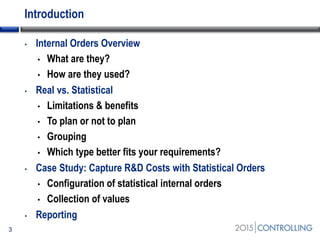
Introduction
• Internal Orders Overview
• What are they?
• How are they used?
• Real vs. Statistical
• Limitations & benefits
• To plan or not to plan
• Grouping
• Which type better fits your requirements?
• Case Study: Capture R&D Costs with Statistical Orders
• Configuration of statistical internal orders
• Collection of values
• Reporting
3
Topics
4
• Internal Orders Overview
• Real vs. Statistical
• Case Study: Capture R&D Costs with Statistical Orders
• Reporting
• Summary
Start of first section:
List the main points in your presentation and insert this slide at
the start of each new topic. Move the highlighted box down for
each new section. This divides your presentation into easy to
follow sections.
Internal Orders Explained
• What are they?
• Internal orders are a cost object in SAP Controlling module
• The primary purpose of an internal order is to capture costs
and/or revenues related to specific event or project
• Provide cost control & monitoring of short-term jobs & tasks
5
Internal Orders Explained (cont.)
6
• How are they used?
• Internal orders are used to capture and monitor:
• Non-departmental costs
• Revenues related to a specific sales order
• Large or small internal projects
Topics
• Internal Orders Overview
• Real vs. Statistical
• Case Study: Statistical Orders to Capture R&D Costs
• Reporting
• Summary
7
Start of second section:
List the main points in your presentation and insert
this slide at the start of each new topic. Move the
highlighted box down for each new section. This
divides your presentation into easy to follow
sections.
Real vs. Statistical
8
• Real internal orders
• A real internal order tracks costs that settle to:
• An asset
• A general ledger account
• Another cost object such as a cost center or internal order
• Can post plan:
• A new building or large maintenance project that will result in an asset
• SAP implementation: settlement is split between asset and expense
accounts
Real vs. Statistical (cont.)
9
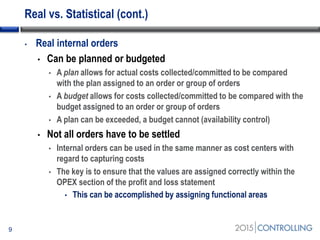
• Real internal orders
• Can be planned or budgeted
• A plan allows for actual costs collected/committed to be compared
with the plan assigned to an order or group of orders
• A budget allows for costs collected/committed to be compared with the
budget assigned to an order or group of orders
• A plan can be exceeded, a budget cannot (availability control)
• Not all orders have to be settled
• Internal orders can be used in the same manner as cost centers with
regard to capturing costs
• The key is to ensure that the values are assigned correctly within the
OPEX section of the profit and loss statement
• This can be accomplished by assigning functional areas
Real vs. Statistical (cont.)
10
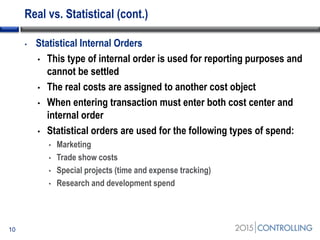
• Statistical Internal Orders
• This type of internal order is used for reporting purposes and
cannot be settled
• The real costs are assigned to another cost object
• When entering transaction must enter both cost center and
internal order
• Statistical orders are used for the following types of spend:
• Marketing
• Trade show costs
• Special projects (time and expense tracking)
• Research and development spend
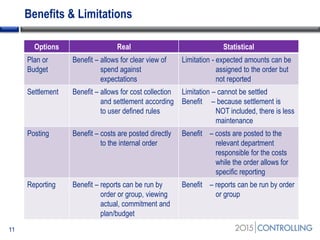
Benefits & Limitations
11
Options Real Statistical
Plan or
Budget
Benefit – allows for clear view of
spend against
expectations
Limitation - expected amounts can be
assigned to the order but
not reported
Settlement Benefit – allows for cost collection
and settlement according
to user defined rules
Limitation – cannot be settled
Benefit – because settlement is
NOT included, there is less
maintenance
Posting Benefit – costs are posted directly
to the internal order
Benefit – costs are posted to the
relevant department
responsible for the costs
while the order allows for
specific reporting
Reporting Benefit – reports can be run by
order or group, viewing
actual, commitment and
plan/budget
Benefit – reports can be run by order
or group
To Plan or Not to Plan
12
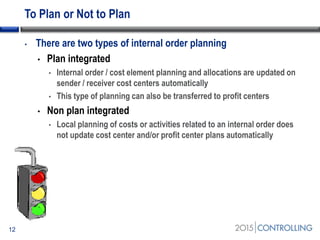
• There are two types of internal order planning
• Plan integrated
• Internal order / cost element planning and allocations are updated on
sender / receiver cost centers automatically
• This type of planning can also be transferred to profit centers
• Non plan integrated
• Local planning of costs or activities related to an internal order does
not update cost center and/or profit center plans automatically
To Plan or Not to Plan (cont.)
• Budgeting for internal orders
• Exceeding a budgeted value applied to an internal order is
considered a hard stop, unlike planning which is a warning
• If proposed spend exceeds budget the system will not allow
the transaction to post
• Any excess amounts require an adjustment to the budget
• Activate availability control
• The budget can take into account any values committed via a purchase
order during entry of financial postings (invoices or G/L entries)
• Activate commitment management
13
To Plan or Not to Plan (cont.)
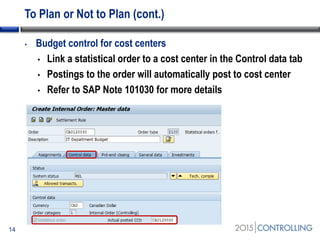
• Budget control for cost centers
• Link a statistical order to a cost center in the Control data tab
• Postings to the order will automatically post to cost center
• Refer to SAP Note 101030 for more details
14
Grouping
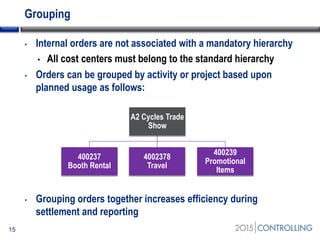
• Internal orders are not associated with a mandatory hierarchy
• All cost centers must belong to the standard hierarchy
• Orders can be grouped by activity or project based upon
planned usage as follows:
• Grouping orders together increases efficiency during
settlement and reporting
15
A2 Cycles Trade
Show
400237
Booth Rental
4002378
Travel
400239
Promotional
Items
Grouping (cont.)
• A grouping of internal orders can also be used to collect and
budget a large project where you want to charge to a lower level
but report at a higher level
• Examples are:
• Large scale building
• Renovation projects
• Large scale marketing/advertising
16
Which type of order better fits your requirements?
• Determine how the order will be used
• Will it require settlement to cost center, asset or GL account?
• Do you require planning or budgeting?
• It is necessary to review actual vs. commitment vs. plan?
• Is the purpose to collect department related costs specific to
an event or project for internal reporting requirements?
17
Topics
• Internal Orders Overview
• Real vs. Statistical
• Case Study: Capture R&D Costs with Statistical Orders
• Reporting
• Summary
18
Start of second section:
List the main points in your presentation and insert
this slide at the start of each new topic. Move the
highlighted box down for each new section. This
divides your presentation into easy to follow
sections.
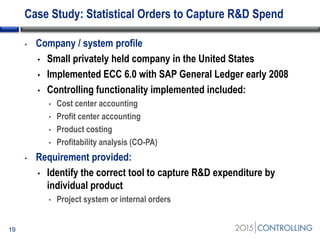
Case Study: Statistical Orders to Capture R&D Spend
• Company / system profile
• Small privately held company in the United States
• Implemented ECC 6.0 with SAP General Ledger early 2008
• Controlling functionality implemented included:
• Cost center accounting
• Profit center accounting
• Product costing
• Profitability analysis (CO-PA)
• Requirement provided:
• Identify the correct tool to capture R&D expenditure by
individual product
• Project system or internal orders
19
Case Study: Statistical Orders to Capture R&D Spend
(cont.)
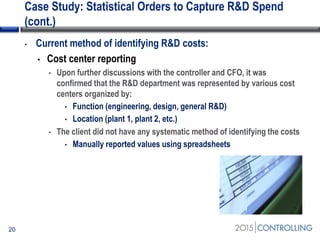
• Current method of identifying R&D costs:
• Cost center reporting
• Upon further discussions with the controller and CFO, it was
confirmed that the R&D department was represented by various cost
centers organized by:
• Function (engineering, design, general R&D)
• Location (plant 1, plant 2, etc.)
• The client did not have any systematic method of identifying the costs
• Manually reported values using spreadsheets
20
Case Study: Statistical Orders to Capture R&D Spend
(cont.)
• Recommendation:
• Statistical internal orders
• Given the requirement that existing cost centers retain responsibility
AND the reporting requirements, this was the most efficient option
• Project system would require too much design and maintenance
• The cost of implementing statistical internal orders equated to 20
consulting hours versus a larger implementation of project system
21
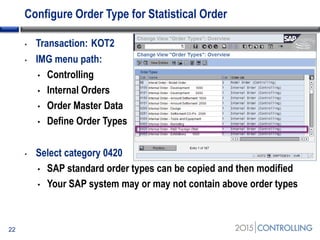
Configure Order Type for Statistical Order
• Transaction: KOT2
• IMG menu path:
• Controlling
• Internal Orders
• Order Master Data
• Define Order Types
• Select category 0420
• SAP standard order types can be copied and then modified
• Your SAP system may or may not contain above order types
22
Configure Order Type for Statistical Order (cont.)
23
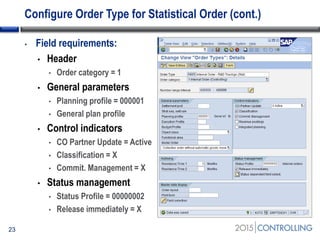
• Field requirements:
• Header
• Order category = 1
• General parameters
• Planning profile = 000001
• General plan profile
• Control indicators
• CO Partner Update = Active
• Classification = X
• Commit. Management = X
• Status management
• Status Profile = 00000002
• Release immediately = X
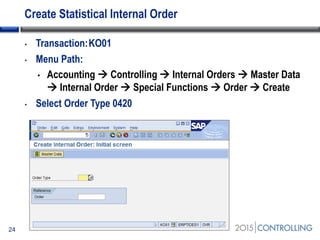
Create Statistical Internal Order
• Transaction:KO01
• Menu Path:
• Accounting  Controlling  Internal Orders  Master Data
 Internal Order  Special Functions  Order  Create
• Select Order Type 0420
24
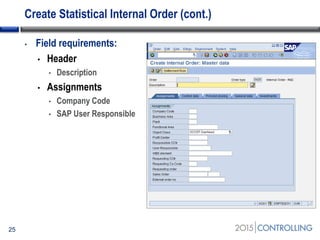
Create Statistical Internal Order (cont.)
25
• Field requirements:
• Header
• Description
• Assignments
• Company Code
• SAP User Responsible
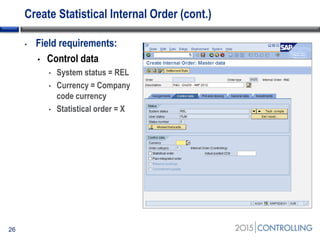
Create Statistical Internal Order (cont.)
26
• Field requirements:
• Control data
• System status = REL
• Currency = Company
code currency
• Statistical order = X
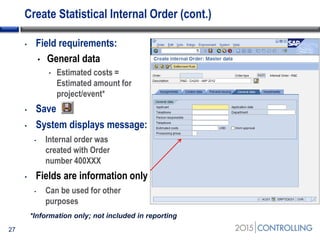
Create Statistical Internal Order (cont.)
27
• Field requirements:
• General data
• Estimated costs =
Estimated amount for
project/event*
• Save
• System displays message:
• Internal order was
created with Order
number 400XXX
• Fields are information only
• Can be used for other
purposes
*Information only; not included in reporting
Topics
• Internal Orders Overview
• Real vs. Statistical
• Case Study: Capture R&D Costs with Statistical Orders
• Reporting
• Summary
28
Start of second section:
List the main points in your presentation and insert
this slide at the start of each new topic. Move the
highlighted box down for each new section. This
divides your presentation into easy to follow
sections.
Reporting
• Internal order reporting is divided into categories to make it
easier to find the report you are looking for:
• Plan/Actual Comparisons
• Actual/Actual Comparisons
• Planning Reports
• Line Items
• Master Data Indexes
• Summarization Reports
• More Reports
29
Reporting (cont.)
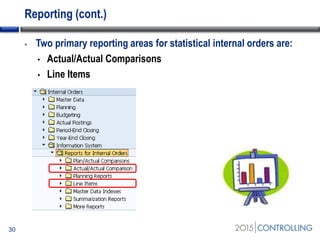
• Two primary reporting areas for statistical internal orders are:
• Actual/Actual Comparisons
• Line Items
30
Actual/Actual Comparisons
• Compare results on period, quarterly, or annual basis with a
prior fiscal year
• Identify where your department is over time from a spend
analysis perspective
• Period Comparison
• Period totals for a fiscal year
• Quarterly Comparison
• Quarterly totals for a fiscal year
• Yearly Comparison
• Current fiscal year totals along with totals for two previous years
31
Line Items
• View line item data relevant to:
• Actual postings
• Commitments
• Plan
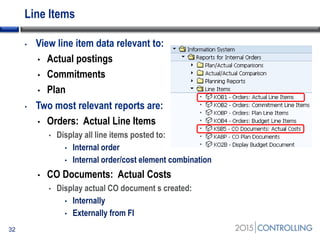
• Two most relevant reports are:
• Orders: Actual Line Items
• Display all line items posted to:
• Internal order
• Internal order/cost element combination
• CO Documents: Actual Costs
• Display actual CO document s created:
• Internally
• Externally from FI
32
Topics
• Internal Orders Overview
• Real vs. Statistical
• Case Study: Capture R&D Costs with Statistical Orders
• Reporting
• Summary
33
Summary
• Statistical Orders provide valuable reporting and require limited
set-up and maintenance
• Retains reporting by cost center
• Allows for grouping of internal orders based upon events
• Easier to set-up and maintain than project system
• Can collect revenue
34
Five Key Ideas
• Implement statistical orders for following events:
• Trade shows
• Conferences
• R&D expenses
• Entertainment
• Collect costs related to company Christmas party
• Implement real orders without settlement for projects that do
not require capitalization
• Implement commitment management and availability control
• Consider reporting using FAGLL03
• G/L account line item display
35
Resources
• 100 Things You Should Know About Controlling with SAP
• https://www.sap-press.com/controlling-with-sap_3746/
• SAP Help
• http://help.sap.com/saphelp_erp60_sp/helpdata/en/a9/ab7f68
414111d182b10000e829fbfe/frameset.htm
• SDN Wiki
• http://wiki.scn.sap.com/wiki/display/ERPFI/Internal+Orders
36
Questions
• Now:
• Ask questions now for immediate answers
• Later:
• jjordan@erpcorp.com
37
Q&A
Disclaimer
SAP®, R/3, mySAP, mySAP.com, xApps, xApp, SAP NetWeaver®, Duet®, PartnerEdge, and other SAP® products and
services mentioned herein as well as their respective logos are trademarks or registered trademarks of SAP AG in
Germany and in several other countries all over the world. All other product and service names mentioned are the
trademarks of their respective companies. ERP Corp is neither owned nor controlled by SAP.

Set up and utilize internal orders as standard SAP® functionality

  • 2.
    © 2015 ERPCorp. All rights reserved. Set Up and Utilize Internal Orders as Standard SAP® Functionality John Jordan ERP Corp
  • 3.
    Introduction • Internal OrdersOverview • What are they? • How are they used? • Real vs. Statistical • Limitations & benefits • To plan or not to plan • Grouping • Which type better fits your requirements? • Case Study: Capture R&D Costs with Statistical Orders • Configuration of statistical internal orders • Collection of values • Reporting 3
  • 4.
    Topics 4 • Internal OrdersOverview • Real vs. Statistical • Case Study: Capture R&D Costs with Statistical Orders • Reporting • Summary Start of first section: List the main points in your presentation and insert this slide at the start of each new topic. Move the highlighted box down for each new section. This divides your presentation into easy to follow sections.
  • 5.
    Internal Orders Explained •What are they? • Internal orders are a cost object in SAP Controlling module • The primary purpose of an internal order is to capture costs and/or revenues related to specific event or project • Provide cost control & monitoring of short-term jobs & tasks 5
  • 6.
    Internal Orders Explained(cont.) 6 • How are they used? • Internal orders are used to capture and monitor: • Non-departmental costs • Revenues related to a specific sales order • Large or small internal projects
  • 7.
    Topics • Internal OrdersOverview • Real vs. Statistical • Case Study: Statistical Orders to Capture R&D Costs • Reporting • Summary 7 Start of second section: List the main points in your presentation and insert this slide at the start of each new topic. Move the highlighted box down for each new section. This divides your presentation into easy to follow sections.
  • 8.
    Real vs. Statistical 8 •Real internal orders • A real internal order tracks costs that settle to: • An asset • A general ledger account • Another cost object such as a cost center or internal order • Can post plan: • A new building or large maintenance project that will result in an asset • SAP implementation: settlement is split between asset and expense accounts
  • 9.
    Real vs. Statistical(cont.) 9 • Real internal orders • Can be planned or budgeted • A plan allows for actual costs collected/committed to be compared with the plan assigned to an order or group of orders • A budget allows for costs collected/committed to be compared with the budget assigned to an order or group of orders • A plan can be exceeded, a budget cannot (availability control) • Not all orders have to be settled • Internal orders can be used in the same manner as cost centers with regard to capturing costs • The key is to ensure that the values are assigned correctly within the OPEX section of the profit and loss statement • This can be accomplished by assigning functional areas
  • 10.
    Real vs. Statistical(cont.) 10 • Statistical Internal Orders • This type of internal order is used for reporting purposes and cannot be settled • The real costs are assigned to another cost object • When entering transaction must enter both cost center and internal order • Statistical orders are used for the following types of spend: • Marketing • Trade show costs • Special projects (time and expense tracking) • Research and development spend
  • 11.
    Benefits & Limitations 11 OptionsReal Statistical Plan or Budget Benefit – allows for clear view of spend against expectations Limitation - expected amounts can be assigned to the order but not reported Settlement Benefit – allows for cost collection and settlement according to user defined rules Limitation – cannot be settled Benefit – because settlement is NOT included, there is less maintenance Posting Benefit – costs are posted directly to the internal order Benefit – costs are posted to the relevant department responsible for the costs while the order allows for specific reporting Reporting Benefit – reports can be run by order or group, viewing actual, commitment and plan/budget Benefit – reports can be run by order or group
  • 12.
    To Plan orNot to Plan 12 • There are two types of internal order planning • Plan integrated • Internal order / cost element planning and allocations are updated on sender / receiver cost centers automatically • This type of planning can also be transferred to profit centers • Non plan integrated • Local planning of costs or activities related to an internal order does not update cost center and/or profit center plans automatically
  • 13.
    To Plan orNot to Plan (cont.) • Budgeting for internal orders • Exceeding a budgeted value applied to an internal order is considered a hard stop, unlike planning which is a warning • If proposed spend exceeds budget the system will not allow the transaction to post • Any excess amounts require an adjustment to the budget • Activate availability control • The budget can take into account any values committed via a purchase order during entry of financial postings (invoices or G/L entries) • Activate commitment management 13
  • 14.
    To Plan orNot to Plan (cont.) • Budget control for cost centers • Link a statistical order to a cost center in the Control data tab • Postings to the order will automatically post to cost center • Refer to SAP Note 101030 for more details 14
  • 15.
    Grouping • Internal ordersare not associated with a mandatory hierarchy • All cost centers must belong to the standard hierarchy • Orders can be grouped by activity or project based upon planned usage as follows: • Grouping orders together increases efficiency during settlement and reporting 15 A2 Cycles Trade Show 400237 Booth Rental 4002378 Travel 400239 Promotional Items
  • 16.
    Grouping (cont.) • Agrouping of internal orders can also be used to collect and budget a large project where you want to charge to a lower level but report at a higher level • Examples are: • Large scale building • Renovation projects • Large scale marketing/advertising 16
  • 17.
    Which type oforder better fits your requirements? • Determine how the order will be used • Will it require settlement to cost center, asset or GL account? • Do you require planning or budgeting? • It is necessary to review actual vs. commitment vs. plan? • Is the purpose to collect department related costs specific to an event or project for internal reporting requirements? 17
  • 18.
    Topics • Internal OrdersOverview • Real vs. Statistical • Case Study: Capture R&D Costs with Statistical Orders • Reporting • Summary 18 Start of second section: List the main points in your presentation and insert this slide at the start of each new topic. Move the highlighted box down for each new section. This divides your presentation into easy to follow sections.
  • 19.
    Case Study: StatisticalOrders to Capture R&D Spend • Company / system profile • Small privately held company in the United States • Implemented ECC 6.0 with SAP General Ledger early 2008 • Controlling functionality implemented included: • Cost center accounting • Profit center accounting • Product costing • Profitability analysis (CO-PA) • Requirement provided: • Identify the correct tool to capture R&D expenditure by individual product • Project system or internal orders 19
  • 20.
    Case Study: StatisticalOrders to Capture R&D Spend (cont.) • Current method of identifying R&D costs: • Cost center reporting • Upon further discussions with the controller and CFO, it was confirmed that the R&D department was represented by various cost centers organized by: • Function (engineering, design, general R&D) • Location (plant 1, plant 2, etc.) • The client did not have any systematic method of identifying the costs • Manually reported values using spreadsheets 20
  • 21.
    Case Study: StatisticalOrders to Capture R&D Spend (cont.) • Recommendation: • Statistical internal orders • Given the requirement that existing cost centers retain responsibility AND the reporting requirements, this was the most efficient option • Project system would require too much design and maintenance • The cost of implementing statistical internal orders equated to 20 consulting hours versus a larger implementation of project system 21
  • 22.
    Configure Order Typefor Statistical Order • Transaction: KOT2 • IMG menu path: • Controlling • Internal Orders • Order Master Data • Define Order Types • Select category 0420 • SAP standard order types can be copied and then modified • Your SAP system may or may not contain above order types 22
  • 23.
    Configure Order Typefor Statistical Order (cont.) 23 • Field requirements: • Header • Order category = 1 • General parameters • Planning profile = 000001 • General plan profile • Control indicators • CO Partner Update = Active • Classification = X • Commit. Management = X • Status management • Status Profile = 00000002 • Release immediately = X
  • 24.
    Create Statistical InternalOrder • Transaction:KO01 • Menu Path: • Accounting  Controlling  Internal Orders  Master Data  Internal Order  Special Functions  Order  Create • Select Order Type 0420 24
  • 25.
    Create Statistical InternalOrder (cont.) 25 • Field requirements: • Header • Description • Assignments • Company Code • SAP User Responsible
  • 26.
    Create Statistical InternalOrder (cont.) 26 • Field requirements: • Control data • System status = REL • Currency = Company code currency • Statistical order = X
  • 27.
    Create Statistical InternalOrder (cont.) 27 • Field requirements: • General data • Estimated costs = Estimated amount for project/event* • Save • System displays message: • Internal order was created with Order number 400XXX • Fields are information only • Can be used for other purposes *Information only; not included in reporting
  • 28.
    Topics • Internal OrdersOverview • Real vs. Statistical • Case Study: Capture R&D Costs with Statistical Orders • Reporting • Summary 28 Start of second section: List the main points in your presentation and insert this slide at the start of each new topic. Move the highlighted box down for each new section. This divides your presentation into easy to follow sections.
  • 29.
    Reporting • Internal orderreporting is divided into categories to make it easier to find the report you are looking for: • Plan/Actual Comparisons • Actual/Actual Comparisons • Planning Reports • Line Items • Master Data Indexes • Summarization Reports • More Reports 29
  • 30.
    Reporting (cont.) • Twoprimary reporting areas for statistical internal orders are: • Actual/Actual Comparisons • Line Items 30
  • 31.
    Actual/Actual Comparisons • Compareresults on period, quarterly, or annual basis with a prior fiscal year • Identify where your department is over time from a spend analysis perspective • Period Comparison • Period totals for a fiscal year • Quarterly Comparison • Quarterly totals for a fiscal year • Yearly Comparison • Current fiscal year totals along with totals for two previous years 31
  • 32.
    Line Items • Viewline item data relevant to: • Actual postings • Commitments • Plan • Two most relevant reports are: • Orders: Actual Line Items • Display all line items posted to: • Internal order • Internal order/cost element combination • CO Documents: Actual Costs • Display actual CO document s created: • Internally • Externally from FI 32
  • 33.
    Topics • Internal OrdersOverview • Real vs. Statistical • Case Study: Capture R&D Costs with Statistical Orders • Reporting • Summary 33
  • 34.
    Summary • Statistical Ordersprovide valuable reporting and require limited set-up and maintenance • Retains reporting by cost center • Allows for grouping of internal orders based upon events • Easier to set-up and maintain than project system • Can collect revenue 34
  • 35.
    Five Key Ideas •Implement statistical orders for following events: • Trade shows • Conferences • R&D expenses • Entertainment • Collect costs related to company Christmas party • Implement real orders without settlement for projects that do not require capitalization • Implement commitment management and availability control • Consider reporting using FAGLL03 • G/L account line item display 35
  • 36.
    Resources • 100 ThingsYou Should Know About Controlling with SAP • https://www.sap-press.com/controlling-with-sap_3746/ • SAP Help • http://help.sap.com/saphelp_erp60_sp/helpdata/en/a9/ab7f68 414111d182b10000e829fbfe/frameset.htm • SDN Wiki • http://wiki.scn.sap.com/wiki/display/ERPFI/Internal+Orders 36
  • 37.
    Questions • Now: • Askquestions now for immediate answers • Later: • jjordan@erpcorp.com 37 Q&A
  • 38.
    Disclaimer SAP®, R/3, mySAP,mySAP.com, xApps, xApp, SAP NetWeaver®, Duet®, PartnerEdge, and other SAP® products and services mentioned herein as well as their respective logos are trademarks or registered trademarks of SAP AG in Germany and in several other countries all over the world. All other product and service names mentioned are the trademarks of their respective companies. ERP Corp is neither owned nor controlled by SAP.