User Experience Design
Fundamentals 1: Users & Goals


Periscope     | www.periscopeux.com
We design smart, usable digital products
Laura Ballay & Meghan Deutscher
Takeaways
Understand UX fundamentals:
•  Value & Process
•  Goal-directed design
•  Users and their goals

Learn how to articulate the goals
of your product’s users

Learn how to use user goals to
assess a website or product
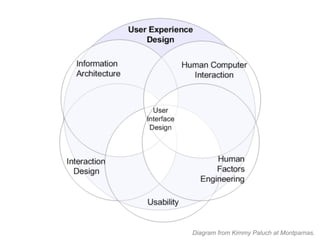
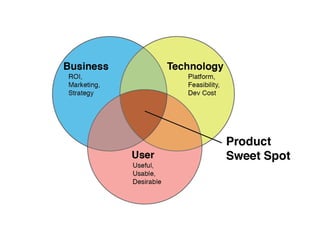
Diagram from Kimmy Paluch at Montparnas.
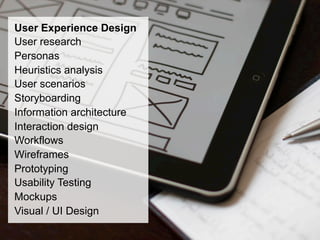
User Experience Design
User research
Personas
Heuristics analysis
User scenarios
Storyboarding
Information architecture
Interaction design
Workflows
Wireframes
Prototyping
Usability Testing
Mockups
Visual / UI Design
Good design is not magic!

There are no cookie-cutter
solutions that you pull out of
a hat.

Good design involves creativity,
balance, and a solid foundation
of guiding principles.

Your activities and how you do
them will always depend on
your product’s maturity, project
resources and constraints.
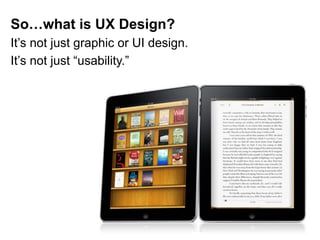
So…what is UX Design?
It’s not just graphic or UI design.
It’s not just “usability.”
UX Design is a combination of
research and design methods used to
understand user needs and design
products that people want to use.
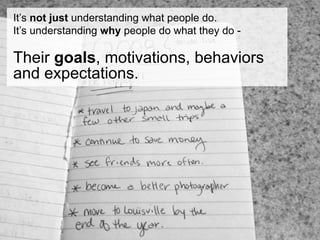
It’s not just understanding what people do.
It’s understanding why people do what they do -

Their goals, motivations, behaviors
and expectations.
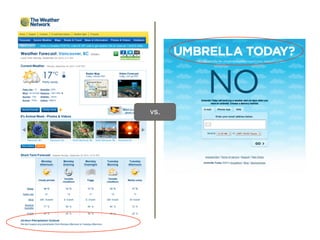
vs.
In Goal-Directed Design, focus is maintained on user goals
to provide rationale for design decisions and a benchmark
for evaluating them.

If your product helps people achieve their goals effectively
and happily, it’s more likely to be successful.
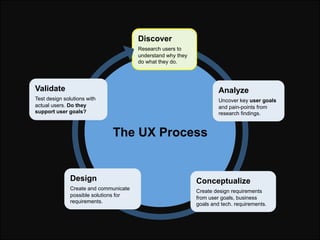
Discover
                                        Research users to
                                        understand why they
                                        do what they do.


Validate                                                               Analyze
Test design solutions with                                             Uncover key user goals
actual users. Do they                                                  and pain-points from
support user goals?                                                    research findings.


                              The UX Process


               Design                                         Conceptualize
               Create and communicate                         Create design requirements
               possible solutions for                         from user goals, business
               requirements.                                  goals and tech. requirements.
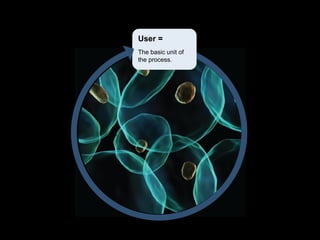
User =
The basic unit of
the process.
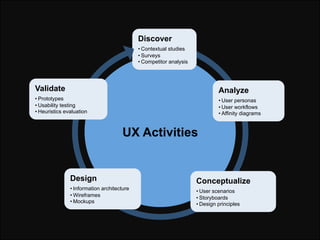
Discover
                                            • Contextual studies
                                            • Surveys
                                            • Competitor analysis


Validate                                                                     Analyze
• Prototypes                                                                 • User personas
• Usability testing                                                          • User workflows
• Heuristics evaluation                                                      • Affinity diagrams


                                      UX Activities


               Design                                               Conceptualize
               • Information architecture                           • User scenarios
               • Wireframes                                         • Storyboards
               • Mockups                                            • Design principles
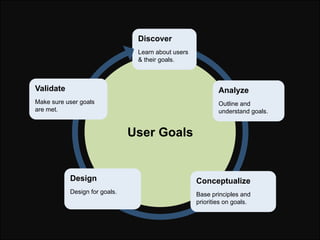
Discover
                                Learn about users
                                & their goals.


Validate                                                    Analyze
Make sure user goals                                        Outline and
are met.                                                    understand goals.


                               User Goals


           Design                                   Conceptualize
           Design for goals.                        Base principles and
                                                    priorities on goals.
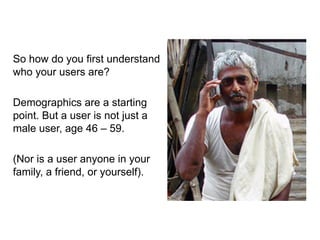
So how do you first understand
who your users are?

Demographics are a starting
point. But a user is not just a
male user, age 46 – 59.

(Nor is a user anyone in your
family, a friend, or yourself).
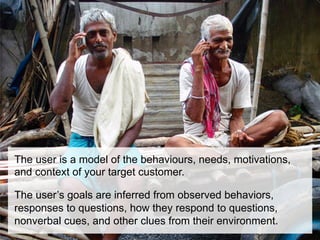
The user is a model of the behaviours, needs, motivations,
and context of your target customer.

The user’s goals are inferred from observed behaviors,
responses to questions, how they respond to questions,
nonverbal cues, and other clues from their environment.
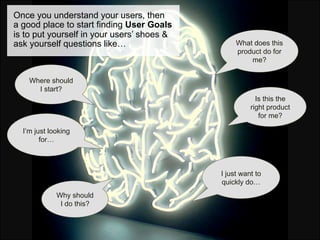
Once you understand your users, then
a good place to start finding User Goals
is to put yourself in your users’ shoes &
ask yourself questions like…                     What does this
                                                 product do for
                                                     me?

    Where should
      I start?
                                                        Is this the
                                                      right product
                                                         for me?

  I’m just looking
        for…


                                            I just want to
                                            quickly do…
             Why should
              I do this?
User Goals should be related to:
•  How a user wants to feel
•  What they want to do
•  Who they want to be

They are not tasks or what you
want a user to do with your
product.

They’re also often not what a
user says they are, because it’s
hard for a person to articulate
his/her own goal.
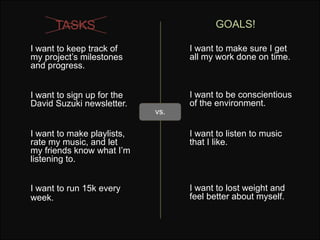
TASKS                              GOALS!

I want to keep track of           I want to make sure I get
my project’s milestones           all my work done on time.
and progress.


I want to sign up for the         I want to be conscientious
David Suzuki newsletter.          of the environment.
                            vs.

I want to make playlists,         I want to listen to music
rate my music, and let            that I like.
my friends know what I’m
listening to.


I want to run 15k every           I want to lost weight and
week.                             feel better about myself.
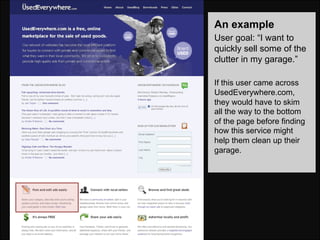
An example
User goal: “I want to
quickly sell some of the
clutter in my garage.”

If this user came across
UsedEverywhere.com,
they would have to skim
all the way to the bottom
of the page before finding
how this service might
help them clean up their
garage.
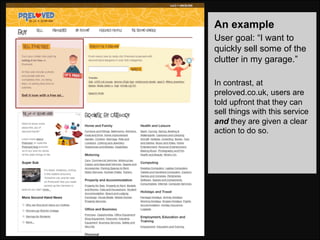
An example
User goal: “I want to
quickly sell some of the
clutter in my garage.”

In contrast, at
preloved.co.uk, users are
told upfront that they can
sell things with this service
and they are given a clear
action to do so.
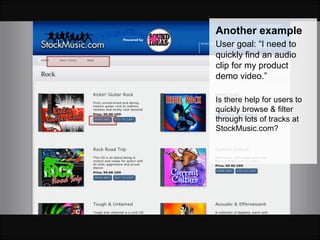
Another example
User goal: “I need to
quickly find an audio
clip for my product
demo video.”

Is there help for users to
quickly browse & filter
through lots of tracks at
StockMusic.com?
User Goals
    •  Example of site that supports goals
       well


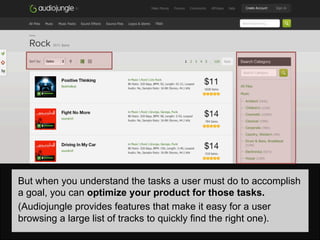
But when you understand the tasks a user must do to accomplish
a goal, you can optimize your product for those tasks.
(Audiojungle provides features that make it easy for a user
browsing a large list of tracks to quickly find the right one).
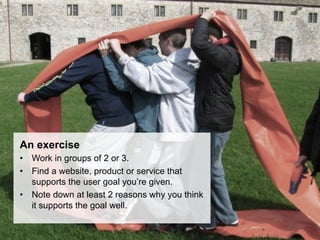
An exercise
•  Work in groups of 2 or 3.
•  Find a website, product or service that
   supports the user goal you’re given.
•  Note down at least 2 reasons why you think
   it supports the goal well.
When you understand your users’ goals and their context, you
can focus your product on satisfying those goals.
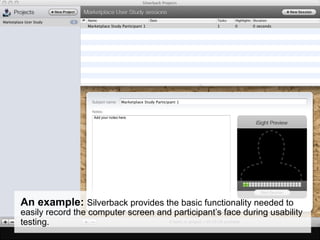
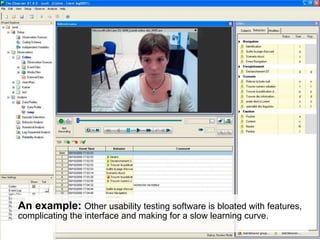
An example: Silverback provides the basic functionality needed to
easily record the computer screen and participant’s face during usability
testing.
An example: Other usability testing software is bloated with features,
complicating the interface and making for a slow learning curve.
Discovering Goals
•  User Goals à Product
•  But Product à User Goals?
An example: Who is Questrade for?
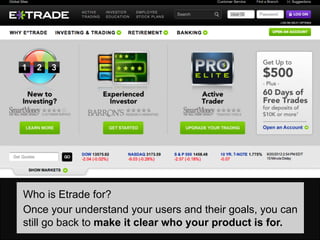
Who is Etrade for?
Once your understand your users and their goals, you can
still go back to make it clear who your product is for.
What you can do now
•    Next workshop we will teach you how to
     talk to and learn from users.
•    Goals can help you focus/tweak your
     product or prioritize your features.
Homework
Examining your own product / service, determine:
•  Who your target user(s) are.
•  Their 3 most important goals.
•  How a user would go about completing their goal,
   starting from the first touch-point with your product.
Questions?
info@periscopeux.com
Thanks!
…and thank you to all the awesome people who share their photos on
                                Flickr:
                           Stephen Bowler
                             Eva Ekeblad
                              Simon Law
                               "Baldiri"
                             Yagan Kiely
                           "The Mac Girl*"
                           Dipanker Dutta
                            "Kool_skatkat"
                         Courtney McGough
                             Devon Shaw
                         Andrea Hernandez
                             And also
                        Jesseedwards.net
                         "Juice Bits" blog

User Experience Design Fundamentals - Part 1: Users & Goals

  • 1.
    User Experience Design Fundamentals1: Users & Goals Periscope | www.periscopeux.com We design smart, usable digital products Laura Ballay & Meghan Deutscher
  • 2.
    Takeaways Understand UX fundamentals: • Value & Process •  Goal-directed design •  Users and their goals Learn how to articulate the goals of your product’s users Learn how to use user goals to assess a website or product
  • 3.
    Diagram from KimmyPaluch at Montparnas.
  • 5.
    User Experience Design Userresearch Personas Heuristics analysis User scenarios Storyboarding Information architecture Interaction design Workflows Wireframes Prototyping Usability Testing Mockups Visual / UI Design
  • 6.
    Good design isnot magic! There are no cookie-cutter solutions that you pull out of a hat. Good design involves creativity, balance, and a solid foundation of guiding principles. Your activities and how you do them will always depend on your product’s maturity, project resources and constraints.
  • 7.
    So…what is UXDesign? It’s not just graphic or UI design. It’s not just “usability.”
  • 8.
    UX Design isa combination of research and design methods used to understand user needs and design products that people want to use.
  • 9.
    It’s not justunderstanding what people do. It’s understanding why people do what they do - Their goals, motivations, behaviors and expectations.
  • 10.
  • 11.
    In Goal-Directed Design,focus is maintained on user goals to provide rationale for design decisions and a benchmark for evaluating them. If your product helps people achieve their goals effectively and happily, it’s more likely to be successful.
  • 12.
    Discover Research users to understand why they do what they do. Validate Analyze Test design solutions with Uncover key user goals actual users. Do they and pain-points from support user goals? research findings. The UX Process Design Conceptualize Create and communicate Create design requirements possible solutions for from user goals, business requirements. goals and tech. requirements.
  • 13.
    User = The basicunit of the process.
  • 14.
    Discover • Contextual studies • Surveys • Competitor analysis Validate Analyze • Prototypes • User personas • Usability testing • User workflows • Heuristics evaluation • Affinity diagrams UX Activities Design Conceptualize • Information architecture • User scenarios • Wireframes • Storyboards • Mockups • Design principles
  • 15.
    Discover Learn about users & their goals. Validate Analyze Make sure user goals Outline and are met. understand goals. User Goals Design Conceptualize Design for goals. Base principles and priorities on goals.
  • 16.
    So how doyou first understand who your users are? Demographics are a starting point. But a user is not just a male user, age 46 – 59. (Nor is a user anyone in your family, a friend, or yourself).
  • 17.
    The user isa model of the behaviours, needs, motivations, and context of your target customer. The user’s goals are inferred from observed behaviors, responses to questions, how they respond to questions, nonverbal cues, and other clues from their environment.
  • 18.
    Once you understandyour users, then a good place to start finding User Goals is to put yourself in your users’ shoes & ask yourself questions like… What does this product do for me? Where should I start? Is this the right product for me? I’m just looking for… I just want to quickly do… Why should I do this?
  • 19.
    User Goals shouldbe related to: •  How a user wants to feel •  What they want to do •  Who they want to be They are not tasks or what you want a user to do with your product. They’re also often not what a user says they are, because it’s hard for a person to articulate his/her own goal.
  • 20.
    TASKS GOALS! I want to keep track of I want to make sure I get my project’s milestones all my work done on time. and progress. I want to sign up for the I want to be conscientious David Suzuki newsletter. of the environment. vs. I want to make playlists, I want to listen to music rate my music, and let that I like. my friends know what I’m listening to. I want to run 15k every I want to lost weight and week. feel better about myself.
  • 21.
    An example User goal:“I want to quickly sell some of the clutter in my garage.” If this user came across UsedEverywhere.com, they would have to skim all the way to the bottom of the page before finding how this service might help them clean up their garage.
  • 22.
    An example User goal:“I want to quickly sell some of the clutter in my garage.” In contrast, at preloved.co.uk, users are told upfront that they can sell things with this service and they are given a clear action to do so.
  • 23.
    Another example User goal:“I need to quickly find an audio clip for my product demo video.” Is there help for users to quickly browse & filter through lots of tracks at StockMusic.com?
  • 24.
    User Goals •  Example of site that supports goals well But when you understand the tasks a user must do to accomplish a goal, you can optimize your product for those tasks. (Audiojungle provides features that make it easy for a user browsing a large list of tracks to quickly find the right one).
  • 25.
    An exercise •  Workin groups of 2 or 3. •  Find a website, product or service that supports the user goal you’re given. •  Note down at least 2 reasons why you think it supports the goal well.
  • 26.
    When you understandyour users’ goals and their context, you can focus your product on satisfying those goals.
  • 27.
    An example: Silverbackprovides the basic functionality needed to easily record the computer screen and participant’s face during usability testing.
  • 28.
    An example: Otherusability testing software is bloated with features, complicating the interface and making for a slow learning curve.
  • 29.
    Discovering Goals •  UserGoals à Product •  But Product à User Goals?
  • 30.
    An example: Whois Questrade for?
  • 31.
    Who is Etradefor? Once your understand your users and their goals, you can still go back to make it clear who your product is for.
  • 32.
    What you cando now •  Next workshop we will teach you how to talk to and learn from users. •  Goals can help you focus/tweak your product or prioritize your features.
  • 33.
    Homework Examining your ownproduct / service, determine: •  Who your target user(s) are. •  Their 3 most important goals. •  How a user would go about completing their goal, starting from the first touch-point with your product.
  • 34.
  • 35.
    Thanks! …and thank youto all the awesome people who share their photos on Flickr: Stephen Bowler Eva Ekeblad Simon Law "Baldiri" Yagan Kiely "The Mac Girl*" Dipanker Dutta "Kool_skatkat" Courtney McGough Devon Shaw Andrea Hernandez And also Jesseedwards.net "Juice Bits" blog