Module 6 – Timer, serial port
and Interrupt programming
Marimuthu R
Timer
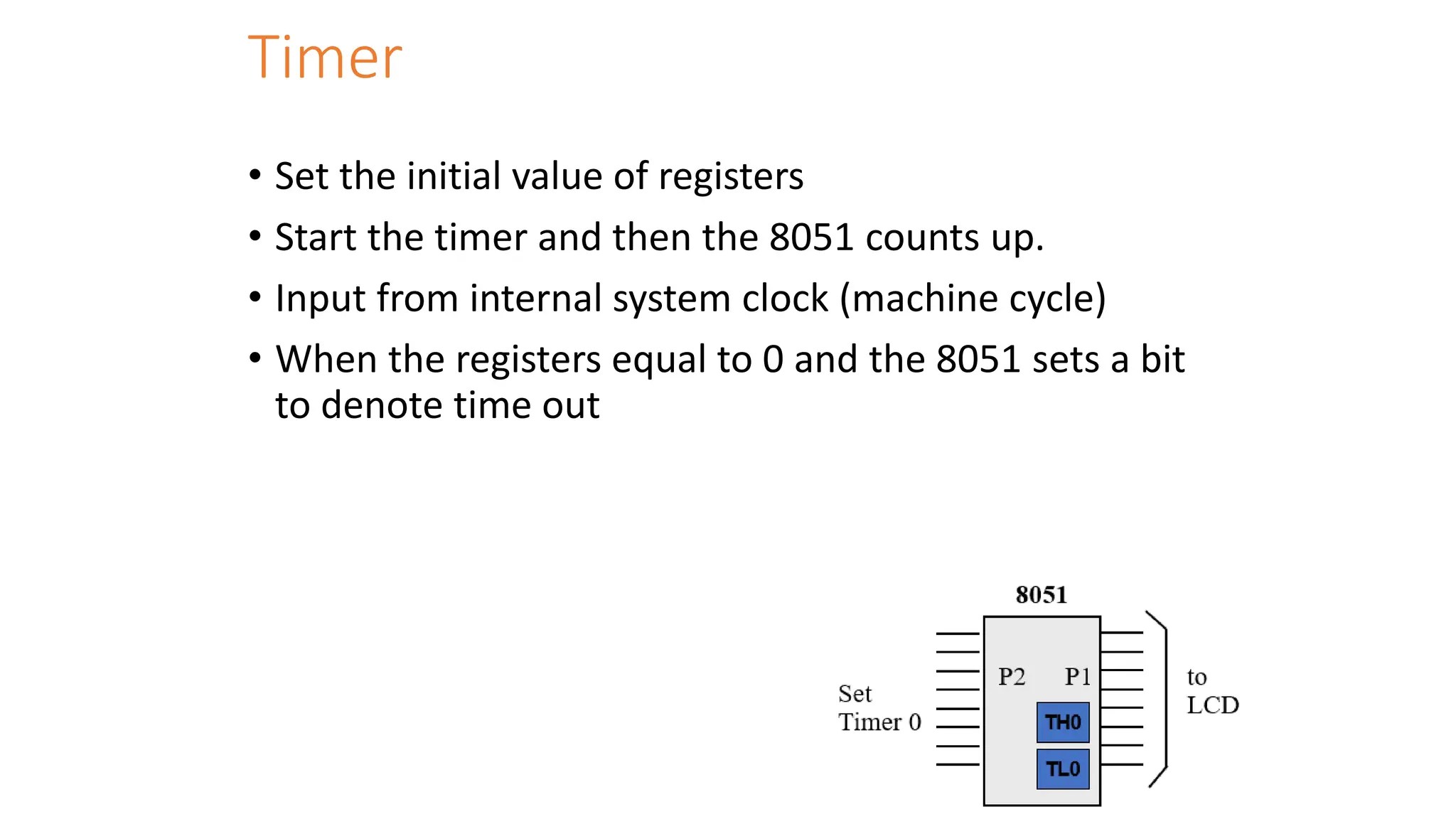
• Set the initial value of registers
• Start the timer and then the 8051 counts up.
• Input from internal system clock (machine cycle)
• When the registers equal to 0 and the 8051 sets a bit
to denote time out
Counter
• Count the number of events
• Show the number of events on registers
• External input from T0 input pin (P3.4) for Counter 0
• External input from T1 input pin (P3.5) for Counter 1
• External input from Tx input pin.
• We use Tx to denote T0 or T1.
Registers Used in Timer/Counter
• TH0, TL0, TH1, TL1
• TMOD (Timer mode register)
• TCON (Timer control register)
• You can see Appendix H (pages 413-415) for details.
• Since 8052 has 3 timers/counters, the formats of these control
registers are different.
• T2CON (Timer 2 control register), TH2 and TL2 used for 8052 only.
Basic Registers of the Timer
• Both timer 0 and timer 1 are 16 bits wide.
• These registers stores
• the time delay as a timer
• the number of events as a counter
• Timer 0: TH0 & TL0
• Timer 0 high byte, timer 0 low byte
• Timer 1: TH1 & TL1
• Timer 1 high byte, timer 1 low byte
• Each 16-bit timer can be accessed as two separate registers of low byte and
high byte.
Timer Registers
TMOD Register
• Timer mode register: TMOD
MOV TMOD,#21H
• An 8-bit register
• Set the usage mode for two timers
• Set lower 4 bits for Timer 0 (Set to 0000 if not used)
• Set upper 4 bits for Timer 1 (Set to 0000 if not used)
• Not bit-addressable
GATE C/T M1 M0 GATE C/T M1 M0
Timer 1 Timer 0
(MSB) (LSB)
TMOD Register
GATE Gating control when set. Timer/counter is enabled only while the
INTx pin is high and the TRx control pin is set. When cleared, the
timer is enabled whenever the TRx control bit is set.
C/T Timer or counter selected cleared for timer operation (input
from internal system clock). Set for counter operation (input
from Tx input pin).
M1 Mode bit 1
M0 Mode bit 0
C/T (Counter/Timer)
• This bit is used to decide whether the timer is used as a delay
generator or an event counter.
• C/T = 0 : timer
• C/T = 1 : counter
Gate
• Every timer has a mean of starting and stopping.
• GATE=0
• Internal control
• The start and stop of the timer are controlled by way of software.
• Set/clear the TR for start/stop timer.
• GATE=1
• External control
• The hardware way of starting and stopping the timer by software and an external source.
• Timer/counter is enabled only while the INT pin is high and the TR control pin is set (TR).
M1, M0
• M0 and M1 select the timer mode for timers 0 & 1.
M1 M0 Mode Operating Mode
0 0 0 13-bit timer mode
8-bit THx + 5-bit TLx (x= 0 or 1)
0 1 1 16-bit timer mode
8-bit THx + 8-bit TLx
1 0 2 8-bit auto reload
8-bit auto reload timer/counter;
THx holds a value which is to be reloaded into
TLx each time it overflows.
1 1 3 Split timer mode
Example
Find the value for TMOD if we want to program timer 0 in mode 2,
use 8051 XTAL for the clock source, and use instructions to start
and stop the timer.
Solution:
TMOD= 0000 0010 Timer 1 is not used.
Timer 0, mode 2,
C/T = 0 to use XTAL clock source (timer)
gate = 0 to use internal (software)
start and stop method.
Timer modes
TCON Register (1/2)
• Timer control register: TMOD
– Upper nibble for timer/counter, lower nibble for
interrupts
• TR (run control bit)
– TR0 for Timer/counter 0; TR1 for
Timer/counter 1.
– TR is set by programmer to turn timer/counter
on/off.
• TR=0: off (stop)
• TR=1: on (start)
TF1 TR1 TF0 TR0 IE1 IT1 IE0 IT0
Timer 1 Timer0 for Interrupt
(MSB) (LSB)
TCON Register (2/2)
• TF (timer flag, control flag)
– TF0 for timer/counter 0; TF1 for timer/counter 1.
– TF is like a carry. Originally, TF=0. When TH-TL roll
over to 0000 from FFFFH, the TF is set to 1.
• TF=0 : not reach
• TF=1: reach
• If we enable interrupt, TF=1 will trigger ISR.
TF1 TR1 TF0 TR0 IE1 IT1 IE0 IT0
Timer 1 Timer0 for Interrupt
(MSB) (LSB)
Equivalent Instructions for the Timer Control
Register
For timer 0
SETB TR0 = SETB TCON.4
CLR TR0 = CLR TCON.4
SETB TF0 = SETB TCON.5
CLR TF0 = CLR TCON.5
For timer 1
SETB TR1 = SETB TCON.6
CLR TR1 = CLR TCON.6
SETB TF1 = SETB TCON.7
CLR TF1 = CLR TCON.7
Timer Mode 1
• In following, we all use timer 0 as an example.
• 16-bit timer (TH0 and TL0)
• TH0-TL0 is incremented continuously when TR0 is set to 1. And the 8051
stops to increment TH0-TL0 when TR0 is cleared.
• The timer works with the internal system clock. In other words, the timer
counts up each machine cycle.
• When the timer (TH0-TL0) reaches its maximum of FFFFH, it rolls over to
0000, and TF0 is raised.
• Programmer should check TF0 and stop the timer 0.
Steps of Mode 1 (1/3)
1. Choose mode 1 timer 0
• MOV TMOD,#01H
2. Set the original value to TH0 and TL0.
• MOV TH0,#FFH
• MOV TL0,#FCH
3. You had better to clear the flag to monitor: TF0=0.
• CLR TF0
4. Start the timer.
• SETB TR0
Steps of Mode 1 (2/3)
5.The 8051 starts to count up by incrementing the
TH0-TL0.
– TH0-TL0=
FFFCH,FFFDH,FFFEH,FFFFH,0000H
Steps of Mode 1 (3/3)
6. When TH0-TL0 rolls over from FFFFH to 0000, the 8051 set
TF0=1.
TH0-TL0= FFFEH, FFFFH, 0000H (Now TF0=1)
7. Keep monitoring the timer flag (TF) to see if it is raised.
AGAIN: JNB TF0, AGAIN
8. Clear TR0 to stop the process.
CLR TR0
9. Clear the TF flag for the next round.
CLR TF0
Mode 1 Programming
Timer Delay Calculation for XTAL = 11.0592
MHz
(a) in hex
• (FFFF – YYXX + 1) × 1.085 s
• where YYXX are TH, TL initial values respectively.
• Notice that values YYXX are in hex.
(b) in decimal
• Convert YYXX values of the TH, TL register to decimal to get
a NNNNN decimal number
• then (65536 – NNNNN) × 1.085 s
Find Timer Values
• Assume that XTAL = 11.0592 MHz .
• And we know desired delay
• how to find the values for the TH,TL ?
1. Divide the delay by 1.085 s and get n.
2. Perform 65536 –n
3. Convert the result of Step 2 to hex (yyxx )
4. Set TH = yy and TL = xx.
Programming steps for delay function
• Load Tmod register value i.e. TMOD = 0x01 for Timer0 mode1 (16-bit
timer mode).
• Load calculated THx value i.e. here TH0 = 0xFC.
• Load calculated TLx value i.e. here TL0 = 0x74.
• Start the timer by setting a TRx bit. i.e. here TR0 = 1.
• Poll TFx flag till it does not get set.
• Stop the timer by clearing TRx bit. i.e. here TR0 = 0.
• Clear timer flag TFx bit i.e. here TF0 = 0.
• Repeat from step 1 to 7 for the delay again.
Example Code – (T0 – M1)
#include <reg51.h> /* Include x51 header file */
sbit test = P1^0; /* set test pin0 of port1 */
void timer_delay() /* Timer0 delay function */
{
TH0 = 0xFC; /* Load higher 8-bit in TH0 */
TL0 = 0x74; /* Load lower 8-bit in TL0 */
TR0 = 1; /* Start timer0 */
while(TF0 == 0);/* Wait until timer0 flag set */
TR0 = 0; /* Stop timer0 */
TF0 = 0; /* Clear timer0 flag */
}
void main()
{
TMOD = 0x01; /* Timer0 mode1 (16-bit timer mode) */
while(1)
{
test = ~test; /* Toggle test pin */
timer_delay(); /* Call timer0 delay */
}
}
Generate a Large Time Delay
• The size of the time delay depends on two factors:
• They crystal frequency
• The timer’s 16-bit register, TH & TL
• The largest time delay is achieved by making TH=TL=0.
• What if that is not enough?
• Next Example show how to achieve large time delay
Generate 1-sec delay
#include<reg51.h>
sbit led=P1^0; //Led connected to port-1 pin#0
void delay()
{
int count=0;
while(count!=500)
{
TMOD=0x01; //16-bit timer0 selected
TH0=0xF8; // Loading high byte in TH
TL0=0xCC; // Loaded low byte in TL
TR0=1; // Running the timer
while(!TF0); //Checking the timer flag register if it is not equal to 1
TR0 = 0; // If TF0=1 stop the timer
TF0 = 0; // Clear the Timer Flag bit for next calculation
Generate 1-sec delay
count++;
}
}
void main()
{
P1=0x00; //Port-1 Declared Output
while(1) // Constantly running while loop.
{
led=1; // LED glows here
delay(); // Delay for 1 second
led=0; // LED switch off
delay(); // Delay for 1 second
}
}
Timer Mode 2
• 8-bit timer.
• It allows only values of 00 to FFH to be loaded into TH0.
• Auto-reloading
• TL0 is incremented continuously when TR0=1.
• next example: 200 MCs delay on timer 0.
• See Examples 9-14 to 9-16
Timer 1 Mode 2 with internal Input
XTAL
oscillator ÷ 12
TR1
TL1
TH1
TF1
overflow flag
reload
TF goes high when FF 0
C/T = 0
Example
Find
(a) the frequency of the square wave generated in the following code
(b) the duty cycle of this wave.
Solution:
“MOV TH0,#-150” uses 150 clocks.
The DELAY subroutine = 150 × 1.085 s = 162 s.
The high portion is twice tat of the low portion (66% duty cycle).
The total period = high portion + low portion
T= 325.5 s + 162.25 s = 488.25 s
Frequency = 2.048 kHz.
Mode 2 Code
• Load Tmod register value i.e. TMOD = 0x20 for Timer1 mode2 (8-bit
timer auto reload mode).
• Load calculated THx value i.e. here TH1 = 0xA4.
• Load same value for TLx i.e. here TL1 = 0xA4.
• Start the timer by setting a TRx bit. i.e. here TR1 = 1.
• Poll TFx flag till it does not get set.
• Clear timer flag TFx bit i.e. here TF1 = 0.
• Repeat from step 5 and 6 for the delay again.
Program (T1 – M2)
#include <reg51.h> /* Include x51 header file */
sbit test = P1^0; /* set test pin0 of port1 */
void main()
{
TMOD = 0x20; /* Timer1 mode2 (8-bit auto reload timer mode) */
TH1 = 0xA4; /* Load 8-bit in TH1 */
TL1 = 0xA4; /* Load 8-bit in TL1 once */
TR1 = 1; /* Start timer1 */
while(1)
{
test = ~test; /* Toggle test pin */
while(TF1 == 0); /* Wait until timer1 flag set */
TF1 = 0; /* Clear timer1 flag */
}
}
Counter
• These timers can also be used as counters counting
events happening outside the 8051.
• When the timer is used as a counter, it is a pulse
outside of the 8051 that increments the TH, TL.
• When C/T=1, the counter counts up as pulses are fed
from
• T0: timer 0 input (Pin 14, P3.4)
• T1: timer 1 input (Pin 15, P3.5)
Port 3 Pins Used For Timers 0 and 1
Pin Port Pin Function Description
14 P3.4 T0 Timer/Counter 0 external input
15 P3.5 T1 Timer/Counter 1 external input
GATE C/T=1 M1 M0 GATE C/T=1 M1 M0
Timer 1 Timer 0
(MSB) (LSB)
Timer/Counter selection
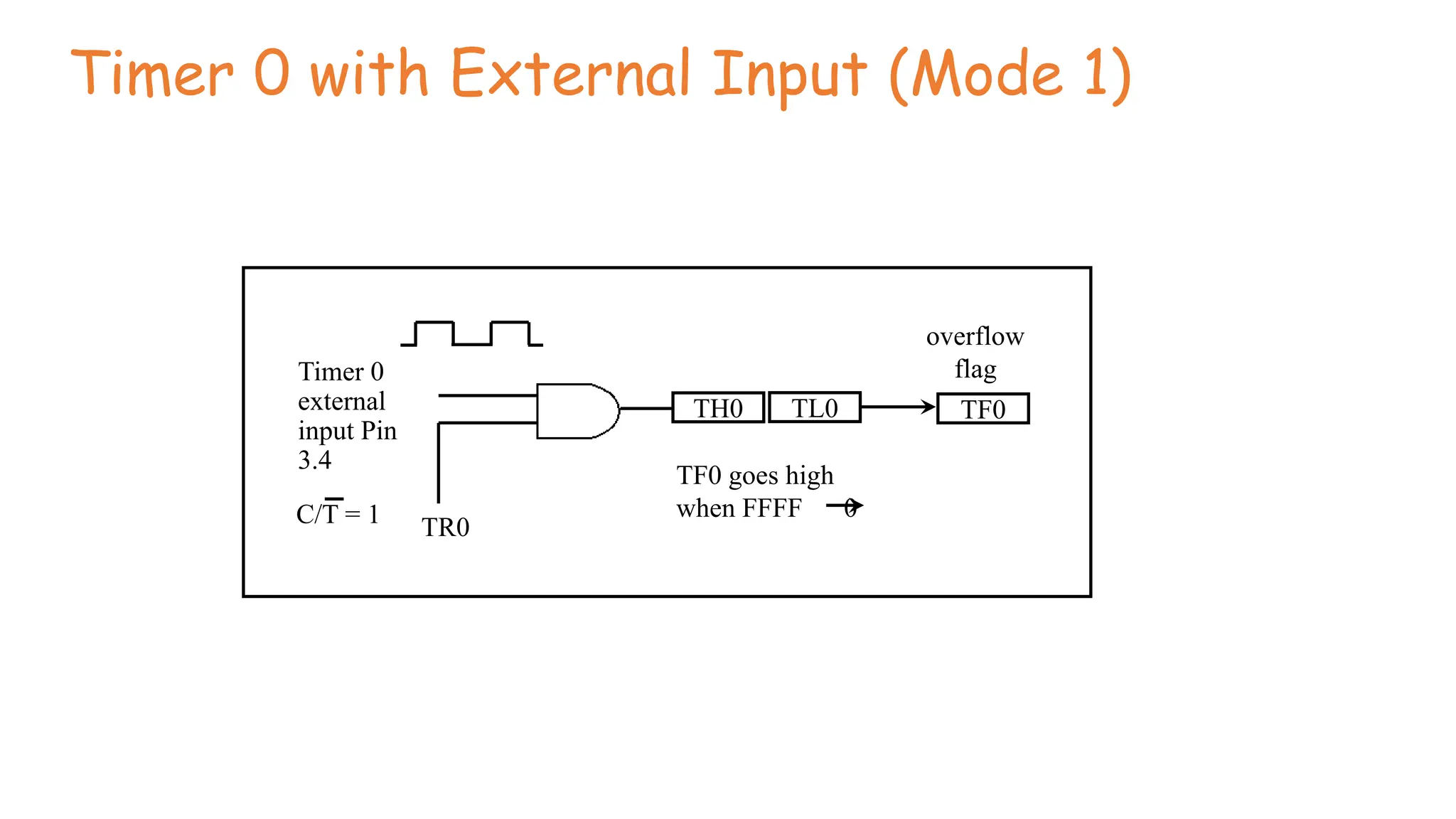
Counter Mode 1
• 16-bit counter (TH0 and TL0)
• TH0-TL0 is incremented when TR0 is set to 1 and an external pulse (in T0) occurs.
• When the counter (TH0-TL0) reaches its maximum of FFFFH, it rolls over to 0000, and TF0 is
raised.
• Programmers should monitor TF0 continuously and stop the counter 0.
• Programmers can set the initial value of TH0-TL0 and let TF0=1 as an indicator to show a
special condition. (ex: 100 people have come).
Timer 0 with External Input (Mode 1)
Timer 0
external
input Pin
3.4
TR0
TH0 TL0 TF0
TF0 goes high
when FFFF 0
overflow
flag
C/T = 1
Counter Mode 2
• 8-bit counter.
• It allows only values of 00 to FFH to be loaded into TH0.
• Auto-reloading
•TL0 is incremented if TR0=1 and external pulse occurs.
Example
Assume that a 1-Hz frequency pulse is connected to input pin 3.4.
Write a program to display counter 0 on an LCD. Set the initial
value of TH0 to -60.
Solution:
Note that on the first round, it starts from 0 and counts 256 events, since on RESET, TL0=0. To solve this problem, load
TH0 with -60 at the beginning of the program.
T
0
to
LCD
P3.4
P
1
8051
1 Hz clock
Counter Program – Mode 2
#include <reg51.h>
void main(void)
{
TMOD = 0x60;
TH1=0;
while(1)
{
do
{
TR1=1;
P1=TL1;
}
while(TF1==0) ;
TR1=0;
TF1=0;
}
}
Counter – Mode 1 Program
#include <reg51.h>
void main(void)
{
TMOD = 0x05;
TH0=0;
TL0=0;
while(1)
{
do
{
TR0=1;
P1=TL0;
P2=TH0;
}
while(TF0==0);
TR0=0;
TF0=0;
}
}
Assume that 60-Hz external clock is being fed into pin T0(3.4). Write a C program for
counter 0 in mode 2 to display the seconds and minutes on P1 and P2, respectively.
#include <reg51.h>
void T0Time(unsigned char);
void main(void)
{
unsigned char val;
TMOD = 0x06;
TH0=-60;
while(1)
{
do
{
TR0=1;
val=TL0;
T0Time(val);
}
while(TF0==0);
TR0=0;
TF0=0;
}
}
void T0Time(unsigned char val)
{
unsigned char sec, min;
min = val/60;
sec = val%60;
P1=sec;
P2=min;
}
Serial Communication
• Serial Vs Parallel
Serial Communication
• The transmitter converts a byte of data into serial bits using parallel-in-serial-out
shift register, while the receiver has a serial-in-parallel-out shift register to receive
the serial data and pack them into a byte.
• For a short distance, the digital signal can be transferred on a simple wire without
modulation.
• To transfer data over a long distance, some form of modulation may be required.
• For example, to transfer data on the telephone line, it must be converted from 0s
and 1s to audio tones.
• The device which performs conversion of 0s and 1s to audio tones, and back, is
called a modem, “Modulator/demodulator”.
Synchronous- transfer block of data(characters) at a time
Asynchronous- transfer single byte at a time
Serial Communication
• USART (Universal Synchronous-Asynchronous Receiver-Transmitter)
• UART (Universal Asynchronous Receiver Transmitter). The 8051 chip
has a built-in UART.
• Asynchronous communication is used for character-oriented
transmissions, but each character is placed in between start and stop
bits; this is called framing.
• The start bit is always one bit and the stop bit can be one or two bits.
The start bit is always a 0 (low), while the stop bit(s) is 1 (high) and
the LSB is sent out first.
• Block-oriented data transfers use the synchronous method. Data
transfer rate in serial data communication is mentioned in bps (bits
per second) or baud rate.
Framing
RS232
• RS232 standards: The bit-value of 1 is represented as -3 to -25 V and
the value 0 is represented as +3 to +25 V, while -3 to +3 is undefined.
MAX232 to convert the TTL logic levels to the RS232 voltage levels,
and vice versa.
• 8051 connections to RS232: 8051 has two pins used for transferring
and receiving data serially. They are TxD and RxD pins. TxD and RxD
are part of the port 3 group (P3.0 and P3.1), while pin 11 (P3.1) of
8051 is assigned to TxD.
Serial Communication Registers
• SBUF Register:
• 8-bit register.
• To transmit a byte of data via the TxD line, it must be placed in the
SBUF register.
• When a byte is written into SBUF, it is framed with the start and stop
bits and transferred serially via the TxD line.
• SBUF holds the byte of data when it is received by 8051 RxD line.
• When the bits are received serially via RxD, 8051 deframes it by
removing the stop and start bits, making a byte out of the data
received, and then places it in SBUF register.
SCON (serial control) register:
Mode 0: The baud rate is fixed at 1 / 12 of the oscillator frequency.
Mode 1: In this mode one data consists of 10 bits, which includes one start bit, eight data bit
and one stop bit. During reception the stop bit is stored as RB8 in SCON register.
Mode 2 In this mode the serial port function as full duplex serial port with a baud rate of
either 1/32 or 1/64 of the oscillator frequency.
Mode 3: The mode-3 is same as mode-2, except the baud rate.
PCON Register
Baud Rate Calculation
Procedure
1. Configure Timer 1 in mode 2 i.e 20H
2. Load TH1 as per the required baud rate.
3. Configure SCON register.
4. Start timer 1
5. Place the character to be transmitted in SBUF.
6. Keep monitor the “TI” pin until this bit is set.
7. Clear TI
8. Go to step 5 for next character.
Write a C program for 8051 to transfer the letter “A” serially at
4800 baud continuously.
#include <reg51.h>
void main(void){
TMOD=0x20; //use Timer 1, mode 2
TH1=0xFA; //4800 baud rate
SCON=0x50;
TR1=1;
while (1) {
SBUF=‘A’; //place value in buffer
while (TI==0);
TI=0;
}
}
Write an 8051 C program to transfer the message “YES” serially
at 9600 baud, 8-bit data, 1 stop bit. Do this continuously.
#include <reg51.h>
void SerTx(unsigned char);
void main(void){
TMOD=0x20; //use Timer 1, mode 2
TH1=0xFD; //9600 baud rate
SCON=0x50;
TR1=1; //start timer
while (1) {
SerTx(‘Y’);
SerTx(‘E’);
SerTx(‘S’);
}
}
void SerTx(unsigned char x){
SBUF=x; //place value in buffer
while (TI==0); //wait until transmitted
TI=0;
}
Program the 8051 in C to receive bytes of data serially and put them in
P1. Set the baud rate at 4800; use 8-bit data, and 1 stop bit.
#include <reg51.h>
void main(void){
unsigned char mybyte;
TMOD=0x20; //use Timer 1, mode 2
TH1=0xFA; //4800 baud rate
SCON=0x50;
TR1=1; //start timer
while (1) { //repeat forever
while (RI==0); //wait to receive
mybyte=SBUF; //save value
P1=mybyte; //write value to port
RI=0;
}
}
Program
• Write an 8051 C Program to send the two messages “Normal Speed”
and “High Speed” to the serial port. Assuming that SW is connected
to pin P2.0, monitor its status and set the baud rate as follows:
SW = 0, 28,800 baud rate
SW = 1, 56K baud rate
Assume that XTAL = 11.0592 MHz for both cases.
Program
#include <reg51.h>
sbit MYSW=P2^0; //input switch
void main(void){
unsigned char z;
unsigned char Mess1[]=“Normal Speed”;
unsigned char Mess2[]=“High Speed”;
TMOD=0x20; //use Timer 1, mode 2
TH1=0xFF; //28800 for normal
SCON=0x50;
TR1=1; //start timer
if(MYSW==0) {
for (z=0;z<12;z++) {
SBUF=Mess1[z]; //place value in buffer
while(TI==0); //wait for transmit
TI=0;
}
}
Program
else
{
PCON=PCON|0x80; //for high speed of 56K
for (z=0;z<10;z++) {
SBUF=Mess2[z]; //place value in buffer
while(TI==0); //wait for transmit
TI=0;
}
}
}
Types of Interrupts
IE Register
TCON Register
Bit 3- IE1:
External Interrupt 1 edge flag, set by hardware when interrupt on INT1 pin occurred and cleared by
hardware when interrupt get processed.
Bit 2- IT1:
This bit selects the external interrupt event type on INT1 pin,
1= sets interrupt on falling edge
0= sets interrupt on low level
Bit 1- IE0:
Interrupt0 edge flag, set by hardware when interrupt on INT0 pin occurred and cleared by hardware
when an interrupt is processed.
Bit 0 - IT0:
This bit selects the external interrupt event type on the INT0 pin.
1= sets interrupt on falling edge
0= sets interrupt on low level
Interrupt Structure
IP Register
Interrupt Numbers
External Interrupt – 0 Program
#include <reg51.h> /* Include x51 header file */
sbit LED = P1^0; /* set LED on port1 */
void Ext_int_Init()
{
EA = 1; /* Enable global interrupt */
EX0 = 1; /* Enable Ext. interrupt0 */
IT0 = 1; /* Select Ext. interrupt0 on falling edge */
}
void External0_ISR() interrupt 0
{
LED = ~LED;/* Toggle pin on falling edge on INT0 pin */
}
void main()
{
Ext_int_Init(); /* Call Ext. interrupt initialize */
while(1);
}
Write a program to increment P1 value when external interrupt 0 is detected.
Similarly, decrement P1 value when external interrupt 1 is detected.
#include <reg51.h> /* Include x51 header file */
sbit LED = P1^0; /* set LED on port1 */
unsigned char count;
void External0_ISR() interrupt 0
{
count++;
P1 = count;
}
void External_ISR() interrupt 2
{
count--;
P1 = count;
}
void main()
{
EA = 1;
EX0 = 1;
IT0 = 1;
EX1 = 1;
IT1 = 1;
while(1);
}
Program
• Write a C program that continuously gets a single bit of data from
P1.0 and sends it to P2.0, while simultaneously creating a square
wave of 200 µs period on pin P1.1. Use timer 0 to create the square
wave. Assume XTAL=11.0592 MHz.
• Write a C program that continuously gets a single bit of data from
P1.0 and sends it to P2.0, while simultaneously (a) creating a square
wave of 200 µs period on pin P1.1, and (b) sending letter ‘A’ to the
serial port. Use timer 0 to create the square wave. Assume
XTAL=11.0592 MHz. Use the 9600 baud rate.
Solution 1
#include <reg51.h> /* Include x51 header file */
sbit port1 = P1^0;
sbit port2 = P2^0;
sbit toggle = P1^1;
void timer0(void) interrupt 1
{
toggle = ~toggle;
}
void main()
{
TMOD=0X02;
TH0=0XA4;
IE=0X82;
TR0=1;
while(1)
{
port2 = port1;
}
}
Solution 2
#include <reg51.h> /* Include x51 header file */
sbit port1 = P1^0;
sbit port2 = P2^0;
sbit toggle = P1^1;
void timer0(void) interrupt 1
{
toggle = ~toggle;
}
void serial0() interrupt 4
{
if(TI==1)
{
TI=0;
}
}
Solution 2
void main()
{
TH1=-3;
TMOD=0X22;
TH0=0XA4;
IE=0X92;
TR0=1;
TR1=1;
while(1)
{
SBUF='A';
port2 = port1;
}
}

6-Interrupts Programming-27-03-2024.pptx

  • 1.
    Module 6 –Timer, serial port and Interrupt programming Marimuthu R
  • 2.
    Timer • Set theinitial value of registers • Start the timer and then the 8051 counts up. • Input from internal system clock (machine cycle) • When the registers equal to 0 and the 8051 sets a bit to denote time out
  • 3.
    Counter • Count thenumber of events • Show the number of events on registers • External input from T0 input pin (P3.4) for Counter 0 • External input from T1 input pin (P3.5) for Counter 1 • External input from Tx input pin. • We use Tx to denote T0 or T1.
  • 4.
    Registers Used inTimer/Counter • TH0, TL0, TH1, TL1 • TMOD (Timer mode register) • TCON (Timer control register) • You can see Appendix H (pages 413-415) for details. • Since 8052 has 3 timers/counters, the formats of these control registers are different. • T2CON (Timer 2 control register), TH2 and TL2 used for 8052 only.
  • 5.
    Basic Registers ofthe Timer • Both timer 0 and timer 1 are 16 bits wide. • These registers stores • the time delay as a timer • the number of events as a counter • Timer 0: TH0 & TL0 • Timer 0 high byte, timer 0 low byte • Timer 1: TH1 & TL1 • Timer 1 high byte, timer 1 low byte • Each 16-bit timer can be accessed as two separate registers of low byte and high byte.
  • 6.
  • 7.
    TMOD Register • Timermode register: TMOD MOV TMOD,#21H • An 8-bit register • Set the usage mode for two timers • Set lower 4 bits for Timer 0 (Set to 0000 if not used) • Set upper 4 bits for Timer 1 (Set to 0000 if not used) • Not bit-addressable GATE C/T M1 M0 GATE C/T M1 M0 Timer 1 Timer 0 (MSB) (LSB)
  • 8.
    TMOD Register GATE Gatingcontrol when set. Timer/counter is enabled only while the INTx pin is high and the TRx control pin is set. When cleared, the timer is enabled whenever the TRx control bit is set. C/T Timer or counter selected cleared for timer operation (input from internal system clock). Set for counter operation (input from Tx input pin). M1 Mode bit 1 M0 Mode bit 0
  • 9.
    C/T (Counter/Timer) • Thisbit is used to decide whether the timer is used as a delay generator or an event counter. • C/T = 0 : timer • C/T = 1 : counter
  • 10.
    Gate • Every timerhas a mean of starting and stopping. • GATE=0 • Internal control • The start and stop of the timer are controlled by way of software. • Set/clear the TR for start/stop timer. • GATE=1 • External control • The hardware way of starting and stopping the timer by software and an external source. • Timer/counter is enabled only while the INT pin is high and the TR control pin is set (TR).
  • 11.
    M1, M0 • M0and M1 select the timer mode for timers 0 & 1. M1 M0 Mode Operating Mode 0 0 0 13-bit timer mode 8-bit THx + 5-bit TLx (x= 0 or 1) 0 1 1 16-bit timer mode 8-bit THx + 8-bit TLx 1 0 2 8-bit auto reload 8-bit auto reload timer/counter; THx holds a value which is to be reloaded into TLx each time it overflows. 1 1 3 Split timer mode
  • 12.
    Example Find the valuefor TMOD if we want to program timer 0 in mode 2, use 8051 XTAL for the clock source, and use instructions to start and stop the timer. Solution: TMOD= 0000 0010 Timer 1 is not used. Timer 0, mode 2, C/T = 0 to use XTAL clock source (timer) gate = 0 to use internal (software) start and stop method.
  • 13.
  • 14.
    TCON Register (1/2) •Timer control register: TMOD – Upper nibble for timer/counter, lower nibble for interrupts • TR (run control bit) – TR0 for Timer/counter 0; TR1 for Timer/counter 1. – TR is set by programmer to turn timer/counter on/off. • TR=0: off (stop) • TR=1: on (start) TF1 TR1 TF0 TR0 IE1 IT1 IE0 IT0 Timer 1 Timer0 for Interrupt (MSB) (LSB)
  • 15.
    TCON Register (2/2) •TF (timer flag, control flag) – TF0 for timer/counter 0; TF1 for timer/counter 1. – TF is like a carry. Originally, TF=0. When TH-TL roll over to 0000 from FFFFH, the TF is set to 1. • TF=0 : not reach • TF=1: reach • If we enable interrupt, TF=1 will trigger ISR. TF1 TR1 TF0 TR0 IE1 IT1 IE0 IT0 Timer 1 Timer0 for Interrupt (MSB) (LSB)
  • 16.
    Equivalent Instructions forthe Timer Control Register For timer 0 SETB TR0 = SETB TCON.4 CLR TR0 = CLR TCON.4 SETB TF0 = SETB TCON.5 CLR TF0 = CLR TCON.5 For timer 1 SETB TR1 = SETB TCON.6 CLR TR1 = CLR TCON.6 SETB TF1 = SETB TCON.7 CLR TF1 = CLR TCON.7
  • 17.
    Timer Mode 1 •In following, we all use timer 0 as an example. • 16-bit timer (TH0 and TL0) • TH0-TL0 is incremented continuously when TR0 is set to 1. And the 8051 stops to increment TH0-TL0 when TR0 is cleared. • The timer works with the internal system clock. In other words, the timer counts up each machine cycle. • When the timer (TH0-TL0) reaches its maximum of FFFFH, it rolls over to 0000, and TF0 is raised. • Programmer should check TF0 and stop the timer 0.
  • 18.
    Steps of Mode1 (1/3) 1. Choose mode 1 timer 0 • MOV TMOD,#01H 2. Set the original value to TH0 and TL0. • MOV TH0,#FFH • MOV TL0,#FCH 3. You had better to clear the flag to monitor: TF0=0. • CLR TF0 4. Start the timer. • SETB TR0
  • 19.
    Steps of Mode1 (2/3) 5.The 8051 starts to count up by incrementing the TH0-TL0. – TH0-TL0= FFFCH,FFFDH,FFFEH,FFFFH,0000H
  • 20.
    Steps of Mode1 (3/3) 6. When TH0-TL0 rolls over from FFFFH to 0000, the 8051 set TF0=1. TH0-TL0= FFFEH, FFFFH, 0000H (Now TF0=1) 7. Keep monitoring the timer flag (TF) to see if it is raised. AGAIN: JNB TF0, AGAIN 8. Clear TR0 to stop the process. CLR TR0 9. Clear the TF flag for the next round. CLR TF0
  • 21.
  • 22.
    Timer Delay Calculationfor XTAL = 11.0592 MHz (a) in hex • (FFFF – YYXX + 1) × 1.085 s • where YYXX are TH, TL initial values respectively. • Notice that values YYXX are in hex. (b) in decimal • Convert YYXX values of the TH, TL register to decimal to get a NNNNN decimal number • then (65536 – NNNNN) × 1.085 s
  • 23.
    Find Timer Values •Assume that XTAL = 11.0592 MHz . • And we know desired delay • how to find the values for the TH,TL ? 1. Divide the delay by 1.085 s and get n. 2. Perform 65536 –n 3. Convert the result of Step 2 to hex (yyxx ) 4. Set TH = yy and TL = xx.
  • 24.
    Programming steps fordelay function • Load Tmod register value i.e. TMOD = 0x01 for Timer0 mode1 (16-bit timer mode). • Load calculated THx value i.e. here TH0 = 0xFC. • Load calculated TLx value i.e. here TL0 = 0x74. • Start the timer by setting a TRx bit. i.e. here TR0 = 1. • Poll TFx flag till it does not get set. • Stop the timer by clearing TRx bit. i.e. here TR0 = 0. • Clear timer flag TFx bit i.e. here TF0 = 0. • Repeat from step 1 to 7 for the delay again.
  • 25.
    Example Code –(T0 – M1) #include <reg51.h> /* Include x51 header file */ sbit test = P1^0; /* set test pin0 of port1 */ void timer_delay() /* Timer0 delay function */ { TH0 = 0xFC; /* Load higher 8-bit in TH0 */ TL0 = 0x74; /* Load lower 8-bit in TL0 */ TR0 = 1; /* Start timer0 */ while(TF0 == 0);/* Wait until timer0 flag set */ TR0 = 0; /* Stop timer0 */ TF0 = 0; /* Clear timer0 flag */ } void main() { TMOD = 0x01; /* Timer0 mode1 (16-bit timer mode) */ while(1) { test = ~test; /* Toggle test pin */ timer_delay(); /* Call timer0 delay */ } }
  • 26.
    Generate a LargeTime Delay • The size of the time delay depends on two factors: • They crystal frequency • The timer’s 16-bit register, TH & TL • The largest time delay is achieved by making TH=TL=0. • What if that is not enough? • Next Example show how to achieve large time delay
  • 27.
    Generate 1-sec delay #include<reg51.h> sbitled=P1^0; //Led connected to port-1 pin#0 void delay() { int count=0; while(count!=500) { TMOD=0x01; //16-bit timer0 selected TH0=0xF8; // Loading high byte in TH TL0=0xCC; // Loaded low byte in TL TR0=1; // Running the timer while(!TF0); //Checking the timer flag register if it is not equal to 1 TR0 = 0; // If TF0=1 stop the timer TF0 = 0; // Clear the Timer Flag bit for next calculation
  • 28.
    Generate 1-sec delay count++; } } voidmain() { P1=0x00; //Port-1 Declared Output while(1) // Constantly running while loop. { led=1; // LED glows here delay(); // Delay for 1 second led=0; // LED switch off delay(); // Delay for 1 second } }
  • 29.
    Timer Mode 2 •8-bit timer. • It allows only values of 00 to FFH to be loaded into TH0. • Auto-reloading • TL0 is incremented continuously when TR0=1. • next example: 200 MCs delay on timer 0. • See Examples 9-14 to 9-16
  • 30.
    Timer 1 Mode2 with internal Input XTAL oscillator ÷ 12 TR1 TL1 TH1 TF1 overflow flag reload TF goes high when FF 0 C/T = 0
  • 31.
    Example Find (a) the frequencyof the square wave generated in the following code (b) the duty cycle of this wave. Solution: “MOV TH0,#-150” uses 150 clocks. The DELAY subroutine = 150 × 1.085 s = 162 s. The high portion is twice tat of the low portion (66% duty cycle). The total period = high portion + low portion T= 325.5 s + 162.25 s = 488.25 s Frequency = 2.048 kHz.
  • 32.
    Mode 2 Code •Load Tmod register value i.e. TMOD = 0x20 for Timer1 mode2 (8-bit timer auto reload mode). • Load calculated THx value i.e. here TH1 = 0xA4. • Load same value for TLx i.e. here TL1 = 0xA4. • Start the timer by setting a TRx bit. i.e. here TR1 = 1. • Poll TFx flag till it does not get set. • Clear timer flag TFx bit i.e. here TF1 = 0. • Repeat from step 5 and 6 for the delay again.
  • 33.
    Program (T1 –M2) #include <reg51.h> /* Include x51 header file */ sbit test = P1^0; /* set test pin0 of port1 */ void main() { TMOD = 0x20; /* Timer1 mode2 (8-bit auto reload timer mode) */ TH1 = 0xA4; /* Load 8-bit in TH1 */ TL1 = 0xA4; /* Load 8-bit in TL1 once */ TR1 = 1; /* Start timer1 */ while(1) { test = ~test; /* Toggle test pin */ while(TF1 == 0); /* Wait until timer1 flag set */ TF1 = 0; /* Clear timer1 flag */ } }
  • 34.
    Counter • These timerscan also be used as counters counting events happening outside the 8051. • When the timer is used as a counter, it is a pulse outside of the 8051 that increments the TH, TL. • When C/T=1, the counter counts up as pulses are fed from • T0: timer 0 input (Pin 14, P3.4) • T1: timer 1 input (Pin 15, P3.5)
  • 35.
    Port 3 PinsUsed For Timers 0 and 1 Pin Port Pin Function Description 14 P3.4 T0 Timer/Counter 0 external input 15 P3.5 T1 Timer/Counter 1 external input GATE C/T=1 M1 M0 GATE C/T=1 M1 M0 Timer 1 Timer 0 (MSB) (LSB)
  • 36.
  • 37.
    Counter Mode 1 •16-bit counter (TH0 and TL0) • TH0-TL0 is incremented when TR0 is set to 1 and an external pulse (in T0) occurs. • When the counter (TH0-TL0) reaches its maximum of FFFFH, it rolls over to 0000, and TF0 is raised. • Programmers should monitor TF0 continuously and stop the counter 0. • Programmers can set the initial value of TH0-TL0 and let TF0=1 as an indicator to show a special condition. (ex: 100 people have come).
  • 38.
    Timer 0 withExternal Input (Mode 1) Timer 0 external input Pin 3.4 TR0 TH0 TL0 TF0 TF0 goes high when FFFF 0 overflow flag C/T = 1
  • 39.
    Counter Mode 2 •8-bit counter. • It allows only values of 00 to FFH to be loaded into TH0. • Auto-reloading •TL0 is incremented if TR0=1 and external pulse occurs.
  • 40.
    Example Assume that a1-Hz frequency pulse is connected to input pin 3.4. Write a program to display counter 0 on an LCD. Set the initial value of TH0 to -60. Solution: Note that on the first round, it starts from 0 and counts 256 events, since on RESET, TL0=0. To solve this problem, load TH0 with -60 at the beginning of the program. T 0 to LCD P3.4 P 1 8051 1 Hz clock
  • 41.
    Counter Program –Mode 2 #include <reg51.h> void main(void) { TMOD = 0x60; TH1=0; while(1) { do { TR1=1; P1=TL1; } while(TF1==0) ; TR1=0; TF1=0; } }
  • 42.
    Counter – Mode1 Program #include <reg51.h> void main(void) { TMOD = 0x05; TH0=0; TL0=0; while(1) { do { TR0=1; P1=TL0; P2=TH0; } while(TF0==0); TR0=0; TF0=0; } }
  • 43.
    Assume that 60-Hzexternal clock is being fed into pin T0(3.4). Write a C program for counter 0 in mode 2 to display the seconds and minutes on P1 and P2, respectively. #include <reg51.h> void T0Time(unsigned char); void main(void) { unsigned char val; TMOD = 0x06; TH0=-60;
  • 44.
  • 45.
    void T0Time(unsigned charval) { unsigned char sec, min; min = val/60; sec = val%60; P1=sec; P2=min; }
  • 46.
  • 47.
    Serial Communication • Thetransmitter converts a byte of data into serial bits using parallel-in-serial-out shift register, while the receiver has a serial-in-parallel-out shift register to receive the serial data and pack them into a byte. • For a short distance, the digital signal can be transferred on a simple wire without modulation. • To transfer data over a long distance, some form of modulation may be required. • For example, to transfer data on the telephone line, it must be converted from 0s and 1s to audio tones. • The device which performs conversion of 0s and 1s to audio tones, and back, is called a modem, “Modulator/demodulator”. Synchronous- transfer block of data(characters) at a time Asynchronous- transfer single byte at a time
  • 48.
    Serial Communication • USART(Universal Synchronous-Asynchronous Receiver-Transmitter) • UART (Universal Asynchronous Receiver Transmitter). The 8051 chip has a built-in UART. • Asynchronous communication is used for character-oriented transmissions, but each character is placed in between start and stop bits; this is called framing. • The start bit is always one bit and the stop bit can be one or two bits. The start bit is always a 0 (low), while the stop bit(s) is 1 (high) and the LSB is sent out first. • Block-oriented data transfers use the synchronous method. Data transfer rate in serial data communication is mentioned in bps (bits per second) or baud rate.
  • 49.
  • 50.
    RS232 • RS232 standards:The bit-value of 1 is represented as -3 to -25 V and the value 0 is represented as +3 to +25 V, while -3 to +3 is undefined. MAX232 to convert the TTL logic levels to the RS232 voltage levels, and vice versa. • 8051 connections to RS232: 8051 has two pins used for transferring and receiving data serially. They are TxD and RxD pins. TxD and RxD are part of the port 3 group (P3.0 and P3.1), while pin 11 (P3.1) of 8051 is assigned to TxD.
  • 51.
    Serial Communication Registers •SBUF Register: • 8-bit register. • To transmit a byte of data via the TxD line, it must be placed in the SBUF register. • When a byte is written into SBUF, it is framed with the start and stop bits and transferred serially via the TxD line. • SBUF holds the byte of data when it is received by 8051 RxD line. • When the bits are received serially via RxD, 8051 deframes it by removing the stop and start bits, making a byte out of the data received, and then places it in SBUF register.
  • 52.
    SCON (serial control)register: Mode 0: The baud rate is fixed at 1 / 12 of the oscillator frequency. Mode 1: In this mode one data consists of 10 bits, which includes one start bit, eight data bit and one stop bit. During reception the stop bit is stored as RB8 in SCON register. Mode 2 In this mode the serial port function as full duplex serial port with a baud rate of either 1/32 or 1/64 of the oscillator frequency. Mode 3: The mode-3 is same as mode-2, except the baud rate.
  • 53.
  • 54.
  • 55.
    Procedure 1. Configure Timer1 in mode 2 i.e 20H 2. Load TH1 as per the required baud rate. 3. Configure SCON register. 4. Start timer 1 5. Place the character to be transmitted in SBUF. 6. Keep monitor the “TI” pin until this bit is set. 7. Clear TI 8. Go to step 5 for next character.
  • 56.
    Write a Cprogram for 8051 to transfer the letter “A” serially at 4800 baud continuously. #include <reg51.h> void main(void){ TMOD=0x20; //use Timer 1, mode 2 TH1=0xFA; //4800 baud rate SCON=0x50; TR1=1; while (1) { SBUF=‘A’; //place value in buffer while (TI==0); TI=0; } }
  • 57.
    Write an 8051C program to transfer the message “YES” serially at 9600 baud, 8-bit data, 1 stop bit. Do this continuously. #include <reg51.h> void SerTx(unsigned char); void main(void){ TMOD=0x20; //use Timer 1, mode 2 TH1=0xFD; //9600 baud rate SCON=0x50; TR1=1; //start timer while (1) { SerTx(‘Y’); SerTx(‘E’); SerTx(‘S’); } } void SerTx(unsigned char x){ SBUF=x; //place value in buffer while (TI==0); //wait until transmitted TI=0; }
  • 58.
    Program the 8051in C to receive bytes of data serially and put them in P1. Set the baud rate at 4800; use 8-bit data, and 1 stop bit. #include <reg51.h> void main(void){ unsigned char mybyte; TMOD=0x20; //use Timer 1, mode 2 TH1=0xFA; //4800 baud rate SCON=0x50; TR1=1; //start timer while (1) { //repeat forever while (RI==0); //wait to receive mybyte=SBUF; //save value P1=mybyte; //write value to port RI=0; } }
  • 59.
    Program • Write an8051 C Program to send the two messages “Normal Speed” and “High Speed” to the serial port. Assuming that SW is connected to pin P2.0, monitor its status and set the baud rate as follows: SW = 0, 28,800 baud rate SW = 1, 56K baud rate Assume that XTAL = 11.0592 MHz for both cases.
  • 60.
    Program #include <reg51.h> sbit MYSW=P2^0;//input switch void main(void){ unsigned char z; unsigned char Mess1[]=“Normal Speed”; unsigned char Mess2[]=“High Speed”; TMOD=0x20; //use Timer 1, mode 2 TH1=0xFF; //28800 for normal SCON=0x50; TR1=1; //start timer if(MYSW==0) { for (z=0;z<12;z++) { SBUF=Mess1[z]; //place value in buffer while(TI==0); //wait for transmit TI=0; } }
  • 61.
    Program else { PCON=PCON|0x80; //for highspeed of 56K for (z=0;z<10;z++) { SBUF=Mess2[z]; //place value in buffer while(TI==0); //wait for transmit TI=0; } } }
  • 62.
  • 63.
  • 64.
    TCON Register Bit 3-IE1: External Interrupt 1 edge flag, set by hardware when interrupt on INT1 pin occurred and cleared by hardware when interrupt get processed. Bit 2- IT1: This bit selects the external interrupt event type on INT1 pin, 1= sets interrupt on falling edge 0= sets interrupt on low level Bit 1- IE0: Interrupt0 edge flag, set by hardware when interrupt on INT0 pin occurred and cleared by hardware when an interrupt is processed. Bit 0 - IT0: This bit selects the external interrupt event type on the INT0 pin. 1= sets interrupt on falling edge 0= sets interrupt on low level
  • 65.
  • 66.
  • 67.
  • 68.
    External Interrupt –0 Program #include <reg51.h> /* Include x51 header file */ sbit LED = P1^0; /* set LED on port1 */ void Ext_int_Init() { EA = 1; /* Enable global interrupt */ EX0 = 1; /* Enable Ext. interrupt0 */ IT0 = 1; /* Select Ext. interrupt0 on falling edge */ } void External0_ISR() interrupt 0 { LED = ~LED;/* Toggle pin on falling edge on INT0 pin */ } void main() { Ext_int_Init(); /* Call Ext. interrupt initialize */ while(1); }
  • 69.
    Write a programto increment P1 value when external interrupt 0 is detected. Similarly, decrement P1 value when external interrupt 1 is detected. #include <reg51.h> /* Include x51 header file */ sbit LED = P1^0; /* set LED on port1 */ unsigned char count; void External0_ISR() interrupt 0 { count++; P1 = count; } void External_ISR() interrupt 2 { count--; P1 = count; } void main() { EA = 1; EX0 = 1; IT0 = 1; EX1 = 1; IT1 = 1; while(1); }
  • 70.
    Program • Write aC program that continuously gets a single bit of data from P1.0 and sends it to P2.0, while simultaneously creating a square wave of 200 µs period on pin P1.1. Use timer 0 to create the square wave. Assume XTAL=11.0592 MHz. • Write a C program that continuously gets a single bit of data from P1.0 and sends it to P2.0, while simultaneously (a) creating a square wave of 200 µs period on pin P1.1, and (b) sending letter ‘A’ to the serial port. Use timer 0 to create the square wave. Assume XTAL=11.0592 MHz. Use the 9600 baud rate.
  • 71.
    Solution 1 #include <reg51.h>/* Include x51 header file */ sbit port1 = P1^0; sbit port2 = P2^0; sbit toggle = P1^1; void timer0(void) interrupt 1 { toggle = ~toggle; } void main() { TMOD=0X02; TH0=0XA4; IE=0X82; TR0=1; while(1) { port2 = port1; } }
  • 72.
    Solution 2 #include <reg51.h>/* Include x51 header file */ sbit port1 = P1^0; sbit port2 = P2^0; sbit toggle = P1^1; void timer0(void) interrupt 1 { toggle = ~toggle; } void serial0() interrupt 4 { if(TI==1) { TI=0; } }
  • 73.