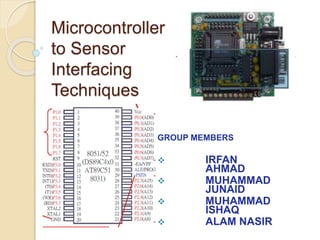
Microcontroller
to Sensor
Interfacing
Techniques
GROUP MEMBERS
 IRFAN
AHMAD
 MUHAMMAD
JUNAID
 MUHAMMAD
ISHAQ
 ALAM NASIR
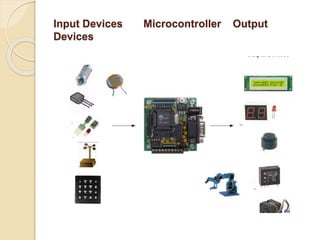
Micro-controllers are useful to the extent that they communicate
with other devices, such as sensors,
motors, switches, keypads, displays, memory and even other
micro-controllers
 Many microcontroller designs typically
mix multiple interfacing methods. In a
very simplistic form, a microcontroller
 system can be viewed as a system
that reads from (monitors) inputs,
performs processing and
 writes to ( controls ) outputs.
Input Devices Microcontroller Output
Devices
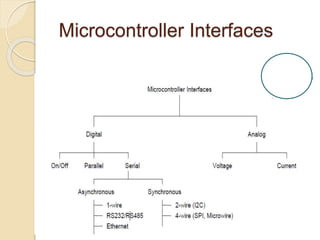
Microcontroller Interfaces
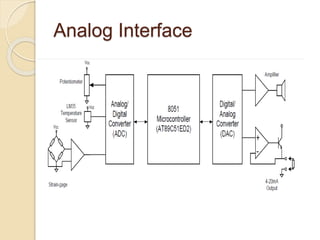
Analog Interface
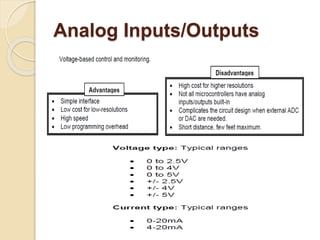
Analog Inputs/Outputs
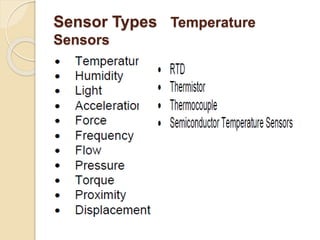
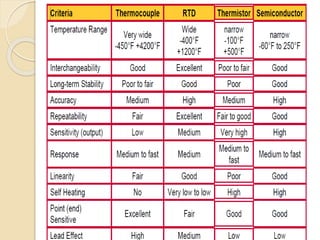
Sensor Types Temperature
Sensors
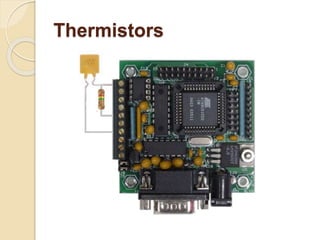
Thermistors
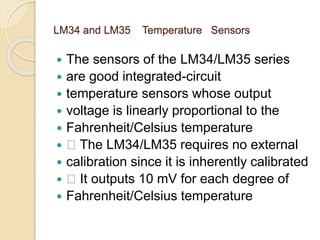
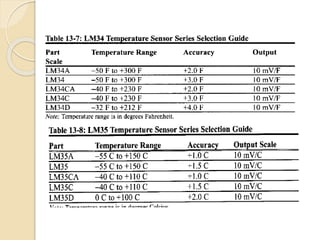
LM34 and LM35 Temperature Sensors
 The sensors of the LM34/LM35 series
 are good integrated-circuit
 temperature sensors whose output
 voltage is linearly proportional to the
 Fahrenheit/Celsius temperature
 􀂾 The LM34/LM35 requires no external
 calibration since it is inherently calibrated
 􀂾 It outputs 10 mV for each degree of
 Fahrenheit/Celsius temperature
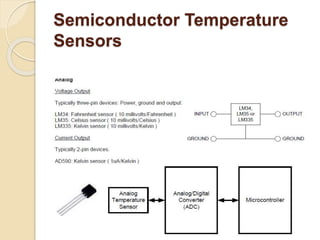
Semiconductor Temperature
Sensors
8051 Connection to ADC0848 and
Temperature Sensor
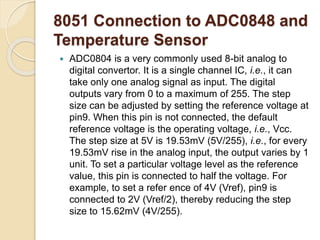
 ADC0804 is a very commonly used 8-bit analog to
digital convertor. It is a single channel IC, i.e., it can
take only one analog signal as input. The digital
outputs vary from 0 to a maximum of 255. The step
size can be adjusted by setting the reference voltage at
pin9. When this pin is not connected, the default
reference voltage is the operating voltage, i.e., Vcc.
The step size at 5V is 19.53mV (5V/255), i.e., for every
19.53mV rise in the analog input, the output varies by 1
unit. To set a particular voltage level as the reference
value, this pin is connected to half the voltage. For
example, to set a refer ence of 4V (Vref), pin9 is
connected to 2V (Vref/2), thereby reducing the step
size to 15.62mV (4V/255).
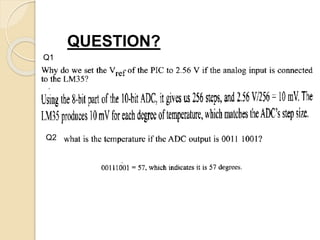
QUESTION?
Q1
Q2
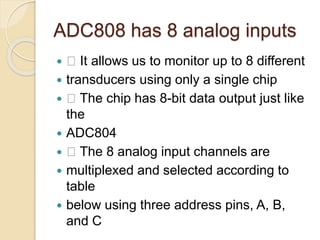
ADC808 has 8 analog inputs
 􀂾 It allows us to monitor up to 8 different
 transducers using only a single chip
 􀂾 The chip has 8-bit data output just like
the
 ADC804
 􀂾 The 8 analog input channels are
 multiplexed and selected according to
table
 below using three address pins, A, B,
and C
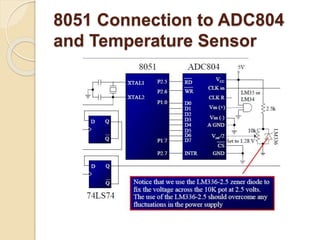
8051 Connection to ADC804
and Temperature Sensor
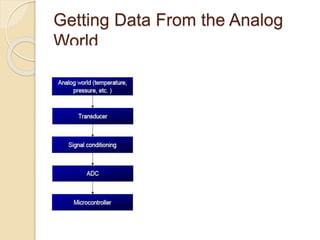
Getting Data From the Analog
World
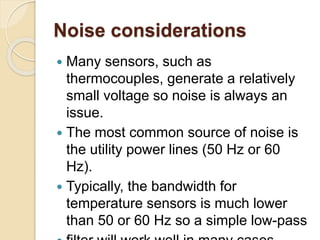
Noise considerations
 Many sensors, such as
thermocouples, generate a relatively
small voltage so noise is always an
issue.
 The most common source of noise is
the utility power lines (50 Hz or 60
Hz).
 Typically, the bandwidth for
temperature sensors is much lower
than 50 or 60 Hz so a simple low-pass
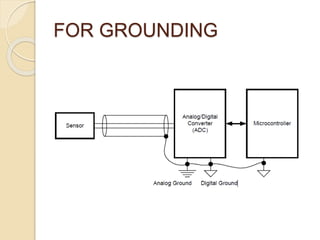
FOR GROUNDING
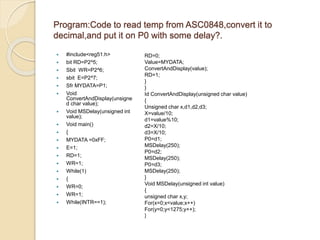
Program:Code to read temp from ASC0848,convert it to
decimal,and put it on P0 with some delay?.
 #include<reg51.h>
 bit RD=P2^5;
 Sbit WR=P2^6;
 sbit E=P2^7;
 Sfr MYDATA=P1;
 Void
ConvertAndDisplay(unsigne
d char value);
 Void MSDelay(unsigned int
value);
 Void main()
 {
 MYDATA =0xFF;
 E=1;
 RD=1;
 WR=1;
 While(1)
 {
 WR=0;
 WR=1;
 While(INTR==1);
RD=0;
Value=MYDATA;
ConvertAndDisplay(value);
RD=1;
}
}
Id ConvertAndDisplay(unsigned char value)
{
Unsigned char x,d1,d2,d3;
X=value/10;
d1=value%10;
d2=X/10;
d3=X/10;
P0=d1;
MSDelay(250);
P0=d2;
MSDelay(250);
P0=d3;
MSDelay(250);
}
Void MSDelay(unsigned int value)
{
unsigned char x,y;
For(x=0;x<value;x++)
For(y=0;y<1275;y++);
}
Sensor interfacing in 8051

Sensor interfacing in 8051

  • 2.
    Microcontroller to Sensor Interfacing Techniques GROUP MEMBERS IRFAN AHMAD  MUHAMMAD JUNAID  MUHAMMAD ISHAQ  ALAM NASIR
  • 3.
    Micro-controllers are usefulto the extent that they communicate with other devices, such as sensors, motors, switches, keypads, displays, memory and even other micro-controllers  Many microcontroller designs typically mix multiple interfacing methods. In a very simplistic form, a microcontroller  system can be viewed as a system that reads from (monitors) inputs, performs processing and  writes to ( controls ) outputs.
  • 4.
  • 5.
  • 6.
  • 7.
  • 8.
  • 10.
  • 11.
    LM34 and LM35Temperature Sensors  The sensors of the LM34/LM35 series  are good integrated-circuit  temperature sensors whose output  voltage is linearly proportional to the  Fahrenheit/Celsius temperature  􀂾 The LM34/LM35 requires no external  calibration since it is inherently calibrated  􀂾 It outputs 10 mV for each degree of  Fahrenheit/Celsius temperature
  • 13.
  • 14.
    8051 Connection toADC0848 and Temperature Sensor  ADC0804 is a very commonly used 8-bit analog to digital convertor. It is a single channel IC, i.e., it can take only one analog signal as input. The digital outputs vary from 0 to a maximum of 255. The step size can be adjusted by setting the reference voltage at pin9. When this pin is not connected, the default reference voltage is the operating voltage, i.e., Vcc. The step size at 5V is 19.53mV (5V/255), i.e., for every 19.53mV rise in the analog input, the output varies by 1 unit. To set a particular voltage level as the reference value, this pin is connected to half the voltage. For example, to set a refer ence of 4V (Vref), pin9 is connected to 2V (Vref/2), thereby reducing the step size to 15.62mV (4V/255).
  • 15.
  • 16.
    ADC808 has 8analog inputs  􀂾 It allows us to monitor up to 8 different  transducers using only a single chip  􀂾 The chip has 8-bit data output just like the  ADC804  􀂾 The 8 analog input channels are  multiplexed and selected according to table  below using three address pins, A, B, and C
  • 17.
    8051 Connection toADC804 and Temperature Sensor
  • 18.
    Getting Data Fromthe Analog World
  • 19.
    Noise considerations  Manysensors, such as thermocouples, generate a relatively small voltage so noise is always an issue.  The most common source of noise is the utility power lines (50 Hz or 60 Hz).  Typically, the bandwidth for temperature sensors is much lower than 50 or 60 Hz so a simple low-pass
  • 20.
  • 21.
    Program:Code to readtemp from ASC0848,convert it to decimal,and put it on P0 with some delay?.  #include<reg51.h>  bit RD=P2^5;  Sbit WR=P2^6;  sbit E=P2^7;  Sfr MYDATA=P1;  Void ConvertAndDisplay(unsigne d char value);  Void MSDelay(unsigned int value);  Void main()  {  MYDATA =0xFF;  E=1;  RD=1;  WR=1;  While(1)  {  WR=0;  WR=1;  While(INTR==1); RD=0; Value=MYDATA; ConvertAndDisplay(value); RD=1; } } Id ConvertAndDisplay(unsigned char value) { Unsigned char x,d1,d2,d3; X=value/10; d1=value%10; d2=X/10; d3=X/10; P0=d1; MSDelay(250); P0=d2; MSDelay(250); P0=d3; MSDelay(250); } Void MSDelay(unsigned int value) { unsigned char x,y; For(x=0;x<value;x++) For(y=0;y<1275;y++); }