Effective remote working with
Microsoft Teams
Niv Hess
Teams &
Sharepoint
Advanced features: Tabs & Third Parties
integration
Teams & Channels | Document
management
How to manage an effective meeting in
Teams
Teams Intro: Set up | Chats | Call
Agenda
Tips & Tricks
Introduction to Teams
• Established at Nov 2016 as a competitor for Slack. 44M active users. 12M new users
during the past 7 days (Coronavirus)
• Teams was a leading product in 2019 Microsoft summit in Las Vegas
• Teams is the platform to manage all communications
Chats | Alerts | Skype | Meetings | Tasks | Etc.
• Microsoft announced a free 6 months plan for Teams due to Corona virus.
• Requires Microsoft account (can be created for free)
• Go to https://products.office.com/he-IL/microsoft-teams/group-chat-software
Setup Teams
• Chat with others like in
Whatsapp
• All chats are documented
• Voice & video call can be
done easily
Setup Teams
How to manage an
effective meeting in
Teams
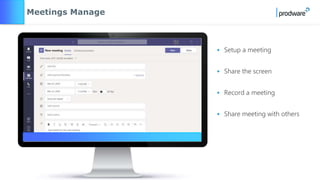
• Setup a meeting
• Share the screen
• Record a meeting
• Share meeting with others
Meetings Manage
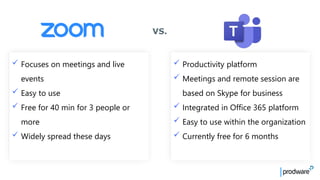
✓ Productivity platform
✓ Meetings and remote session are
based on Skype for business
✓ Integrated in Office 365 platform
✓ Easy to use within the organization
✓ Currently free for 6 months
✓ Focuses on meetings and live
events
✓ Easy to use
✓ Free for 40 min for 3 people or
more
✓ Widely spread these days
VS.
How to manage an effective meeting with “Teams”
PROVIDE A DETAILED AGENDA
& FILES
CHECK YOUR CONNECTION - AUDIO & VIDEO
Use dedicated headset for better audio quality
DOWNLOAD THE APP & USE “LOBBY” FOR
GUESTS
Presenter - be ready 5 minutes before
Before the meeting
FOLLOW PRE-MEETING STEPS
Share the detailed agenda
Choose a quiet location
Mute your mobile phone
Deactivate notifications
SET MEETING GUIDELINES
Turn your video on
Q&A
Blur background
Record meeting if needed
USE ENGAGING TOOLS
Whiteboard
OneNote
Better to share windows only & not desktop
Upload & share files on Teams
Create a conversation
During the meeting
After the meeting
SHARE SUMMARY WITH
CALL TO ACTION POINTS
ASK FOR FEEDBACK
Teams | Channels |
Document management
• Teams uses SharePoint platform for
document collaboration
• All SharePoint capacities are available
in Teams such as:
Alerts | Permissions | Version | Flows
etc.
Document Collaboration in Teams
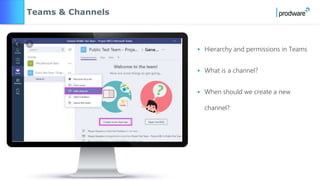
• Hierarchy and permissions in Teams
• What is a channel?
• When should we create a new
channel?
Teams & Channels
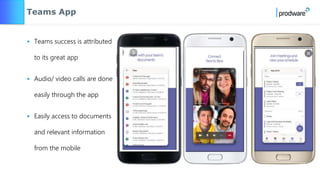
Teams App
• Teams success is attributed
to its great app
• Audio/ video calls are done
easily through the app
• Easily access to documents
and relevant information
from the mobile
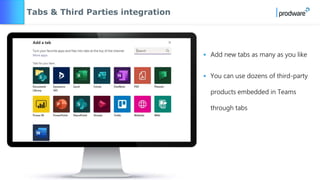
Advanced features
• Add new tabs as many as you like
• You can use dozens of third-party
products embedded in Teams
through tabs
Tabs & Third Parties integration
Tips & Tricks
Our top 6 Tips & Tricks
SEARCH IN TEAMS USE / FOR COMMANDS IN TEAMS WHO?
WIKI AUDIO
Q&A
Prodware Pink Lemonade Series-Effective remote working with Microsoft Teams

Prodware Pink Lemonade Series-Effective remote working with Microsoft Teams

  • 1.
    Effective remote workingwith Microsoft Teams Niv Hess Teams & Sharepoint
  • 2.
    Advanced features: Tabs& Third Parties integration Teams & Channels | Document management How to manage an effective meeting in Teams Teams Intro: Set up | Chats | Call Agenda Tips & Tricks
  • 3.
  • 4.
    • Established atNov 2016 as a competitor for Slack. 44M active users. 12M new users during the past 7 days (Coronavirus) • Teams was a leading product in 2019 Microsoft summit in Las Vegas • Teams is the platform to manage all communications Chats | Alerts | Skype | Meetings | Tasks | Etc.
  • 5.
    • Microsoft announceda free 6 months plan for Teams due to Corona virus. • Requires Microsoft account (can be created for free) • Go to https://products.office.com/he-IL/microsoft-teams/group-chat-software Setup Teams
  • 6.
    • Chat withothers like in Whatsapp • All chats are documented • Voice & video call can be done easily Setup Teams
  • 7.
    How to managean effective meeting in Teams
  • 8.
    • Setup ameeting • Share the screen • Record a meeting • Share meeting with others Meetings Manage
  • 9.
    ✓ Productivity platform ✓Meetings and remote session are based on Skype for business ✓ Integrated in Office 365 platform ✓ Easy to use within the organization ✓ Currently free for 6 months ✓ Focuses on meetings and live events ✓ Easy to use ✓ Free for 40 min for 3 people or more ✓ Widely spread these days VS.
  • 10.
    How to managean effective meeting with “Teams” PROVIDE A DETAILED AGENDA & FILES CHECK YOUR CONNECTION - AUDIO & VIDEO Use dedicated headset for better audio quality DOWNLOAD THE APP & USE “LOBBY” FOR GUESTS Presenter - be ready 5 minutes before Before the meeting FOLLOW PRE-MEETING STEPS Share the detailed agenda Choose a quiet location Mute your mobile phone Deactivate notifications SET MEETING GUIDELINES Turn your video on Q&A Blur background Record meeting if needed USE ENGAGING TOOLS Whiteboard OneNote Better to share windows only & not desktop Upload & share files on Teams Create a conversation During the meeting After the meeting SHARE SUMMARY WITH CALL TO ACTION POINTS ASK FOR FEEDBACK
  • 11.
    Teams | Channels| Document management
  • 12.
    • Teams usesSharePoint platform for document collaboration • All SharePoint capacities are available in Teams such as: Alerts | Permissions | Version | Flows etc. Document Collaboration in Teams
  • 13.
    • Hierarchy andpermissions in Teams • What is a channel? • When should we create a new channel? Teams & Channels
  • 14.
    Teams App • Teamssuccess is attributed to its great app • Audio/ video calls are done easily through the app • Easily access to documents and relevant information from the mobile
  • 15.
  • 16.
    • Add newtabs as many as you like • You can use dozens of third-party products embedded in Teams through tabs Tabs & Third Parties integration
  • 17.
  • 18.
    Our top 6Tips & Tricks SEARCH IN TEAMS USE / FOR COMMANDS IN TEAMS WHO? WIKI AUDIO
  • 19.