Why Are We Upgrading?
The Blackboard Corporation purchased Angel
 Learning in 2009 and announced a 2013 end of
 life for ANGEL. Although that decision was
 rescinded for now, DeSales wanted to get ahead
 of the game for when support eventually ends.
 Blackboard 9.1 introduces a number of new
 features to support teaching and learning, as
 well as enhanced functionality to make
 managing Blackboard courses easier.
When Are We Upgrading?
A pilot will be run with the ACCESS
 program in early spring 2013.
DEIT will begin to offer online and face-to-
 face workshops to pilot instructors in
 January 2013, and provide Blackboard
 Learn preview sessions to all faculty and
 students starting in March 2013.
All courses will be taught in Blackboard
 9.1 effective the first day of classes for Fall
 2013
What’s New in Blackboard
          9.1?
New Features
 Journals, Blogs, Wikis
 Mashups
 SafeAssign
 Exciting Course Structure Templates
  & Design Themes
Journals, Blogs, Wikis
The Journals, Blogs and Wikis provide tools, within
 Blackboard, for written student work.
   Journals (one to one)
     Communication is generally between the student and the
      instructor only.
   Blogs (one to many)
     Communication is between individual students and the
      entire class.
   Wikis (many to many)
     Communication is collaborative among many writers
      developing a single final product.
Mashups
Mashups have been introduced in Blackboard
 9.1 for three types of external web content:
  YouTube© videos
  Flickr© photo streams
  SlideShare© presentations
The Mashup tool allows users to search those
 external sites from within Blackboard to
 quickly locate and embed content.
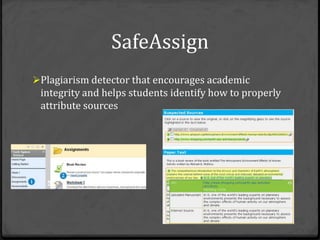
SafeAssign
Plagiarism detector that encourages academic
 integrity and helps students identify how to properly
 attribute sources
Course Structure Templates
   and Design Themes
Course Structure templates to facilitate
 course navigational organization to
 better reflect the structure of your
 course.
Course Themes allowing you to change
 the color scheme and “wallpaper” within
 your course.
What’s New in Blackboard
           9.1?
New Functionality – The look and
 feel of Blackboard 9.1 is very
 different from ANGEL, and may well
 take the most getting used to.
 However, once users get the hang of
 it, we think they will find it is
 ultimately far more user-friendly!
What’s New in Blackboard
          9.1?

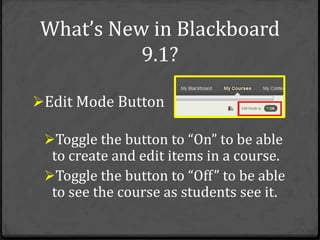
Edit Mode Button

 Toggle the button to “On” to be able
  to create and edit items in a course.
 Toggle the button to “Off” to be able
  to see the course as students see it.
What’s New in Blackboard
           9.1?
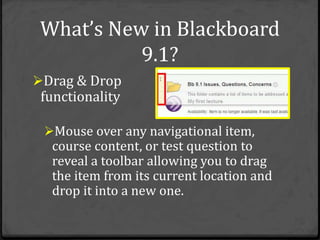
Drag & Drop
 functionality

 Mouse over any navigational item,
  course content, or test question to
  reveal a toolbar allowing you to drag
  the item from its current location and
  drop it into a new one.
What’s New in Blackboard
           9.1?
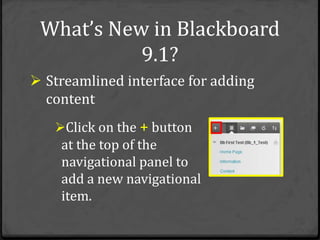
 Streamlined interface for adding
  content
   Click on the + button
    at the top of the
    navigational panel to
    add a new navigational
    item.
What’s New in Blackboard
            9.1?
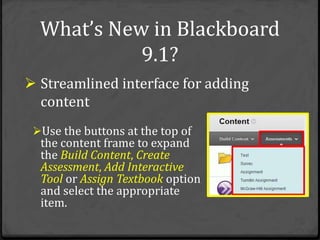
 Streamlined interface for adding
  content
 Use the buttons at the top of
  the content frame to expand
  the Build Content, Create
  Assessment, Add Interactive
  Tool or Assign Textbook option
  and select the appropriate
  item.
What’s New in Blackboard
           9.1?
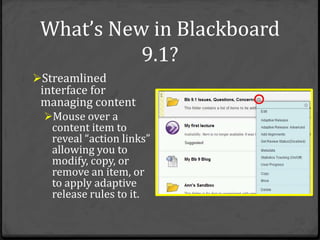
Streamlined
 interface for
 managing content
  Mouse over a
   content item to
   reveal “action links”
   allowing you to
   modify, copy, or
   remove an item, or
   to apply adaptive
   release rules to it.
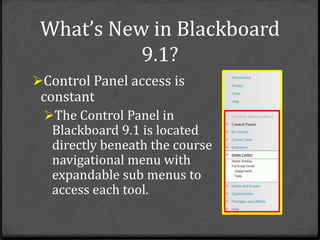
What’s New in Blackboard
           9.1?
Control Panel access is
 constant
 The Control Panel in
   Blackboard 9.1 is located
   directly beneath the course
   navigational menu with
   expandable sub menus to
   access each tool.
What Enhancements Can I
  Expect to See in Bb 9.1?
Assignments
 Assignments can be assigned to a
  Group and a single grade given to all
  members of the group
Discussion Boards
 Ability to add comments and feedback
  when grading Discussion Boards
What Enhancements Can I
 Expect to See in Bb 9.1?
Groups
 Availability of more group
  collaboration tools: journals,
  blogs, wikis.
Steps to Successfully Navigating
Your Way Through the Upgrade
Step 1: Stay Informed
Step 2: Learn how to use Blackboard 9.1
Step 3: Clean up your ANGEL Learning Object
 Repository
Step 4: Be prepared to adjust your course(s)
 for Bb 9.1
Step 5: Be aware of changing URLs
Step 6: Develop your Fall 2013 course(s)
Steps to Successfully Navigating
Your Way Through the Upgrade
Step 1: Stay Informed
  Congratulations! You are here so this
   step is already under way.
  Read the Word of Mouse blog:
   http://blogs.desales.edu/deit
  Watch your email
Steps to Successfully Navigating
Your Way Through the Upgrade
Step 2: Learn how to use Blackboard 9.1
  Attend a DEIT training session:
    Familiarize yourself with the new
     Blackboard 9.1 interface.
    Learn about one or more of the new
     Blackboard features.
  Sign up for training via:
   http://www.desales.edu/facultyworkshops
Steps to Successfully Navigating
Your Way Through the Upgrade
Step 2.1: Learn how to use Blackboard 9.1
  Visit the Blackboard On Demand tutorials
   web site at:
   http://ondemand.blackboard.com/
  Visit the Blackboard Instructor User Manual
   at: https://help.blackboard.com/en-
   us/Learn/9.1_SP_10_and_SP_11/Instructor
Steps to Successfully Navigating
Your Way Through the Upgrade
Step 3: Clean up your LOR
  Making any move provides a great
   opportunity to sort through things, scaling
   back to only what is truly needed.
  After 4 years in ANGEL, we suspect that
   there is some “ancient history” in LORs.
  The goal is to leave the “ancient history”
   behind and move forward with only those
   files that will be needed for future courses.
Steps to Successfully Navigating
Your Way Through the Upgrade
Step 3.1: Back up and Remove or Move LOR
 Files
  Use the Backup utility to back up all LOR
   files on ANGEL for archival purposes.
  Delete old files from your LOR in
   ANGEL, leaving only those files you expect
   to use in Bb 9.1.
Steps to Successfully Navigating
Your Way Through the Upgrade
Step 4: Be prepared to adjust your course(s)
 for Bb 9.1
  The new navigation options and tools
   available in Bb Learn make the switch an
   ideal time to redesign the way course
   material is presented to students so it is
   done through objective-driven modules.
Steps to Successfully Navigating
Your Way Through the Upgrade
Step 5: Be aware of changing URLs:
   https://desales.angellearning.com
   https://desales.blackboard.com/
New links will be added to the MyDSU
 portal
Steps to Successfully Navigating
Your Way Through the Upgrade
Step 6: Develop your Fall 2013
 course(s)
  With some familiarity of Blackboard
   9.1 acquired through various training
   methods, your course shell created,
   and your ANGEL files moved, you are
   ready to start developing your Fall
   2013 courses.
Questions?
Survey Invitation

Survey Link: http://tinyurl.com/Workshop-E

Workshop Title:

   Introducing Blackboard Learn– 1/23/13

Introducing Blackboard Learn

  • 2.
    Why Are WeUpgrading? The Blackboard Corporation purchased Angel Learning in 2009 and announced a 2013 end of life for ANGEL. Although that decision was rescinded for now, DeSales wanted to get ahead of the game for when support eventually ends.  Blackboard 9.1 introduces a number of new features to support teaching and learning, as well as enhanced functionality to make managing Blackboard courses easier.
  • 3.
    When Are WeUpgrading? A pilot will be run with the ACCESS program in early spring 2013. DEIT will begin to offer online and face-to- face workshops to pilot instructors in January 2013, and provide Blackboard Learn preview sessions to all faculty and students starting in March 2013. All courses will be taught in Blackboard 9.1 effective the first day of classes for Fall 2013
  • 4.
    What’s New inBlackboard 9.1? New Features Journals, Blogs, Wikis Mashups SafeAssign Exciting Course Structure Templates & Design Themes
  • 5.
    Journals, Blogs, Wikis TheJournals, Blogs and Wikis provide tools, within Blackboard, for written student work.  Journals (one to one) Communication is generally between the student and the instructor only.  Blogs (one to many) Communication is between individual students and the entire class.  Wikis (many to many) Communication is collaborative among many writers developing a single final product.
  • 6.
    Mashups Mashups have beenintroduced in Blackboard 9.1 for three types of external web content: YouTube© videos Flickr© photo streams SlideShare© presentations The Mashup tool allows users to search those external sites from within Blackboard to quickly locate and embed content.
  • 7.
    SafeAssign Plagiarism detector thatencourages academic integrity and helps students identify how to properly attribute sources
  • 8.
    Course Structure Templates and Design Themes Course Structure templates to facilitate course navigational organization to better reflect the structure of your course. Course Themes allowing you to change the color scheme and “wallpaper” within your course.
  • 9.
    What’s New inBlackboard 9.1? New Functionality – The look and feel of Blackboard 9.1 is very different from ANGEL, and may well take the most getting used to. However, once users get the hang of it, we think they will find it is ultimately far more user-friendly!
  • 10.
    What’s New inBlackboard 9.1? Edit Mode Button Toggle the button to “On” to be able to create and edit items in a course. Toggle the button to “Off” to be able to see the course as students see it.
  • 11.
    What’s New inBlackboard 9.1? Drag & Drop functionality Mouse over any navigational item, course content, or test question to reveal a toolbar allowing you to drag the item from its current location and drop it into a new one.
  • 12.
    What’s New inBlackboard 9.1?  Streamlined interface for adding content Click on the + button at the top of the navigational panel to add a new navigational item.
  • 13.
    What’s New inBlackboard 9.1?  Streamlined interface for adding content Use the buttons at the top of the content frame to expand the Build Content, Create Assessment, Add Interactive Tool or Assign Textbook option and select the appropriate item.
  • 14.
    What’s New inBlackboard 9.1? Streamlined interface for managing content Mouse over a content item to reveal “action links” allowing you to modify, copy, or remove an item, or to apply adaptive release rules to it.
  • 15.
    What’s New inBlackboard 9.1? Control Panel access is constant The Control Panel in Blackboard 9.1 is located directly beneath the course navigational menu with expandable sub menus to access each tool.
  • 16.
    What Enhancements CanI Expect to See in Bb 9.1? Assignments Assignments can be assigned to a Group and a single grade given to all members of the group Discussion Boards Ability to add comments and feedback when grading Discussion Boards
  • 17.
    What Enhancements CanI Expect to See in Bb 9.1? Groups Availability of more group collaboration tools: journals, blogs, wikis.
  • 18.
    Steps to SuccessfullyNavigating Your Way Through the Upgrade Step 1: Stay Informed Step 2: Learn how to use Blackboard 9.1 Step 3: Clean up your ANGEL Learning Object Repository Step 4: Be prepared to adjust your course(s) for Bb 9.1 Step 5: Be aware of changing URLs Step 6: Develop your Fall 2013 course(s)
  • 19.
    Steps to SuccessfullyNavigating Your Way Through the Upgrade Step 1: Stay Informed Congratulations! You are here so this step is already under way. Read the Word of Mouse blog: http://blogs.desales.edu/deit Watch your email
  • 20.
    Steps to SuccessfullyNavigating Your Way Through the Upgrade Step 2: Learn how to use Blackboard 9.1 Attend a DEIT training session: Familiarize yourself with the new Blackboard 9.1 interface. Learn about one or more of the new Blackboard features. Sign up for training via: http://www.desales.edu/facultyworkshops
  • 21.
    Steps to SuccessfullyNavigating Your Way Through the Upgrade Step 2.1: Learn how to use Blackboard 9.1 Visit the Blackboard On Demand tutorials web site at: http://ondemand.blackboard.com/ Visit the Blackboard Instructor User Manual at: https://help.blackboard.com/en- us/Learn/9.1_SP_10_and_SP_11/Instructor
  • 22.
    Steps to SuccessfullyNavigating Your Way Through the Upgrade Step 3: Clean up your LOR Making any move provides a great opportunity to sort through things, scaling back to only what is truly needed. After 4 years in ANGEL, we suspect that there is some “ancient history” in LORs. The goal is to leave the “ancient history” behind and move forward with only those files that will be needed for future courses.
  • 23.
    Steps to SuccessfullyNavigating Your Way Through the Upgrade Step 3.1: Back up and Remove or Move LOR Files Use the Backup utility to back up all LOR files on ANGEL for archival purposes. Delete old files from your LOR in ANGEL, leaving only those files you expect to use in Bb 9.1.
  • 24.
    Steps to SuccessfullyNavigating Your Way Through the Upgrade Step 4: Be prepared to adjust your course(s) for Bb 9.1 The new navigation options and tools available in Bb Learn make the switch an ideal time to redesign the way course material is presented to students so it is done through objective-driven modules.
  • 25.
    Steps to SuccessfullyNavigating Your Way Through the Upgrade Step 5: Be aware of changing URLs:  https://desales.angellearning.com  https://desales.blackboard.com/ New links will be added to the MyDSU portal
  • 26.
    Steps to SuccessfullyNavigating Your Way Through the Upgrade Step 6: Develop your Fall 2013 course(s)  With some familiarity of Blackboard 9.1 acquired through various training methods, your course shell created, and your ANGEL files moved, you are ready to start developing your Fall 2013 courses.
  • 27.
  • 28.
    Survey Invitation Survey Link:http://tinyurl.com/Workshop-E Workshop Title: Introducing Blackboard Learn– 1/23/13