
June Wall
Consultancy
DEVELOPING ONLINE
TUTORIALS:
USING OFFICE MIX
INTRODUCTION
June Wall is an eLearning
consultant passionate
about ensuring that digital
technologies are used to
enhance learning and
leverage the best of the
technology to positively
effect student learning. She
has worked with K-12
schools, professional
associations, universities
and other training providers
on a range of projects
involving digital learning.
OVERVIEW
At the conclusion of this webinar, participants
will be able to:
 Design an online learning activity
 Build an online learning tutorial using Office Mix
 Identify resources and tools needed for online learning
© June Wall Consultancy
Office Mix - Create information PPT with
interactives
Include quizzes
Plays as video and so is available for any device
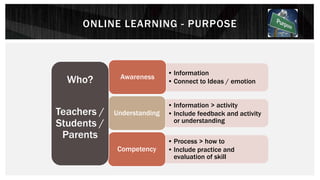
ONLINE LEARNING - PURPOSE
• Information
• Connect to Ideas / emotion
Awareness
• Information > activity
• Include feedback and activity
or understanding
Understanding
• Process > how to
• Include practice and
evaluation of skill
Competency
Who?
Teachers /
Students /
Parents
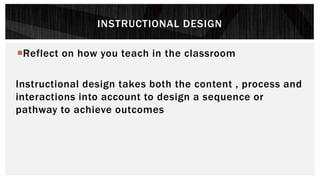
INSTRUCTIONAL DESIGN
Reflect on how you teach in the classroom
Instructional design takes both the content , process and
interactions into account to design a sequence or
pathway to achieve outcomes
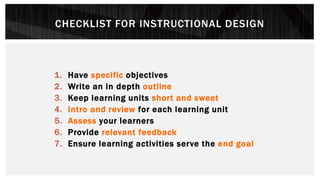
CHECKLIST FOR INSTRUCTIONAL DESIGN
1. Have specific objectives
2. Write an in depth outline
3. Keep learning units short and sweet
4. Intro and review for each learning unit
5. Assess your learners
6. Provide relevant feedback
7. Ensure learning activities serve the end goal
© June Wall Consultancy
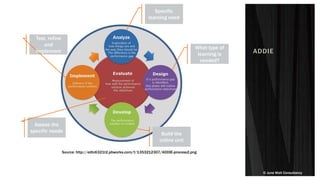
ADDIE
Source: http://edtc6321t2.pbworks.com/f/1353212307/ADDIE-process2.png
Specific
learning need
What type of
learning is
needed?
Build the
online unit
Test, refine
and
implement
Assess the
specific needs
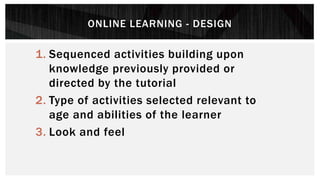
ONLINE LEARNING - DESIGN
1. Sequenced activities building upon
knowledge previously provided or
directed by the tutorial
2. Type of activities selected relevant to
age and abilities of the learner
3. Look and feel
OFFICE MIX
Integrate video, audio, quizzes and interactive components for
learning.
It is free, but only works on Office 2013 or Office 365
Download here https://mix.office.com/en-us/Home
Watch - Are poor countries doomed to stay poor? Bill Gates
https://mix.office.com/watch/1otxpj7hz6kbx as an example of
a mix that is simple and effective
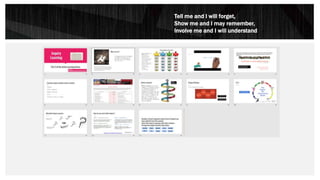
Tell me and I will forget,
Show me and I may remember,
Involve me and I will understand
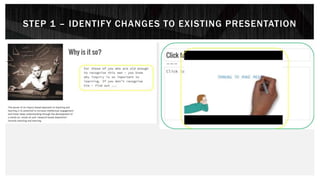
STEP 1 – IDENTIFY CHANGES TO EXISTING PRESENTATION
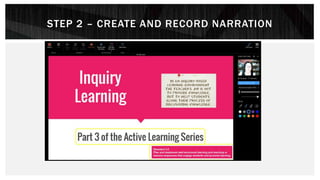
STEP 2 – CREATE AND RECORD NARRATION
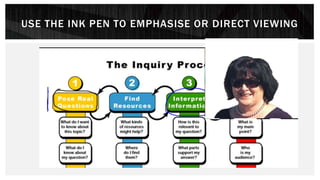
USE THE INK PEN TO EMPHASISE OR DIRECT VIEWING
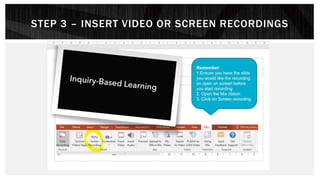
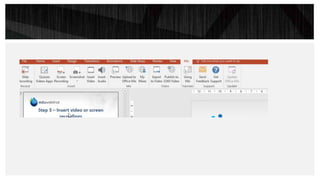
STEP 3 – INSERT VIDEO OR SCREEN RECORDINGS
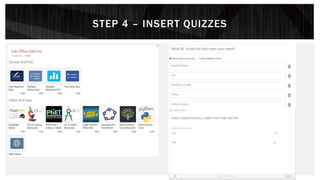
STEP 4 – INSERT QUIZZES
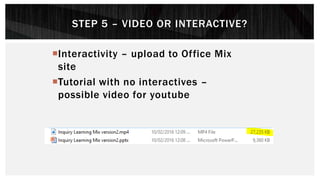
STEP 5 – VIDEO OR INTERACTIVE?
Interactivity – upload to Office Mix
site
Tutorial with no interactives –
possible video for youtube
RESOURCES AND TOOLS
Web tools for Inquiry learning http://eduwebinar.com.au/web-
tools-to-support-inquiry-based-learning
F-10 Inquiry scope and sequence http://eduwebinar.com.au/wp-
content/uploads/2015/03/curriculum_mapping_scope_sequence_
skills_tools.pdf
Instructional design models
http://www.instructionaldesign.org/models/index.html
https://onlinelearninginsights.wordpress.com/2013/11/15/review
-of-instructional-design-models-applied-to-k-12-learning-
environments/
RECAP
Who is your audience for an online tutorial?
What type of knowledge or skills do you need to impart or
engage with?
What type of interactive component will your audience use?
Planning is essential
Twitter: @junewall
Facebook: www.facebook.com/junewallconsultancy
Email: june@junewall.com.au

Developing online tutorials: Using Office Mix

  • 1.
  • 2.
    INTRODUCTION June Wall isan eLearning consultant passionate about ensuring that digital technologies are used to enhance learning and leverage the best of the technology to positively effect student learning. She has worked with K-12 schools, professional associations, universities and other training providers on a range of projects involving digital learning.
  • 3.
    OVERVIEW At the conclusionof this webinar, participants will be able to:  Design an online learning activity  Build an online learning tutorial using Office Mix  Identify resources and tools needed for online learning
  • 4.
    © June WallConsultancy Office Mix - Create information PPT with interactives Include quizzes Plays as video and so is available for any device
  • 5.
    ONLINE LEARNING -PURPOSE • Information • Connect to Ideas / emotion Awareness • Information > activity • Include feedback and activity or understanding Understanding • Process > how to • Include practice and evaluation of skill Competency Who? Teachers / Students / Parents
  • 6.
    INSTRUCTIONAL DESIGN Reflect onhow you teach in the classroom Instructional design takes both the content , process and interactions into account to design a sequence or pathway to achieve outcomes
  • 7.
    CHECKLIST FOR INSTRUCTIONALDESIGN 1. Have specific objectives 2. Write an in depth outline 3. Keep learning units short and sweet 4. Intro and review for each learning unit 5. Assess your learners 6. Provide relevant feedback 7. Ensure learning activities serve the end goal
  • 8.
    © June WallConsultancy ADDIE Source: http://edtc6321t2.pbworks.com/f/1353212307/ADDIE-process2.png Specific learning need What type of learning is needed? Build the online unit Test, refine and implement Assess the specific needs
  • 9.
    ONLINE LEARNING -DESIGN 1. Sequenced activities building upon knowledge previously provided or directed by the tutorial 2. Type of activities selected relevant to age and abilities of the learner 3. Look and feel
  • 10.
    OFFICE MIX Integrate video,audio, quizzes and interactive components for learning. It is free, but only works on Office 2013 or Office 365 Download here https://mix.office.com/en-us/Home Watch - Are poor countries doomed to stay poor? Bill Gates https://mix.office.com/watch/1otxpj7hz6kbx as an example of a mix that is simple and effective
  • 12.
    Tell me andI will forget, Show me and I may remember, Involve me and I will understand
  • 13.
    STEP 1 –IDENTIFY CHANGES TO EXISTING PRESENTATION
  • 14.
    STEP 2 –CREATE AND RECORD NARRATION
  • 15.
    USE THE INKPEN TO EMPHASISE OR DIRECT VIEWING
  • 16.
    STEP 3 –INSERT VIDEO OR SCREEN RECORDINGS
  • 18.
    STEP 4 –INSERT QUIZZES
  • 19.
    STEP 5 –VIDEO OR INTERACTIVE? Interactivity – upload to Office Mix site Tutorial with no interactives – possible video for youtube
  • 20.
    RESOURCES AND TOOLS Webtools for Inquiry learning http://eduwebinar.com.au/web- tools-to-support-inquiry-based-learning F-10 Inquiry scope and sequence http://eduwebinar.com.au/wp- content/uploads/2015/03/curriculum_mapping_scope_sequence_ skills_tools.pdf Instructional design models http://www.instructionaldesign.org/models/index.html https://onlinelearninginsights.wordpress.com/2013/11/15/review -of-instructional-design-models-applied-to-k-12-learning- environments/
  • 21.
    RECAP Who is youraudience for an online tutorial? What type of knowledge or skills do you need to impart or engage with? What type of interactive component will your audience use? Planning is essential Twitter: @junewall Facebook: www.facebook.com/junewallconsultancy Email: june@junewall.com.au