Sunraysia Institute
Improving personal
productivity
Presented by: Russell Cummings
Strategic Business Development
The Productivity Challenge

Find an Extra 8 Hours in Every Week
“If you can’t do your job in a 10-hour day during the
week, you’re either overworked or incompetent.”
Mike Abel
Chief Exec – M&C Saatchi Australia
BRW – April 23, 2009
Our Infographic Map to
improving your
productivity
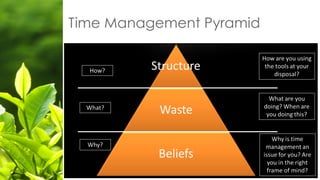
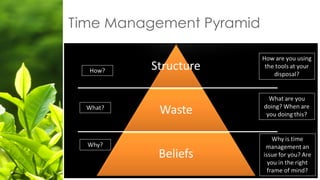
Time Management Pyramid
Beliefs – Why?
Why are you poor at time
management?
1. Attitude – focus, work ethic, motivation
2. Health - diet and exercise
3. Sleep – need 8 hours per
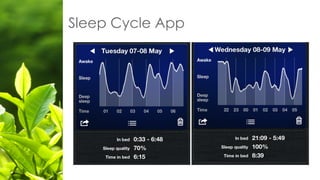
Sleep Cycle App
What should you be doing with your time?
Waste & Inefficiency
Waste What?
What are you doing with your time?
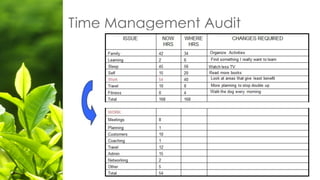
Time Management Audit
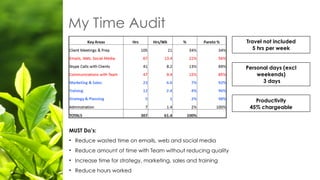
My Time Audit
MUST Do’s:
• Reduce wasted time on emails, web and social media
• Reduce amount of time with Team without reducing quality
• Increase time for strategy, marketing, sales and training
• Reduce hours worked
Travel not included
5 hrs per week
Productivity
45% chargeable
Personal days (excl
weekends)
3 days
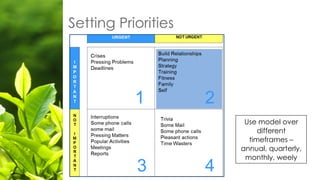
Setting Priorities
Use model over
different
timeframes –
annual, quarterly,
monthly, weely
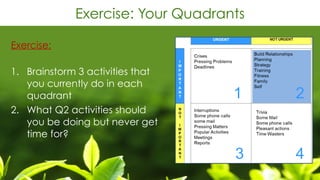
Exercise: Your Quadrants
Exercise:

1. Brainstorm 3 activities that
you currently do in each
quadrant
2. What Q2 activities should
you be doing but never get
time for?
Getting the Structure Right
How will you manage the day-to-day?
Setup a “4 Things” Framework
What are the 4 key areas of activity that you
must focus on in your business to be successful?
My daily roster:
• Client work – 4 hours
• Marketing & Sales – 2 hours
• Strategy & Development – 1 hour
• Team Management – 1 hour
Exercise: Be Strategic
Exercise:

What are the Top 4 things you
MUST focus on in order to
achieve success?
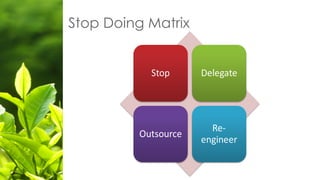
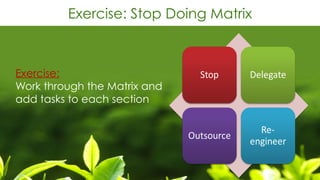
Stop Doing Matrix
Exercise: Stop Doing Matrix
Exercise:

Work through the Matrix and
add tasks to each section
• Work in 25 minute bursts – 5 min break
• Every 4 cycles take a 15 min break
• This will: increase focus, concentration,
reduce interruptions and maximise your
output.
• Use an app like
www.focusboosterapp.com or Pomodoro
Time
Pomodoro Technique
Tips to leverage your time
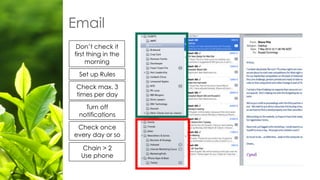
Email
Check max. 3
times per day
Check once
every day or so
Set up Rules
Turn off
notifications
Don’t check it
first thing in the
morning
Chain > 2
Use phone
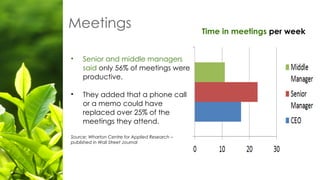
Meetings
• Senior and middle managers
said only 56% of meetings were
productive.
• They added that a phone call
or a memo could have
replaced over 25% of the
meetings they attend.
Source: Wharton Centre for Applied Research –
published in Wall Street Journal
Time in meetings per week
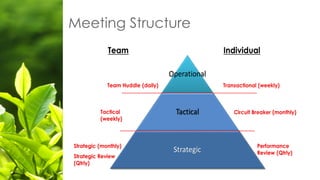
Key Team Meetings
• Team Huddle – weekly, 5 to 15 minutes
• Transactional Catch up – daily or weekly, 5 to 10 minutes
• Circuit Breaker – monthly, 15 to 20 minutes
• Performance Review – quarterly, 30 minutes
Meeting Structure
Effective Meetings & Internal Communication
Effective meetings are driven
by :
• Purpose
• Process
• Payoff
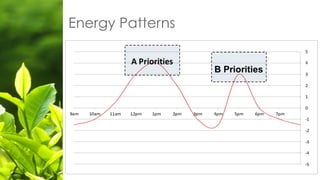
Energy Patterns
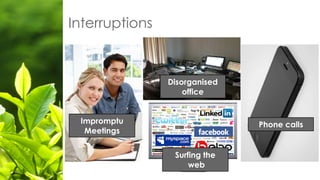
Interruptions
Impromptu
Meetings
Disorganised
office
Phone calls
Surfing the
web
• Online Employee with a specific skill set
• Engage them by Contract, Part-Time, Full-Time
• Contractors for projects: freelancer.com,
elance.com, fiverr.com
• Employees: usually from Philippines, India or
Eastern Europe
• See our website for a blog article on “How to
recruit a VA”
A Virtual Assistant
• Use technology at your fingertips and create audio and video
messages and instructions for your Team
• Benefits: quick, effective and easy to do. Better quality of
communication – especially for complex issues.
• Integrate with tools like Trello, Evernote, etc.
Use Video and Audio instead of Email
Productivity tools that work
Core Technology
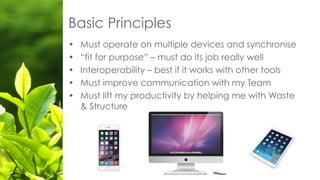
• Must operate on multiple devices and synchronise
• “fit for purpose” – must do its job really well
• Interoperability – best if it works with other tools
• Must improve communication with my Team
• Must lift my productivity by helping me with Waste
& Structure
Basic Principles
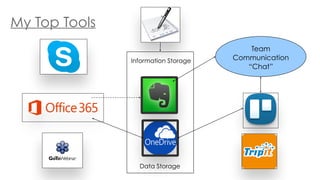
My Top Tools
Team
Communication
“Chat”
Information Storage
Data Storage
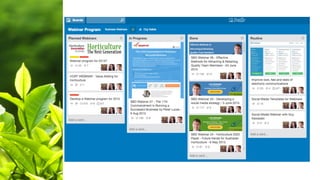
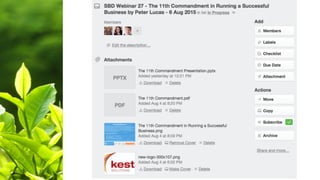
• Powerful task management tool that enables collaboration and
planning
• Simple layout – easy drag and drop navigation
• Can add files from OneDrive, Dropbox, etc
• Base version is free – Premium is modest
• Other options:
• kanbanflow.com
• Basecamphq.com
Trello.com
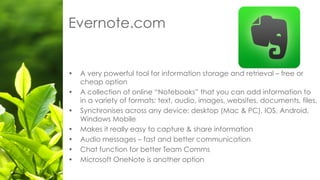
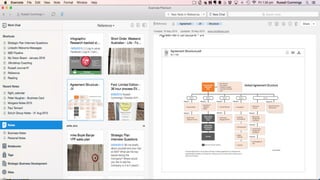
• A very powerful tool for information storage and retrieval – free or
cheap option
• A collection of online “Notebooks” that you can add information to
in a variety of formats: text, audio, images, websites, documents, files.
• Synchronises across any device: desktop (Mac & PC), IOS, Android,
Windows Mobile
• Makes it really easy to capture & share information
• Audio messages – fast and better communication
• Chat function for better Team Comms
• Microsoft OneNote is another option
Evernote.com
Online File Storage - Onedrive
• Cloud based storage is easy to access and has come of age.
• Store files on your desktop – access them on any device – share
easily – auto-back up
• Other popular options:
• Dropbox.com
• Box.net
Microsoft Office 365
• Software rental – updated and cost effective
• $10 per month - 5 Users – Home Package
• Acccess to latest Office Software: Word, Excel, PowerPoint,
Outlook, OneNote and Publisher
• 1TB of free storage on OneDrive (per User)
• 60 minutes of free skype to phone calls
• With MS Exchange - Shared Calendars, Contacts, emails, etc
• Available for Mac, PC, tablets and smartphones
Video Conferencing
• Cheap effective communication using video conferencing
• Visual element improves engagement and increase productivity – reduce
travel
• All Devices: desktop, tablet, smartphone
Lots of options:
• Video Conference Calls – skype, Vsee
• Online Meetings – GotoMeeting
• Webinars and Seminars - GotoWebinar
Tripit.com
• If you travel by air – this is the app for you
• Scans your email for confirmations and builds an itinerary
using airline, hotel, hire car, etc bookings.
• Tracks flights and updates on delays
• Finds maps of hotels, etc.
• Loads it automatically into your electronic diary
• Premium version is $50 pa – also free
• On all devices – desktop, tablet and smartphone
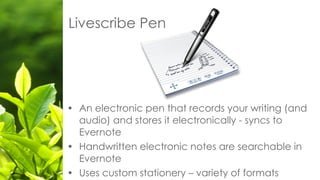
Livescribe Pen
• An electronic pen that records your writing (and
audio) and stores it electronically - syncs to
Evernote
• Handwritten electronic notes are searchable in
Evernote
• Uses custom stationery – variety of formats
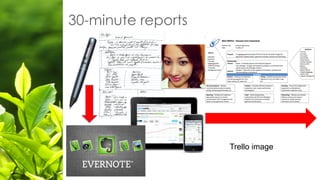
30-minute reports
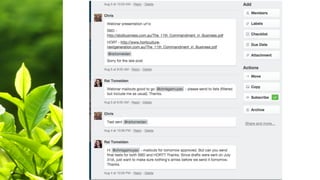
Trello image
Other Tools - Horticulture
• There are really good programs around for helping you
manage the various activities and collect great data in
your business.
• Some are stand-alone programs and others are
integrated as part of your grader systems.
• AgWorld - www.agworld.com.au
• Grownote – www.grownote.co.nz
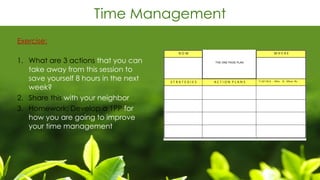
Time Management
Exercise:

1. What are 3 actions that you can
take away from this session to
save yourself 8 hours in the next
week?
2. Share this with your neighbor
3. Homework: Develop a 1PP for
how you are going to improve
your time management
Summary
Time Management Pyramid
We will send you a link to copies of today’s PPT plus any
resource materials in the next few days.
You can visit www.horticulture-nextgeneration.com.au and
complete our free online Business Diagnostic, webinars,
blogs and videos.
We are about to launch a range of on-line training and
business leadership development programs.
More Resources
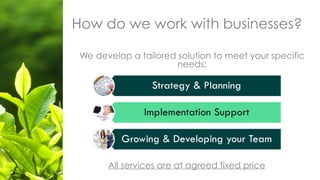
How do we work with businesses?
We develop a tailored solution to meet your specific
needs:
All services are at agreed fixed price
Take the 30-minute Challenge
• Book a free 30 minute call and
we will discuss your Top Issues
and create a plan to address
them.
• Go to www.takethe30minute
challenge.com
Russell Cummings
Business Consultant
M: +61 414 929 585
W: www.sbdbusiness.com.au
E: russell@sbdbusiness.com.au
Thank You

Sunraysia Productivity Workshop

  • 1.
    Sunraysia Institute Improving personal productivity Presentedby: Russell Cummings Strategic Business Development
  • 2.
    The Productivity Challenge
 Findan Extra 8 Hours in Every Week
  • 3.
    “If you can’tdo your job in a 10-hour day during the week, you’re either overworked or incompetent.” Mike Abel Chief Exec – M&C Saatchi Australia BRW – April 23, 2009
  • 4.
    Our Infographic Mapto improving your productivity
  • 5.
  • 6.
    Beliefs – Why? Whyare you poor at time management? 1. Attitude – focus, work ethic, motivation 2. Health - diet and exercise 3. Sleep – need 8 hours per
  • 7.
  • 8.
    What should yoube doing with your time? Waste & Inefficiency
  • 9.
    Waste What? What areyou doing with your time?
  • 10.
  • 11.
    My Time Audit MUSTDo’s: • Reduce wasted time on emails, web and social media • Reduce amount of time with Team without reducing quality • Increase time for strategy, marketing, sales and training • Reduce hours worked Travel not included 5 hrs per week Productivity 45% chargeable Personal days (excl weekends) 3 days
  • 12.
    Setting Priorities Use modelover different timeframes – annual, quarterly, monthly, weely
  • 13.
    Exercise: Your Quadrants Exercise:
 1.Brainstorm 3 activities that you currently do in each quadrant 2. What Q2 activities should you be doing but never get time for?
  • 14.
    Getting the StructureRight How will you manage the day-to-day?
  • 15.
    Setup a “4Things” Framework What are the 4 key areas of activity that you must focus on in your business to be successful? My daily roster: • Client work – 4 hours • Marketing & Sales – 2 hours • Strategy & Development – 1 hour • Team Management – 1 hour
  • 16.
    Exercise: Be Strategic Exercise:
 Whatare the Top 4 things you MUST focus on in order to achieve success?
  • 17.
  • 18.
    Exercise: Stop DoingMatrix Exercise:
 Work through the Matrix and add tasks to each section
  • 19.
    • Work in25 minute bursts – 5 min break • Every 4 cycles take a 15 min break • This will: increase focus, concentration, reduce interruptions and maximise your output. • Use an app like www.focusboosterapp.com or Pomodoro Time Pomodoro Technique
  • 20.
  • 21.
    Email Check max. 3 timesper day Check once every day or so Set up Rules Turn off notifications Don’t check it first thing in the morning Chain > 2 Use phone
  • 22.
    Meetings • Senior andmiddle managers said only 56% of meetings were productive. • They added that a phone call or a memo could have replaced over 25% of the meetings they attend. Source: Wharton Centre for Applied Research – published in Wall Street Journal Time in meetings per week
  • 23.
    Key Team Meetings •Team Huddle – weekly, 5 to 15 minutes • Transactional Catch up – daily or weekly, 5 to 10 minutes • Circuit Breaker – monthly, 15 to 20 minutes • Performance Review – quarterly, 30 minutes
  • 24.
  • 25.
    Effective Meetings &Internal Communication Effective meetings are driven by : • Purpose • Process • Payoff
  • 26.
  • 27.
  • 28.
    • Online Employeewith a specific skill set • Engage them by Contract, Part-Time, Full-Time • Contractors for projects: freelancer.com, elance.com, fiverr.com • Employees: usually from Philippines, India or Eastern Europe • See our website for a blog article on “How to recruit a VA” A Virtual Assistant
  • 29.
    • Use technologyat your fingertips and create audio and video messages and instructions for your Team • Benefits: quick, effective and easy to do. Better quality of communication – especially for complex issues. • Integrate with tools like Trello, Evernote, etc. Use Video and Audio instead of Email
  • 30.
  • 31.
  • 32.
    • Must operateon multiple devices and synchronise • “fit for purpose” – must do its job really well • Interoperability – best if it works with other tools • Must improve communication with my Team • Must lift my productivity by helping me with Waste & Structure Basic Principles
  • 33.
  • 34.
    • Powerful taskmanagement tool that enables collaboration and planning • Simple layout – easy drag and drop navigation • Can add files from OneDrive, Dropbox, etc • Base version is free – Premium is modest • Other options: • kanbanflow.com • Basecamphq.com Trello.com
  • 38.
    • A verypowerful tool for information storage and retrieval – free or cheap option • A collection of online “Notebooks” that you can add information to in a variety of formats: text, audio, images, websites, documents, files. • Synchronises across any device: desktop (Mac & PC), IOS, Android, Windows Mobile • Makes it really easy to capture & share information • Audio messages – fast and better communication • Chat function for better Team Comms • Microsoft OneNote is another option Evernote.com
  • 40.
    Online File Storage- Onedrive • Cloud based storage is easy to access and has come of age. • Store files on your desktop – access them on any device – share easily – auto-back up • Other popular options: • Dropbox.com • Box.net
  • 41.
    Microsoft Office 365 •Software rental – updated and cost effective • $10 per month - 5 Users – Home Package • Acccess to latest Office Software: Word, Excel, PowerPoint, Outlook, OneNote and Publisher • 1TB of free storage on OneDrive (per User) • 60 minutes of free skype to phone calls • With MS Exchange - Shared Calendars, Contacts, emails, etc • Available for Mac, PC, tablets and smartphones
  • 42.
    Video Conferencing • Cheapeffective communication using video conferencing • Visual element improves engagement and increase productivity – reduce travel • All Devices: desktop, tablet, smartphone Lots of options: • Video Conference Calls – skype, Vsee • Online Meetings – GotoMeeting • Webinars and Seminars - GotoWebinar
  • 43.
    Tripit.com • If youtravel by air – this is the app for you • Scans your email for confirmations and builds an itinerary using airline, hotel, hire car, etc bookings. • Tracks flights and updates on delays • Finds maps of hotels, etc. • Loads it automatically into your electronic diary • Premium version is $50 pa – also free • On all devices – desktop, tablet and smartphone
  • 44.
    Livescribe Pen • Anelectronic pen that records your writing (and audio) and stores it electronically - syncs to Evernote • Handwritten electronic notes are searchable in Evernote • Uses custom stationery – variety of formats
  • 45.
  • 46.
    Other Tools -Horticulture • There are really good programs around for helping you manage the various activities and collect great data in your business. • Some are stand-alone programs and others are integrated as part of your grader systems. • AgWorld - www.agworld.com.au • Grownote – www.grownote.co.nz
  • 47.
    Time Management Exercise:
 1. Whatare 3 actions that you can take away from this session to save yourself 8 hours in the next week? 2. Share this with your neighbor 3. Homework: Develop a 1PP for how you are going to improve your time management
  • 48.
  • 49.
  • 50.
    We will sendyou a link to copies of today’s PPT plus any resource materials in the next few days. You can visit www.horticulture-nextgeneration.com.au and complete our free online Business Diagnostic, webinars, blogs and videos. We are about to launch a range of on-line training and business leadership development programs. More Resources
  • 51.
    How do wework with businesses? We develop a tailored solution to meet your specific needs: All services are at agreed fixed price
  • 52.
    Take the 30-minuteChallenge • Book a free 30 minute call and we will discuss your Top Issues and create a plan to address them. • Go to www.takethe30minute challenge.com
  • 53.
    Russell Cummings Business Consultant M:+61 414 929 585 W: www.sbdbusiness.com.au E: russell@sbdbusiness.com.au Thank You