Criminal Justice Training  Center Level One High Tech Evidence Collection and Seizure
High Tech Evidence Collection and Seizure Evidence practices  and procedures
High Tech Evidence Collection and Seizure
Agenda Identification Preservation Collection Chain of evidence Storage guidelines
Agenda Familiarization Good evidence handling practices
Agenda Law Enforcement vs. Private Enterprise Law Enforcement – how cases come in Patrol – Sexual assault/Domestic Meth labs – ID Theft
Identification General concepts Types of computer related evidence Where and how computer related evidence may be found
Identification – General Concepts Consider all items real and virtual to be evidence Must be described in the search warrant or articulated at the time of seizure Determined by the “type” of crime Sophistication of suspect
Identification – General Concepts All computing evidence is considered physical evidence. [1]  Information listed here are excerpts from the book “Digital Evidence and Computer Crime” by Eoghan Casey, Academic Press.
Identification – General Concepts You can take everything, or take only what is subject to search warrant or you can take only data. (Computer of Victim vs. Suspect vs. 2nd party to the event ??) But…
Identification – General Concepts If you leave things behind, you may need it later After you leave, things may disappear And …
Identification – General Concepts Can you secure the scene long enough to accomplish tasks? Do you have equipment and personnel necessary to accomplish tasks?
Identification – Types of Evidence Printers and other hardcopy hardware Mouse, cables and other connectors Software Jaz and Zip drives Tape backup drives Hand and flat-plate scanners
Identification – Types of Evidence Computers, keyboards and monitors Disks, CDs and diskettes Magnetic tape storage units Phones (memory dialers) Circuit boards and components Modems
Identification – Types of Evidence Paper output Manuals Ledgers Address books Correspondence Diary Notes and scribbling
Identification – Where to Look for It Desktops Tabletops Monitors Next to phones Garbage cans In wallet In suspects pocket In bookcases Under keyboards
Identification – Where to Look For It Search the Area Carefully Do not get “tunnel vision”  Look for evidence of computer use Dependent only on the size of item being searched for Restricted only by the imagination of suspect
Identification – Where to Look For It Search may be limited by the location described in warrant Search may be limited by the size of smallest item listed in warrant
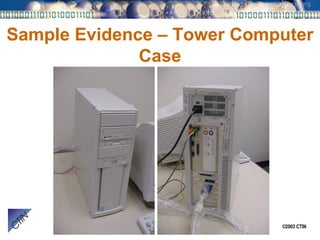
Sample Evidence – Tower Computer Case
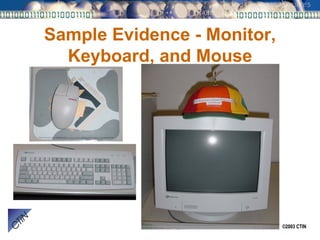
Sample Evidence - Monitor, Keyboard, and Mouse
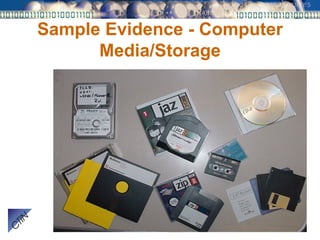
Sample Evidence - Computer Media/Storage
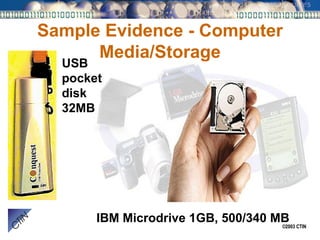
Sample Evidence - Computer Media/Storage USB pocket disk 32MB IBM Microdrive 1GB, 500/340 MB
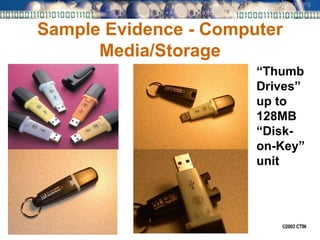
Sample Evidence - Computer Media/Storage “ Thumb Drives” up to 128MB “Disk-on-Key” unit
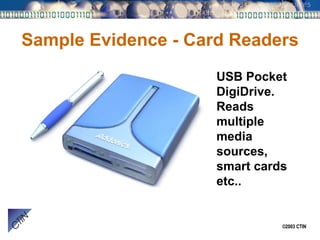
Sample Evidence - Card Readers USB Pocket DigiDrive.  Reads multiple media sources, smart cards etc..
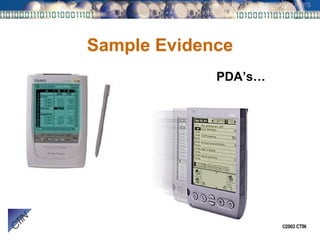
Sample Evidence PDA’s…
Sample Evidence – Magnetic Card Readers Mini-Mag Magstripe reader (PMR 102)
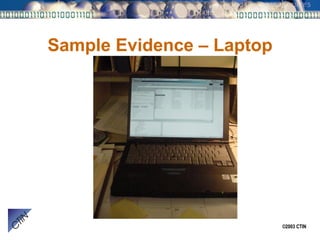
Sample Evidence – Laptop
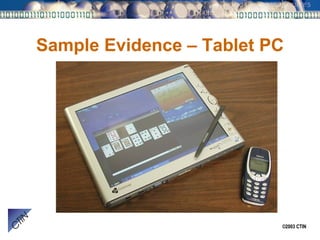
Sample Evidence – Tablet PC
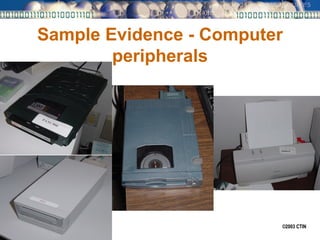
Sample Evidence - Computer peripherals
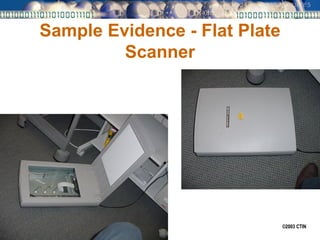
Sample Evidence - Flat Plate Scanner
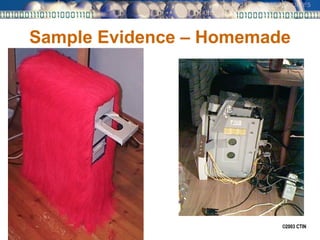
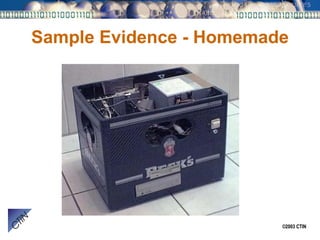
Sample Evidence – Homemade
Sample Evidence - Homemade
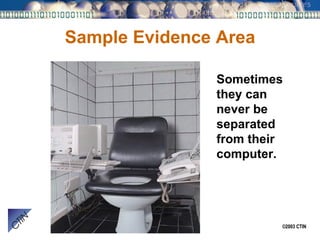
Sample Evidence Area Sometimes they can never be separated from their computer.
Preservation and Collection Preservation Collection Physical chain of evidence
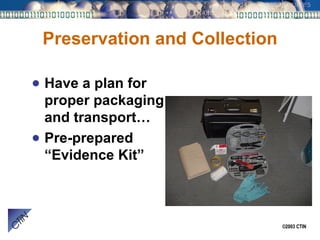
Preservation and Collection Have a plan for proper packaging and transport… Pre-prepared “Evidence Kit”
Preservation – Basic Rules Do not let the suspect near the machine. Do not let cops or “computer experts” play with the computers to “see what’s inside.”
Preservation – Basic Rules Do not let the suspect near the machine. He may pretend to help but only wants to do something to destroy evidence It will alter the evidence
Preservation – Basic Rules Do not let cops or “computer experts” play with the computers to “see what’s inside.” If I could just “get a peek” I’m the computer expert Do you know how the machine is configured?  Is it booby trapped?
Preservation – Basic Rules Both the suspect and other officers can be equally destructive
Preservation – Basic Rules Photograph everything Overalls and detail Photo log Keep in mind “Crime Scene” Use trained evidence collection units/personnel
Preservation – Basic Rules Practice safe evidence handling - wear rubber gloves! Don’t let your prints be the only ones found Bio-Hazards
Preservation Determine if the evidence can be collected and preserved for future analyses, (on-site vs. seizure) Keep “chain of evidence” in mind Document everything
Preservation – Fragility of Evidence Tends to be very volatile and easily be damaged or destroyed Follow documented procedures for preserving computer and electronic evidence
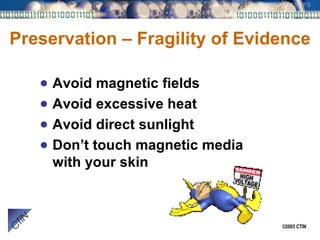
Preservation – Fragility of Evidence Avoid magnetic fields Avoid excessive heat Avoid direct sunlight Don’t touch magnetic media with your skin
Preservation – Fragility of Evidence Do use paper bags or cardboard boxes Do use original packaging material
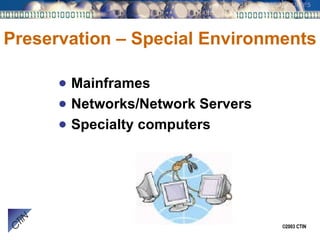
Preservation – Special Environments Mainframes Networks/Network Servers Specialty computers
Preservation – Evaluating Conditions Does the case call for “immediate results” to effect an arrest If it does then having someone capable to evaluate the machine without losing evidence is important
Preservation – Hacker systems When you have a case involving a computer as the object or means of committing a crime, remember that a program running in memory might be the evidence of your crime.
Preservation – Evaluating Conditions Is the computer on or off? If the computer is on, what is the computer doing? Printing? Screensaver on? If a computer is on, there is a good chance it is doing something
Preservation – Evaluating Conditions What applications are running? What is displayed on the screen? What operating system is functioning?
Preservation – Evaluating Conditions Assess the potential for loss of data from outside threats such as weather, electrical and magnetic conditions Determine if the computer is connected to other computers by network or modem
Preservation – Evaluating Conditions Consider previous conditions to determine if the computer should be turned off or left running Be prepared for “Emergency” shut-down Have camera ready - photograph the screen with a video camera
Preservation – Evaluating Conditions Decide on a strategy for power down… Do I interrupt the power or shutdown normally? There are pro and cons
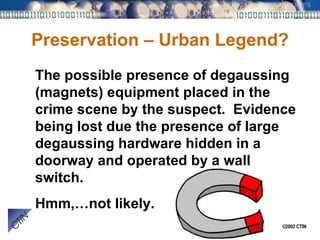
Preservation – Urban Legend? The possible presence of degaussing (magnets) equipment placed in the crime scene by the suspect.  Evidence being lost due the presence of large degaussing hardware hidden in a doorway and operated by a wall switch. Hmm,…not likely.
Collection – Chronological Worksheet Date, time, description of the computer The identity of those assisting you The identify of witnesses to your activity
Collection – Chronological Worksheet Date, time and action taken Record investigative clues and leads Date, time and programs or utilities used
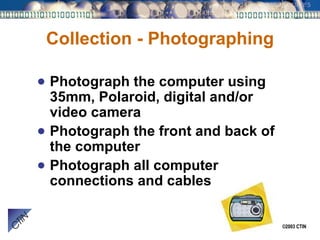
Collection - Photographing Photograph the computer using 35mm, Polaroid, digital and/or video camera Photograph the front and back of the computer Photograph all computer connections and cables
Collection - Photographing Photograph all hardware devices Take pictures of anything everywhere that may be of value or used for evidence
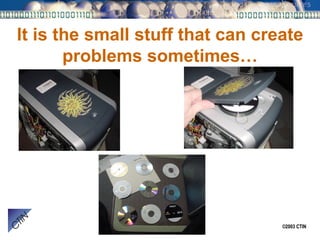
It is the small stuff that can create problems sometimes…
Collection - Photographing Be sure to note “unusual” things about the condition of the evidence….
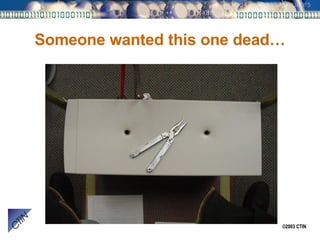
Someone wanted this one dead…
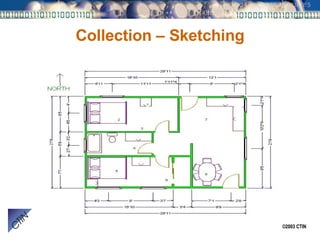
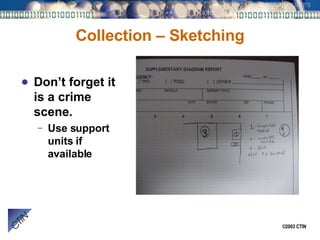
Collection – Sketching
Collection – Sketching Why Sketch?  I already have photo’s! Puts photo’s in context Helps in recollection for reports and testimony Useful with prosecutor and court to aid in testimony
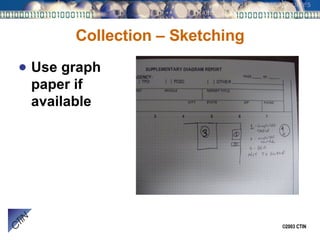
Collection – Sketching Use graph paper if available
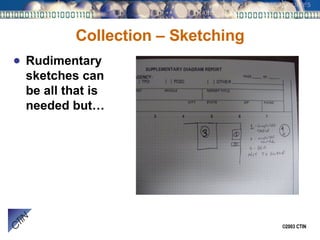
Collection – Sketching Rudimentary sketches can be all that is needed but…
Collection – Sketching Don’t forget it is a crime scene. Use support units if available
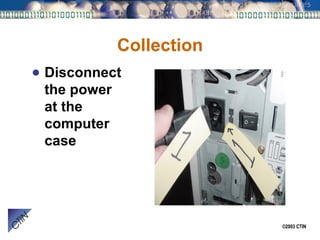
Collection Disconnect the power at the computer case
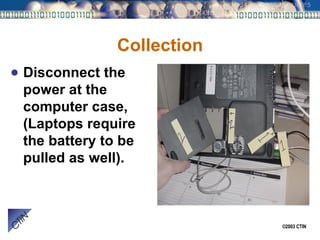
Collection Disconnect the power at the computer case, (Laptops require the battery to be pulled as well).
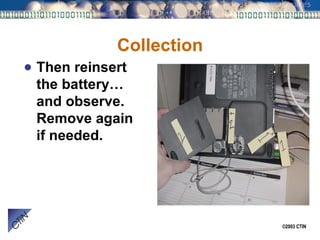
Collection Then reinsert the battery…and observe.  Remove again if needed.
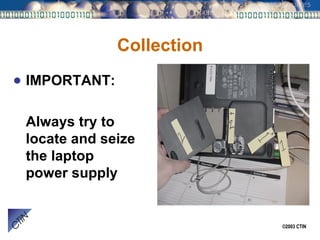
Collection IMPORTANT: Always try to locate and seize the laptop power supply
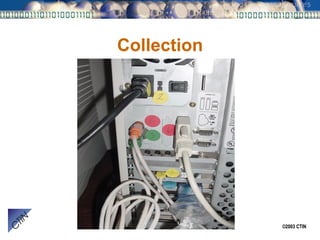
Collection Mark and tag all cables and hardware at both ends Helpful for reconstruction and court (even juries will understand it)
Collection
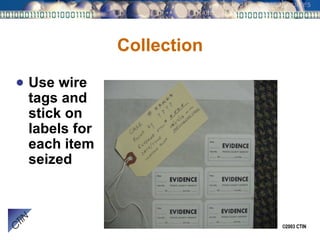
Collection Use wire tags and stick on labels for each item seized
Collection If you are seizing more than one computer system first number the computers and then tag the cables and hardware using the computer number. Ex. A-1, B-1, A-2, B-2 etc…
Collection - Transport Package the computer, cables and other hardware in boxes after entering the evidence description in the search warrant property sheet Keep boxes for each computer together during transport and storage
Collection - Transport When seizing floppies and removable media count floppies and removable media Mark them using an indelible colored marker or labels on tape or other stick on media
Collection - Transport Keep magnetic media separate from other seized items Place seized diskettes in separate boxes for each room
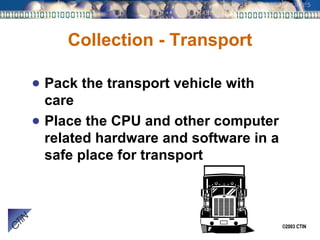
Collection - Transport Pack the transport vehicle with care Place the CPU and other computer related hardware and software in a safe place for transport
Collection – Golden Rules Package properly Handle carefully Mark clearly If you are comfortable, the computer is comfortable
What is “Chain of Evidence”? Documentation of dominion and control of evidence Physical security of evidence
What is “Chain of Evidence”? Basically, being able to show by documentation that the evidence is the same and untampered with from the moment of seizure to court presentation
Maintaining the Chain of Evidence Evidence clearly marked so as to provide positive identification in court Begins when evidence is identified Ends when court/prosecutor releases same
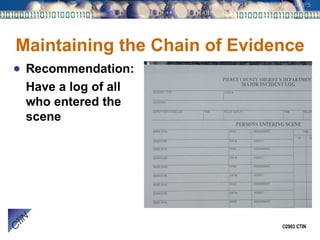
Maintaining the Chain of Evidence Recommendation: Have a log of all who entered the scene
Maintaining the Chain of Evidence Recommendation: Establish a central point in or near the crime scene and make it the “Evidence Collection Point”.  Then designation a “Property Officer” to log in and mark evidence.
Presenting the Chain of Evidence Agency case number Person finding the evidence Evidence number Date and time Location found Running log for each person handling (receiving) the evidence
Presenting the Chain of Evidence Photographs Sketches and notes Mark/label Packages and evidence label
Presenting the Chain of Evidence Property booking report Chronological search form Lab evidence tracking report Individual supplemental reports
Evidence Storage Guidelines Secure area Moderate temperature Free of excessive dust No excessive moisture Free of magnetic influence
Storage Containers Original packaging is the best material Other options: Cardboard boxes Wooden shelves Non static containers
Summary Finding all the evidence Preserving and collecting any evidence Transportation and storage of all evidence
 

Evidence Seizure Level One

  • 1.
    Criminal Justice Training Center Level One High Tech Evidence Collection and Seizure
  • 2.
    High Tech EvidenceCollection and Seizure Evidence practices and procedures
  • 3.
    High Tech EvidenceCollection and Seizure
  • 4.
    Agenda Identification PreservationCollection Chain of evidence Storage guidelines
  • 5.
    Agenda Familiarization Goodevidence handling practices
  • 6.
    Agenda Law Enforcementvs. Private Enterprise Law Enforcement – how cases come in Patrol – Sexual assault/Domestic Meth labs – ID Theft
  • 7.
    Identification General conceptsTypes of computer related evidence Where and how computer related evidence may be found
  • 8.
    Identification – GeneralConcepts Consider all items real and virtual to be evidence Must be described in the search warrant or articulated at the time of seizure Determined by the “type” of crime Sophistication of suspect
  • 9.
    Identification – GeneralConcepts All computing evidence is considered physical evidence. [1] Information listed here are excerpts from the book “Digital Evidence and Computer Crime” by Eoghan Casey, Academic Press.
  • 10.
    Identification – GeneralConcepts You can take everything, or take only what is subject to search warrant or you can take only data. (Computer of Victim vs. Suspect vs. 2nd party to the event ??) But…
  • 11.
    Identification – GeneralConcepts If you leave things behind, you may need it later After you leave, things may disappear And …
  • 12.
    Identification – GeneralConcepts Can you secure the scene long enough to accomplish tasks? Do you have equipment and personnel necessary to accomplish tasks?
  • 13.
    Identification – Typesof Evidence Printers and other hardcopy hardware Mouse, cables and other connectors Software Jaz and Zip drives Tape backup drives Hand and flat-plate scanners
  • 14.
    Identification – Typesof Evidence Computers, keyboards and monitors Disks, CDs and diskettes Magnetic tape storage units Phones (memory dialers) Circuit boards and components Modems
  • 15.
    Identification – Typesof Evidence Paper output Manuals Ledgers Address books Correspondence Diary Notes and scribbling
  • 16.
    Identification – Whereto Look for It Desktops Tabletops Monitors Next to phones Garbage cans In wallet In suspects pocket In bookcases Under keyboards
  • 17.
    Identification – Whereto Look For It Search the Area Carefully Do not get “tunnel vision” Look for evidence of computer use Dependent only on the size of item being searched for Restricted only by the imagination of suspect
  • 18.
    Identification – Whereto Look For It Search may be limited by the location described in warrant Search may be limited by the size of smallest item listed in warrant
  • 19.
    Sample Evidence –Tower Computer Case
  • 20.
    Sample Evidence -Monitor, Keyboard, and Mouse
  • 21.
    Sample Evidence -Computer Media/Storage
  • 22.
    Sample Evidence -Computer Media/Storage USB pocket disk 32MB IBM Microdrive 1GB, 500/340 MB
  • 23.
    Sample Evidence -Computer Media/Storage “ Thumb Drives” up to 128MB “Disk-on-Key” unit
  • 24.
    Sample Evidence -Card Readers USB Pocket DigiDrive. Reads multiple media sources, smart cards etc..
  • 25.
  • 26.
    Sample Evidence –Magnetic Card Readers Mini-Mag Magstripe reader (PMR 102)
  • 27.
  • 28.
  • 29.
    Sample Evidence -Computer peripherals
  • 30.
    Sample Evidence -Flat Plate Scanner
  • 31.
  • 32.
  • 33.
    Sample Evidence AreaSometimes they can never be separated from their computer.
  • 34.
    Preservation and CollectionPreservation Collection Physical chain of evidence
  • 35.
    Preservation and CollectionHave a plan for proper packaging and transport… Pre-prepared “Evidence Kit”
  • 36.
    Preservation – BasicRules Do not let the suspect near the machine. Do not let cops or “computer experts” play with the computers to “see what’s inside.”
  • 37.
    Preservation – BasicRules Do not let the suspect near the machine. He may pretend to help but only wants to do something to destroy evidence It will alter the evidence
  • 38.
    Preservation – BasicRules Do not let cops or “computer experts” play with the computers to “see what’s inside.” If I could just “get a peek” I’m the computer expert Do you know how the machine is configured? Is it booby trapped?
  • 39.
    Preservation – BasicRules Both the suspect and other officers can be equally destructive
  • 40.
    Preservation – BasicRules Photograph everything Overalls and detail Photo log Keep in mind “Crime Scene” Use trained evidence collection units/personnel
  • 41.
    Preservation – BasicRules Practice safe evidence handling - wear rubber gloves! Don’t let your prints be the only ones found Bio-Hazards
  • 42.
    Preservation Determine ifthe evidence can be collected and preserved for future analyses, (on-site vs. seizure) Keep “chain of evidence” in mind Document everything
  • 43.
    Preservation – Fragilityof Evidence Tends to be very volatile and easily be damaged or destroyed Follow documented procedures for preserving computer and electronic evidence
  • 44.
    Preservation – Fragilityof Evidence Avoid magnetic fields Avoid excessive heat Avoid direct sunlight Don’t touch magnetic media with your skin
  • 45.
    Preservation – Fragilityof Evidence Do use paper bags or cardboard boxes Do use original packaging material
  • 46.
    Preservation – SpecialEnvironments Mainframes Networks/Network Servers Specialty computers
  • 47.
    Preservation – EvaluatingConditions Does the case call for “immediate results” to effect an arrest If it does then having someone capable to evaluate the machine without losing evidence is important
  • 48.
    Preservation – Hackersystems When you have a case involving a computer as the object or means of committing a crime, remember that a program running in memory might be the evidence of your crime.
  • 49.
    Preservation – EvaluatingConditions Is the computer on or off? If the computer is on, what is the computer doing? Printing? Screensaver on? If a computer is on, there is a good chance it is doing something
  • 50.
    Preservation – EvaluatingConditions What applications are running? What is displayed on the screen? What operating system is functioning?
  • 51.
    Preservation – EvaluatingConditions Assess the potential for loss of data from outside threats such as weather, electrical and magnetic conditions Determine if the computer is connected to other computers by network or modem
  • 52.
    Preservation – EvaluatingConditions Consider previous conditions to determine if the computer should be turned off or left running Be prepared for “Emergency” shut-down Have camera ready - photograph the screen with a video camera
  • 53.
    Preservation – EvaluatingConditions Decide on a strategy for power down… Do I interrupt the power or shutdown normally? There are pro and cons
  • 54.
    Preservation – UrbanLegend? The possible presence of degaussing (magnets) equipment placed in the crime scene by the suspect. Evidence being lost due the presence of large degaussing hardware hidden in a doorway and operated by a wall switch. Hmm,…not likely.
  • 55.
    Collection – ChronologicalWorksheet Date, time, description of the computer The identity of those assisting you The identify of witnesses to your activity
  • 56.
    Collection – ChronologicalWorksheet Date, time and action taken Record investigative clues and leads Date, time and programs or utilities used
  • 57.
    Collection - PhotographingPhotograph the computer using 35mm, Polaroid, digital and/or video camera Photograph the front and back of the computer Photograph all computer connections and cables
  • 58.
    Collection - PhotographingPhotograph all hardware devices Take pictures of anything everywhere that may be of value or used for evidence
  • 59.
    It is thesmall stuff that can create problems sometimes…
  • 60.
    Collection - PhotographingBe sure to note “unusual” things about the condition of the evidence….
  • 61.
  • 62.
  • 63.
    Collection – SketchingWhy Sketch? I already have photo’s! Puts photo’s in context Helps in recollection for reports and testimony Useful with prosecutor and court to aid in testimony
  • 64.
    Collection – SketchingUse graph paper if available
  • 65.
    Collection – SketchingRudimentary sketches can be all that is needed but…
  • 66.
    Collection – SketchingDon’t forget it is a crime scene. Use support units if available
  • 67.
    Collection Disconnect thepower at the computer case
  • 68.
    Collection Disconnect thepower at the computer case, (Laptops require the battery to be pulled as well).
  • 69.
    Collection Then reinsertthe battery…and observe. Remove again if needed.
  • 70.
    Collection IMPORTANT: Alwaystry to locate and seize the laptop power supply
  • 71.
    Collection Mark andtag all cables and hardware at both ends Helpful for reconstruction and court (even juries will understand it)
  • 72.
  • 73.
    Collection Use wiretags and stick on labels for each item seized
  • 74.
    Collection If youare seizing more than one computer system first number the computers and then tag the cables and hardware using the computer number. Ex. A-1, B-1, A-2, B-2 etc…
  • 75.
    Collection - TransportPackage the computer, cables and other hardware in boxes after entering the evidence description in the search warrant property sheet Keep boxes for each computer together during transport and storage
  • 76.
    Collection - TransportWhen seizing floppies and removable media count floppies and removable media Mark them using an indelible colored marker or labels on tape or other stick on media
  • 77.
    Collection - TransportKeep magnetic media separate from other seized items Place seized diskettes in separate boxes for each room
  • 78.
    Collection - TransportPack the transport vehicle with care Place the CPU and other computer related hardware and software in a safe place for transport
  • 79.
    Collection – GoldenRules Package properly Handle carefully Mark clearly If you are comfortable, the computer is comfortable
  • 80.
    What is “Chainof Evidence”? Documentation of dominion and control of evidence Physical security of evidence
  • 81.
    What is “Chainof Evidence”? Basically, being able to show by documentation that the evidence is the same and untampered with from the moment of seizure to court presentation
  • 82.
    Maintaining the Chainof Evidence Evidence clearly marked so as to provide positive identification in court Begins when evidence is identified Ends when court/prosecutor releases same
  • 83.
    Maintaining the Chainof Evidence Recommendation: Have a log of all who entered the scene
  • 84.
    Maintaining the Chainof Evidence Recommendation: Establish a central point in or near the crime scene and make it the “Evidence Collection Point”. Then designation a “Property Officer” to log in and mark evidence.
  • 85.
    Presenting the Chainof Evidence Agency case number Person finding the evidence Evidence number Date and time Location found Running log for each person handling (receiving) the evidence
  • 86.
    Presenting the Chainof Evidence Photographs Sketches and notes Mark/label Packages and evidence label
  • 87.
    Presenting the Chainof Evidence Property booking report Chronological search form Lab evidence tracking report Individual supplemental reports
  • 88.
    Evidence Storage GuidelinesSecure area Moderate temperature Free of excessive dust No excessive moisture Free of magnetic influence
  • 89.
    Storage Containers Originalpackaging is the best material Other options: Cardboard boxes Wooden shelves Non static containers
  • 90.
    Summary Finding allthe evidence Preserving and collecting any evidence Transportation and storage of all evidence
  • 91.