EMAIL FORENSICS
EXPLORING THE ROLES OF THE CLIENT
AND SERVER IN E-MAIL
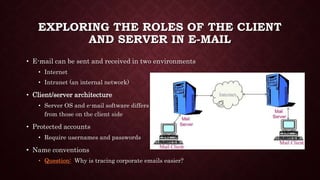
• E-mail can be sent and received in two environments
• Internet
• Intranet (an internal network)
• Client/server architecture
• Server OS and e-mail software differs
from those on the client side
• Protected accounts
• Require usernames and passwords
• Name conventions
• Question: Why is tracing corporate emails easier?
INVESTIGATING E-MAIL CRIMES
• Similar to other types of investigations
• Goals
• Find who is behind the crime
• Collect the evidence
• Present your findings
• Build a case
• Problems
• Faking E-mail – Manipulating Headers, striping headers or burner email account
• Spoofing – Presenting an email as someone else’s. First machine receives both fake and
original IP.
• Anonymous Remailing – Email server that strips identifying information from the email
message before forwarding it.
OBTAINING E-MAIL MESSAGES
• Access victim’s computer or mobile device to recover the evidence
• Using the victim’s e-mail client
• Find and copy evidence in the e-mail
• Access protected or encrypted material
• Print e-mails
• You may have to recover deleted e-mails
• Copying an e-mail message
• Before you start an e-mail investigation
• You need to copy and print the e-mail involved in the crime
• You might also want to forward the message as an attachment to another e-mail address
• With many GUI e-mail programs, you can copy an e-mail by dragging it to a storage
medium
• Or by saving it in a different location
E-MAIL HEADERS
The header of an email message tells
you a great deal about the message.
The email header format is RFC
2822.
The header keeps a record of the
message’s journey as it travels
through the communication network.
As the message is routed through
mail servers each one can add its
own IP address.
Just like the post office
An email investigation begins with a
review of an email message. The
message header provides an audit
trail of every machine through which
the email has passed.
There is a wealth of information in
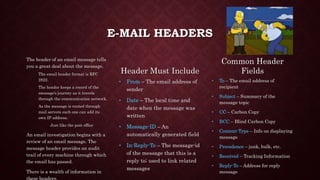
Header Must Include
• From – The email address of
sender
• Date – The local time and
date when the message was
written
• Message-ID – An
automatically generated field
• In-Reply-To – The message-id
of the message that this is a
reply to; used to link related
messages
Common Header
Fields
• To – The email address of
recipient
• Subject – Summary of the
message topic
• CC – Carbon Copy
• BCC – Blind Carbon Copy
• Content-Type – Info on displaying
message
• Precedence – junk, bulk, etc.
• Received – Tracking Information
• Reply-To – Address for reply
message
VIEWING E-MAIL HEADERS
• Investigators should learn how to find e-mail headers
• GUI clients
• Web-based clients
• Become familiar with as many e-mail programs as possible
• Often more than one e-mail program is installed
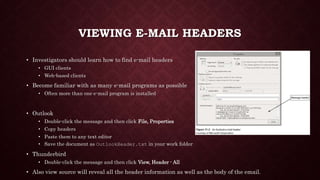
• Outlook
• Double-click the message and then click File, Properties
• Copy headers
• Paste them to any text editor
• Save the document as OutlookHeader.txt in your work folder
• Thunderbird
• Double-click the message and then click View, Header - All
• Also view source will reveal all the header information as well as the body of the email.
EXAMINING E-MAIL HEADERS
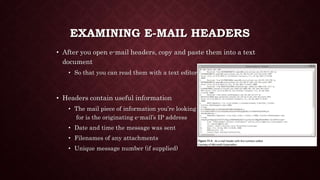
• After you open e-mail headers, copy and paste them into a text
document
• So that you can read them with a text editor
• Headers contain useful information
• The mail piece of information you’re looking
for is the originating e-mail’s IP address
• Date and time the message was sent
• Filenames of any attachments
• Unique message number (if supplied)

Email Forensics

  • 1.
  • 2.
    EXPLORING THE ROLESOF THE CLIENT AND SERVER IN E-MAIL • E-mail can be sent and received in two environments • Internet • Intranet (an internal network) • Client/server architecture • Server OS and e-mail software differs from those on the client side • Protected accounts • Require usernames and passwords • Name conventions • Question: Why is tracing corporate emails easier?
  • 3.
    INVESTIGATING E-MAIL CRIMES •Similar to other types of investigations • Goals • Find who is behind the crime • Collect the evidence • Present your findings • Build a case • Problems • Faking E-mail – Manipulating Headers, striping headers or burner email account • Spoofing – Presenting an email as someone else’s. First machine receives both fake and original IP. • Anonymous Remailing – Email server that strips identifying information from the email message before forwarding it.
  • 4.
    OBTAINING E-MAIL MESSAGES •Access victim’s computer or mobile device to recover the evidence • Using the victim’s e-mail client • Find and copy evidence in the e-mail • Access protected or encrypted material • Print e-mails • You may have to recover deleted e-mails • Copying an e-mail message • Before you start an e-mail investigation • You need to copy and print the e-mail involved in the crime • You might also want to forward the message as an attachment to another e-mail address • With many GUI e-mail programs, you can copy an e-mail by dragging it to a storage medium • Or by saving it in a different location
  • 5.
    E-MAIL HEADERS The headerof an email message tells you a great deal about the message. The email header format is RFC 2822. The header keeps a record of the message’s journey as it travels through the communication network. As the message is routed through mail servers each one can add its own IP address. Just like the post office An email investigation begins with a review of an email message. The message header provides an audit trail of every machine through which the email has passed. There is a wealth of information in Header Must Include • From – The email address of sender • Date – The local time and date when the message was written • Message-ID – An automatically generated field • In-Reply-To – The message-id of the message that this is a reply to; used to link related messages Common Header Fields • To – The email address of recipient • Subject – Summary of the message topic • CC – Carbon Copy • BCC – Blind Carbon Copy • Content-Type – Info on displaying message • Precedence – junk, bulk, etc. • Received – Tracking Information • Reply-To – Address for reply message
  • 6.
    VIEWING E-MAIL HEADERS •Investigators should learn how to find e-mail headers • GUI clients • Web-based clients • Become familiar with as many e-mail programs as possible • Often more than one e-mail program is installed • Outlook • Double-click the message and then click File, Properties • Copy headers • Paste them to any text editor • Save the document as OutlookHeader.txt in your work folder • Thunderbird • Double-click the message and then click View, Header - All • Also view source will reveal all the header information as well as the body of the email.
  • 7.
    EXAMINING E-MAIL HEADERS •After you open e-mail headers, copy and paste them into a text document • So that you can read them with a text editor • Headers contain useful information • The mail piece of information you’re looking for is the originating e-mail’s IP address • Date and time the message was sent • Filenames of any attachments • Unique message number (if supplied)

Editor's Notes

  • #6 Multipurpose Internet Mail Extensions (MIME) is an Internet standard that extends the format of email to support: Text in character sets other than ASCII Non-text attachments: audio, video, images, application programs etc. Message bodies with multiple parts Header information in non-ASCII character sets Virtually all human-written Internet email and a fairly large proportion of automated email is transmitted via SMTP in MIME format
  • #7 Email client local vs. cloud. Local will d/l emails and store in databases format vs. web client which interacts with the server directly