Android N and Beyond
A Step towards Future
www.letsnurture.com
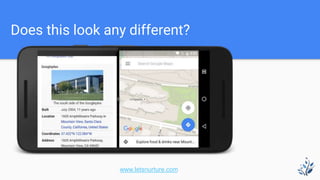
Does this look any different?
www.letsnurture.com
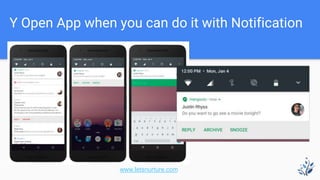
Y Open App when you can do it with Notification
www.letsnurture.com
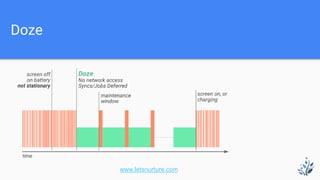
Doze
www.letsnurture.com
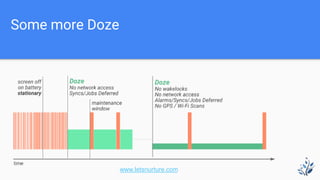
Some more Doze
www.letsnurture.com
Project Svelte: Background Optimizations
Android N applies the following optimizations:
Apps targeting Android N do not receive CONNECTIVITY_ACTION broadcasts,
even if they have manifest entries to request notification of these events. Apps
running in the foreground can still listen for CONNECTIVITY_CHANGE on
their main thread if they request notification with a BroadcastReceiver.
Apps cannot send or receive ACTION_NEW_PICTURE or ACTION_NEW_VIDEO
broadcasts. This optimization affects all apps, not only those targeting Android
N.
www.letsnurture.com
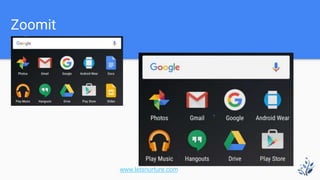
Zoomit
www.letsnurture.com
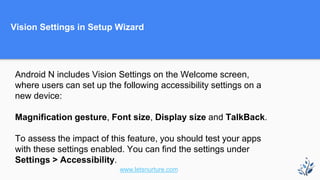
Vision Settings in Setup Wizard
Android N includes Vision Settings on the Welcome screen,
where users can set up the following accessibility settings on a
new device:
Magnification gesture, Font size, Display size and TalkBack.
To assess the impact of this feature, you should test your apps
with these settings enabled. You can find the settings under
Settings > Accessibility.
www.letsnurture.com
Other important points
When an app is running on Android N, but targets a lower API level, and the
user changes display size, the app process is killed.
The app must be able to gracefully handle this scenario. Otherwise, it crashes
when the user restores it from Recents.
You should test your app to ensure that this behavior does not occur. You can
do so by causing an identical crash when killing the app manually via DDMS.
www.letsnurture.com
Other important points
Apps targeting N and above are not automatically killed on density changes;
however, they may still respond poorly to configuration changes.
Apps on Android N should be able to gracefully handle configuration changes,
and should not crash on subsequent starts.
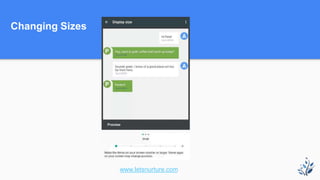
You can verify app behavior by changing font size (Setting > Display > Font
size), and then restoring the app from Recents.
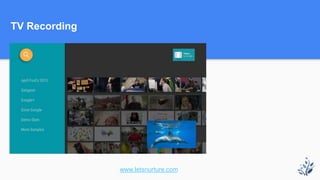
TV Recording
www.letsnurture.com
Changing Sizes
www.letsnurture.com
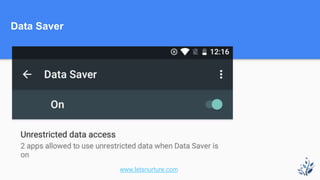
Data Saver
www.letsnurture.com
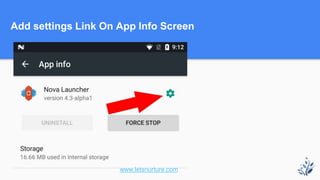
Add settings Link On App Info Screen
www.letsnurture.com
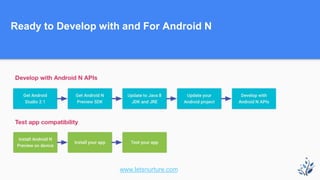
Ready to Develop with and For Android N
www.letsnurture.com
Visit Letsnurturefor more
www.letsnurture.com

Android n and beyond

  • 1.
    Android N andBeyond A Step towards Future www.letsnurture.com
  • 2.
    Does this lookany different? www.letsnurture.com
  • 3.
    Y Open Appwhen you can do it with Notification www.letsnurture.com
  • 4.
  • 5.
  • 6.
    Project Svelte: BackgroundOptimizations Android N applies the following optimizations: Apps targeting Android N do not receive CONNECTIVITY_ACTION broadcasts, even if they have manifest entries to request notification of these events. Apps running in the foreground can still listen for CONNECTIVITY_CHANGE on their main thread if they request notification with a BroadcastReceiver. Apps cannot send or receive ACTION_NEW_PICTURE or ACTION_NEW_VIDEO broadcasts. This optimization affects all apps, not only those targeting Android N. www.letsnurture.com
  • 7.
  • 8.
    Vision Settings inSetup Wizard Android N includes Vision Settings on the Welcome screen, where users can set up the following accessibility settings on a new device: Magnification gesture, Font size, Display size and TalkBack. To assess the impact of this feature, you should test your apps with these settings enabled. You can find the settings under Settings > Accessibility. www.letsnurture.com
  • 9.
    Other important points Whenan app is running on Android N, but targets a lower API level, and the user changes display size, the app process is killed. The app must be able to gracefully handle this scenario. Otherwise, it crashes when the user restores it from Recents. You should test your app to ensure that this behavior does not occur. You can do so by causing an identical crash when killing the app manually via DDMS. www.letsnurture.com
  • 10.
    Other important points Appstargeting N and above are not automatically killed on density changes; however, they may still respond poorly to configuration changes. Apps on Android N should be able to gracefully handle configuration changes, and should not crash on subsequent starts. You can verify app behavior by changing font size (Setting > Display > Font size), and then restoring the app from Recents.
  • 11.
  • 12.
  • 13.
  • 14.
    Add settings LinkOn App Info Screen www.letsnurture.com
  • 15.
    Ready to Developwith and For Android N www.letsnurture.com
  • 16.