Preliminary task
     Amy Willetts
1. In what ways does your media product use, develop or
challenge forms and conventions of real media products?

2. What have you learnt about the technologies from the
process of constructing this product
In what ways does your media product use, develop or challenge forms and conventions
of real media products?
THE FRONT COVER-SIMILARITIES

                                  Masthead


                                 Cover lines

                               Dominant Image
                               [rule of thirds] &
                               Plain background
                                   Barcode

                                Images both
                               medium close up
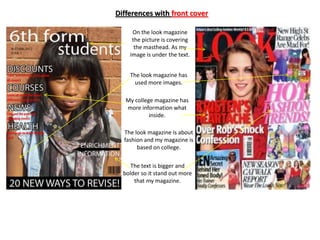
Differences with front cover

     On the look magazine
     the picture is covering
      the masthead. As my
    image is under the text.


    The look magazine has
      used more images.

   My college magazine has
   more information what
            inside.

  The look magazine is about
  fashion and my magazine is
       based on college.

     The text is bigger and
  bolder so it stand out more
      that my magazine.
In what ways does your media product use, develop or challenge forms and
conventions of real media products? contents page

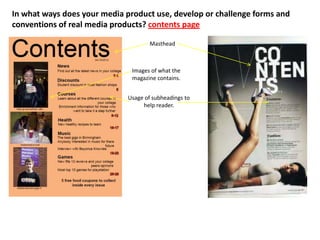
                                      Masthead


                               Images of what the
                               magazine contains.


                              Usage of subheadings to
                                   help reader.
DIFFERENCES WITH CONTENTS PAGE


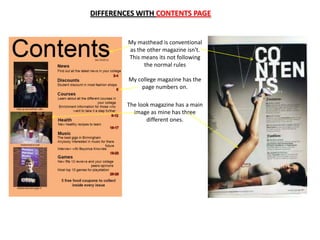
         My masthead is conventional
         as the other magazine isn't.
         This means its not following
               the normal rules

         My college magazine has the
             page numbers on.

         The look magazine has a main
           image as mine has three
                different ones.
What have you learnt about the technologies from the process of constructing this product


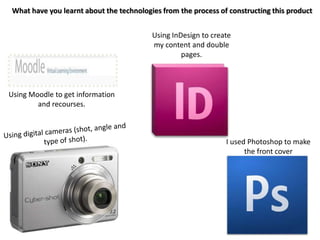
                                         Using InDesign to create
                                         my content and double
                                                  pages.


Using Moodle to get information
        and recourses.


                                                               I used Photoshop to make
                                                                     the front cover
Photoshop
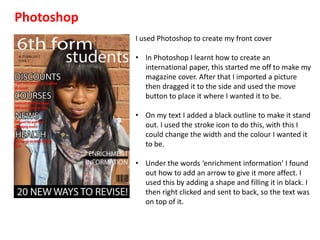
            I used Photoshop to create my front cover

            • In Photoshop I learnt how to create an
              international paper, this started me off to make my
              magazine cover. After that I imported a picture
              then dragged it to the side and used the move
              button to place it where I wanted it to be.

            • On my text I added a black outline to make it stand
              out. I used the stroke icon to do this, with this I
              could change the width and the colour I wanted it
              to be.

            • Under the words ‘enrichment information’ I found
              out how to add an arrow to give it more affect. I
              used this by adding a shape and filling it in black. I
              then right clicked and sent to back, so the text was
              on top of it.
InDesign
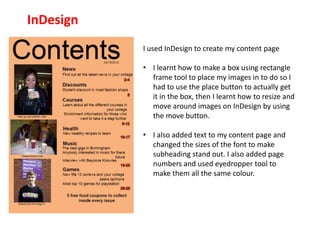
           I used InDesign to create my content page

           • I learnt how to make a box using rectangle
             frame tool to place my images in to do so I
             had to use the place button to actually get
             it in the box, then I learnt how to resize and
             move around images on InDesign by using
             the move button.

           • I also added text to my content page and
             changed the sizes of the font to make
             subheading stand out. I also added page
             numbers and used eyedropper tool to
             make them all the same colour.

Preliminary task powerpoint Amy Willetts

  • 1.
    Preliminary task Amy Willetts
  • 2.
    1. In whatways does your media product use, develop or challenge forms and conventions of real media products? 2. What have you learnt about the technologies from the process of constructing this product
  • 3.
    In what waysdoes your media product use, develop or challenge forms and conventions of real media products? THE FRONT COVER-SIMILARITIES Masthead Cover lines Dominant Image [rule of thirds] & Plain background Barcode Images both medium close up
  • 4.
    Differences with frontcover On the look magazine the picture is covering the masthead. As my image is under the text. The look magazine has used more images. My college magazine has more information what inside. The look magazine is about fashion and my magazine is based on college. The text is bigger and bolder so it stand out more that my magazine.
  • 5.
    In what waysdoes your media product use, develop or challenge forms and conventions of real media products? contents page Masthead Images of what the magazine contains. Usage of subheadings to help reader.
  • 6.
    DIFFERENCES WITH CONTENTSPAGE My masthead is conventional as the other magazine isn't. This means its not following the normal rules My college magazine has the page numbers on. The look magazine has a main image as mine has three different ones.
  • 7.
    What have youlearnt about the technologies from the process of constructing this product Using InDesign to create my content and double pages. Using Moodle to get information and recourses. I used Photoshop to make the front cover
  • 8.
    Photoshop I used Photoshop to create my front cover • In Photoshop I learnt how to create an international paper, this started me off to make my magazine cover. After that I imported a picture then dragged it to the side and used the move button to place it where I wanted it to be. • On my text I added a black outline to make it stand out. I used the stroke icon to do this, with this I could change the width and the colour I wanted it to be. • Under the words ‘enrichment information’ I found out how to add an arrow to give it more affect. I used this by adding a shape and filling it in black. I then right clicked and sent to back, so the text was on top of it.
  • 9.
    InDesign I used InDesign to create my content page • I learnt how to make a box using rectangle frame tool to place my images in to do so I had to use the place button to actually get it in the box, then I learnt how to resize and move around images on InDesign by using the move button. • I also added text to my content page and changed the sizes of the font to make subheading stand out. I also added page numbers and used eyedropper tool to make them all the same colour.