PRELIMINARY TASK
                        EVALUATION

                    COVER AND CONTENTS PAGES OF A
                          SCHOOL MAGAZINE
                          AS Media Unit G321


 What have you learnt about the technologies
    from the process of constructing this
   product?
    In what ways does your media product use, develop or
    challenge forms and conventions of real media products?
MY FRONT COVER AND
                          CONTENTS PAGE


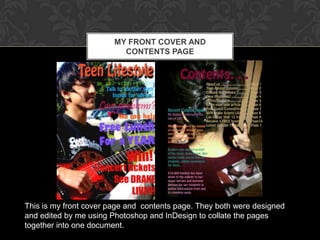
This is my front cover page and contents page. They both were designed
and edited by me using Photoshop and InDesign to collate the pages
together into one document.
SIMILARITIES BETWEEN MY
FRONT COVER AND AN EXISTING
           COVER

      Both magazines have a
      Masthead. To show
      what the page is about.
      Both of them include a
      number of Cover
      Lines. Giving the
      reader an idea of what
      to expect inside the
      magazine.
      Dominant Images
      separating text around
      the image. [rule of
      thirds] Making the
      page look interesting.
DIFFERENCES BETWEEN MY
FRONT COVER AND AN EXISTING
          COVER
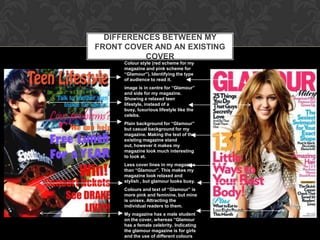
      Colour style (red scheme for my
      magazine and pink scheme for
      “Glamour”). Identifying the type
      of audience to read it.
      image is in centre for “Glamour”
      and side for my magazine.
      Showing a relaxed teen
      lifestyle, instead of a
      busy, luxurious lifestyle like the
      celebs.
      Plain background for “Glamour”
      but casual background for my
      magazine. Making the text of the
      existing magazine stand
      out, however it makes my
      magazine look much interesting
      to look at.
      Less cover lines in my magazine
      than “Glamour”. This makes my
      magazine look relaxed and
      stylish , but glamour looks busy.
      Colours and text of “Glamour” is
      more pink and feminine, but mine
      is unisex. Attracting the
      individual readers to them.
      My magazine has a male student
      on the cover, whereas “Glamour
      has a female celebrity. Indicating
      the glamour magazine is for girls
      and the use of different colours
SIMILARITIES BETWEEN MY
CONTENTS PAGE AND AN EXISTING
              ONE
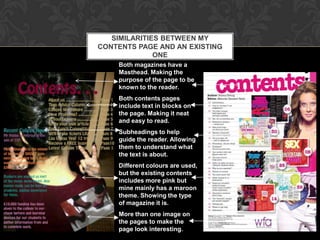
    Both magazines have a
    Masthead. Making the
    purpose of the page to be
    known to the reader.
    Both contents pages
    include text in blocks on
    the page. Making it neat
    and easy to read.
    Subheadings to help
    guide the reader. Allowing
    them to understand what
    the text is about.
    Different colours are used,
    but the existing contents
    includes more pink but
    mine mainly has a maroon
    theme. Showing the type
    of magazine it is.
    More than one image on
    the pages to make the
    page look interesting.
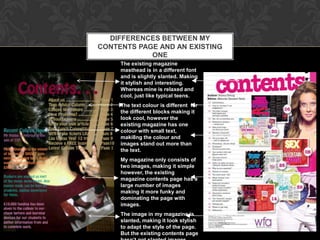
DIFFERENCES BETWEEN MY
CONTENTS PAGE AND AN EXISTING
            ONE
     The existing magazine
     masthead is in a different font
     and is slightly slanted. Making
     it stylish and interesting.
     Whereas mine is relaxed and
     cool, just like typical teens.
     The text colour is different for
     the different blocks making it
     look cool, however the
     existing magazine has one
     colour with small text,
     maki8ng the colour and
     images stand out more than
     the text.
     My magazine only consists of
     two images, making it simple
     however, the existing
     magazine contents page has a
     large number of images
     making it more funky and
     dominating the page with
     images.
     The image in my magazine is
     slanted, making it look stylish
     to adapt the style of the page.
     But the existing contents page
SOFTWARE AND RESOURCES

                                During the process of constructing the magazine I’ve
                                learnt more about the college online moodle facility, I
                                learnt how to find different documents and
                                slideshows to help me obtain and gather information.
                                Particularly, I learnt how to operate moodle by saving
                                or opening the documents which are based on the
                                online learning system.

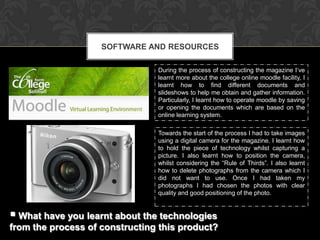
                                Towards the start of the process I had to take images
                                using a digital camera for the magazine. I learnt how
                                to hold the piece of technology whilst capturing a
                                picture. I also learnt how to position the camera,
                                whilst considering the “Rule of Thirds”. I also learnt
                                how to delete photographs from the camera which I
                                did not want to use. Once I had taken my
                                photographs I had chosen the photos with clear
                                quality and good positioning of the photo.


 What have you learnt about the technologies
from the process of constructing this product?
SOFTWARE AND RESOURCES

                                Whilst producing my product I had used Adobe
                                Photoshop to edit my images. I learnt what the
                                buttons on the program do to the image and I also
                                learnt how to create different layers and merging
                                different layers. I learnt how to insert images and to
                                crop them to fit the size of a magazine page. As well
                                as this I used Adobe InDesign, this allowed me to
                                collate both images of my magazine into one
                                document. I learnt how to insert text and how to
                                rearrange the image on the page, for it to be suitable
                                for magazine pages.

                                During the process of production I had to use
                                Microsoft Word to come up with ideas. I learnt how to
                                insert images and to brainstorm on the program. As
                                well as this I had used Microsoft Publisher to produce
                                draft pages of both pages of the product. I learnt how
                                to insert backgrounds and how to use tabs to
                                process effective layouts.
 What have you learnt about the technologies
from the process of constructing this product?
RESOURCES AND TECHNOLOGY USED
                                 TO PRODUCE MAGAZINE COVER
Digital Camera
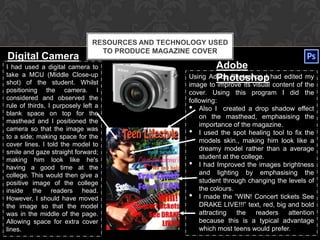
I had used a digital camera to                             Adobe
take a MCU (Middle Close-up
shot) of the student. Whilst
                                                           Photoshop
                                                   Using Adobe Photoshop I had edited my
                                                   image to improve its visual content of the
positioning the camera. I                          cover. Using this program I did the
considered and observed the                        following:
rule of thirds, I purposely left a
blank space on top for the
                                                   • Also I created a drop shadow effect
                                                       on the masthead, emphasising the
masthead and I positioned the
                                                       importance of the magazine.
camera so that the image was
to a side; making space for the
                                                   • I used the spot healing tool to fix the
                                                       models skin., making him look like a
cover lines. I told the model to
                                                       dreamy model rather than a average
smile and gaze straight forward;
making him look like he's                              student at the college.
having a good time at the                          • I had Improved the images brightness
college. This would then give a                        and lighting by emphasising the
positive image of the college                          student through changing the levels of
inside the readers head.                               the colours.
However, I should have moved                       • I made the “WIN! Concert tickets See
the image so that the model                            DRAKE LIVE!!!” text, red, big and bold
was in the middle of the page.                         attracting   the    readers   attention
Allowing space for extra cover                         because this is a typical advantage
lines.                                                 which most teens would prefer.
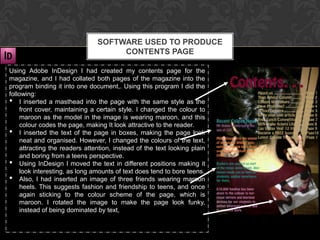
SOFTWARE USED TO PRODUCE
                                     CONTENTS PAGE

Using Adobe InDesign I had created my contents page for the
magazine, and I had collated both pages of the magazine into the
program binding it into one document,. Using this program I did the
following:
• I inserted a masthead into the page with the same style as the
    front cover, maintaining a certain style. I changed the colour to
    maroon as the model in the image is wearing maroon, and this
    colour codes the page, making It look attractive to the reader.
• I inserted the text of the page in boxes, making the page look
    neat and organised. However, I changed the colours of the text,
    attracting the readers attention, instead of the text looking plain
    and boring from a teens perspective.
• Using InDesign I moved the text in different positions making it
    look interesting, as long amounts of text does tend to bore teens.
• Also, I had inserted an image of three friends wearing maroon
    heels. This suggests fashion and friendship to teens, and once
    again sticking to the colour scheme of the page, which is
    maroon. I rotated the image to make the page look funky,
    instead of being dominated by text,

Preliminary task evaluation

  • 1.
    PRELIMINARY TASK EVALUATION COVER AND CONTENTS PAGES OF A SCHOOL MAGAZINE AS Media Unit G321  What have you learnt about the technologies from the process of constructing this  product? In what ways does your media product use, develop or challenge forms and conventions of real media products?
  • 2.
    MY FRONT COVERAND CONTENTS PAGE This is my front cover page and contents page. They both were designed and edited by me using Photoshop and InDesign to collate the pages together into one document.
  • 3.
    SIMILARITIES BETWEEN MY FRONTCOVER AND AN EXISTING COVER Both magazines have a Masthead. To show what the page is about. Both of them include a number of Cover Lines. Giving the reader an idea of what to expect inside the magazine. Dominant Images separating text around the image. [rule of thirds] Making the page look interesting.
  • 4.
    DIFFERENCES BETWEEN MY FRONTCOVER AND AN EXISTING COVER Colour style (red scheme for my magazine and pink scheme for “Glamour”). Identifying the type of audience to read it. image is in centre for “Glamour” and side for my magazine. Showing a relaxed teen lifestyle, instead of a busy, luxurious lifestyle like the celebs. Plain background for “Glamour” but casual background for my magazine. Making the text of the existing magazine stand out, however it makes my magazine look much interesting to look at. Less cover lines in my magazine than “Glamour”. This makes my magazine look relaxed and stylish , but glamour looks busy. Colours and text of “Glamour” is more pink and feminine, but mine is unisex. Attracting the individual readers to them. My magazine has a male student on the cover, whereas “Glamour has a female celebrity. Indicating the glamour magazine is for girls and the use of different colours
  • 5.
    SIMILARITIES BETWEEN MY CONTENTSPAGE AND AN EXISTING ONE Both magazines have a Masthead. Making the purpose of the page to be known to the reader. Both contents pages include text in blocks on the page. Making it neat and easy to read. Subheadings to help guide the reader. Allowing them to understand what the text is about. Different colours are used, but the existing contents includes more pink but mine mainly has a maroon theme. Showing the type of magazine it is. More than one image on the pages to make the page look interesting.
  • 6.
    DIFFERENCES BETWEEN MY CONTENTSPAGE AND AN EXISTING ONE The existing magazine masthead is in a different font and is slightly slanted. Making it stylish and interesting. Whereas mine is relaxed and cool, just like typical teens. The text colour is different for the different blocks making it look cool, however the existing magazine has one colour with small text, maki8ng the colour and images stand out more than the text. My magazine only consists of two images, making it simple however, the existing magazine contents page has a large number of images making it more funky and dominating the page with images. The image in my magazine is slanted, making it look stylish to adapt the style of the page. But the existing contents page
  • 7.
    SOFTWARE AND RESOURCES During the process of constructing the magazine I’ve learnt more about the college online moodle facility, I learnt how to find different documents and slideshows to help me obtain and gather information. Particularly, I learnt how to operate moodle by saving or opening the documents which are based on the online learning system. Towards the start of the process I had to take images using a digital camera for the magazine. I learnt how to hold the piece of technology whilst capturing a picture. I also learnt how to position the camera, whilst considering the “Rule of Thirds”. I also learnt how to delete photographs from the camera which I did not want to use. Once I had taken my photographs I had chosen the photos with clear quality and good positioning of the photo.  What have you learnt about the technologies from the process of constructing this product?
  • 8.
    SOFTWARE AND RESOURCES Whilst producing my product I had used Adobe Photoshop to edit my images. I learnt what the buttons on the program do to the image and I also learnt how to create different layers and merging different layers. I learnt how to insert images and to crop them to fit the size of a magazine page. As well as this I used Adobe InDesign, this allowed me to collate both images of my magazine into one document. I learnt how to insert text and how to rearrange the image on the page, for it to be suitable for magazine pages. During the process of production I had to use Microsoft Word to come up with ideas. I learnt how to insert images and to brainstorm on the program. As well as this I had used Microsoft Publisher to produce draft pages of both pages of the product. I learnt how to insert backgrounds and how to use tabs to process effective layouts.  What have you learnt about the technologies from the process of constructing this product?
  • 9.
    RESOURCES AND TECHNOLOGYUSED TO PRODUCE MAGAZINE COVER Digital Camera I had used a digital camera to Adobe take a MCU (Middle Close-up shot) of the student. Whilst Photoshop Using Adobe Photoshop I had edited my image to improve its visual content of the positioning the camera. I cover. Using this program I did the considered and observed the following: rule of thirds, I purposely left a blank space on top for the • Also I created a drop shadow effect on the masthead, emphasising the masthead and I positioned the importance of the magazine. camera so that the image was to a side; making space for the • I used the spot healing tool to fix the models skin., making him look like a cover lines. I told the model to dreamy model rather than a average smile and gaze straight forward; making him look like he's student at the college. having a good time at the • I had Improved the images brightness college. This would then give a and lighting by emphasising the positive image of the college student through changing the levels of inside the readers head. the colours. However, I should have moved • I made the “WIN! Concert tickets See the image so that the model DRAKE LIVE!!!” text, red, big and bold was in the middle of the page. attracting the readers attention Allowing space for extra cover because this is a typical advantage lines. which most teens would prefer.
  • 10.
    SOFTWARE USED TOPRODUCE CONTENTS PAGE Using Adobe InDesign I had created my contents page for the magazine, and I had collated both pages of the magazine into the program binding it into one document,. Using this program I did the following: • I inserted a masthead into the page with the same style as the front cover, maintaining a certain style. I changed the colour to maroon as the model in the image is wearing maroon, and this colour codes the page, making It look attractive to the reader. • I inserted the text of the page in boxes, making the page look neat and organised. However, I changed the colours of the text, attracting the readers attention, instead of the text looking plain and boring from a teens perspective. • Using InDesign I moved the text in different positions making it look interesting, as long amounts of text does tend to bore teens. • Also, I had inserted an image of three friends wearing maroon heels. This suggests fashion and friendship to teens, and once again sticking to the colour scheme of the page, which is maroon. I rotated the image to make the page look funky, instead of being dominated by text,