Masthead


   Cover Lines


Dominant Image
 [rule of thirds] &
Plain background

    Barcode/
  price/website
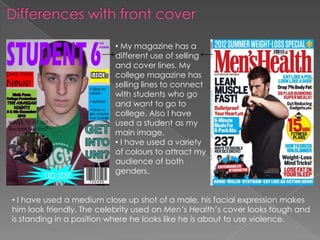
• My magazine has a
                          different use of selling
                          and cover lines. My
                          college magazine has
                          selling lines to connect
                          with students who go
                          and want to go to
                          college. Also I have
                          used a student as my
                          main image.
                          • I have used a variety
                          of colours to attract my
                          audience of both
                          genders.


• I have used a medium close up shot of a male, his facial expression makes
him look friendly. The celebrity used on Men’s Health’s cover looks tough and
is standing in a position where he looks like he is about to use violence.
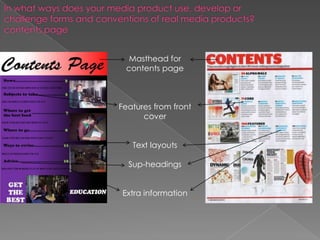
Masthead for
 contents page


Features from front
      cover


   Text layouts

  Sup-headings


Extra information
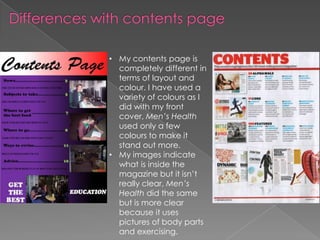
• My contents page is
  completely different in
  terms of layout and
  colour. I have used a
  variety of colours as I
  did with my front
  cover, Men’s Health
  used only a few
  colours to make it
  stand out more.
• My images indicate
  what is inside the
  magazine but it isn’t
  really clear, Men’s
  Health did the same
  but is more clear
  because it uses
  pictures of body parts
  and exercising.
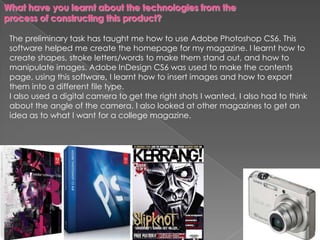
The preliminary task has taught me how to use Adobe Photoshop CS6. This
software helped me create the homepage for my magazine. I learnt how to
create shapes, stroke letters/words to make them stand out, and how to
manipulate images. Adobe InDesign CS6 was used to make the contents
page, using this software, I learnt how to insert images and how to export
them into a different file type.
I also used a digital camera to get the right shots I wanted, I also had to think
about the angle of the camera. I also looked at other magazines to get an
idea as to what I want for a college magazine.
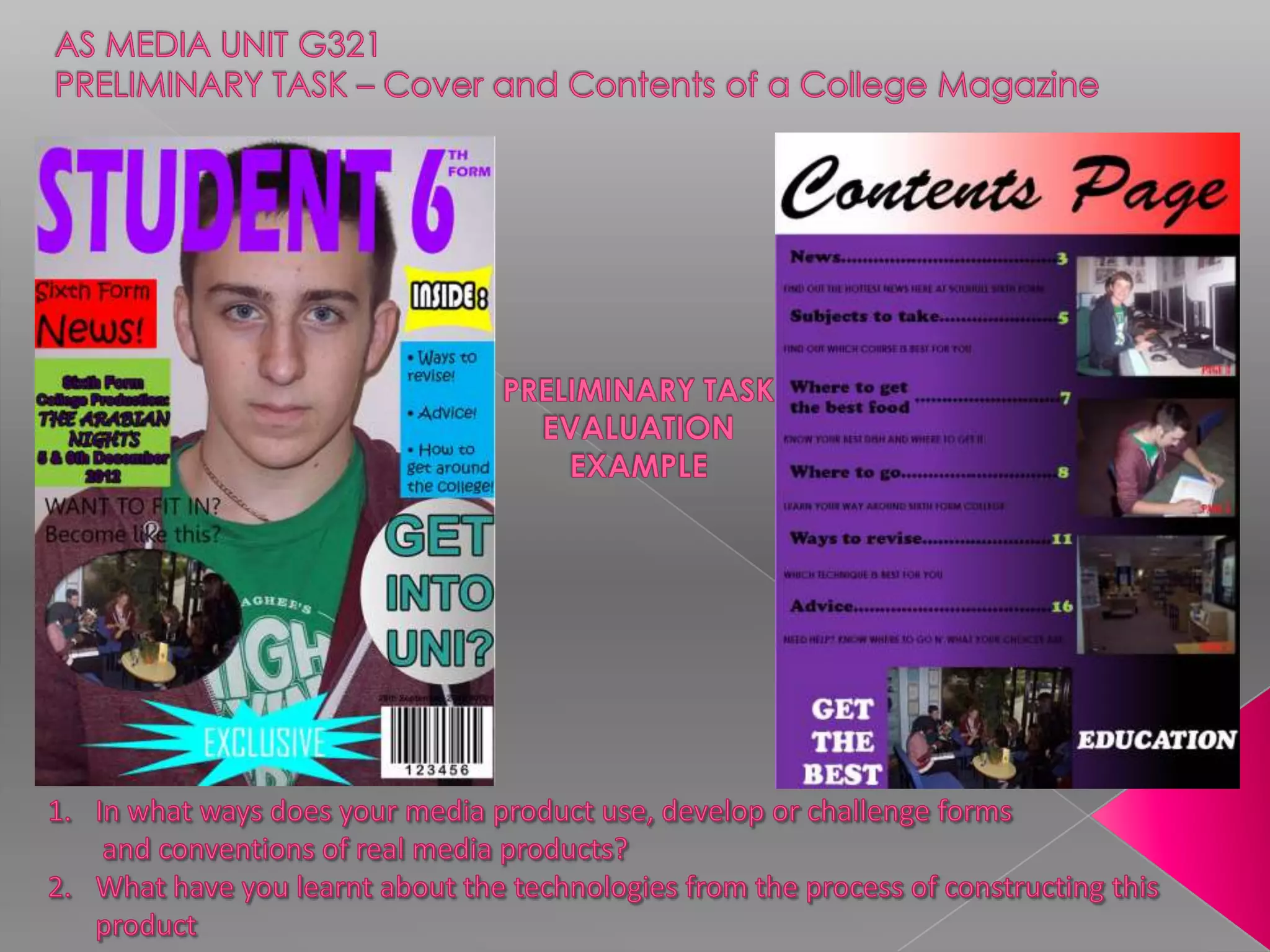
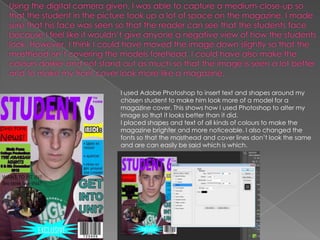
I used Adobe Photoshop to insert text and shapes around my
chosen student to make him look more of a model for a
magazine cover. This shows how I used Photoshop to alter my
image so that it looks better than it did.
I placed shapes and text of all kinds of colours to make the
magazine brighter and more noticeable. I also changed the
fonts so that the masthead and cover lines don’t look the same
and are can easily be said which is which.
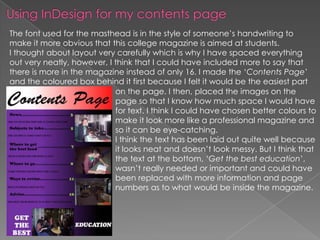
The font used for the masthead is in the style of someone’s handwriting to
make it more obvious that this college magazine is aimed at students.
I thought about layout very carefully which is why I have spaced everything
out very neatly, however, I think that I could have included more to say that
there is more in the magazine instead of only 16. I made the ‘Contents Page’
and the coloured box behind it first because I felt it would be the easiest part
                            on the page. I then, placed the images on the
                            page so that I know how much space I would have
                            for text. I think I could have chosen better colours to
                            make it look more like a professional magazine and
                            so it can be eye-catching.
                            I think the text has been laid out quite well because
                            it looks neat and doesn’t look messy. But I think that
                            the text at the bottom, ‘Get the best education’,
                            wasn’t really needed or important and could have
                            been replaced with more information and page
                            numbers as to what would be inside the magazine.

College magazine

  • 2.
    Masthead Cover Lines Dominant Image [rule of thirds] & Plain background Barcode/ price/website
  • 3.
    • My magazinehas a different use of selling and cover lines. My college magazine has selling lines to connect with students who go and want to go to college. Also I have used a student as my main image. • I have used a variety of colours to attract my audience of both genders. • I have used a medium close up shot of a male, his facial expression makes him look friendly. The celebrity used on Men’s Health’s cover looks tough and is standing in a position where he looks like he is about to use violence.
  • 4.
    Masthead for contentspage Features from front cover Text layouts Sup-headings Extra information
  • 5.
    • My contentspage is completely different in terms of layout and colour. I have used a variety of colours as I did with my front cover, Men’s Health used only a few colours to make it stand out more. • My images indicate what is inside the magazine but it isn’t really clear, Men’s Health did the same but is more clear because it uses pictures of body parts and exercising.
  • 6.
    The preliminary taskhas taught me how to use Adobe Photoshop CS6. This software helped me create the homepage for my magazine. I learnt how to create shapes, stroke letters/words to make them stand out, and how to manipulate images. Adobe InDesign CS6 was used to make the contents page, using this software, I learnt how to insert images and how to export them into a different file type. I also used a digital camera to get the right shots I wanted, I also had to think about the angle of the camera. I also looked at other magazines to get an idea as to what I want for a college magazine.
  • 7.
    I used AdobePhotoshop to insert text and shapes around my chosen student to make him look more of a model for a magazine cover. This shows how I used Photoshop to alter my image so that it looks better than it did. I placed shapes and text of all kinds of colours to make the magazine brighter and more noticeable. I also changed the fonts so that the masthead and cover lines don’t look the same and are can easily be said which is which.
  • 8.
    The font usedfor the masthead is in the style of someone’s handwriting to make it more obvious that this college magazine is aimed at students. I thought about layout very carefully which is why I have spaced everything out very neatly, however, I think that I could have included more to say that there is more in the magazine instead of only 16. I made the ‘Contents Page’ and the coloured box behind it first because I felt it would be the easiest part on the page. I then, placed the images on the page so that I know how much space I would have for text. I think I could have chosen better colours to make it look more like a professional magazine and so it can be eye-catching. I think the text has been laid out quite well because it looks neat and doesn’t look messy. But I think that the text at the bottom, ‘Get the best education’, wasn’t really needed or important and could have been replaced with more information and page numbers as to what would be inside the magazine.