1. In what ways does your media product use,
develop or challenge forms
 and conventions of real media products?


      2. What have you learnt about the
      technologies from the process of
      constructing this product

    MY COVER AND CONTENTS OF A
         COLLEGE MAGAZINE
    PRELIMINARY TASK EVALUATION
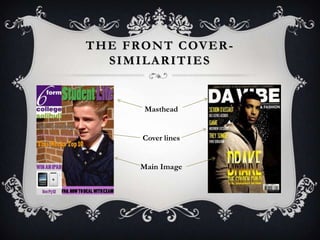
T H E F RO N T C OV E R -
    SIMILARITIES


          Masthead


         Cover lines


         Main Image
D I F F E R E N C E S W I T H F RO N T
                C OV E R

             The differences are that my
           magazine has a logo where as
            the second magazine doesn’t
               have one. The second
            magazine has a barcode, and
            mine has an advertisement in
            the bottom left corner. Also
               the main image on my
            magazine is on the right third
              of the page whereas the
           second magazine has the main
          image placed more towards the
                      left third.
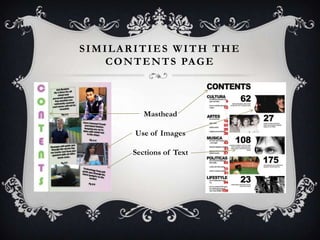
SIMILARITIES WITH THE
   C O N T E N T S PA G E


           Masthead

        Use of Images

        Sections of Text
DIFFERENCES WITH THE CONTENTS
             PA G E


        In my contents page the
        masthead is down the
        side of the page whereas
        on the second contents
        page it its along the top.
        The second contents
        page has five images with
        shorter amounts of text
        whereas mine has four
        images with more text.
Software/Resources    WHAT HAVE YOU LEARNT ABOUT
                      THE TECHNOLOGIES FROM THE
       Used          PROCESS OF CONSTRUCTING THIS
                               PRODUCT?
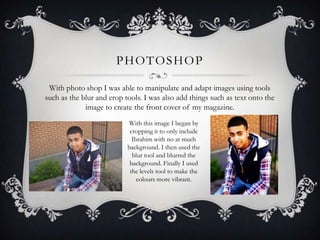
PHOTOSHOP

 With photo shop I was able to manipulate and adapt images using tools
such as the blur and crop tools. I was also add things such as text onto the
             image to create the front cover of my magazine.
                           With this image I began by
                            cropping it to only include
                             Ibrahim with no at much
                           background. I then used the
                             blur tool and blurred the
                            background. Finally I used
                            the levels tool to make the
                               colours more vibrant.
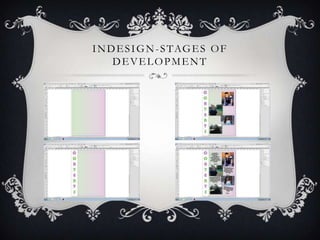
INDESIGN
I was able to use InDesign to create the layout for my contents page. I could also
input my front cover onto the document to create a two page spread of my front
                            cover and contents page.
 With my contents I was able to add a gradient background fading from green to
      purple. I then was able to add a masthead down the side of the page.
                              After that I added in my
                                 edited images from
                             Photoshop, and also added
                           small blocks of text. I put the
                            text at a five degree tilt, and
                             on both the images and the
                           text added a shadow using the
                                “drop shadow” tool.
I N D E S I G N - S TAG E S O F
     DEVELOPMENT
P H O T O S H O P - S TAG E S O F
      DEVELOPMENT

Evaluation

  • 1.
    1. In whatways does your media product use, develop or challenge forms and conventions of real media products? 2. What have you learnt about the technologies from the process of constructing this product MY COVER AND CONTENTS OF A COLLEGE MAGAZINE PRELIMINARY TASK EVALUATION
  • 2.
    T H EF RO N T C OV E R - SIMILARITIES Masthead Cover lines Main Image
  • 3.
    D I FF E R E N C E S W I T H F RO N T C OV E R The differences are that my magazine has a logo where as the second magazine doesn’t have one. The second magazine has a barcode, and mine has an advertisement in the bottom left corner. Also the main image on my magazine is on the right third of the page whereas the second magazine has the main image placed more towards the left third.
  • 4.
    SIMILARITIES WITH THE C O N T E N T S PA G E Masthead Use of Images Sections of Text
  • 5.
    DIFFERENCES WITH THECONTENTS PA G E In my contents page the masthead is down the side of the page whereas on the second contents page it its along the top. The second contents page has five images with shorter amounts of text whereas mine has four images with more text.
  • 6.
    Software/Resources WHAT HAVE YOU LEARNT ABOUT THE TECHNOLOGIES FROM THE Used PROCESS OF CONSTRUCTING THIS PRODUCT?
  • 7.
    PHOTOSHOP With photoshop I was able to manipulate and adapt images using tools such as the blur and crop tools. I was also add things such as text onto the image to create the front cover of my magazine. With this image I began by cropping it to only include Ibrahim with no at much background. I then used the blur tool and blurred the background. Finally I used the levels tool to make the colours more vibrant.
  • 8.
    INDESIGN I was ableto use InDesign to create the layout for my contents page. I could also input my front cover onto the document to create a two page spread of my front cover and contents page. With my contents I was able to add a gradient background fading from green to purple. I then was able to add a masthead down the side of the page. After that I added in my edited images from Photoshop, and also added small blocks of text. I put the text at a five degree tilt, and on both the images and the text added a shadow using the “drop shadow” tool.
  • 9.
    I N DE S I G N - S TAG E S O F DEVELOPMENT
  • 10.
    P H OT O S H O P - S TAG E S O F DEVELOPMENT