Cover and contents of my college magazine!
   Evaluation.


AS MEDIA PRELIMINARY TASK
IN WHAT WAY DOES YOUR MEDIA PRODUCT USE,
DEVELOP OR CHALLENGE FORMS AND CONVENTIONS
OF MEDIA PRODUCTS? COVER PAGE.
SIMILARITIES:
                     Masthead


                     Cover lines
                     around the
                     main image


                      “C” used
                      to display
                      images
                      and text.


                      Rule of thirds
                   Eye contact with both
                   people on cover
IN WHAT WAY DOES YOUR MEDIA PRODUCT USE, DEVELOP
OR CHALLENGE FORMS AND CONVENTIONS OF MEDIA
PRODUCTS? COVER PAGE
DIFFERENCES:
                 A medium shot used in “fashion” whereas
                 a medium close up is used on “sfcs
                 student.” A model is used on the front
                 cover. The pose of the model on “fashion”
                 could have connotations of being sexy, a
                 confident pose is portrayed with
                 connotations of glamour and style.
                 Whereas on “sfcs student” the facial
                 expression is a smile, it is a real life
                 student which the students would relate
                 to and she looks welcoming and friendly
                 inviting the reader to read on.


                  Another difference was the
                  background
                  “sfcs student” has a background
                  whereas fashion has a plain
                  background.


                 Lastly “sfcs student” has a barcode
                 which I feel makes it look
                 professional and like a proper
                 magazine whereas “fashion”
                 doesn’t.
STRENGTHS AND WEAKNESSES OF THE
FRONT COVER OF MY STUDENT MAGAZINE


 Strengths:
     I think that I followed the idea of a “c” shape as a magazine would do which
 made it look professional.
     I think that the background emphasised the idea of college life as it represented a
 student at college.
     Lastly I think that my image was clear and worked quite well.

 Weaknesses:
    I think there was some dead space which I could have filled more effectively.
    I could have used a range of fonts to make it more interesting
    Lastly I think that my image had too much headspace which could have been improved
     by taking the image from a better angle.
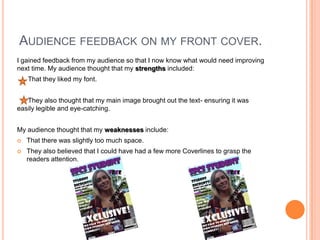
AUDIENCE FEEDBACK ON MY FRONT COVER.
I gained feedback from my audience so that I now know what would need improving
next time. My audience thought that my strengths included:
    That they liked my font.


   They also thought that my main image brought out the text- ensuring it was
easily legible and eye-catching.


My audience thought that my weaknesses include:
   That there was slightly too much space.
   They also believed that I could have had a few more Coverlines to grasp the
    readers attention.
IN WHAT WAY DOES YOUR MEDIA PRODUCT USE, DEVELOP
OR CHALLENGE FORMS AND CONVENTIONS OF MEDIA
PRODUCTS?   CONTENTS PAGE.
SIMILARITIES

                 Both contents pages have initial
                 magazine masthead on their
                 contents pages.

                 Information backs up the
                 coverlines on the front cover.

                 Simple layout of columns with
                 sub headings headings so the
                 readers can simply read the
                 information (columns divided
                 into 3). This makes the
                 information clear.

                 Use of images to provide a
                 visual representation for the
                 readers and to make it more
                 interesting.
IN WHAT WAY DOES YOUR MEDIA PRODUCT USE, DEVELOP
OR CHALLENGE FORMS AND CONVENTIONS OF MEDIA
PRODUCTS? CONTENTS PAGE.
DIFFERENCES.   “Drummer” uses a number on
                    their images which is
                    professional; it allows the reader
                    to know exactly where to find
                    this section; whereas on my
                    magazine I didn’t do this- I think
                    next time I could to make it more
                    professional.

                    On my student magazine I
                    added an email address and
                    number to make it seem more
                    professional; this isn’t on
                    “drummer”.

                    Drummer has a clear
                    professional colour scheme
                    whereas my magazine uses a
                    range over colours. I think using
                    a colour scheme makes the
                    magazine look professional
STRENGTHS AND WEAKNESSES OF THE
CONTENTS PAGE OF MY STUDENT MAGAZINE


Strengths:
     I think that I put a reasonable amount of images on my contents to ensure the interest of
the reader.
    I also used subheadings to make sure that the information was clear and legible this
ensured my magazine would be easy to navigate around.
     Lastly I used three columns to ensure my magazine gave quite a professional
approach.


Weaknesses:
   I think that my images weren’t very clear and could have been made more able to see, by
    making them bigger.
   I think I could have had more text and information.
   Lastly I think I could have showed the fact I was aiming to use 3 columns more clearly.
AUDIENCE FEEDBACK ON MY CONTENTS
 PAGE.
   I gained feedback from my audience so that I now know what would need
    improving next time. My audience thought that my strengths included:
     That my layout was good and easy to gather information from.
      Also that I used a good amount of pictures which made it more interesting.


My audience thought that my weaknesses include:
   That I could have used a background colour this would have made it more
    interesting and overall made my contents page more effective.
WHAT HAVE YOU LEARNT ABOUT THE
TECHNOLOGIES FROM THE PROCESS
OF CONSTRUCTING THIS PRODUCT?
By Laura Boucher
I used a digital camera to take my main image- I learnt about a range of different angles and use a medium
close up on my front cover.
I had to ensure that the model dominated the frame however there was room for coverlines. I think I could
have angled the camera better to ensure that there was less headspace.
I then used adobe photoshop. This is an image based, industry standard package. I learnt to do many
things such as:
add an image; add text; add colour and to use the range of tools available.


                                                          I began by simply adding my image;
                                                          this set the background for my
                                                          magazine. I simply did this by
                                                          placing my image.


                                                           I then added my masthead; to do
                                                           this is used the text tool and then I
                                                           simply changed both the colour and
                                                           font. I want to made my masthead
                                                           stand out so I used fx and added a
                                                           stroke and drop shadow.
ADOBE PHOTOSHOP

             Here I was able to add some key
             coverlines, including my main one
             “exclusive” here I used the text tool,
             font and colour, I was also able to
             position my text wherever I wanted it.


             Here I added a barcode and I used a strip
             at the bottom, to do this I added a
             rectangle and then simply added text to it.
CONTENTS PAGE USING INDESIGN.
   I created my contents page using InDesign. This is an industry standard package. It allowed me to “place”
   my images in and also my masthead. It allowed me to add text with a range of fonts, colours ext. I found
   indesign fairly simple to use and easily became familiar with the toolbar.

                                                                    This shows my contents page in
                                                                    indesign.


Indesign allowed me to think about the importance of layout. I helped me to try and achieve the three
columns I was aiming for. The only thing I found difficult about indesign was drawing the picture boxes
first as often the sizing was wrong and the image didn’t fit. I don’t think that my contents page looked
very professional I think that I could have improved this by ensuring the images were resized and more
clear and maybe having a background colour to make the text and images stand out more. Overall
indesign enabled me to add the features of my contents page and mainly enabled me to think about the
importance of a good layout; which I have now realised I can improve upon next time.

Magazine evaluation- preliminary task.

  • 1.
    Cover and contentsof my college magazine! Evaluation. AS MEDIA PRELIMINARY TASK
  • 2.
    IN WHAT WAYDOES YOUR MEDIA PRODUCT USE, DEVELOP OR CHALLENGE FORMS AND CONVENTIONS OF MEDIA PRODUCTS? COVER PAGE. SIMILARITIES: Masthead Cover lines around the main image “C” used to display images and text. Rule of thirds Eye contact with both people on cover
  • 3.
    IN WHAT WAYDOES YOUR MEDIA PRODUCT USE, DEVELOP OR CHALLENGE FORMS AND CONVENTIONS OF MEDIA PRODUCTS? COVER PAGE DIFFERENCES: A medium shot used in “fashion” whereas a medium close up is used on “sfcs student.” A model is used on the front cover. The pose of the model on “fashion” could have connotations of being sexy, a confident pose is portrayed with connotations of glamour and style. Whereas on “sfcs student” the facial expression is a smile, it is a real life student which the students would relate to and she looks welcoming and friendly inviting the reader to read on. Another difference was the background “sfcs student” has a background whereas fashion has a plain background. Lastly “sfcs student” has a barcode which I feel makes it look professional and like a proper magazine whereas “fashion” doesn’t.
  • 4.
    STRENGTHS AND WEAKNESSESOF THE FRONT COVER OF MY STUDENT MAGAZINE Strengths: I think that I followed the idea of a “c” shape as a magazine would do which made it look professional. I think that the background emphasised the idea of college life as it represented a student at college. Lastly I think that my image was clear and worked quite well. Weaknesses:  I think there was some dead space which I could have filled more effectively.  I could have used a range of fonts to make it more interesting  Lastly I think that my image had too much headspace which could have been improved by taking the image from a better angle.
  • 5.
    AUDIENCE FEEDBACK ONMY FRONT COVER. I gained feedback from my audience so that I now know what would need improving next time. My audience thought that my strengths included: That they liked my font. They also thought that my main image brought out the text- ensuring it was easily legible and eye-catching. My audience thought that my weaknesses include:  That there was slightly too much space.  They also believed that I could have had a few more Coverlines to grasp the readers attention.
  • 6.
    IN WHAT WAYDOES YOUR MEDIA PRODUCT USE, DEVELOP OR CHALLENGE FORMS AND CONVENTIONS OF MEDIA PRODUCTS? CONTENTS PAGE. SIMILARITIES Both contents pages have initial magazine masthead on their contents pages. Information backs up the coverlines on the front cover. Simple layout of columns with sub headings headings so the readers can simply read the information (columns divided into 3). This makes the information clear. Use of images to provide a visual representation for the readers and to make it more interesting.
  • 7.
    IN WHAT WAYDOES YOUR MEDIA PRODUCT USE, DEVELOP OR CHALLENGE FORMS AND CONVENTIONS OF MEDIA PRODUCTS? CONTENTS PAGE. DIFFERENCES. “Drummer” uses a number on their images which is professional; it allows the reader to know exactly where to find this section; whereas on my magazine I didn’t do this- I think next time I could to make it more professional. On my student magazine I added an email address and number to make it seem more professional; this isn’t on “drummer”. Drummer has a clear professional colour scheme whereas my magazine uses a range over colours. I think using a colour scheme makes the magazine look professional
  • 8.
    STRENGTHS AND WEAKNESSESOF THE CONTENTS PAGE OF MY STUDENT MAGAZINE Strengths: I think that I put a reasonable amount of images on my contents to ensure the interest of the reader. I also used subheadings to make sure that the information was clear and legible this ensured my magazine would be easy to navigate around. Lastly I used three columns to ensure my magazine gave quite a professional approach. Weaknesses:  I think that my images weren’t very clear and could have been made more able to see, by making them bigger.  I think I could have had more text and information.  Lastly I think I could have showed the fact I was aiming to use 3 columns more clearly.
  • 9.
    AUDIENCE FEEDBACK ONMY CONTENTS PAGE.  I gained feedback from my audience so that I now know what would need improving next time. My audience thought that my strengths included: That my layout was good and easy to gather information from. Also that I used a good amount of pictures which made it more interesting. My audience thought that my weaknesses include:  That I could have used a background colour this would have made it more interesting and overall made my contents page more effective.
  • 10.
    WHAT HAVE YOULEARNT ABOUT THE TECHNOLOGIES FROM THE PROCESS OF CONSTRUCTING THIS PRODUCT? By Laura Boucher
  • 11.
    I used adigital camera to take my main image- I learnt about a range of different angles and use a medium close up on my front cover. I had to ensure that the model dominated the frame however there was room for coverlines. I think I could have angled the camera better to ensure that there was less headspace. I then used adobe photoshop. This is an image based, industry standard package. I learnt to do many things such as: add an image; add text; add colour and to use the range of tools available. I began by simply adding my image; this set the background for my magazine. I simply did this by placing my image. I then added my masthead; to do this is used the text tool and then I simply changed both the colour and font. I want to made my masthead stand out so I used fx and added a stroke and drop shadow.
  • 12.
    ADOBE PHOTOSHOP Here I was able to add some key coverlines, including my main one “exclusive” here I used the text tool, font and colour, I was also able to position my text wherever I wanted it. Here I added a barcode and I used a strip at the bottom, to do this I added a rectangle and then simply added text to it.
  • 13.
    CONTENTS PAGE USINGINDESIGN. I created my contents page using InDesign. This is an industry standard package. It allowed me to “place” my images in and also my masthead. It allowed me to add text with a range of fonts, colours ext. I found indesign fairly simple to use and easily became familiar with the toolbar. This shows my contents page in indesign. Indesign allowed me to think about the importance of layout. I helped me to try and achieve the three columns I was aiming for. The only thing I found difficult about indesign was drawing the picture boxes first as often the sizing was wrong and the image didn’t fit. I don’t think that my contents page looked very professional I think that I could have improved this by ensuring the images were resized and more clear and maybe having a background colour to make the text and images stand out more. Overall indesign enabled me to add the features of my contents page and mainly enabled me to think about the importance of a good layout; which I have now realised I can improve upon next time.