Practical 02: Modern
Survey Instrument
© 2018 Dr. Sarhat M. Adam
BSc in civil Engineering
Msc in Geodetic Surveying
PhD in Engineering Surveying & Space Geodesy
Note – Figures and materials in the slides may be the authors own work or
extracted from internet websites, Materials by Duhok and Nottingham
universities’ staff and their slides, author's own knowledge, or various internet
image sources and codes.
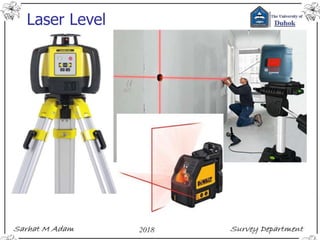
Laser Level
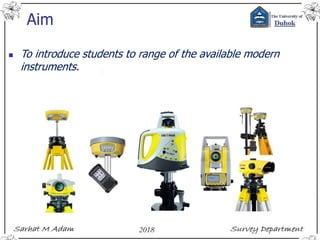
Aim
 To introduce students to range of the available modern
instruments.
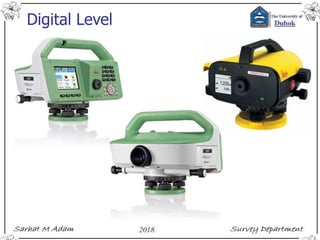
Digital Level
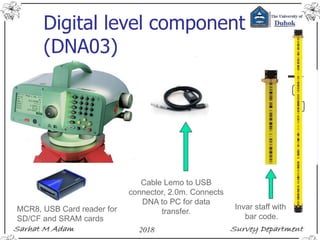
Digital level component
(DNA03)
Cable Lemo to USB
connector, 2.0m. Connects
DNA to PC for data
transfer.
MCR8, USB Card reader for
SD/CF and SRAM cards
Invar staff with
bar code.
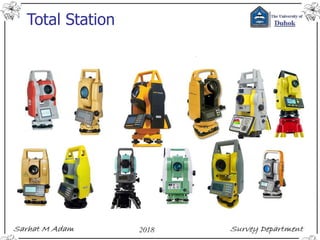
Total Station
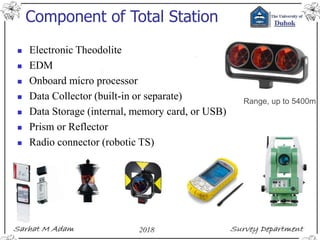
Component of Total Station
 Electronic Theodolite
 EDM
 Onboard micro processor
 Data Collector (built-in or separate)
 Data Storage (internal, memory card, or USB)
 Prism or Reflector
 Radio connector (robotic TS)
Range, up to 5400m
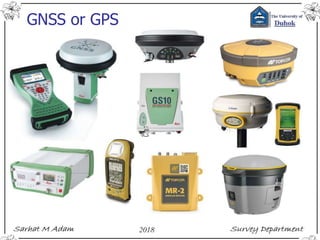
GNSS or GPS
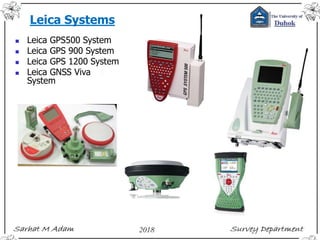
Leica Systems
 Leica GPS500 System
 Leica GPS 900 System
 Leica GPS 1200 System
 Leica GNSS Viva
System
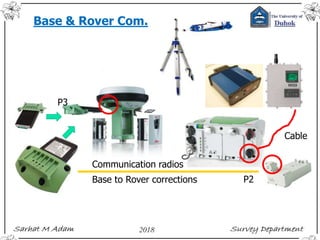
Base & Rover Com.
Cable
P2
P3
Communication radios
Base to Rover corrections
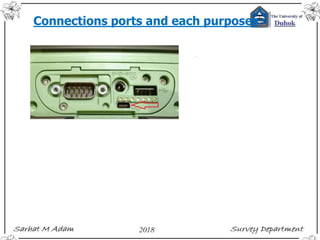
Connections ports and each purposes
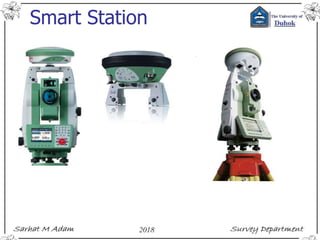
Smart Station
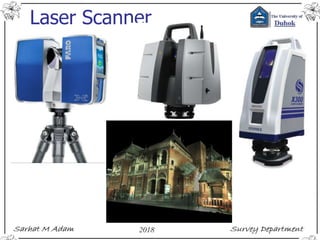
Laser Scanner

Practical 02: Modern Survey Instrument

  • 1.
    Practical 02: Modern SurveyInstrument © 2018 Dr. Sarhat M. Adam BSc in civil Engineering Msc in Geodetic Surveying PhD in Engineering Surveying & Space Geodesy Note – Figures and materials in the slides may be the authors own work or extracted from internet websites, Materials by Duhok and Nottingham universities’ staff and their slides, author's own knowledge, or various internet image sources and codes.
  • 2.
  • 3.
    Aim  To introducestudents to range of the available modern instruments.
  • 4.
  • 5.
    Digital level component (DNA03) CableLemo to USB connector, 2.0m. Connects DNA to PC for data transfer. MCR8, USB Card reader for SD/CF and SRAM cards Invar staff with bar code.
  • 6.
  • 7.
    Component of TotalStation  Electronic Theodolite  EDM  Onboard micro processor  Data Collector (built-in or separate)  Data Storage (internal, memory card, or USB)  Prism or Reflector  Radio connector (robotic TS) Range, up to 5400m
  • 8.
  • 9.
    Leica Systems  LeicaGPS500 System  Leica GPS 900 System  Leica GPS 1200 System  Leica GNSS Viva System
  • 10.
    Base & RoverCom. Cable P2 P3 Communication radios Base to Rover corrections
  • 11.
    Connections ports andeach purposes
  • 12.
  • 13.

Editor's Notes

  • #3 https://social.technet.microsoft.com/wiki/contents/articles/14663.loops-with-visual-basic-net.aspx http://www.ncl.ac.uk/undergraduate/modules/ceg2701/
  • #4 https://social.technet.microsoft.com/wiki/contents/articles/14663.loops-with-visual-basic-net.aspx http://www.ncl.ac.uk/undergraduate/modules/ceg2701/
  • #5 https://social.technet.microsoft.com/wiki/contents/articles/14663.loops-with-visual-basic-net.aspx http://www.ncl.ac.uk/undergraduate/modules/ceg2701/
  • #7 https://social.technet.microsoft.com/wiki/contents/articles/14663.loops-with-visual-basic-net.aspx http://www.ncl.ac.uk/undergraduate/modules/ceg2701/
  • #9 https://social.technet.microsoft.com/wiki/contents/articles/14663.loops-with-visual-basic-net.aspx http://www.ncl.ac.uk/undergraduate/modules/ceg2701/
  • #12 http://helpdesk.microsurvey.com/index.php?/Knowledgebase/Article/View/1298/149/leica-cs15-to-pc-connection-with-usb-cable Home Register Contact Us Knowledgebase Troubleshooter Downloads Movies Forums Training Hardware Support Live Support Optional LoginRSS Remember me Lost password Knowledgebase (320)Downloads (1023)Land Surveying (295)Accident Reconstruction (37)Construction Surveying (28)Other SEARCH Knowledgebase: Data Collectors Leica CS15 to PC connection with USB cable Posted by Jacob Wall on 05 November 2015 02:20 PM To connect your CS15 to your computer via standard USB cable (using mini USB end at controller) in order to download/upload FieldGenius or Layout projects; follow these steps: Download and install Windows Mobile Device Center from this website https://support.microsoft.com/en-us/kb/931937 Download and install MicroSurvey Transfer program from here http://helpdesk.microsurvey.com/index.php?/Knowledgebase/Article/View/714/0/microsurvey-transfer-program Download and install the Leica CS Driver from myWorld @ Leica Geosystems. The Tools category for the CS15 Product will have the driver downloads. The downloaded file should be called Setup_Leica_USB_64bit.zip or similar. Once everything is installed you should be able to connect the USB cable and two things should happen automatically: Windows Mobile Device Center should launch allowing you to explore files on the device, etc. MicroSurvey Transfer should automatically open which will allow you to quickly transfer files back and forth between PC and CS15 folders for FieldGenius or Layout NOTE: Not all CS15 data collectors will have the OPTIONAL mini USB port. (0 vote(s)) Helpful Not helpful Comments (0) Help Desk Software by Kayako