Jen HegnaCreating your virtual voice with Podcasting
ObjectivesWhat is Podcasting?What is RSS?Finding and subscribing to PodcastsCreating your own podcastPublishing your podcast
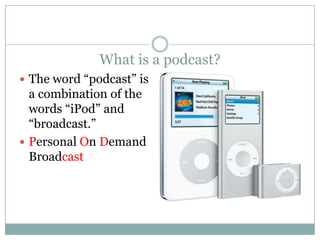
What is a podcast?The word “podcast” is a combination of the words “iPod” and “broadcast.”Personal On Demand Broadcast
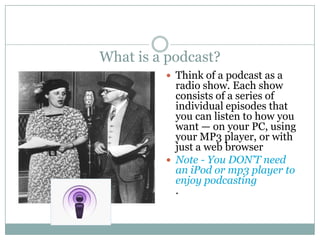
What is a podcast?Think of a podcast as a radio show. Each show consists of a series of individual episodes that you can listen to how you want — on your PC, using your MP3 player, or with just a web browserNote - You DON’T need an iPod or mp3 player to enjoy podcasting.
RSSRSS files are used for publishing all types of information on the Internet, but are primarily a tool for sharing web site news.
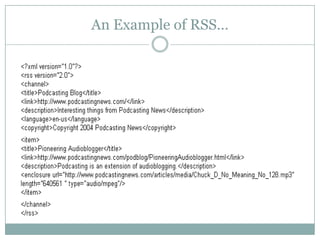
An Example of RSS…
Finding and subscribing to Podcastshttp://podomatic.com/http://www.podcast.net/http://www.podcastalley.com/http://www.podshow.com/http://www.podomatic.com/My Favorite – ITUNES!
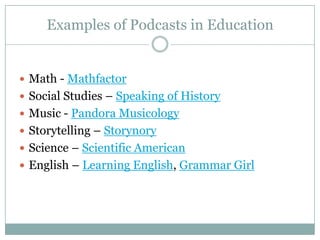
Examples of Podcasts in EducationMath - MathfactorSocial Studies – Speaking of HistoryMusic - Pandora Musicology Storytelling – StorynoryScience – Scientific AmericanEnglish – Learning English, Grammar Girl
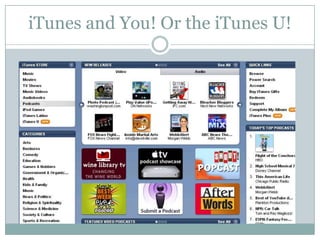
iTunes and You! Or the iTunes U!
Creative Commons According to Wikipedia, the Creative Commons (CC) is a non-profit organization devoted to expanding the range of creative work available for others legally to build upon and share. The organization has released several copyright licenses known as Creative Commons licenses. These licenses, depending on the one chosen, restrict only certain rights (or none) of the work.
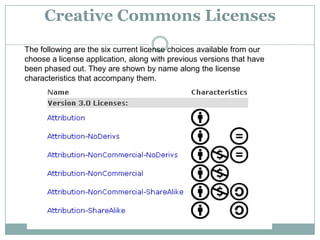
Creative Commons LicensesThe following are the six current license choices available from our choose a license application, along with previous versions that have been phased out. They are shown by name along the license characteristics that accompany them.
AttributionYou let others copy, distribute, display, and perform your copyrighted work — and derivative works based upon it — but only if they give credit the way you request.Example: Jane publishes her photograph with an Attribution license, because she wants the world to use her pictures provided they give her credit. Bob finds her photograph online and wants to display it on the front page of his website. Bob puts Jane’s picture on his site, and clearly indicates Jane’s authorship.
NoncommercialYou let others copy, distribute, display, and perform your work — and derivative works based upon it — but for noncommercial purposes onlyExamples: Gus publishes his photograph on his website with a Noncommercial license. Camille prints Gus’ photograph. Camille is not allowed to sell the print photograph without Gus’s permission.
No Derivative WorksYou let others copy, distribute, display, and perform only verbatim copies of your work, not derivative works based upon it.Example: Sara licenses a recording of her song with a No Derivative Works license. Joe would like to cut Sara’s track and mix it with his own to produce an entirely new song. Joe cannot do this without Sara’s permission (unless his song amounts to fair use)
Share AlikeYou allow others to distribute derivative works only under a license identical to the license that governs your work.Example: Gus’s online photo is licensed under the Noncommercial and Share Alike terms. Camille is an amateur collage artist, and she takes Gus’s photo and puts it into one of her collages. This Share Alike language requires Camille to make her collage available on a Noncommercial plus Share AlikeNote: A license cannot feature both the Share Alike and No Derivative Works options. The Share Alike requirement applies only to derivative works.
Creative Commons - Video
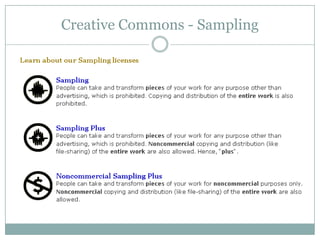
Creative Commons - Sampling
The Podcasting Legal Guidehttp://wiki.creativecommons.org/Welcome_To_The_Podcasting_Legal_Guide
Podcasting = time Not a one time shotIt takes timePlanRecordEditPublishPromoteCommitment
Step 1- determine content and formatMake decisions first!What to record?  How long?  How frequently?Tone, energy, scripting and music.Who is your audience?
Step 2 -Assemble equipment and peopleContent and audio!Support for the causeMic and a computerAudio Editing Software (Audacity and Lame)
Step 3 - RecordStart recording!This is the fun part!  Breathe.  Enunciate.  Slow down.Monitor the recording.Record the intro and outro last.
Post ProductionSound editingExport to mp3Edit tagsID3 tagsName/TitleTrack numberGenreArtistComments etc….Listen to your Completed Work!
Terms to knowSample rateFrequency of snapshots taken during actual recordingLike frames of a movieHigher number is better quality but a larger file44,100 khz is standardSet before recordingBit rateAmount of information processed per unit of timeAgain higher number is better quality but a larger fileSuggestions: 64 kbps for voice; 128 kbps for musicSet when exporting to mp3
Step Four – Upload and PublishThis step can be done manually, but there are many sites that do this automatically – including rSchool!These type of sites include a combination of:RSS feed generationServer space/file hostingBandwidth allotmentBlog/websiteRecording capacity All-in-one exampleshttp://www.podomatic.com/http://studio.odeo.com/create/homehttp://www.gcast.com/
Promote your podcast!Websites/blogsDirectorieshttp://www.podcastbunker.comhttp://www.podcastalley.comhttp://www.apple.com/ituneshttp://podcasts.yahoo.com/publishhttp://www.podcastblaster.com/Talk to your students, parents, community!
LETS DO IT!
Creative Commons Music for Podcastinghttp://www.podsafeaudio.com/http://www.opsound.org/http://freesound.iua.upf.eduhttp://spinxpress.com/http://www.jamendo.comhttp://magnatune.com/http://www.incompetech.com/http://ccmixter.org/
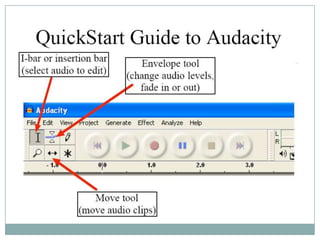
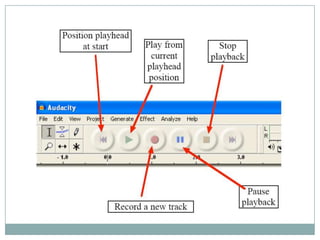
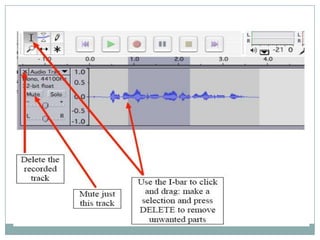
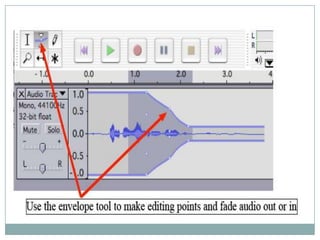
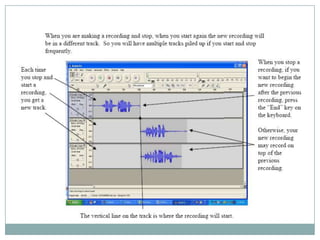
The Audacity of it ALL!Audacity is a free, easy-to-use audio editor and recorder for Windows Programs like Audacity are also called open source software, because their source code is available for anyone to study or use. http://audacity.sourceforge.net/
Don’t Be Lame is an MP3 encoder that will allow you to export audio files from Audacity to an MP3 format.When you have finished downloading the ZIP folder, unzip it and save the file lame_enc.dll that it contains to anywhere on your computer. The first time you use the "Export as MP3" command, Audacity will ask you where lame_enc.dll is saved. http://lame.sourceforge.net/links.php
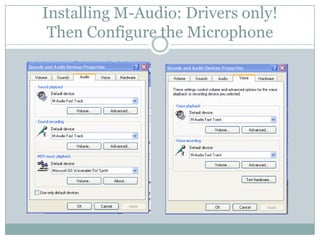
Installing M-Audio: Drivers only!Then Configure the Microphone
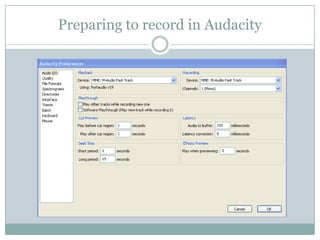
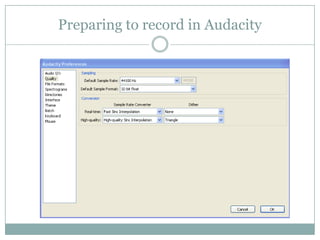
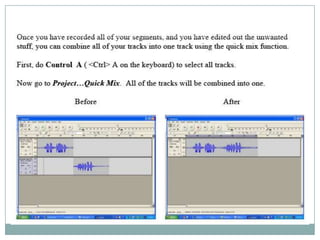
Preparing to record in Audacity
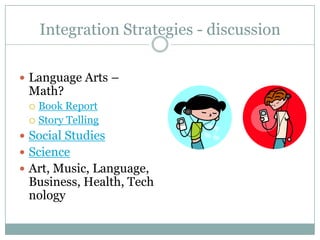
Integration Strategies - discussionLanguage Arts – Math?Book ReportStory TellingSocial Studies ScienceArt, Music, Language, Business, Health, Technology
Podcast Web Siteshttp://vocaroo.com/http://www.odiogo.com/http://librivox.org/podcast-page/http://www.learnoutloud.com/http://yodio.com/
Referenceshttp://en.wikipedia.org/wiki/Podcastinghttp://wiki.creativecommons.org/http://www.how-to-podcast-tutorial.com/17-audacity-tutorial.htmhttp://podcasts.yahoo.com/publish/3

Podcasting 2009

  • 1.
    Jen HegnaCreating yourvirtual voice with Podcasting
  • 2.
    ObjectivesWhat is Podcasting?Whatis RSS?Finding and subscribing to PodcastsCreating your own podcastPublishing your podcast
  • 3.
    What is apodcast?The word “podcast” is a combination of the words “iPod” and “broadcast.”Personal On Demand Broadcast
  • 4.
    What is apodcast?Think of a podcast as a radio show. Each show consists of a series of individual episodes that you can listen to how you want — on your PC, using your MP3 player, or with just a web browserNote - You DON’T need an iPod or mp3 player to enjoy podcasting.
  • 5.
    RSSRSS files areused for publishing all types of information on the Internet, but are primarily a tool for sharing web site news.
  • 6.
  • 8.
    Finding and subscribingto Podcastshttp://podomatic.com/http://www.podcast.net/http://www.podcastalley.com/http://www.podshow.com/http://www.podomatic.com/My Favorite – ITUNES!
  • 9.
    Examples of Podcastsin EducationMath - MathfactorSocial Studies – Speaking of HistoryMusic - Pandora Musicology Storytelling – StorynoryScience – Scientific AmericanEnglish – Learning English, Grammar Girl
  • 10.
    iTunes and You!Or the iTunes U!
  • 11.
    Creative Commons Accordingto Wikipedia, the Creative Commons (CC) is a non-profit organization devoted to expanding the range of creative work available for others legally to build upon and share. The organization has released several copyright licenses known as Creative Commons licenses. These licenses, depending on the one chosen, restrict only certain rights (or none) of the work.
  • 12.
    Creative Commons LicensesThefollowing are the six current license choices available from our choose a license application, along with previous versions that have been phased out. They are shown by name along the license characteristics that accompany them.
  • 13.
    AttributionYou let otherscopy, distribute, display, and perform your copyrighted work — and derivative works based upon it — but only if they give credit the way you request.Example: Jane publishes her photograph with an Attribution license, because she wants the world to use her pictures provided they give her credit. Bob finds her photograph online and wants to display it on the front page of his website. Bob puts Jane’s picture on his site, and clearly indicates Jane’s authorship.
  • 14.
    NoncommercialYou let otherscopy, distribute, display, and perform your work — and derivative works based upon it — but for noncommercial purposes onlyExamples: Gus publishes his photograph on his website with a Noncommercial license. Camille prints Gus’ photograph. Camille is not allowed to sell the print photograph without Gus’s permission.
  • 15.
    No Derivative WorksYoulet others copy, distribute, display, and perform only verbatim copies of your work, not derivative works based upon it.Example: Sara licenses a recording of her song with a No Derivative Works license. Joe would like to cut Sara’s track and mix it with his own to produce an entirely new song. Joe cannot do this without Sara’s permission (unless his song amounts to fair use)
  • 16.
    Share AlikeYou allowothers to distribute derivative works only under a license identical to the license that governs your work.Example: Gus’s online photo is licensed under the Noncommercial and Share Alike terms. Camille is an amateur collage artist, and she takes Gus’s photo and puts it into one of her collages. This Share Alike language requires Camille to make her collage available on a Noncommercial plus Share AlikeNote: A license cannot feature both the Share Alike and No Derivative Works options. The Share Alike requirement applies only to derivative works.
  • 17.
  • 18.
  • 19.
    The Podcasting LegalGuidehttp://wiki.creativecommons.org/Welcome_To_The_Podcasting_Legal_Guide
  • 21.
    Podcasting = timeNot a one time shotIt takes timePlanRecordEditPublishPromoteCommitment
  • 22.
    Step 1- determinecontent and formatMake decisions first!What to record? How long? How frequently?Tone, energy, scripting and music.Who is your audience?
  • 23.
    Step 2 -Assembleequipment and peopleContent and audio!Support for the causeMic and a computerAudio Editing Software (Audacity and Lame)
  • 24.
    Step 3 -RecordStart recording!This is the fun part! Breathe. Enunciate. Slow down.Monitor the recording.Record the intro and outro last.
  • 25.
    Post ProductionSound editingExportto mp3Edit tagsID3 tagsName/TitleTrack numberGenreArtistComments etc….Listen to your Completed Work!
  • 26.
    Terms to knowSamplerateFrequency of snapshots taken during actual recordingLike frames of a movieHigher number is better quality but a larger file44,100 khz is standardSet before recordingBit rateAmount of information processed per unit of timeAgain higher number is better quality but a larger fileSuggestions: 64 kbps for voice; 128 kbps for musicSet when exporting to mp3
  • 27.
    Step Four –Upload and PublishThis step can be done manually, but there are many sites that do this automatically – including rSchool!These type of sites include a combination of:RSS feed generationServer space/file hostingBandwidth allotmentBlog/websiteRecording capacity All-in-one exampleshttp://www.podomatic.com/http://studio.odeo.com/create/homehttp://www.gcast.com/
  • 28.
  • 29.
  • 30.
    Creative Commons Musicfor Podcastinghttp://www.podsafeaudio.com/http://www.opsound.org/http://freesound.iua.upf.eduhttp://spinxpress.com/http://www.jamendo.comhttp://magnatune.com/http://www.incompetech.com/http://ccmixter.org/
  • 31.
    The Audacity ofit ALL!Audacity is a free, easy-to-use audio editor and recorder for Windows Programs like Audacity are also called open source software, because their source code is available for anyone to study or use. http://audacity.sourceforge.net/
  • 32.
    Don’t Be Lameis an MP3 encoder that will allow you to export audio files from Audacity to an MP3 format.When you have finished downloading the ZIP folder, unzip it and save the file lame_enc.dll that it contains to anywhere on your computer. The first time you use the "Export as MP3" command, Audacity will ask you where lame_enc.dll is saved. http://lame.sourceforge.net/links.php
  • 33.
    Installing M-Audio: Driversonly!Then Configure the Microphone
  • 34.
  • 35.
  • 42.
    Integration Strategies -discussionLanguage Arts – Math?Book ReportStory TellingSocial Studies ScienceArt, Music, Language, Business, Health, Technology
  • 43.
  • 44.