Jennifer Carrier Dorman http://jdorman.wikispaces.com/PETEC2008   Do You Have the  Audacity  to Podcast?
 
Participatory Culture
Participatory Culture According to a recent study from the Pew Internet & American Life project (Lenhardt & Madden, 2005), more than one-half of all teens have created media content, and roughly one-third of teens who use the Internet have shared content they produced.
Participatory Culture Relatively low barriers to artistic expression and civic engagement Strong support for creating and sharing one’s creations with others
Participatory Culture Some type of informal mentorship whereby what is known by the most experienced is passed along to novices Members believe that their contributions matter Members feel some degree of social connection with one another (at the least they care what other people think about what they have created)
Implications A growing body of scholarship suggests potential benefits of these forms of participatory culture, including: opportunities for peer-to-peer learning,  a changed attitude toward intellectual property,  the diversification of cultural expression,  the development of skills valued in the modern workplace, and a more empowered conception of citizenship.
Implications Participatory culture shifts the focus of literacy from one of individual expression to community involvement. The new literacies almost all involve social skills developed through collaboration and networking. These skills build on the foundation of traditional literacy, research skills, technical skills, and critical analysis skills taught in the classroom.
Podcasts
Podcasts iPod + Broadcast = Podcast Amateur radio Podcasting is the method of distributing multimedia files over the Internet using RSS syndication formats for playback on mobile devices and personal computers.
Why use podcasts? Podcasts enable students to share their knowledge and expertise with others through a creative outlet. Podcasts tap into a mode of media input that is commonplace for digital natives. Podcasts empower students to form relationships with the content and each other in relevant ways.
Why use podcasts? Podcasting is yet another way for them [students] to be creating and contributing ideas to a larger conversation, and it’s a way of archiving that contribution for future audiences to use. Will Richardson,  Blogs, Wikis, Podcasts and Other Powerful Web Tools for Classrooms
How can podcasts be used? In the classroom, educators and students can use podcasts   to  inform  others about class news, current events, and areas of interest. Students can use a podcast   forum to  persuade  their peers to help others, make a difference, or try something new.  Podcasts can also be used to edutain others through creative  narratives .
How can podcasts be used? Podcasts engage students in thinking critically about their speaking fluency and communication skills.  The opportunity to create a podcast about what students would like to discuss and share with others is extremely motivating.
Integration Ideas sequencing skills  planning sheets  sharing student work with the community  authentic audience  create characters out of literature  peer tutoring
Integration Ideas improve fluency in reading  expression and speed  increases awareness of how they sound thus more practice  student input into community/world/historical issues  historical recounts  create a podcast to download for schools to use on field trips audio tour of plants and how they were used by Native Americans "ethnobotany movements"
Integration Ideas notes for absent students (substitutes)  bring experts and knowledge to students  daily information  immediate access to information  second language learning enforcement  immediate feedback and communication
Integration Ideas auditory modality of learning  forces students to focus on content  audio book reports  study guides  diminishes fear of public speaking  school information  school tours
Ways I Have Used Podcasts Narratives Conversations  Oral histories Vocabulary and/or concept practice Pod-tours Unit or topic podcasts as overview of unit Oral reports Supplement instructional materials with existing podcasts created by others Information for parents Previews/reviews of course material Differentiate research products for LS students
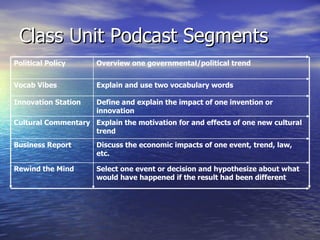
Class Unit Podcast Segments Select one event or decision and hypothesize about what would have happened if the result had been different  Rewind the Mind Discuss the economic impacts of one event, trend, law, etc. Business Report  Explain the motivation for and effects of one new cultural trend  Cultural Commentary Define and explain the impact of one invention or innovation  Innovation Station  Explain and use two vocabulary words  Vocab Vibes  Overview one governmental/political trend  Political Policy
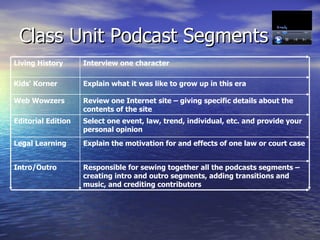
Class Unit Podcast Segments Responsible for sewing together all the podcasts segments – creating intro and outro segments, adding transitions and music, and crediting contributors Intro/Outro Explain the motivation for and effects of one law or court case  Legal Learning  Select one event, law, trend, individual, etc. and provide your personal opinion  Editorial Edition Review one Internet site – giving specific details about the contents of the site Web Wowzers Explain what it was like to grow up in this era Kids' Korner  Interview one character  Living History
Jumping in with both feet . . . Listen to a few podcasts online iTunes > Source List > Podcasts > Education Get a feel for the genre Podcasts are not “polished” – production value is secondary to the content
Creating a Podcast Write your script. Practice. Record your audio file.  ( Audacity ) Edit your audio (Effect > Normalize) Add and credit legally useable music ( optional ) File > Save Project. File > Export as MP3 > Edit ID3 Tags Upload the MP3 file to a web server. ( GCast )
Audacity Open-source cross-platform audio editing software
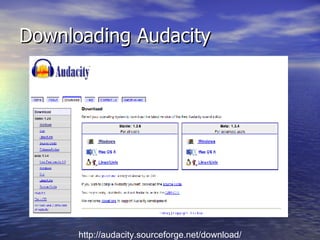
Downloading Audacity http://audacity.sourceforge.net/download/
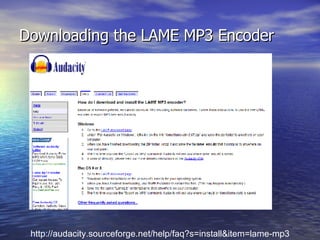
Downloading the LAME MP3 Encoder http://audacity.sourceforge.net/help/faq?s=install&item=lame-mp3
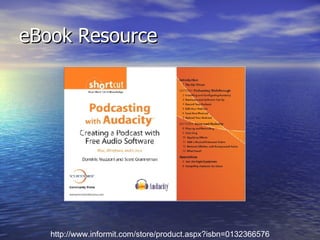
eBook Resource http://www.informit.com/store/product.aspx?isbn=0132366576
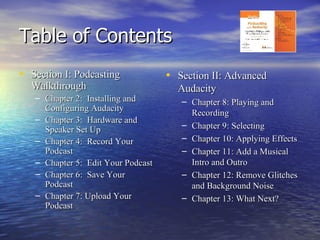
Table of Contents Section I: Podcasting Walkthrough Chapter 2:  Installing and Configuring Audacity Chapter 3:  Hardware and Speaker Set Up Chapter 4:  Record Your Podcast Chapter 5:  Edit Your Podcast Chapter 6:  Save Your Podcast Chapter 7: Upload Your Podcast Section II: Advanced Audacity Chapter 8: Playing and Recording Chapter 9: Selecting Chapter 10: Applying Effects Chapter 11: Add a Musical Intro and Outro Chapter 12: Remove Glitches and Background Noise Chapter 13: What Next?
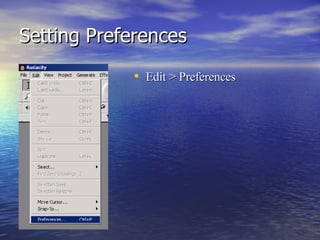
Setting Preferences Edit > Preferences
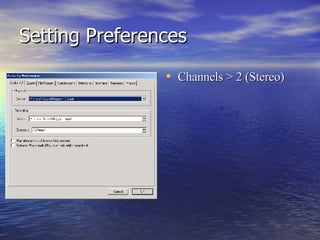
Setting Preferences Channels > 2 (Stereo)
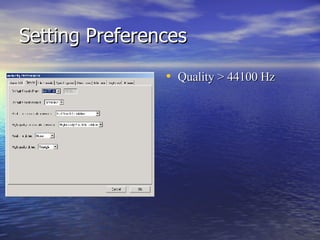
Setting Preferences Quality > 44100 Hz
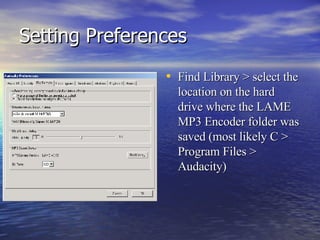
Setting Preferences Find Library > select the location on the hard drive where the LAME MP3 Encoder folder was saved (most likely C > Program Files > Audacity)
Toolbar
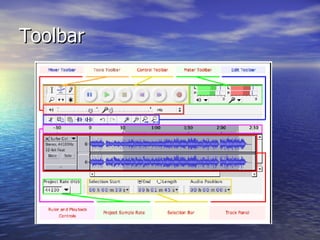
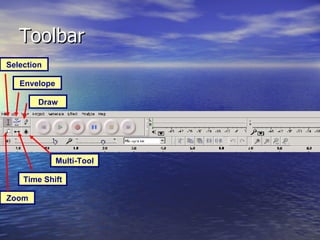
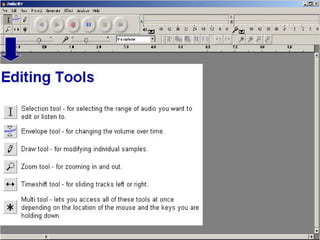
Toolbar Selection Envelope Draw Zoom Time Shift Multi-Tool
 
 
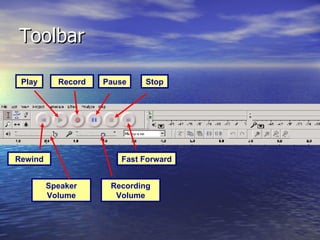
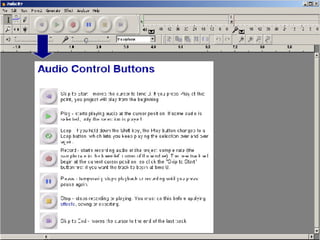
Toolbar Play Pause Stop Record Rewind Fast Forward Recording Volume Speaker Volume
 
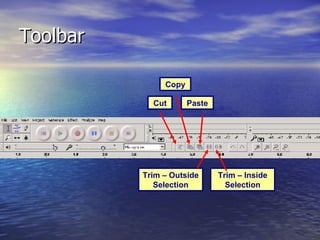
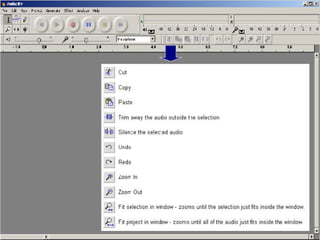
Toolbar Cut Paste Copy Trim – Outside Selection Trim – Inside Selection
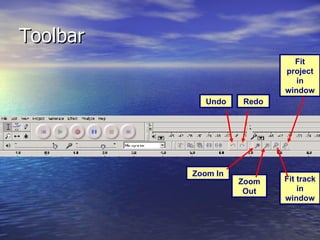
Toolbar Undo Redo Zoom Out Fit track in window Zoom In Fit project in window
 
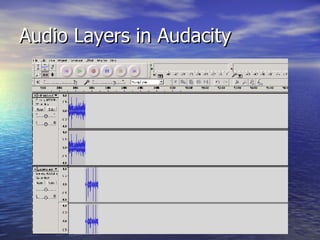
Audio Layers in Audacity
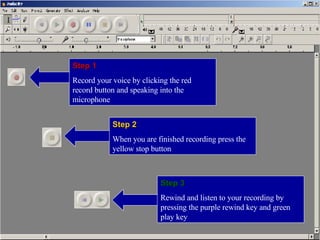
Step 1 Record your voice by clicking the red record button and speaking into the microphone Step 2 When you are finished recording press the yellow stop button Step 3 Rewind and listen to your recording by pressing the purple rewind key and green play key
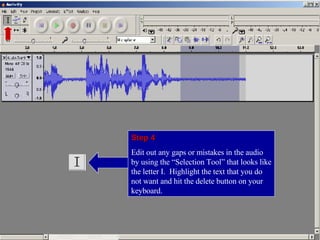
Step 4 Edit out any gaps or mistakes in the audio by using the “Selection Tool” that looks like the letter I.  Highlight the text that you do not want and hit the delete button on your keyboard.
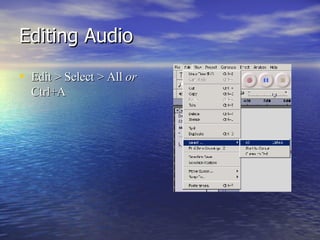
Editing Audio Edit > Select > All  or  Ctrl+A
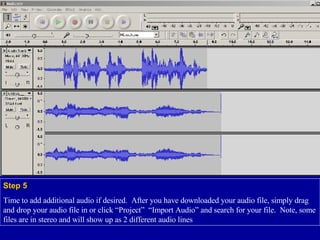
Step 5 Time to add additional audio if desired.  After you have downloaded your audio file, simply drag and drop your audio file in or click “Project”  “Import Audio” and search for your file.  Note, some files are in stereo and will show up as 2 different audio lines
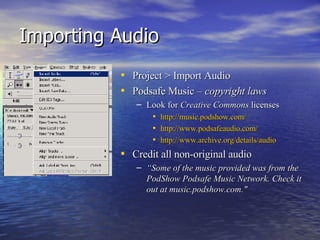
Importing Audio Project > Import Audio Podsafe Music –  copyright laws Look for  Creative Commons  licenses http://music.podshow.com/ http://www.podsafeaudio.com/ http://www.archive.org/details/audio   Credit all non-original audio “ Some of the music provided was from the PodShow Podsafe Music Network. Check it out at music.podshow.com."
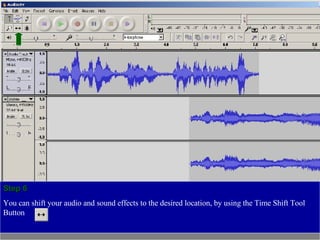
Step 6 You can shift your audio and sound effects to the desired location, by using the Time Shift Tool Button
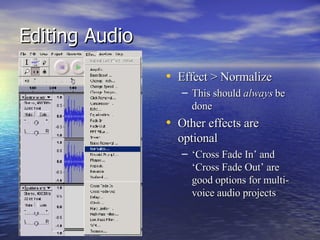
Editing Audio Effect > Normalize This should  always  be done Other effects are optional ‘ Cross Fade In’ and ‘Cross Fade Out’ are good options for multi-voice audio projects
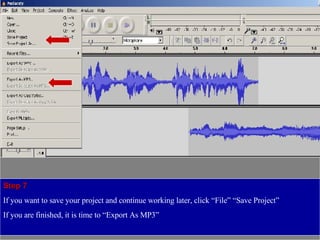
Step 7 If you want to save your project and continue working later, click “File” “Save Project” If you are finished, it is time to “Export As MP3”
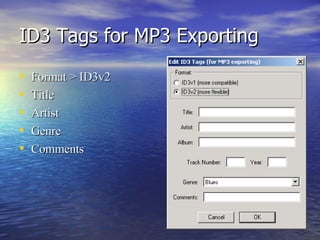
ID3 Tags for MP3 Exporting Format > ID3v2 Title Artist Genre Comments
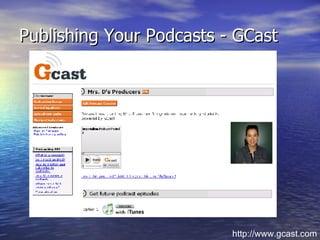
Publishing Your Podcasts - GCast http://www.gcast.com
Podcasting Resources http://jdorman.wikispaces.com/PETEC2008   http://jdorman.wikispaces.com/podcastingworkshop

Do You Have The Audacity to Podcast

  • 1.
    Jennifer Carrier Dormanhttp://jdorman.wikispaces.com/PETEC2008 Do You Have the Audacity to Podcast?
  • 2.
  • 3.
  • 4.
    Participatory Culture Accordingto a recent study from the Pew Internet & American Life project (Lenhardt & Madden, 2005), more than one-half of all teens have created media content, and roughly one-third of teens who use the Internet have shared content they produced.
  • 5.
    Participatory Culture Relativelylow barriers to artistic expression and civic engagement Strong support for creating and sharing one’s creations with others
  • 6.
    Participatory Culture Sometype of informal mentorship whereby what is known by the most experienced is passed along to novices Members believe that their contributions matter Members feel some degree of social connection with one another (at the least they care what other people think about what they have created)
  • 7.
    Implications A growingbody of scholarship suggests potential benefits of these forms of participatory culture, including: opportunities for peer-to-peer learning, a changed attitude toward intellectual property, the diversification of cultural expression, the development of skills valued in the modern workplace, and a more empowered conception of citizenship.
  • 8.
    Implications Participatory cultureshifts the focus of literacy from one of individual expression to community involvement. The new literacies almost all involve social skills developed through collaboration and networking. These skills build on the foundation of traditional literacy, research skills, technical skills, and critical analysis skills taught in the classroom.
  • 9.
  • 10.
    Podcasts iPod +Broadcast = Podcast Amateur radio Podcasting is the method of distributing multimedia files over the Internet using RSS syndication formats for playback on mobile devices and personal computers.
  • 11.
    Why use podcasts?Podcasts enable students to share their knowledge and expertise with others through a creative outlet. Podcasts tap into a mode of media input that is commonplace for digital natives. Podcasts empower students to form relationships with the content and each other in relevant ways.
  • 12.
    Why use podcasts?Podcasting is yet another way for them [students] to be creating and contributing ideas to a larger conversation, and it’s a way of archiving that contribution for future audiences to use. Will Richardson, Blogs, Wikis, Podcasts and Other Powerful Web Tools for Classrooms
  • 13.
    How can podcastsbe used? In the classroom, educators and students can use podcasts to inform others about class news, current events, and areas of interest. Students can use a podcast forum to persuade their peers to help others, make a difference, or try something new. Podcasts can also be used to edutain others through creative narratives .
  • 14.
    How can podcastsbe used? Podcasts engage students in thinking critically about their speaking fluency and communication skills. The opportunity to create a podcast about what students would like to discuss and share with others is extremely motivating.
  • 15.
    Integration Ideas sequencingskills planning sheets sharing student work with the community authentic audience create characters out of literature peer tutoring
  • 16.
    Integration Ideas improvefluency in reading expression and speed increases awareness of how they sound thus more practice student input into community/world/historical issues historical recounts create a podcast to download for schools to use on field trips audio tour of plants and how they were used by Native Americans "ethnobotany movements"
  • 17.
    Integration Ideas notesfor absent students (substitutes) bring experts and knowledge to students daily information immediate access to information second language learning enforcement immediate feedback and communication
  • 18.
    Integration Ideas auditorymodality of learning forces students to focus on content audio book reports study guides diminishes fear of public speaking school information school tours
  • 19.
    Ways I HaveUsed Podcasts Narratives Conversations Oral histories Vocabulary and/or concept practice Pod-tours Unit or topic podcasts as overview of unit Oral reports Supplement instructional materials with existing podcasts created by others Information for parents Previews/reviews of course material Differentiate research products for LS students
  • 20.
    Class Unit PodcastSegments Select one event or decision and hypothesize about what would have happened if the result had been different Rewind the Mind Discuss the economic impacts of one event, trend, law, etc. Business Report Explain the motivation for and effects of one new cultural trend Cultural Commentary Define and explain the impact of one invention or innovation Innovation Station Explain and use two vocabulary words Vocab Vibes Overview one governmental/political trend Political Policy
  • 21.
    Class Unit PodcastSegments Responsible for sewing together all the podcasts segments – creating intro and outro segments, adding transitions and music, and crediting contributors Intro/Outro Explain the motivation for and effects of one law or court case Legal Learning Select one event, law, trend, individual, etc. and provide your personal opinion Editorial Edition Review one Internet site – giving specific details about the contents of the site Web Wowzers Explain what it was like to grow up in this era Kids' Korner Interview one character Living History
  • 22.
    Jumping in withboth feet . . . Listen to a few podcasts online iTunes > Source List > Podcasts > Education Get a feel for the genre Podcasts are not “polished” – production value is secondary to the content
  • 23.
    Creating a PodcastWrite your script. Practice. Record your audio file. ( Audacity ) Edit your audio (Effect > Normalize) Add and credit legally useable music ( optional ) File > Save Project. File > Export as MP3 > Edit ID3 Tags Upload the MP3 file to a web server. ( GCast )
  • 24.
  • 25.
  • 26.
    Downloading the LAMEMP3 Encoder http://audacity.sourceforge.net/help/faq?s=install&item=lame-mp3
  • 27.
  • 28.
    Table of ContentsSection I: Podcasting Walkthrough Chapter 2:  Installing and Configuring Audacity Chapter 3:  Hardware and Speaker Set Up Chapter 4:  Record Your Podcast Chapter 5:  Edit Your Podcast Chapter 6:  Save Your Podcast Chapter 7: Upload Your Podcast Section II: Advanced Audacity Chapter 8: Playing and Recording Chapter 9: Selecting Chapter 10: Applying Effects Chapter 11: Add a Musical Intro and Outro Chapter 12: Remove Glitches and Background Noise Chapter 13: What Next?
  • 29.
  • 30.
  • 31.
  • 32.
    Setting Preferences FindLibrary > select the location on the hard drive where the LAME MP3 Encoder folder was saved (most likely C > Program Files > Audacity)
  • 33.
  • 34.
    Toolbar Selection EnvelopeDraw Zoom Time Shift Multi-Tool
  • 35.
  • 36.
  • 37.
    Toolbar Play PauseStop Record Rewind Fast Forward Recording Volume Speaker Volume
  • 38.
  • 39.
    Toolbar Cut PasteCopy Trim – Outside Selection Trim – Inside Selection
  • 40.
    Toolbar Undo RedoZoom Out Fit track in window Zoom In Fit project in window
  • 41.
  • 42.
  • 43.
    Step 1 Recordyour voice by clicking the red record button and speaking into the microphone Step 2 When you are finished recording press the yellow stop button Step 3 Rewind and listen to your recording by pressing the purple rewind key and green play key
  • 44.
    Step 4 Editout any gaps or mistakes in the audio by using the “Selection Tool” that looks like the letter I. Highlight the text that you do not want and hit the delete button on your keyboard.
  • 45.
    Editing Audio Edit> Select > All or Ctrl+A
  • 46.
    Step 5 Timeto add additional audio if desired. After you have downloaded your audio file, simply drag and drop your audio file in or click “Project” “Import Audio” and search for your file. Note, some files are in stereo and will show up as 2 different audio lines
  • 47.
    Importing Audio Project> Import Audio Podsafe Music – copyright laws Look for Creative Commons licenses http://music.podshow.com/ http://www.podsafeaudio.com/ http://www.archive.org/details/audio Credit all non-original audio “ Some of the music provided was from the PodShow Podsafe Music Network. Check it out at music.podshow.com."
  • 48.
    Step 6 Youcan shift your audio and sound effects to the desired location, by using the Time Shift Tool Button
  • 49.
    Editing Audio Effect> Normalize This should always be done Other effects are optional ‘ Cross Fade In’ and ‘Cross Fade Out’ are good options for multi-voice audio projects
  • 50.
    Step 7 Ifyou want to save your project and continue working later, click “File” “Save Project” If you are finished, it is time to “Export As MP3”
  • 51.
    ID3 Tags forMP3 Exporting Format > ID3v2 Title Artist Genre Comments
  • 52.
    Publishing Your Podcasts- GCast http://www.gcast.com
  • 53.
    Podcasting Resources http://jdorman.wikispaces.com/PETEC2008 http://jdorman.wikispaces.com/podcastingworkshop