Podcast/Vodcast
Today
•   What is (not) a podcast
•   How do you make one
•   Tools for making, editing and distributing
•   Play
What is a Pod/vodcast
•   Noun and verb
•   Digital media
•   Episodic
•   Subscribed to and downloaded through
    web syndication
• or streamed online to a computer or
  mobile device.


                                   http://en.wikipedia.org/wiki/Podcast
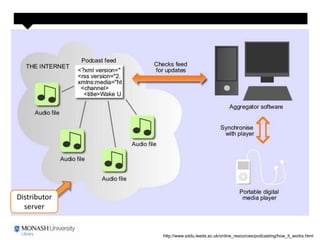
What is a Web Feed
• A document with web links to the source of
  the content
• Maintained on the distributor's server
• Accessed using a podcatcher or
  aggregator (i.e. iTunes)
• Language = XML (usually)
• Formats = RSS or Atom (usually)
Distributor
  server


              http://www.sddu.leeds.ac.uk/online_resources/podcasting/how_it_works.html
What is not a Podcast
• Webcast – internet streaming
Monash
Podcasts


 http://arts.monash.edu.au/ecps/podcast/
Creating a podcast
1. Create the object
  – Captivate, PowerPoint, audio
2. Save to a server with byte-range support
   enabled and a publicly accessible URL
  – Byte-range support allows users to stream the
    media
3. Create a webfeed
Make the podcast accessible
• Submit the URL for your feed to iTunes or
  other
  – http://www.podcastingnews.com/topics/Podcast_Soft
    ware.html
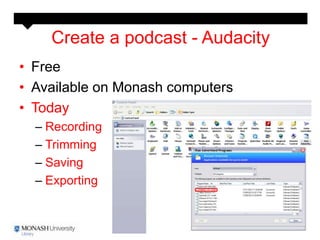
Create a podcast - Audacity
• Free
• Available on Monash computers
• Today
  – Recording
  – Trimming
  – Saving
  – Exporting
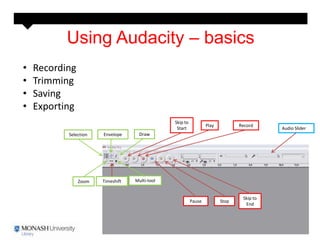
Using Audacity – basics
•   Recording
•   Trimming
•   Saving
•   Exporting
                                                Skip to
                                                                  Play          Record
                                                 Start                                     Audio Slider
           Selection   Envelope      Draw


                Zoom   Timeshift   Multi-tool


                                                                                 Skip to
                                                          Pause          Stop
                                                                                  End
Create a Webfeed
• http://poderator.com/account.aspx?id=0
Validate Your Feed


                     http://validator.w3.org/appc/
iTunes
• Podcast can be an audio recording, video, or
  even a text document.
• Supported file formats include .m4a, .mp3, .mov,
  .mp4, .m4v, .pdf and .epub.
Submit your Podcast
           Open iTunes
           1. Click Podcasts
           2. Click Submit a Podcast
           3. Enter your Podcast Feed URL
Issues & Bits
• Content copyright
• Where to store the objects for public
  access
• iTunes U
Resources
• Library Guide
  – Links to tutorial videos

Podcast

  • 1.
  • 2.
    Today • What is (not) a podcast • How do you make one • Tools for making, editing and distributing • Play
  • 3.
    What is aPod/vodcast • Noun and verb • Digital media • Episodic • Subscribed to and downloaded through web syndication • or streamed online to a computer or mobile device. http://en.wikipedia.org/wiki/Podcast
  • 4.
    What is aWeb Feed • A document with web links to the source of the content • Maintained on the distributor's server • Accessed using a podcatcher or aggregator (i.e. iTunes) • Language = XML (usually) • Formats = RSS or Atom (usually)
  • 5.
    Distributor server http://www.sddu.leeds.ac.uk/online_resources/podcasting/how_it_works.html
  • 6.
    What is nota Podcast • Webcast – internet streaming
  • 7.
  • 8.
    Creating a podcast 1.Create the object – Captivate, PowerPoint, audio 2. Save to a server with byte-range support enabled and a publicly accessible URL – Byte-range support allows users to stream the media 3. Create a webfeed
  • 9.
    Make the podcastaccessible • Submit the URL for your feed to iTunes or other – http://www.podcastingnews.com/topics/Podcast_Soft ware.html
  • 10.
    Create a podcast- Audacity • Free • Available on Monash computers • Today – Recording – Trimming – Saving – Exporting
  • 11.
    Using Audacity –basics • Recording • Trimming • Saving • Exporting Skip to Play Record Start Audio Slider Selection Envelope Draw Zoom Timeshift Multi-tool Skip to Pause Stop End
  • 12.
    Create a Webfeed •http://poderator.com/account.aspx?id=0
  • 13.
    Validate Your Feed http://validator.w3.org/appc/
  • 14.
    iTunes • Podcast canbe an audio recording, video, or even a text document. • Supported file formats include .m4a, .mp3, .mov, .mp4, .m4v, .pdf and .epub.
  • 15.
    Submit your Podcast Open iTunes 1. Click Podcasts 2. Click Submit a Podcast 3. Enter your Podcast Feed URL
  • 16.
    Issues & Bits •Content copyright • Where to store the objects for public access • iTunes U
  • 17.
    Resources • Library Guide – Links to tutorial videos