CATCH THE BIG FISH
         By Podcasting to Reel in New Clients


                                  Austin Hecker
                                 Mary Koffman
                               Amanda Voelzke
                             Stephanie Rayeske
TABLE OF CONTENTS
Overview ……………………….    Page 3
Plan ………………………………      Page 4
Equipment ……………………..   Page 5
Record ………………………….     Page 6
Edit ……………………………….     Page 7
Publish …………………………..   Page 8
Share …………………………....   Page 9


                                2
OVERVIEW

                 N
                         o longer do we sit in front of the radio waiting to hear something
                         we want to listen to. Music and programs are on-demand, which
                         means we can choose what we listen to and when we listen to it.
                 Since the release of the iPod in 2001, the popularity of audio has
                 multiplied. 1

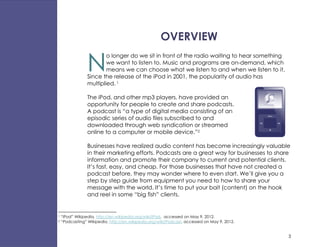
                 The iPod, and other mp3 players, have provided an
                 opportunity for people to create and share podcasts.
                 A podcast is “a type of digital media consisting of an
                 episodic series of audio files subscribed to and
                 downloaded through web syndication or streamed
                 online to a computer or mobile device.”2

                 Businesses have realized audio content has become increasingly valuable
                 in their marketing efforts. Podcasts are a great way for businesses to share
                 information and promote their company to current and potential clients.
                 It’s fast, easy, and cheap. For those businesses that have not created a
                 podcast before, they may wonder where to even start. We’ll give you a
                 step by step guide from equipment you need to how to share your
                 message with the world. It’s time to put your bait (content) on the hook
                 and reel in some “big fish” clients.


1   “iPod” Wikipedia, http://en.wikipedia.org/wiki/IPod, accessed on May 9, 2012.
2   “Podcasting” Wikipedia, http://en.wikipedia.org/wiki/Podcast, accessed on May 9, 2012.


                                                                                              3
PLAN


Y
      ou’re probably ready to jump in, but before you grab a microphone
      and start recording, stop! You wouldn’t head to the lake to fish
      without making sure you know what bait you should bring to catch
the kind of fish you want.

Your first step isn’t to record; it’s to start     WHEN YOU PLAN…
the planning process. Start with a
narrow, focused topic. What are your             - Keep your audience in mind
customers interested in? What do they
find valuable that you have to offer?            - Choose a topic
Remember, this podcast is for them, not          - Write an outline or script
for your company, so always keep your
audience in mind.

Okay, so now you have a great topic. Unless you’ve got an amazing
knack to talk “on the fly,” you should consider writing an outline or script
for what you’re going to say. If you write a script, make sure you sound
natural and not like you’re just reading a piece of paper.

Now that you’ve got a topic and an outline, it’s time to gather your
supplies so you can head out to the lake of opportunity.


                                                                                4
EQUIPMENT


P
       odcasts are fast, easy, and cheap. One of the reasons why they
       are so inexpensive to make is that you may already have the
       necessary equipment. You wouldn’t run out to buy a new,
       expensive fishing poll if you’ve got a perfectly good one sitting in
       the garage. Likewise, don’t run out and buy the most expensive
sound equipment if you already have something that will do the job.


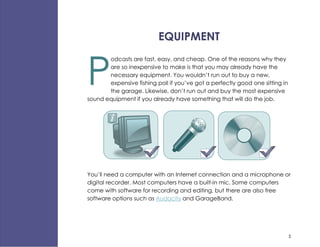
You’ll need a computer with an Internet connection and a microphone or
digital recorder. Most computers have a built-in mic. Some computers
come with software for recording and editing, but there are also free
software options such as Audacity and GarageBand.


                                                                              5
RECORD

              R
                    ehearse your podcast. You can use the
                    software that came with your computer,
                    Audacity, GarageBand, or any other
              recording software. You can, and probably
              should, make several recordings of your podcast.
              If you find you are stumbling over a few words,
              rephrase them and record again. Don’t worry too
              much about the “ums” in your speech. You can
              edit those out later.

              The book, Content Rules: How to Create Killer Blogs, Podcasts, Videos,
              Ebooks, Webinars (and More) has a few tips you’ll want to keep in mind
              while recording:

                     Keep the podcast short. It shouldn’t be longer than
                     30 minutes. If you use music, add it after you record
                     your voice so you have more control over the
                     balance of the music and the audio.3


3Handley, A., & Chapman, C. (2011). Content Rules: How to Create Killer Blogs, Podcasts, Videos, eBooks, Webinars
(and more) That Engage Customers and Ignite Your Business. Hoboken: Wiley.


                                                                                                                    6
EDIT

E
     ven if you did a great job recording
     your audio, you’ll probably want to
     do a little bit of editing. Most likely
you will use the software you used to
record your podcast, such as Audacity
or GarageBand, to edit your audio.

Get rid of all the “ums” and long pauses
of silence. Add music or sound effects
only if they are appropriate for the
content you’re creating. Don’t use any
music that is copyrighted.

Save a copy of the original recording in case something unexpected
happens while you’re editing the file. The file should also be saved on a
second computer or storage device just in case your computer crashes or
you can’t access the file.


                                                                        7
PUBLISH

             S
                 o far, you’ve come up with a plan,
                 recorded your podcast, and edited
                 it. Now that you are happy with how
             your podcast sounds, you’re ready to
             publish it.

             Several sites such as Spreaker, Hipcast,                                BONUS TIP
             and Podbean will host your podcasts.
             Make sure you choose a site that will                        Spreaker is a site that will actually let
             accept the file format you’ve created.                         you broadcast your podcast live
             Some sites will host your podcasts for free
             and others are paid to do so.


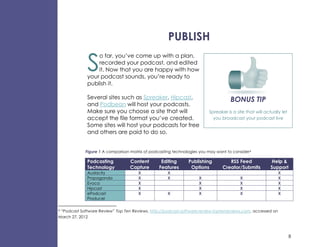
             Figure 1 A comparison matrix of podcasting technologies you may want to consider 4

             Podcasting            Content        Editing       Publishing          RSS Feed               Help &
             Technology            Capture       Features        Options         Creator/Submits          Support
             Audacity                  X             X                                                        X
             Propaganda                X             X               X                    X                   X
             Evoca                     X                             X                    X                   X
             Hipcast                   X                             X                    X                   X
             ePodcast                  X             X               X                    X                   X
             Producer

4“Podcast Software Review” Top Ten Reviews, http://podcast-software-review.toptenreviews.com, accessed on
March 27, 2012


                                                                                                                      8
SHARE

C
      ongratulations! Not only have you created a podcast, you’ve also
      published it and are ready to move on to the final step. You’re at
      the lake with the bait on the hook and you’re ready to cast out
your message.

People will be able to follow
your podcast on the website
where your podcast is hosted. If
you want to reach more
people, you should submit your
podcast to the iTunes store.

Let your customers and potential customers know you’ve created
something they might be interested in. Link your podcast to your website;
write about it in your next blog post; Tweet about it and share it on your
Facebook page.

One last tip: Even though the content you create should be about your
audience and their needs, make sure you link your content back to your
website and provide contact information. You could be the informed
resource people are looking for. If you’re successful, you might not only
catch the “big fish,” you might have more fish follow you home.


                                   May 2012                                  9

Podcasting eBook

  • 1.
    CATCH THE BIGFISH By Podcasting to Reel in New Clients Austin Hecker Mary Koffman Amanda Voelzke Stephanie Rayeske
  • 2.
    TABLE OF CONTENTS Overview………………………. Page 3 Plan ……………………………… Page 4 Equipment …………………….. Page 5 Record …………………………. Page 6 Edit ………………………………. Page 7 Publish ………………………….. Page 8 Share ………………………….... Page 9 2
  • 3.
    OVERVIEW N o longer do we sit in front of the radio waiting to hear something we want to listen to. Music and programs are on-demand, which means we can choose what we listen to and when we listen to it. Since the release of the iPod in 2001, the popularity of audio has multiplied. 1 The iPod, and other mp3 players, have provided an opportunity for people to create and share podcasts. A podcast is “a type of digital media consisting of an episodic series of audio files subscribed to and downloaded through web syndication or streamed online to a computer or mobile device.”2 Businesses have realized audio content has become increasingly valuable in their marketing efforts. Podcasts are a great way for businesses to share information and promote their company to current and potential clients. It’s fast, easy, and cheap. For those businesses that have not created a podcast before, they may wonder where to even start. We’ll give you a step by step guide from equipment you need to how to share your message with the world. It’s time to put your bait (content) on the hook and reel in some “big fish” clients. 1 “iPod” Wikipedia, http://en.wikipedia.org/wiki/IPod, accessed on May 9, 2012. 2 “Podcasting” Wikipedia, http://en.wikipedia.org/wiki/Podcast, accessed on May 9, 2012. 3
  • 4.
    PLAN Y ou’re probably ready to jump in, but before you grab a microphone and start recording, stop! You wouldn’t head to the lake to fish without making sure you know what bait you should bring to catch the kind of fish you want. Your first step isn’t to record; it’s to start WHEN YOU PLAN… the planning process. Start with a narrow, focused topic. What are your - Keep your audience in mind customers interested in? What do they find valuable that you have to offer? - Choose a topic Remember, this podcast is for them, not - Write an outline or script for your company, so always keep your audience in mind. Okay, so now you have a great topic. Unless you’ve got an amazing knack to talk “on the fly,” you should consider writing an outline or script for what you’re going to say. If you write a script, make sure you sound natural and not like you’re just reading a piece of paper. Now that you’ve got a topic and an outline, it’s time to gather your supplies so you can head out to the lake of opportunity. 4
  • 5.
    EQUIPMENT P odcasts are fast, easy, and cheap. One of the reasons why they are so inexpensive to make is that you may already have the necessary equipment. You wouldn’t run out to buy a new, expensive fishing poll if you’ve got a perfectly good one sitting in the garage. Likewise, don’t run out and buy the most expensive sound equipment if you already have something that will do the job. You’ll need a computer with an Internet connection and a microphone or digital recorder. Most computers have a built-in mic. Some computers come with software for recording and editing, but there are also free software options such as Audacity and GarageBand. 5
  • 6.
    RECORD R ehearse your podcast. You can use the software that came with your computer, Audacity, GarageBand, or any other recording software. You can, and probably should, make several recordings of your podcast. If you find you are stumbling over a few words, rephrase them and record again. Don’t worry too much about the “ums” in your speech. You can edit those out later. The book, Content Rules: How to Create Killer Blogs, Podcasts, Videos, Ebooks, Webinars (and More) has a few tips you’ll want to keep in mind while recording: Keep the podcast short. It shouldn’t be longer than 30 minutes. If you use music, add it after you record your voice so you have more control over the balance of the music and the audio.3 3Handley, A., & Chapman, C. (2011). Content Rules: How to Create Killer Blogs, Podcasts, Videos, eBooks, Webinars (and more) That Engage Customers and Ignite Your Business. Hoboken: Wiley. 6
  • 7.
    EDIT E ven if you did a great job recording your audio, you’ll probably want to do a little bit of editing. Most likely you will use the software you used to record your podcast, such as Audacity or GarageBand, to edit your audio. Get rid of all the “ums” and long pauses of silence. Add music or sound effects only if they are appropriate for the content you’re creating. Don’t use any music that is copyrighted. Save a copy of the original recording in case something unexpected happens while you’re editing the file. The file should also be saved on a second computer or storage device just in case your computer crashes or you can’t access the file. 7
  • 8.
    PUBLISH S o far, you’ve come up with a plan, recorded your podcast, and edited it. Now that you are happy with how your podcast sounds, you’re ready to publish it. Several sites such as Spreaker, Hipcast, BONUS TIP and Podbean will host your podcasts. Make sure you choose a site that will Spreaker is a site that will actually let accept the file format you’ve created. you broadcast your podcast live Some sites will host your podcasts for free and others are paid to do so. Figure 1 A comparison matrix of podcasting technologies you may want to consider 4 Podcasting Content Editing Publishing RSS Feed Help & Technology Capture Features Options Creator/Submits Support Audacity X X X Propaganda X X X X X Evoca X X X X Hipcast X X X X ePodcast X X X X X Producer 4“Podcast Software Review” Top Ten Reviews, http://podcast-software-review.toptenreviews.com, accessed on March 27, 2012 8
  • 9.
    SHARE C ongratulations! Not only have you created a podcast, you’ve also published it and are ready to move on to the final step. You’re at the lake with the bait on the hook and you’re ready to cast out your message. People will be able to follow your podcast on the website where your podcast is hosted. If you want to reach more people, you should submit your podcast to the iTunes store. Let your customers and potential customers know you’ve created something they might be interested in. Link your podcast to your website; write about it in your next blog post; Tweet about it and share it on your Facebook page. One last tip: Even though the content you create should be about your audience and their needs, make sure you link your content back to your website and provide contact information. You could be the informed resource people are looking for. If you’re successful, you might not only catch the “big fish,” you might have more fish follow you home. May 2012 9