ASTU
CSE 1102 Fundamentals of Programming
Lecture #3
Spring 2017
Computer Science & Engineering Program
School of Electrical Engineering & Computing
Adama Science & Technology University
ASTU
Basics of C++ Programming
– Modular Program
– The Main Function
– Identifiers
– Program Output using cout
– Data Types
– Arithmetic Operations
– Variables
– Assignment Operations
Case study: Radar Speed Trap, Heat Transfer
Reading assignment
– Chapter 2 of the textbook
– Section 3.1 from Chapter 3 of the textbook
2
ASTU
Introduction to C++
• Modular program: A program consisting
of interrelated segments (or modules)
arranged in a logical and understandable
form
– Easy to develop, correct, and modify
• Modules in C++ can be classes or
functions
3
ASTU
Introduction to C++
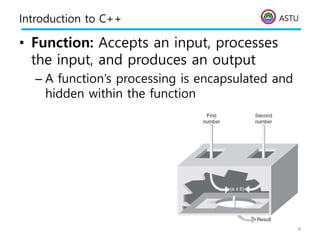
• Function: Accepts an input, processes
the input, and produces an output
– A function’s processing is encapsulated and
hidden within the function
4
ASTU
Introduction to C++
• Class: Contains both data and functions
used to manipulate the data
• Identifier: A name given to an element
of the language, such as a class or
function
– Rules for forming identifier names:
• First character must be a letter or underscore
• Only letters, digits, or underscores may follow
the initial letter (no blanks allowed)
• Keywords cannot be used as identifiers
• Maximum length of an identifier =
1024 characters
5
ASTU
Introduction to C++
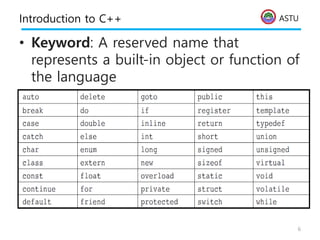
• Keyword: A reserved name that
represents a built-in object or function of
the language
6
ASTU
Introduction to C++
• Examples of valid C++ identifiers:
degToRad intersect addNums
slope bessell multTwo
findMax density
• Examples of invalid C++ identifiers:
1AB3 (begins with a number)
E*6 (contains a special character)
while (this is a keyword)
7
ASTU
Introduction to C++
• Function names
– Require a set of parentheses at the end
– Can use mixed upper and lower case
– Should be meaningful, or be a mnemonic
• Examples of function names:
easy() c3po() r2d2() theForce()
• Note that C++ is a case-sensitive
language!
8
ASTU
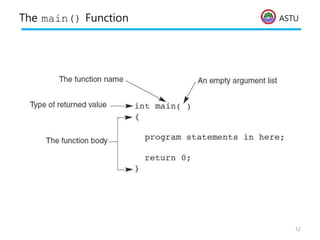
The main() Function
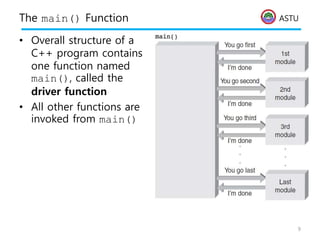
• Overall structure of a
C++ program contains
one function named
main(), called the
driver function
• All other functions are
invoked from main()
9
ASTU
The main() Function
• Function header line: First line of a
function, which contains:
– The type of data returned by the function (if
any)
– The name of the function
– The type of data that must be passed into the
function when it is invoked (if any)
• Arguments: The data passed into a
function
• Function body: The statements inside a
function
– enclosed in braces
10
ASTU
The main() Function
• Each statement inside the function must
be terminated with a semicolon
• return: A keyword causing the
appropriate value to be returned from
the function
• The statement return 0 in the main()
function causes the program to end
11
ASTU
The main() Function
12
ASTU
The cout Object
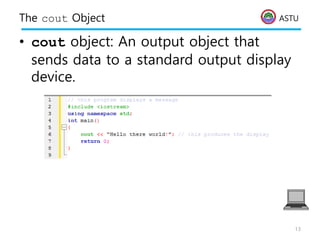
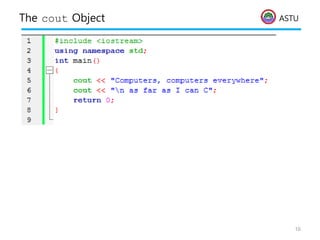
• cout object: An output object that
sends data to a standard output display
device.
13
ASTU
The cout Object
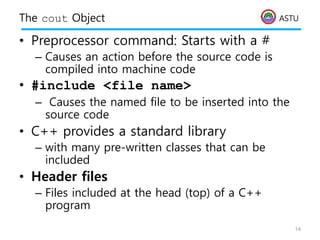
• Preprocessor command: Starts with a #
– Causes an action before the source code is
compiled into machine code
• #include <file name>
– Causes the named file to be inserted into the
source code
• C++ provides a standard library
– with many pre-written classes that can be
included
• Header files
– Files included at the head (top) of a C++
program
14
ASTU
The cout Object
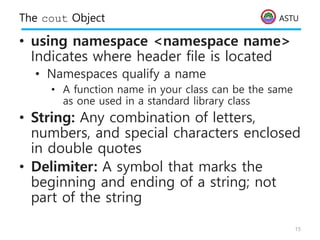
• using namespace <namespace name>
Indicates where header file is located
• Namespaces qualify a name
• A function name in your class can be the same
as one used in a standard library class
• String: Any combination of letters,
numbers, and special characters enclosed
in double quotes
• Delimiter: A symbol that marks the
beginning and ending of a string; not
part of the string
15
ASTU
The cout Object
16
ASTU
The cout Object
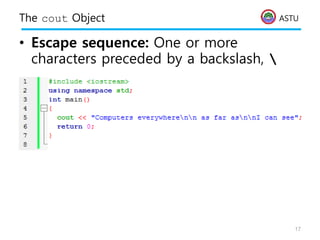
• Escape sequence: One or more
characters preceded by a backslash, 
17
ASTU
Comments
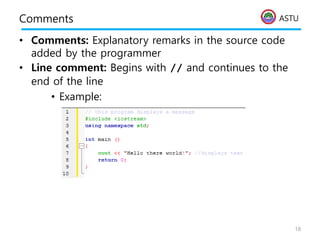
• Comments: Explanatory remarks in the source code
added by the programmer
• Line comment: Begins with // and continues to the
end of the line
• Example:
18
ASTU
Comments
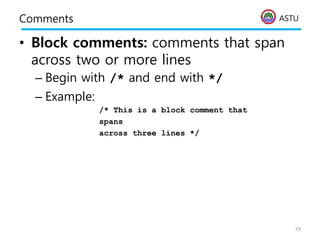
• Block comments: comments that span
across two or more lines
– Begin with /* and end with */
– Example:
/* This is a block comment that
spans
across three lines */
19
ASTU
Data Types
• Data type: A set of values and the
operations that can be applied to these
values
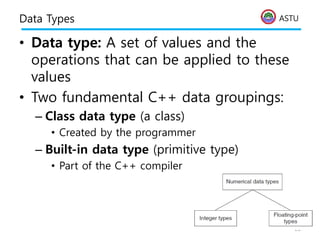
• Two fundamental C++ data groupings:
– Class data type (a class)
• Created by the programmer
– Built-in data type (primitive type)
• Part of the C++ compiler
20
ASTU
Data Types
• Literal (constant): An actual value
– Examples:
3.6 //numeric literal
“Hello” //string literal
• Integer: A whole number
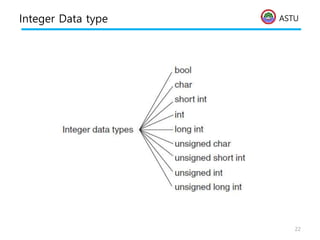
• C++ has nine built-in integer data types
– Each provides different amounts of storage
(compiler dependent)
21
ASTU
Integer Data type
22
ASTU
Integer Data type
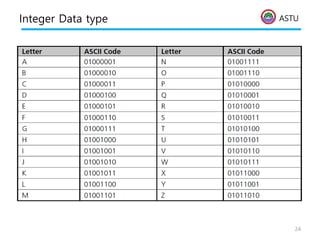
• int data type: Whole numbers
(integers), optionally with plus (+) or
minus (–) sign
– Example: 2, -5
• char data type: Individual character; any
letter, digit, or special character enclosed
in single quotes
– Example: ‘A’
– Character values are usually stored in ASCII
code
23
ASTU
Integer Data type
24
ASTU
Integer Data type
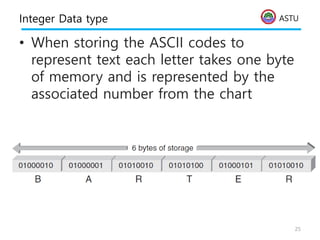
• When storing the ASCII codes to
represent text each letter takes one byte
of memory and is represented by the
associated number from the chart
25
ASTU
Bool Data Type
• bool data type: Represents Boolean
(logical) data
– Restricted to two values: true or false
– Useful when a program must examine a
condition and take a prescribed course of
action, based on whether the condition is
true or false
26
ASTU
Signed and Unsigned Data Types
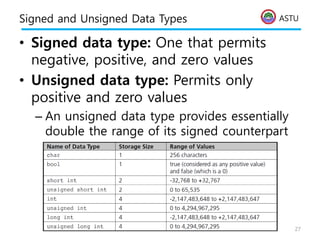
• Signed data type: One that permits
negative, positive, and zero values
• Unsigned data type: Permits only
positive and zero values
– An unsigned data type provides essentially
double the range of its signed counterpart
27
ASTU
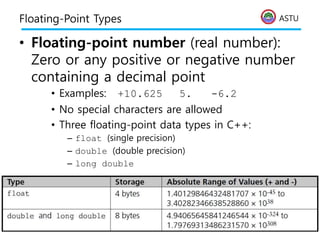
Floating-Point Types
• Floating-point number (real number):
Zero or any positive or negative number
containing a decimal point
• Examples: +10.625 5. -6.2
• No special characters are allowed
• Three floating-point data types in C++:
– float (single precision)
– double (double precision)
– long double
28
ASTU
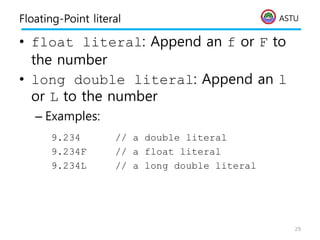
Floating-Point literal
• float literal: Append an f or F to
the number
• long double literal: Append an l
or L to the number
– Examples:
9.234 // a double literal
9.234F // a float literal
9.234L // a long double literal
29
ASTU
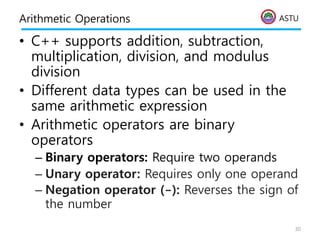
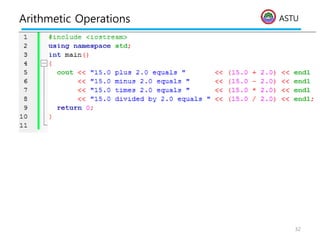
Arithmetic Operations
• C++ supports addition, subtraction,
multiplication, division, and modulus
division
• Different data types can be used in the
same arithmetic expression
• Arithmetic operators are binary
operators
– Binary operators: Require two operands
– Unary operator: Requires only one operand
– Negation operator (-): Reverses the sign of
the number
30
ASTU
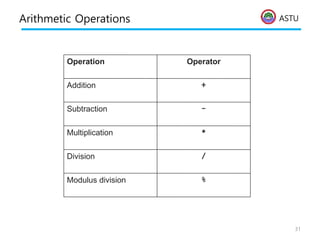
Arithmetic Operations
31
%
Modulus division
/
Division
*
Multiplication
-
Subtraction
+
Addition
Operator
Operation
ASTU
Arithmetic Operations
32
ASTU
Expression Types
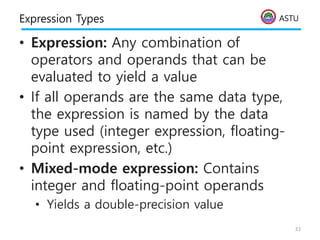
• Expression: Any combination of
operators and operands that can be
evaluated to yield a value
• If all operands are the same data type,
the expression is named by the data
type used (integer expression, floating-
point expression, etc.)
• Mixed-mode expression: Contains
integer and floating-point operands
• Yields a double-precision value
33
ASTU
Integer Division
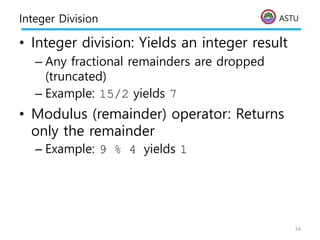
• Integer division: Yields an integer result
– Any fractional remainders are dropped
(truncated)
– Example: 15/2 yields 7
• Modulus (remainder) operator: Returns
only the remainder
– Example: 9 % 4 yields 1
34
ASTU
Operator Precedence
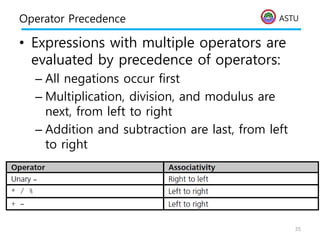
• Expressions with multiple operators are
evaluated by precedence of operators:
– All negations occur first
– Multiplication, division, and modulus are
next, from left to right
– Addition and subtraction are last, from left
to right
35
ASTU
Variables and Declaration Statements
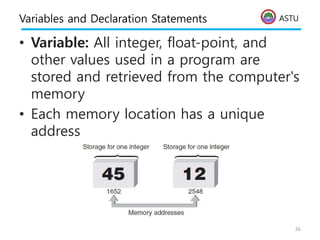
• Variable: All integer, float-point, and
other values used in a program are
stored and retrieved from the computer's
memory
• Each memory location has a unique
address
36
ASTU
Variables and Declaration Statements
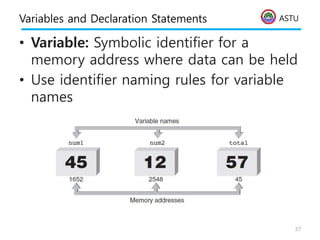
• Variable: Symbolic identifier for a
memory address where data can be held
• Use identifier naming rules for variable
names
37
ASTU
Variables and Declaration Statements
• Assignment statement: Used to store a
value into a variable
• Value of the expression on the right is
assigned to the memory location of the
variable on the left side
– Examples:
num1 = 45;
num2 = 12;
total = num1 + num2;
38
ASTU
Variables and Declaration Statements
• Declaration statement: Specifies the
data type and identifier of a variable;
sets up the memory location
– Syntax: dataType variableName;
• Data type is any valid C++ data type
– Example: int sum;
• Declarations may be used anywhere in a
function
– Usually grouped at the opening brace
39
ASTU
Variables and Declaration Statements
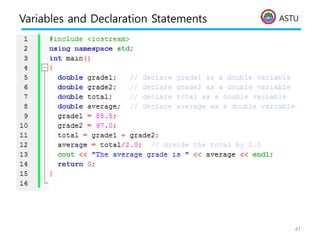
• Multiple variables of the same data type
can be declared in a single declaration
statement
– Example:
double grade1, grade2, total, average;
• Variables can be initialized in a
declaration
– Example:
double grade1 = 87.0
• A variable must be declared before it is
used
40
ASTU
Variables and Declaration Statements
41
ASTU
Assignment Operations
• Assignment Statement: Assigns the
value of the expression on the right side
of the = to the variable on the left side
of the =
• Another assignment statement using the
same variable will overwrite the previous
value with the new value
Examples:
slope = 3.7;
slope = 6.28;
42
ASTU
Assignment Operations
• Right side of an assignment statement
may contain any expression that can be
evaluated to a value
Examples:
newtotal = 18.3 + total;
taxes = .06*amount;
average = sum / items;
• Only one variable can be on the left side
of an assignment statement
43
ASTU
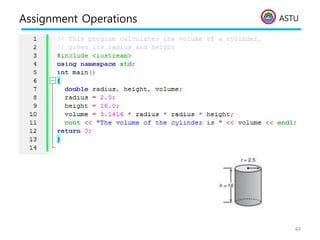
Assignment Operations
44
ASTU
Assignment Operations
• Assignment operator: The = sign
• C++ statement: Any expression
terminated by a semicolon
• Accumulation statement: Has the effect
of accumulating, or totaling
• Syntax:
variable = variable + newValue;
45
ASTU
Assignment Operations
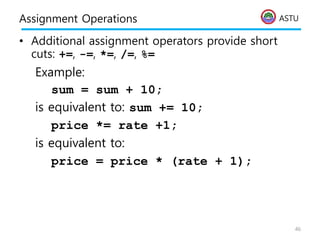
• Additional assignment operators provide short
cuts: +=, -=, *=, /=, %=
Example:
sum = sum + 10;
is equivalent to: sum += 10;
price *= rate +1;
is equivalent to:
price = price * (rate + 1);
46
ASTU
Assignment Operations
47
ASTU
Assignment Operations
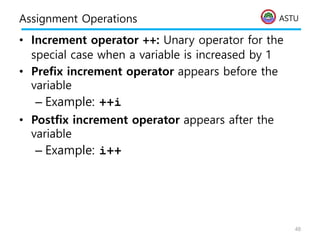
• Increment operator ++: Unary operator for the
special case when a variable is increased by 1
• Prefix increment operator appears before the
variable
– Example: ++i
• Postfix increment operator appears after the
variable
– Example: i++
48
ASTU
Assignment Operations
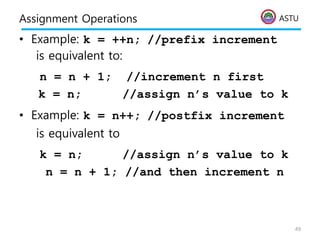
• Example: k = ++n; //prefix increment
is equivalent to:
n = n + 1; //increment n first
k = n; //assign n’s value to k
• Example: k = n++; //postfix increment
is equivalent to
k = n; //assign n’s value to k
n = n + 1; //and then increment n
49
ASTU
Assignment Operations
• Decrement operator --: Unary operator for the
special case when a variable is decreased by 1
• Prefix decrement operator appears before the
variable
– Example: --i;
• Postfix decrement operator appears after the
variable
– Example: i--;
50
ASTU
Case Study: Radar Speed Trap
51
ASTU
Case Study: Radar Speed Trap
• A highway-patrol speed-detection radar
emits a beam of microwaves at a
frequency designated as fe
• The beam is reflected off an approaching
car, and the radar unit picks up and
analyzes the reflected beam’s frequency,
fr
• The reflected beam’s frequency is shifted
slightly from fe to fr because of the car’s
motion.
52
ASTU
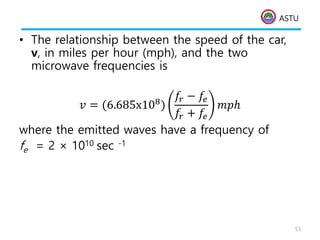
• The relationship between the speed of the car,
v, in miles per hour (mph), and the two
microwave frequencies is
𝑣 = (6.685x10⁸)
𝑓𝑟 − 𝑓𝑒
𝑓𝑟 + 𝑓𝑒
𝑚𝑝ℎ
where the emitted waves have a frequency of
fe = 2 × 10¹⁰ sec -1
53
ASTU
• we will write a C ++ program
– using the software development procedure
– calculate and display the speed
corresponding to a received frequency of
2.000004 × 10¹⁰ sec-1
54
ASTU
Case Study: Radar Speed Trap
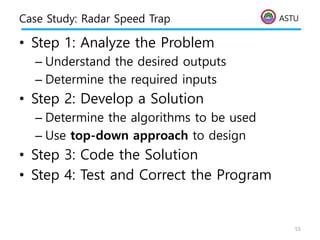
• Step 1: Analyze the Problem
– Understand the desired outputs
– Determine the required inputs
• Step 2: Develop a Solution
– Determine the algorithms to be used
– Use top-down approach to design
• Step 3: Code the Solution
• Step 4: Test and Correct the Program
55
ASTU
Case Study: Radar Speed Trap
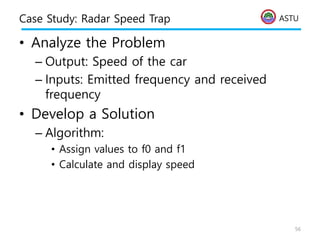
• Analyze the Problem
– Output: Speed of the car
– Inputs: Emitted frequency and received
frequency
• Develop a Solution
– Algorithm:
• Assign values to f0 and f1
• Calculate and display speed
56
ASTU
Case Study: Radar Speed Trap
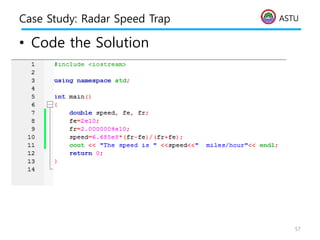
• Code the Solution
57
ASTU
Case Study: Radar Speed Trap
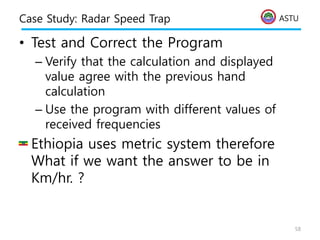
• Test and Correct the Program
– Verify that the calculation and displayed
value agree with the previous hand
calculation
– Use the program with different values of
received frequencies
• Ethiopia uses metric system therefore
What if we want the answer to be in
Km/hr. ?
58

BASIC C++ lecture NOTE C++ lecture 3.pptx

  • 1.
    ASTU CSE 1102 Fundamentalsof Programming Lecture #3 Spring 2017 Computer Science & Engineering Program School of Electrical Engineering & Computing Adama Science & Technology University
  • 2.
    ASTU Basics of C++Programming – Modular Program – The Main Function – Identifiers – Program Output using cout – Data Types – Arithmetic Operations – Variables – Assignment Operations Case study: Radar Speed Trap, Heat Transfer Reading assignment – Chapter 2 of the textbook – Section 3.1 from Chapter 3 of the textbook 2
  • 3.
    ASTU Introduction to C++ •Modular program: A program consisting of interrelated segments (or modules) arranged in a logical and understandable form – Easy to develop, correct, and modify • Modules in C++ can be classes or functions 3
  • 4.
    ASTU Introduction to C++ •Function: Accepts an input, processes the input, and produces an output – A function’s processing is encapsulated and hidden within the function 4
  • 5.
    ASTU Introduction to C++ •Class: Contains both data and functions used to manipulate the data • Identifier: A name given to an element of the language, such as a class or function – Rules for forming identifier names: • First character must be a letter or underscore • Only letters, digits, or underscores may follow the initial letter (no blanks allowed) • Keywords cannot be used as identifiers • Maximum length of an identifier = 1024 characters 5
  • 6.
    ASTU Introduction to C++ •Keyword: A reserved name that represents a built-in object or function of the language 6
  • 7.
    ASTU Introduction to C++ •Examples of valid C++ identifiers: degToRad intersect addNums slope bessell multTwo findMax density • Examples of invalid C++ identifiers: 1AB3 (begins with a number) E*6 (contains a special character) while (this is a keyword) 7
  • 8.
    ASTU Introduction to C++ •Function names – Require a set of parentheses at the end – Can use mixed upper and lower case – Should be meaningful, or be a mnemonic • Examples of function names: easy() c3po() r2d2() theForce() • Note that C++ is a case-sensitive language! 8
  • 9.
    ASTU The main() Function •Overall structure of a C++ program contains one function named main(), called the driver function • All other functions are invoked from main() 9
  • 10.
    ASTU The main() Function •Function header line: First line of a function, which contains: – The type of data returned by the function (if any) – The name of the function – The type of data that must be passed into the function when it is invoked (if any) • Arguments: The data passed into a function • Function body: The statements inside a function – enclosed in braces 10
  • 11.
    ASTU The main() Function •Each statement inside the function must be terminated with a semicolon • return: A keyword causing the appropriate value to be returned from the function • The statement return 0 in the main() function causes the program to end 11
  • 12.
  • 13.
    ASTU The cout Object •cout object: An output object that sends data to a standard output display device. 13
  • 14.
    ASTU The cout Object •Preprocessor command: Starts with a # – Causes an action before the source code is compiled into machine code • #include <file name> – Causes the named file to be inserted into the source code • C++ provides a standard library – with many pre-written classes that can be included • Header files – Files included at the head (top) of a C++ program 14
  • 15.
    ASTU The cout Object •using namespace <namespace name> Indicates where header file is located • Namespaces qualify a name • A function name in your class can be the same as one used in a standard library class • String: Any combination of letters, numbers, and special characters enclosed in double quotes • Delimiter: A symbol that marks the beginning and ending of a string; not part of the string 15
  • 16.
  • 17.
    ASTU The cout Object •Escape sequence: One or more characters preceded by a backslash, 17
  • 18.
    ASTU Comments • Comments: Explanatoryremarks in the source code added by the programmer • Line comment: Begins with // and continues to the end of the line • Example: 18
  • 19.
    ASTU Comments • Block comments:comments that span across two or more lines – Begin with /* and end with */ – Example: /* This is a block comment that spans across three lines */ 19
  • 20.
    ASTU Data Types • Datatype: A set of values and the operations that can be applied to these values • Two fundamental C++ data groupings: – Class data type (a class) • Created by the programmer – Built-in data type (primitive type) • Part of the C++ compiler 20
  • 21.
    ASTU Data Types • Literal(constant): An actual value – Examples: 3.6 //numeric literal “Hello” //string literal • Integer: A whole number • C++ has nine built-in integer data types – Each provides different amounts of storage (compiler dependent) 21
  • 22.
  • 23.
    ASTU Integer Data type •int data type: Whole numbers (integers), optionally with plus (+) or minus (–) sign – Example: 2, -5 • char data type: Individual character; any letter, digit, or special character enclosed in single quotes – Example: ‘A’ – Character values are usually stored in ASCII code 23
  • 24.
  • 25.
    ASTU Integer Data type •When storing the ASCII codes to represent text each letter takes one byte of memory and is represented by the associated number from the chart 25
  • 26.
    ASTU Bool Data Type •bool data type: Represents Boolean (logical) data – Restricted to two values: true or false – Useful when a program must examine a condition and take a prescribed course of action, based on whether the condition is true or false 26
  • 27.
    ASTU Signed and UnsignedData Types • Signed data type: One that permits negative, positive, and zero values • Unsigned data type: Permits only positive and zero values – An unsigned data type provides essentially double the range of its signed counterpart 27
  • 28.
    ASTU Floating-Point Types • Floating-pointnumber (real number): Zero or any positive or negative number containing a decimal point • Examples: +10.625 5. -6.2 • No special characters are allowed • Three floating-point data types in C++: – float (single precision) – double (double precision) – long double 28
  • 29.
    ASTU Floating-Point literal • floatliteral: Append an f or F to the number • long double literal: Append an l or L to the number – Examples: 9.234 // a double literal 9.234F // a float literal 9.234L // a long double literal 29
  • 30.
    ASTU Arithmetic Operations • C++supports addition, subtraction, multiplication, division, and modulus division • Different data types can be used in the same arithmetic expression • Arithmetic operators are binary operators – Binary operators: Require two operands – Unary operator: Requires only one operand – Negation operator (-): Reverses the sign of the number 30
  • 31.
  • 32.
  • 33.
    ASTU Expression Types • Expression:Any combination of operators and operands that can be evaluated to yield a value • If all operands are the same data type, the expression is named by the data type used (integer expression, floating- point expression, etc.) • Mixed-mode expression: Contains integer and floating-point operands • Yields a double-precision value 33
  • 34.
    ASTU Integer Division • Integerdivision: Yields an integer result – Any fractional remainders are dropped (truncated) – Example: 15/2 yields 7 • Modulus (remainder) operator: Returns only the remainder – Example: 9 % 4 yields 1 34
  • 35.
    ASTU Operator Precedence • Expressionswith multiple operators are evaluated by precedence of operators: – All negations occur first – Multiplication, division, and modulus are next, from left to right – Addition and subtraction are last, from left to right 35
  • 36.
    ASTU Variables and DeclarationStatements • Variable: All integer, float-point, and other values used in a program are stored and retrieved from the computer's memory • Each memory location has a unique address 36
  • 37.
    ASTU Variables and DeclarationStatements • Variable: Symbolic identifier for a memory address where data can be held • Use identifier naming rules for variable names 37
  • 38.
    ASTU Variables and DeclarationStatements • Assignment statement: Used to store a value into a variable • Value of the expression on the right is assigned to the memory location of the variable on the left side – Examples: num1 = 45; num2 = 12; total = num1 + num2; 38
  • 39.
    ASTU Variables and DeclarationStatements • Declaration statement: Specifies the data type and identifier of a variable; sets up the memory location – Syntax: dataType variableName; • Data type is any valid C++ data type – Example: int sum; • Declarations may be used anywhere in a function – Usually grouped at the opening brace 39
  • 40.
    ASTU Variables and DeclarationStatements • Multiple variables of the same data type can be declared in a single declaration statement – Example: double grade1, grade2, total, average; • Variables can be initialized in a declaration – Example: double grade1 = 87.0 • A variable must be declared before it is used 40
  • 41.
  • 42.
    ASTU Assignment Operations • AssignmentStatement: Assigns the value of the expression on the right side of the = to the variable on the left side of the = • Another assignment statement using the same variable will overwrite the previous value with the new value Examples: slope = 3.7; slope = 6.28; 42
  • 43.
    ASTU Assignment Operations • Rightside of an assignment statement may contain any expression that can be evaluated to a value Examples: newtotal = 18.3 + total; taxes = .06*amount; average = sum / items; • Only one variable can be on the left side of an assignment statement 43
  • 44.
  • 45.
    ASTU Assignment Operations • Assignmentoperator: The = sign • C++ statement: Any expression terminated by a semicolon • Accumulation statement: Has the effect of accumulating, or totaling • Syntax: variable = variable + newValue; 45
  • 46.
    ASTU Assignment Operations • Additionalassignment operators provide short cuts: +=, -=, *=, /=, %= Example: sum = sum + 10; is equivalent to: sum += 10; price *= rate +1; is equivalent to: price = price * (rate + 1); 46
  • 47.
  • 48.
    ASTU Assignment Operations • Incrementoperator ++: Unary operator for the special case when a variable is increased by 1 • Prefix increment operator appears before the variable – Example: ++i • Postfix increment operator appears after the variable – Example: i++ 48
  • 49.
    ASTU Assignment Operations • Example:k = ++n; //prefix increment is equivalent to: n = n + 1; //increment n first k = n; //assign n’s value to k • Example: k = n++; //postfix increment is equivalent to k = n; //assign n’s value to k n = n + 1; //and then increment n 49
  • 50.
    ASTU Assignment Operations • Decrementoperator --: Unary operator for the special case when a variable is decreased by 1 • Prefix decrement operator appears before the variable – Example: --i; • Postfix decrement operator appears after the variable – Example: i--; 50
  • 51.
  • 52.
    ASTU Case Study: RadarSpeed Trap • A highway-patrol speed-detection radar emits a beam of microwaves at a frequency designated as fe • The beam is reflected off an approaching car, and the radar unit picks up and analyzes the reflected beam’s frequency, fr • The reflected beam’s frequency is shifted slightly from fe to fr because of the car’s motion. 52
  • 53.
    ASTU • The relationshipbetween the speed of the car, v, in miles per hour (mph), and the two microwave frequencies is 𝑣 = (6.685x10⁸) 𝑓𝑟 − 𝑓𝑒 𝑓𝑟 + 𝑓𝑒 𝑚𝑝ℎ where the emitted waves have a frequency of fe = 2 × 10¹⁰ sec -1 53
  • 54.
    ASTU • we willwrite a C ++ program – using the software development procedure – calculate and display the speed corresponding to a received frequency of 2.000004 × 10¹⁰ sec-1 54
  • 55.
    ASTU Case Study: RadarSpeed Trap • Step 1: Analyze the Problem – Understand the desired outputs – Determine the required inputs • Step 2: Develop a Solution – Determine the algorithms to be used – Use top-down approach to design • Step 3: Code the Solution • Step 4: Test and Correct the Program 55
  • 56.
    ASTU Case Study: RadarSpeed Trap • Analyze the Problem – Output: Speed of the car – Inputs: Emitted frequency and received frequency • Develop a Solution – Algorithm: • Assign values to f0 and f1 • Calculate and display speed 56
  • 57.
    ASTU Case Study: RadarSpeed Trap • Code the Solution 57
  • 58.
    ASTU Case Study: RadarSpeed Trap • Test and Correct the Program – Verify that the calculation and displayed value agree with the previous hand calculation – Use the program with different values of received frequencies • Ethiopia uses metric system therefore What if we want the answer to be in Km/hr. ? 58

Editor's Notes

  • #18 backslash (\) has a special meaning in C++ as the escape character. When a backslash is placed in front of a group of characters, it tells the compiler to escape from the way these characters are normally interpreted. The combination of a backslash and these characters is called an escape sequence
  • #21 Primitive types: provided as part of the C++ compiler and require no external C++ code most operations for built-in data types are designated as symbols. For class data types, most operations are provided as functions.
  • #22 A literal is an acceptable value for a data type. The term “literal” in this context means the value identifies itself. (Another name for a literal is a literal value or constant.) For example, all numbers, such as 2, 3.6, and -8.2, are referred to as literal values because they literally display their values.
  • #23 The essential difference between these integer data types is the amount of storage used for each type, which affects the range of values each type is capable of representing. The three most important and common types used in most applications are int, char, and bool.