Presented By:
Priyanka Pandey
Guided By:
Prof. Ravi K Sheth
Android
Android overview
Android Security
• Security
• Overview
 Kernel security
 App security
 Update and resources
o Android 5.0
o Android 4.4
o Android 4.3
o Android 4.2
o Android 4.1
 Enhancement
• Implementation
 Encryption
 Verified boot
 Security enhance
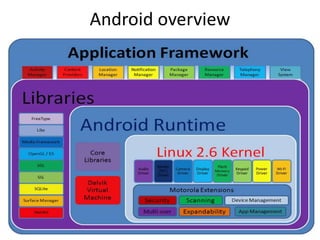
• The main Android platform building blocks are:
 Device Hardware
 Android Operating System
 Android Application Runtime
• Android applications extend the core Android operating
system. There are two primary sources for applications:
 Pre-Installed Applications
 User-Installed Applications
Android Security
Android Security
• Google provides a set of cloud-based services that are
available to any compatible Android device. The primary
services are:
 Google Play
 Android Updates
 Application Services
Android Security overview
• The key components of the Android Security Program include:
 Design Review
 Penetration Testing and Code Review
 Open Source and Community Review
 Incident Response
• Android seeks to be the most secure and usable operating
system for mobile platforms by re-purposing traditional
operating system security controls to:
 Protect user data
 Protect system resources (including the network)
 Provide application isolation
Kernel Security
System & kernel Security
• Linux Security:
A user-based permissions model.
Process isolation.
Extensible mechanism for secure IPC.
The ability to remove unnecessary and potentially insecure parts
of the kernel.
• The Application Sandbox
• System Partition and Safe Mode
• File system Permissions
• Cryptography
• User Security Features
 File system Encryption
 Password Protection
 Device Administration
System And Kernel Security
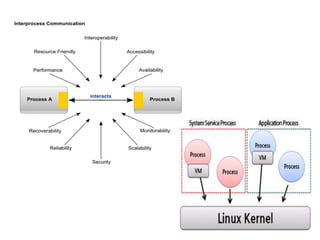
• Android platform provides the security of the Linux kernel, as
well as a secure inter-process communication (IPC) facility to
enable secure communication between applications running
in different processes.
• The Linux kernel provides Android with several key security
features, including:
 A user-based permissions model
 Process isolation
 Extensible mechanism for secure IPC
 The ability to remove unnecessary and potentially insecure
parts of the kernel
Application Sandbox
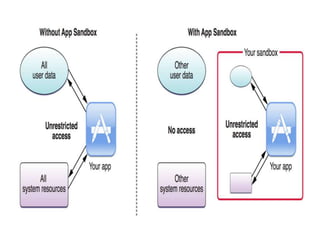
• The Android system assigns a unique user ID (UID) to each
Android application and runs it as that user in a separate
process.
• The kernel enforces security between applications and the
system at the process level through standard Linux facilities,
such as user and group IDs that are assigned to applications.
• The sandbox is simple, auditable, and based on decades-old
UNIX-style user separation of processes and file permissions.
System Partition and Safe Mode
• The system partition contains Android's
 kernel as well as the operating system
 Libraries,
 application runtime,
 application framework
 applications.
This partition is set to read-only.
• When a user boots the device into Safe Mode, only core
Android applications are available.
• This ensures that the user can boot their phone into an
environment that is free of third-party software.
File system Permissions
• In Unix:
 one user cannot alter or read another user's files.
• Android:
 each application runs as its own user.
 Unless the developer explicitly exposes files to other
applications, files created by one application cannot be read
or altered by another application.
Cryptography
• Android provides a set of cryptographic APIs for use by
applications.
• These include implementations of standard and commonly
used cryptographic primitives such as AES, RSA, DSA, and SHA.
• Additionally, APIs are provided for higher level protocols such
as SSL and HTTPS.
Password Protection
• Android can be configured to verify a user-supplied
password prior to providing access to a device.
• In addition to preventing unauthorized use of the
device, this password protects the cryptographic key
for full filesystem encryption.
• Use of a password and/or password complexity rules
can be required by a device administrator.
App Security
• Android applications are most often written in
the Java programming language and run in the
Dalvik virtual machine.
• Applications are installed from a single file with
the .apk file extension.
• The main Android application building blocks are:
• AndroidManifest.xml
• Activities
• Services
Security updates and resources
• Reporting Security Issues
• Android Updates
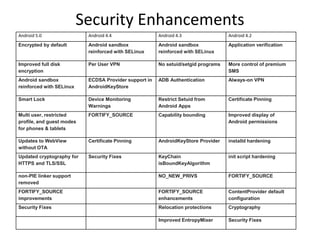
Security Enhancements
Android 5.0 Android 4.4 Android 4.3 Android 4.2
Encrypted by default Android sandbox
reinforced with SELinux
Android sandbox
reinforced with SELinux
Application verification
Improved full disk
encryption
Per User VPN No setuid/setgid programs More control of premium
SMS
Android sandbox
reinforced with SELinux
ECDSA Provider support in
AndroidKeyStore
ADB Authentication Always-on VPN
Smart Lock Device Monitoring
Warnings
Restrict Setuid from
Android Apps
Certificate Pinning
Multi user, restricted
profile, and guest modes
for phones & tablets
FORTIFY_SOURCE Capability bounding Improved display of
Android permissions
Updates to WebView
without OTA
Certificate Pinning AndroidKeyStore Provider installd hardening
Updated cryptography for
HTTPS and TLS/SSL
Security Fixes KeyChain
isBoundKeyAlgorithm
init script hardening
non-PIE linker support
removed
NO_NEW_PRIVS FORTIFY_SOURCE
FORTIFY_SOURCE
improvements
FORTIFY_SOURCE
enhancements
ContentProvider default
configuration
Security Fixes Relocation protections Cryptography
Improved EntropyMixer Security Fixes
Encryption
• Android disk encryption is based on dm‐crypt, which is a kernel feature
that works at the block device layer.
• Encryption works with Embedded MultiMediaCard (eMMC) and similar
flash devices that present themselves to the kernel as block devices.
• The encryption algorithm is 128 Advanced Encryption Standard (AES) with
cipher-block chaining (CBC) and ESSIV:SHA256.
• The master key is encrypted with 128-bit AES via calls to the OpenSSL
library.
• In the Android 5.0 release, there are four kinds of encryption states:
 default
 PIN
 Password
 Pattern
Verified Boot
• Android 4.4 and later supports verified boot
through the optional device-mapper-verity
(dm-verity) kernel feature, which provides
transparent integrity checking of block
devices.
• Establishing a verified boot flow
• Switching to block-oriented OTA
• Configuring dm-verity
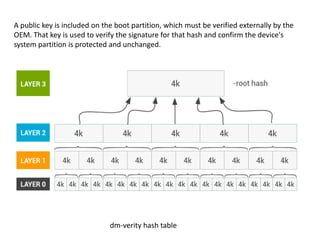
dm-verity hash table
A public key is included on the boot partition, which must be verified externally by the
OEM. That key is used to verify the signature for that hash and confirm the device's
system partition is protected and unchanged.
Android Application Security Scans
• When building and testing the security of Android
apps, developers should follow Android security
best practices and keep the following in mid
when performing security tests:
• unsafe file creation
• improper database storage
• unsafe use of shared preferences
• storage of sensitive data on mass storage device
• content provider SQL injection
• APN or proxy modification
VULNERABILITIES IN ANDROID
SECURITY
• Rooting
• Repackaging
• Update Attack
• Drive-by Download
Rooting of Devices
• rooting your phone is the process of modifying the operating system that shipped with your
device to grant you complete control over it.
 Full Control Over Android
You have access to alter any system files, use themes, change boot images, delete annoying
stock apps, such as Sprint's NFL Mobile live and Nascar Sprint Cup Mobile, and other various
native applications that might drive you crazy (Footprints, Voice Dialer, etc).
 Back Up And Restore The Whole System
rooted Android devices, you can back up your entire system to an SD card, much in the same
way you can image a hard drive.
 Rooting immediately voids your phone's warranty
 Rooting involves the risk of "bricking" your phone:
A "bricked" phone is no better than carrying around a brick in your pocket. The phone is dead
when it has been "bricked.“
 Poor performance
 Viruses
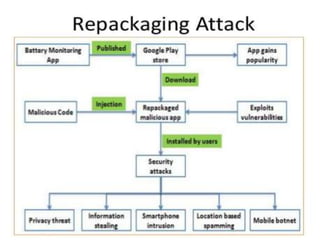
Repackaging
• Repackaging is one of the most common
techniques malware authors use to piggyback
malicious payloads into popular applications (or
simply apps). In essence, malware authors may
locate and download popular apps, disassemble
them, enclose malicious payloads, and then re-
assemble and submit the new apps to official
and/or alternative Android Markets.
• Users could be vulnerable by being enticed to
download and install these infected apps.
Update Attack
• Update Attack The first technique typically
piggybacks the entire malicious payloads into
host apps, which could potentially expose their
presence.
• The second technique makes it difficult for
detection. Specifically, it may still repackage
popular apps. But instead of enclosing the
payload as a whole, it only includes an update
component that will fetch or download the
malicious payloads at runtime.
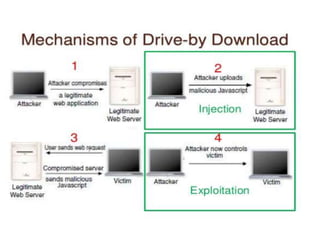
Drive-by Download
• Drive-by Download The third technique applies the traditional
drive-by download attacks to mobile space. Though
• they are not directly exploiting mobile browser vulnerabilities, they
are essentially enticing users to download “interesting” or “feature-
rich” apps.
• for example when a user clicks a special advertisement link, it will
redirect the user to a malicious website, which claims to be
analyzing the battery usage of user’s phone and will redirect the
user to one fake Android Market to download an app claimed to
improve battery efficiency. Unfortunately, the downloaded app is
not one that focuses on improving the efficiency of battery, but a
malware that will subscribe to a premium-rate service without
user’s knowledge.
Any
Questions ?
THANK
YOU

Mobile security

  • 1.
  • 2.
  • 3.
  • 4.
    Android Security • Security •Overview  Kernel security  App security  Update and resources o Android 5.0 o Android 4.4 o Android 4.3 o Android 4.2 o Android 4.1  Enhancement • Implementation  Encryption  Verified boot  Security enhance
  • 5.
    • The mainAndroid platform building blocks are:  Device Hardware  Android Operating System  Android Application Runtime • Android applications extend the core Android operating system. There are two primary sources for applications:  Pre-Installed Applications  User-Installed Applications Android Security
  • 6.
    Android Security • Googleprovides a set of cloud-based services that are available to any compatible Android device. The primary services are:  Google Play  Android Updates  Application Services
  • 7.
    Android Security overview •The key components of the Android Security Program include:  Design Review  Penetration Testing and Code Review  Open Source and Community Review  Incident Response • Android seeks to be the most secure and usable operating system for mobile platforms by re-purposing traditional operating system security controls to:  Protect user data  Protect system resources (including the network)  Provide application isolation
  • 8.
    Kernel Security System &kernel Security • Linux Security: A user-based permissions model. Process isolation. Extensible mechanism for secure IPC. The ability to remove unnecessary and potentially insecure parts of the kernel. • The Application Sandbox • System Partition and Safe Mode • File system Permissions • Cryptography • User Security Features  File system Encryption  Password Protection  Device Administration
  • 9.
    System And KernelSecurity • Android platform provides the security of the Linux kernel, as well as a secure inter-process communication (IPC) facility to enable secure communication between applications running in different processes. • The Linux kernel provides Android with several key security features, including:  A user-based permissions model  Process isolation  Extensible mechanism for secure IPC  The ability to remove unnecessary and potentially insecure parts of the kernel
  • 11.
    Application Sandbox • TheAndroid system assigns a unique user ID (UID) to each Android application and runs it as that user in a separate process. • The kernel enforces security between applications and the system at the process level through standard Linux facilities, such as user and group IDs that are assigned to applications. • The sandbox is simple, auditable, and based on decades-old UNIX-style user separation of processes and file permissions.
  • 13.
    System Partition andSafe Mode • The system partition contains Android's  kernel as well as the operating system  Libraries,  application runtime,  application framework  applications. This partition is set to read-only. • When a user boots the device into Safe Mode, only core Android applications are available. • This ensures that the user can boot their phone into an environment that is free of third-party software.
  • 14.
    File system Permissions •In Unix:  one user cannot alter or read another user's files. • Android:  each application runs as its own user.  Unless the developer explicitly exposes files to other applications, files created by one application cannot be read or altered by another application.
  • 15.
    Cryptography • Android providesa set of cryptographic APIs for use by applications. • These include implementations of standard and commonly used cryptographic primitives such as AES, RSA, DSA, and SHA. • Additionally, APIs are provided for higher level protocols such as SSL and HTTPS.
  • 16.
    Password Protection • Androidcan be configured to verify a user-supplied password prior to providing access to a device. • In addition to preventing unauthorized use of the device, this password protects the cryptographic key for full filesystem encryption. • Use of a password and/or password complexity rules can be required by a device administrator.
  • 17.
    App Security • Androidapplications are most often written in the Java programming language and run in the Dalvik virtual machine. • Applications are installed from a single file with the .apk file extension. • The main Android application building blocks are: • AndroidManifest.xml • Activities • Services
  • 18.
    Security updates andresources • Reporting Security Issues • Android Updates
  • 19.
    Security Enhancements Android 5.0Android 4.4 Android 4.3 Android 4.2 Encrypted by default Android sandbox reinforced with SELinux Android sandbox reinforced with SELinux Application verification Improved full disk encryption Per User VPN No setuid/setgid programs More control of premium SMS Android sandbox reinforced with SELinux ECDSA Provider support in AndroidKeyStore ADB Authentication Always-on VPN Smart Lock Device Monitoring Warnings Restrict Setuid from Android Apps Certificate Pinning Multi user, restricted profile, and guest modes for phones & tablets FORTIFY_SOURCE Capability bounding Improved display of Android permissions Updates to WebView without OTA Certificate Pinning AndroidKeyStore Provider installd hardening Updated cryptography for HTTPS and TLS/SSL Security Fixes KeyChain isBoundKeyAlgorithm init script hardening non-PIE linker support removed NO_NEW_PRIVS FORTIFY_SOURCE FORTIFY_SOURCE improvements FORTIFY_SOURCE enhancements ContentProvider default configuration Security Fixes Relocation protections Cryptography Improved EntropyMixer Security Fixes
  • 20.
    Encryption • Android diskencryption is based on dm‐crypt, which is a kernel feature that works at the block device layer. • Encryption works with Embedded MultiMediaCard (eMMC) and similar flash devices that present themselves to the kernel as block devices. • The encryption algorithm is 128 Advanced Encryption Standard (AES) with cipher-block chaining (CBC) and ESSIV:SHA256. • The master key is encrypted with 128-bit AES via calls to the OpenSSL library. • In the Android 5.0 release, there are four kinds of encryption states:  default  PIN  Password  Pattern
  • 21.
    Verified Boot • Android4.4 and later supports verified boot through the optional device-mapper-verity (dm-verity) kernel feature, which provides transparent integrity checking of block devices. • Establishing a verified boot flow • Switching to block-oriented OTA • Configuring dm-verity
  • 22.
    dm-verity hash table Apublic key is included on the boot partition, which must be verified externally by the OEM. That key is used to verify the signature for that hash and confirm the device's system partition is protected and unchanged.
  • 23.
    Android Application SecurityScans • When building and testing the security of Android apps, developers should follow Android security best practices and keep the following in mid when performing security tests: • unsafe file creation • improper database storage • unsafe use of shared preferences • storage of sensitive data on mass storage device • content provider SQL injection • APN or proxy modification
  • 24.
    VULNERABILITIES IN ANDROID SECURITY •Rooting • Repackaging • Update Attack • Drive-by Download
  • 25.
    Rooting of Devices •rooting your phone is the process of modifying the operating system that shipped with your device to grant you complete control over it.  Full Control Over Android You have access to alter any system files, use themes, change boot images, delete annoying stock apps, such as Sprint's NFL Mobile live and Nascar Sprint Cup Mobile, and other various native applications that might drive you crazy (Footprints, Voice Dialer, etc).  Back Up And Restore The Whole System rooted Android devices, you can back up your entire system to an SD card, much in the same way you can image a hard drive.  Rooting immediately voids your phone's warranty  Rooting involves the risk of "bricking" your phone: A "bricked" phone is no better than carrying around a brick in your pocket. The phone is dead when it has been "bricked.“  Poor performance  Viruses
  • 26.
    Repackaging • Repackaging isone of the most common techniques malware authors use to piggyback malicious payloads into popular applications (or simply apps). In essence, malware authors may locate and download popular apps, disassemble them, enclose malicious payloads, and then re- assemble and submit the new apps to official and/or alternative Android Markets. • Users could be vulnerable by being enticed to download and install these infected apps.
  • 28.
    Update Attack • UpdateAttack The first technique typically piggybacks the entire malicious payloads into host apps, which could potentially expose their presence. • The second technique makes it difficult for detection. Specifically, it may still repackage popular apps. But instead of enclosing the payload as a whole, it only includes an update component that will fetch or download the malicious payloads at runtime.
  • 29.
    Drive-by Download • Drive-byDownload The third technique applies the traditional drive-by download attacks to mobile space. Though • they are not directly exploiting mobile browser vulnerabilities, they are essentially enticing users to download “interesting” or “feature- rich” apps. • for example when a user clicks a special advertisement link, it will redirect the user to a malicious website, which claims to be analyzing the battery usage of user’s phone and will redirect the user to one fake Android Market to download an app claimed to improve battery efficiency. Unfortunately, the downloaded app is not one that focuses on improving the efficiency of battery, but a malware that will subscribe to a premium-rate service without user’s knowledge.
  • 31.
  • 32.