1
Overview of Scientific Workflows:
Why Use Them?
Scott Callaghan
Southern California Earthquake Center
University of Southern California
scottcal@usc.edu
Blue Waters Webinar Series
March 8, 2017
Overview
• What are “workflows”?
• What elements make up a workflow?
• What problems do workflow tools solve?
• What should you consider in selecting a tool for your
work?
• How have workflow tools helped me in my work?
• Why should you use workflow tools?
2
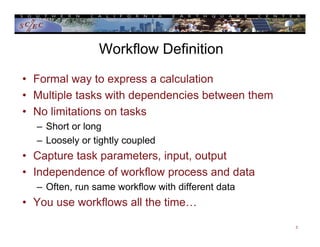
Workflow Definition
• Formal way to express a calculation
• Multiple tasks with dependencies between them
• No limitations on tasks
– Short or long
– Loosely or tightly coupled
• Capture task parameters, input, output
• Independence of workflow process and data
– Often, run same workflow with different data
• You use workflows all the time…
3
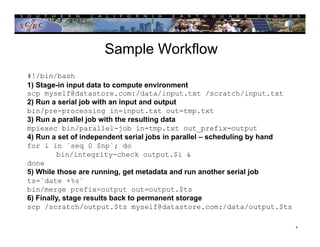
Sample Workflow
4
#!/bin/bash
1) Stage-in input data to compute environment
scp myself@datastore.com:/data/input.txt /scratch/input.txt
2) Run a serial job with an input and output
bin/pre-processing in=input.txt out=tmp.txt
3) Run a parallel job with the resulting data
mpiexec bin/parallel-job in=tmp.txt out_prefix=output
4) Run a set of independent serial jobs in parallel – scheduling by hand
for i in `seq 0 $np`; do
bin/integrity-check output.$i &
done
5) While those are running, get metadata and run another serial job
ts=`date +%s`
bin/merge prefix=output out=output.$ts
6) Finally, stage results back to permanent storage
scp /scratch/output.$ts myself@datastore.com:/data/output.$ts
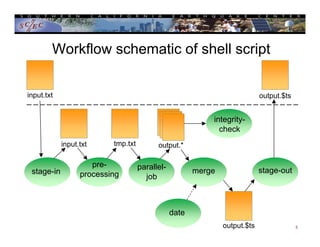
Workflow schematic of shell script
5
stage-in
parallel-
job
pre-
processing merge stage-out
date
integrity-
check
input.txt
input.txt tmp.txt output.*
output.$ts
output.$ts
Workflow Elements
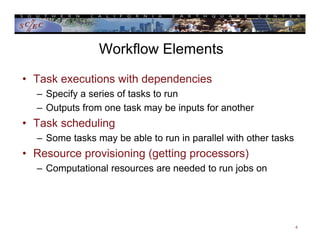
• Task executions with dependencies
– Specify a series of tasks to run
– Outputs from one task may be inputs for another
• Task scheduling
– Some tasks may be able to run in parallel with other tasks
• Resource provisioning (getting processors)
– Computational resources are needed to run jobs on
6
Workflow Elements (cont.)
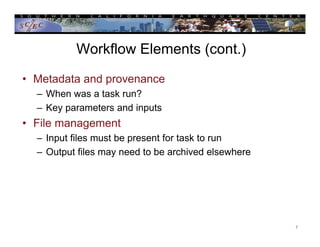
• Metadata and provenance
– When was a task run?
– Key parameters and inputs
• File management
– Input files must be present for task to run
– Output files may need to be archived elsewhere
7
What do we need help with?
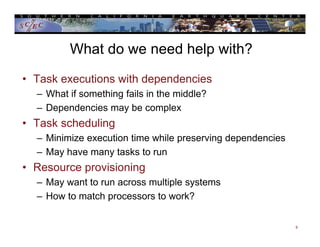
• Task executions with dependencies
– What if something fails in the middle?
– Dependencies may be complex
• Task scheduling
– Minimize execution time while preserving dependencies
– May have many tasks to run
• Resource provisioning
– May want to run across multiple systems
– How to match processors to work?
8
• Metadata and provenance
– Automatically capture and track
– Where did my task run? How long did it take?
– What were the inputs and parameters?
– What versions of code were used?
• File management
– Make sure inputs are available for tasks
– Archive output data
• Automation
– You have a workflow already – are there manual steps?
9
Workflow Tools
• Software products designed to help users with
workflows
– Component to create your workflow
– Component to run your workflow
• Can support all kinds of workflows
• Can run on local machines or large clusters
• Use existing code (no changes)
• Automate your pipeline
• Provide many features and capabilities for flexibility
10
Problems Workflow Tools Solve
• Task execution
– Workflow tools will retry and checkpoint if needed
• Data management
– Stage-in and stage-out data
– Ensure data is available for jobs automatically
• Task scheduling
– Optimal execution on available resources
• Metadata
– Automatically track runtime, environment, arguments, inputs
• Resource provisioning
– Whether large parallel jobs or high throughput
11
Workflow Webinar Schedule
Date Workflow Tool
March 8 Overview of Scientific Workflows
March 22 Makeflow and WorkQueue
April 12 Computational Data Workflow Mapping
April 26 Kepler Scientific Workflow System
May 10 RADICAL-Cybertools
May 24 Pegasus Workflow Management System
June 14 Data-flow networks and using the Copernicus workflow system
June 28 VIKING
12
• Overview of different workflow tools to help you pick
the one best for you
How to select a workflow tool
• Tools are solving same general problems, but differ
in specific approach
• A few categories to think about for your work:
– Interface: how are workflows constructed?
– Workload: what does your workflow look like?
– Community: what domains does the tool focus on?
– Push vs. Pull: how are resources matched to jobs?
• Other points of comparison will emerge
13
Interface
• How does a user construct workflows?
– Graphical: like assembling a flow chart
– Scripting: use a workflow tool-specific scripting language to
describe workflow
– API: use a common programming language with a tool-
provided API to describe workflow
• Which is best depends on your application
– Graphical can be unwieldy with many tasks
– Scripting and API can require more initial investment
• Some tools support multiple approaches
14
Workload
• What kind of workflow are you running?
– Many vs. few tasks
– Short vs. long
– Dynamic vs. static
– Loops vs. directed acyclic graph
• Different tools are targeted at different workloads
15
Community
• What kinds of applications is the tool designed for?
• Some tools focus on certain science fields
– Have specific paradigms or task types built-in
– Workflow community will share science field
– Less useful if not in the field or users of the provided tasks
• Some tools are more general
– Open-ended, flexible
– Less domain-specific community
16
Push vs. Pull
• Challenge: tasks need to run on processors
somewhere
• Want the approach to be automated
• How to get the tasks to run on the processors?
• Two primary approaches:
– Push: When work is ready, send it to a resource, waiting if
necessary
– Pull: Gather resources, then find work to put on them
• Which is best for you depends on your target system
and workload
17
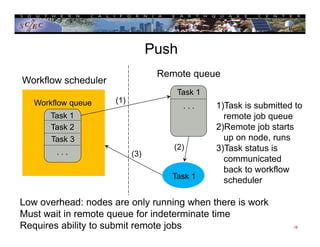
Push
18
Workflow queue
Task 1
Task 2
Task 3
. . .
Remote queue
Workflow scheduler
Task 1
. . .
Task 1
1)Task is submitted to
remote job queue
2)Remote job starts
up on node, runs
3)Task status is
communicated
back to workflow
scheduler
(1)
(2)
(3)
Low overhead: nodes are only running when there is work
Must wait in remote queue for indeterminate time
Requires ability to submit remote jobs
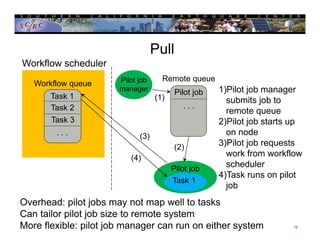
Pull
19
Workflow queue
Task 1
Task 2
Task 3
. . .
Remote queue
Workflow scheduler
Pilot job
. . .
Task 1
(1)
(2)
(3)
Pilot job
manager
Pilot job
(4)
1)Pilot job manager
submits job to
remote queue
2)Pilot job starts up
on node
3)Pilot job requests
work from workflow
scheduler
4)Task runs on pilot
job
Overhead: pilot jobs may not map well to tasks
Can tailor pilot job size to remote system
More flexible: pilot job manager can run on either system
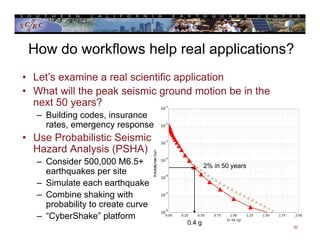
How do workflows help real applications?
• Let’s examine a real scientific application
• What will the peak seismic ground motion be in the
next 50 years?
– Building codes, insurance
rates, emergency response
• Use Probabilistic Seismic
Hazard Analysis (PSHA)
– Consider 500,000 M6.5+
earthquakes per site
– Simulate each earthquake
– Combine shaking with
probability to create curve
– “CyberShake” platform
20
2% in 50 years
0.4 g
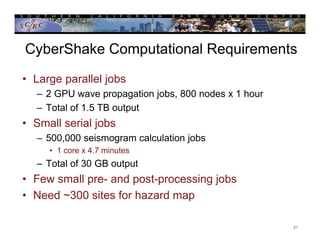
CyberShake Computational Requirements
• Large parallel jobs
– 2 GPU wave propagation jobs, 800 nodes x 1 hour
– Total of 1.5 TB output
• Small serial jobs
– 500,000 seismogram calculation jobs
• 1 core x 4.7 minutes
– Total of 30 GB output
• Few small pre- and post-processing jobs
• Need ~300 sites for hazard map
21
CyberShake Challenges
• Automation
– Too much work to run by hand
• Data management
– Input files need to be moved to the cluster
– Output files transferred back for archiving
• Resource provisioning
– How to move 500,000 small jobs through the cluster
efficiently?
• Error handling
– Detect and recover from basic errors without a human
22
CyberShake workflow solution
• Decided to use Pegasus-WMS
– Programmatic workflow description (API)
– Supports many types of tasks, no loops
– General community running on large clusters
– Supports push and pull approaches
– Based at USC ISI; excellent support
• Use Pegasus API to write workflow description
• Plan workflow to run on specific system
• Workflow is executed using HTCondor
• No modifications to scientific codes
23
CyberShake solutions
• Automation
– Workflows enable automated submission of all jobs
– Includes generation of all data products
• Data management
– Pegasus automatically adds jobs to stage files in and out
– Could split up our workflows to run on separate machines
– Cleans up intermediate data products when not needed
24
CyberShake solutions, cont.
• Resource provisioning
– Pegasus uses other tools for remote job submission
• Supports both push and pull
– Large jobs work well with this approach
– How to move small jobs through queue?
– Cluster tasks (done by Pegasus)
• Tasks are grouped into clusters
• Clusters are submitted to remote system to reduce job count
– MPI wrapper
• Use Pegasus-provided option to wrap tasks in MPI job
• Master-worker paradigm
25
CyberShake solutions, cont.
• Error Handling
– If errors occur, jobs are automatically retried
– If errors continue, workflow runs as much as possible, then
writes workflow checkpoint file
– Can provide alternate execution systems
• Workflow framework makes it easy to add new
verification jobs
– Check for NaNs, zeros, values out of range
– Correct number of files
26
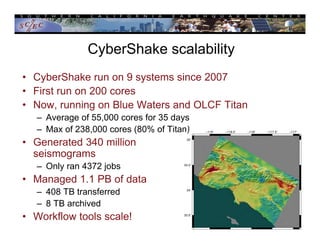
CyberShake scalability
• CyberShake run on 9 systems since 2007
• First run on 200 cores
• Now, running on Blue Waters and OLCF Titan
– Average of 55,000 cores for 35 days
– Max of 238,000 cores (80% of Titan)
• Generated 340 million
seismograms
– Only ran 4372 jobs
• Managed 1.1 PB of data
– 408 TB transferred
– 8 TB archived
• Workflow tools scale!
27
Why should you use workflow tools?
• Probably using a workflow already
– Replace manual steps and polling to monitor
• Scales from local system to large clusters
• Provides a portable algorithm description
independent of data
• Workflow tool developers have thought of and
resolved problems you haven’t even considered
28
Thoughts from my workflow experience
• Automation is vital
– Put everything in the workflow: validation, visualization,
publishing, notifications…
• It’s worth the initial investment
• Having a workflow provides other benefits
– Easy to explain process
– Simplifies training new people
– Move to new machines easily
• Workflow tool developers want to help you!
29
Resources
• Blue Waters 2016 workflow workshop:
https://sites.google.com/a/illinois.edu/workflows-
workshop/home
• Makeflow: http://ccl.cse.nd.edu/software/makeflow/
• Kepler: https://kepler-project.org/
• RADICAL-Cybertools: http://radical-cybertools.github.io/
• Pegasus: https://pegasus.isi.edu/
• Copernicus: http://copernicus-computing.org/
• VIKING: http://viking.sdu.dk/
30
Questions?
31

Overview of Scientific Workflows - Why Use Them?

  • 1.
    1 Overview of ScientificWorkflows: Why Use Them? Scott Callaghan Southern California Earthquake Center University of Southern California scottcal@usc.edu Blue Waters Webinar Series March 8, 2017
  • 2.
    Overview • What are“workflows”? • What elements make up a workflow? • What problems do workflow tools solve? • What should you consider in selecting a tool for your work? • How have workflow tools helped me in my work? • Why should you use workflow tools? 2
  • 3.
    Workflow Definition • Formalway to express a calculation • Multiple tasks with dependencies between them • No limitations on tasks – Short or long – Loosely or tightly coupled • Capture task parameters, input, output • Independence of workflow process and data – Often, run same workflow with different data • You use workflows all the time… 3
  • 4.
    Sample Workflow 4 #!/bin/bash 1) Stage-ininput data to compute environment scp myself@datastore.com:/data/input.txt /scratch/input.txt 2) Run a serial job with an input and output bin/pre-processing in=input.txt out=tmp.txt 3) Run a parallel job with the resulting data mpiexec bin/parallel-job in=tmp.txt out_prefix=output 4) Run a set of independent serial jobs in parallel – scheduling by hand for i in `seq 0 $np`; do bin/integrity-check output.$i & done 5) While those are running, get metadata and run another serial job ts=`date +%s` bin/merge prefix=output out=output.$ts 6) Finally, stage results back to permanent storage scp /scratch/output.$ts myself@datastore.com:/data/output.$ts
  • 5.
    Workflow schematic ofshell script 5 stage-in parallel- job pre- processing merge stage-out date integrity- check input.txt input.txt tmp.txt output.* output.$ts output.$ts
  • 6.
    Workflow Elements • Taskexecutions with dependencies – Specify a series of tasks to run – Outputs from one task may be inputs for another • Task scheduling – Some tasks may be able to run in parallel with other tasks • Resource provisioning (getting processors) – Computational resources are needed to run jobs on 6
  • 7.
    Workflow Elements (cont.) •Metadata and provenance – When was a task run? – Key parameters and inputs • File management – Input files must be present for task to run – Output files may need to be archived elsewhere 7
  • 8.
    What do weneed help with? • Task executions with dependencies – What if something fails in the middle? – Dependencies may be complex • Task scheduling – Minimize execution time while preserving dependencies – May have many tasks to run • Resource provisioning – May want to run across multiple systems – How to match processors to work? 8
  • 9.
    • Metadata andprovenance – Automatically capture and track – Where did my task run? How long did it take? – What were the inputs and parameters? – What versions of code were used? • File management – Make sure inputs are available for tasks – Archive output data • Automation – You have a workflow already – are there manual steps? 9
  • 10.
    Workflow Tools • Softwareproducts designed to help users with workflows – Component to create your workflow – Component to run your workflow • Can support all kinds of workflows • Can run on local machines or large clusters • Use existing code (no changes) • Automate your pipeline • Provide many features and capabilities for flexibility 10
  • 11.
    Problems Workflow ToolsSolve • Task execution – Workflow tools will retry and checkpoint if needed • Data management – Stage-in and stage-out data – Ensure data is available for jobs automatically • Task scheduling – Optimal execution on available resources • Metadata – Automatically track runtime, environment, arguments, inputs • Resource provisioning – Whether large parallel jobs or high throughput 11
  • 12.
    Workflow Webinar Schedule DateWorkflow Tool March 8 Overview of Scientific Workflows March 22 Makeflow and WorkQueue April 12 Computational Data Workflow Mapping April 26 Kepler Scientific Workflow System May 10 RADICAL-Cybertools May 24 Pegasus Workflow Management System June 14 Data-flow networks and using the Copernicus workflow system June 28 VIKING 12 • Overview of different workflow tools to help you pick the one best for you
  • 13.
    How to selecta workflow tool • Tools are solving same general problems, but differ in specific approach • A few categories to think about for your work: – Interface: how are workflows constructed? – Workload: what does your workflow look like? – Community: what domains does the tool focus on? – Push vs. Pull: how are resources matched to jobs? • Other points of comparison will emerge 13
  • 14.
    Interface • How doesa user construct workflows? – Graphical: like assembling a flow chart – Scripting: use a workflow tool-specific scripting language to describe workflow – API: use a common programming language with a tool- provided API to describe workflow • Which is best depends on your application – Graphical can be unwieldy with many tasks – Scripting and API can require more initial investment • Some tools support multiple approaches 14
  • 15.
    Workload • What kindof workflow are you running? – Many vs. few tasks – Short vs. long – Dynamic vs. static – Loops vs. directed acyclic graph • Different tools are targeted at different workloads 15
  • 16.
    Community • What kindsof applications is the tool designed for? • Some tools focus on certain science fields – Have specific paradigms or task types built-in – Workflow community will share science field – Less useful if not in the field or users of the provided tasks • Some tools are more general – Open-ended, flexible – Less domain-specific community 16
  • 17.
    Push vs. Pull •Challenge: tasks need to run on processors somewhere • Want the approach to be automated • How to get the tasks to run on the processors? • Two primary approaches: – Push: When work is ready, send it to a resource, waiting if necessary – Pull: Gather resources, then find work to put on them • Which is best for you depends on your target system and workload 17
  • 18.
    Push 18 Workflow queue Task 1 Task2 Task 3 . . . Remote queue Workflow scheduler Task 1 . . . Task 1 1)Task is submitted to remote job queue 2)Remote job starts up on node, runs 3)Task status is communicated back to workflow scheduler (1) (2) (3) Low overhead: nodes are only running when there is work Must wait in remote queue for indeterminate time Requires ability to submit remote jobs
  • 19.
    Pull 19 Workflow queue Task 1 Task2 Task 3 . . . Remote queue Workflow scheduler Pilot job . . . Task 1 (1) (2) (3) Pilot job manager Pilot job (4) 1)Pilot job manager submits job to remote queue 2)Pilot job starts up on node 3)Pilot job requests work from workflow scheduler 4)Task runs on pilot job Overhead: pilot jobs may not map well to tasks Can tailor pilot job size to remote system More flexible: pilot job manager can run on either system
  • 20.
    How do workflowshelp real applications? • Let’s examine a real scientific application • What will the peak seismic ground motion be in the next 50 years? – Building codes, insurance rates, emergency response • Use Probabilistic Seismic Hazard Analysis (PSHA) – Consider 500,000 M6.5+ earthquakes per site – Simulate each earthquake – Combine shaking with probability to create curve – “CyberShake” platform 20 2% in 50 years 0.4 g
  • 21.
    CyberShake Computational Requirements •Large parallel jobs – 2 GPU wave propagation jobs, 800 nodes x 1 hour – Total of 1.5 TB output • Small serial jobs – 500,000 seismogram calculation jobs • 1 core x 4.7 minutes – Total of 30 GB output • Few small pre- and post-processing jobs • Need ~300 sites for hazard map 21
  • 22.
    CyberShake Challenges • Automation –Too much work to run by hand • Data management – Input files need to be moved to the cluster – Output files transferred back for archiving • Resource provisioning – How to move 500,000 small jobs through the cluster efficiently? • Error handling – Detect and recover from basic errors without a human 22
  • 23.
    CyberShake workflow solution •Decided to use Pegasus-WMS – Programmatic workflow description (API) – Supports many types of tasks, no loops – General community running on large clusters – Supports push and pull approaches – Based at USC ISI; excellent support • Use Pegasus API to write workflow description • Plan workflow to run on specific system • Workflow is executed using HTCondor • No modifications to scientific codes 23
  • 24.
    CyberShake solutions • Automation –Workflows enable automated submission of all jobs – Includes generation of all data products • Data management – Pegasus automatically adds jobs to stage files in and out – Could split up our workflows to run on separate machines – Cleans up intermediate data products when not needed 24
  • 25.
    CyberShake solutions, cont. •Resource provisioning – Pegasus uses other tools for remote job submission • Supports both push and pull – Large jobs work well with this approach – How to move small jobs through queue? – Cluster tasks (done by Pegasus) • Tasks are grouped into clusters • Clusters are submitted to remote system to reduce job count – MPI wrapper • Use Pegasus-provided option to wrap tasks in MPI job • Master-worker paradigm 25
  • 26.
    CyberShake solutions, cont. •Error Handling – If errors occur, jobs are automatically retried – If errors continue, workflow runs as much as possible, then writes workflow checkpoint file – Can provide alternate execution systems • Workflow framework makes it easy to add new verification jobs – Check for NaNs, zeros, values out of range – Correct number of files 26
  • 27.
    CyberShake scalability • CyberShakerun on 9 systems since 2007 • First run on 200 cores • Now, running on Blue Waters and OLCF Titan – Average of 55,000 cores for 35 days – Max of 238,000 cores (80% of Titan) • Generated 340 million seismograms – Only ran 4372 jobs • Managed 1.1 PB of data – 408 TB transferred – 8 TB archived • Workflow tools scale! 27
  • 28.
    Why should youuse workflow tools? • Probably using a workflow already – Replace manual steps and polling to monitor • Scales from local system to large clusters • Provides a portable algorithm description independent of data • Workflow tool developers have thought of and resolved problems you haven’t even considered 28
  • 29.
    Thoughts from myworkflow experience • Automation is vital – Put everything in the workflow: validation, visualization, publishing, notifications… • It’s worth the initial investment • Having a workflow provides other benefits – Easy to explain process – Simplifies training new people – Move to new machines easily • Workflow tool developers want to help you! 29
  • 30.
    Resources • Blue Waters2016 workflow workshop: https://sites.google.com/a/illinois.edu/workflows- workshop/home • Makeflow: http://ccl.cse.nd.edu/software/makeflow/ • Kepler: https://kepler-project.org/ • RADICAL-Cybertools: http://radical-cybertools.github.io/ • Pegasus: https://pegasus.isi.edu/ • Copernicus: http://copernicus-computing.org/ • VIKING: http://viking.sdu.dk/ 30
  • 31.