Introduction to GPUs in HPC
Ben Cumming, CSCS
February 28, 2017
2D and 3D Launch Configurations
Launch Configuration
So far we have used one-dimensional launch configurations
threads in blocks indexed using threadIdx.x
blocks in a grid indexed using blockIdx.x
Many kernels map naturally onto 2D and 3D indexing
e.g. matrix-matrix operations
e.g. stencils
Introduction to GPUs in HPC | 3
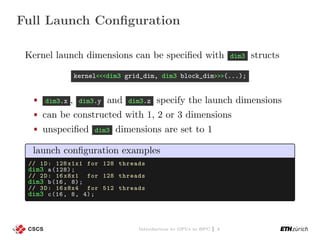
Full Launch Configuration
Kernel launch dimensions can be specified with dim3 structs
kernel<<<dim3 grid_dim, dim3 block_dim>>>(...);
dim3.x , dim3.y and dim3.z specify the launch dimensions
can be constructed with 1, 2 or 3 dimensions
unspecified dim3 dimensions are set to 1
launch configuration examples
// 1D: 128 x1x1 for 128 threads
dim3 a(128);
// 2D: 16 x8x1 for 128 threads
dim3 b(16, 8);
// 3D: 16 x8x4 for 512 threads
dim3 c(16, 8, 4);
Introduction to GPUs in HPC | 4
The threadIdx , blockDim , blockIdx and gridDim can be treated
like 3D vectors via the .x , .y and .z members.
matrix addition example
__global__
void MatAdd(float *A, float *B, float *C, int n) {
int i = blockIdx.x * blockDim.x + threadIdx.x;
int j = blockIdx.y * blockDim.y + threadIdx.y;
if(i<n && j<n) {
auto pos = i + j*n;
C[pos] = A[pos] + B[pos ];
}
}
int main () {
// ...
dim3 threadsPerBlock (16, 16);
dim3 numBlocks(n / threadsPerBlock .x, n / threadsPerBlock .y);
MatAdd <<<numBlocks , threadsPerBlock >>>(A, B, C);
// ...
}
Introduction to GPUs in HPC | 5
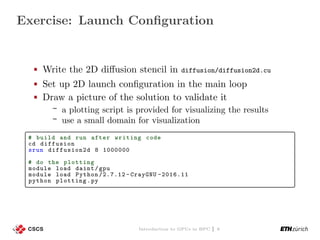
Exercise: Launch Configuration
Write the 2D diffusion stencil in diffusion/diffusion2d.cu
Set up 2D launch configuration in the main loop
Draw a picture of the solution to validate it
a plotting script is provided for visualizing the results
use a small domain for visualization
# build and run after writing code
cd diffusion
srun diffusion2d 8 1000000
# do the plotting
module load daint/gpu
module load Python /2.7.12 - CrayGNU -2016.11
python plotting.py
Introduction to GPUs in HPC | 6
Using MPI with GPUs
What is MPI
MPI (Message Passing Interface) is a standardised library
for message passing
Highly portable: it is implemented on every HPC system
available today.
Has C, C++ and Fortran bindings.
Supports point to point communication
MPI_Send, MPI_Recv, MPI_Sendrecv, etc.
Supports global collectives
MPI_Barrier, MPI_Gather, MPI_Reduce, etc.
When you start an MPI application
N copies of the application are launched.
Each copy is given a rank∈ {0, 1, . . . , N − 1}.
Introduction to GPUs in HPC | 8
A basic MPI application
Example MPI application myapp.cpp
#include <mpi.h>
#include <unistd.h>
#include <cstdio >
int main(int argc , char ** argv) {
// initialize MPI on this rank
MPI_Init (&argc , &argv);
// get information about our place in the world
int rank , size;
MPI_Comm_rank (MPI_COMM_WORLD , &rank);
MPI_Comm_size (MPI_COMM_WORLD , &size);
// print a message
char name [128]; gethostname (name , sizeof(name));
printf("hello world from %d of %d on %sn", rank , size , name);
// close down MPI
MPI_Finalize ();
return 0;
}
MPI applications are compiled with a compiler wrapper:
> CC myapp.cpp -o myapp # the Cray C++ wrapper is CC
Introduction to GPUs in HPC | 9
Running our basic MPI application
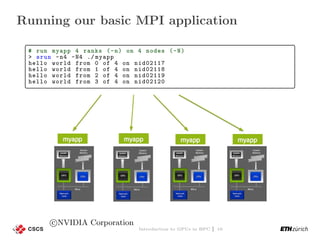
# run myapp 4 ranks (-n) on 4 nodes (-N)
> srun -n4 -N4 ./ myapp
hello world from 0 of 4 on nid02117
hello world from 1 of 4 on nid02118
hello world from 2 of 4 on nid02119
hello world from 3 of 4 on nid02120
c NVIDIA Corporation
Introduction to GPUs in HPC | 10
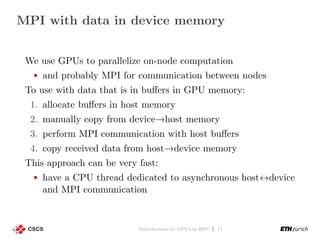
MPI with data in device memory
We use GPUs to parallelize on-node computation
and probably MPI for communication between nodes
To use with data that is in buffers in GPU memory:
1. allocate buffers in host memory
2. manually copy from device→host memory
3. perform MPI communication with host buffers
4. copy received data from host→device memory
This approach can be very fast:
have a CPU thread dedicated to asynchronous host↔device
and MPI communication
Introduction to GPUs in HPC | 11
GPU-aware MPI
GPU-aware MPI implementations can automatically handle
MPI transactions with pointers to GPU memory
MVAPICH 2.0
OpenMPI since version 1.7.0
Cray MPI
How it works
Each pointer passed to MPI is checked to see if it is in
host or device memory. If not set, MPI assumes that all
pointers are to host memory, and your application will
probably crash with segmentation faults
Small messages between GPUs (up to ≈8 k) are copied
directly with RDMA
Larger messages are pipelined via host memory
Introduction to GPUs in HPC | 12
How to use G2G communication
Set the environment variable export MPICH_RDMA_ENABLED_CUDA=1
If not set, MPI assumes that all pointers are to host
memory, and your application will probably crash with
segmentation faults
Experiment with the environment variable
MPICH_G2G_PIPELINE
Sets the maximum number of 512 kB message chunks that
can be in flight (default 16)
MPI with G2G example
MPI_Request srequest , rrequest;
auto send_data = malloc_device <double >(100);
auto recv_data = malloc_device <double >(100);
// call MPI with GPU pointers
MPI_Irecv(recv_data , 100, MPI_DOUBLE , source , tag , MPI_COMM_WORLD ,
&rrequest);
MPI_Isend(send_data , 100, MPI_DOUBLE , target , tag , MPI_COMM_WORLD ,
&srequest);
Introduction to GPUs in HPC | 13
Capabilities and Limitations
Support for most MPI API calls (point-to-point, collectives,
etc)
Robust support for common MPI API calls
i.e. point-to-point operations
No support for user-defined MPI data types
Introduction to GPUs in HPC | 14
Exercise: MPI with G2G
2D stencil with MPI in diffusion/diffusion2d_mpi.cu
Implement the G2G version
1. can you observe any performance differences between the
two?
2. why are we restricted to just 1 MPI rank per node?
Implement a version that uses managed memory
what happens if you don’t set MPICH_RDMA_ENABLED_CUDA?
# load modules require to compile MPI
module swap PrgEnv -cray PrgEnv -gnu
module load cudatoolkit
# launch with 2 MPI ranks
MPICH_RDMA_ENABLED_CUDA =1 srun --reservation =Pascal2day -p jalet
-C gpu -n2 -N2 diffusion2d_mpi .cuda 8
# plot the solution
module load python /2.7.6
python plotting.py
# once it gets the correct results:
sbatch job.batch
Introduction to GPUs in HPC | 15
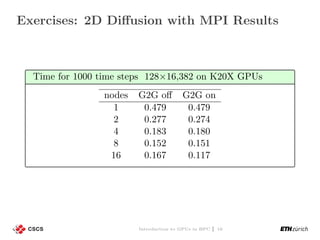
Exercises: 2D Diffusion with MPI Results
Time for 1000 time steps 128×16,382 on K20X GPUs
nodes G2G off G2G on
1 0.479 0.479
2 0.277 0.274
4 0.183 0.180
8 0.152 0.151
16 0.167 0.117
Introduction to GPUs in HPC | 16
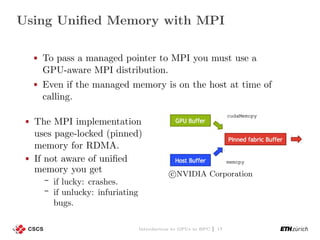
Using Unified Memory with MPI
To pass a managed pointer to MPI you must use a
GPU-aware MPI distribution.
Even if the managed memory is on the host at time of
calling.
The MPI implementation
uses page-locked (pinned)
memory for RDMA.
If not aware of unified
memory you get
if lucky: crashes.
if unlucky: infuriating
bugs.
c NVIDIA Corporation
Introduction to GPUs in HPC | 17

Introduction to GPUs in HPC

  • 1.
    Introduction to GPUsin HPC Ben Cumming, CSCS February 28, 2017
  • 2.
    2D and 3DLaunch Configurations
  • 3.
    Launch Configuration So farwe have used one-dimensional launch configurations threads in blocks indexed using threadIdx.x blocks in a grid indexed using blockIdx.x Many kernels map naturally onto 2D and 3D indexing e.g. matrix-matrix operations e.g. stencils Introduction to GPUs in HPC | 3
  • 4.
    Full Launch Configuration Kernellaunch dimensions can be specified with dim3 structs kernel<<<dim3 grid_dim, dim3 block_dim>>>(...); dim3.x , dim3.y and dim3.z specify the launch dimensions can be constructed with 1, 2 or 3 dimensions unspecified dim3 dimensions are set to 1 launch configuration examples // 1D: 128 x1x1 for 128 threads dim3 a(128); // 2D: 16 x8x1 for 128 threads dim3 b(16, 8); // 3D: 16 x8x4 for 512 threads dim3 c(16, 8, 4); Introduction to GPUs in HPC | 4
  • 5.
    The threadIdx ,blockDim , blockIdx and gridDim can be treated like 3D vectors via the .x , .y and .z members. matrix addition example __global__ void MatAdd(float *A, float *B, float *C, int n) { int i = blockIdx.x * blockDim.x + threadIdx.x; int j = blockIdx.y * blockDim.y + threadIdx.y; if(i<n && j<n) { auto pos = i + j*n; C[pos] = A[pos] + B[pos ]; } } int main () { // ... dim3 threadsPerBlock (16, 16); dim3 numBlocks(n / threadsPerBlock .x, n / threadsPerBlock .y); MatAdd <<<numBlocks , threadsPerBlock >>>(A, B, C); // ... } Introduction to GPUs in HPC | 5
  • 6.
    Exercise: Launch Configuration Writethe 2D diffusion stencil in diffusion/diffusion2d.cu Set up 2D launch configuration in the main loop Draw a picture of the solution to validate it a plotting script is provided for visualizing the results use a small domain for visualization # build and run after writing code cd diffusion srun diffusion2d 8 1000000 # do the plotting module load daint/gpu module load Python /2.7.12 - CrayGNU -2016.11 python plotting.py Introduction to GPUs in HPC | 6
  • 7.
  • 8.
    What is MPI MPI(Message Passing Interface) is a standardised library for message passing Highly portable: it is implemented on every HPC system available today. Has C, C++ and Fortran bindings. Supports point to point communication MPI_Send, MPI_Recv, MPI_Sendrecv, etc. Supports global collectives MPI_Barrier, MPI_Gather, MPI_Reduce, etc. When you start an MPI application N copies of the application are launched. Each copy is given a rank∈ {0, 1, . . . , N − 1}. Introduction to GPUs in HPC | 8
  • 9.
    A basic MPIapplication Example MPI application myapp.cpp #include <mpi.h> #include <unistd.h> #include <cstdio > int main(int argc , char ** argv) { // initialize MPI on this rank MPI_Init (&argc , &argv); // get information about our place in the world int rank , size; MPI_Comm_rank (MPI_COMM_WORLD , &rank); MPI_Comm_size (MPI_COMM_WORLD , &size); // print a message char name [128]; gethostname (name , sizeof(name)); printf("hello world from %d of %d on %sn", rank , size , name); // close down MPI MPI_Finalize (); return 0; } MPI applications are compiled with a compiler wrapper: > CC myapp.cpp -o myapp # the Cray C++ wrapper is CC Introduction to GPUs in HPC | 9
  • 10.
    Running our basicMPI application # run myapp 4 ranks (-n) on 4 nodes (-N) > srun -n4 -N4 ./ myapp hello world from 0 of 4 on nid02117 hello world from 1 of 4 on nid02118 hello world from 2 of 4 on nid02119 hello world from 3 of 4 on nid02120 c NVIDIA Corporation Introduction to GPUs in HPC | 10
  • 11.
    MPI with datain device memory We use GPUs to parallelize on-node computation and probably MPI for communication between nodes To use with data that is in buffers in GPU memory: 1. allocate buffers in host memory 2. manually copy from device→host memory 3. perform MPI communication with host buffers 4. copy received data from host→device memory This approach can be very fast: have a CPU thread dedicated to asynchronous host↔device and MPI communication Introduction to GPUs in HPC | 11
  • 12.
    GPU-aware MPI GPU-aware MPIimplementations can automatically handle MPI transactions with pointers to GPU memory MVAPICH 2.0 OpenMPI since version 1.7.0 Cray MPI How it works Each pointer passed to MPI is checked to see if it is in host or device memory. If not set, MPI assumes that all pointers are to host memory, and your application will probably crash with segmentation faults Small messages between GPUs (up to ≈8 k) are copied directly with RDMA Larger messages are pipelined via host memory Introduction to GPUs in HPC | 12
  • 13.
    How to useG2G communication Set the environment variable export MPICH_RDMA_ENABLED_CUDA=1 If not set, MPI assumes that all pointers are to host memory, and your application will probably crash with segmentation faults Experiment with the environment variable MPICH_G2G_PIPELINE Sets the maximum number of 512 kB message chunks that can be in flight (default 16) MPI with G2G example MPI_Request srequest , rrequest; auto send_data = malloc_device <double >(100); auto recv_data = malloc_device <double >(100); // call MPI with GPU pointers MPI_Irecv(recv_data , 100, MPI_DOUBLE , source , tag , MPI_COMM_WORLD , &rrequest); MPI_Isend(send_data , 100, MPI_DOUBLE , target , tag , MPI_COMM_WORLD , &srequest); Introduction to GPUs in HPC | 13
  • 14.
    Capabilities and Limitations Supportfor most MPI API calls (point-to-point, collectives, etc) Robust support for common MPI API calls i.e. point-to-point operations No support for user-defined MPI data types Introduction to GPUs in HPC | 14
  • 15.
    Exercise: MPI withG2G 2D stencil with MPI in diffusion/diffusion2d_mpi.cu Implement the G2G version 1. can you observe any performance differences between the two? 2. why are we restricted to just 1 MPI rank per node? Implement a version that uses managed memory what happens if you don’t set MPICH_RDMA_ENABLED_CUDA? # load modules require to compile MPI module swap PrgEnv -cray PrgEnv -gnu module load cudatoolkit # launch with 2 MPI ranks MPICH_RDMA_ENABLED_CUDA =1 srun --reservation =Pascal2day -p jalet -C gpu -n2 -N2 diffusion2d_mpi .cuda 8 # plot the solution module load python /2.7.6 python plotting.py # once it gets the correct results: sbatch job.batch Introduction to GPUs in HPC | 15
  • 16.
    Exercises: 2D Diffusionwith MPI Results Time for 1000 time steps 128×16,382 on K20X GPUs nodes G2G off G2G on 1 0.479 0.479 2 0.277 0.274 4 0.183 0.180 8 0.152 0.151 16 0.167 0.117 Introduction to GPUs in HPC | 16
  • 17.
    Using Unified Memorywith MPI To pass a managed pointer to MPI you must use a GPU-aware MPI distribution. Even if the managed memory is on the host at time of calling. The MPI implementation uses page-locked (pinned) memory for RDMA. If not aware of unified memory you get if lucky: crashes. if unlucky: infuriating bugs. c NVIDIA Corporation Introduction to GPUs in HPC | 17