FireWorks workflow software 
MAVRL workshop | Nov 2014 
Anubhav Jain 
Energy & Environmental Technologies 
Berkeley Lab
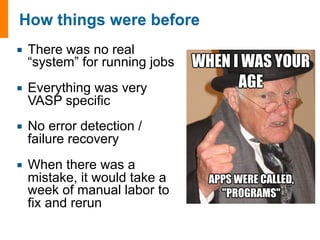
¡ There was no real 
“system” for running jobs 
¡ Everything was very 
VASP specific 
¡ No error detection / 
failure recovery 
¡ When there was a 
mistake, it would take a 
week of manual labor to 
fix and rerun
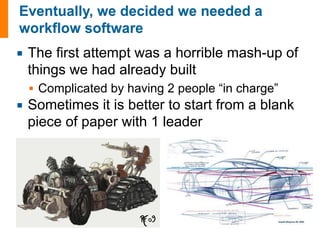
¡ The first attempt was a horrible mash-up of 
things we had already built 
§ Complicated by having 2 people “in charge” 
¡ Sometimes it is better to start from a blank 
piece of paper with 1 leader
¡ #1 Google hit for “Python workflow software” 
§ now even beats Adobe Fireworks for #1 spot for 
“Fireworks workflow”! 
¡ Won NERSC award for innovative use of HPC 
¡ Used in many applications 
§ genomics to computer graphics 
§ this is not an “internal code” for running crystals 
¡ Doc page ~200 hits/week 
§ 1/10th of Materials Project
¡ What is FireWorks and why use it? 
¡ Practical: learn to use FireWorks
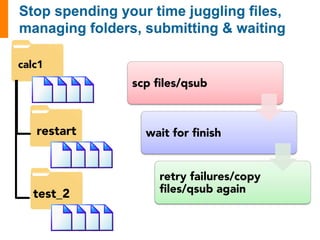
calc1 
restart 
test_2 
scp files/qsub 
wait for finish 
retry failures/copy 
files/qsub again
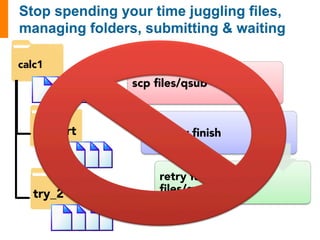
calc1 
restart 
try_2 
scp files/qsub 
wait for finish 
retry failures/copy 
files/qsub again
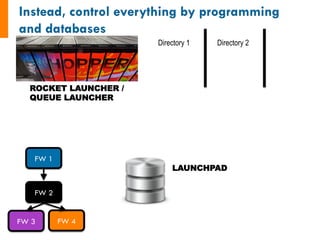
LAUNCHPAD 
ROCKET LAUNCHER / 
QUEUE LAUNCHER 
FW 1 
FW 2 
FW 3 FW 4 
Directory 1 Directory 2
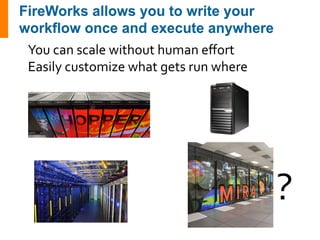
? 
You 
can 
scale 
without 
human 
effort 
Easily 
customize 
what 
gets 
run 
where
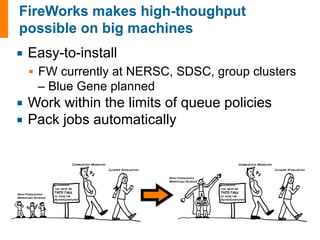
¡ Easy-to-install 
§ FW currently at NERSC, SDSC, group clusters 
– Blue Gene planned 
¡ Work within the limits of queue policies 
¡ Pack jobs automatically
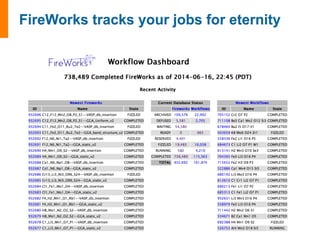
No job left behind!
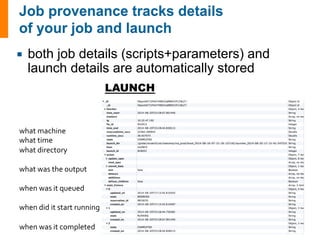
¡ both job details (scripts+parameters) and 
launch details are automatically stored 
what 
machine 
what 
time 
what 
directory 
what 
was 
the 
output 
when 
was 
it 
queued 
when 
did 
it 
start 
running 
when 
was 
it 
completed 
LAUNCH
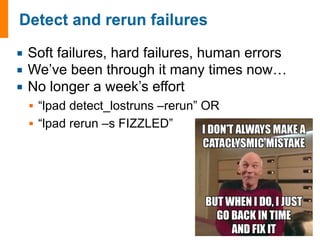
¡ Soft failures, hard failures, human errors 
¡ We’ve been through it many times now… 
¡ No longer a week’s effort 
§ “lpad detect_lostruns –rerun” OR 
§ “lpad rerun –s FIZZLED”
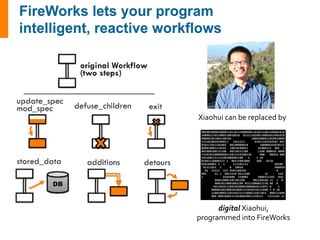
Xiaohui 
can 
be 
replaced 
by 
digital 
Xiaohui, 
programmed 
into 
FireWorks
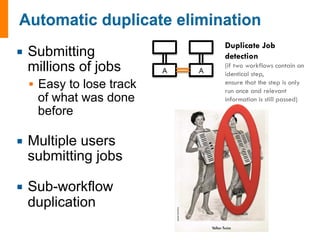
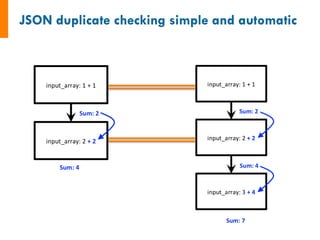
¡ Submitting 
millions of jobs 
§ Easy to lose track 
of what was done 
before 
¡ Multiple users 
submitting jobs 
¡ Sub-workflow 
duplication 
A 
A 
Duplicate Job 
detection 
(if two workflows contain an 
identical step, 
ensure that the step is only 
run once and relevant 
information is still passed)
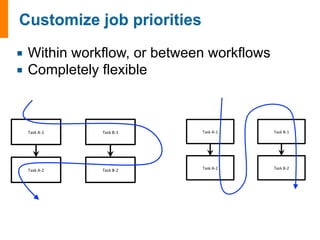
¡ Within workflow, or between workflows 
¡ Completely flexible
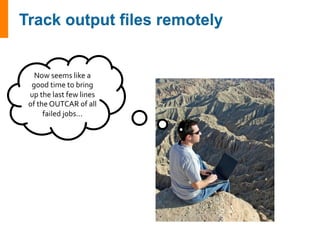
Now 
seems 
like 
a 
good 
time 
to 
bring 
up 
the 
last 
few 
lines 
of 
the 
OUTCAR 
of 
all 
failed 
jobs...
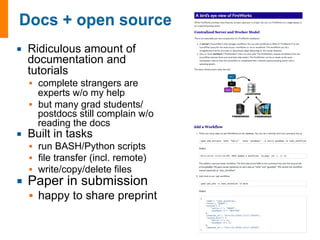
¡ Ridiculous amount of 
documentation and 
tutorials 
§ complete strangers are 
experts w/o my help 
§ but many grad students/ 
postdocs still complain w/o 
reading the docs 
¡ Built in tasks 
§ run BASH/Python scripts 
§ file transfer (incl. remote) 
§ write/copy/delete files 
¡ Paper in submission 
§ happy to share preprint
¡ What is FireWorks and why use it? 
¡ Practical: learn to use FireWorks
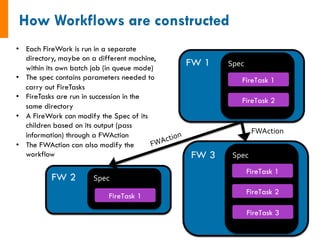
FW 1 Spec 
FireTask 1 
FireTask 2 
• Each FireWork is run in a separate 
directory, maybe on a different machine, 
within its own batch job (in queue mode) 
• The spec contains parameters needed to 
carry out FireTasks 
• FireTasks are run in succession in the 
same directory 
• A FireWork can modify the Spec of its 
children based on its output (pass 
information) through a FWAction 
• The FWAction can also modify the 
workflow 
FW 2 Spec 
FireTask 1 
FW 3 Spec 
FWAction 
FireTask 1 
FireTask 2 
FireTask 3 
FWAction
input_array: [1, 2, 3] 
1. Sum input array 
2. Write to file 
3. Pass result to next job 
input_array: [4, 5, 6] 
1. Sum input array 
2. Write to file 
3. Pass result to next job 
6 15 
input_data: [6, 15] 
1. Sum input data 
2. Write to file 
3. Pass result to next job 
------------------------------------- 
1. Copy result to home dir
class 
MyAdditionTask(FireTaskBase): 
_fw_name 
= 
"My 
Addition 
Task" 
def 
run_task(self, 
fw_spec): 
input_array: [1, 2, 3] 
1. Sum input array 
2. Write to file 
3. Pass result to next job 
input_array 
= 
fw_spec['input_array'] 
m_sum 
= 
sum(input_array) 
print("The 
sum 
of 
{} 
is: 
{}".format(input_array, 
m_sum)) 
with 
open('my_sum.txt', 
'a') 
as 
f: 
f.writelines(str(m_sum)+'n') 
# 
store 
the 
sum; 
push 
the 
sum 
to 
the 
input 
array 
of 
the 
next 
sum 
return 
FWAction(stored_data={'sum': 
m_sum}, 
mod_spec=[{'_push': 
{'input_array': 
m_sum}}]) 
See 
also: 
http://pythonhosted.org/FireWorks/guide_to_writing_firetasks.html
input_array: [1, 2, 3] 
1. Sum input array 
2. Write to file 
3. Pass result to next job 
input_array: [4, 5, 6] 
1. Sum input array 
2. Write to file 
3. Pass result to next job 
6 15! 
input_data: [6, 15] 
1. Sum input data 
2. Write to file 
3. Pass result to next job 
------------------------------------- 
1. Copy result to home dir 
# 
set 
up 
the 
LaunchPad 
and 
reset 
it 
launchpad 
= 
LaunchPad() 
launchpad.reset('', 
require_password=False) 
# 
create 
Workflow 
consisting 
of 
a 
AdditionTask 
FWs 
+ 
file 
transfer 
fw1 
= 
Firework(MyAdditionTask(), 
{"input_array": 
[1,2,3]}, 
name="pt 
1A") 
fw2 
= 
Firework(MyAdditionTask(), 
{"input_array": 
[4,5,6]}, 
name="pt 
1B") 
fw3 
= 
Firework([MyAdditionTask(), 
FileTransferTask({"mode": 
"cp", 
"files": 
["my_sum.txt"], 
"dest": 
"~"})], 
name="pt 
2") 
wf 
= 
Workflow([fw1, 
fw2, 
fw3], 
{fw1: 
fw3, 
fw2: 
fw3}, 
name="MAVRL 
test") 
launchpad.add_wf(wf) 
# 
launch 
the 
entire 
Workflow 
locally 
rapidfire(launchpad, 
FWorker())
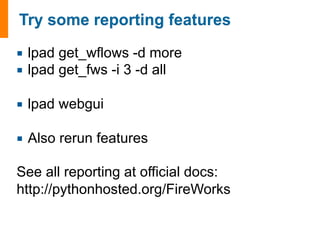
¡ lpad get_wflows -d more 
¡ lpad get_fws -i 3 -d all 
¡ lpad webgui 
¡ Also rerun features 
See all reporting at official docs: 
http://pythonhosted.org/FireWorks
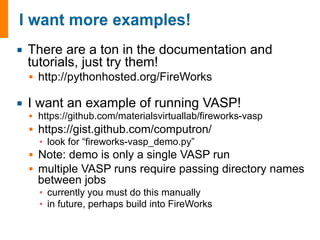
¡ There are a ton in the documentation and 
tutorials, just try them! 
§ http://pythonhosted.org/FireWorks 
¡ I want an example of running VASP! 
§ https://github.com/materialsvirtuallab/fireworks-vasp 
§ https://gist.github.com/computron/ 
▪ look for “fireworks-vasp_demo.py” 
§ Note: demo is only a single VASP run 
§ multiple VASP runs require passing directory names 
between jobs 
▪ currently you must do this manually 
▪ in future, perhaps build into FireWorks
¡ It is not an accident that we are able to support so 
many advanced features in such a short time 
§ many features not found anywhere else! 
¡ FireWorks is designed to: 
§ leverage modern tools 
§ be extensible at a fundamental level, not post-hoc 
feature additions
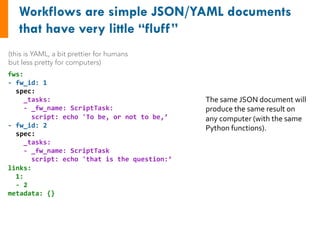
(this is YAML, a bit prettier for humans 
but less pretty for computers) 
fws: 
-­‐ 
fw_id: 
1 
spec: 
_tasks: 
-­‐ 
_fw_name: 
ScriptTask: 
script: 
echo 
'To 
be, 
or 
not 
to 
be,’ 
-­‐ 
fw_id: 
2 
spec: 
_tasks: 
-­‐ 
_fw_name: 
ScriptTask 
script: 
echo 
'that 
is 
the 
question:’ 
links: 
1: 
-­‐ 
2 
metadata: 
{} 
The 
same 
JSON 
document 
will 
produce 
the 
same 
result 
on 
any 
computer 
(with 
the 
same 
Python 
functions).
(this is YAML, a bit prettier for humans 
but less pretty for computers) 
fws: 
-­‐ 
fw_id: 
1 
spec: 
_tasks: 
-­‐ 
_fw_name: 
ScriptTask: 
script: 
echo 
'To 
be, 
or 
not 
to 
be,’ 
-­‐ 
fw_id: 
2 
spec: 
_tasks: 
-­‐ 
_fw_name: 
ScriptTask 
script: 
echo 
'that 
is 
the 
question:’ 
links: 
1: 
-­‐ 
2 
metadata: 
{} 
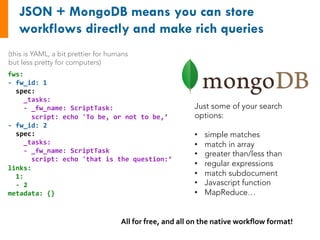
Just some of your search 
options: 
• simple matches 
• match in array 
• greater than/less than 
• regular expressions 
• match subdocument 
• Javascript function 
• MapReduce… 
All 
for 
free, 
and 
all 
on 
the 
native 
workflow 
format!
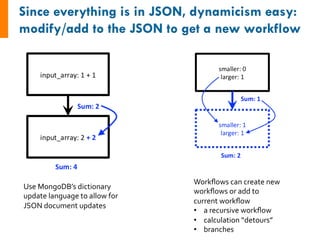
Use 
MongoDB’s 
dictionary 
update 
language 
to 
allow 
for 
JSON 
document 
updates 
Workflows 
can 
create 
new 
workflows 
or 
add 
to 
current 
workflow 
• a 
recursive 
workflow 
• calculation 
“detours” 
• branches
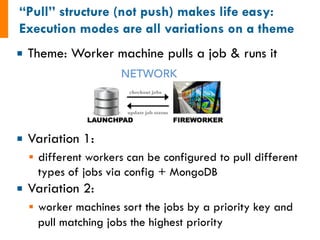
¡ Theme: Worker machine pulls a job & runs it 
¡ Variation 1: 
§ different workers can be configured to pull different 
types of jobs via config + MongoDB 
¡ Variation 2: 
§ worker machines sort the jobs by a priority key and 
pull matching jobs the highest priority
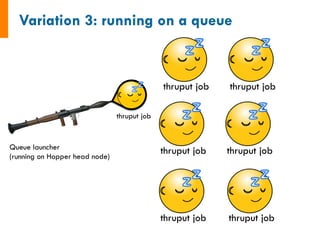
Queue launcher 
(running on Hopper head node) 
thruput job 
thruput job 
thruput job 
thruput job 
thruput job 
thruput job 
thruput job
Job wakes up 
when PBS runs it 
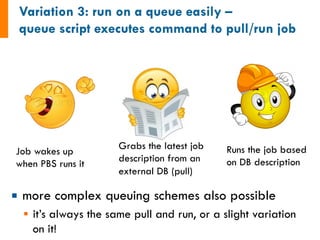
¡ more complex queuing schemes also possible 
§ it’s always the same pull and run, or a slight variation 
on it! 
Grabs the latest job 
description from an 
external DB (pull) 
Runs the job based 
on DB description
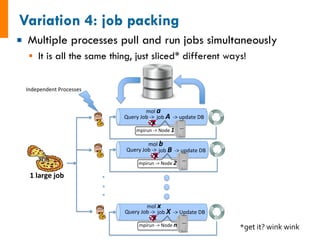
¡ Multiple processes pull and run jobs simultaneously 
§ It is all the same thing, just sliced* different ways! 
Query&Job&*>&&&job&A!!*>&update&DB& 
mpirun&*>&Node&1% 
Query&Job&*>&& &job&B!!*>&update&DB&& 
mpirun&*>&Node&2% 
Query&Job&*>&&&job&X&&*>&Update&DB& 
mpirun&*>&Node&n% 
Independent&Processes& 
1!large!job! 
mol&a% 
mol&b% 
mol&x% 
*get 
it? 
wink 
wink
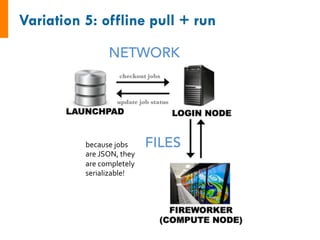
because 
jobs 
are 
JSON, 
they 
are 
completely 
serializable!
¡ When a job runs, a separate thread periodically 
pings an “alive” signal to the database 
¡ If that alive signal doesn’t appear for some time, 
the job is dead 
§ this method is robust for all types of failures 
¡ The ping thread is reused to also track the output 
files and report the results to the database

FireWorks workflow software

  • 1.
    FireWorks workflow software MAVRL workshop | Nov 2014 Anubhav Jain Energy & Environmental Technologies Berkeley Lab
  • 2.
    ¡ There wasno real “system” for running jobs ¡ Everything was very VASP specific ¡ No error detection / failure recovery ¡ When there was a mistake, it would take a week of manual labor to fix and rerun
  • 3.
    ¡ The firstattempt was a horrible mash-up of things we had already built § Complicated by having 2 people “in charge” ¡ Sometimes it is better to start from a blank piece of paper with 1 leader
  • 4.
    ¡ #1 Googlehit for “Python workflow software” § now even beats Adobe Fireworks for #1 spot for “Fireworks workflow”! ¡ Won NERSC award for innovative use of HPC ¡ Used in many applications § genomics to computer graphics § this is not an “internal code” for running crystals ¡ Doc page ~200 hits/week § 1/10th of Materials Project
  • 5.
    ¡ What isFireWorks and why use it? ¡ Practical: learn to use FireWorks
  • 6.
    calc1 restart test_2 scp files/qsub wait for finish retry failures/copy files/qsub again
  • 7.
    calc1 restart try_2 scp files/qsub wait for finish retry failures/copy files/qsub again
  • 8.
    LAUNCHPAD ROCKET LAUNCHER/ QUEUE LAUNCHER FW 1 FW 2 FW 3 FW 4 Directory 1 Directory 2
  • 9.
    ? You can scale without human effort Easily customize what gets run where
  • 10.
    ¡ Easy-to-install §FW currently at NERSC, SDSC, group clusters – Blue Gene planned ¡ Work within the limits of queue policies ¡ Pack jobs automatically
  • 12.
    No job leftbehind!
  • 13.
    ¡ both jobdetails (scripts+parameters) and launch details are automatically stored what machine what time what directory what was the output when was it queued when did it start running when was it completed LAUNCH
  • 14.
    ¡ Soft failures,hard failures, human errors ¡ We’ve been through it many times now… ¡ No longer a week’s effort § “lpad detect_lostruns –rerun” OR § “lpad rerun –s FIZZLED”
  • 15.
    Xiaohui can be replaced by digital Xiaohui, programmed into FireWorks
  • 16.
    ¡ Submitting millionsof jobs § Easy to lose track of what was done before ¡ Multiple users submitting jobs ¡ Sub-workflow duplication A A Duplicate Job detection (if two workflows contain an identical step, ensure that the step is only run once and relevant information is still passed)
  • 17.
    ¡ Within workflow,or between workflows ¡ Completely flexible
  • 18.
    Now seems like a good time to bring up the last few lines of the OUTCAR of all failed jobs...
  • 19.
    ¡ Ridiculous amountof documentation and tutorials § complete strangers are experts w/o my help § but many grad students/ postdocs still complain w/o reading the docs ¡ Built in tasks § run BASH/Python scripts § file transfer (incl. remote) § write/copy/delete files ¡ Paper in submission § happy to share preprint
  • 20.
    ¡ What isFireWorks and why use it? ¡ Practical: learn to use FireWorks
  • 21.
    FW 1 Spec FireTask 1 FireTask 2 • Each FireWork is run in a separate directory, maybe on a different machine, within its own batch job (in queue mode) • The spec contains parameters needed to carry out FireTasks • FireTasks are run in succession in the same directory • A FireWork can modify the Spec of its children based on its output (pass information) through a FWAction • The FWAction can also modify the workflow FW 2 Spec FireTask 1 FW 3 Spec FWAction FireTask 1 FireTask 2 FireTask 3 FWAction
  • 22.
    input_array: [1, 2,3] 1. Sum input array 2. Write to file 3. Pass result to next job input_array: [4, 5, 6] 1. Sum input array 2. Write to file 3. Pass result to next job 6 15 input_data: [6, 15] 1. Sum input data 2. Write to file 3. Pass result to next job ------------------------------------- 1. Copy result to home dir
  • 23.
    class MyAdditionTask(FireTaskBase): _fw_name = "My Addition Task" def run_task(self, fw_spec): input_array: [1, 2, 3] 1. Sum input array 2. Write to file 3. Pass result to next job input_array = fw_spec['input_array'] m_sum = sum(input_array) print("The sum of {} is: {}".format(input_array, m_sum)) with open('my_sum.txt', 'a') as f: f.writelines(str(m_sum)+'n') # store the sum; push the sum to the input array of the next sum return FWAction(stored_data={'sum': m_sum}, mod_spec=[{'_push': {'input_array': m_sum}}]) See also: http://pythonhosted.org/FireWorks/guide_to_writing_firetasks.html
  • 24.
    input_array: [1, 2,3] 1. Sum input array 2. Write to file 3. Pass result to next job input_array: [4, 5, 6] 1. Sum input array 2. Write to file 3. Pass result to next job 6 15! input_data: [6, 15] 1. Sum input data 2. Write to file 3. Pass result to next job ------------------------------------- 1. Copy result to home dir # set up the LaunchPad and reset it launchpad = LaunchPad() launchpad.reset('', require_password=False) # create Workflow consisting of a AdditionTask FWs + file transfer fw1 = Firework(MyAdditionTask(), {"input_array": [1,2,3]}, name="pt 1A") fw2 = Firework(MyAdditionTask(), {"input_array": [4,5,6]}, name="pt 1B") fw3 = Firework([MyAdditionTask(), FileTransferTask({"mode": "cp", "files": ["my_sum.txt"], "dest": "~"})], name="pt 2") wf = Workflow([fw1, fw2, fw3], {fw1: fw3, fw2: fw3}, name="MAVRL test") launchpad.add_wf(wf) # launch the entire Workflow locally rapidfire(launchpad, FWorker())
  • 25.
    ¡ lpad get_wflows-d more ¡ lpad get_fws -i 3 -d all ¡ lpad webgui ¡ Also rerun features See all reporting at official docs: http://pythonhosted.org/FireWorks
  • 26.
    ¡ There area ton in the documentation and tutorials, just try them! § http://pythonhosted.org/FireWorks ¡ I want an example of running VASP! § https://github.com/materialsvirtuallab/fireworks-vasp § https://gist.github.com/computron/ ▪ look for “fireworks-vasp_demo.py” § Note: demo is only a single VASP run § multiple VASP runs require passing directory names between jobs ▪ currently you must do this manually ▪ in future, perhaps build into FireWorks
  • 29.
    ¡ It isnot an accident that we are able to support so many advanced features in such a short time § many features not found anywhere else! ¡ FireWorks is designed to: § leverage modern tools § be extensible at a fundamental level, not post-hoc feature additions
  • 30.
    (this is YAML,a bit prettier for humans but less pretty for computers) fws: -­‐ fw_id: 1 spec: _tasks: -­‐ _fw_name: ScriptTask: script: echo 'To be, or not to be,’ -­‐ fw_id: 2 spec: _tasks: -­‐ _fw_name: ScriptTask script: echo 'that is the question:’ links: 1: -­‐ 2 metadata: {} The same JSON document will produce the same result on any computer (with the same Python functions).
  • 31.
    (this is YAML,a bit prettier for humans but less pretty for computers) fws: -­‐ fw_id: 1 spec: _tasks: -­‐ _fw_name: ScriptTask: script: echo 'To be, or not to be,’ -­‐ fw_id: 2 spec: _tasks: -­‐ _fw_name: ScriptTask script: echo 'that is the question:’ links: 1: -­‐ 2 metadata: {} Just some of your search options: • simple matches • match in array • greater than/less than • regular expressions • match subdocument • Javascript function • MapReduce… All for free, and all on the native workflow format!
  • 32.
    Use MongoDB’s dictionary update language to allow for JSON document updates Workflows can create new workflows or add to current workflow • a recursive workflow • calculation “detours” • branches
  • 34.
    ¡ Theme: Workermachine pulls a job & runs it ¡ Variation 1: § different workers can be configured to pull different types of jobs via config + MongoDB ¡ Variation 2: § worker machines sort the jobs by a priority key and pull matching jobs the highest priority
  • 35.
    Queue launcher (runningon Hopper head node) thruput job thruput job thruput job thruput job thruput job thruput job thruput job
  • 36.
    Job wakes up when PBS runs it ¡ more complex queuing schemes also possible § it’s always the same pull and run, or a slight variation on it! Grabs the latest job description from an external DB (pull) Runs the job based on DB description
  • 37.
    ¡ Multiple processespull and run jobs simultaneously § It is all the same thing, just sliced* different ways! Query&Job&*>&&&job&A!!*>&update&DB& mpirun&*>&Node&1% Query&Job&*>&& &job&B!!*>&update&DB&& mpirun&*>&Node&2% Query&Job&*>&&&job&X&&*>&Update&DB& mpirun&*>&Node&n% Independent&Processes& 1!large!job! mol&a% mol&b% mol&x% *get it? wink wink
  • 38.
    because jobs are JSON, they are completely serializable!
  • 39.
    ¡ When ajob runs, a separate thread periodically pings an “alive” signal to the database ¡ If that alive signal doesn’t appear for some time, the job is dead § this method is robust for all types of failures ¡ The ping thread is reused to also track the output files and report the results to the database