Anubhav Jain
FireWorks workflow software:
An introduction
LLNL meeting | November 2016
Energy & Environmental Technologies
Berkeley Lab
1Slides	available	at	www.slideshare.net/anubhavster
¡ Built w/Python+MongoDB. Open-source, pip-installable:
§ http://pythonhosted.org/FireWorks/
§ Very easy to install, most people can run first tutorial within 30 minutes of
starting
¡ At least 100 million CPU-hours used; everyday production use by
3 large DOE projects (Materials Project, JCESR, JCAP) as well as
many materials science research groups
¡ Also used for graphics processing, machine learning, multiscale
modeling, and document processing (but not by us)
¡ #1 Google hit for “Python workflow software”
§ still behind Pegasus, Kepler, Taverna, Trident,
for “scientific workflow software”
2
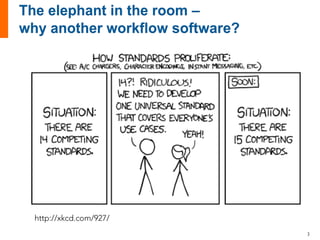
http://xkcd.com/927/
3
¡ Partly, we had trouble learning and using other people’s
workflow software
§ Today, I think the situation is much better
§ For example, Pegasus in 2011 gave no instructions to a
general user on how to install/use/deploy it apart from a
super-complicated user manual
§ Today, Pegasus takes more care to show you how to use it on
their web page
§ Other tools like Swift (Argonne) are also providing tutorials
¡ Partly, the other workflow software wasn’t what we were
looking for
§ Other software emphasized completing a fixed workload
quickly rather than fluidly adding, subtracting, reprioritizing,
searching, etc. workflows over long time periods
4
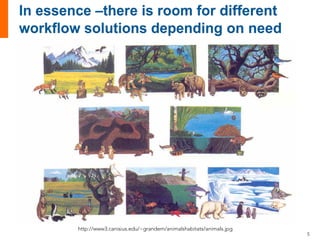
http://www3.canisius.edu/~grandem/animalshabitats/animals.jpg
5
¡ Millions of small jobs, each at least a minute long
¡ Small amount of inter-job parallelism (“bundling”) (e.g. <1000
jobs); any amount of intra-job parallelism
¡ Failures are common; need persistent status
§ like UPS packages, database is a necessity
¡ Very dynamic workflows
§ i.e. workflows that can modify themselves intelligently and act like
researchers that submit extra calculations as needed
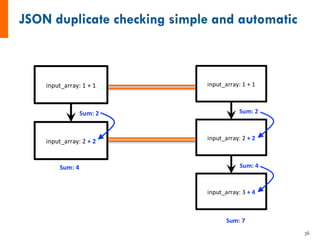
¡ Collisions/duplicate detection
§ people submitting the same workflow, or perhaps have some steps in
common
¡ Runs on a laptop or a supercomputer
¡ Not “extreme” or record-breaking applications
¡ Can install/learn/use it by yourself without help/support, and
by a normal scientist rather than a “workflow expert”.
¡ Python-centric
6
¡ Features
¡ Potential issues
¡ Conclusion
¡ Appendix slides
§ Implementation
§ Getting started
§ Advanced usage
7
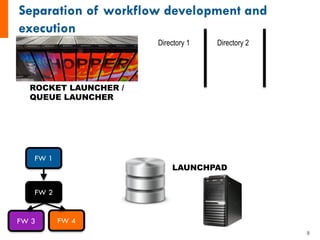
LAUNCHPAD
FW 1
FW 2
FW 3 FW 4
ROCKET LAUNCHER /
QUEUE LAUNCHER
Directory 1 Directory 2
8
?
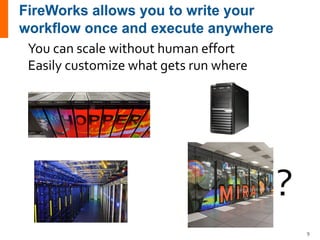
You can scale without human effort
Easily customize what gets run where
9
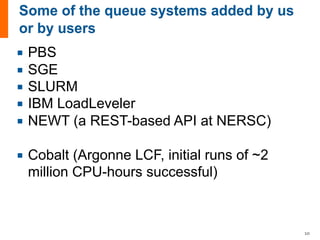
¡ PBS
¡ SGE
¡ SLURM
¡ IBM LoadLeveler
¡ NEWT (a REST-based API at NERSC)
¡ Cobalt (Argonne LCF, initial runs of ~2
million CPU-hours successful)
10
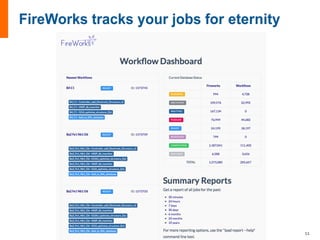
11
No job left behind!
12
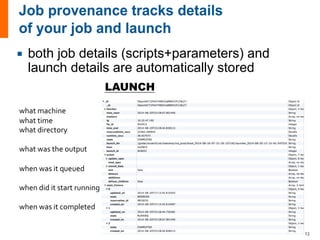
what machine
what time
what directory
what was the output
when was it queued
when did it start running
when was it completed
LAUNCH
¡ both job details (scripts+parameters) and
launch details are automatically stored
13
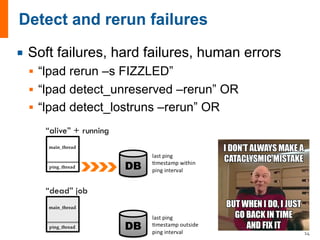
¡ Soft failures, hard failures, human errors
§ “lpad rerun –s FIZZLED”
§ “lpad detect_unreserved –rerun” OR
§ “lpad detect_lostruns –rerun” OR
14
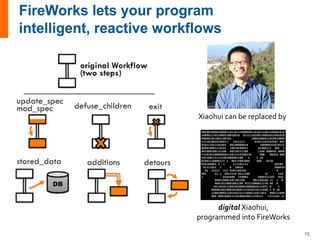
Xiaohui can be replaced by
digital Xiaohui,
programmed into FireWorks
15
16
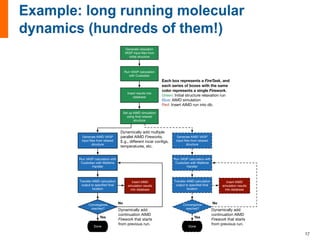
Generate relaxation
VASP input files from
initial structure
Run VASP calculation
with Custodian
Insert results into
database
Set up AIMD simulation
using final relaxed
structure
Generate AIMD VASP
input files from relaxed
structure
Run VASP calculation with
Custodian with Walltime
Handler
Insert AIMD
simulation results
into database
Convergence
reached?
No
Done
Transfer AIMD calculation
output to specified final
location
Yes
Each box represents a FireTask, and
each series of boxes with the same
color represents a single Firework.
Green: Initial structure relaxation run
Blue: AIMD simulation
Red: Insert AIMD run into db.
Generate AIMD VASP
input files from relaxed
structure
Run VASP calculation with
Custodian with Walltime
Handler
Insert AIMD
simulation results
into database
Convergence
reached?
No
Done
Transfer AIMD calculation
output to specified final
location
Yes
Dynamically add multiple
parallel AIMD Fireworks.
E.g., different incar configs,
temperatures, etc.
Dynamically add
continuation AIMD
Firework that starts
from previous run.
Dynamically add
continuation AIMD
Firework that starts
from previous run.
17
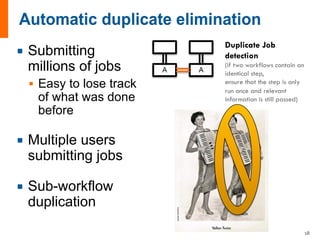
¡ Submitting
millions of jobs
§ Easy to lose track
of what was done
before
¡ Multiple users
submitting jobs
¡ Sub-workflow
duplication
A A
Duplicate Job
detection
(if two workflows contain an
identical step,
ensure that the step is only
run once and relevant
information is still passed)
18
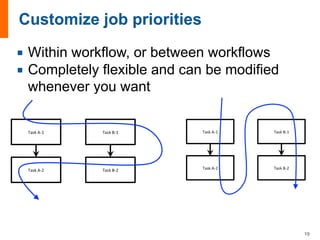
¡ Within workflow, or between workflows
¡ Completely flexible and can be modified
whenever you want
19
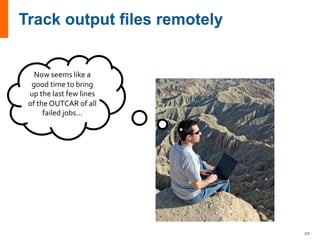
Now seems like a
good time to bring
up the last few lines
of the OUTCAR of all
failed jobs...
20
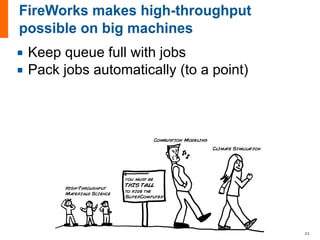
¡ Keep queue full with jobs
¡ Pack jobs automatically (to a point)
21
22
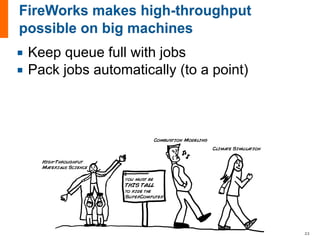
¡ Keep queue full with jobs
¡ Pack jobs automatically (to a point)
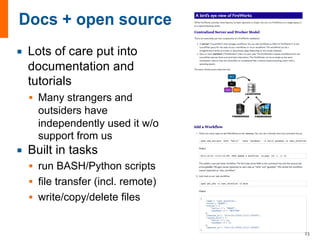
¡ Lots of care put into
documentation and
tutorials
§ Many strangers and
outsiders have
independently used it w/o
support from us
¡ Built in tasks
§ run BASH/Python scripts
§ file transfer (incl. remote)
§ write/copy/delete files
23
¡ No direct funding for FWS – certainly not a multimillion dollar project
¡ Mitigating longevity concerns:
§ FWS is open-source so the existing code will always be there
§ FWS never required explicit funding for development / enhancment
§ FWS has a distributed user and developer community, shielding it from a single point of
failure
§ Several multimillion dollar DOE projects and many research groups including my own
depend critically on FireWorks. Funding for basic improvements/bugfixes is certainly
going to be there if really needed.
¡ Mitigating support concerns:
§ No funding does mean limited support for external users
§ Support mechanisms favor solving problems broadly (e.g., better code, better
documentation) versus working one-on-one with potential users to solve their problems
and develop single-serving “workarounds”
§ BUT there is a free support list, and if you look, you will see that even specific individual
concerns are handled quickly and efficiently:
▪ https://groups.google.com/forum/#!forum/fireworkflows
§ In fact, I have yet to see proof of better user support from well-funded projects:
▪ Compare against: http://mailman.isi.edu/pipermail/pegasus-users/
▪ Compare against: https://lists.apache.org/list.html?users@taverna.apache.org
▪ Compare against: http://swift-lang.org/support/index.php (no results in any search?)
24
¡ Features
¡ Potential issues
¡ Conclusion
¡ Appendix slides
§ Implementation
§ Getting started
§ Advanced usage
25
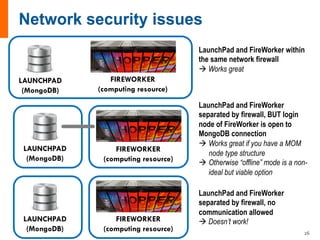
26
LAUNCHPAD
(MongoDB)
FIREWORKER
(computing resource)
LAUNCHPAD
(MongoDB)
FIREWORKER
(computing resource)
LAUNCHPAD
(MongoDB)
FIREWORKER
(computing resource)
LaunchPad and FireWorker within
the same network firewall
à Works great
LaunchPad and FireWorker
separated by firewall, BUT login
node of FireWorker is open to
MongoDB connection
à Works great if you have a MOM
node type structure
à Otherwise “offline” mode is a non-
ideal but viable option
LaunchPad and FireWorker
separated by firewall, no
communication allowed
à Doesn’t work!
2
4
6
0 250 500 750 1000
# Jobs
Jobs/second
command
mlaunch
rlaunch
1 workflow 5 workflows
0.0
0.2
0.4
0.6
0.0
0.2
0.4
0.6
1client8clients
200
400
600
800
1000
200
400
600
800
1000
Number of tasks
Secondspertask
Workflow pattern
pairwise
parallel
reduce
sequence
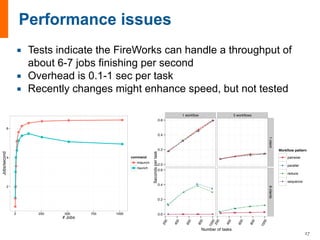
¡ Tests indicate the FireWorks can handle a throughput of
about 6-7 jobs finishing per second
¡ Overhead is 0.1-1 sec per task
¡ Recently changes might enhance speed, but not tested
27
¡ Computing center issues
§ Almost all computing centers limit the number
of “mpirun”-style commands that can be
executed within a single job
§ Typically, this sets a limit to the degree of job
packing that can be achieved
§ Currently, no good solution; may need to work
on “hacking” the MPI communicator. e.g.,
“wraprun” is one effort at Oak Ridge.
28
¡ Features
¡ Potential issues
¡ Conclusion
¡ Appendix slides
§ Implementation
§ Getting started
§ Advanced usage
29
¡ If you are curious, just try spending 1 hour with
FireWorks
§ http://pythonhosted.org/FireWorks
§ If you’re not intrigued after an hour, try something else
¡ If you need help, contact the support list:
§ https://groups.google.com/forum/#!forum/fireworkflows
¡ If you want to read up on FireWorks, there is a paper
– but this is no substitute for trying it
§ “FireWorks: a dynamic workflow system designed for high-
throughput applications”. Concurr. Comput. Pract. Exp. 22,
5037–5059 (2015).
§ Please cite this if you use FireWorks
30
¡ Features
¡ Potential issues
¡ Conclusion
¡ Appendix slides
§ Implementation
§ Getting started
§ Advanced usage
31
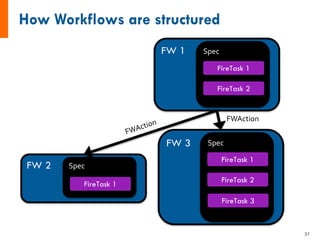
FW 1 Spec
FireTask 1
FireTask 2
FW 2 Spec
FireTask 1
FW 3 Spec
FireTask 1
FireTask 2
FireTask 3
FWAction
32
from fireworks import Firework, Workflow, LaunchPad, ScriptTask
from fireworks.core.rocket_launcher import rapidfire
# set up the LaunchPad and reset it (first time only)
launchpad = LaunchPad()
launchpad.reset('', require_password=False)
# define the individual FireWorks and Workflow
fw1 = Firework(ScriptTask.from_str('echo "To be, or not to be,"'))
fw2 = Firework(ScriptTask.from_str('echo "that is the question:"'))
wf = Workflow([fw1, fw2], {fw1:fw2}) # set of FWs and dependencies
# store workflow in LaunchPad
launchpad.add_wf(wf)
# pull all jobs and run them locally
rapidfire(launchpad)
33
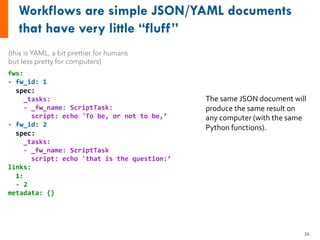
fws:
- fw_id: 1
spec:
_tasks:
- _fw_name: ScriptTask:
script: echo 'To be, or not to be,’
- fw_id: 2
spec:
_tasks:
- _fw_name: ScriptTask
script: echo 'that is the question:’
links:
1:
- 2
metadata: {}
(this is YAML, a bit prettier for humans
but less pretty for computers)
The same JSON document will
produce the same result on
any computer (with the same
Python functions).
34
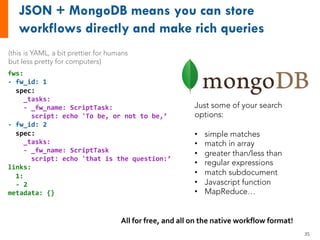
fws:
- fw_id: 1
spec:
_tasks:
- _fw_name: ScriptTask:
script: echo 'To be, or not to be,’
- fw_id: 2
spec:
_tasks:
- _fw_name: ScriptTask
script: echo 'that is the question:’
links:
1:
- 2
metadata: {}
Just some of your search
options:
• simple matches
• match in array
• greater than/less than
• regular expressions
• match subdocument
• Javascript function
• MapReduce…
All for free, and all on the native workflow format!
(this is YAML, a bit prettier for humans
but less pretty for computers)
35
36
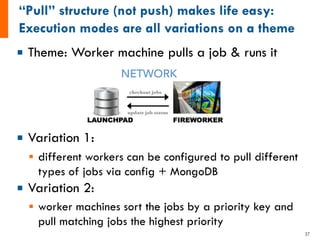
¡ Theme: Worker machine pulls a job & runs it
¡ Variation 1:
§ different workers can be configured to pull different
types of jobs via config + MongoDB
¡ Variation 2:
§ worker machines sort the jobs by a priority key and
pull matching jobs the highest priority
37
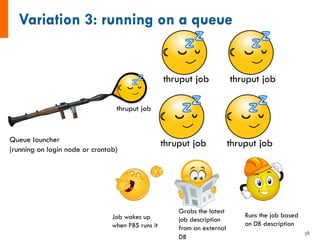
Queue launcher
(running on login node or crontab)
thruput job
thruput job
thruput job
thruput job
thruput job
Job wakes up
when PBS runs it
Grabs the latest
job description
from an external
DB
Runs the job based
on DB description
38
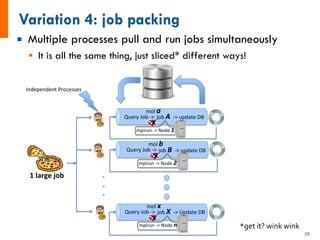
¡ Multiple processes pull and run jobs simultaneously
§ It is all the same thing, just sliced* different ways!
Query&Job&*>&&&job&A!!*>&update&DB&
Query&Job&*>&&&job&B!!*>&update&DB&&
Query&Job&*>&&&job&X&&*>&Update&DB&
mpirun&*>&Node&1%
mpirun&*>&Node&2%
mpirun&*>&Node&n%
1!large!job!
Independent&Processes&
mol&a%
mol&b%
mol&x%
*get it? wink wink
39
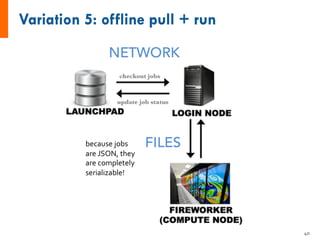
because jobs
are JSON, they
are completely
serializable!
40
¡ Features
¡ Potential issues
¡ Conclusion
¡ Appendix slides
§ Implementation
§ Getting started
§ Advanced usage
41
input_array: [1, 2, 3]
1. Sum input array
2. Write to file
3. Pass result to next job
input_array: [4, 5, 6]
1. Sum input array
2. Write to file
3. Pass result to next job
input_data: [6, 15]
1. Sum input data
2. Write to file
3. Pass result to next job
-------------------------------------
1. Copy result to home dir
6 15
class MyAdditionTask(FireTaskBase):
_fw_name = "My Addition Task"
def run_task(self, fw_spec):
input_array = fw_spec['input_array']
m_sum = sum(input_array)
print("The sum of {} is: {}".format(input_array, m_sum))
with open('my_sum.txt', 'a') as f:
f.writelines(str(m_sum)+'n')
# store the sum; push the sum to the input array of the next
sum
return FWAction(stored_data={'sum': m_sum},
mod_spec=[{'_push': {'input_array': m_sum}}])
See also: http://pythonhosted.org/FireWorks/guide_to_writing_firetasks.html
input_array: [1, 2, 3]
1. Sum input array
2. Write to file
3. Pass result to next job
input_array: [1, 2, 3]
1.  Sum input array
2.  Write to file
3.  Pass result to next job
input_array: [4, 5, 6]
1.  Sum input array
2.  Write to file
3.  Pass result to next job
input_data: [6, 15]
1.  Sum input data
2.  Write to file
3.  Pass result to next job
-------------------------------------
1.  Copy result to home dir
6 15!
# set up the LaunchPad and reset it
launchpad = LaunchPad()
launchpad.reset('', require_password=False)
# create Workflow consisting of a AdditionTask FWs + file transfer
fw1 = Firework(MyAdditionTask(), {"input_array": [1,2,3]}, name="pt 1A")
fw2 = Firework(MyAdditionTask(), {"input_array": [4,5,6]}, name="pt 1B")
fw3 = Firework([MyAdditionTask(), FileTransferTask({"mode": "cp", "files": ["my_sum.txt"],
"dest": "~"})], name="pt 2")
wf = Workflow([fw1, fw2, fw3], {fw1: fw3, fw2: fw3}, name="MAVRL test")
launchpad.add_wf(wf)
# launch the entire Workflow locally
rapidfire(launchpad, FWorker())
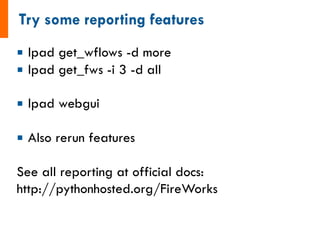
¡ lpad get_wflows -d more
¡ lpad get_fws -i 3 -d all
¡ lpad webgui
¡ Also rerun features
See all reporting at official docs:
http://pythonhosted.org/FireWorks
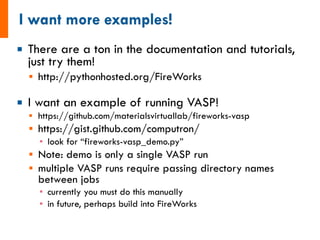
¡ There are a ton in the documentation and tutorials,
just try them!
§ http://pythonhosted.org/FireWorks
¡ I want an example of running VASP!
§ https://github.com/materialsvirtuallab/fireworks-vasp
§ https://gist.github.com/computron/
▪ look for “fireworks-vasp_demo.py”
§ Note: demo is only a single VASP run
§ multiple VASP runs require passing directory names
between jobs
▪ currently you must do this manually
▪ in future, perhaps build into FireWorks
¡ If you can copy commands from a web page
and type them into a Terminal, you possess the
skills needed to complete the FireWorks tutorials
§ BUT: for long-term use, highly suggested you learn
some Python
¡ Go to:
§ http://pythonhosted.org/FireWorks
§ or Google “FireWorks workflow software”
¡ NERSC-specific instructions & notes:
§ https://pythonhosted.org/FireWorks/installation_note
s.html
47
¡ Features
¡ Potential issues
¡ Conclusion
¡ Appendix slides
§ Implementation
§ Getting started
§ Advanced usage
48
¡ Say you have a FWS database with many different
job types, and want to run different jobs types on
different machines
¡ You have three options:
1. Set the “_fworker” variable in the FW itself. Only the
FWorker(s) with the matching name will run the job.
2. Set the “_category” variable in the FW itself. Only the
FWorker(s) with the matching categories will run the job.
3. Set the “query” parameter in the FWorker. You can set
any Mongo query on the FW to decide what jobs this
FWorker will run. e.g., jobs with certain parameter
ranges.
49
¡ Both Trackers and BackgroundTasks will run a process in
the background of your main FW.
¡ A Tracker is a quick way to monitor the first or last few
lines of a file (e.g., output file) during job execution. It is
also easy to set up, just set the “_tracker” variable in the
FW spec with the details of what files you want to
monitor.
§ This allows you to track output files of all your jobs using the
database.
§ For example, one command will let you view the output files of
all failed jobs – all without logging into any machines!
¡ A BackgroundTask will run any FireTask in a separate
Process from the main task. There are built-in parameters
to help.
50
¡ Sometimes, the specific Python code that you
need to execute (FireTask) depends on what
machine you are running on
¡ A solution to this is FW_env
¡ Each Worker configuration can set its own “env”
variable, which is accessible by the FireWork
when running within the “_fw_env” key
¡ The same job will see different values of
“_fw_env” depending on where it’s running, and
use this to execute the workflow
51
¡ Normally, a workflow stops proceeding when a
FireWork fails, or “fizzles”.
§ at this point, a user might change some backend code and
rerun the failed job
¡ Sometimes, you want a child FW to run even if one
or more parents have “fizzled”.
§ For example, the child FW might inspect the parent,
determine a cause of failure, and initiate a “recovery
workflow”
¡ To enable a child to run, set the
“_allow_fizzled_parents” key in the spec to True
§ FWS also create a “_fizzled_parents” key in that FW
spec that becomes available when the parents fail, and
contains details about the parent FW
52
¡ You might want some statistics on FWS jobs:
§ daily, weekly, monthly reports over certain periods for
how many Workflows/FireWorks/etc. completed
§ identify days when there were many job failures, perhaps
associated with a computing center outage
§ grouping FIZZLED jobs by a key in the spec, e.g. to get
stats on what job types failed most often
¡ All this is possible with the reporting package, type
“lpad report –h” for more information
¡ You can also introspect to find common factors in job
failures, type “lpad introspect –h” for more
information
53

FireWorks overview

  • 1.
    Anubhav Jain FireWorks workflowsoftware: An introduction LLNL meeting | November 2016 Energy & Environmental Technologies Berkeley Lab 1Slides available at www.slideshare.net/anubhavster
  • 2.
    ¡ Built w/Python+MongoDB.Open-source, pip-installable: § http://pythonhosted.org/FireWorks/ § Very easy to install, most people can run first tutorial within 30 minutes of starting ¡ At least 100 million CPU-hours used; everyday production use by 3 large DOE projects (Materials Project, JCESR, JCAP) as well as many materials science research groups ¡ Also used for graphics processing, machine learning, multiscale modeling, and document processing (but not by us) ¡ #1 Google hit for “Python workflow software” § still behind Pegasus, Kepler, Taverna, Trident, for “scientific workflow software” 2
  • 3.
  • 4.
    ¡ Partly, wehad trouble learning and using other people’s workflow software § Today, I think the situation is much better § For example, Pegasus in 2011 gave no instructions to a general user on how to install/use/deploy it apart from a super-complicated user manual § Today, Pegasus takes more care to show you how to use it on their web page § Other tools like Swift (Argonne) are also providing tutorials ¡ Partly, the other workflow software wasn’t what we were looking for § Other software emphasized completing a fixed workload quickly rather than fluidly adding, subtracting, reprioritizing, searching, etc. workflows over long time periods 4
  • 5.
  • 6.
    ¡ Millions ofsmall jobs, each at least a minute long ¡ Small amount of inter-job parallelism (“bundling”) (e.g. <1000 jobs); any amount of intra-job parallelism ¡ Failures are common; need persistent status § like UPS packages, database is a necessity ¡ Very dynamic workflows § i.e. workflows that can modify themselves intelligently and act like researchers that submit extra calculations as needed ¡ Collisions/duplicate detection § people submitting the same workflow, or perhaps have some steps in common ¡ Runs on a laptop or a supercomputer ¡ Not “extreme” or record-breaking applications ¡ Can install/learn/use it by yourself without help/support, and by a normal scientist rather than a “workflow expert”. ¡ Python-centric 6
  • 7.
    ¡ Features ¡ Potentialissues ¡ Conclusion ¡ Appendix slides § Implementation § Getting started § Advanced usage 7
  • 8.
    LAUNCHPAD FW 1 FW 2 FW3 FW 4 ROCKET LAUNCHER / QUEUE LAUNCHER Directory 1 Directory 2 8
  • 9.
    ? You can scalewithout human effort Easily customize what gets run where 9
  • 10.
    ¡ PBS ¡ SGE ¡SLURM ¡ IBM LoadLeveler ¡ NEWT (a REST-based API at NERSC) ¡ Cobalt (Argonne LCF, initial runs of ~2 million CPU-hours successful) 10
  • 11.
  • 12.
    No job leftbehind! 12
  • 13.
    what machine what time whatdirectory what was the output when was it queued when did it start running when was it completed LAUNCH ¡ both job details (scripts+parameters) and launch details are automatically stored 13
  • 14.
    ¡ Soft failures,hard failures, human errors § “lpad rerun –s FIZZLED” § “lpad detect_unreserved –rerun” OR § “lpad detect_lostruns –rerun” OR 14
  • 15.
    Xiaohui can bereplaced by digital Xiaohui, programmed into FireWorks 15
  • 16.
  • 17.
    Generate relaxation VASP inputfiles from initial structure Run VASP calculation with Custodian Insert results into database Set up AIMD simulation using final relaxed structure Generate AIMD VASP input files from relaxed structure Run VASP calculation with Custodian with Walltime Handler Insert AIMD simulation results into database Convergence reached? No Done Transfer AIMD calculation output to specified final location Yes Each box represents a FireTask, and each series of boxes with the same color represents a single Firework. Green: Initial structure relaxation run Blue: AIMD simulation Red: Insert AIMD run into db. Generate AIMD VASP input files from relaxed structure Run VASP calculation with Custodian with Walltime Handler Insert AIMD simulation results into database Convergence reached? No Done Transfer AIMD calculation output to specified final location Yes Dynamically add multiple parallel AIMD Fireworks. E.g., different incar configs, temperatures, etc. Dynamically add continuation AIMD Firework that starts from previous run. Dynamically add continuation AIMD Firework that starts from previous run. 17
  • 18.
    ¡ Submitting millions ofjobs § Easy to lose track of what was done before ¡ Multiple users submitting jobs ¡ Sub-workflow duplication A A Duplicate Job detection (if two workflows contain an identical step, ensure that the step is only run once and relevant information is still passed) 18
  • 19.
    ¡ Within workflow,or between workflows ¡ Completely flexible and can be modified whenever you want 19
  • 20.
    Now seems likea good time to bring up the last few lines of the OUTCAR of all failed jobs... 20
  • 21.
    ¡ Keep queuefull with jobs ¡ Pack jobs automatically (to a point) 21
  • 22.
    22 ¡ Keep queuefull with jobs ¡ Pack jobs automatically (to a point)
  • 23.
    ¡ Lots ofcare put into documentation and tutorials § Many strangers and outsiders have independently used it w/o support from us ¡ Built in tasks § run BASH/Python scripts § file transfer (incl. remote) § write/copy/delete files 23
  • 24.
    ¡ No directfunding for FWS – certainly not a multimillion dollar project ¡ Mitigating longevity concerns: § FWS is open-source so the existing code will always be there § FWS never required explicit funding for development / enhancment § FWS has a distributed user and developer community, shielding it from a single point of failure § Several multimillion dollar DOE projects and many research groups including my own depend critically on FireWorks. Funding for basic improvements/bugfixes is certainly going to be there if really needed. ¡ Mitigating support concerns: § No funding does mean limited support for external users § Support mechanisms favor solving problems broadly (e.g., better code, better documentation) versus working one-on-one with potential users to solve their problems and develop single-serving “workarounds” § BUT there is a free support list, and if you look, you will see that even specific individual concerns are handled quickly and efficiently: ▪ https://groups.google.com/forum/#!forum/fireworkflows § In fact, I have yet to see proof of better user support from well-funded projects: ▪ Compare against: http://mailman.isi.edu/pipermail/pegasus-users/ ▪ Compare against: https://lists.apache.org/list.html?users@taverna.apache.org ▪ Compare against: http://swift-lang.org/support/index.php (no results in any search?) 24
  • 25.
    ¡ Features ¡ Potentialissues ¡ Conclusion ¡ Appendix slides § Implementation § Getting started § Advanced usage 25
  • 26.
    26 LAUNCHPAD (MongoDB) FIREWORKER (computing resource) LAUNCHPAD (MongoDB) FIREWORKER (computing resource) LAUNCHPAD (MongoDB) FIREWORKER (computingresource) LaunchPad and FireWorker within the same network firewall à Works great LaunchPad and FireWorker separated by firewall, BUT login node of FireWorker is open to MongoDB connection à Works great if you have a MOM node type structure à Otherwise “offline” mode is a non- ideal but viable option LaunchPad and FireWorker separated by firewall, no communication allowed à Doesn’t work!
  • 27.
    2 4 6 0 250 500750 1000 # Jobs Jobs/second command mlaunch rlaunch 1 workflow 5 workflows 0.0 0.2 0.4 0.6 0.0 0.2 0.4 0.6 1client8clients 200 400 600 800 1000 200 400 600 800 1000 Number of tasks Secondspertask Workflow pattern pairwise parallel reduce sequence ¡ Tests indicate the FireWorks can handle a throughput of about 6-7 jobs finishing per second ¡ Overhead is 0.1-1 sec per task ¡ Recently changes might enhance speed, but not tested 27
  • 28.
    ¡ Computing centerissues § Almost all computing centers limit the number of “mpirun”-style commands that can be executed within a single job § Typically, this sets a limit to the degree of job packing that can be achieved § Currently, no good solution; may need to work on “hacking” the MPI communicator. e.g., “wraprun” is one effort at Oak Ridge. 28
  • 29.
    ¡ Features ¡ Potentialissues ¡ Conclusion ¡ Appendix slides § Implementation § Getting started § Advanced usage 29
  • 30.
    ¡ If youare curious, just try spending 1 hour with FireWorks § http://pythonhosted.org/FireWorks § If you’re not intrigued after an hour, try something else ¡ If you need help, contact the support list: § https://groups.google.com/forum/#!forum/fireworkflows ¡ If you want to read up on FireWorks, there is a paper – but this is no substitute for trying it § “FireWorks: a dynamic workflow system designed for high- throughput applications”. Concurr. Comput. Pract. Exp. 22, 5037–5059 (2015). § Please cite this if you use FireWorks 30
  • 31.
    ¡ Features ¡ Potentialissues ¡ Conclusion ¡ Appendix slides § Implementation § Getting started § Advanced usage 31
  • 32.
    FW 1 Spec FireTask1 FireTask 2 FW 2 Spec FireTask 1 FW 3 Spec FireTask 1 FireTask 2 FireTask 3 FWAction 32
  • 33.
    from fireworks importFirework, Workflow, LaunchPad, ScriptTask from fireworks.core.rocket_launcher import rapidfire # set up the LaunchPad and reset it (first time only) launchpad = LaunchPad() launchpad.reset('', require_password=False) # define the individual FireWorks and Workflow fw1 = Firework(ScriptTask.from_str('echo "To be, or not to be,"')) fw2 = Firework(ScriptTask.from_str('echo "that is the question:"')) wf = Workflow([fw1, fw2], {fw1:fw2}) # set of FWs and dependencies # store workflow in LaunchPad launchpad.add_wf(wf) # pull all jobs and run them locally rapidfire(launchpad) 33
  • 34.
    fws: - fw_id: 1 spec: _tasks: -_fw_name: ScriptTask: script: echo 'To be, or not to be,’ - fw_id: 2 spec: _tasks: - _fw_name: ScriptTask script: echo 'that is the question:’ links: 1: - 2 metadata: {} (this is YAML, a bit prettier for humans but less pretty for computers) The same JSON document will produce the same result on any computer (with the same Python functions). 34
  • 35.
    fws: - fw_id: 1 spec: _tasks: -_fw_name: ScriptTask: script: echo 'To be, or not to be,’ - fw_id: 2 spec: _tasks: - _fw_name: ScriptTask script: echo 'that is the question:’ links: 1: - 2 metadata: {} Just some of your search options: • simple matches • match in array • greater than/less than • regular expressions • match subdocument • Javascript function • MapReduce… All for free, and all on the native workflow format! (this is YAML, a bit prettier for humans but less pretty for computers) 35
  • 36.
  • 37.
    ¡ Theme: Workermachine pulls a job & runs it ¡ Variation 1: § different workers can be configured to pull different types of jobs via config + MongoDB ¡ Variation 2: § worker machines sort the jobs by a priority key and pull matching jobs the highest priority 37
  • 38.
    Queue launcher (running onlogin node or crontab) thruput job thruput job thruput job thruput job thruput job Job wakes up when PBS runs it Grabs the latest job description from an external DB Runs the job based on DB description 38
  • 39.
    ¡ Multiple processespull and run jobs simultaneously § It is all the same thing, just sliced* different ways! Query&Job&*>&&&job&A!!*>&update&DB& Query&Job&*>&&&job&B!!*>&update&DB&& Query&Job&*>&&&job&X&&*>&Update&DB& mpirun&*>&Node&1% mpirun&*>&Node&2% mpirun&*>&Node&n% 1!large!job! Independent&Processes& mol&a% mol&b% mol&x% *get it? wink wink 39
  • 40.
    because jobs are JSON,they are completely serializable! 40
  • 41.
    ¡ Features ¡ Potentialissues ¡ Conclusion ¡ Appendix slides § Implementation § Getting started § Advanced usage 41
  • 42.
    input_array: [1, 2,3] 1. Sum input array 2. Write to file 3. Pass result to next job input_array: [4, 5, 6] 1. Sum input array 2. Write to file 3. Pass result to next job input_data: [6, 15] 1. Sum input data 2. Write to file 3. Pass result to next job ------------------------------------- 1. Copy result to home dir 6 15
  • 43.
    class MyAdditionTask(FireTaskBase): _fw_name ="My Addition Task" def run_task(self, fw_spec): input_array = fw_spec['input_array'] m_sum = sum(input_array) print("The sum of {} is: {}".format(input_array, m_sum)) with open('my_sum.txt', 'a') as f: f.writelines(str(m_sum)+'n') # store the sum; push the sum to the input array of the next sum return FWAction(stored_data={'sum': m_sum}, mod_spec=[{'_push': {'input_array': m_sum}}]) See also: http://pythonhosted.org/FireWorks/guide_to_writing_firetasks.html input_array: [1, 2, 3] 1. Sum input array 2. Write to file 3. Pass result to next job
  • 44.
    input_array: [1, 2,3] 1.  Sum input array 2.  Write to file 3.  Pass result to next job input_array: [4, 5, 6] 1.  Sum input array 2.  Write to file 3.  Pass result to next job input_data: [6, 15] 1.  Sum input data 2.  Write to file 3.  Pass result to next job ------------------------------------- 1.  Copy result to home dir 6 15! # set up the LaunchPad and reset it launchpad = LaunchPad() launchpad.reset('', require_password=False) # create Workflow consisting of a AdditionTask FWs + file transfer fw1 = Firework(MyAdditionTask(), {"input_array": [1,2,3]}, name="pt 1A") fw2 = Firework(MyAdditionTask(), {"input_array": [4,5,6]}, name="pt 1B") fw3 = Firework([MyAdditionTask(), FileTransferTask({"mode": "cp", "files": ["my_sum.txt"], "dest": "~"})], name="pt 2") wf = Workflow([fw1, fw2, fw3], {fw1: fw3, fw2: fw3}, name="MAVRL test") launchpad.add_wf(wf) # launch the entire Workflow locally rapidfire(launchpad, FWorker())
  • 45.
    ¡ lpad get_wflows-d more ¡ lpad get_fws -i 3 -d all ¡ lpad webgui ¡ Also rerun features See all reporting at official docs: http://pythonhosted.org/FireWorks
  • 46.
    ¡ There area ton in the documentation and tutorials, just try them! § http://pythonhosted.org/FireWorks ¡ I want an example of running VASP! § https://github.com/materialsvirtuallab/fireworks-vasp § https://gist.github.com/computron/ ▪ look for “fireworks-vasp_demo.py” § Note: demo is only a single VASP run § multiple VASP runs require passing directory names between jobs ▪ currently you must do this manually ▪ in future, perhaps build into FireWorks
  • 47.
    ¡ If youcan copy commands from a web page and type them into a Terminal, you possess the skills needed to complete the FireWorks tutorials § BUT: for long-term use, highly suggested you learn some Python ¡ Go to: § http://pythonhosted.org/FireWorks § or Google “FireWorks workflow software” ¡ NERSC-specific instructions & notes: § https://pythonhosted.org/FireWorks/installation_note s.html 47
  • 48.
    ¡ Features ¡ Potentialissues ¡ Conclusion ¡ Appendix slides § Implementation § Getting started § Advanced usage 48
  • 49.
    ¡ Say youhave a FWS database with many different job types, and want to run different jobs types on different machines ¡ You have three options: 1. Set the “_fworker” variable in the FW itself. Only the FWorker(s) with the matching name will run the job. 2. Set the “_category” variable in the FW itself. Only the FWorker(s) with the matching categories will run the job. 3. Set the “query” parameter in the FWorker. You can set any Mongo query on the FW to decide what jobs this FWorker will run. e.g., jobs with certain parameter ranges. 49
  • 50.
    ¡ Both Trackersand BackgroundTasks will run a process in the background of your main FW. ¡ A Tracker is a quick way to monitor the first or last few lines of a file (e.g., output file) during job execution. It is also easy to set up, just set the “_tracker” variable in the FW spec with the details of what files you want to monitor. § This allows you to track output files of all your jobs using the database. § For example, one command will let you view the output files of all failed jobs – all without logging into any machines! ¡ A BackgroundTask will run any FireTask in a separate Process from the main task. There are built-in parameters to help. 50
  • 51.
    ¡ Sometimes, thespecific Python code that you need to execute (FireTask) depends on what machine you are running on ¡ A solution to this is FW_env ¡ Each Worker configuration can set its own “env” variable, which is accessible by the FireWork when running within the “_fw_env” key ¡ The same job will see different values of “_fw_env” depending on where it’s running, and use this to execute the workflow 51
  • 52.
    ¡ Normally, aworkflow stops proceeding when a FireWork fails, or “fizzles”. § at this point, a user might change some backend code and rerun the failed job ¡ Sometimes, you want a child FW to run even if one or more parents have “fizzled”. § For example, the child FW might inspect the parent, determine a cause of failure, and initiate a “recovery workflow” ¡ To enable a child to run, set the “_allow_fizzled_parents” key in the spec to True § FWS also create a “_fizzled_parents” key in that FW spec that becomes available when the parents fail, and contains details about the parent FW 52
  • 53.
    ¡ You mightwant some statistics on FWS jobs: § daily, weekly, monthly reports over certain periods for how many Workflows/FireWorks/etc. completed § identify days when there were many job failures, perhaps associated with a computing center outage § grouping FIZZLED jobs by a key in the spec, e.g. to get stats on what job types failed most often ¡ All this is possible with the reporting package, type “lpad report –h” for more information ¡ You can also introspect to find common factors in job failures, type “lpad introspect –h” for more information 53