

OpenVPN on Mikrotik
GLC Networks
SUPONO
Mikrotik enthusiast
Contact:
supono@gmail.com
Contents:
● Intro to VPN
● Encryption
● OpenVPN
● OpenVPN on Mikrotik
● Demo
Intro into
VPN
What is VPN
Why Should I Use a VPN?
How Does a VPN Work?
Type of Implementation
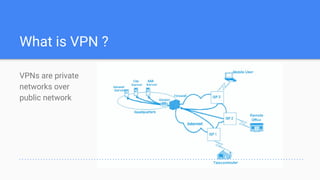
What is VPN ?
VPNs are private
networks over
public network
Why Should I Use a VPN?
● VPNs use advanced encryption and ‘tunneling’ technology to
establish secure connection
● Employees can access the network (Intranet) from remote locations.
● The Internet is used as the backbone for VPNs
● Saves cost tremendously from reduction of equipment and
maintenance costs.
● Scalability
How Does a VPN Work?
https://www.reddit.com/r/memes/comments/9vcpac/how_a_vpn_works/
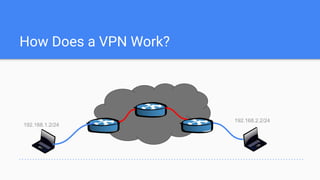
How Does a VPN Work?
192.168.1.2/24
192.168.2.2/24
Types of Implementations
● Remote Access – Employee to Business
● Intranet – Within an organization
● Extranet – Outside an organization
Encryption
What is Encryption
Symetric Encryption
Asymetric Encryption
What is Encryption ?
Encryption is the method by which information
is covered into secret code that hides the
information’s true meaning
The science of encrypting and decrypting
information is called Cryptography.
Cryptology
Cryptanalysis Cryptography
Encryption
Digital Signatures
Message
Authentication Codes
(MAC) Hash Functions
Encryption Schemes
Symmetric encryption
Uses a single key that needs to be shared among the people who need to
receive the message.
Asymmetric encryption
Uses a pair of public key and private key to encrypt and decrypt messages
when comunicating.
Symmetric encryption
A single key to encrypt and decrypt (same key)
Doesn’t scale very well
If it gets out, you will need another key for all
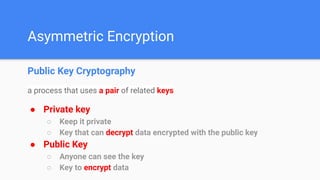
Asymmetric Encryption
Public Key Cryptography
a process that uses a pair of related keys
● Private key
○ Keep it private
○ Key that can decrypt data encrypted with the public key
● Public Key
○ Anyone can see the key
○ Key to encrypt data
OpenVPN
What is OpenVPN ?
Why use OpenVPN ?
What is OpenVPN ?
With OpenVPN, you can:
● Tunnel any IP subnetwork or virtual ethernet adapter
● Configure a scalable, load-balanced VPN server farm
● use all of the encryption, authentication, and certification features
of the OpenSSL library to protect your private network traffic
● Create secure ethernet bridges using virtual tap devices
source : https://openvpn.net
Why use OpenVPN ?
● OpenVPN has been ported to various platforms (Linux, Windows,
Mac, Mobile phone) and it's configuration is throughout likewise on
each of these systems
● Easier to support and maintain.
● OpenVPN is one of the few VPN protocols that can make use of a
proxy, which might be handy sometimes.
OpenVPN
on
Mikrotik
OpenVPN Feature on
Mikrotik
OpenVPN on Mikrotik
requires v3.x
install and enable the ppp package
only tcp is supported. udp will not work.
OpenVPN Features on Mikrotik
Supported
● TCP
● Bridging (tap device) (ethernet in Mikrotik)
● Routing (tun device) (ip in Mikrotik)
● Certificates
● p2p mode (refer to OpenVPN V2.1 manual page)
Unsupported
● UDP
● LZO compression
DEMO
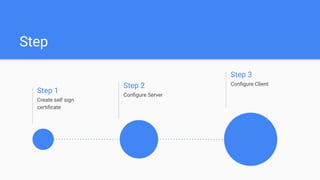
Step
Step 1
Create self sign
certificate
Step 2
Configure Server
Step 3
Configure Client
Create
self sign
Certificate
https://github.com/supon0/MikrotikCertificate.git
/certificate
add name=rootCA common-name=supono.com
sign rootCA ca-crl-host=10.0.0.1
export-certificate rootCA export-passphrase=12345678
filename=rootCA
Configure
Server
https://github.com/supon0/MikrotikOVPN/blob/main/
server.rsc
#Setting nama Device
/system identity set name=R1
#Setting IP Address
/ip address
add address=10.0.0.1/24 interface=ether1
add address=192.168.1.1/24 interface=ether2
Configure
Server
#Setting OVPN
/interface ovpn-server server set enabled=yes certificate=rootCA
#Menambah User OVPN
/ppp secret add name=R2 password=123 local-address=12.0.0.1
remote-address=12.0.0.2
#Menambah routing lewat OVPN
/ip route add dst-address=192.168.2.0/24 gateway=12.0.0.2
#Verifikasi
/interface ovpn-server server print
#Monitoring OVPN
/interface ovpn-server monitor 0
Configure
Client
https://github.com/supon0/MikrotikOVPN/blob/
main/client.rsc
#Setting nama Device
/system identity set name=R2
#Setting IP Address
/ip address
add address=10.0.0.2/24 interface=ether1
add address=192.168.2.1/24 interface=ether2
#Verifikasi IP Address
/ping 10.0.0.1
/ping 192.168.2.2
Configure
Client
#Copy Certificate
/tool fetch mode=ftp user=admin password=""
address=10.0.0.1 src-path=rootCA.key
/tool fetch mode=ftp user=admin password=""
address=10.0.0.1 src-path=rootCA.crt
#Tambah Routing lewat OVPN
/ip route
add dst-address=192.168.1.0/24
gateway=12.0.0.1
Configure
Client
#Import Certificate
/certificate
import name=rootCA file-name=rootCA.crt
passphrase=12345678
import name=rootCA file-name=rootCA.key
passphrase=12345678
#Buat OVPN Client
/interface ovpn-client add name=OVPN-to-R1
user=R2 password=123 connect-to=10.0.0.1
certificate=rootCA
Thank you

OpeVPN on Mikrotik