OpenVPN with
Mikrotik RouterBOARD
Anthony, Duong Nguyen
Sales Director
Mobile: +84 9 7117 5115 – Email: duongnt@adtek.vn
About Us
Our Company
 Company Name: AD.TEK Joint Stock Company
 Brand name: Advanced Networks Technology
 Head quarter: No.9 Building 10, Lane 95 Chua Boc st., Dong Da dist., Hanoi
 Founded: November 2010
 Resources: 30+ employees with 10+ Technical engineers
 Business: Datacenter and Enterprise Network solutions and products distribution
 Contact: sales@adtek.vn www.adtek.vn
Hanoi Ho Chi Minh City Nha Trang City
45/140 Khuat Duy Tien st.
Thanh Xuan, Hanoi
Hotline: +84 98 672 8080
26F/11 Le Quoc Hung st.
Ward 12, Dist. 4, HCMC.
Hotline: +84 98 652 8080
25 Nguyen Van Bay st.
Phuoc Long, Nha Trang
Hotline: +84 97 235 8080
Our Solutions
 DataCenter: Cable Routing & Pathway system, Structured Cabling System,
Network infrastructure, Network Routing & Switching, Cloud Storage, DCIM,
UPS, Rack & Cabinet
 Enterprise: Structured Cabling system, Routing & Switching, Server & Storage,
Security, Wireless Solution, Video Surveillance, UPS, Rack & Cabinet
 Wireless: Carrier grade Wireless PTP, PMP, Wifi Access Point, Hotspot & Billing
solutions
Our Vertical Market
Healthcare Education Technology Finance Gov./Defense
Our Partners
OpenVPN with Mikrotik RouterOS
Challenges
 Corporate with Head Quarter and multiple branch/offices need to sharing
data between sites
 Corporate with mobile users working out of office and connect to
Private/Local Applications system
 Central managed for IT networking equipments/devices from HQ.
 Over budget for leasedline/MPLS VPN from ISP.
Prerequisites
 Equipments
 HQ networks (LAN, Servers) and Mikrotik Gateway router
 Branch networks with Mikrotik Gateway router
 Technical skill
 Networking basic: TCP/IP, NAT, IPSec, VPN, SSL knowledge based
 RouterOS features, Webfig/Winbox, RouterOS CLI
What is OpenVPN?
 Open Source software application implements VPN (virtual private network)
for creating secure point-to-point or site-to-site connection.
 Written by Jame Yonan and published under GNU General Public License (GPL)
 Support routed or bridged mode and remote access topology
 Used custom security protocol utilized SSL/TSL for key exchange
 Allow peers to authenticate each other using pre-shared secret key,
certificates or username/password.
 Uses the OpenSSL encryption library, as well as the SSLv3/TLSv1 protocol, and
contains many security and control features.
 Has been ported and embedded to several systems like DD-WRT (GNU/Linux-
based firmware for wireless routers and access points), Mikrotik RouterOS,
SoftEther VPN,…
Architecture
 Encryption
 OpenVPN uses the OpenSSL library to
provide encryption of both the data and
control channels. It lets OpenSSL do all
the encryption and authentication work,
allowing OpenVPN to use all the ciphers
available in the OpenSSL package
 Can support the HMAC (Hash-based
message authentication code) packet
authentication feature to add an
additional layer of security to the
connection
 Also support hardware acceleration to
get better encryption performance
 Authentication
 Support pre-shared keys, certificate-
based, and username/password-based
authentication
 Security
 256 bits encryption through OpenSSL
library
 Custom protocol based on SSL and TSL
support IKE, IPSec, L2TP or PPTP.
 Networking
 Support over both UDP or TCP
 Support IPv6 (version 2.3.x)
 Support working through proxy servers
(including HTTP proxy server)
 Support working through NAT
 Support TUN (layer 2) or TAP (layer 3)
interface
 IANA official port: 1194
Mikrotik RouterOS and OpenVPN
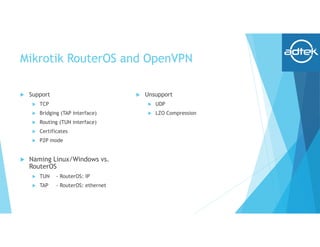
 Support
 TCP
 Bridging (TAP interface)
 Routing (TUN interface)
 Certificates
 P2P mode
 Naming Linux/Windows vs.
RouterOS
 TUN - RouterOS: IP
 TAP - RouterOS: ethernet
 Unsupport
 UDP
 LZO Compression
Topology
Topology
How to?
 1. Certificate Generation
 2. Server site VPN gateway setup
 3. Branch site VPN Client setup
 4. Routing & Check connection
Certificates generation
 ssh/telnet to HQ Mikrotik gateway, create your own certificate authority (CA)
named myCA and.
 192.168.1.1 is LAN interface
 export the CA certificate
 Create a private and public key pair for the VPN Server and another key pair
for the VPN Client.
Certificates generation (cont.)
 Sign both public keys with new CA
#/certificate sign OVPNserver ca=myCA name=server
#/certificate sign OVPNbranch ca=myCA name=branch
 Export the VPN branch's private key and public key+certificate files.
 Check your certifcates:
 Check your files:
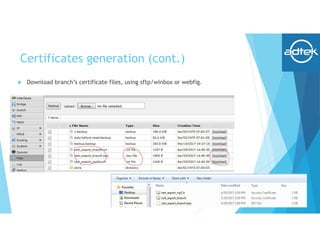
Certificates generation (cont.)
 Download branch’s certificate files, using sftp/winbox or webfig.
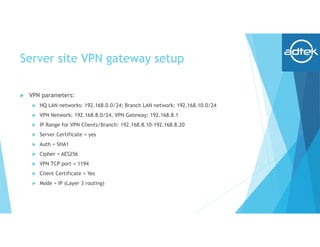
Server site VPN gateway setup
 VPN parameters:
 HQ LAN networks: 192.168.0.0/24; Branch LAN network: 192.168.10.0/24
 VPN Network: 192.168.8.0/24, VPN Gateway: 192.168.8.1
 IP Range for VPN Clients/Branch: 192.168.8.10-192.168.8.20
 Server Certificate = yes
 Auth = SHA1
 Cipher = AES256
 VPN TCP port = 1194
 Client Certificate = Yes
 Mode = IP (Layer 3 routing)
Server site VPN gateway setup (cont.)
 Create the PPP profile and IP address pool
 Check your configuration
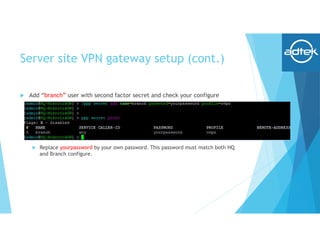
Server site VPN gateway setup (cont.)
 Add “branch” user with second factor secret and check your configure
 Replace yourpassword by your own password. This password must match both HQ
and Branch configure.
Server site VPN gateway setup (cont.)
 Create OVPN interface in the HQ-MikrotikGW using certificate, authentication
SHA1, cipher AES256, port 1194, mode IP.
Branch site VPN Client setup
 Import certificate downloaded before to Branch Mikrotik Router using
sftp/webfig/winbox
Branch site VPN Client setup (cont.)
 Import certificates. Using your own password created before for passphrase
 Check your imported certificates:
Branch site VPN Client setup (cont.)
 Add VPN client interface.
 Note:
 Change HQWAN-IP to your HQ Public IP address of HQ-MikrotikGW. If you are using
dynamic IP address, please enable cloud and using domain name.
 Change yourpassword to your own password
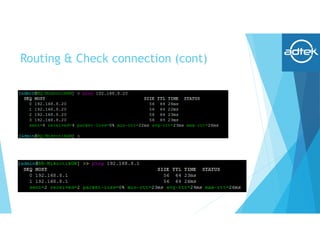
Routing & Check connection
 Check VPN Connection.
Routing & Check connection (cont)
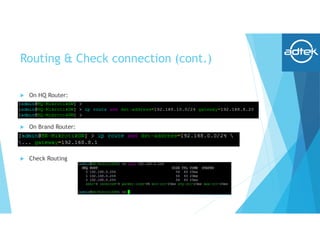
Routing & Check connection (cont.)
 On HQ Router:
 On Brand Router:
 Check Routing
Routing & Check connection (cont.)
 From Laptop in Branch, connect to HQ Server
Anthony, Duong Nguyen
Sales Director
Email: duongnt@adtek.vn
Mobile: +84 97 117 5115 / +84 93 448 6969 (Whatsapp/Zalo/Vibers)
Skype: duongnt37
ADVANCED NETWORKS TECHNOLOGY – AD.TEK JSC
Email: sales@adtek.vn Website: http://www.adtek.vn
Hanoi Ho Chi Minh City Nha Trang City
45/140 Khuat Duy Tien st.,
Thanh Xuan dist., Hanoi
Hotline: +84 98 672 8080
26F/11 Le Quoc Hung st.,
Ward 12, District 4, HCMC
Hotline: +84 98 652 8080
25 Nguyen Van Bay st.,
Phuoc Long, Nha Trang City
Hotline: +84 97 235 8080

presentation_4102_1493726768.pdf

  • 1.
    OpenVPN with Mikrotik RouterBOARD Anthony,Duong Nguyen Sales Director Mobile: +84 9 7117 5115 – Email: duongnt@adtek.vn
  • 2.
  • 3.
    Our Company  CompanyName: AD.TEK Joint Stock Company  Brand name: Advanced Networks Technology  Head quarter: No.9 Building 10, Lane 95 Chua Boc st., Dong Da dist., Hanoi  Founded: November 2010  Resources: 30+ employees with 10+ Technical engineers  Business: Datacenter and Enterprise Network solutions and products distribution  Contact: sales@adtek.vn www.adtek.vn Hanoi Ho Chi Minh City Nha Trang City 45/140 Khuat Duy Tien st. Thanh Xuan, Hanoi Hotline: +84 98 672 8080 26F/11 Le Quoc Hung st. Ward 12, Dist. 4, HCMC. Hotline: +84 98 652 8080 25 Nguyen Van Bay st. Phuoc Long, Nha Trang Hotline: +84 97 235 8080
  • 4.
    Our Solutions  DataCenter:Cable Routing & Pathway system, Structured Cabling System, Network infrastructure, Network Routing & Switching, Cloud Storage, DCIM, UPS, Rack & Cabinet  Enterprise: Structured Cabling system, Routing & Switching, Server & Storage, Security, Wireless Solution, Video Surveillance, UPS, Rack & Cabinet  Wireless: Carrier grade Wireless PTP, PMP, Wifi Access Point, Hotspot & Billing solutions
  • 5.
    Our Vertical Market HealthcareEducation Technology Finance Gov./Defense
  • 6.
  • 7.
  • 8.
    Challenges  Corporate withHead Quarter and multiple branch/offices need to sharing data between sites  Corporate with mobile users working out of office and connect to Private/Local Applications system  Central managed for IT networking equipments/devices from HQ.  Over budget for leasedline/MPLS VPN from ISP.
  • 9.
    Prerequisites  Equipments  HQnetworks (LAN, Servers) and Mikrotik Gateway router  Branch networks with Mikrotik Gateway router  Technical skill  Networking basic: TCP/IP, NAT, IPSec, VPN, SSL knowledge based  RouterOS features, Webfig/Winbox, RouterOS CLI
  • 10.
    What is OpenVPN? Open Source software application implements VPN (virtual private network) for creating secure point-to-point or site-to-site connection.  Written by Jame Yonan and published under GNU General Public License (GPL)  Support routed or bridged mode and remote access topology  Used custom security protocol utilized SSL/TSL for key exchange  Allow peers to authenticate each other using pre-shared secret key, certificates or username/password.  Uses the OpenSSL encryption library, as well as the SSLv3/TLSv1 protocol, and contains many security and control features.  Has been ported and embedded to several systems like DD-WRT (GNU/Linux- based firmware for wireless routers and access points), Mikrotik RouterOS, SoftEther VPN,…
  • 11.
    Architecture  Encryption  OpenVPNuses the OpenSSL library to provide encryption of both the data and control channels. It lets OpenSSL do all the encryption and authentication work, allowing OpenVPN to use all the ciphers available in the OpenSSL package  Can support the HMAC (Hash-based message authentication code) packet authentication feature to add an additional layer of security to the connection  Also support hardware acceleration to get better encryption performance  Authentication  Support pre-shared keys, certificate- based, and username/password-based authentication  Security  256 bits encryption through OpenSSL library  Custom protocol based on SSL and TSL support IKE, IPSec, L2TP or PPTP.  Networking  Support over both UDP or TCP  Support IPv6 (version 2.3.x)  Support working through proxy servers (including HTTP proxy server)  Support working through NAT  Support TUN (layer 2) or TAP (layer 3) interface  IANA official port: 1194
  • 12.
    Mikrotik RouterOS andOpenVPN  Support  TCP  Bridging (TAP interface)  Routing (TUN interface)  Certificates  P2P mode  Naming Linux/Windows vs. RouterOS  TUN - RouterOS: IP  TAP - RouterOS: ethernet  Unsupport  UDP  LZO Compression
  • 13.
  • 14.
  • 15.
    How to?  1.Certificate Generation  2. Server site VPN gateway setup  3. Branch site VPN Client setup  4. Routing & Check connection
  • 16.
    Certificates generation  ssh/telnetto HQ Mikrotik gateway, create your own certificate authority (CA) named myCA and.  192.168.1.1 is LAN interface  export the CA certificate  Create a private and public key pair for the VPN Server and another key pair for the VPN Client.
  • 17.
    Certificates generation (cont.) Sign both public keys with new CA #/certificate sign OVPNserver ca=myCA name=server #/certificate sign OVPNbranch ca=myCA name=branch  Export the VPN branch's private key and public key+certificate files.  Check your certifcates:  Check your files:
  • 18.
    Certificates generation (cont.) Download branch’s certificate files, using sftp/winbox or webfig.
  • 19.
    Server site VPNgateway setup  VPN parameters:  HQ LAN networks: 192.168.0.0/24; Branch LAN network: 192.168.10.0/24  VPN Network: 192.168.8.0/24, VPN Gateway: 192.168.8.1  IP Range for VPN Clients/Branch: 192.168.8.10-192.168.8.20  Server Certificate = yes  Auth = SHA1  Cipher = AES256  VPN TCP port = 1194  Client Certificate = Yes  Mode = IP (Layer 3 routing)
  • 20.
    Server site VPNgateway setup (cont.)  Create the PPP profile and IP address pool  Check your configuration
  • 21.
    Server site VPNgateway setup (cont.)  Add “branch” user with second factor secret and check your configure  Replace yourpassword by your own password. This password must match both HQ and Branch configure.
  • 22.
    Server site VPNgateway setup (cont.)  Create OVPN interface in the HQ-MikrotikGW using certificate, authentication SHA1, cipher AES256, port 1194, mode IP.
  • 23.
    Branch site VPNClient setup  Import certificate downloaded before to Branch Mikrotik Router using sftp/webfig/winbox
  • 24.
    Branch site VPNClient setup (cont.)  Import certificates. Using your own password created before for passphrase  Check your imported certificates:
  • 25.
    Branch site VPNClient setup (cont.)  Add VPN client interface.  Note:  Change HQWAN-IP to your HQ Public IP address of HQ-MikrotikGW. If you are using dynamic IP address, please enable cloud and using domain name.  Change yourpassword to your own password
  • 26.
    Routing & Checkconnection  Check VPN Connection.
  • 27.
    Routing & Checkconnection (cont)
  • 28.
    Routing & Checkconnection (cont.)  On HQ Router:  On Brand Router:  Check Routing
  • 29.
    Routing & Checkconnection (cont.)  From Laptop in Branch, connect to HQ Server
  • 30.
    Anthony, Duong Nguyen SalesDirector Email: duongnt@adtek.vn Mobile: +84 97 117 5115 / +84 93 448 6969 (Whatsapp/Zalo/Vibers) Skype: duongnt37 ADVANCED NETWORKS TECHNOLOGY – AD.TEK JSC Email: sales@adtek.vn Website: http://www.adtek.vn Hanoi Ho Chi Minh City Nha Trang City 45/140 Khuat Duy Tien st., Thanh Xuan dist., Hanoi Hotline: +84 98 672 8080 26F/11 Le Quoc Hung st., Ward 12, District 4, HCMC Hotline: +84 98 652 8080 25 Nguyen Van Bay st., Phuoc Long, Nha Trang City Hotline: +84 97 235 8080